indicator TOYOTA PRIUS PRIME 2017 2.G Owners Manual
[x] Cancel search | Manufacturer: TOYOTA, Model Year: 2017, Model line: PRIUS PRIME, Model: TOYOTA PRIUS PRIME 2017 2.GPages: 784, PDF Size: 14.98 MB
Page 412 of 784
412
PRIUS PRIME_OM_OM47A88U_(U)
5-5. Using the driving support systems
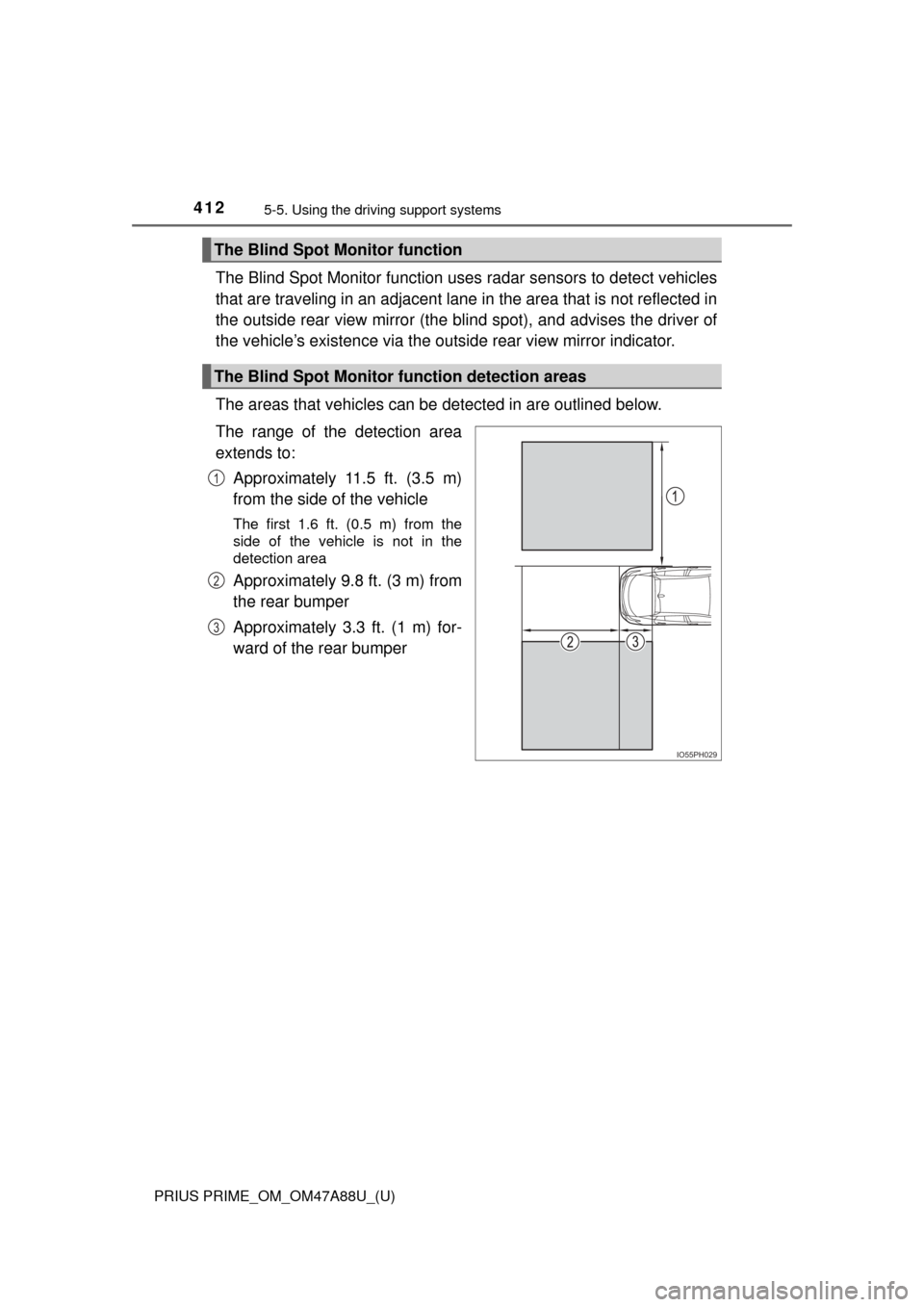
The Blind Spot Monitor function uses radar sensors to detect vehicles
that are traveling in an adjacent lane in the area that is not reflected in
the outside rear view mirror (the b lind spot), and advises the driver of
the vehicle’s existence via the ou tside rear view mirror indicator.
The areas that vehicles can be detected in are outlined below.
The range of the detection area
extends to: Approximately 11.5 ft. (3.5 m)
from the side of the vehicle
The first 1.6 ft. (0.5 m) from the
side of the vehicle is not in the
detection area
Approximately 9.8 ft. (3 m) from
the rear bumper
Approximately 3.3 ft. (1 m) for-
ward of the rear bumper
The Blind Spot Monitor function
The Blind Spot Monitor function detection areas
IO55PH029
1
2
3
Page 415 of 784
PRIUS PRIME_OM_OM47A88U_(U)
4155-5. Using the driving support systems
5
Driving
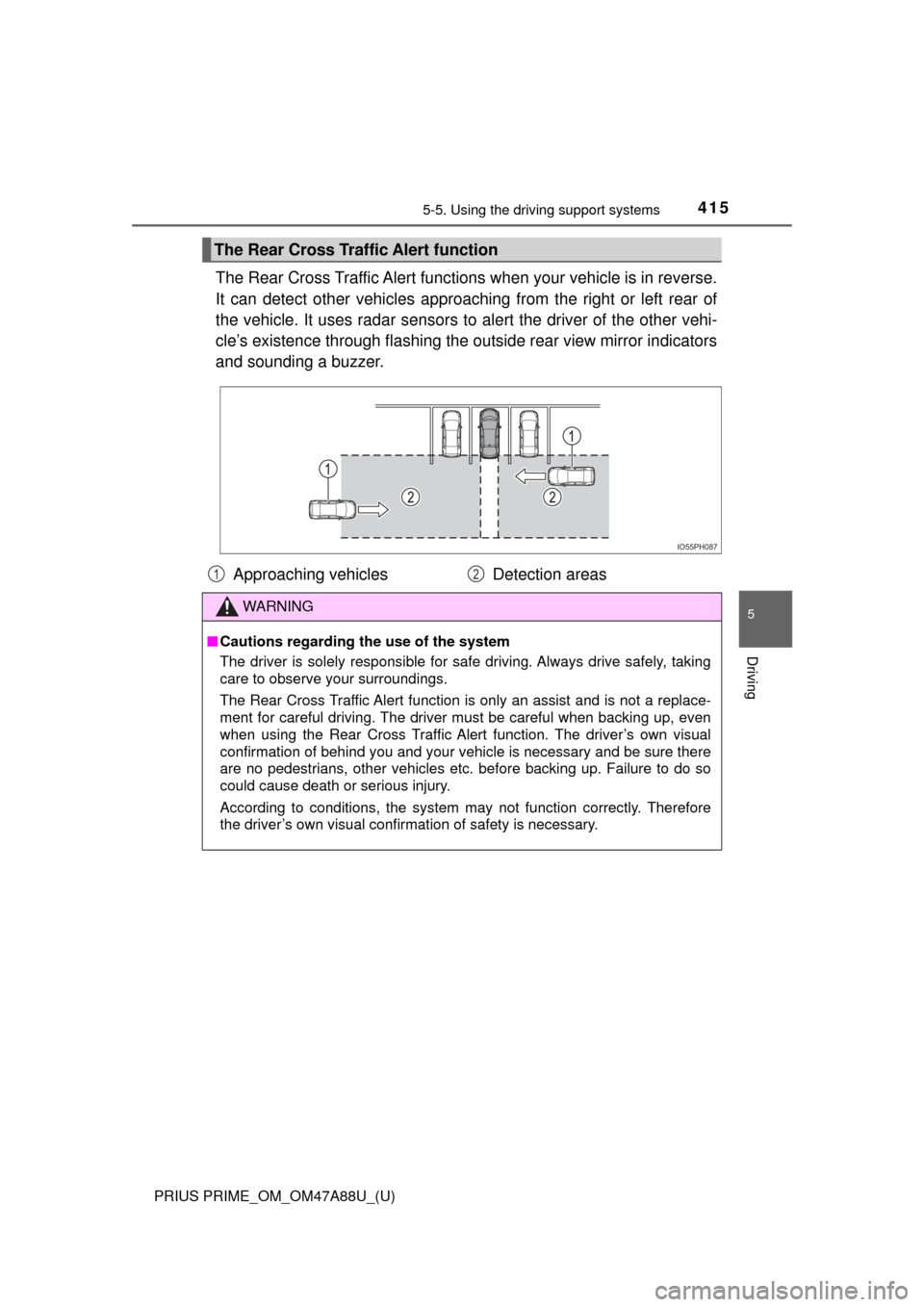
The Rear Cross Traffic Alert functions when your vehicle is in reverse.
It can detect other vehicles approaching from the right or left rear of
the vehicle. It uses radar sensors to alert the driver of the other vehi-
cle’s existence through fl ashing the outside rear view mirror indicators
and sounding a buzzer.
The Rear Cross Traffic Alert function
IO55PH087
Approaching vehicles Detection areas
WARNING
■Cautions regarding the use of the system
The driver is solely responsible for safe driving. Always drive safely, taking
care to observe your surroundings.
The Rear Cross Traffic Alert function is only an assist and is not a replace-
ment for careful driving. The driver must be careful when backing up, even
when using the Rear Cross Traffic Alert function. The driver’s own visual
confirmation of behind you and your vehicle is necessary and be sure there
are no pedestrians, other vehicles etc. before backing up. Failure to do so
could cause death or serious injury.
According to conditions, the system may not function correctly. Therefore
the driver’s own visual confirmation of safety is necessary.
12
Page 420 of 784
420
PRIUS PRIME_OM_OM47A88U_(U)
5-5. Using the driving support systems
Intuitive parking assist∗
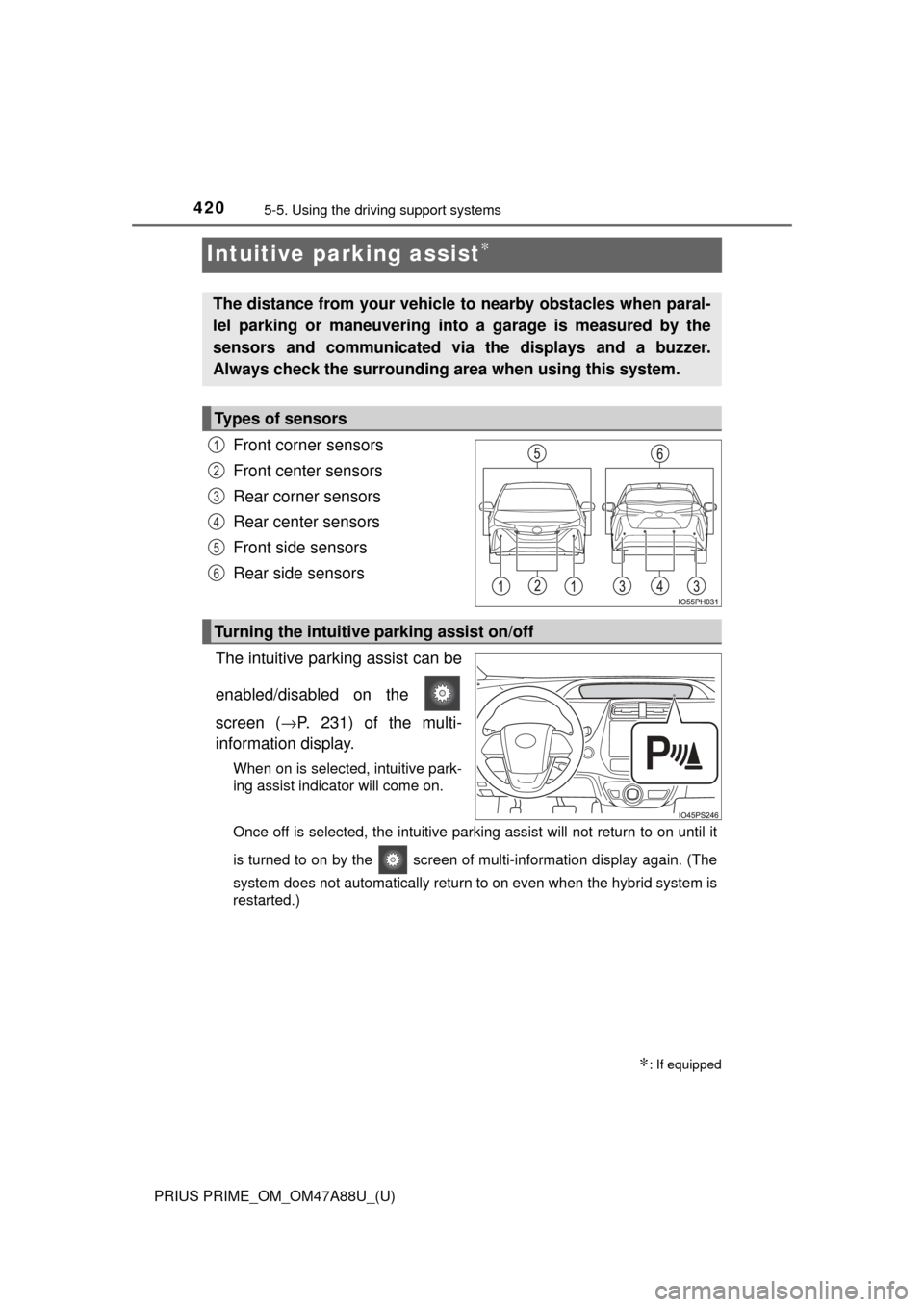
Front corner sensors
Front center sensors
Rear corner sensors
Rear center sensors
Front side sensors
Rear side sensors
The intuitive parking assist can be
enabled/disabled on the
screen ( →P. 231) of the multi-
information display.
When on is selected, intuitive park-
ing assist indicator will come on.
Once off is selected, the intuitive parking assist will not return to on until it
is turned to on by the screen of multi-information display again. (The
system does not automatically return to on even when the hybrid system is
restarted.)
∗: If equipped
The distance from your vehicle to nearby obstacles when paral-
lel parking or maneuvering into a garage is measured by the
sensors and communicated via the displays and a buzzer.
Always check the surrounding area when using this system.
Types of sensors
1
2
3
4
5
6
Turning the intuitive parking assist on/off
Page 431 of 784
PRIUS PRIME_OM_OM47A88U_(U)
4315-5. Using the driving support systems
5
Driving
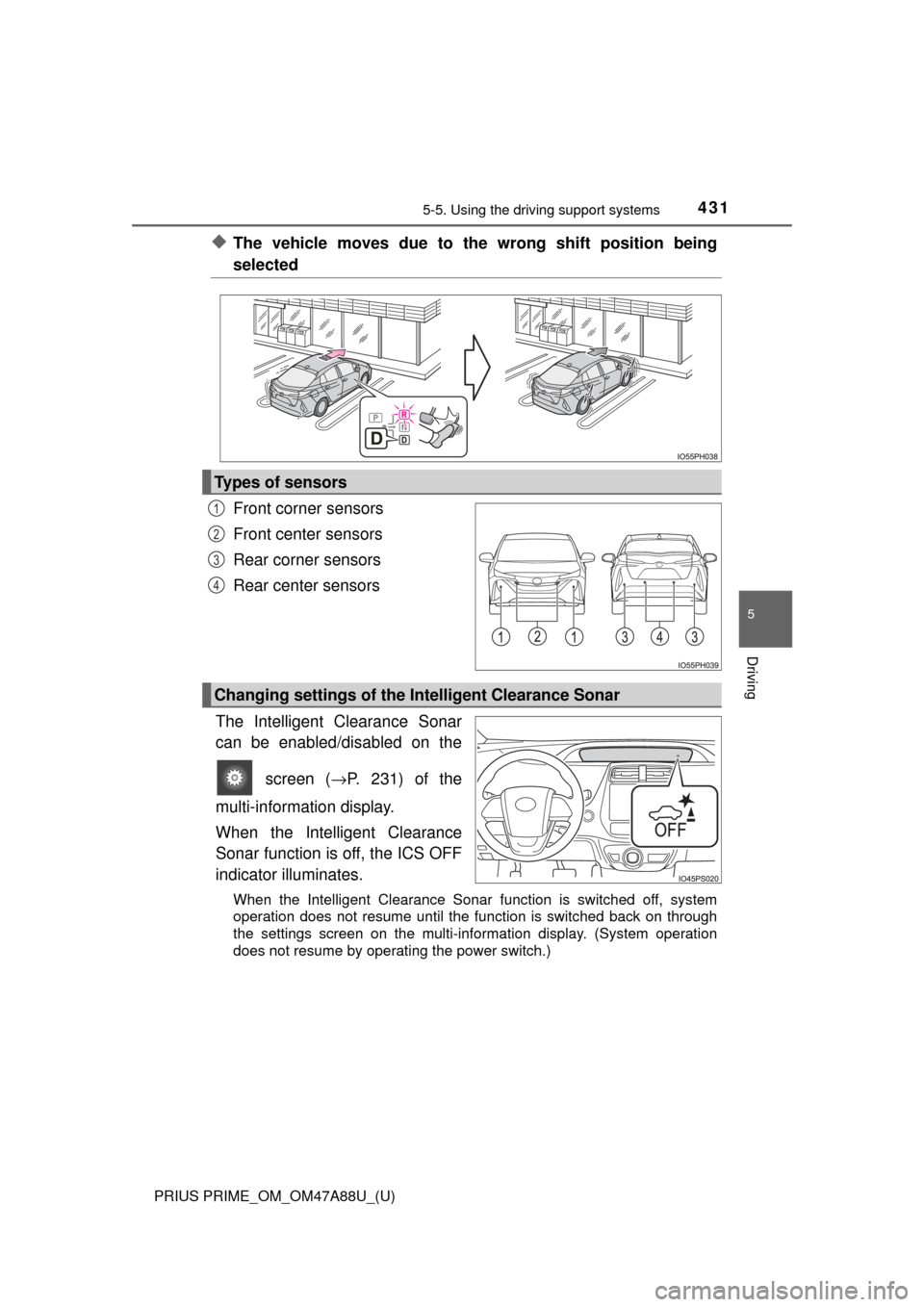
◆The vehicle moves due to the wrong shift position being
selected
Front corner sensors
Front center sensors
Rear corner sensors
Rear center sensors
The Intelligent Clearance Sonar
can be enabled/disabled on the screen ( →P. 231) of the
multi-information display.
When the Intelligent Clearance
Sonar function is off, the ICS OFF
indicator illuminates.
When the Intelligent Clearance Sonar function is switched off, system
operation does not resume until the function is switched back on through
the settings screen on the multi-information display. (System operation
does not resume by operating the power switch.)
Types of sensors
1
2
3
4
Changing settings of the In telligent Clearance Sonar
Page 435 of 784
PRIUS PRIME_OM_OM47A88U_(U)
4355-5. Using the driving support systems
5
Driving
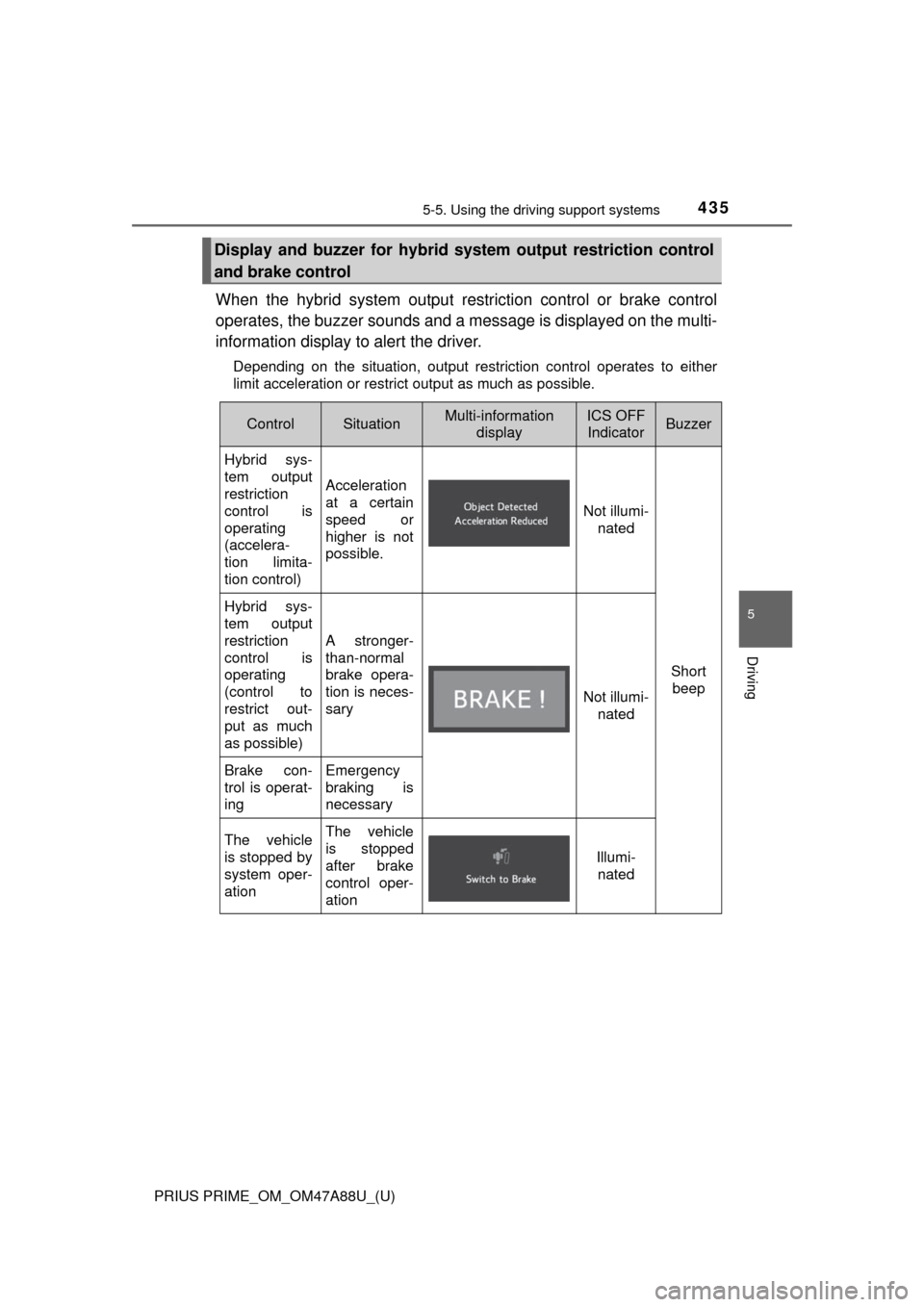
When the hybrid system output restriction control or brake control
operates, the buzzer sounds and a message is displayed on the multi-
information display to alert the driver.
Depending on the situation, output restriction control operates to either
limit acceleration or restrict output as much as possible.
Display and buzzer for hybrid system output restriction control
and brake control
ControlSituationMulti-information displayICS OFF IndicatorBuzzer
Hybrid sys-
tem output
restriction
control is
operating
(accelera-
tion limita-
tion control)
Acceleration
at a certain
speed or
higher is not
possible.
Not illumi- nated
Short beep
Hybrid sys-
tem output
restriction
control is
operating
(control to
restrict out-
put as much
as possible)
A stronger-
than-normal
brake opera-
tion is neces-
sary
Not illumi- nated
Brake con-
trol is operat-
ingEmergency
braking is
necessary
The vehicle
is stopped by
system oper-
ationThe vehicle
is stopped
after brake
control oper-
ation
Illumi-nated
Page 436 of 784

436
PRIUS PRIME_OM_OM47A88U_(U)
5-5. Using the driving support systems
■Sensor detection range
The detection range of the Intelligent Clearance Sonar function differs from
the detection range of the intuitive parking assist ( →P. 424).
Therefore, even if the intuitive parking assist detects an obstacle and pro-
vides a warning, the Intelligent Clearance Sonar may not start operating.
■ System operation
When the vehicle is stopped by system operation, the Intelligent Clearance
Sonar function stops and the ICS OFF indicator illuminates.
■ System recovery
When the Intelligent Clearance Sonar function is stopped by system opera-
tion and you would like to resume operation, either turn the Intelligent Clear-
ance Sonar on again ( →P. 431), or turn the power switch off and then back
on. Furthermore, when the vehicle moves with an obstacle no longer in the
traveling direction of the vehicle, or when the traveling direction of the vehicle
changes (such as when switching from moving forward to backing up, and
vice versa), system operation automatically resumes.
■ Obstacles not detected by the sensors
The following obstacles may not be detected by the sensors.
●Objects such as people, cloth and snow, that are difficult for sonic waves to
reflect off of. (In particular, people may also not be detected depending on
the type of clothing they are wearing.)
● Objects not perpendicular with the ground, objects not at a right angle to the
traveling direction of the vehicle, uneven objects or waving objects
● Low objects
● Thin objects such as wires, fences, ropes and signposts
● Objects that are extremely close to the bumper
■ Intuitive parking assist buzzer
Regardless of whether the intuitive parking assist is on or off ( →P. 420), if the
Intelligent Clearance Sonar function is not stopped ( →P. 431), when the front
or rear sensors detect an obstacle and brake control is performed, the intui-
tive parking assist buzzer also sounds and a notification of the approximate
distance to the obstacle is provided.
Page 439 of 784
PRIUS PRIME_OM_OM47A88U_(U)
4395-5. Using the driving support systems
5
Driving
●Influence from other sonic waves
• An ultrasonic wave source is nearby, such as the horn or parking assist
system of another vehicle, a vehicle detector, a motorcycle engine or the
air brake of a large vehicle
• Electronic components (such as a backlit license plate (especially fluo- rescent types), fog lights, a fender pole or a wireless antenna) are
installed near the sensors
● Changes in the vehicle
• The vehicle is tilted a large amount
• The height of the vehicle has drastically changed due to the carried load
(the nose tilts up or down)
• The direction of the sensor has deviated due to a collision or other impact
■ Intelligent Clearance Sonar function while the Simple Advanced Parking
Guidance System is operating
→P. 444
■ When removing and installi ng the 12-volt battery
The system needs to be initialized.
The system can be initialized by driving the vehicle straight ahead for 5 sec-
onds or more at a speed of approximately 22 mph (35 km/h) or higher.
■ When “ICS Unavailable” is displayed on the multi-information display
and the ICS OFF indicator flashes
● Ice, snow, dirt, etc., may have adhered to the sensor. If this occurs, remove
the ice, snow, dirt, etc., from the sensor to return the system to normal.
Also, a warning message may be displayed at low temperatures due to ice
forming on the sensor, and the sensor may not detect obstacles. Once the
ice melts, the system will return to normal.
● If this message is shown even after removing dirt from the sensor, or shown
when the sensor was not dirty to begin with, have the vehicle inspected at
your Toyota dealer.
● System initialization may not have been performed after removal and instal-
lation of the 12-volt battery. Perform system initialization.
■ When “ICS Malfunction Visit Your Deal er” is displayed on the multi-infor-
mation display, the ICS OFF indi cator flashes and the buzzer sounds
The system may not be operating properly. Have the vehicle inspected at
your Toyota dealer.
Page 446 of 784
446
PRIUS PRIME_OM_OM47A88U_(U)
5-5. Using the driving support systems
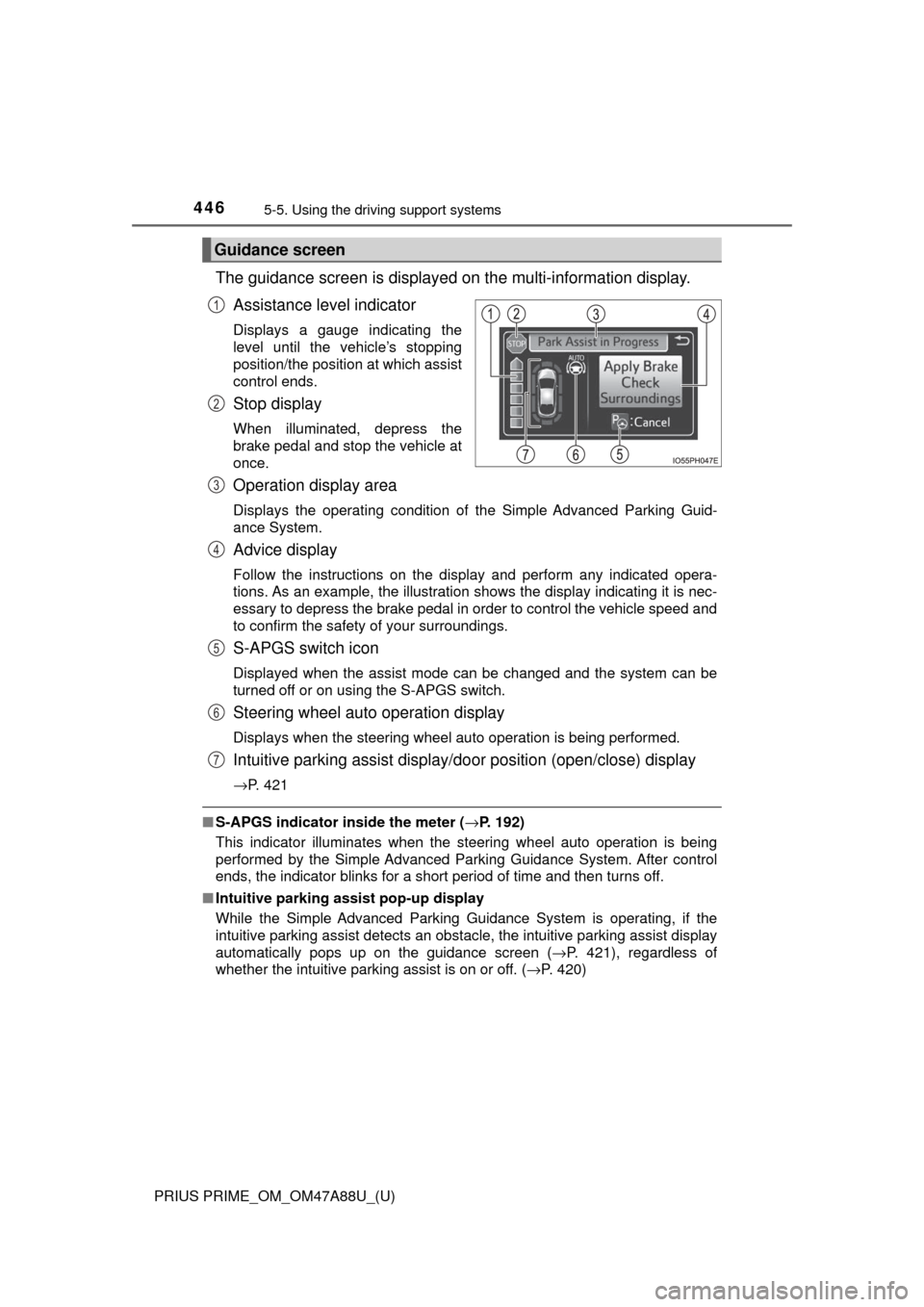
The guidance screen is displayed on the multi-information display.
Assistance level indicator
Displays a gauge indicating the
level until the vehicle’s stopping
position/the position at which assist
control ends.
Stop display
When illuminated, depress the
brake pedal and stop the vehicle at
once.
Operation display area
Displays the operating condition of the Simple Advanced Parking Guid-
ance System.
Advice display
Follow the instructions on the display and perform any indicated opera-
tions. As an example, the illustration shows the display indicating it is nec-
essary to depress the brake pedal in order to control the vehicle speed and
to confirm the safety of your surroundings.
S-APGS switch icon
Displayed when the assist mode can be changed and the system can be
turned off or on using the S-APGS switch.
Steering wheel auto operation display
Displays when the steering wheel auto operation is being performed.
Intuitive parking assist display/do or position (open/close) display
→P. 421
■S-APGS indicator inside the meter ( →P. 192)
This indicator illuminates when the steering wheel auto operation is being
performed by the Simple Advanced Parking Guidance System. After control
ends, the indicator blinks for a short period of time and then turns off.
■ Intuitive parking assist pop-up display
While the Simple Advanced Parking Guidance System is operating, if the
intuitive parking assist detects an obstacle, the intuitive parking assist display
automatically pops up on the guidance screen ( →P. 421), regardless of
whether the intuitive parking assist is on or off. ( →P. 420)
Guidance screen
1
2
3
4
5
6
7
Page 451 of 784
PRIUS PRIME_OM_OM47A88U_(U)
4515-5. Using the driving support systems
5
Driving
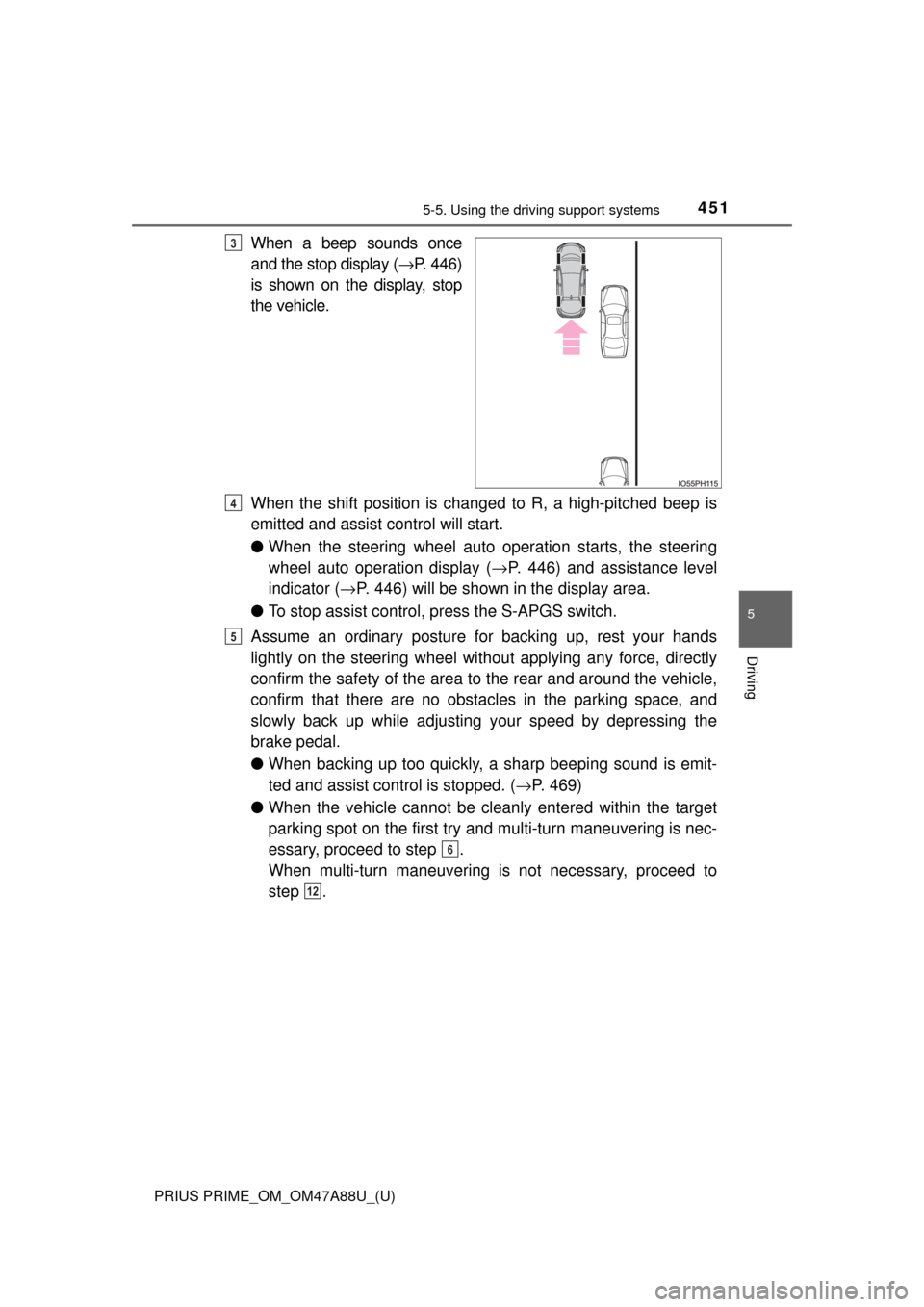
When a beep sounds once
and the stop display ( →P. 446)
is shown on the display, stop
the vehicle.
When the shift position is changed to R, a high-pitched beep is
emitted and assist control will start.
● When the steering wheel auto operation starts, the steering
wheel auto operation display ( →P. 446) and assistance level
indicator ( →P. 446) will be shown in the display area.
● To stop assist control, press the S-APGS switch.
Assume an ordinary posture for backing up, rest your hands
lightly on the steering wheel wi thout applying any force, directly
confirm the safety of the area to the rear and around the vehicle,
confirm that there are no obst acles in the parking space, and
slowly back up while adjusting your speed by depressing the
brake pedal.
● When backing up too quickly, a sharp beeping sound is emit-
ted and assist control is stopped. ( →P. 469)
● When the vehicle cannot be cleanly entered within the target
parking spot on the first try and multi-turn maneuvering is nec-
essary, proceed to step .
When multi-turn maneuvering is not necessary, proceed to
step .3
4
5
6
12
Page 456 of 784
456
PRIUS PRIME_OM_OM47A88U_(U)
5-5. Using the driving support systems
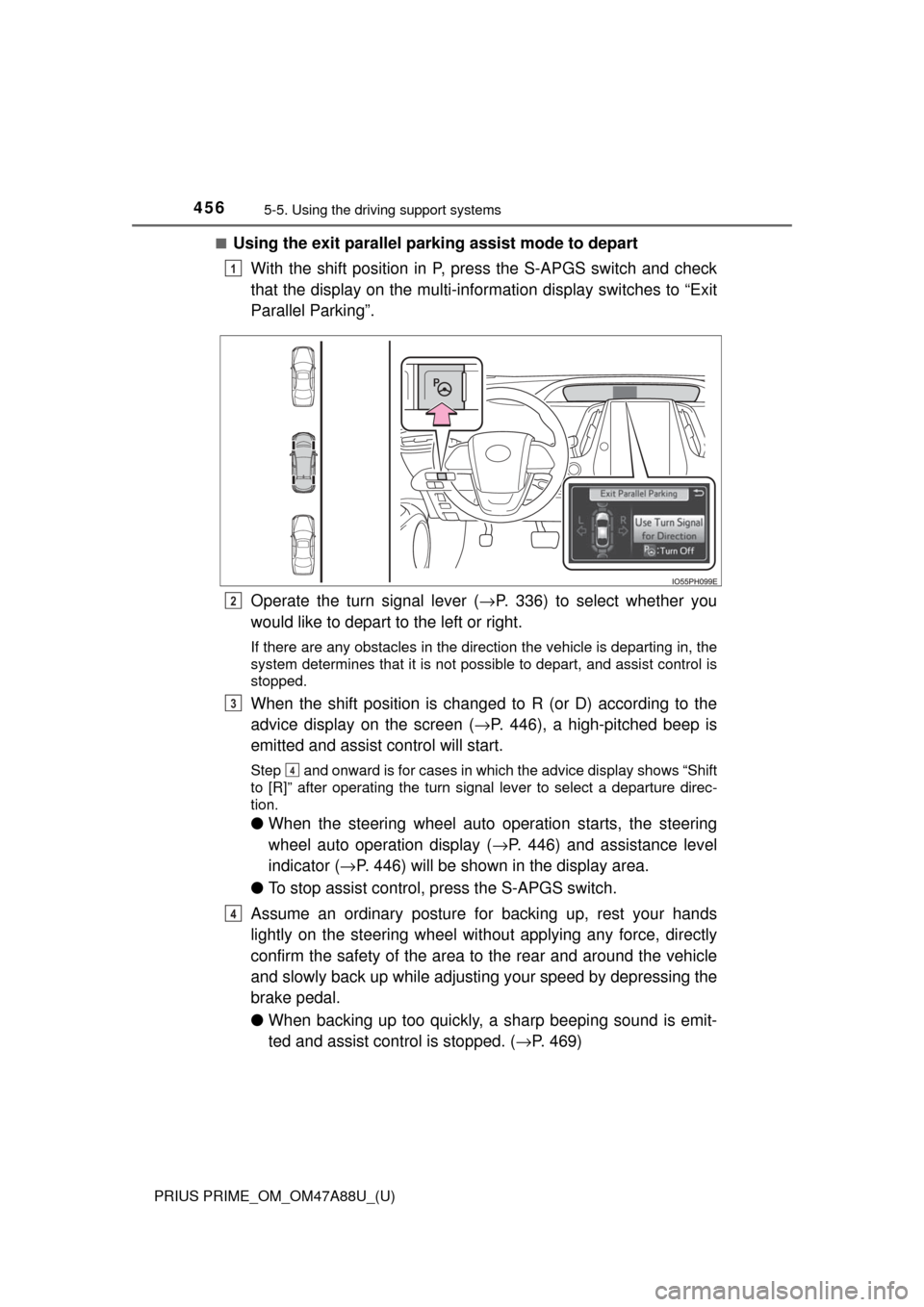
■Using the exit parallel park ing assist mode to depart
With the shift position in P, press the S-APGS switch and check
that the display on the multi-information display switches to “Exit
Parallel Parking”.
Operate the turn signal lever ( →P. 336) to select whether you
would like to depart to the left or right.
If there are any obstacles in the direction the vehicle is departing in, the
system determines that it is not possible to depart, and assist control is
stopped.
When the shift position is changed to R (or D) according to the
advice display on the screen ( →P. 446), a high-pitched beep is
emitted and assist control will start.
Step and onward is for cases in which the advice display shows “Shift
to [R]” after operating the turn signal lever to select a departure direc-
tion.
● When the steering wheel auto operation starts, the steering
wheel auto operation display ( →P. 446) and assistance level
indicator ( →P. 446) will be shown in the display area.
● To stop assist control, press the S-APGS switch.
Assume an ordinary posture for backing up, rest your hands
lightly on the steering wheel wi thout applying any force, directly
confirm the safety of the area to the rear and around the vehicle
and slowly back up while adjusti ng your speed by depressing the
brake pedal.
● When backing up too quickly, a sharp beeping sound is emit-
ted and assist control is stopped. ( →P. 469)
1
2
3
4
4