indicator TOYOTA PRIUS PRIME 2017 2.G Owners Manual
[x] Cancel search | Manufacturer: TOYOTA, Model Year: 2017, Model line: PRIUS PRIME, Model: TOYOTA PRIUS PRIME 2017 2.GPages: 784, PDF Size: 14.98 MB
Page 384 of 784
384
PRIUS PRIME_OM_OM47A88U_(U)
5-5. Using the driving support systems
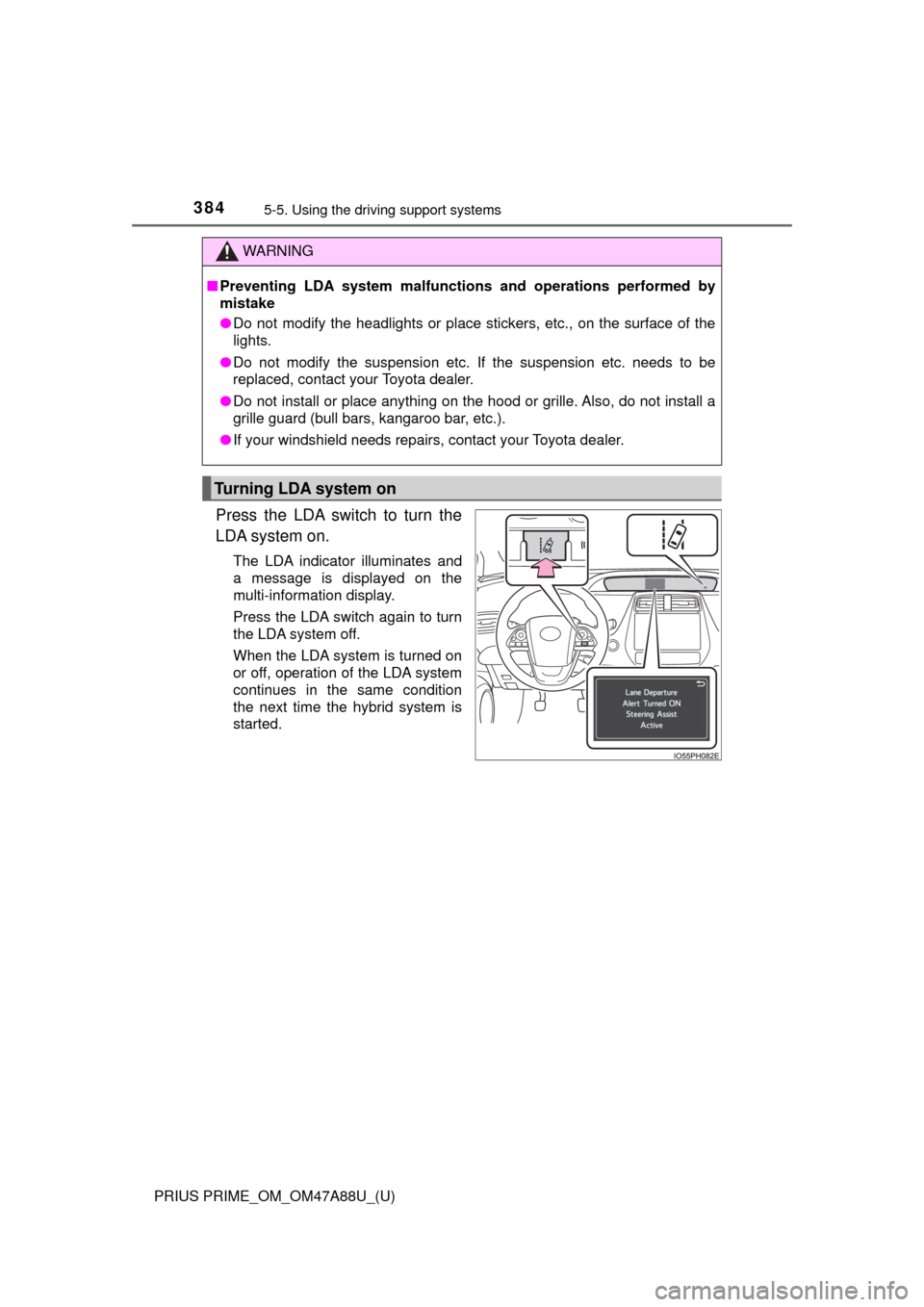
Press the LDA switch to turn the
LDA system on.
The LDA indicator illuminates and
a message is displayed on the
multi-information display.
Press the LDA switch again to turn
the LDA system off.
When the LDA system is turned on
or off, operation of the LDA system
continues in the same condition
the next time the hybrid system is
started.
WARNING
■Preventing LDA system malfunctio ns and operations performed by
mistake
● Do not modify the headlights or place stickers, etc., on the surface of the
lights.
● Do not modify the suspension etc. If the suspension etc. needs to be
replaced, contact your Toyota dealer.
● Do not install or place anything on the hood or grille. Also, do not install a
grille guard (bull bars, kangaroo bar, etc.).
● If your windshield needs repairs, contact your Toyota dealer.
Turning LDA system on
Page 385 of 784
PRIUS PRIME_OM_OM47A88U_(U)
3855-5. Using the driving support systems
5
Driving
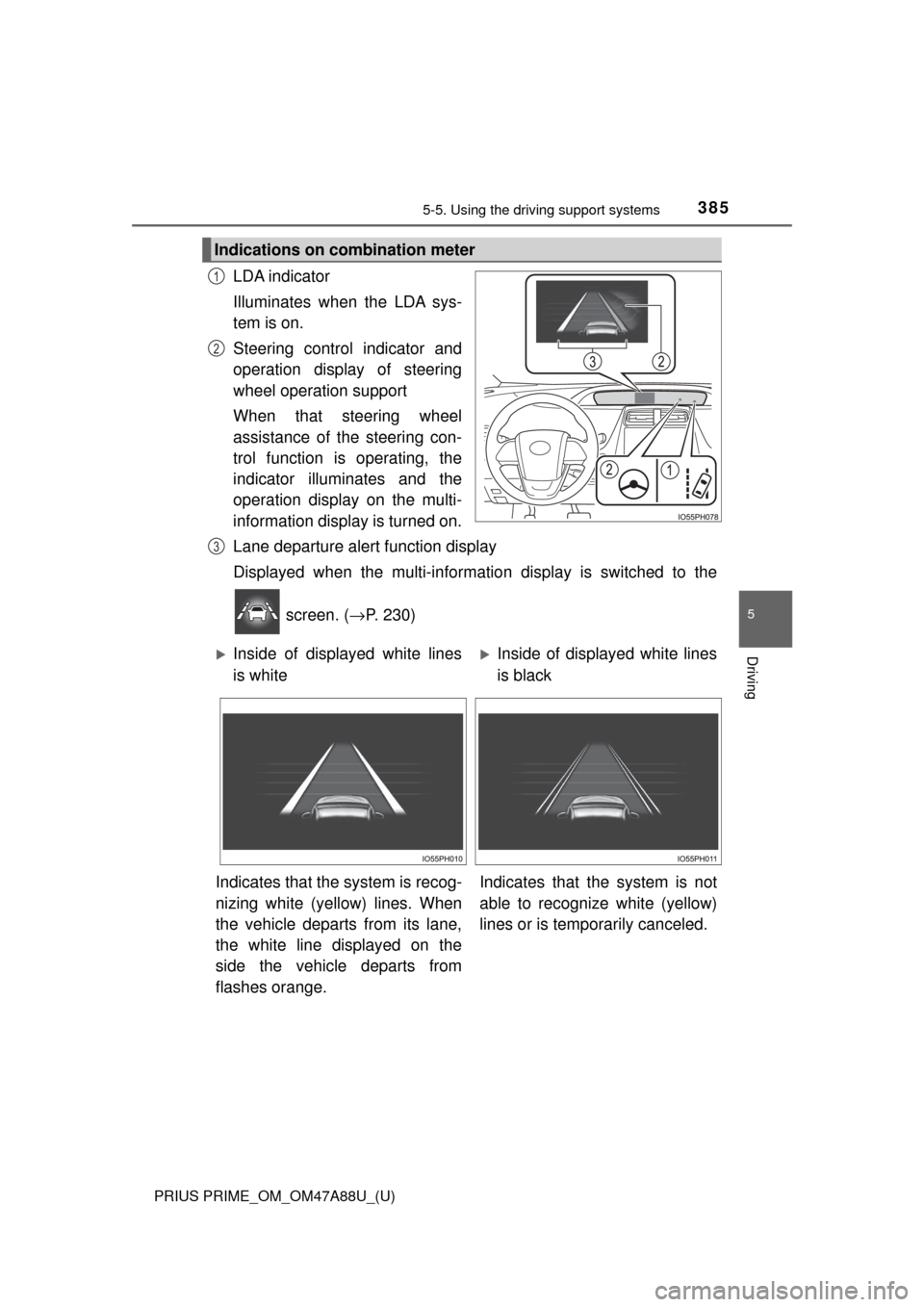
LDA indicator
Illuminates when the LDA sys-
tem is on.
Steering control indicator and
operation display of steering
wheel operation support
When that steering wheel
assistance of the steering con-
trol function is operating, the
indicator illuminates and the
operation display on the multi-
information display is turned on.
Lane departure alert function display
Displayed when the multi-informatio n display is switched to the
screen. ( →P. 230)
Indications on combination meter
1
2
3
Inside of displayed white lines
is whiteInside of displayed white lines
is black
Indicates that the system is recog-
nizing white (yellow) lines. When
the vehicle departs from its lane,
the white line displayed on the
side the vehicle departs from
flashes orange. Indicates that t
he system is not
able to recognize white (yellow)
lines or is temporarily canceled.
Page 391 of 784
391
PRIUS PRIME_OM_OM47A88U_(U)
5-5. Using the driving support systems
5
Driving
Dynamic radar cruise control with full-speed
range
In vehicle-to-vehicle distance co ntrol mode, the vehicle automatically
accelerates, decelerates and stops to match the speed changes of the
preceding vehicle even if the acce lerator pedal is not depressed. In
constant speed control mode, t he vehicle runs at a fixed speed.
Use the dynamic radar cruise control with full-speed range on free-
ways and highways.
● Vehicle-to-vehicle distance control mode ( →P. 394)
● Constant speed control mode ( →P. 401)
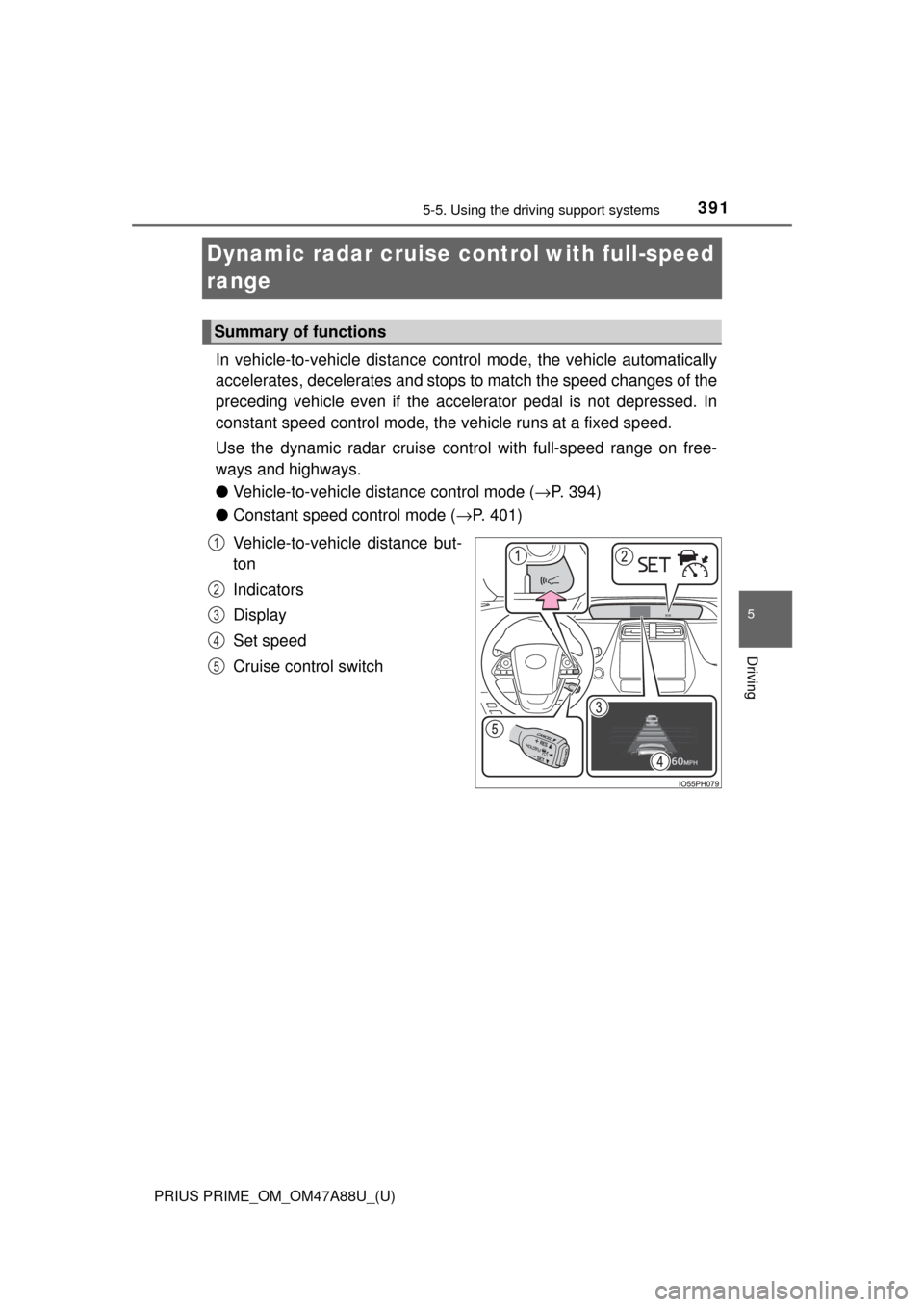
Vehicle-to-vehicle distance but-
ton
Indicators
Display
Set speed
Cruise control switch
Summary of functions
1
2
3
4
5
Page 396 of 784
396
PRIUS PRIME_OM_OM47A88U_(U)
5-5. Using the driving support systems
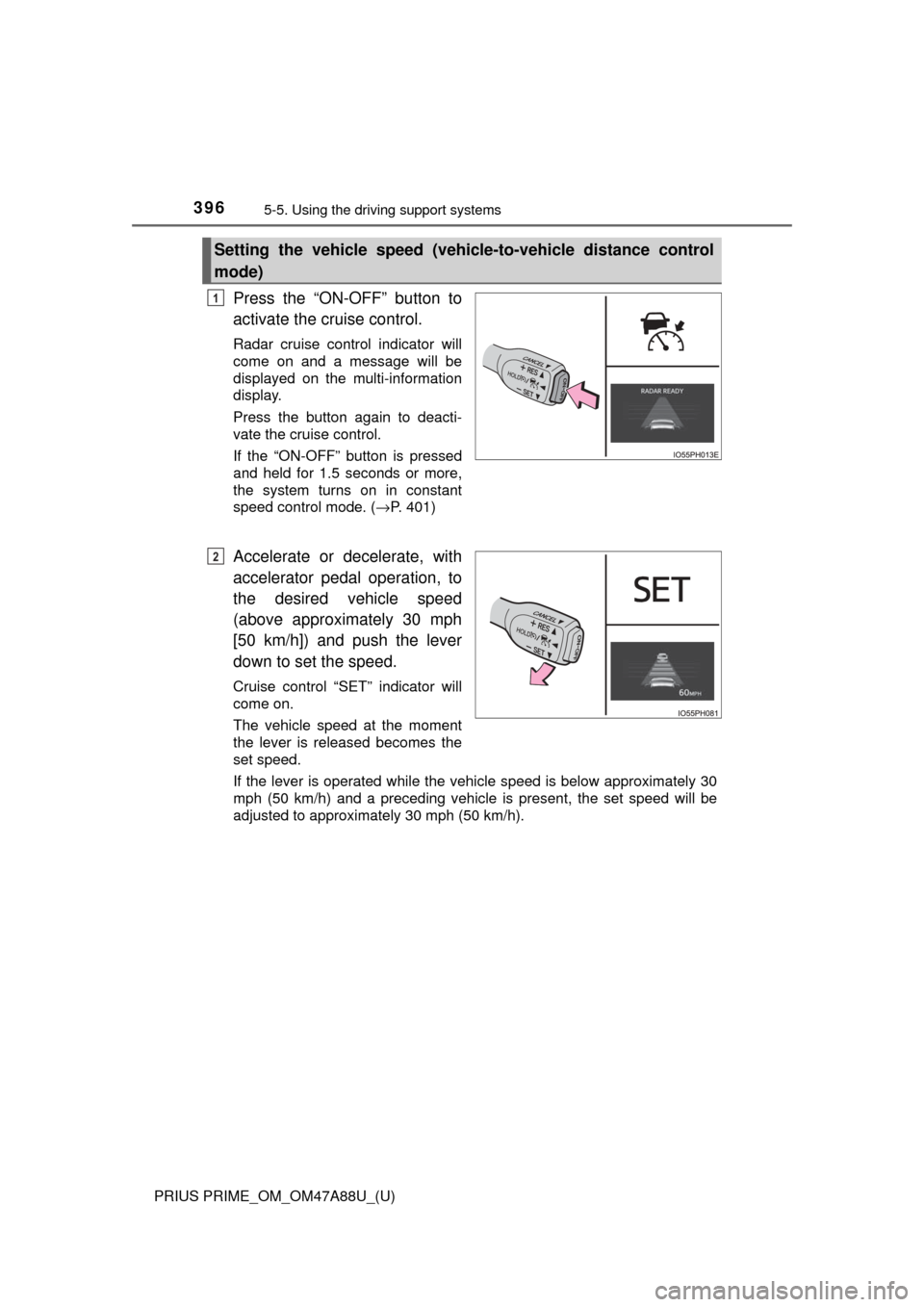
Press the “ON-OFF” button to
activate the cruise control.
Radar cruise control indicator will
come on and a message will be
displayed on the multi-information
display.
Press the button again to deacti-
vate the cruise control.
If the “ON-OFF” button is pressed
and held for 1.5 seconds or more,
the system turns on in constant
speed control mode. ( →P. 401)
Accelerate or decelerate, with
accelerator pedal operation, to
the desired vehicle speed
(above approximately 30 mph
[50 km/h]) and push the lever
down to set the speed.
Cruise control “SET” indicator will
come on.
The vehicle speed at the moment
the lever is released becomes the
set speed.
If the lever is operated while the vehicle speed is below approximately 30
mph (50 km/h) and a preceding vehicle is present, the set speed will be
adjusted to approximately 30 mph (50 km/h).
Setting the vehicle speed (vehicle-to-vehicle distance control
mode)
1
2
Page 401 of 784
PRIUS PRIME_OM_OM47A88U_(U)
4015-5. Using the driving support systems
5
Driving
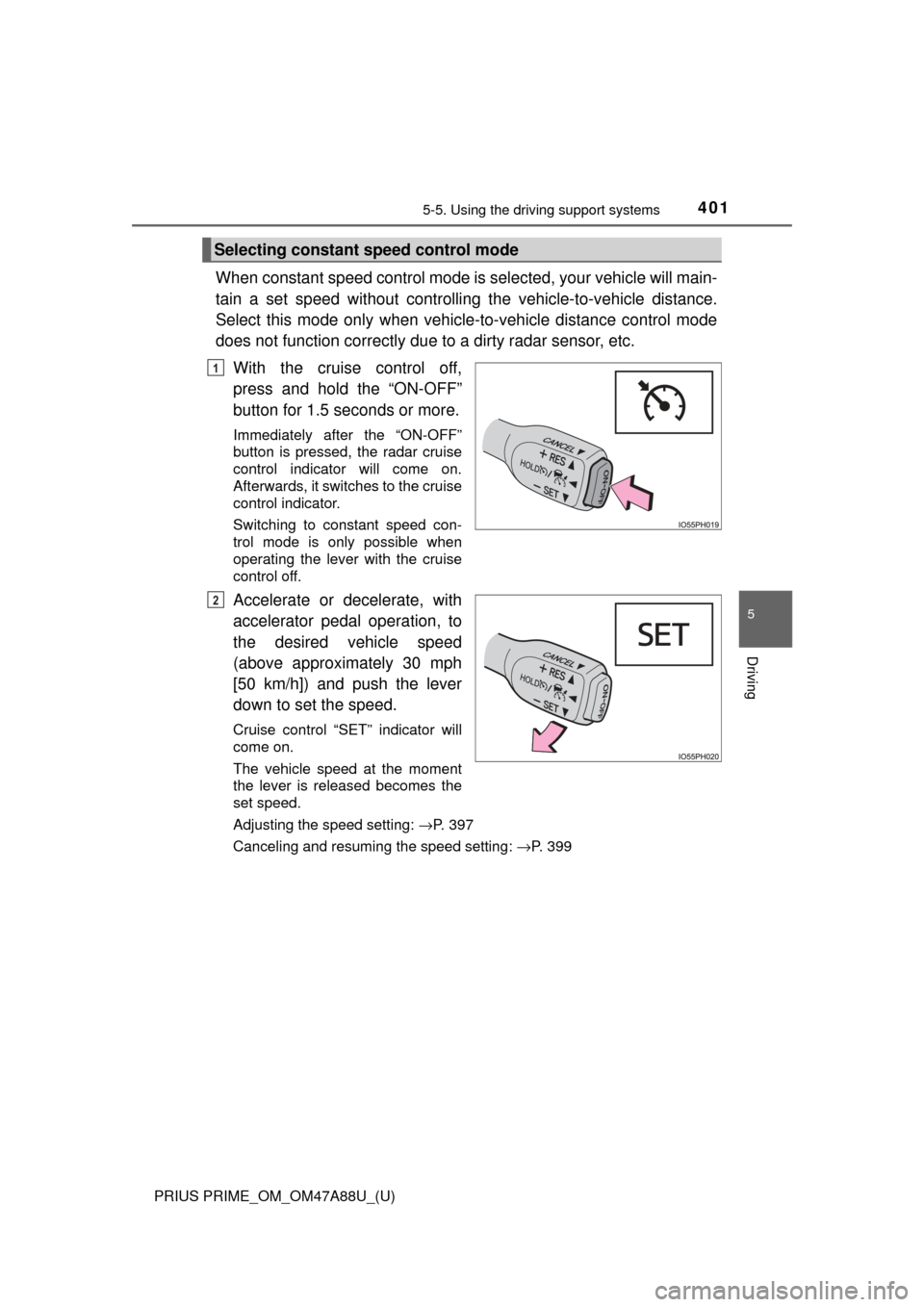
When constant speed control mode is selected, your vehicle will main-
tain a set speed without controllin g the vehicle-to-vehicle distance.
Select this mode only when vehicle-to-vehicle distance control mode
does not function co rrectly due to a dirty radar sensor, etc.
With the cruise control off,
press and hold the “ON-OFF”
button for 1.5 seconds or more.
Immediately after the “ON-OFF”
button is pressed, the radar cruise
control indicator will come on.
Afterwards, it switches to the cruise
control indicator.
Switching to constant speed con-
trol mode is only possible when
operating the lever with the cruise
control off.
Accelerate or decelerate, with
accelerator pedal operation, to
the desired vehicle speed
(above approximately 30 mph
[50 km/h]) and push the lever
down to set the speed.
Cruise control “SET” indicator will
come on.
The vehicle speed at the moment
the lever is released becomes the
set speed.
Adjusting the speed setting: →P. 397
Canceling and resuming the speed setting: →P. 399
Selecting constant speed control mode
1
2
Page 406 of 784
406
PRIUS PRIME_OM_OM47A88U_(U)
5-5. Using the driving support systems
Driving mode select switch
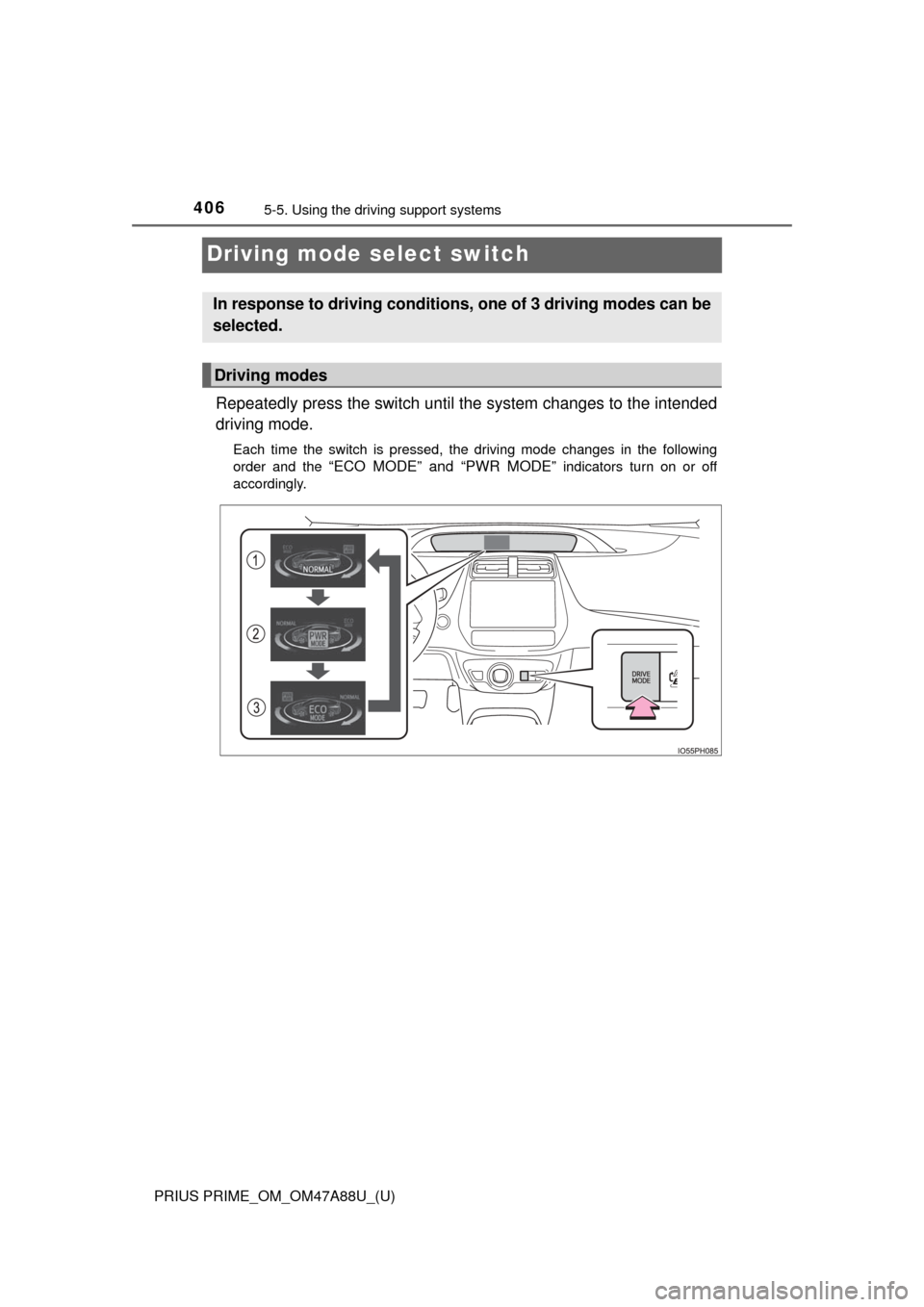
Repeatedly press the switch until t he system changes to the intended
driving mode.
Each time the switch is pressed, the driving mode changes in the following
order and the
“ECO MODE” and “PWR MODE” indicators turn on or off
accordingly.
In response to driving conditions , one of 3 driving modes can be
selected.
Driving modes
Page 407 of 784

PRIUS PRIME_OM_OM47A88U_(U)
4075-5. Using the driving support systems
5
Driving
Normal mode
Suitable for normal driving.
When normal mode is selected, the “ECO MODE” and “PWR MODE”
indicators turn off.
Power mode
Suitable for when crisp handling and enhanced accelerator
response are desired, such as when driving on mountainous roads.
When power mode is selected, the “PWR MODE” indicator will illumi-
nate on the main display.
Eco drive mode
Suitable for driving that improv es fuel economy by generating
torque in response to accelerator pedal operations more smoothly
than in normal mode.
When Eco drive mode is selected, the “ECO MODE” indicator will illumi-
nate on the main display.
While the air conditioning is being used, the system automatically
switches to air conditioning eco mode (→P. 490, 501), allowing for driv-
ing that leads to even better fuel economy.
■ The driving mode after turning the power switch off
The driving mode will not be changed automatically until the switch is
pressed, even if the power switch is turned off.
1
2
3
Page 408 of 784
408
PRIUS PRIME_OM_OM47A88U_(U)
5-5. Using the driving support systems
BSM (Blind Spot Monitor)∗
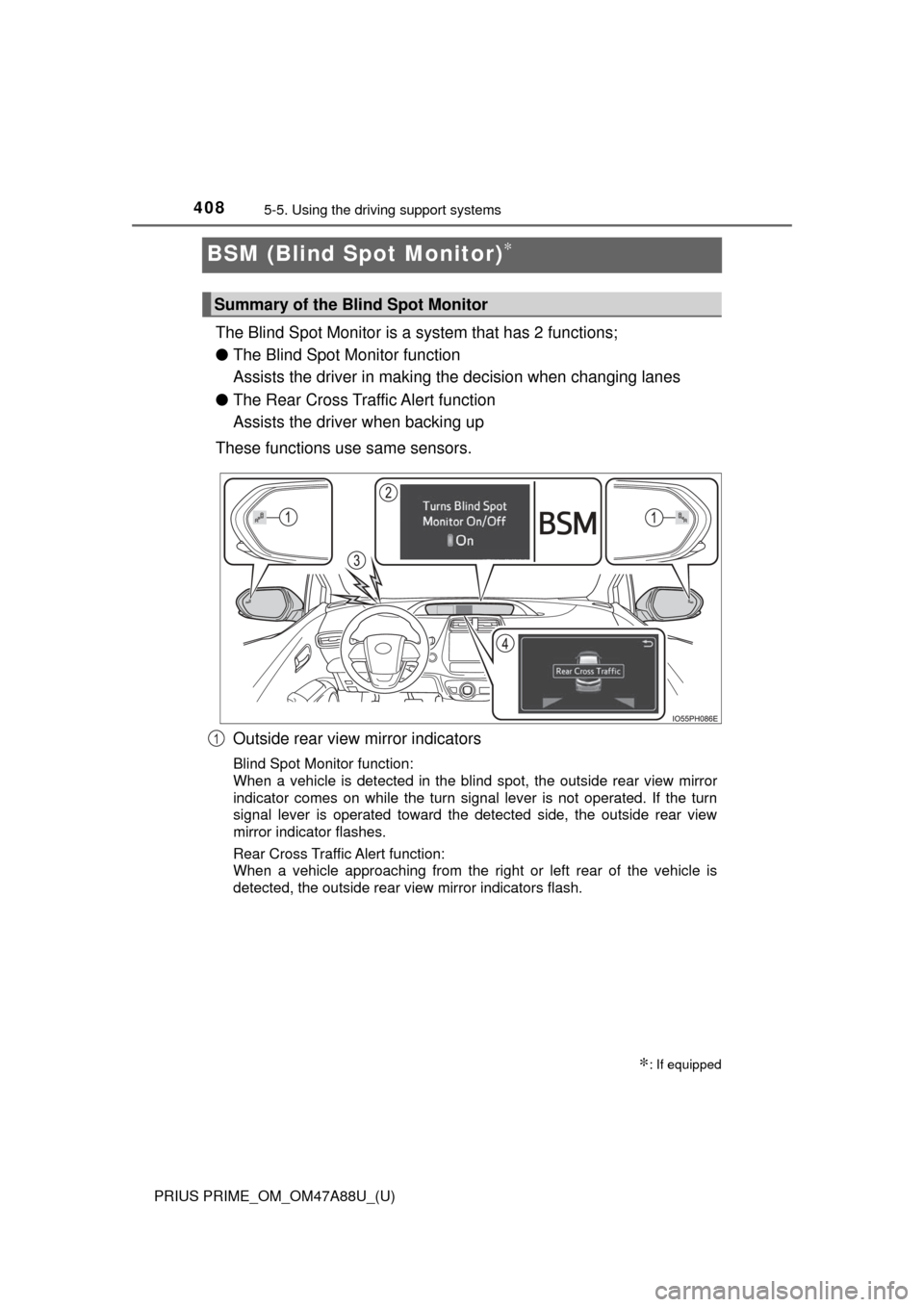
The Blind Spot Monitor is a system that has 2 functions;
● The Blind Spot Monitor function
Assists the driver in making t he decision when changing lanes
● The Rear Cross Traffic Alert function
Assists the driver when backing up
These functions use same sensors.
Outside rear view mirror indicators
Blind Spot Monitor function:
When a vehicle is detected in the blind spot, the outside rear view mirror
indicator comes on while the turn signal lever is not operated. If the turn
signal lever is operated toward the detected side, the outside rear view
mirror indicator flashes.
Rear Cross Traffic Alert function:
When a vehicle approaching from the right or left rear of the vehicle is
detected, the outside rear view mirror indicators flash.
∗: If equipped
Summary of the Blind Spot Monitor
1
Page 409 of 784
PRIUS PRIME_OM_OM47A88U_(U)
4095-5. Using the driving support systems
5
Driving
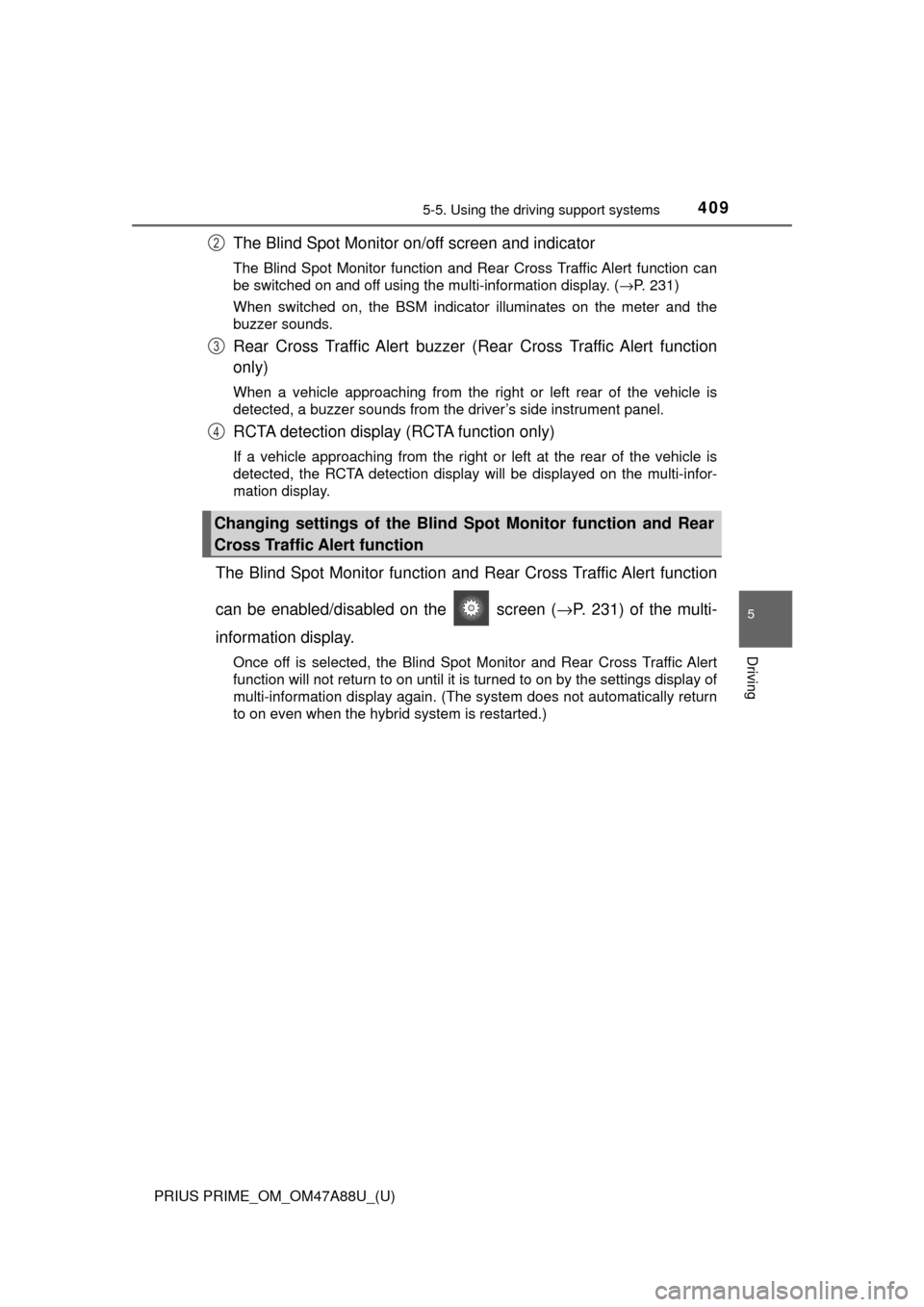
The Blind Spot Monitor on/off screen and indicator
The Blind Spot Monitor function and Rear Cross Traffic Alert function can
be switched on and off using the multi-information display. ( →P. 231)
When switched on, the BSM indicator illuminates on the meter and the
buzzer sounds.
Rear Cross Traffic Alert buzzer (Rear Cross Traffic Alert function
only)
When a vehicle approaching from the right or left rear of the vehicle is
detected, a buzzer sounds from the driver’s side instrument panel.
RCTA detection display (RCTA function only)
If a vehicle approaching from the right or left at the rear of the vehic\
le is
detected, the RCTA detection display will be displayed on the multi-infor-
mation display.
The Blind Spot Monitor function and Rear Cross Traffic Alert function
can be enabled/disabled on the screen ( →P. 231) of the multi-
information display.
Once off is selected, the Blind Spot Monitor and Rear Cross Traffic Alert
function will not return to on until it is turned to on by the settings display of
multi-information display again. (The system does not automatically return
to on even when the hybrid system is restarted.)
Changing settings of the Blind Spot Monitor function and Rear
Cross Traffic Alert function
2
3
4
Page 410 of 784
410
PRIUS PRIME_OM_OM47A88U_(U)
5-5. Using the driving support systems
■The BSM outside rear view mirror indicators visibility
When under strong sunlight, the outside rear view mirror indicator may be dif-
ficult to see.
■ Rear Cross Traffic Alert buzzer hearing
Rear Cross Traffic Alert function may be difficult to hear over loud noises
such as high audio volume.
■ When “Blind Spot Monitor Unavailabl e” is shown on the multi-informa-
tion display
The sensor voltage has become abnormal, water, snow mud, etc., may be
built up in the vicinity of the sensor area of bumper ( →P. 411). Removing the
water, snow, mud, etc., from the vicinity of the sensor area bumper should
return it to normal. Also, the sensor may not function normally when used in
extremely hot or cold weather.
■ When “Blind Spot Monitor System Malfunction Visit Your Dealer” is
shown on the multi- information display
There may be a sensor malfunction or misaligned. Have the vehicle
inspected by your Toyota dealer.
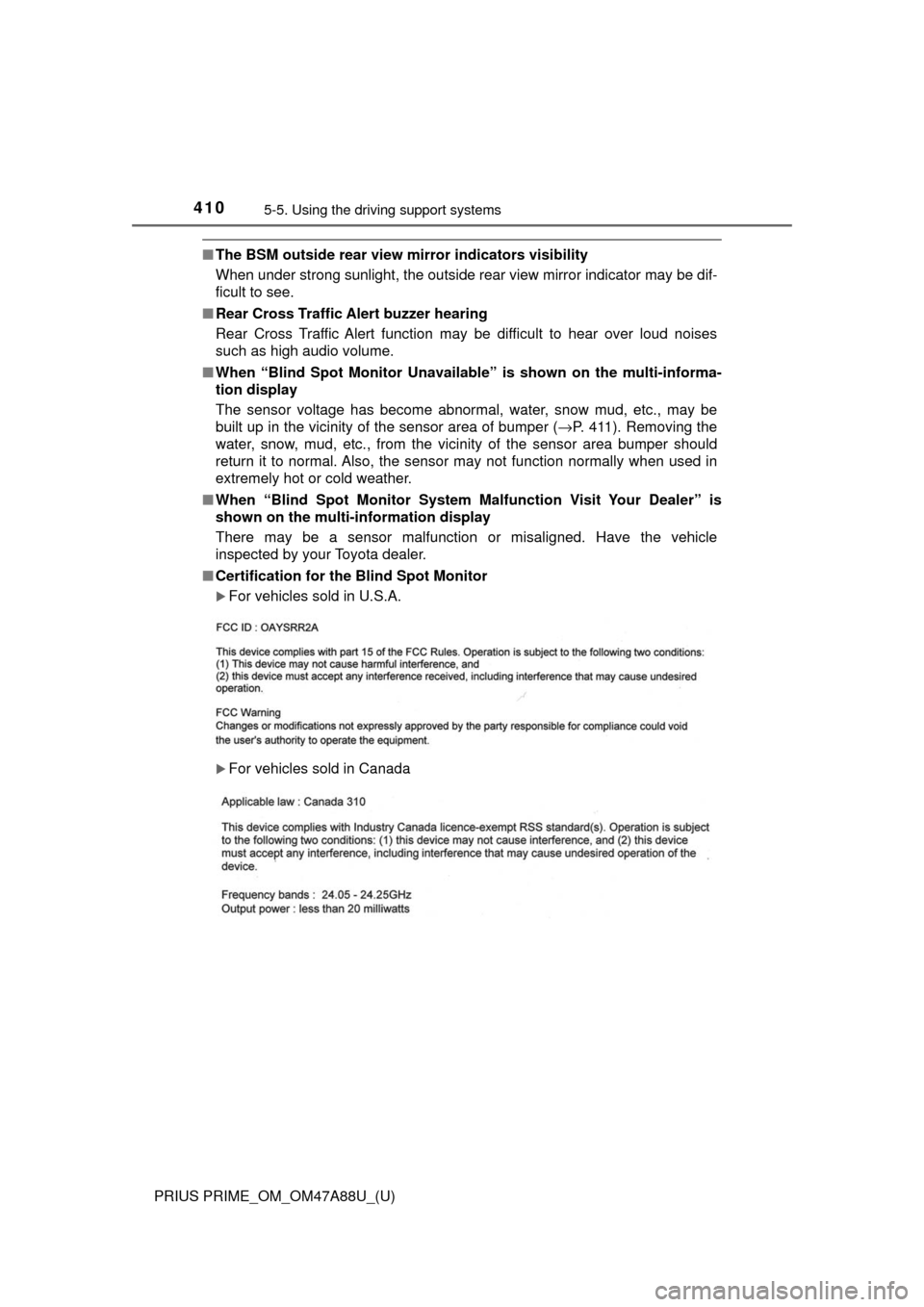
■ Certification for the Blind Spot Monitor
For vehicles sold in U.S.A.
For vehicles sold in Canada