display TOYOTA PRIUS PRIME 2017 2.G Owners Manual
[x] Cancel search | Manufacturer: TOYOTA, Model Year: 2017, Model line: PRIUS PRIME, Model: TOYOTA PRIUS PRIME 2017 2.GPages: 784, PDF Size: 14.98 MB
Page 325 of 784
PRIUS PRIME_OM_OM47A88U_(U)
3255-2. Driving procedures
5
Driving
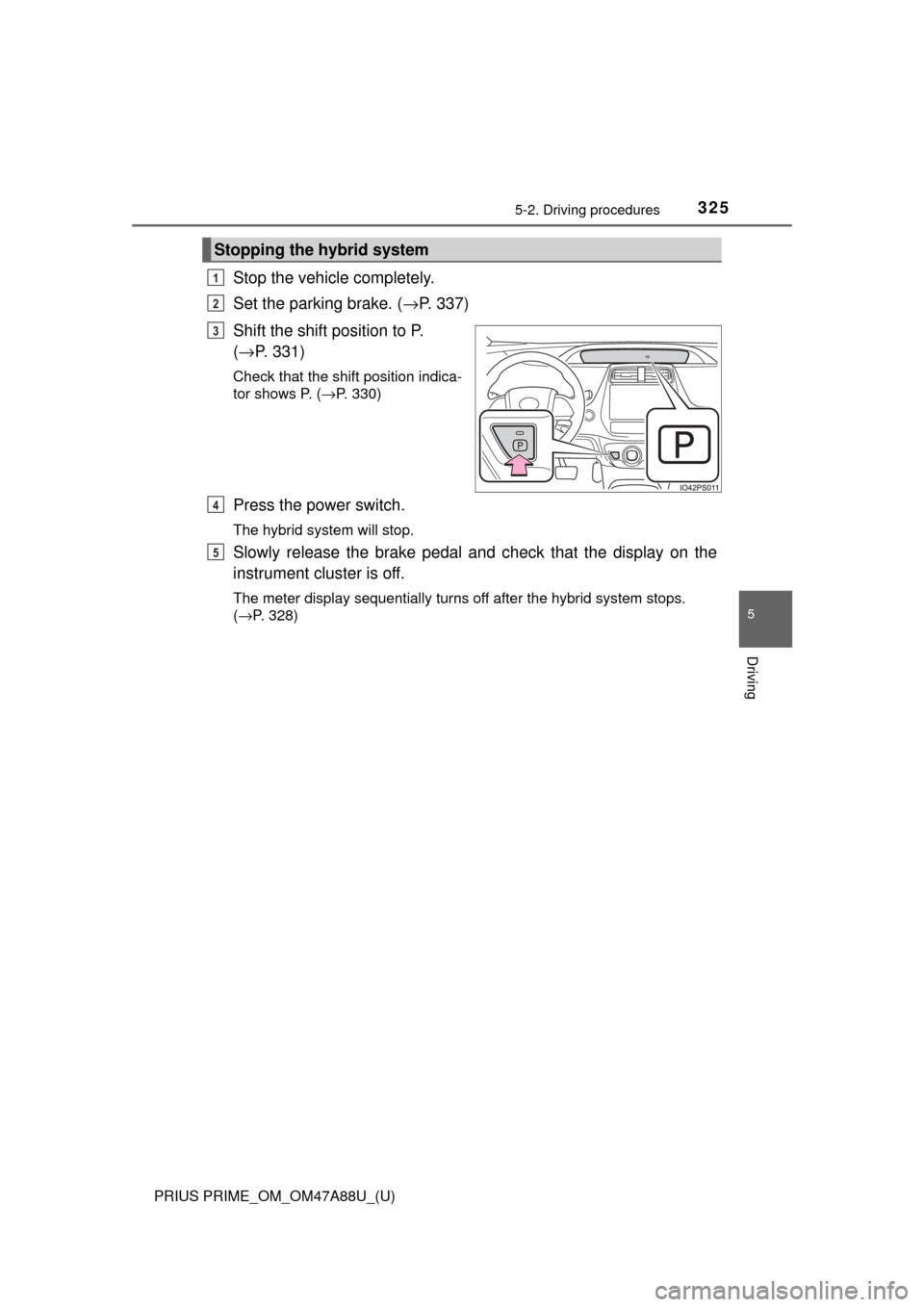
Stop the vehicle completely.
Set the parking brake. (→P. 337)
Shift the shift position to P.
( → P. 331)
Check that the shift position indica-
tor shows P. ( →P. 330)
Press the power switch.
The hybrid system will stop.
Slowly release the brake pedal and check that the display on the
instrument cluster is off.
The meter display sequentially turns off after the hybrid system stops.
( →P. 328)
Stopping the hybrid system
1
2
3
4
5
Page 326 of 784
326
PRIUS PRIME_OM_OM47A88U_(U)
5-2. Driving procedures
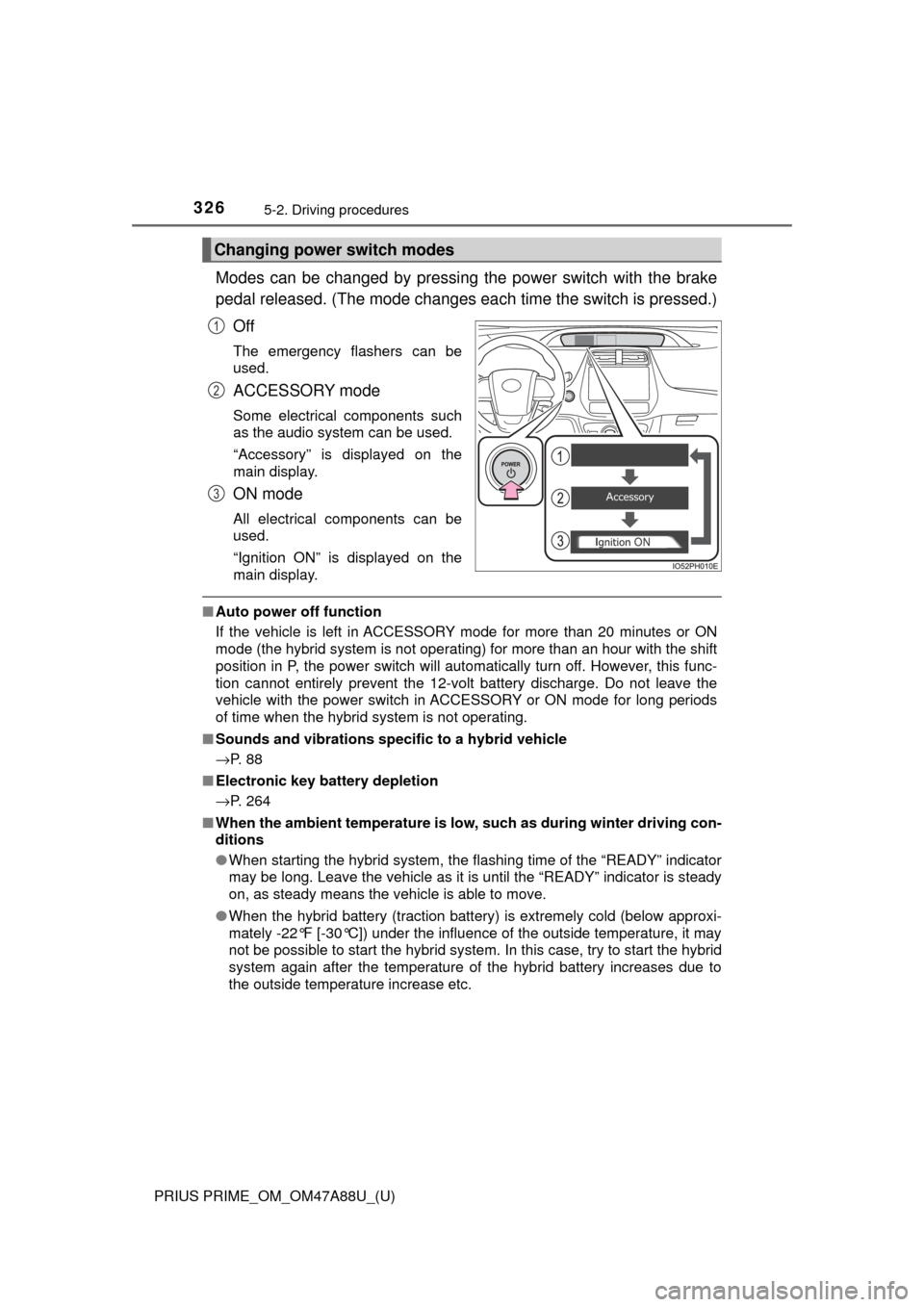
Modes can be changed by pressing the power switch with the brake
pedal released. (The mode changes ea ch time the switch is pressed.)
Off
The emergency flashers can be
used.
ACCESSORY mode
Some electrical components such
as the audio system can be used.
“Accessory” is displayed on the
main display.
ON mode
All electrical components can be
used.
“Ignition ON” is displayed on the
main display.
■ Auto power off function
If the vehicle is left in ACCESSORY mode for more than 20 minutes or ON
mode (the hybrid system is not operating) for more than an hour with the shift
position in P, the power switch will automatically turn off. However, this func-
tion cannot entirely prevent the 12-volt battery discharge. Do not leave the
vehicle with the power switch in ACCESSORY or ON mode for long periods
of time when the hybrid system is not operating.
■ Sounds and vibrations specific to a hybrid vehicle
→P. 8 8
■ Electronic key battery depletion
→P. 264
■ When the ambient temperature is low, such as during winter driving con-
ditions
● When starting the hybrid system, the flashing time of the “READY” indicator
may be long. Leave the vehicle as it is until the “READY” indicator is steady
on, as steady means the vehicle is able to move.
● When the hybrid battery (traction battery) is extremely cold (below approxi-
mately -22°F [-30°C]) under the influence of the outside temperature, it may
not be possible to start the hybrid system. In this case, try to start the hybrid
system again after the temperature of the hybrid battery increases due to
the outside temperature increase etc.
Changing power switch modes
1
2
3
Page 327 of 784

PRIUS PRIME_OM_OM47A88U_(U)
3275-2. Driving procedures
5
Driving
■Conditions affecting operation
→P. 281
■ Note for the entry function
→P. 282
■ If the hybrid system does not start
●The immobilizer system may not have been deactivated. ( →P. 75)
Contact your Toyota dealer.
● The charging cable may be connected to the vehicle. (→ P. 132)
● If a message related to start-up is shown on the multi-information display,
read the message and follow the instructions.
■ If the “READY” indicator does not come on
In the event that the “READY” indicator does not come on even after perform-
ing the proper procedures for starting the vehicle, contact your Toyota dealer
immediately.
■ If the hybrid system is malfunctioning
→P. 663
■ If the electronic key battery is depleted
→P. 627
■ Operation of the power switch
●If the switch is not pressed shortly and firmly, the power switch mode may
not change or the hybrid system may not start.
● If attempting to restart the hybrid system immediately after turning the power
switch off, the hybrid system may not start in some cases. After turning the
power switch off, please wait a few seconds before restarting the hybrid sys-
tem.
■ Automatic P position selection function
→P. 333
■ When the shift control system malfunctions
When attempting to turn the power switch off while there is a malfunction in
the shift control system, the power switch mode may change to ACCES-
SORY mode. In this case, ACCESSORY mode may be turned off by applying
the parking brake and pressing the power sw itch again. If there is a malfunc-
tion in the system, have the vehicle inspected by your Toyota dealer immedi-
ately.
Page 328 of 784

328
PRIUS PRIME_OM_OM47A88U_(U)
5-2. Driving procedures
■Meter display
When the power switch is turned off, each display will turn off as follows.
●The shift position indicator will turn off after approximately 2 seconds.
● The multi-information display, clock, etc. will turn off after approximately 30
seconds.
(Each display will also turn off immediately if a door is locked before 30 sec-
onds has elapsed.)
■ If the smart key system has been deactivated in a customized setting
→P. 691
WARNING
■When starting the hybrid system
Always start the hybrid system while sitting in the driver’s seat. Do not
depress the accelerator pedal while starting the hybrid system under any
circumstances.
Doing so may cause an accident resulting in death or serious injury.
■ Stopping the hybrid system in an emergency
● If you want to stop the hybrid system in an emergency while driving the
vehicle, press and hold the power switch for more than 2 seconds, or
press it briefly 3 times or more in succession. ( →P. 645)
However, do not touch the power switch while driving except in an emer-
gency. Turning the hybrid system off while driving will not cause loss of
steering or braking control, however, power assist to the steering will be
lost. This will make it more difficult to steer smoothly, so you should pull
over and stop the vehicle as soon as it is safe to do so.
● If the power switch is operated while the vehicle is running, a warning
message will be shown on the multi-information display and a buzzer
sounds.
● When restarting the hybrid system after an emergency shutdown while
driving, press the power switch. When restarting the hybrid system after
stopping the vehicle, change the shift position to P and then press the
power switch.
Page 329 of 784
PRIUS PRIME_OM_OM47A88U_(U)
3295-2. Driving procedures
5
Driving
NOTICE
■To prevent 12-volt battery discharge
● Do not leave the power switch in ACCESSORY or ON mode for long peri-
ods of time without the hybrid system on.
● If “Accessory”, “Ignition ON” or mileage display ( →P. 196) is displayed on
the main display while the hybrid system is not operating, the power switch
is not off. Exit the vehicle after turning the power switch off.
■ When starting the hybrid system
If the hybrid system becomes difficult to start, have your vehicle checked by
your Toyota dealer immediately.
■ Symptoms indicating a malf unction with the power switch
If the power switch seems to be operating somewhat differently than usual,
such as the switch sticking slightly, there may be a malfunction. Contact
your Toyota dealer immediately.
Page 332 of 784

332
PRIUS PRIME_OM_OM47A88U_(U)
5-2. Driving procedures
■For the shift positions
●When the power switch is off, the shift position cannot be changed.
● When the power switch is in ON mode (the hybrid system is not operating),
the shift position can only be changed to N. The shift position will be
changed to N even if the shift lever is shifted to D or R and held in that posi-
tion.
● When the “READY” indicator is on, the shift position can be changed from P
to D, N or R.
● When the “READY” indicator is flashing, the shift position cannot be
changed from P to another position even if the shift lever is operated. Wait
until the “READY” indicator changes from a flashing to a solid lig\
ht, and then
operate the shift lever again.
● The shift position can only be changed to B directly from D.
In addition, if an attempt is made to change the shift position by moving the
shift lever or by pressing the P position switch in any of the following situa-
tions, the buzzer will sound and the shifting operation will be disabled or the
shift position will automatically change to N. When this happens, select an
appropriate shift position.
● Situations where the shifting operation will be disabled:
• When an attempt is made to change the shift position from P to another
position by moving the shift lever without depressing the brake pedal.
• When an attempt is made to change the shift position from P or N to B by
moving the shift lever.
• When an attempt is made to change the shift position from P to another position by moving the shift lever while the charging cable is connected to
the vehicle.
● Situations where the shift position will automatically change to N:
• When the P position switch is pressed while the vehicle is running.
*1
• When an attempt is made to select the R position by moving the shift
lever when the vehicle is moving forward.
*2
• When an attempt is made to select the D position by moving the shiftlever when the vehicle is moving in reverse.
*3
• When an attempt is made to change the shift position from R to B bymoving the shift lever.
*1: Shift position may be changed to P when driving at extremely low
speeds.
*2: Shift position may be changed to R when driving at low speeds.
*3: Shift position may be changed to D when driving at low speeds.
● If N is selected while driving at a certain speed, even if the shift lever is not
held in the N position, the shift position changes to N. In this situation, the
buzzer sounds and a confirmation message is displayed on the multi-infor-
mation display to inform the driver that the shift position has changed to N.
Page 333 of 784

PRIUS PRIME_OM_OM47A88U_(U)
3335-2. Driving procedures
5
Driving
■Reverse warning buzzer
When shifting into R, a buzzer will sound to inform the driver that the shift
position is in R.
■ Restraining sudden star t (Drive-Start Control)
When the following unusual operation is performed, the hybrid system output
may be restrained.
● When the shift position is shifted from R to D, D/B to R, N to R, P to D, P to
R with the accelerator pedal depressed, a warning message appears on the
multi-information display. If a warning message is shown on the multi-infor-
mation display, read the message and follow the instructions.
● When the accelerator pedal is depressed too much while the vehicle is in
reverse.
■ Automatic P position selection function
●If the power switch is on and the shift position is not already P, completely
stopping the vehicle and pressing the power switch causes the shift posi\
tion
to automatically switch to P and the power switch to turn off.
*
●The shift position may also automatically switch to P if one of the following
conditions is detected while the vehicle is stopped by dynamic radar cruise
control with full-speed range.
• Driver’s seat belt is not fastened
• Driver’s door is opened
• Approximately 3 minutes elapse after the vehicle stopped
*: If the power switch is pressed when driving at very low speeds (for exam-
ple, just before the vehicle stops), the shift position may automatical\
ly
switch to P. Press the power switch after completely stopping the vehicle to
prevent unexpected sudden stopping of the vehicle.
■ If the shift position can not be shifted from P
There is a possibility that the 12-volt battery is discharged. Check the 12-volt
battery in this situation. ( →P. 694)
■ About engine braking
When shift position B is selected, releasing the accelerator pedal will apply
engine braking.
●When the vehicle is driven at high speeds, compared to ordinary gasoline-
fueled vehicles, the engine braking deceleration is felt less than that of other
vehicles.
● The vehicle can be accelerated even when shift position B is selected.
If the vehicle is driven continuously in the B position, fuel efficiency will
become low. Usually, select the D position.
■ After recharging/reconnect ing the 12-volt battery
→P. 588
Page 334 of 784

334
PRIUS PRIME_OM_OM47A88U_(U)
5-2. Driving procedures
■When a message related to shift oper ations is displayed on the multi-
information display
When the shift position does not switch due to a mistaken operation, system
conditions, etc., or when the attempted shift operation is invalid, a message
indicating the correct operation or the reason why switching cannot be per-
formed is shown on the multi-information display. In these cases, follow the
instructions and retry the operation.
■ Customization
Settings (e.g. reverse warning buzzer) can be changed.
(Customizable features: →P. 732)
WARNING
■When driving on slippery road surfaces
Do not accelerate or shift the shift position suddenly.
Sudden changes in engine braking may cause the vehicle to spin or skid,
resulting in an accident.
■ Shift lever and P position switch
● Do not remove the shift lever knob or use anything but a genuine Toyota
shift lever knob. Also, do not hang anything on the shift lever.
Doing so could prevent the shift lever from returning to position, causing
unexpected accidents to occur when the vehicle is in motion.
● Do not press the P position switch while the vehicle is moving.
If the P position switch is pressed when driving at very low speeds (for
example, just before the vehicle stops), the vehicle may stop suddenly
when the shift position switches to P, which could lead to an accident.
● In order to prevent the shift position from accidentally being changed, \
do
not touch the shift lever or P position switch when not using them.
Page 335 of 784
PRIUS PRIME_OM_OM47A88U_(U)
3355-2. Driving procedures
5
Driving
NOTICE
■Hybrid battery (tract ion battery) charge
If the shift position is in N, the hybrid battery (traction battery) will not be
charged. To help prevent the battery from discharging, avoid leaving the N
position selected for an extended period of time.
■ Situations where shift control system malfunctions are possible
If any of the following situations occurs, shift control system malfunctions
are possible.
Immediately stop the vehicle in a safe place on level ground, apply the park-
ing brake, and then contact your Toyota dealer.
● When the warning message indicating the shift control system appears on
the multi-information display. ( →P. 664)
● The display indicates that no shift position is selected for more than a\
few
seconds.
■ Notes regarding shift lever an d P position switch operation
Avoid repeatedly operating the shift lever and P position switch in quick suc-
cession.
The system protection function may activate and it will not be temporarily
possible to shift the shift position other than P. If this happens, please wait
for approximately 20 seconds before attempting to change the shift position
again.
Page 337 of 784
337
PRIUS PRIME_OM_OM47A88U_(U)
5-2. Driving procedures
5
Driving
Parking brake
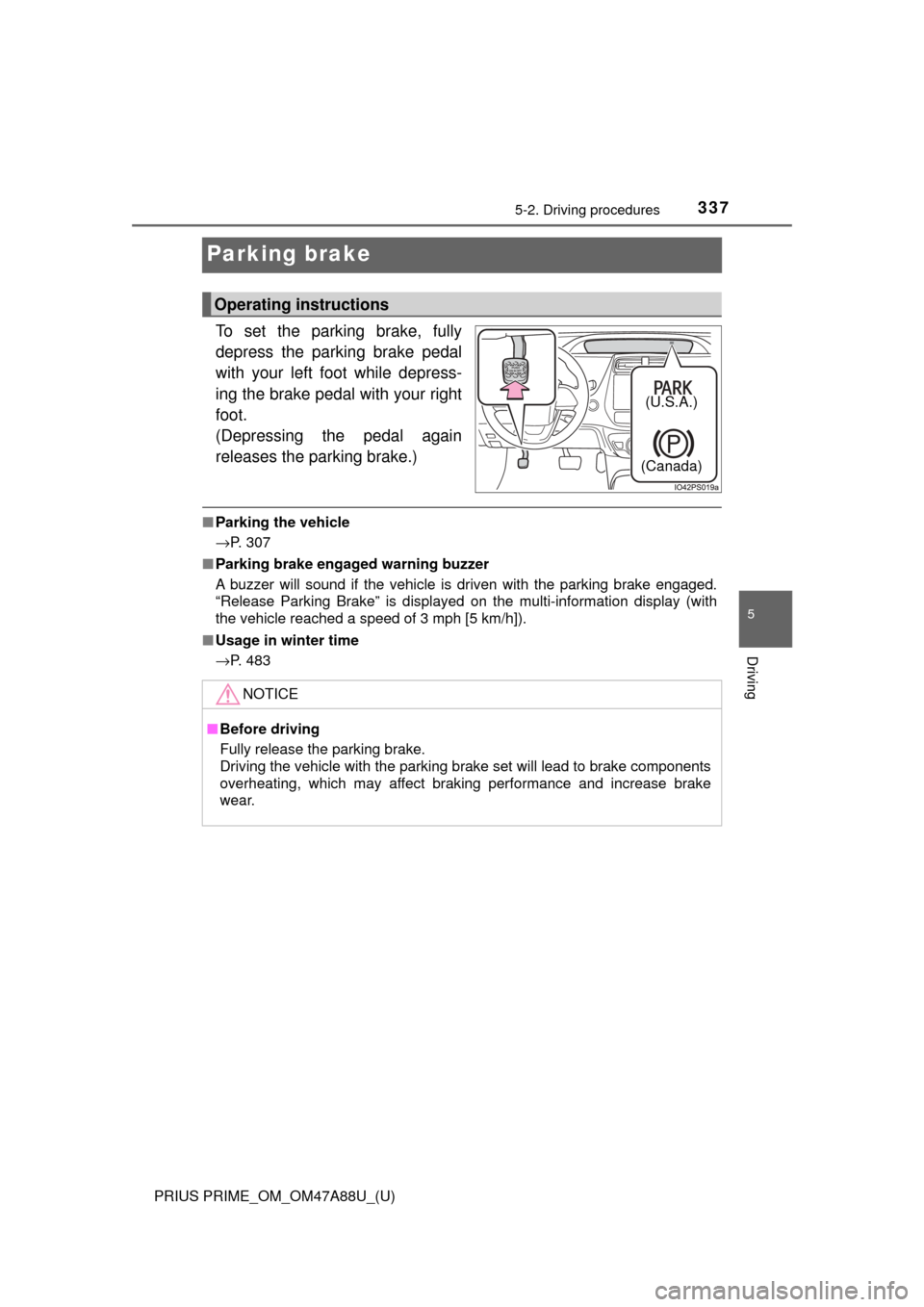
To set the parking brake, fully
depress the parking brake pedal
with your left foot while depress-
ing the brake pedal with your right
foot.
(Depressing the pedal again
releases the parking brake.)
■Parking the vehicle
→P. 307
■ Parking brake engaged warning buzzer
A buzzer will sound if the vehicle is driven with the parking brake engaged.
“Release Parking Brake” is displayed on the multi-information display (with
the vehicle reached a speed of 3 mph [5 km/h]).
■ Usage in winter time
→P. 483
Operating instructions
(U.S.A.)
(Canada)
NOTICE
■ Before driving
Fully release the parking brake.
Driving the vehicle with the parking brake set will lead to brake components
overheating, which may affect braking performance and increase brake
wear.