warning light TOYOTA PRIUS PRIME 2017 2.G Owner's Manual
[x] Cancel search | Manufacturer: TOYOTA, Model Year: 2017, Model line: PRIUS PRIME, Model: TOYOTA PRIUS PRIME 2017 2.GPages: 784, PDF Size: 14.98 MB
Page 178 of 784
178
PRIUS PRIME_OM_OM47A88U_(U)
2-2. Charging
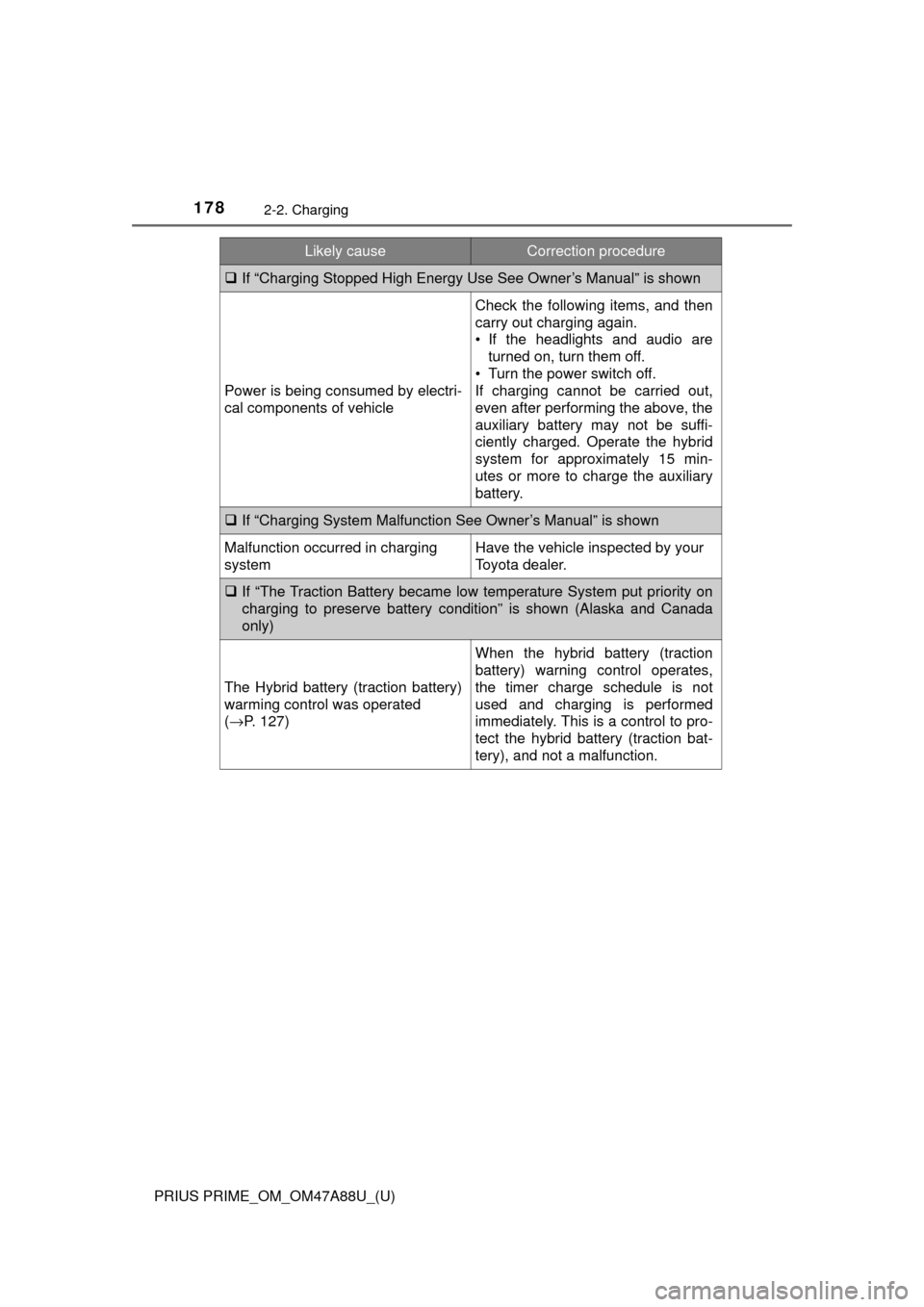
If “Charging Stopped High Energy Use See Owner’s Manual” is shown
Power is being consumed by electri-
cal components of vehicle
Check the following items, and then
carry out charging again.
• If the headlights and audio are
turned on, turn them off.
• Turn the power switch off.
If charging cannot be carried out,
even after performing the above, the
auxiliary battery may not be suffi-
ciently charged. Operate the hybrid
system for approximately 15 min-
utes or more to charge the auxiliary
battery.
If “Charging System Malfunction See Owner’s Manual” is shown
Malfunction occurred in charging
systemHave the vehicle inspected by your
Toyota dealer.
If “The Traction Battery became low temperature System put priority on
charging to preserve battery c ondition” is shown (Alaska and Canada
only)
The Hybrid battery (traction battery)
warming control was operated
( → P. 127)
When the hybrid battery (traction
battery) warning control operates,
the timer charge schedule is not
used and charging is performed
immediately. This is a control to pro-
tect the hybrid battery (traction bat-
tery), and not a malfunction.
Likely causeCorrection procedure
Page 179 of 784
179
PRIUS PRIME_OM_OM47A88U_(U)
Instrument cluster3
3. Instrument clusterCombination meter............ 180
Warning lights and indicators ........................ 188
Main display ...................... 196
Multi-information display ... 205
Head-up display ................ 238
Energy monitor/ consumption screen/
detail screen (vehicles
with 7-inch display) ......... 246
Energy monitor/ consumption screen/
detail screen (vehicles
with 11.6-inch display) .... 252
Page 180 of 784
180
PRIUS PRIME_OM_OM47A88U_(U)
3. Instrument cluster
Combination meter
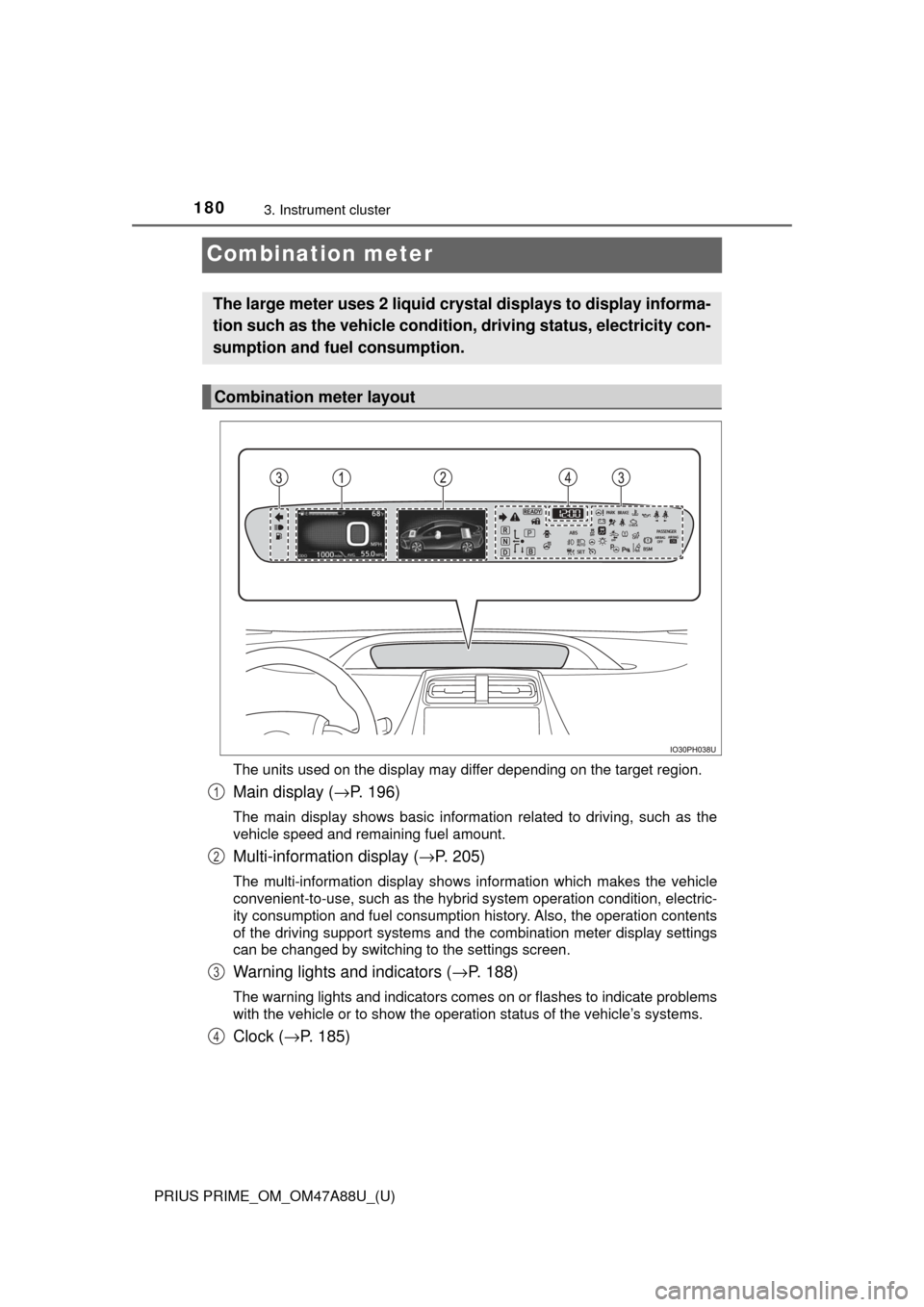
The units used on the display may differ depending on the target region.
Main display (→P. 196)
The main display shows basic information related to driving, such as the
vehicle speed and remaining fuel amount.
Multi-information display ( →P. 205)
The multi-information display shows information which makes the vehicle
convenient-to-use, such as the hybrid system operation condition, electric-
ity consumption and fuel consumption history. Also, the operation contents
of the driving support systems and the combination meter display settings
can be changed by switching to the settings screen.
Warning lights and indicators (→ P. 188)
The warning lights and indicators comes on or flashes to indicate problems
with the vehicle or to show the operation status of the vehicle’s systems.
Clock (→P. 185)
The large meter uses 2 liquid crys tal displays to display informa-
tion such as the vehicle condition , driving status, electricity con-
sumption and fuel consumption.
Combination meter layout
1
2
3
4
Page 187 of 784
PRIUS PRIME_OM_OM47A88U_(U)
1873. Instrument cluster
3
Instrument cluster
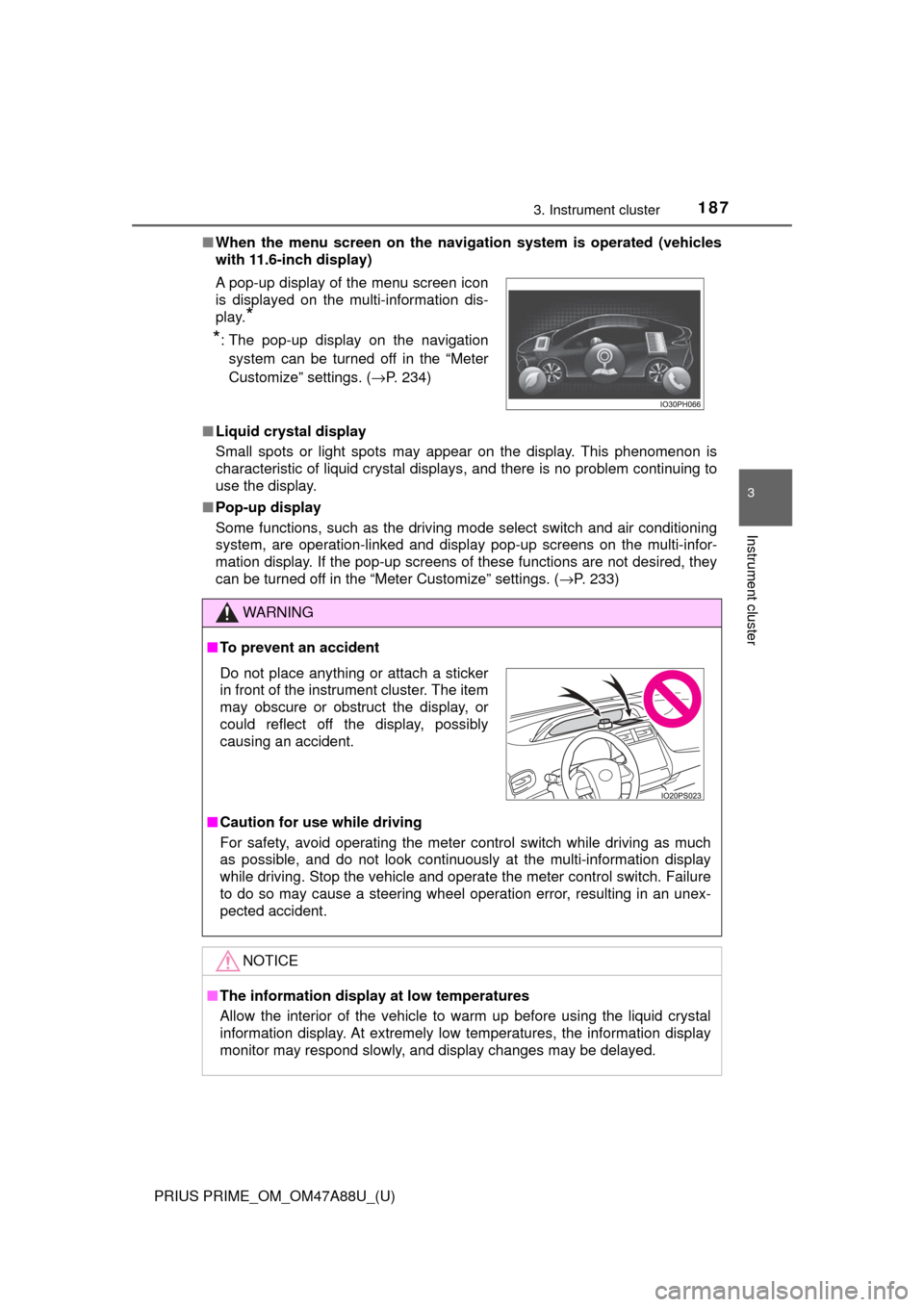
■When the menu screen on the naviga tion system is operated (vehicles
with 11.6-inch display)
■ Liquid crystal display
Small spots or light spots may appear on the display. This phenomenon is
characteristic of liquid crystal displays, and there is no problem continuing to
use the display.
■ Pop-up display
Some functions, such as the driving mode select switch and air conditioning
system, are operation-linked and display pop-up screens on the multi-infor-
mation display. If the pop-up screens of these functions are not desired, they
can be turned off in the “Meter Customize” settings. ( →P. 233)
A pop-up display of the menu screen icon
is displayed on the multi-information dis-
play.
*
*
: The pop-up display on the navigation
system can be turned off in the “Meter
Customize” settings. ( →P. 234)
WARNING
■To prevent an accident
■ Caution for use while driving
For safety, avoid operating the meter control switch while driving as much
as possible, and do not look continuously at the multi-information display
while driving. Stop the vehicle and operate the meter control switch. Failure
to do so may cause a steering wheel operation error, resulting in an unex-
pected accident.
NOTICE
■The information display at low temperatures
Allow the interior of the vehicle to warm up before using the liquid crystal
information display. At extremely low temperatures, the information display
monitor may respond slowly, and display changes may be delayed.
Do not place anything or attach a sticker
in front of the instrument cluster. The item
may obscure or obstruct the display, or
could reflect off the display, possibly
causing an accident.
Page 188 of 784
188
PRIUS PRIME_OM_OM47A88U_(U)
3. Instrument cluster
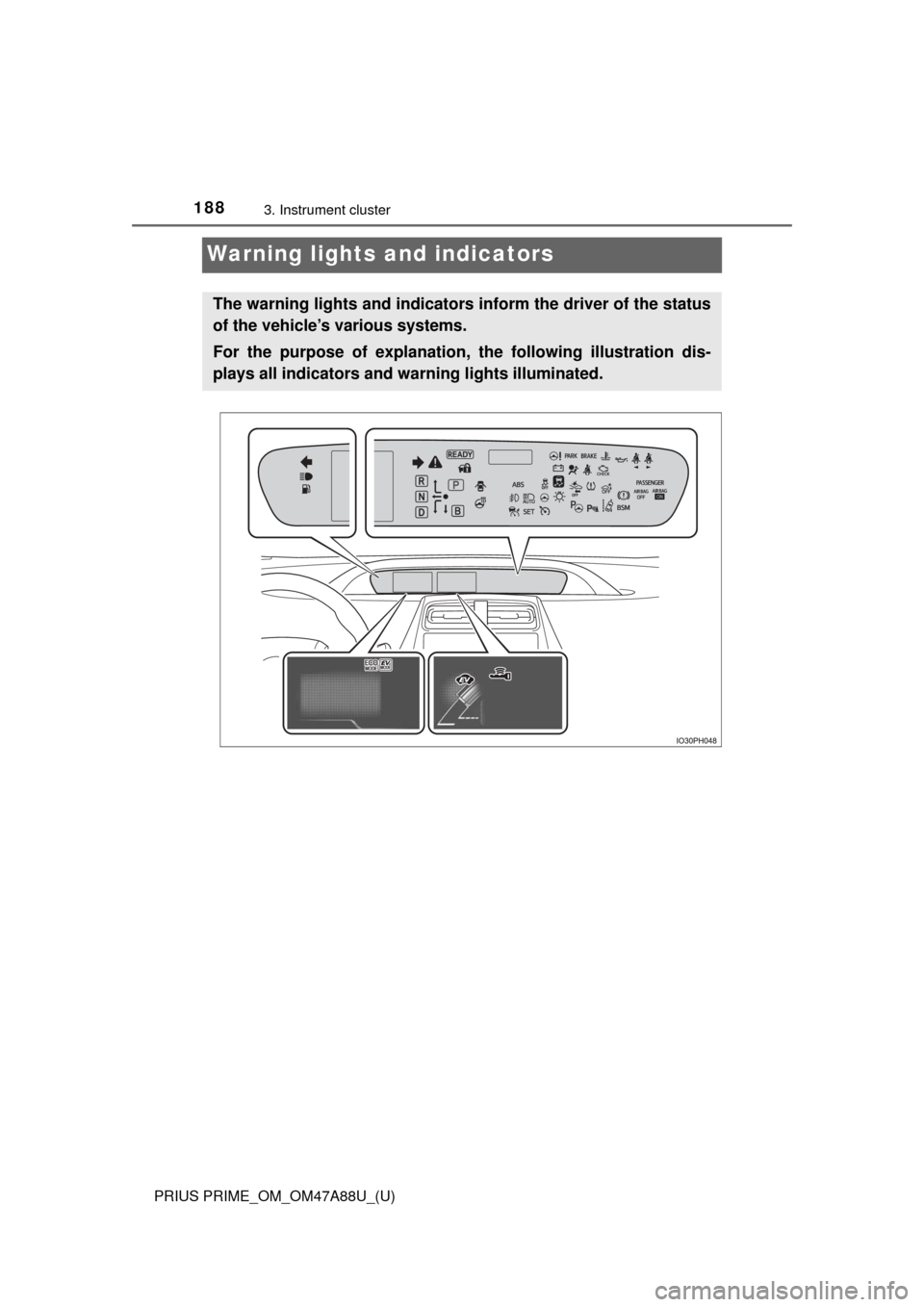
Warning lights and indicators
The warning lights and indicators inform the driver of the status
of the vehicle’s various systems.
For the purpose of explanation, the following illustration dis-
plays all indicators and wa rning lights illuminated.
Page 189 of 784
PRIUS PRIME_OM_OM47A88U_(U)
1893. Instrument cluster
3
Instrument cluster
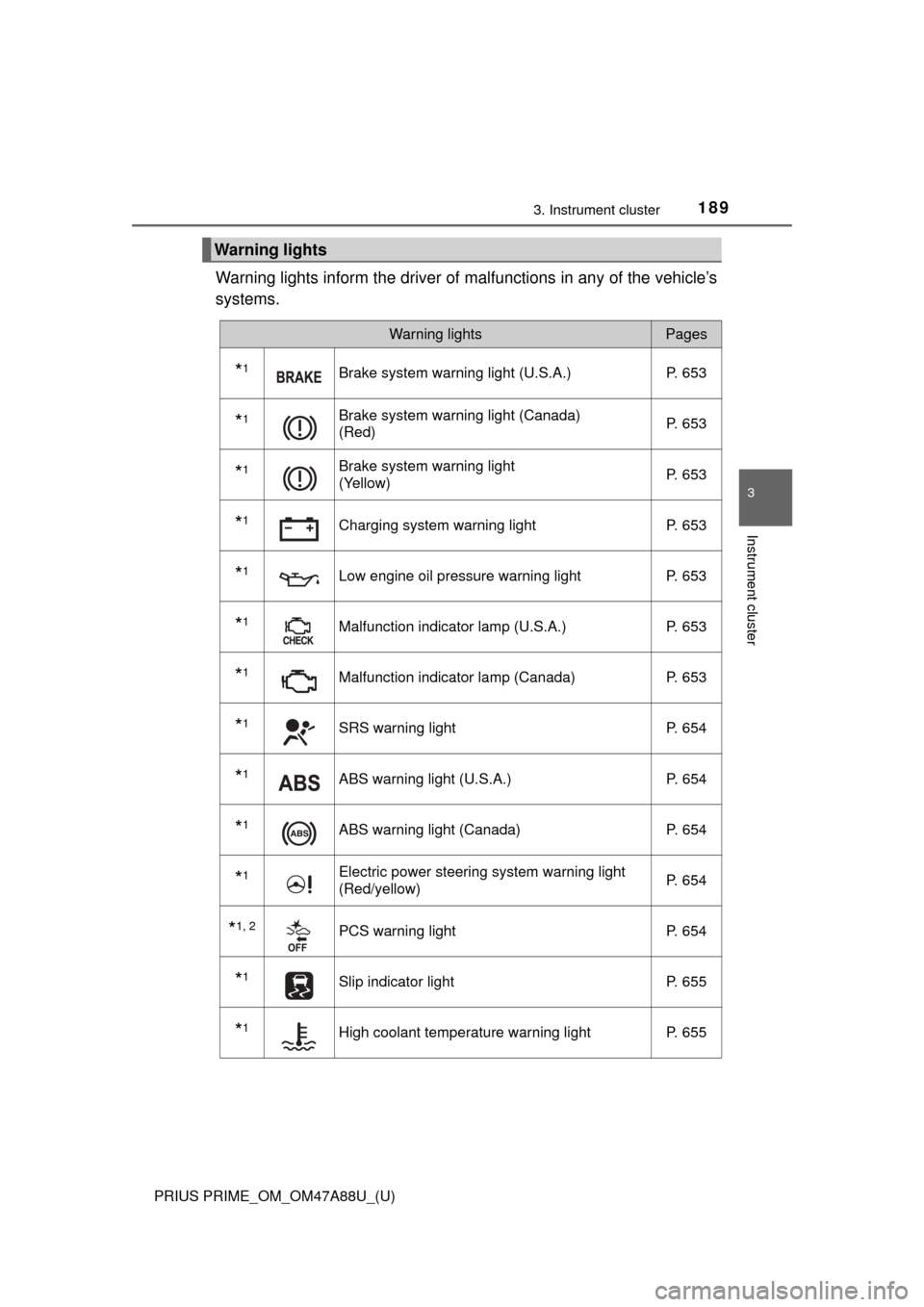
Warning lights inform the driver of malfunctions in any of the vehicle’s
systems.
Warning lights
Warning lightsPages
*1Brake system warning light (U.S.A.) P. 653
*1Brake system warning light (Canada)
(Red)P. 653
*1Brake system warning light
(Yellow)P. 653
*1Charging system warning light
P. 653
*1Low engine oil pressure warning lightP. 653
*1Malfunction indicator lamp (U.S.A.) P. 653
*1Malfunction indicator lamp (Canada) P. 653
*1SRS warning lightP. 654
*1ABS warning light (U.S.A.) P. 654
*1ABS warning light (Canada)P. 654
*1Electric power steering system warning light
(Red/yellow)P. 654
*1, 2PCS warning light
P. 654
*1Slip indicator light P. 655
*1High coolant temperature warning lightP. 655
Page 190 of 784
190
PRIUS PRIME_OM_OM47A88U_(U)
3. Instrument cluster
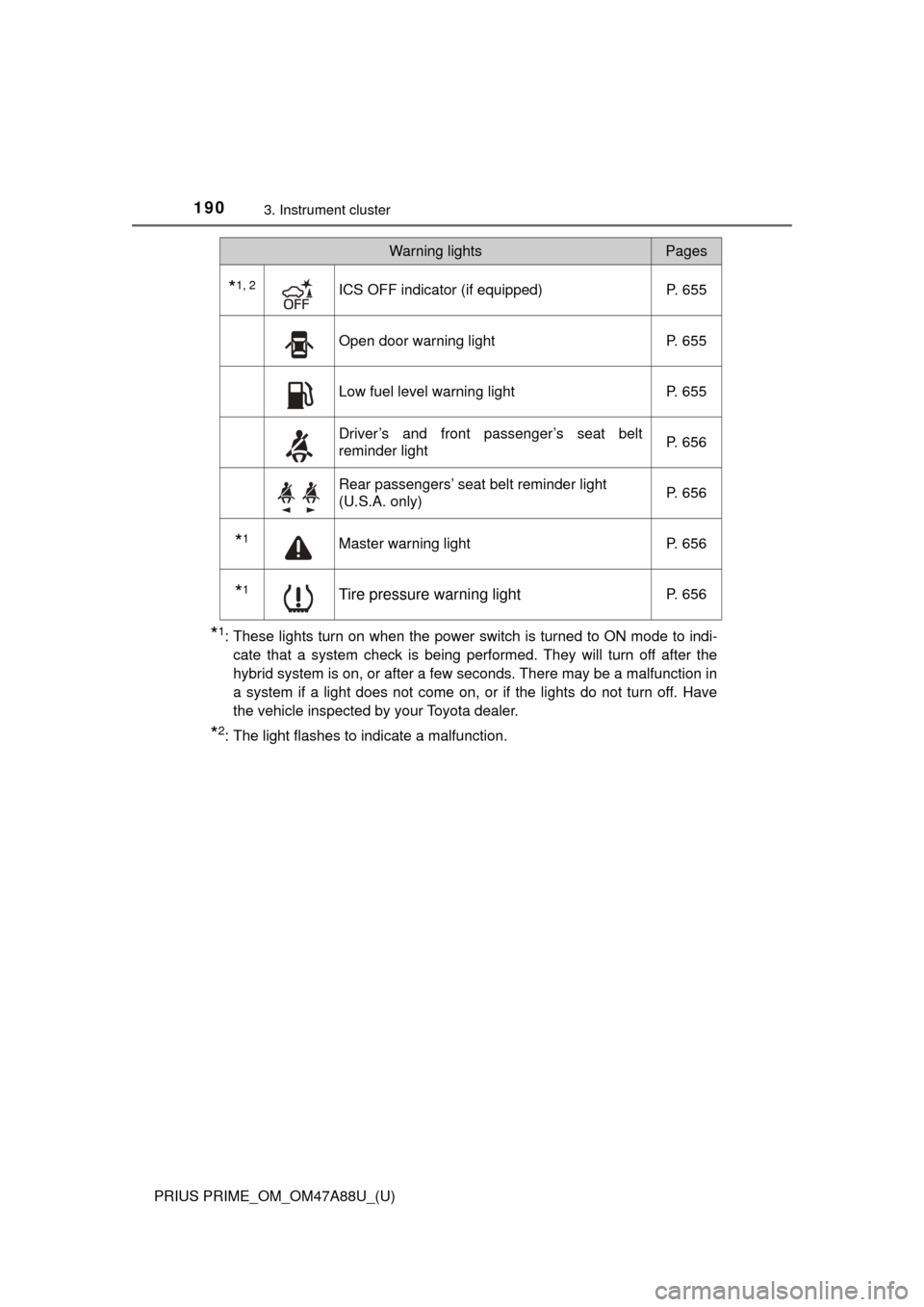
*1: These lights turn on when the power switch is turned to ON mode to indi-cate that a system check is being performed. They will turn off after the
hybrid system is on, or after a few seconds. There may be a malfunction in
a system if a light does not come on, or if the lights do not turn off. Have
the vehicle inspected by your Toyota dealer.
*2: The light flashes to indicate a malfunction.
*1, 2ICS OFF indicator (if equipped) P. 655
Open door warning lightP. 655
Low fuel level warning lightP. 655
Driver’s and front passenger’s seat belt
reminder lightP. 656
Rear passengers’ seat belt reminder light
(U.S.A. only)
P. 656
*1Master warning light
P. 656
*1Tire pressure warning lightP. 656
Warning lightsPages
Page 192 of 784
192
PRIUS PRIME_OM_OM47A88U_(U)
3. Instrument cluster
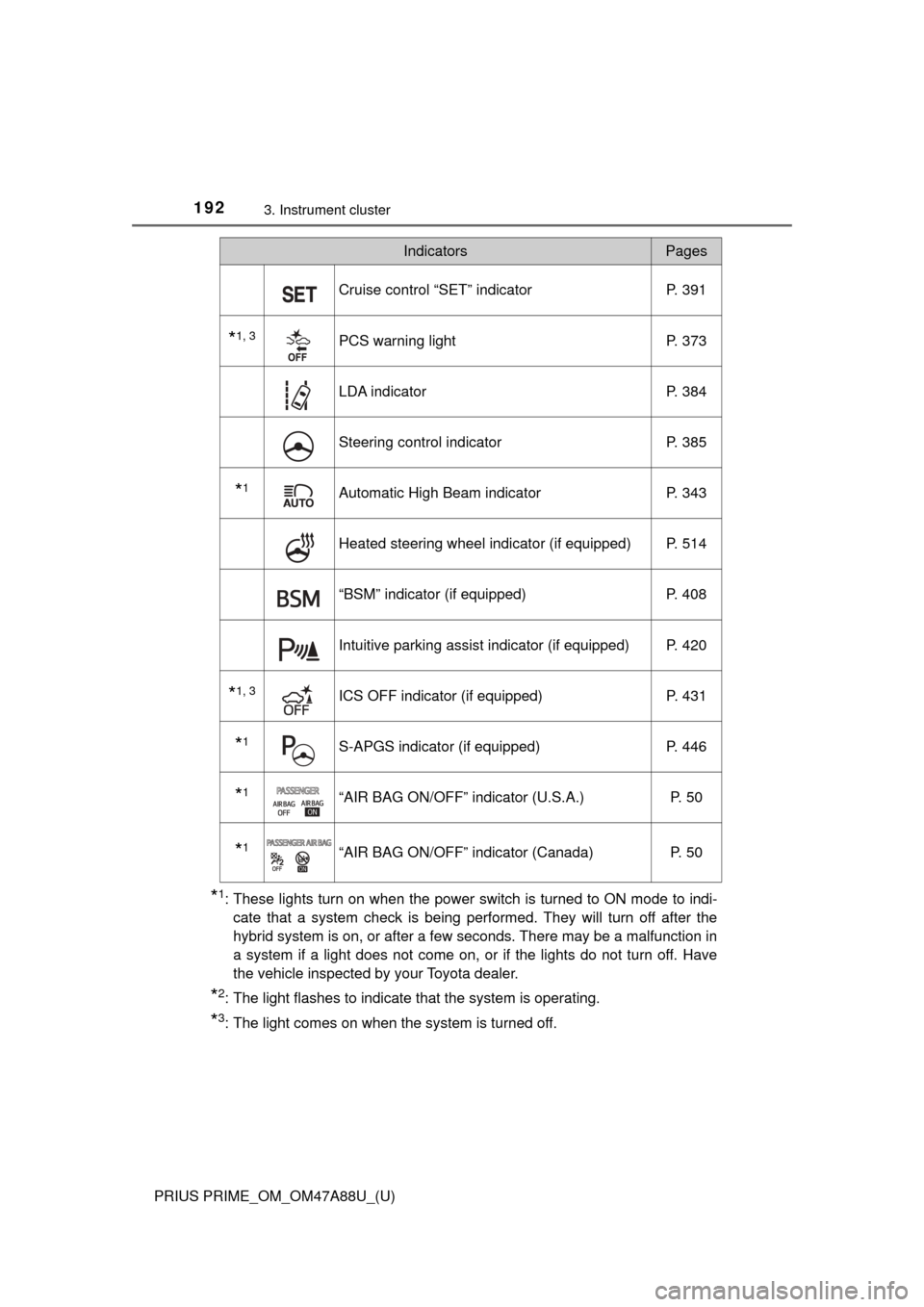
*1: These lights turn on when the power switch is turned to ON mode to indi-cate that a system check is being performed. They will turn off after the
hybrid system is on, or after a few seconds. There may be a malfunction in
a system if a light does not come on, or if the lights do not turn off. Have
the vehicle inspected by your Toyota dealer.
*2: The light flashes to indicate that the system is operating.
*3: The light comes on when the system is turned off.
Cruise control “SET” indicator P. 391
*1, 3PCS warning lightP. 373
LDA indicator P. 384
Steering control indicatorP. 385
*1Automatic High Beam indicatorP. 343
Heated steering wheel indicator (if equipped) P. 514
“BSM” indicator (if equipped)P. 408
Intuitive parking assist indicator (if equipped) P. 420
*1, 3ICS OFF indicator (if equipped) P. 431
*1S-APGS indicator (if equipped)P. 446
*1“AIR BAG ON/OFF” indicator (U.S.A.) P. 50
*1“AIR BAG ON/OFF” indicator (Canada)P. 50
IndicatorsPages
Page 195 of 784
PRIUS PRIME_OM_OM47A88U_(U)
1953. Instrument cluster
3
Instrument cluster
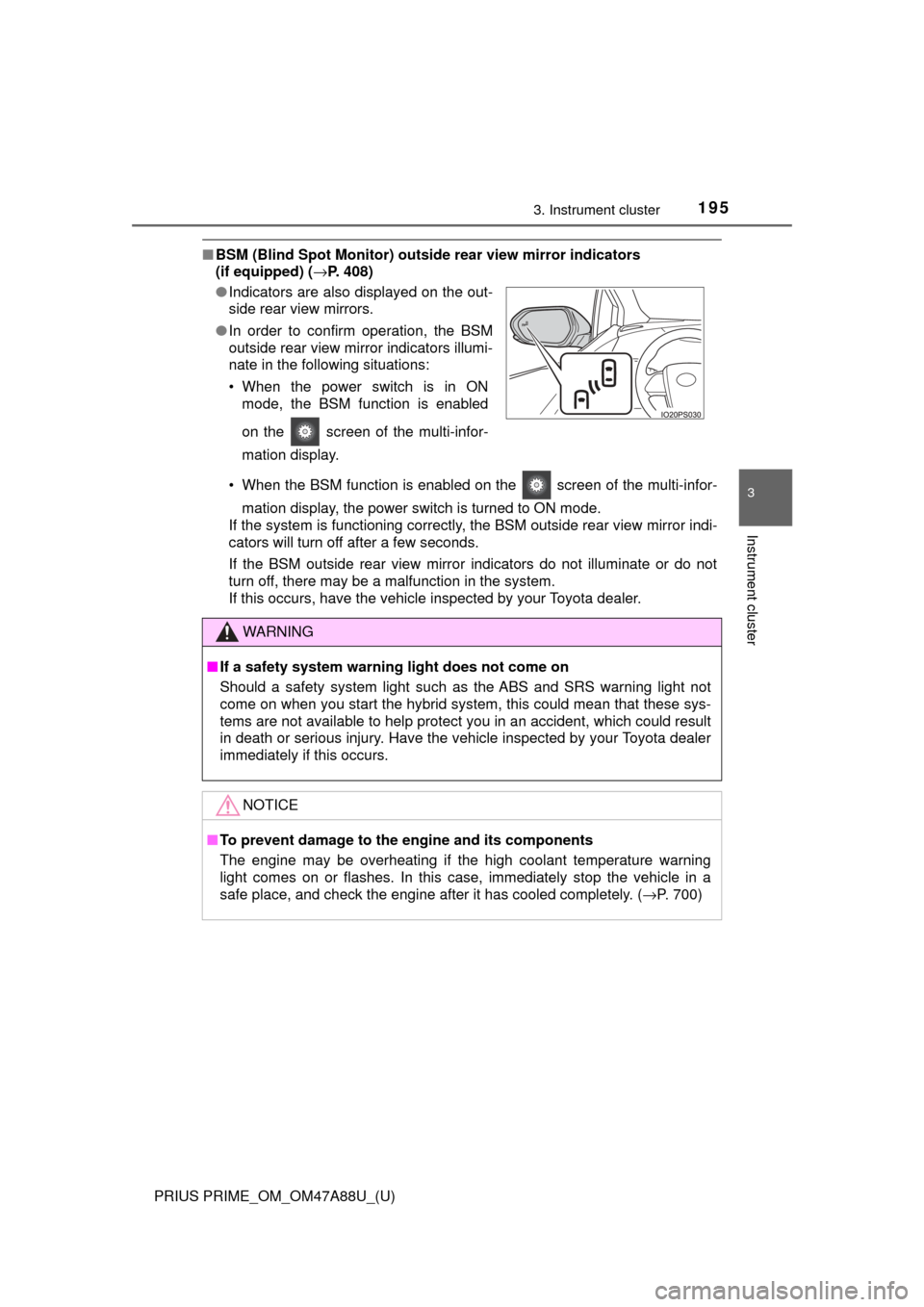
■BSM (Blind Spot Monitor) outsid e rear view mirror indicators
(if equipped) ( →P. 408)
• When the BSM function is enabled on the screen of the multi-infor- mation display, the power switch is turned to ON mode.
If the system is functioning correctly, the BSM outside rear view mirror indi-
cators will turn off after a few seconds.
If the BSM outside rear view mirror indicators do not illuminate or do not
turn off, there may be a malfunction in the system.
If this occurs, have the vehicle inspected by your Toyota dealer.
●
Indicators are also displayed on the out-
side rear view mirrors.
● In order to confirm operation, the BSM
outside rear view mirror indicators illumi-
nate in the following situations:
• When the power switch is in ON
mode, the BSM function is enabled
on the screen of the multi-infor-
mation display.
WARNING
■If a safety system warning light does not come on
Should a safety system light such as the ABS and SRS warning light not
come on when you start the hybrid system, this could mean that these sys-
tems are not available to help protect you in an accident, which could r\
esult
in death or serious injury. Have the vehicle inspected by your Toyota dealer
immediately if this occurs.
NOTICE
■To prevent damage to the engine and its components
The engine may be overheating if the high coolant temperature warning
light comes on or flashes. In this case, immediately stop the vehicle in a
safe place, and check the engine after it has cooled completely. ( →P. 700)
Page 242 of 784
242
PRIUS PRIME_OM_OM47A88U_(U)
3. Instrument cluster
■Insert displays of the driving support systems
Insert displays are linked with the operation of the following sys-
tems and used to show some of the information shown on the multi-
information display on the head-up display.
*: If equipped
■
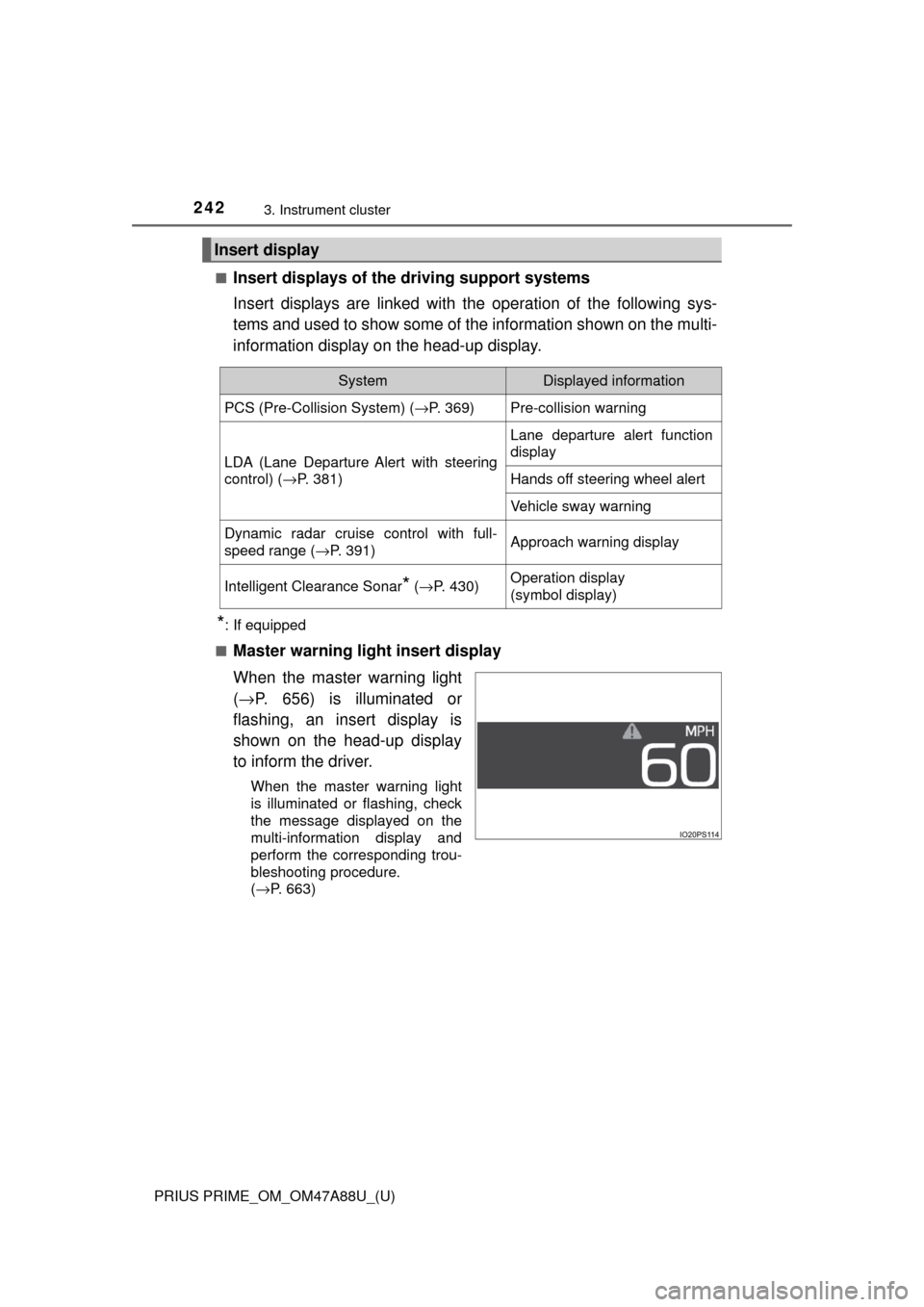
Master warning light insert display
When the master warning light
( → P. 656) is illuminated or
flashing, an insert display is
shown on the head-up display
to inform the driver.
When the master warning light
is illuminated or flashing, check
the message displayed on the
multi-information display and
perform the corresponding trou-
bleshooting procedure.
( →P. 663)
Insert display
SystemDisplayed information
PCS (Pre-Collision System) ( →P. 369)Pre-collision warning
LDA (Lane Departure Alert with steering
control) (→P. 381)
Lane departure alert function
display
Hands off steering wheel alert
Vehicle sway warning
Dynamic radar cruise control with full-
speed range ( →P. 391)Approach warning display
Intelligent Clearance Sonar* (→ P. 430)Operation display
(symbol display)