warning light TOYOTA PRIUS PRIME 2017 2.G Service Manual
[x] Cancel search | Manufacturer: TOYOTA, Model Year: 2017, Model line: PRIUS PRIME, Model: TOYOTA PRIUS PRIME 2017 2.GPages: 784, PDF Size: 14.98 MB
Page 366 of 784

366
PRIUS PRIME_OM_OM47A88U_(U)
5-5. Using the driving support systems
WARNING
●Do not dirty or damage the camera sensor.
When cleaning the inside of the windshield, do not allow glass cleaner to
contact the lens. Also, do not touch the lens.
If the lens is dirty or damaged, contact your Toyota dealer.
● Do not subject the camera sensor to a strong impact.
● Do not change the installation position or direction of the camera sensor or
remove it.
● Do not disassemble the camera sensor.
● Do not install an electronic device or device that emits strong electric
waves near the camera sensor.
● Do not modify any components of the vehicle around the camera sensor
(inside rear view mirror, etc.) or ceiling.
● Do not attach any accessories that may obstruct the camera sensor to the
hood, front grille or front bumper. Contact your Toyota dealer for details.
● If a surfboard or other long object is to be mounted on the roof, make sure
that it will not obstruct the camera sensor.
● Do not modify the headlights or other lights.
Page 373 of 784
PRIUS PRIME_OM_OM47A88U_(U)
3735-5. Using the driving support systems
5
Driving
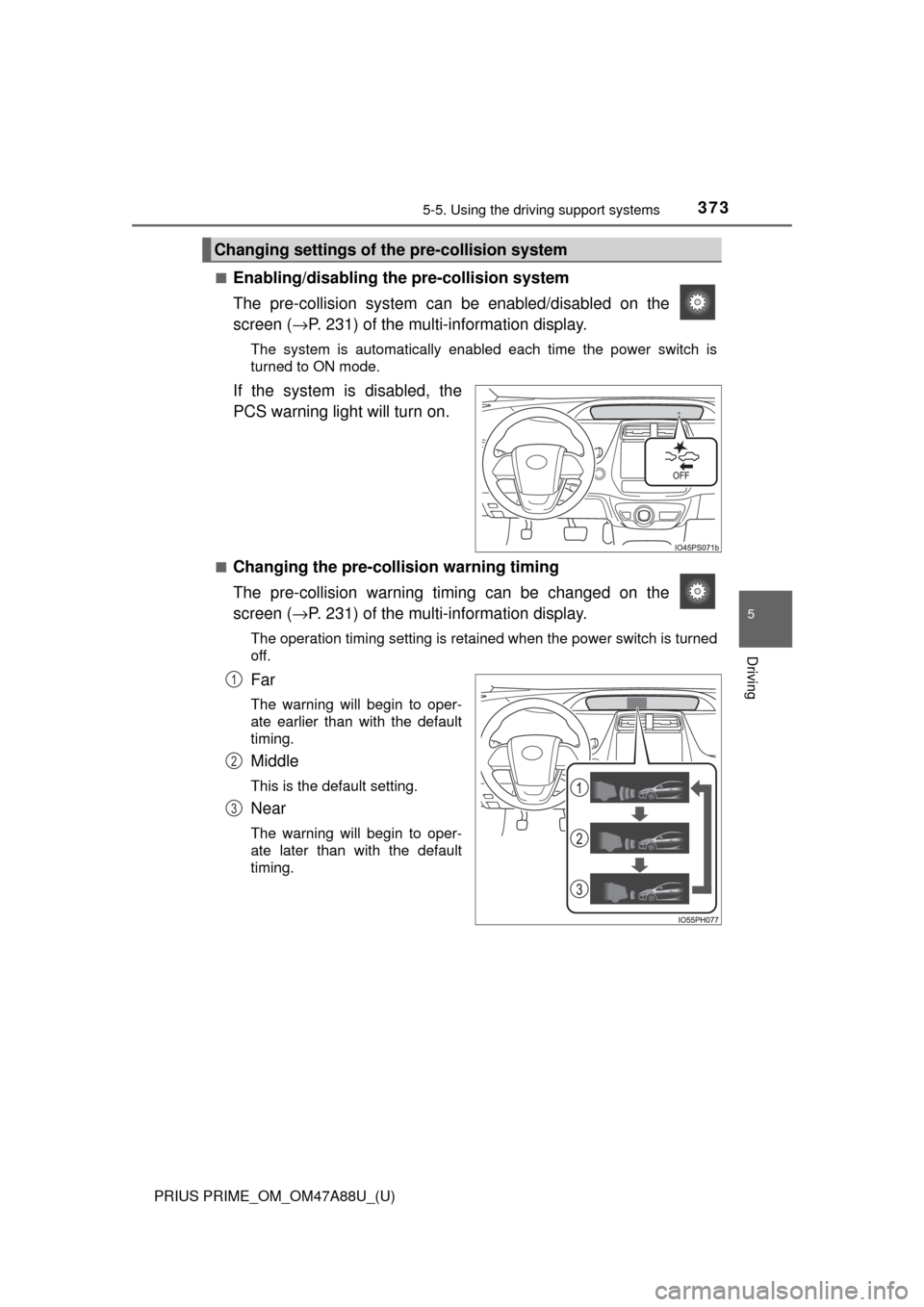
■Enabling/disabling th e pre-collision system
The pre-collision system can be enabled/disabled on the
screen ( →P. 231) of the multi-information display.
The system is automatically enabled each time the power switch is
turned to ON mode.
If the system is disabled, the
PCS warning light will turn on.
■Changing the pre-colli sion warning timing
The pre-collision warning ti ming can be changed on the
screen ( →P. 231) of the multi-information display.
The operation timing setting is retained when the power switch is turned
off.
Far
The warning will begin to oper-
ate earlier than with the default
timing.
Middle
This is the default setting.
Near
The warning will begin to oper-
ate later than with the default
timing.
Changing settings of th e pre-collision system
1
2
3
Page 374 of 784

374
PRIUS PRIME_OM_OM47A88U_(U)
5-5. Using the driving support systems
■Operational conditions
The pre-collision system is enabled and the system determines that the pos-
sibility of a frontal collision wi th a vehicle or pedestrian is high.
Each function is operational at the following speeds:
● Pre-collision warning:
• Vehicle speed is between approximately 7 and 110 mph (10 and 180 km/h).
(For detecting a pedestrian, vehicle speed is between approximately 7 and
50 mph [10 and 80 km/h].)
• The relative speed between your vehicle and the vehicle or pedestrian ahead is approximately 7 mph (10 km/h) or more.
● Pre-collision brake assist:
• Vehicle speed is between approximately 19 and 110 mph (30 and 180 km/h).
(For detecting a pedestrian, vehicle speed is between approximately 19 and
50 mph [30 and 80 km/h].)
• The relative speed between your vehicle and the vehicle or pedestrian ahead is approximately 19 mph (30 km/h) or more.
● Pre-collision braking:
• Vehicle speed is between approximately 7 and 110 mph (10 and 180 km/h).
(For detecting a pedestrian, vehicle speed is between approximately 7 and
50 mph [10 and 80 km/h].)
• The relative speed between your vehicle and the vehicle or pedestrian
ahead is approximately 7 mph (10 km/h) or more.
The system may not operate in the following situations:
● If a 12-volt battery terminal has been disconnected and reconnected and
then the vehicle has not been driven for a certain amount of time
● If the shift position is in R
● If VSC is disabled (only the pre-collision warning function will be opera-
tional)
● If the PCS warning light is flashing or illuminated
Page 380 of 784

380
PRIUS PRIME_OM_OM47A88U_(U)
5-5. Using the driving support systems
■If the PCS warning light flashes a nd a warning message is displayed on
the multi-information display
The pre-collision system may be tem porarily unavailable or there may be a
malfunction in the system.
● In the following situations, the warning light will turn off, the message will
disappear and the system will become operational when normal operating
conditions return:
• When the radar sensor or camera sensor or the area around either sen-
sor is hot, such as in the sun
• When the radar sensor or camera sensor or the area around either sen- sor is cold, such as in an extremely cold environment
• When the radar sensor or front grille emblem is dirty or covered with
snow, etc.
• When the part of the windshield in front of the camera sensor is fogged up or covered with condensation or ice
(Defogging the windshield: →P. 491, 501)
• If the camera sensor is obstructed, such as when the hood is open or a sticker is attached to the windshield near the camera sensor
● If the PCS warning light continues to flash or the warning message does not
disappear, the system may be malfunctioning. Have the vehicle inspected
by your Toyota dealer immediately.
■ If VSC is disabled
●If VSC is disabled ( →P. 478), the pre-collision brake assist and pre-collision
braking functions are also disabled.
● The PCS warning light will turn on and “VSC Turned Off Pre-Collision Brake
System Unavailable” will be displayed on the multi-information display.
Page 384 of 784
384
PRIUS PRIME_OM_OM47A88U_(U)
5-5. Using the driving support systems
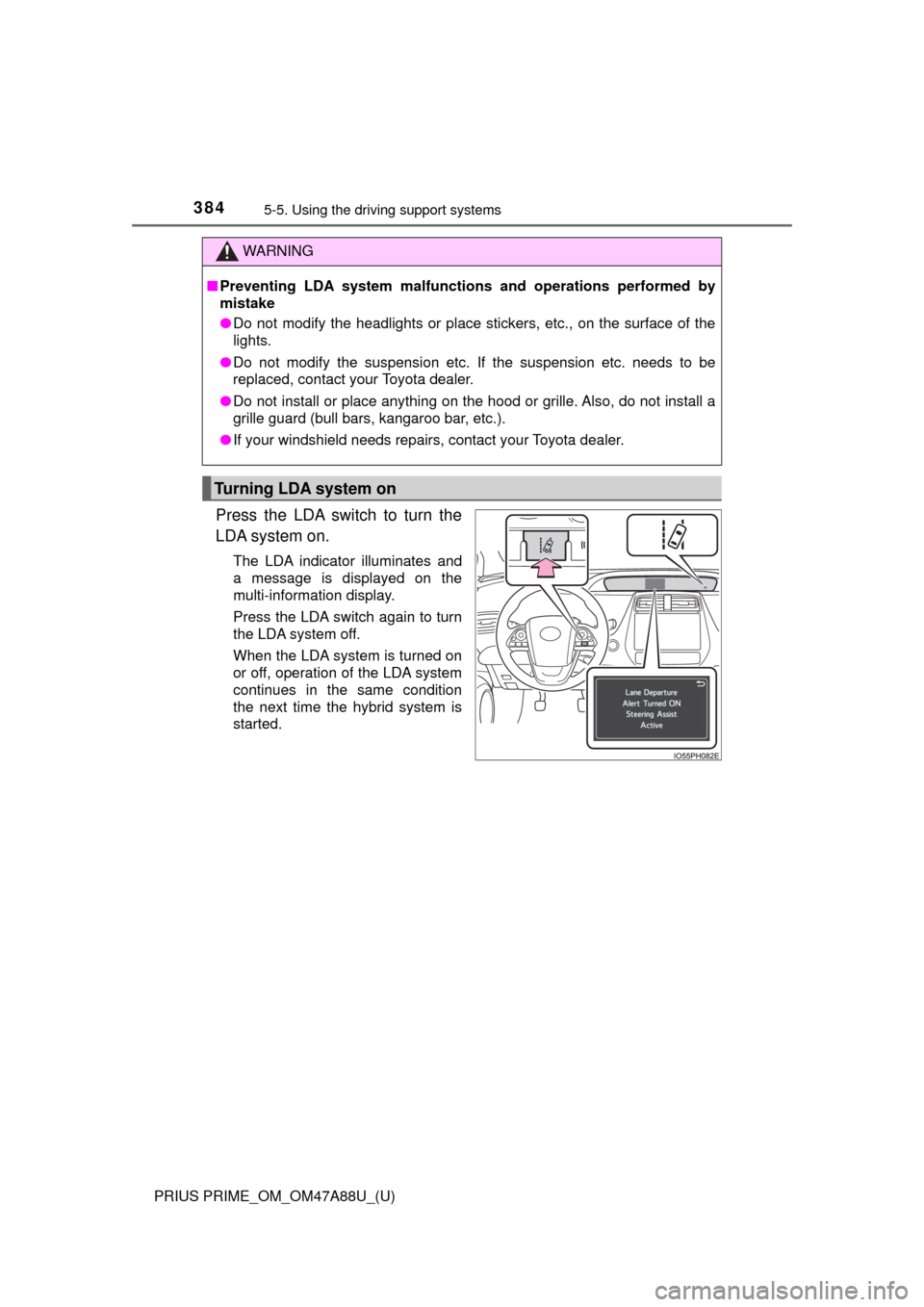
Press the LDA switch to turn the
LDA system on.
The LDA indicator illuminates and
a message is displayed on the
multi-information display.
Press the LDA switch again to turn
the LDA system off.
When the LDA system is turned on
or off, operation of the LDA system
continues in the same condition
the next time the hybrid system is
started.
WARNING
■Preventing LDA system malfunctio ns and operations performed by
mistake
● Do not modify the headlights or place stickers, etc., on the surface of the
lights.
● Do not modify the suspension etc. If the suspension etc. needs to be
replaced, contact your Toyota dealer.
● Do not install or place anything on the hood or grille. Also, do not install a
grille guard (bull bars, kangaroo bar, etc.).
● If your windshield needs repairs, contact your Toyota dealer.
Turning LDA system on
Page 395 of 784

PRIUS PRIME_OM_OM47A88U_(U)
3955-5. Using the driving support systems
5
Driving
Example of constant speed cruising
When there are no vehicles ahead
The vehicle travels at the speed set by the driver. The desired vehicle-to-
vehicle distance can also be set by operating the vehicle-to-vehicle dis-
tance button.
Example of deceleration cruising and follow-up cruising
When a preceding vehicle driving slower than the set speed
appears
When a vehicle is detected running ahead of you, the system automatically
decelerates your vehicle. When a greater reduction in vehicle speed is
necessary, the system applies the brakes (the stop lights will come on at
this time). The system will respond to changes in the speed of the vehicle
ahead in order to maintain the vehicle-to-vehicle distance set by the driver.
Approach warning warns you when the system cannot decelerate suffi-
ciently to prevent your vehicle from closing in on the vehicle ahead.
When the vehicle ahead of you stops, your vehicle will also stop (vehicle is
stopped by system control). After the vehicle ahead starts off, pushing the
cruise control lever up or depressing the accelerator pedal will resume fol-
low-up cruising.
Example of acceleration
When there are no longer any preceding vehicles driving slower
than the set speed
The system accelerates until the set speed is reached. The system then
returns to constant speed cruising.
1
2
3
Page 411 of 784
PRIUS PRIME_OM_OM47A88U_(U)
4115-5. Using the driving support systems
5
Driving
WARNING
■Handling the radar sensor
● Keep the sensor and its surrounding area on the bumper clean at all times.
● Do not subject a sensor or its surrounding area on the rear bumper to a
strong impact.
If a sensor is moved even slightly off position, the system may malfunction
and vehicles may not be detected correctly.
In the following situations, have your vehicle inspected by your Toyota
dealer.
• A sensor or its surrounding area is subject to a strong impact.
• If the surrounding area of a sensor is scratched or dented, or part of
them has become disconnected.
● Do not disassemble the sensor.
● Do not attach accessories or stickers to the sensor or surrounding area on
the bumper.
● Do not modify the sensor or surrounding area on the bumper.
● Do not paint the rear bumper any color other than an official Toyota color.
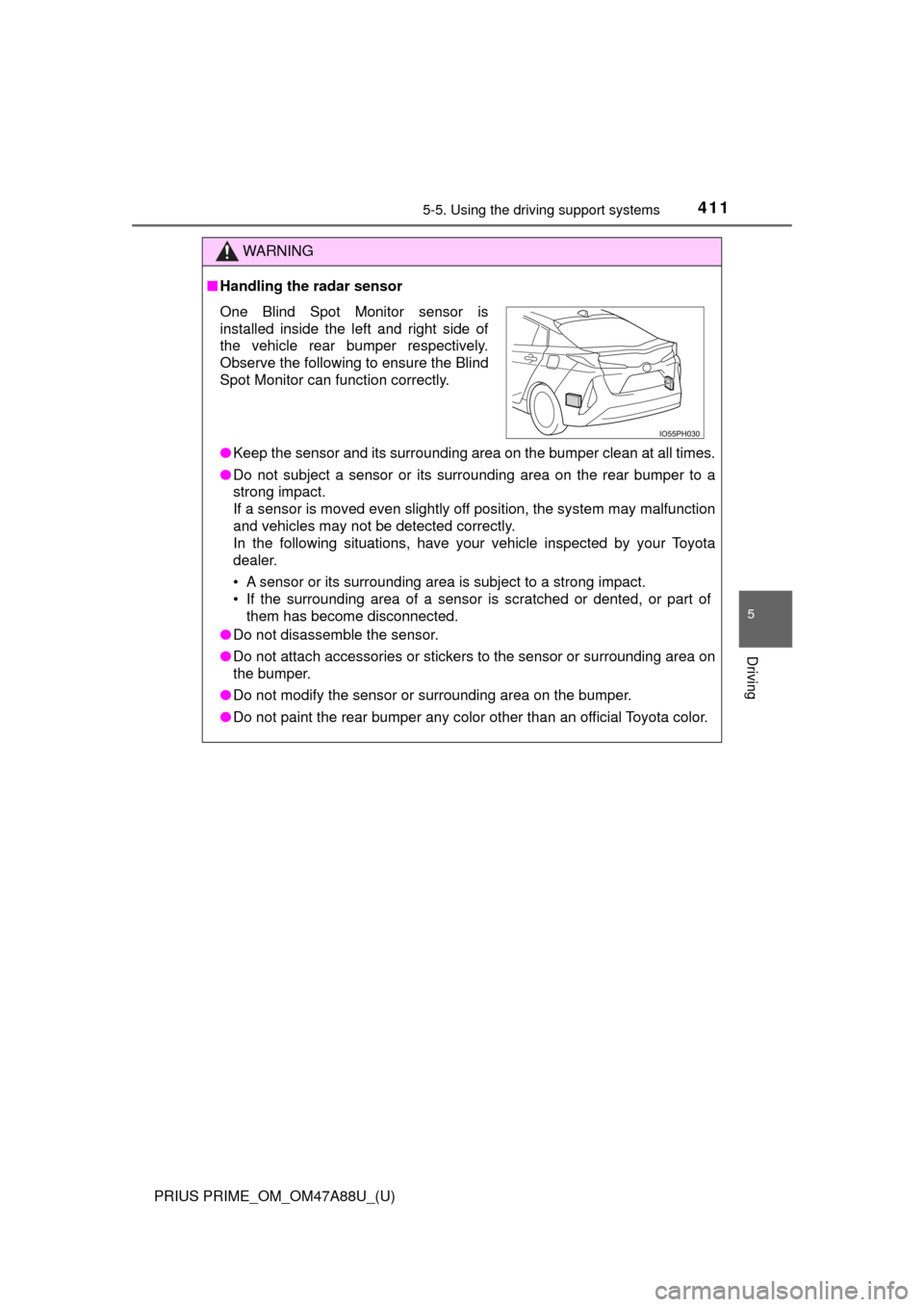
One Blind Spot Monitor sensor is
installed inside the left and right side of
the vehicle rear bumper respectively.
Observe the following to ensure the Blind
Spot Monitor can function correctly.
Page 427 of 784
PRIUS PRIME_OM_OM47A88U_(U)
4275-5. Using the driving support systems
5
Driving
WARNING
■Sensors
Certain vehicle conditions and the surrounding environment may affect the
ability of the sensor to correctly detect obstacles. Particular instances where
this may occur are listed below.
● There is dirt, snow or ice on the sensor. (Wiping the sensors will resolve
this problem.)
● The sensor is frozen. (Thawing the area will resolve this problem.)
In especially cold weather, if a sensor is frozen, the screen may show an
abnormal display, or obstacles may not be detected.
● The sensor is covered in any way.
● In harsh sunlight or intense cold weather
● On an extremely bumpy road, on an incline, on gravel, or on grass
● The vicinity of the vehicle is noisy due to vehicle horns, motorcycle
engines, air brakes of large vehicles , or other loud noises producing ultra-
sonic waves.
● The sensor is splashed with water or drenched with heavy rain.
● The sensor is drenched with water on a flooded road.
● The vehicle is leaning considerably to one side.
● The vehicle is equipped with a fender pole or wireless antenna.
● The vehicle is approaching a tall or curved curb.
● The detection range is reduced due to an object such as a sign.
● The area directly under the bumpers is not detected.
● If obstacles draw too close to the sensor.
● The bumper or sensor receives a strong impact.
● A non-genuine Toyota suspension (lowered suspension etc.) is installed.
● There is another vehicle equipped with parking assist sensors in the vicin-
ity.
● Towing eyelets are installed.
● A backlit license plate is installed.
In addition to the examples above, depending on the shape and condition of
obstacles, detection may not be possible, or the detection range may be
shortened.
Page 439 of 784

PRIUS PRIME_OM_OM47A88U_(U)
4395-5. Using the driving support systems
5
Driving
●Influence from other sonic waves
• An ultrasonic wave source is nearby, such as the horn or parking assist
system of another vehicle, a vehicle detector, a motorcycle engine or the
air brake of a large vehicle
• Electronic components (such as a backlit license plate (especially fluo- rescent types), fog lights, a fender pole or a wireless antenna) are
installed near the sensors
● Changes in the vehicle
• The vehicle is tilted a large amount
• The height of the vehicle has drastically changed due to the carried load
(the nose tilts up or down)
• The direction of the sensor has deviated due to a collision or other impact
■ Intelligent Clearance Sonar function while the Simple Advanced Parking
Guidance System is operating
→P. 444
■ When removing and installi ng the 12-volt battery
The system needs to be initialized.
The system can be initialized by driving the vehicle straight ahead for 5 sec-
onds or more at a speed of approximately 22 mph (35 km/h) or higher.
■ When “ICS Unavailable” is displayed on the multi-information display
and the ICS OFF indicator flashes
● Ice, snow, dirt, etc., may have adhered to the sensor. If this occurs, remove
the ice, snow, dirt, etc., from the sensor to return the system to normal.
Also, a warning message may be displayed at low temperatures due to ice
forming on the sensor, and the sensor may not detect obstacles. Once the
ice melts, the system will return to normal.
● If this message is shown even after removing dirt from the sensor, or shown
when the sensor was not dirty to begin with, have the vehicle inspected at
your Toyota dealer.
● System initialization may not have been performed after removal and instal-
lation of the 12-volt battery. Perform system initialization.
■ When “ICS Malfunction Visit Your Deal er” is displayed on the multi-infor-
mation display, the ICS OFF indi cator flashes and the buzzer sounds
The system may not be operating properly. Have the vehicle inspected at
your Toyota dealer.
Page 478 of 784
478
PRIUS PRIME_OM_OM47A88U_(U)
5-5. Using the driving support systems
■Turning off both TRAC and VSC systems
To turn the TRAC and VSC systems off, press and hold for more than
3 seconds while the vehicle is stopped.
The VSC OFF indicator light will come on and the “Traction Control Turned
Off” will be shown on the multi-information display.
*
Press again to turn the systems back on.
*: Pre-collision brake assist and pre-collision braking will also be disabled.
The PCS warning light will come on and the message will be shown on the
multi-information display. ( →P. 654)
■ When the message is displayed on th e multi-information display show-
ing that TRAC has been disable d even if has not been pressed
TRAC cannot be operated. Contact your Toyota dealer.
■ Sounds and vibrations caused by the ABS, brake assist, VSC, TRAC and
hill-start assist control systems
●A sound may be heard from the engine compartment when the brake pedal
is depressed repeatedly, when the hybrid system is started or just after the
vehicle begins to move. This sound does not indicate that a malfunction has
occurred in any of these systems.
● Any of the following conditions may occur when the above systems are
operating. None of these indicates that a malfunction has occurred.
• Vibrations may be felt through the vehicle body and steering.
• A motor sound may be heard also after the vehicle comes to a stop.
■ ECB operating sound
ECB operating sound may be heard in the following cases, but it does not
indicate that a malfunction has occurred.
●Operating sound heard from the engine compartment when the brake pedal
is operated.
● Motor sound of the brake system heard from the front part of the vehicle
when the driver’s door is opened.
● Operating sound heard from the engine compartment when one or two min-
utes passed after the stop of the hybrid system.
■ EPS operation sound
When the steering wheel is operated, a motor sound (whirring sound) may be
heard. This does not indicate a malfunction.