radio TOYOTA PRIUS PRIME 2018 (in English) User Guide
[x] Cancel search | Manufacturer: TOYOTA, Model Year: 2018, Model line: PRIUS PRIME, Model: TOYOTA PRIUS PRIME 2018Pages: 788, PDF Size: 14.67 MB
Page 286 of 788

286
PRIUS PRIME_OM_OM47C17U_(U)
4-2. Opening, closing and locking the doors
WARNING
■Caution regarding interfer ence with electronic devices
● People with implantable cardiac pacemakers, cardiac resynchroni zation
therapy-pacemakers or implantable cardioverter defibrillators s hould keep
away from the smart key system antennas. ( P. 278)
The radio waves may affect the operation of such devices. If ne cessary,
the entry function can be disabled. Ask your Toyota dealer for details, such
as the frequency of radio waves and timing of the emitted radio waves.
Then, consult your doctor to see if you should disable the entr y function.
● Users of any electrical medical device other than implantable c ardiac
pacemakers, cardiac resynchronization therapy-pacemakers or implant-
able cardioverter defibrillators should consult the manufacture r of the
device for information about its operation under the influence of radio
waves.
Radio waves could have unexpected effects on the operation of such
medical devices.
Ask your Toyota dealer for details on disabling the entry function.
Page 377 of 788
PRIUS PRIME_OM_OM47C17U_(U)
3775-5. Using the driving support systems
5
Driving
• When rapidly closing on an electric toll gate barrier, parking area barrier,
or other barrier that opens and closes
• When using an automatic car wash
• When the vehicle is hit by water, snow, dust, etc. from a vehicle ahead
• When driving through steam or smoke
• When there are patterns or paint on the road or a wall that may be mis-
taken for a vehicle or pedestrian
• When driving near an object that reflects radio waves, such as a large
truck or guardrail
• When driving near a TV tower, broadcasting station, electric power plant,
or other location where strong radio waves or electrical noise may be
present
■ Situations in which the syst em may not operate properly
● In some situations such as the following, a vehicle may not be detected by
the radar sensor and camera sensor, preventing the system from operating
properly:
• If an oncoming vehicle is approaching your vehicle
• If a vehicle ahead is a motorcycle or bicycle
• When approaching the side or front of a vehicle
• If a preceding vehicle has a small rear end, such as an unload ed truck
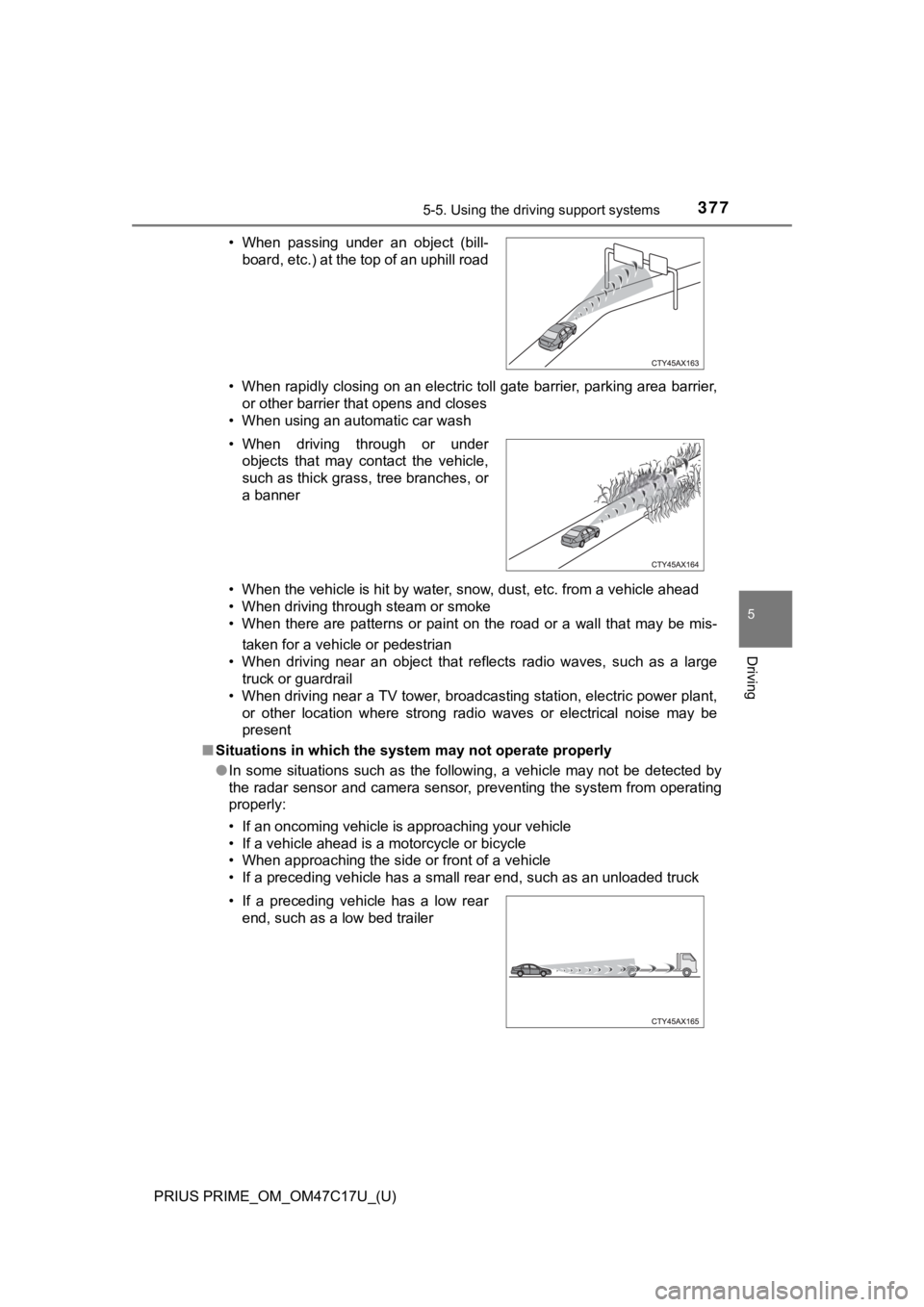
• When passing under an object (bill-
board, etc.) at the top of an uphill road
• When driving through or under objects that may contact the vehicle,
such as thick grass, tree branches, or
a banner
• If a preceding vehicle has a low rear end, such as a low bed trailer
Page 536 of 788

536
PRIUS PRIME_OM_OM47C17U_(U)
6-4. Using the other interior features
■The wireless charger can be operated when
The power switch is in ACCESSORY or ON mode.
■ Usable portable devices
Qi standard wireless charge standard can be used on compatible devices.
However, not all Qi standard devices and compatibility are guar anteed.
Starting with mobile phones and smart phones, it is aimed for l ow power elec-
trically supplied portable devices of no more than 5W.
■ When covers and accessories are attached to portable devices
Do not charge in situations where cover and accessories not able to handle
Qi are attached to the portable device. Depending on the type o f cover and
accessory, it may not be possible to charge. When charging is not performed
even with the portable device placed on the charge area, remove the cover
and accessories.
■ While charging, noise enters the AM radio
Turn off the wireless charger and confirm that the noise has decreased. If the
noise decreases, continuously pushing the power supply switch o f the wire-
less charger for 2 seconds, the frequency of the charger can be changed and
the noise can be reduced.
Also, on that occasion, the operation indicator light will flas h orange 2 times.
■ Important points of the wireless charger
●If the electronic key cannot be detected within the vehicle int erior, charging
cannot be done. When the door is opened and closed, charging ma y be
temporarily suspended.
● When charging, the wireless charging device and portable device will get
warmer, however this is not a malfunction.
When a portable device gets warm while charging, charging may s top due
to the protection function on the portable device side. In this case, when the
temperature of the portable device drops significantly, charge again.
■ Operation sounds
When the power supply is turned on, while searching for the portable device a
sound will be produced, however this is not a malfunction.
Page 543 of 788
PRIUS PRIME_OM_OM47C17U_(U)
5436-4. Using the other interior features
6
Interior features
NOTICE
■Conditions in which the function may not operate correctly
In the following conditions, it may not operate correctly
● The portable device is fully charged
● There is foreign matter between the charge area and portable de vice
● The temperature of the portable device gets higher from charging
● The charging surface of the portable device is facing up
● The placement of the portable device is out of alignment with t he charge
area
● Near a TV tower, electric power plant, gas station, radio stati on, large dis-
play, airport or other facility that generates strong radio wav es or electrical
noise
● When the electronic key is in contact with, or is covered by th e following
metallic objects
• Cards to which aluminum foil is attached
• Cigarette boxes that have aluminum foil inside
• Metallic wallets or bags
• Coins
• Hand warmers made of metal
• Media such as CDs and DVDs
● When other wireless keys (that emit radio waves) are being used nearby
In addition, excluding the above-mentioned, when the charger do es not per-
form normally or the operation display lamp is flashing continu ously, it is
considered that the wireless charger is malfunctioning. Contact your Toyota
dealer.
■ To prevent failure or damage to data
● Do not bring magnetic cards, such as credit cards, or magnetic recording
media, etc., close to the charger while charging, otherwise, da ta may dis-
appear under the influence of magnetism. Also, do not bring pre cision
instruments such as wrist watches, etc., close to the charger, as such
objects may break.
● Do not leave portable devices in the cabin. The temperature ins ide the
cabin may become high, when under the sun, and cause damage to the
device.
■ To prevent 12-volt b attery discharge
When the hybrid system is stopped, do not use the wireless char ger for a
long time.
Page 556 of 788

556
PRIUS PRIME_OM_OM47C17U_(U)
6-4. Using the other interior features
■Enhanced Roadside Assistance
Enhanced Roadside As sistance adds GPS data to the already
included warranty-based Toyota roadside service.
Subscribers can press the “SOS” button to reach a Safety Connec t
response-center agent, who can he lp with a wide range of needs,
such as: towing, flat tire, fuel delivery, etc. For a description of the
Roadside Assistance services an d their limitations, please see the
Safety Connect Terms and Conditions, which are available at
Toyota.com.
Important! Read this informatio n before using Safety Connect.
■Exposure to radio frequency signals
The Safety Connect system installed in your vehicle is a low-po wer
radio transmitter and receiver. I t receives and also sends out radio
frequency (RF) signals.
In August 1996, the Federal Communications Commission (FCC)
adopted RF exposure guidelines with safety levels for mobile wi re-
less phones. Those guidelines are consistent with the safety stan-
dards previously set by the following U.S. and international
standards bodies.
● ANSI (American National Stand ards Institute) C95.1 [1992]
● NCRP (National Council on Radi ation Protection and Measure-
ment) Report 86 [1986]
● ICNIRP (International Commission on Non-Ionizing Radiation
Protection) [1996]
Those standards were based on comprehensive and periodic eval-
uations of the relevant scienti fic literature. Over 120 scientists, engi-
neers, and physicians from unive rsities, and government health
agencies and industries reviewed the available body of research to
develop the ANSI Standard (C95.1).
The design of Safety Connect complies with the FCC guidelines i n
addition to those standards.
Safety information for Safety Connect
Page 603 of 788

PRIUS PRIME_OM_OM47C17U_(U)
6037-3. Do-it-yourself maintenance
7
Maintenance and care
■Situations in which the tire pressure warning system may not oper-
ate properly
●In the following cases, the tire pressure warning system may no t operate
properly.
• If non-genuine Toyota wheels are used.
• When a replacement tire is used, the system may not operate cor-
rectly due to the structure of the replacement tire.
• A tire has been replac ed with a tire that is not of the specif ied size.
• Tire chains etc . are equipped.
• An auxiliary-supported ru n-flat tire is equipped.
• If a window tint that affects the radio wave signals is instal led.
• If there is a lot of snow or ice on the vehicle, particularly around the
wheels or wheel housings.
• If the tire inflation pressure is extremely higher than the sp ecified
level.
• If wheel without the tire pressure warning valve and transmitt er is
used.
• If the ID code on the tire pressure warning valves and transmi tters is
not registered in the tire pressure warning computer.
●Performance may be affected in the following situations.
• Near a TV tower, electric power plant, gas station, radio stat ion, large
display, airport or other facilit y that generates strong radio waves or
electrical noise
• When carrying a portable radio, cellular phone, cordless phone or
other wireless communication device
●When the vehicle is parked, the time taken for the warning to s tart or go
off could be extended.
●When tire inflation pressure declines rapidly for example when a tire has
burst, the warning may not function.
■The initialization operation
●Make sure to carry out initializ ation after adjusting the tire inflation pres-
sure.
Also, make sure the tires are co ld before carrying out initialization or tire
inflation pressure adjustment.
●If you have accidentally turned the power switch off during ini tialization,
it is not necessary to press the reset swit ch again as initialization will
restart automatically when the power switch has been turned to ON
mode for the next time.
●If you accidentally press the reset switch when initialization is not neces-
sary, adjust the tire inflation pressure to the specified level when the
tires are cold, and cond uct initialization again.
Page 730 of 788
730
PRIUS PRIME_OM_OM47C17U_(U)
9-1. Specifications
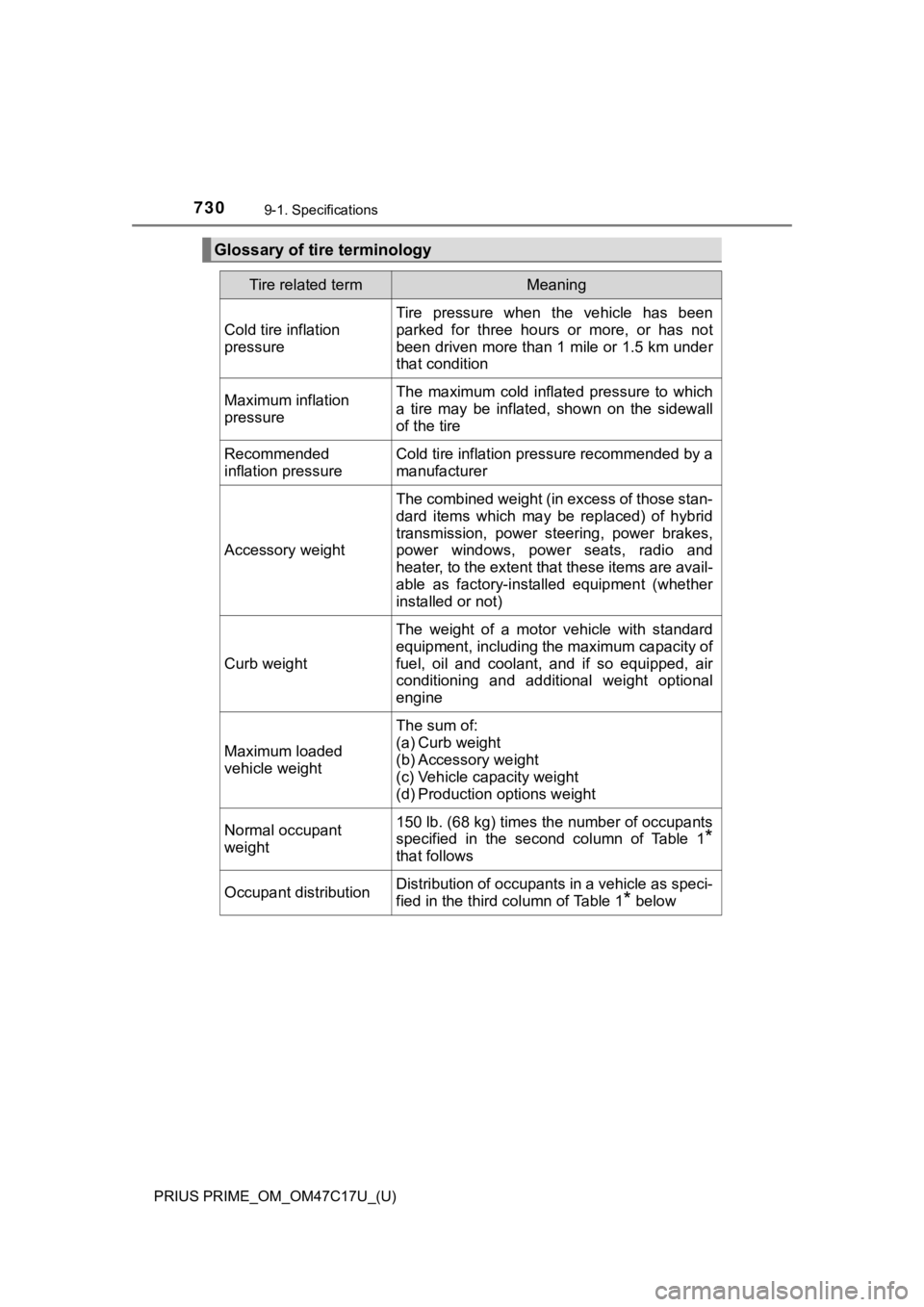
Glossary of tire terminology
Tire related termMeaning
Cold tire inflation
pressure
Tire pressure when the vehicle has been
parked for three hours or more, or has not
been driven more than 1 mile or 1.5 km under
that condition
Maximum inflation
pressureThe maximum cold inflated pressure to which
a tire may be inflated, shown on the sidewall
of the tire
Recommended
inflation pressureCold tire inflation pressure recommended by a
manufacturer
Accessory weight
The combined weight (in excess of those stan-
dard items which may be replaced) of hybrid
transmission, power steering, power brakes,
power windows, power seats, radio and
heater, to the extent that these items are avail-
able as factory-installed equipment (whether
installed or not)
Curb weight
The weight of a motor vehicle with standard
equipment, including the maximum capacity of
fuel, oil and coolant, and if so equipped, air
conditioning and additional weight optional
engine
Maximum loaded
vehicle weight
The sum of:
(a) Curb weight
(b) Accessory weight
(c) Vehicle capacity weight
(d) Production options weight
Normal occupant
weight150 lb. (68 kg) times the number of occupants
specified in the second column of Table 1
*
that follows
Occupant distributionDistribution of occupants in a vehicle as speci-
fied in the third column of Table 1
* below
Page 761 of 788

PRIUS PRIME_OM_OM47C17U_(U)
761
10
For owners
AVERTISSEMENT
■Précautions relatives aux coussins gonflables SRS
● Si vous avez de la difficulté à respirer après le déploiement d es coussins
gonflables SRS, ouvrez une portière ou une glace latérale pour laisser
entrer l’air frais, ou quittez le véhicule si vous pouvez le faire en toute
sécurité. Dès que possible, nettoyez tous les résidus afin d’év iter les irrita-
tions cutanées.
● Si les emplacements de stockage des coussins gonflables SRS, te ls que
le tampon de volant et les garnitures des montants avant et arr ière, sont
endommagés ou fissurés, faites-les remplacer par votre concessi onnaire
Toyota.
● Ne placez aucun objet, par exemple un coussin, sur le siège du passager
avant. Cela disperserait le poids du passager, ce qui empêchera it le cap-
teur de le détecter correctement. Cela pourrait empêcher le déploiement
des coussins gonflables SRS du passager avant en cas de collisi on.
■ Modification et mise au rebut d es composants du système de cous sins
gonflables SRS
Ne mettez pas votre véhicule au rebut et n’effectuez aucune des modifica-
tions suivantes sans d’abord consulter votre concessionnaire To yota. Les
coussins gonflables SRS pourraient fonctionner de manière incor recte ou
se déployer (gonfler) accidentellement, ce qui serait susceptib le d’occasion-
ner des blessures graves, voire mortelles.
● Installation, retrait, démontage et réparation des coussins gon flables SRS
● Réparations, modifications, retrait ou remplacement du volant, du tableau
de bord, de la planche de bord, des sièges ou du capitonnage de s sièges,
des montants avant, latéraux et arrière, des brancards de pavil lon, des
panneaux des portières avant, de la garniture des portières ava nt ou des
haut-parleurs des portières avant
● Modifications du panneau de la portière avant (comme le perfore r)
● Réparations ou modifications de l’aile avant, du pare-chocs ava nt ou du
côté de l’habitacle
● Installation d’une protection de calandre (barre safari, barre kangourou,
etc.), de lames de déneigement, de treuils ou d’un porte-bagage s de toit
● Modifications du système de suspension du véhicule
● Installation d’appareils électroniques tels qu’un émetteur-réce pteur radio
ou un lecteur de CD
● Modifications à votre véhicule pour une personne aux capacités physiques
réduites
Page 766 of 788
766What to do if... (Troubleshooting)
PRIUS PRIME_OM_OM47C17U_(U)
What to do if... (Troubleshooting)
●If you lose your mechanical keys, new genuine mechanical keys can be
made by your Toyota dealer. ( P. 263)
●If you lose your electronic keys, the risk of vehicle theft inc reases signifi-
cantly. Contact your Toyota dealer immediately. ( P. 266)
●Is the electronic key battery weak or depleted? (P. 631)
●Is the power switch in ON mode?
When locking the doors, turn the power switch off. ( P. 326)
●Is the electronic key left inside the vehicle?
When locking the doors, make sure that you have the electronic key on
your person.
●The function may not operate properly due to the condition of t he radio
wave. ( P. 281)
●Is the child-protector lock set?
The rear door cannot be opened from inside the vehicle when the lock is
set. Open the rear door from outside and then unlock the child-protector
lock. ( P. 270)
If you have a problem, check the following before contacting
your Toyota dealer.
The doors cannot be locked, unlocked, opened or closed
You lose your keys
The doors cannot be locked or unlocked
The rear door cannot be opened
Page 780 of 788

780Alphabetical index
PRIUS PRIME_OM_OM47C17U_(U)
Power control unit coolant ..... 588Capacity ................................ 718
Checking ............................... 588
Preparing and checking before winter....................... 482
Radiator ................................ 590
Power outlets ........................... 532
Power sources ......................... 122
Power steering (Electric Power Steering system) ....... 477 Function ................................ 477
Warning light ......................... 658
Power switch............................ 324 Auto power off function ......... 326
Changing the power
switch modes...................... 326
If your vehicle has to be
stopped in an emergency ... 649
Starting the hybrid system .... 324
Power windows........................ 300
Catch protection function ...... 301
Door lock linked window operation ............................ 302
Jam protection function......... 301
Operation .............................. 300
Window lock switch............... 300
Pre-Collision System (PCS) .... 369
Enabling/disabling the system ......... ....................... 373
Function ................................ 369
Warning light ......................... 658 Radar cruise control
(dynamic radar cruise
control with full-speed
range) ..................................... 391
Radiator .................................... 590
Radio
*
Rear passengers’ seat belt reminder light ........................ 660
Rear seat .................................. 289
Rear side marker lights........... 338 Light switch ........................... 338
Replacing light bulbs ............ 644
Rear turn signal lights ............ 336 Replacing light bulbs ............ 644
Turn signal lever ................... 336
Rear view mirror Inside rear view mirror .......... 296
Outside rear view mirrors ..... 298
Rear view monitor system
*
Rear window defogger .... 492, 503
Refueling .................................. 356 Capacity................................ 714
Fuel types ............................. 714
Opening the fuel tank cap..... 358
When the fuel filler door cannot be opened .............. 359
Regenerative braking ................ 86
Remote Air Conditioning
System ................................... 510
Replacing
Electronic key battery ........... 631
Fuses .................................... 634
Light bulbs ............................ 639
Tires...................................... 613
Wiper rubber ......................... 628
Reporting safety defects
for U.S. owners...................... 750
Resetting the message indicating maintenance is
required.................................. 572
Road accident cautions ............ 94
R