radio TOYOTA PRIUS PRIME 2018 Owners Manual (in English)
[x] Cancel search | Manufacturer: TOYOTA, Model Year: 2018, Model line: PRIUS PRIME, Model: TOYOTA PRIUS PRIME 2018Pages: 788, PDF Size: 14.67 MB
Page 9 of 788

PRIUS PRIME_OM_OM47C17U_(U)
9
The installation of a mobile two-way radio system in your vehicle could affect
electronic systems such as:
● Hybrid system
● Multiport fuel injection system/sequential multiport fuel injection system
● Toyota Safety Sense P
● Anti-lock brake system
● SRS airbag system
● Seat belt pretensioner system
Be sure to check with your Toyota dealer for precautionary meas ures or spe-
cial instructions regarding instal lation of a mobile two-way radio system.
High voltage parts and cables on the hybrid vehicles emit appro ximately the
same amount of electromagnetic waves as the conventional gasoli ne pow-
ered vehicles or home electronic appliances despite of their el ectromagnetic
shielding.
Unwanted noise may occur in the reception of the mobile two-way radio.
Installation of a mobile two-way radio system
Page 43 of 788

431-1. For safe use
PRIUS PRIME_OM_OM47C17U_(U)
1
For safety and security
WARNING
■SRS airbag precautions
● If breathing becomes difficult after the SRS airbags have deplo yed, open a
door or side window to allow fresh air in, or leave the vehicle if it is safe to
do so. Wash off any residue as soon as possible to prevent skin irritation.
● If the areas where the SRS airbags are stored, such as the steering wheel
pad and front and rear pillar garnishes, are damaged or cracked , have
them replaced by your Toyota dealer.
● Do not place anything, such as a cushion, on the front passenger’s seat.
Doing so will disperse the passenger’s weight, which prevents t he sensor
from detecting the passenger’s weight properly. As a result, th e SRS front
airbags for the front passenger may not deploy in the event of a collision.
■ Modification and disposal of SRS airbag system components
Do not dispose of your vehicle or perform any of the following modifications
without consulting your Toyota dealer. The SRS airbags may malfunction or
deploy (inflate) accidentally, causing death or serious injury.
● Installation, removal, disassembly and repair of the SRS airbag s
● Repairs, modifications, removal or replacement of the steering wheel,
instrument panel, dashboard, seats or seat upholstery, front, s ide and rear
pillars, roof side rails, front door panels, front door trim, o r front door
speakers
● Modifications to the front door panel (such as making a hole in it)
● Repairs or modifications of the front fender, front bumper, or side of the
occupant compartment
● Installation of a grille guard (bull bars, kangaroo bar, etc.), snow plows,
winches or roof luggage carrier
● Modifications to the vehicle’s suspension system
● Installation of electronic devices such as mobile two-way radio s and CD
players
● Modifications to your vehicle for a person with a physical disa bility
Page 92 of 788

92
PRIUS PRIME_OM_OM47C17U_(U)
2-1. Plug-in hybrid system
■If a warning light comes on, a warning message is displayed or the 12-
volt battery is disconnected
The hybrid system may not start. In that case, try to start the system again. If
the “READY” indicator does not come on, contact your Toyota dea ler.
■ Running out of fuel
When the vehicle has run out of fuel and the hybrid system cann ot be started,
refuel the vehicle with at least enough gasoline to make the lo w fuel level
warning light ( P. 659) go off. If there is only a small amount of fuel, the
hybrid system may not be able to start. (The standard amount of fuel is about
2.0 gal. [7.5 L, 1.7 Imp.gal.], when the vehicle is on a level surface. This value
may vary when the vehicle is on a slope. Add extra fuel when th e vehicle is
inclined.)
■ Electromagnetic waves
●High voltage parts and cables on the hybrid vehicles incorporat e electro-
magnetic shielding, and therefore emit approximately the same amount of
electromagnetic waves as conventional gasoline powered vehicles or home
electronic appliances.
● Your vehicle may cause sound interference in some third party-p roduced
radio parts.
■ Hybrid battery (traction batt ery) (lithium-ion battery)
The hybrid battery (traction battery) has a limited service lif e.
The hybrid battery (traction battery) capacity (the ability to hold a charge)
reduces with time and use in the same way as other rechargeable batteries.
The extent at which capacity reduces changes drastically depending on the
environment (ambient temperature, etc.) and usage conditions, such as how
the vehicle is driven and how the hybrid battery (traction batt ery) is charged.
This is a natural characteristic of lithium-ion batteries, and is not a malfunc-
tion. Also, even though the distance that can be driven in EV m ode decreases
when the hybrid battery (traction battery) capacity reduces, ve hicle perfor-
mance does not significantly become worse.
In order to reduce the possibility of the capacity reducing, fo llow the directions
listed on P. 133, “Capacity reduction of the hybrid battery (tr action battery)”.
■ Starting the hybrid system in a n extremely cold environment
When the hybrid battery (traction battery) is extremely cold (b elow approxi-
mately -22 F [-30 C]) under the influence of the outside temperature, it may
not be possible to start the hybrid system. In this case, try to start the hybrid
system again after the temperature of the hybrid battery increases due to the
outside temperature increase etc.
Page 139 of 788

PRIUS PRIME_OM_OM47C17U_(U)
1392-2. Charging
2
Plug-in hybrid system
■During charging
●The surface of the CCID (Charging Circuit Interrupting Device) may become
hot, but this does not indicate a malfunction.
● Depending on radio wave conditions, interference may be heard o n the
radio.
● The current charging condition and the estimated time until cha rging will
complete can be checked on the multi-information display or 11. 6-inch dis-
play (if equipped). ( P. 130)
● During charging, the hybrid battery (traction battery) status i ndicator illumi-
nates and flashes, and changes according to the charging amount .
( P. 104)
■ If the charging indicator flashes after connecting the charging cable
The charge schedule ( P. 147) is registered and charging cannot be per-
formed immediately. To cancel charging using the timer and star t charging
immediately, perform any of the following procedures.
● Turn “Charge Now” on ( P. 156, 165)
● While the charging indicator is flashing, remove and reconnect the charging
connector within 5 seconds
■ When the charging connector cannot be inserted into the chargin g inlet
(vehicles with smart lid & connector locking system)
P. 119
Page 263 of 788
PRIUS PRIME_OM_OM47C17U_(U)
2634-1. Key information
4
Operation of each component
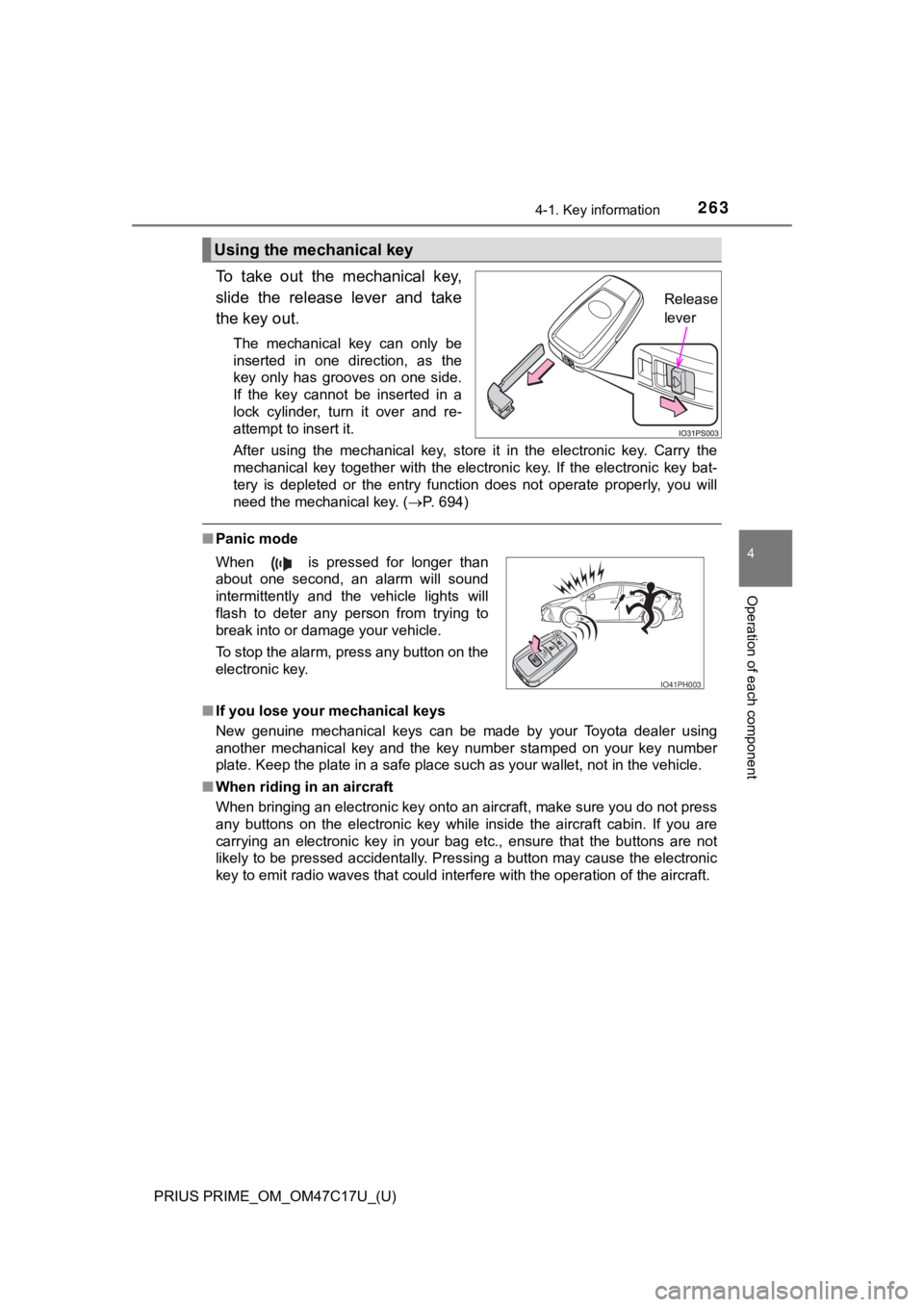
To take out the mechanical key,
slide the release lever and take
the key out.
The mechanical key can only be
inserted in one direction, as the
key only has grooves on one side.
If the key cannot be inserted in a
lock cylinder, turn it over and re-
attempt to insert it.
After using the mechanical key, store it in the electronic key. Carry the
mechanical key together with the electronic key. If the electro nic key bat-
tery is depleted or the entry function does not operate properl y, you will
need the mechanical key. ( P. 694)
■Panic mode
■ If you lose your mechanical keys
New genuine mechanical keys can be made by your Toyota dealer u sing
another mechanical key and the key number stamped on your key n umber
plate. Keep the plate in a safe place such as your wallet, not in the vehicle.
■ When riding in an aircraft
When bringing an electronic key onto an aircraft, make sure you do not press
any buttons on the electronic key while inside the aircraft cab in. If you are
carrying an electronic key in your bag etc., ensure that the bu ttons are not
likely to be pressed accidentally. Pressing a button may cause the electronic
key to emit radio waves that could interfere with the operation of the aircraft.
Using the mechanical key
Release
lever
When is pressed for longer than
about one second, an alarm will sound
intermittently and the vehicle lights will
flash to deter any person from trying to
break into or damage your vehicle.
To stop the alarm, press any button on the
electronic key.
IO41PH003
Page 264 of 788

264
PRIUS PRIME_OM_OM47C17U_(U)
4-1. Key information
■Electronic key battery depletion
●The standard battery life is 1 to 2 years.
● If the battery becomes low, an alarm will sound in the cabin an d a message
will be displayed on the multi-information display when the hyb rid system
stops.
● As the electronic key always receives radio waves, the battery will become
depleted even if the electronic key is not used. The following symptoms indi-
cate that the electronic key battery may be depleted. Replace the battery
when necessary. ( P. 631)
• The smart key system or the wireless remote control does not o perate.
• The detection area becomes smaller.
• The LED indicator on the key surface does not turn on.
You can replace the battery by yourself ( P. 631). However, as there is a
danger that the electronic key may be damaged, it is recommende d that
replacement is carried out by your Toyota dealer.
● To avoid serious deterioration, do not leave the electronic key within 3 ft.
(1 m) of the following electrical appliances that produce a magnetic field:
•TVs
• Personal computers
• Cellular phones, cordless phones and battery chargers
• Table lamps
• Induction cookers
Page 266 of 788

266
PRIUS PRIME_OM_OM47C17U_(U)
4-1. Key information
NOTICE
■To prevent key damage
● Do not drop the keys, subject them to strong shocks or bend them.
● Do not expose the keys to high temperatures for long periods of time.
● Do not get the keys wet or wash them in an ultrasonic washer et c.
● Do not attach metallic or magnetic materials to the keys or pla ce the keys
close to such materials.
● Do not disassemble the keys.
● Do not attach a sticker or anything else to the surface of the electronic key.
● Do not place the keys near objects that produce magnetic fields , such as
TVs, audio systems and induction cookers.
● Do not place the keys near medical electrical equipment such as low-fre-
quency therapy equipment or microwave therapy equipment, and do not
receive medical attention with the keys on your person.
■ Carrying the electronic key on your person
Carry the electronic key 3.9 in. (10 cm) or more away from elec tric appli-
ances that are turned on. Radio waves emitted from electric app liances
within 3.9 in. (10 cm) of the electronic key may interfere with the key, caus-
ing the key to not function properly.
■ In case of a smart key system malfunction or other key-related prob-
lems
Take your vehicle with all the electronic keys provided with yo ur vehicle to
your Toyota dealer.
■ When an electronic key is lost
If the electronic key remains lost, the risk of vehicle theft i ncreases signifi-
cantly. Visit your Toyota dealer immediately with all remaining electronic
keys that were provided with your vehicle.
Page 280 of 788
280
PRIUS PRIME_OM_OM47C17U_(U)
4-2. Opening, closing and locking the doors
■When “Smart Key System malfuncti on See owner’s manual” is dis-
played on the multi-information display
The system may be malfunctioning. Have the vehicle inspected by your
Toyota dealer immediately.
■ Battery-saving function
The battery-saving function will be activated in order to preve nt the electronic
key battery and the 12-volt battery from being discharged while the vehicle is
not in operation for a long time.
● In the following situations, the smart key system may take some time to
unlock the doors.
• The electronic key has been left in an area of approximately 6 ft. (2 m) of
the outside of the vehicle for 10 minutes or longer.
• The smart key system has not been used for 5 days or longer.
● If the smart key system has not been used for 14 days or longer , the doors
cannot be unlocked at any doors except the driver’s door. In th is case, take
hold of the driver’s door handle, or use the wireless remote co ntrol or the
mechanical key, to unlock the doors.
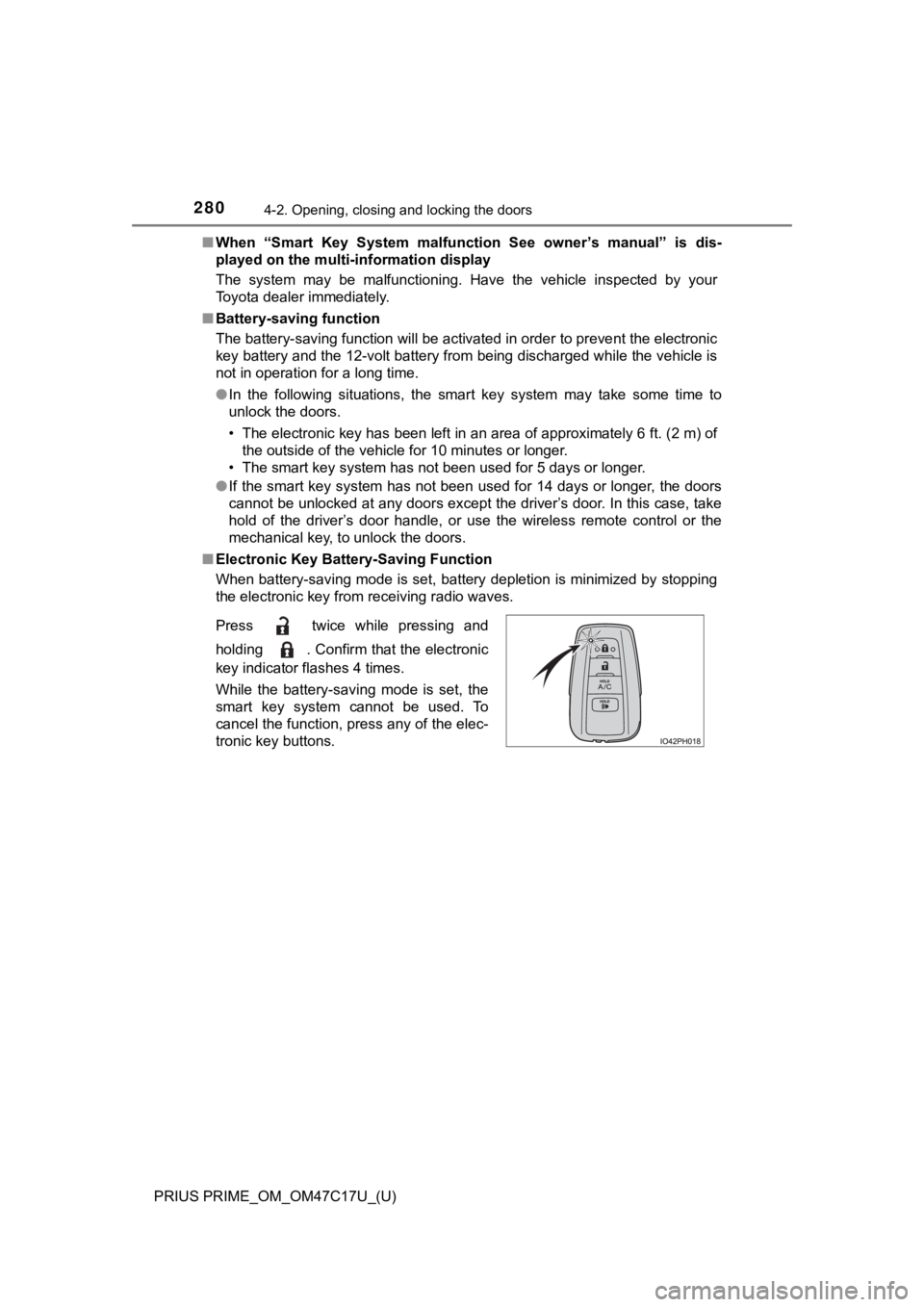
■ Electronic Key Battery-Saving Function
When battery-saving mode is set, battery depletion is minimized by stopping
the electronic key from receiving radio waves.
Press twice while pressing and
holding . Confirm that the electronic
key indicator flashes 4 times.
While the battery-saving mode is set, the
smart key system cannot be used. To
cancel the function, press any of the elec-
tronic key buttons.
Page 281 of 788

PRIUS PRIME_OM_OM47C17U_(U)
2814-2. Opening, closing and locking the doors
4
Operation of each component
■Conditions affecting operation
The smart key system, wireless remote control and immobilizer s ystem use
weak radio waves. In the following situations, the communication between
the electronic key and the vehicle may be affected, preventing the smart key
system, wireless remote control and immobilizer system from operating prop-
erly. (Ways of coping: P. 694)
● When the electronic key battery is depleted
● Near a TV tower, electric power plant, gas station, radio stati on, large dis-
play, airport or other facility that generates strong radio wav es or electrical
noise
● When the electronic key is in contact with, or is covered by the following
metallic objects
• Cards to which aluminum foil is attached
• Cigarette boxes that have aluminum foil inside
• Metallic wallets or bags
• Coins
• Hand warmers made of metal
• Media such as CDs and DVDs
● When other wireless key (that emit radio waves) is being used n earby
● When carrying the electronic key together with the following devices that
emit radio waves
• Portable radio, cellular phone, cordless phone or other wirele ss commu-
nication devices
• Another vehicle’s electronic key or a wireless key that emits radio waves
• Personal computers or personal digital assistants (PDAs)
• Digital audio players
• Portable game systems
● If window tint with a metallic content or metallic objects are attached to the
rear window
● When the electronic key is placed near a battery charger or ele ctronic
devices
Page 282 of 788

282
PRIUS PRIME_OM_OM47C17U_(U)
4-2. Opening, closing and locking the doors
■Note for the entry function
●Even when the electronic key is within the effective range (det ection areas),
the system may not operate properly in the following cases:
• The electronic key is too close to the window or outside door handle, near
the ground, or in a high place when the doors are locked or unl ocked.
• The electronic key is on the instrument panel, floor, or in th e door pockets
or glove box when the hybrid system is started or power switch modes
are changed.
● Do not leave the electronic key on top of the instrument panel or near the
door pockets when exiting the vehicle. Depending on the radio w ave recep-
tion conditions, it may be detected by the antenna outside the cabin and the
door will become lockable from the outside, possibly trapping the electronic
key inside the vehicle.
● As long as the electronic key is within the effective range, th e doors may be
unlocked or locked by anyone.
● Even if the electronic key is not inside the vehicle, it may be possible to start
the hybrid system if the electronic key is near the window.
● The doors may unlock if a large amount of water splashes on the door han-
dle, such as in the rain or in a car wash when the electronic k ey is within the
effective range. (The door will automatically be locked after a pproximately
60 seconds if the doors are not opened and closed.)
● If the wireless remote control is used to lock the doors when t he electronic
key is near the vehicle, there is a possibility that the door m ay not be
unlocked by the entry function. (Use the wireless remote contro l to unlock
the doors.)
● Touching the door lock sensor while wearing gloves may delay or prevent
lock operation. Remove the gloves and touch the lock sensor aga in.
● If the door handle becomes wet while the electronic key is with in the effec-
tive range, the door may lock and unlock repeatedly. In this ca se, follow the
following correction procedures to wash the vehicle.
• Place the electronic key in a location 6 ft. (2 m) or more awa y from the
vehicle. (Take care to ensure that the key is not stolen.)
• Set electronic key to battery-saving mode to disable the smart key sys-
tem. ( P. 280)
● If the electronic key is inside the vehicle and a door handle b ecomes wet
during a car wash, a message may be shown on the multi-informat ion dis-
play and a buzzer will sound outside the vehicle. To turn off t he alarm, lock
all the doors.