ECO mode TOYOTA PRIUS PRIME 2019 (in English) Owner's Manual
[x] Cancel search | Manufacturer: TOYOTA, Model Year: 2019, Model line: PRIUS PRIME, Model: TOYOTA PRIUS PRIME 2019Pages: 792, PDF Size: 17.18 MB
Page 194 of 792
194
PRIUS PRIME_OM_OM47D13U_(U)
3. Instrument cluster
■The meters and display illuminate when
The power switch is in ON mode.
■ Adjusting the instrume nt cluster brightness (P. 190)
● The brightness levels that can be selected differ depending on whether the
tail lights are on and surrounding brightness levels, as shown in the table
below.
*: 22 levels of the brightness are displayed on the setting scree n. However,
the brightness setting will be the brightest when other than 1st level (the
darkest) is selected. If other than 1st or 22nd level is select ed, when the
tail lights are turned on in a dark place, the instrument clust er brightness
setting will be the selected level.
● If the taillights are illuminated in a dark environment, the in strument cluster
light dims. However, when the brightness of the instrument clus ter is set to
minimum or maximum (1st or 22nd level of the instrument cluster bright-
ness), even if the taillights are illuminated, the instrument c luster light will
not dim.
■ When disconnecting and reconnecting 12-volt battery terminals
The settings of the clock will be reset.
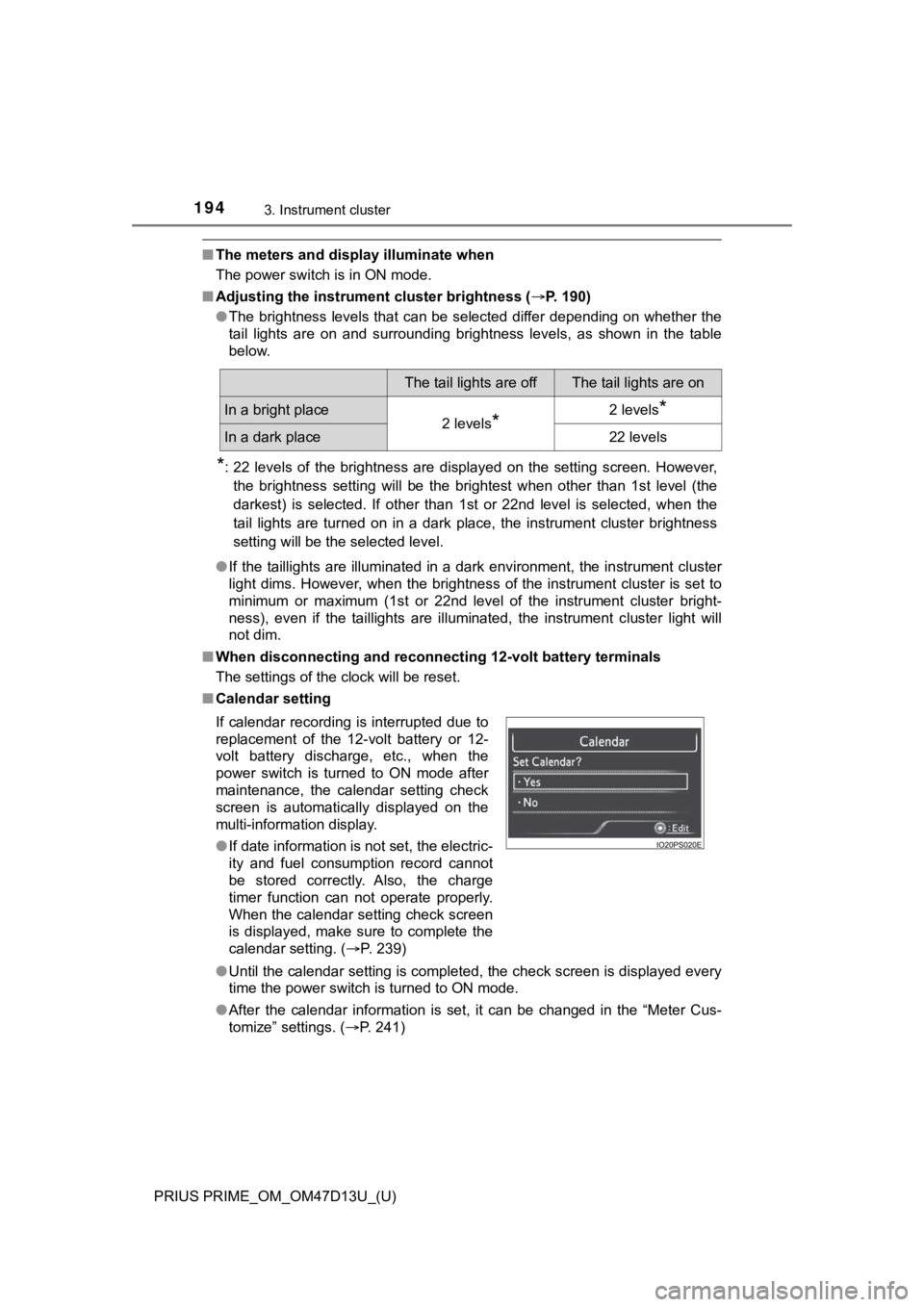
■ Calendar setting
●Until the calendar setting is completed, the check screen is di splayed every
time the power switch is turned to ON mode.
● After the calendar information is set, it can be changed in the “Meter Cus-
tomize” settings. ( P. 241)
The tail lights are offThe tail lights are on
In a bright place2 levels*2 levels*
In a dark place22 levels
If calendar recording is interrupted due to
replacement of the 12-volt battery or 12-
volt battery discharge, etc., when the
power switch is turned to ON mode after
maintenance, the calendar setting check
screen is automatically displayed on the
multi-information display.
● If date information is not set, the electric-
ity and fuel consumption record cannot
be stored correctly. Also, the charge
timer function can not operate properly.
When the calendar setting check screen
is displayed, make sure to complete the
calendar setting. ( P. 239)
Page 198 of 792
198
PRIUS PRIME_OM_OM47D13U_(U)
3. Instrument cluster
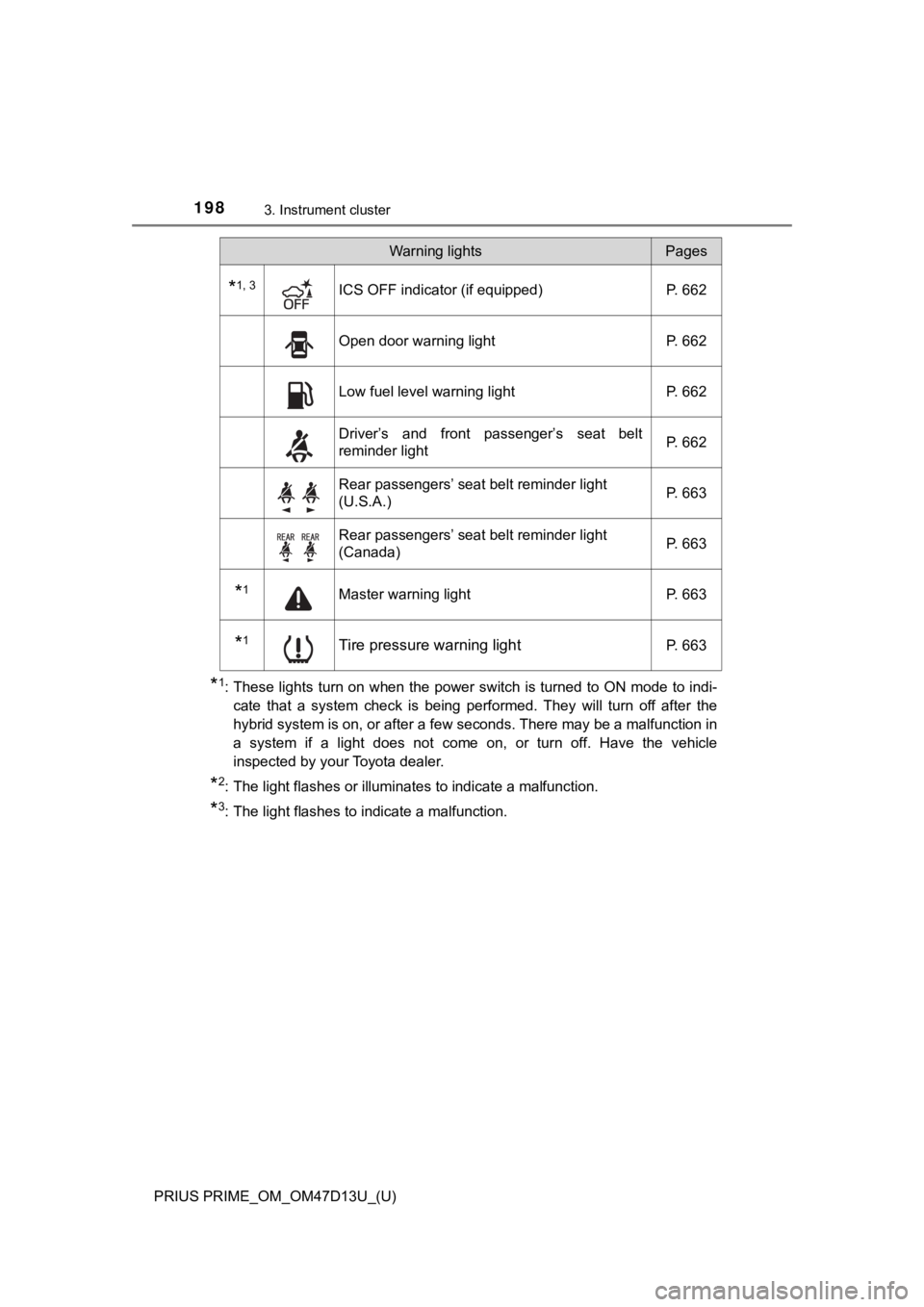
*1: These lights turn on when the power switch is turned to ON mode to indi-
cate that a system check is being performed. They will turn off after the
hybrid system is on, or after a few seconds. There may be a malfunction in
a system if a light does not come on, or turn off. Have the veh icle
inspected by your Toyota dealer.
*2: The light flashes or illuminates to indicate a malfunction.
*3: The light flashes to indicate a malfunction.
*1, 3ICS OFF indicator (if equipped) P. 662
Open door warning light P. 662
Low fuel level warning lightP. 662
Driver’s and front passenger’s seat belt
reminder light P. 662
Rear passengers’ seat belt reminder light
(U.S.A.)
P. 663
Rear passengers’ seat belt reminder light
(Canada)P. 663
*1Master warning light
P. 663
*1Tire pressure warning lightP. 663
Warning lightsPages
Page 200 of 792
200
PRIUS PRIME_OM_OM47D13U_(U)
3. Instrument cluster
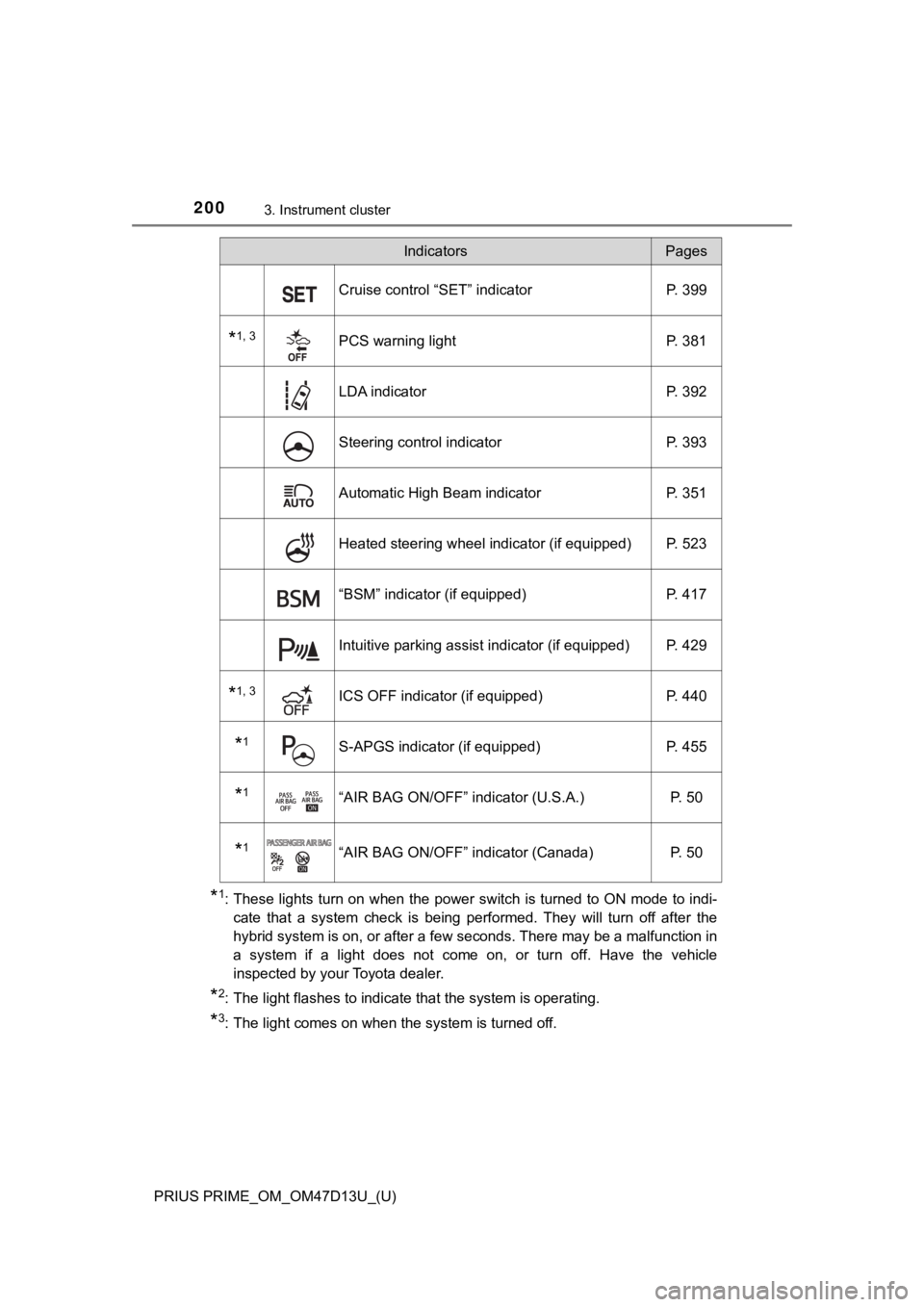
*1: These lights turn on when the power switch is turned to ON mode to indi-
cate that a system check is being performed. They will turn off after the
hybrid system is on, or after a few seconds. There may be a malfunction in
a system if a light does not come on, or turn off. Have the veh icle
inspected by your Toyota dealer.
*2: The light flashes to indicate that the system is operating.
*3: The light comes on when the system is turned off.
Cruise control “SET” indicator P. 399
*1, 3PCS warning light P. 381
LDA indicatorP. 392
Steering control indicatorP. 393
Automatic High Beam indicator P. 351
Heated steering wheel indicator (if equipped) P. 523
“BSM” indicator (if equipped)P. 417
Intuitive parking assist indicator (if equipped) P. 429
*1, 3ICS OFF indicator (if equipped)P. 440
*1S-APGS indicator (if equipped) P. 455
*1“AIR BAG ON/OFF” indicator (U.S.A.) P. 50
*1“AIR BAG ON/OFF” indicator (Canada)P. 50
IndicatorsPages
Page 201 of 792
PRIUS PRIME_OM_OM47D13U_(U)
2013. Instrument cluster
3
Instrument cluster
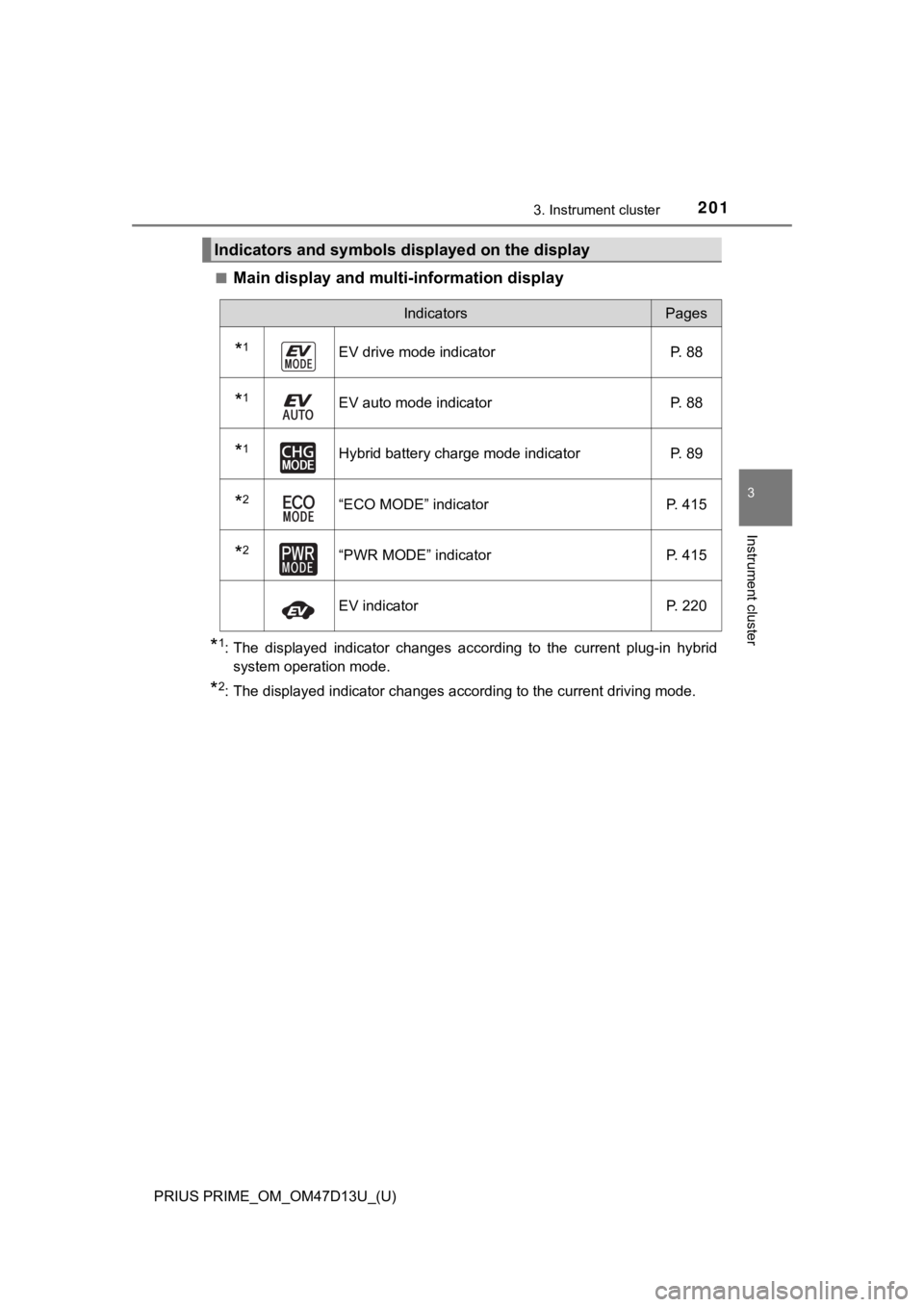
■Main display and multi-information display
*1: The displayed indicator changes according to the current plug-in hybrid
system operation mode.
*2: The displayed indicator changes according to the current drivi ng mode.
Indicators and symbols displayed on the display
IndicatorsPages
*1EV drive mode indicatorP. 88
*1EV auto mode indicator P. 88
*1Hybrid battery charge mode indicatorP. 89
*2“ECO MODE” indicatorP. 415
*2“PWR MODE” indicatorP. 415
EV indicator P. 220
Page 203 of 792
PRIUS PRIME_OM_OM47D13U_(U)
2033. Instrument cluster
3
Instrument cluster
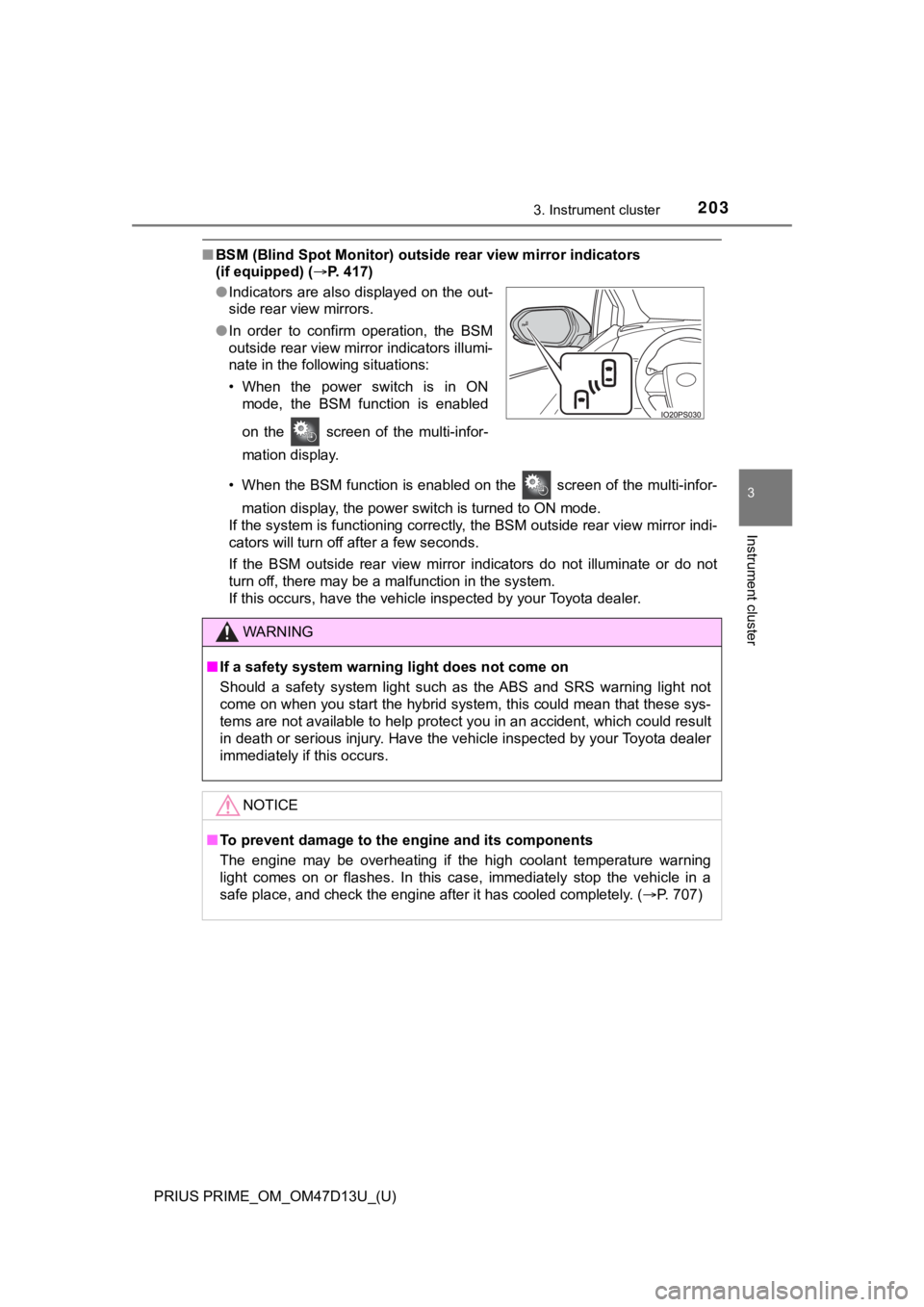
■BSM (Blind Spot Monitor) outsid e rear view mirror indicators
(if equipped) ( P. 417)
• When the BSM function is enabled on the screen of the multi-i nfor-
mation display, the power switch is turned to ON mode.
If the system is functioning correctly, the BSM outside rear vi ew mirror indi-
cators will turn off after a few seconds.
If the BSM outside rear view mirror indicators do not illuminat e or do not
turn off, there may be a malfunction in the system.
If this occurs, have the vehicle inspected by your Toyota deale r.
●
Indicators are also displayed on the out-
side rear view mirrors.
● In order to confirm operation, the BSM
outside rear view mirror indicators illumi-
nate in the following situations:
• When the power switch is in ON
mode, the BSM function is enabled
on the screen of the multi-infor-
mation display.
WARNING
■If a safety system warning light does not come on
Should a safety system light such as the ABS and SRS warning li ght not
come on when you start the hybrid system, this could mean that these sys-
tems are not available to help protect you in an accident, whic h could result
in death or serious injury. Have the vehicle inspected by your Toyota dealer
immediately if this occurs.
NOTICE
■ To prevent damage to the engine and its components
The engine may be overheating if the high coolant temperature warning
light comes on or flashes. In this case, immediately stop the vehicle in a
safe place, and check the engine after it has cooled completely . (P. 707)
Page 212 of 792
212
PRIUS PRIME_OM_OM47D13U_(U)
3. Instrument cluster
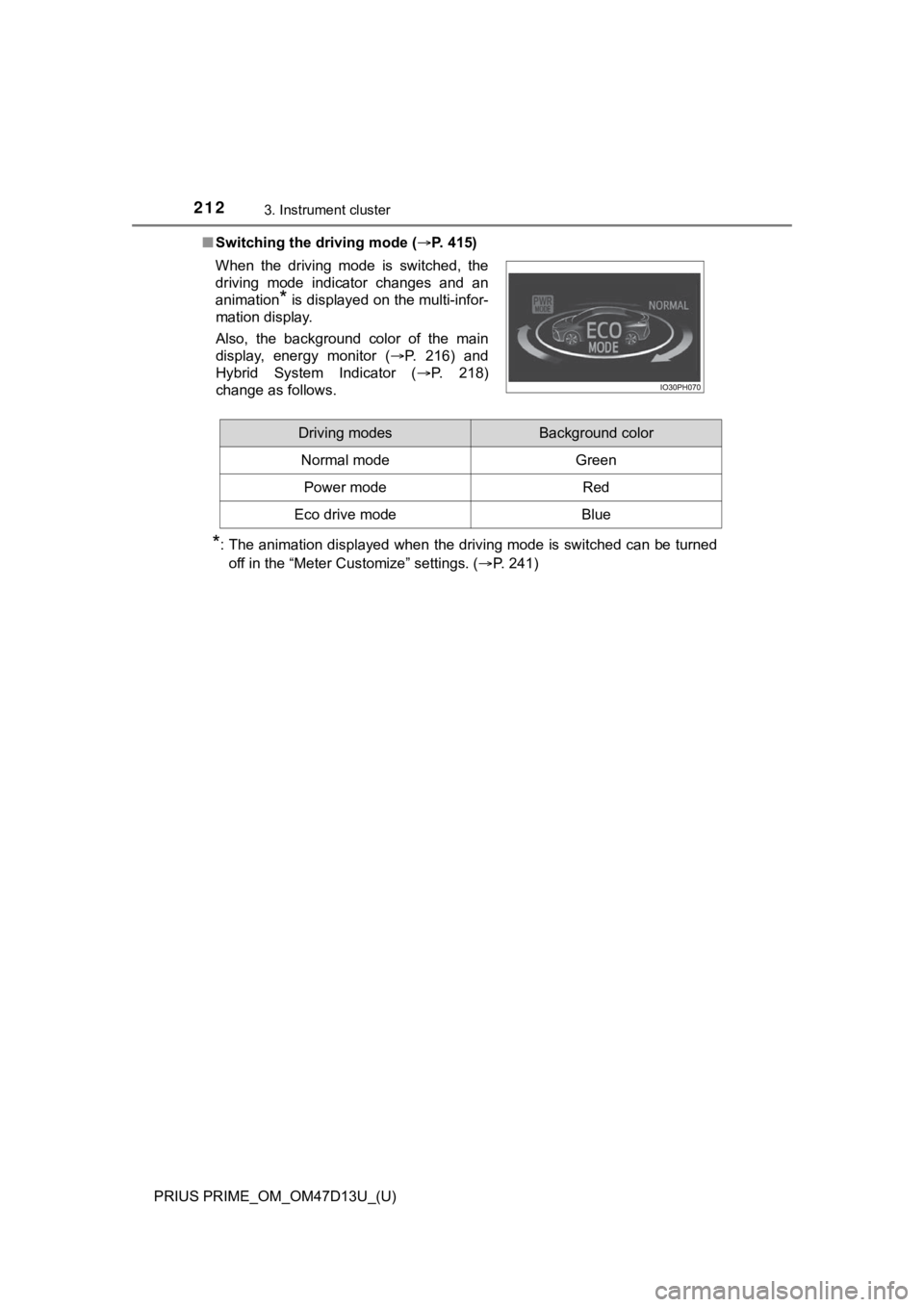
■Switching the driving mode ( P. 415)
*: The animation displayed when the driving mode is switched can be turned
off in the “Meter Customize” settings. ( P. 241)
When the driving mode is switched, the
driving mode indicator changes and an
animation
* is displayed on the multi-infor-
mation display.
Also, the background color of the main
display, energy monitor ( P. 216) and
Hybrid System Indicator ( P. 218)
change as follows.
Driving modesBackground color
Normal mode Green
Power modeRed
Eco drive modeBlue
Page 218 of 792
218
PRIUS PRIME_OM_OM47D13U_(U)
3. Instrument cluster
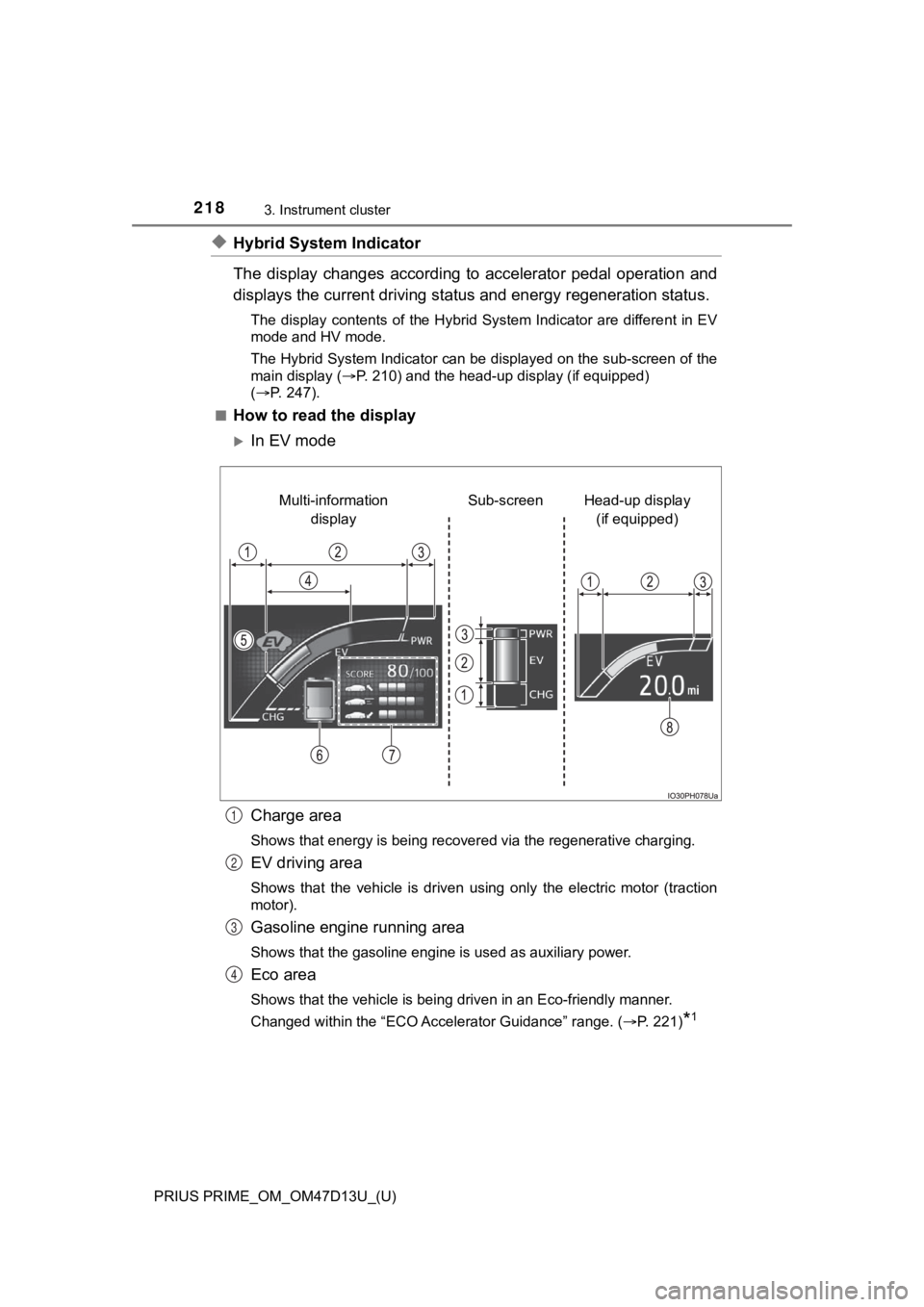
◆Hybrid System Indicator
The display changes according to accelerator pedal operation and
displays the current driving st atus and energy regeneration sta tus.
The display contents of the Hybrid System Indicator are differe nt in EV
mode and HV mode.
The Hybrid System Indicator can be displayed on the sub-screen of the
main display ( P. 210) and the head-up display (if equipped)
( P. 247).
■
How to read the display
In EV mode
Charge area
Shows that energy is being recovered via the regenerative charging.
EV driving area
Shows that the vehicle is driven using only the electric motor (traction
motor).
Gasoline engine running area
Shows that the gasoline engine is used as auxiliary power.
Eco area
Shows that the vehicle is being driven in an Eco-friendly manne r.
Changed within the “ECO Accelerator Guidance” range. ( P. 221)
*1
Head-up display
(if equipped)
Sub-screen
Multi-information
display
1
2
3
4
Page 220 of 792
220
PRIUS PRIME_OM_OM47D13U_(U)
3. Instrument cluster
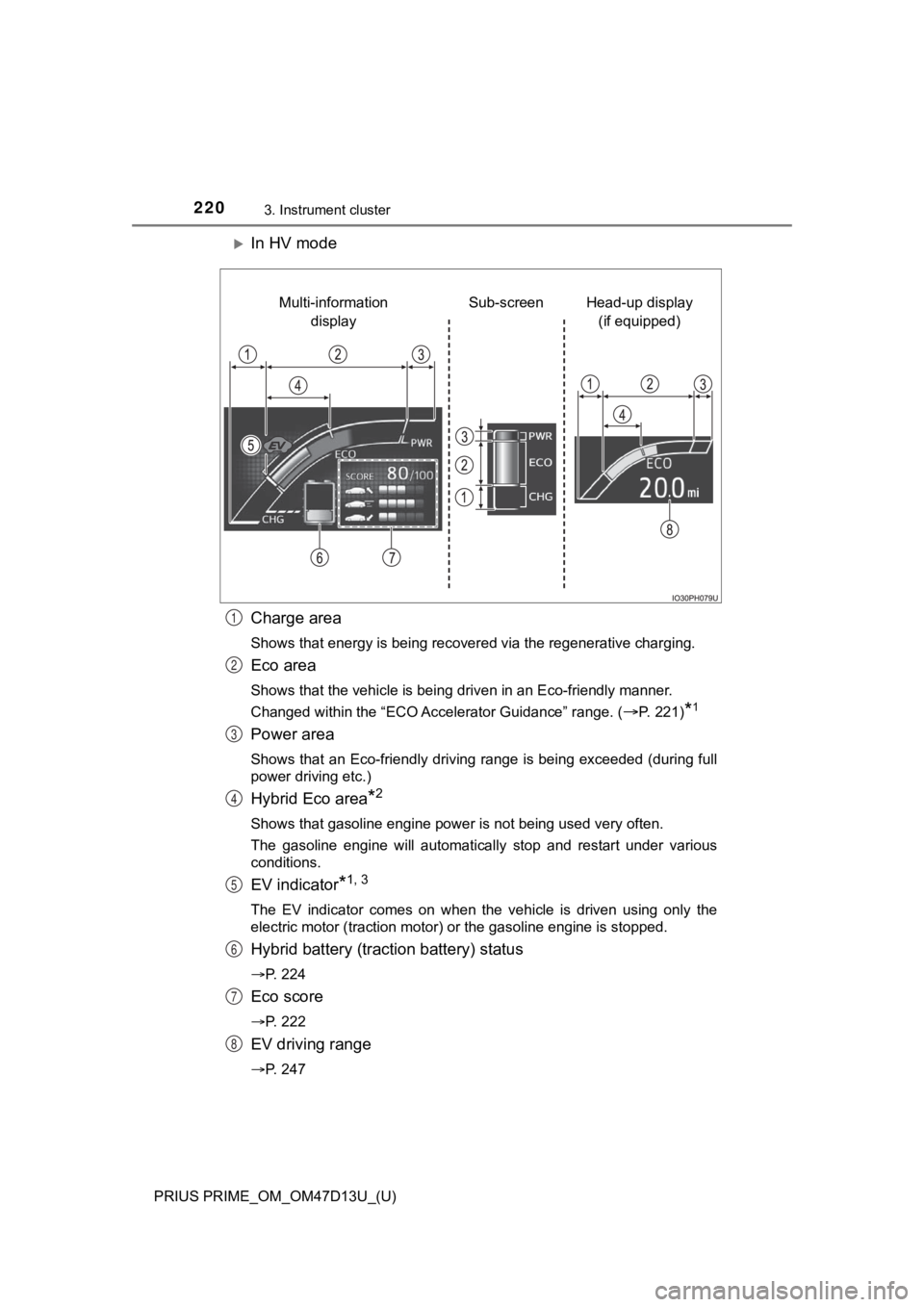
In HV mode
Charge area
Shows that energy is being recovered via the regenerative charging.
Eco area
Shows that the vehicle is being driven in an Eco-friendly manner.
Changed within the “ECO Accelerator Guidance” range. (
P. 221)*1
Power area
Shows that an Eco-friendly driving range is being exceeded (dur ing full
power driving etc.)
Hybrid Eco area*2
Shows that gasoline engine power is not being used very often.
The gasoline engine will automatically stop and restart under v arious
conditions.
EV indicator*1, 3
The EV indicator comes on when the vehicle is driven using only the
electric motor (traction motor) or the gasoline engine is stopped.
Hybrid battery (traction battery) status
P. 224
Eco score
P. 222
EV driving range
P. 247
Head-up display
(if equipped)
Sub-screen
Multi-information
display
1
2
3
4
5
6
7
8
Page 221 of 792
PRIUS PRIME_OM_OM47D13U_(U)
2213. Instrument cluster
3
Instrument cluster
●By keeping the indicator within Eco area, more Eco-friendly dri v-
ing can be achieved.
● Charge area indicates regeneration
*4 status. Regenerated
energy will be used to charge the hybrid battery (traction battery).
*1: Not displayed on the sub-screen or head-up display.
*2: Not displayed on the sub-screen.
*3: The EV indicator function can be turned off in the “Meter Cust omize”
settings. ( P. 241)
*4: When used in this manual, “regeneration” refers to the conversion of
energy created by the movement of the vehicle into electrical e nergy.
■
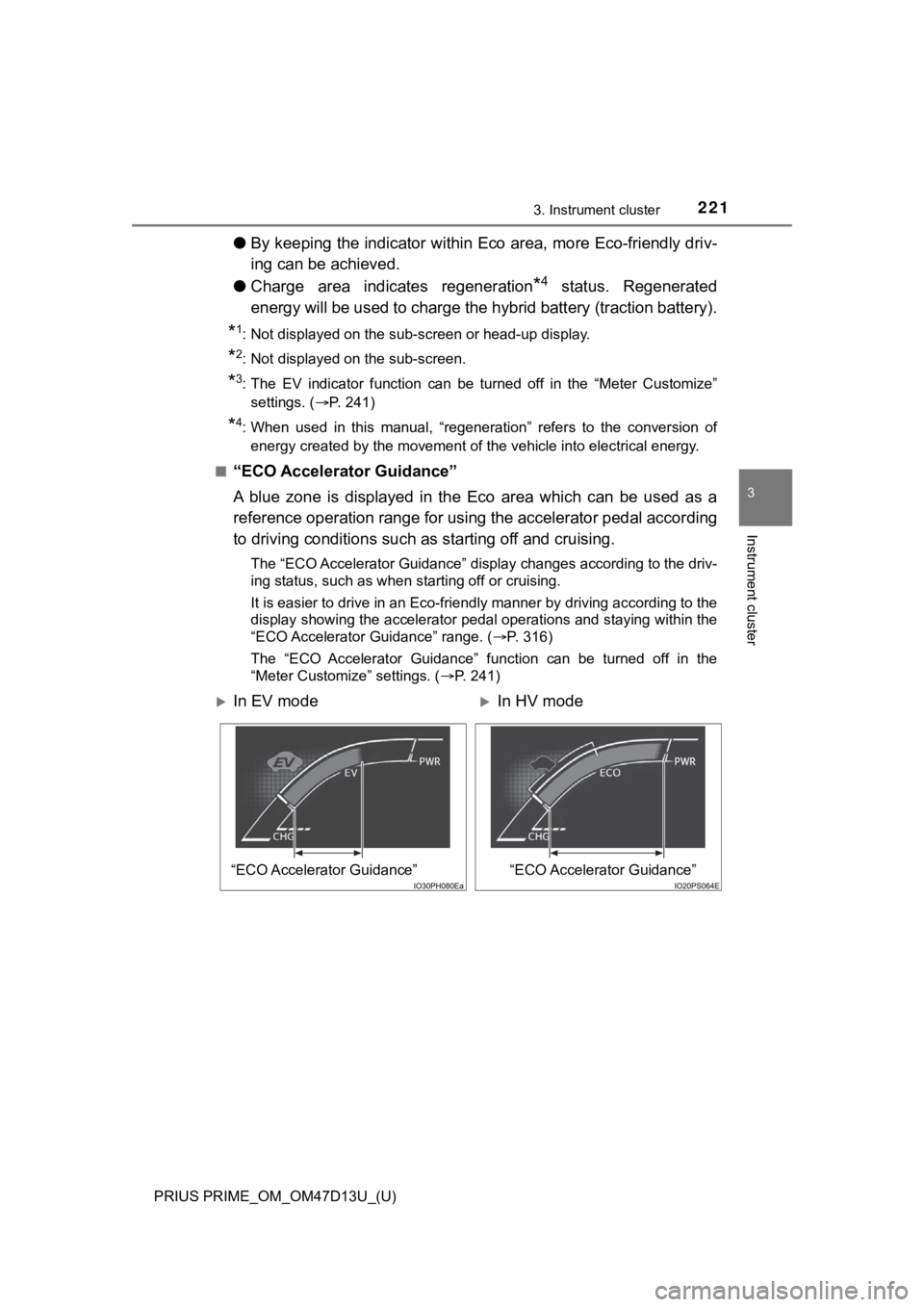
“ECO Accelerator Guidance”
A blue zone is displayed in the Eco area which can be used as a
reference operation range for using the accelerator pedal according
to driving conditions such as starting off and cruising.
The “ECO Accelerator Guidance” display changes according to the driv-
ing status, such as when starting off or cruising.
It is easier to drive in an Eco-friendly manner by driving according to the
display showing the accelerator pedal operations and staying wi thin the
“ECO Accelerator Guidance” range. ( P. 316)
The “ECO Accelerator Guidance” function can be turned off in the
“Meter Customize” settings. ( P. 241)
In EV modeIn HV mode
“ECO Accelerator Guidance”“ECO Accelerator Guidance”
Page 224 of 792
224
PRIUS PRIME_OM_OM47D13U_(U)
3. Instrument cluster
■When operation of each function stops
● The Hybrid System Indicator stops operating in the following si tuations.
• The “READY” indicator is not illuminated.
• The shift position is not D or B.
● The Eco score and “ECO Accelerator Guidance” stop operating in the fol-
lowing situations.
• The Hybrid System Indicator is not operating.
• Dynamic radar cruise control with full-speed range is being us ed.
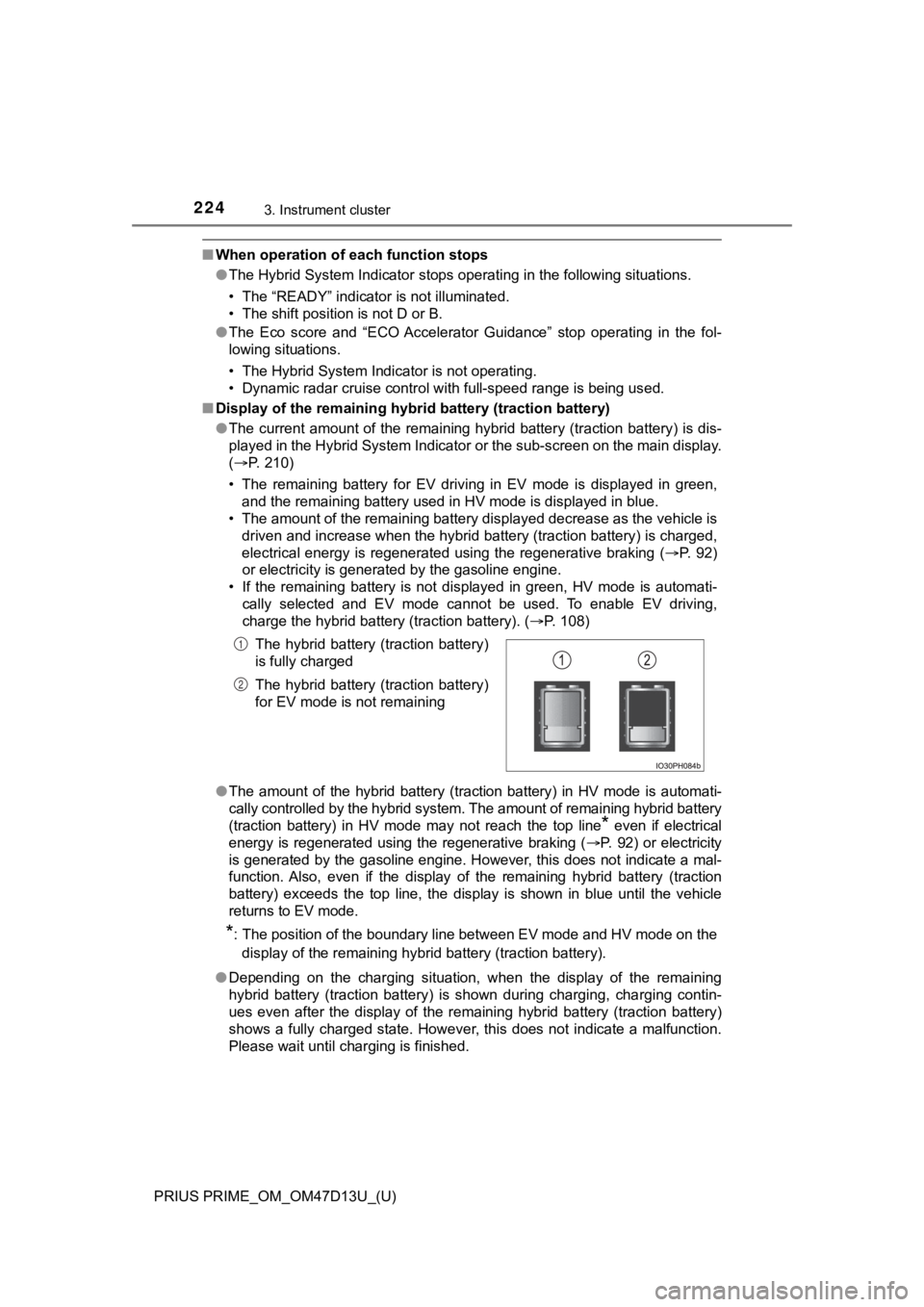
■ Display of the remaining hyb rid battery (traction battery)
● The current amount of the remaining hybrid battery (traction ba ttery) is dis-
played in the Hybrid System Indicator or the sub-screen on the main display.
( P. 210)
• The remaining battery for EV driving in EV mode is displayed i n green,
and the remaining battery used in HV mode is displayed in blue.
• The amount of the remaining battery displayed decrease as the vehicle is
driven and increase when the hybrid battery (traction battery) is charged,
electrical energy is regenerated using the regenerative braking (P. 92)
or electricity is generated by the gasoline engine.
• If the remaining battery is not displayed in green, HV mode is automati-
cally selected and EV mode cannot be used. To enable EV driving ,
charge the hybrid battery (traction battery). ( P. 108)
● The amount of the hybrid battery (traction battery) in HV mode is automati-
cally controlled by the hybrid system. The amount of remaining hybrid battery
(traction battery) in HV mode may not reach the top line
* even if electrical
energy is regenerated using the regenerative braking ( P. 92) or electricity
is generated by the gasoline engine. However, this does not ind icate a mal-
function. Also, even if the display of the remaining hybrid bat tery (traction
battery) exceeds the top line, the display is shown in blue unt il the vehicle
returns to EV mode.
*: The position of the boundary line between EV mode and HV mode on the
display of the remaining hybrid battery (traction battery).
● Depending on the charging situation, when the display of the re maining
hybrid battery (traction battery) is shown during charging, cha rging contin-
ues even after the display of the remaining hybrid battery (tra ction battery)
shows a fully charged state. However, this does not indicate a malfunction.
Please wait until charging is finished. The hybrid battery (traction battery)
is fully charged
The hybrid battery (traction battery)
for EV mode is not remaining
1
2