service TOYOTA PRIUS PRIME 2019 Owners Manual (in English)
[x] Cancel search | Manufacturer: TOYOTA, Model Year: 2019, Model line: PRIUS PRIME, Model: TOYOTA PRIUS PRIME 2019Pages: 68, PDF Size: 3.34 MB
Page 6 of 68
4
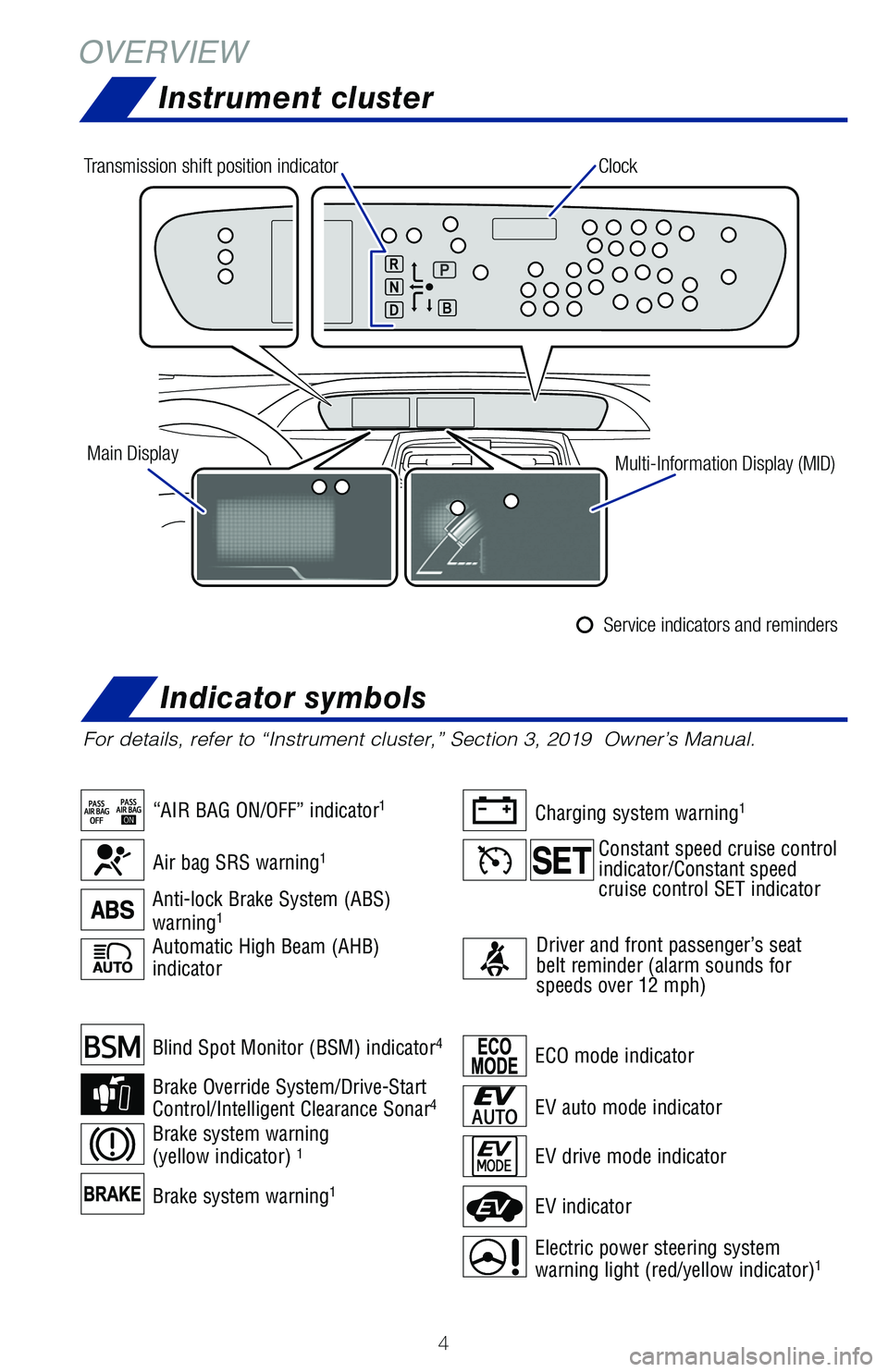
Brake system warning1
Blind Spot Monitor (BSM) indicator4
Brake Override System/Drive-Start
Control/Intelligent Clearance Sonar4
Brake system warning
(yellow indicator) 1
Automatic High Beam (AHB)
indicator
OVERVIEW
Instrument cluster
For details, refer to “Instrument cluster,” Section 3, 2019 Owner’s Manual.
ECO mode indicator
EV drive mode indicator
EV indicator
Electric power steering system
warning light (red/yellow indicator)1
EV auto mode indicator
Air bag SRS warning1
“AIR BAG ON/OFF” indicator1
Anti-lock Brake System (ABS)
warning1
Charging system warning1
Driver and front passenger’s seat
belt reminder (alarm sounds for
speeds over 12 mph)
Clock
Main Display Multi-Information Display (MID)
Transmission shift position indicator
Service indicators and reminders
Constant speed cruise control
indicator/Constant speed
cruise control SET indicator
Indicator symbols
Page 19 of 68
17
OVERVIEW
ELECTRIC VEHICLE SYSTEM
FEATURES & OPERATIONS
TOYOTA SAFETY SENSE
SAFETY &
EMERGENCY FEATURES
Charging system safety functions
Prime Applications (if equipped)
- The Hybrid System will not start while the charging cable is attached \
to the
vehicle, even if the POWER switch is operated.
- If the charge cable is connected while the READY indicator is illuminated, the Hybrid System will stop automatically and driving will not be possible.
- When the charge cable is connected to the vehicle, the shift position \
cannot be changed from P to another position.
- If the latch release button is pressed, charging will not begin even i\
f the charge cable is connected.
- Charging will stop if the latch release button is pressed and held for\
several seconds during charging. When restarting charging, reinsert the charge
connector after pulling it out, and check that the charging indicator il\
luminates.
Prime Applications is a service for Prius Prime vehicles that is added t\
o the Safety
Connect® and Entune® products. It provides charge support, comfort support and
drive support via the vehicle’s navigation system and the owner’s \
smartphone. The
Prime Apps include Charge Management, Remote Climate, Charging Station M\
ap,
Vehicle Finder and ECO Dashboard.
Both an active Safety Connect
® account and an active Entune® account are
required for the services.
The following functions of the Prime Applications can be used with the n\
avigation
system:
Type A Download of nearby charging stations to the map screen.
Type B View list of nearby charging stations and corresponding charging statio\
n information (such as voltage supported).
For details, please refer to http://www.toyota.com/entune.
Page 53 of 68
51
OVERVIEW
ELECTRIC VEHICLE SYSTEM
FEATURES & OPERATIONS
TOYOTA SAFETY SENSE
SAFETY &
EMERGENCY FEATURES
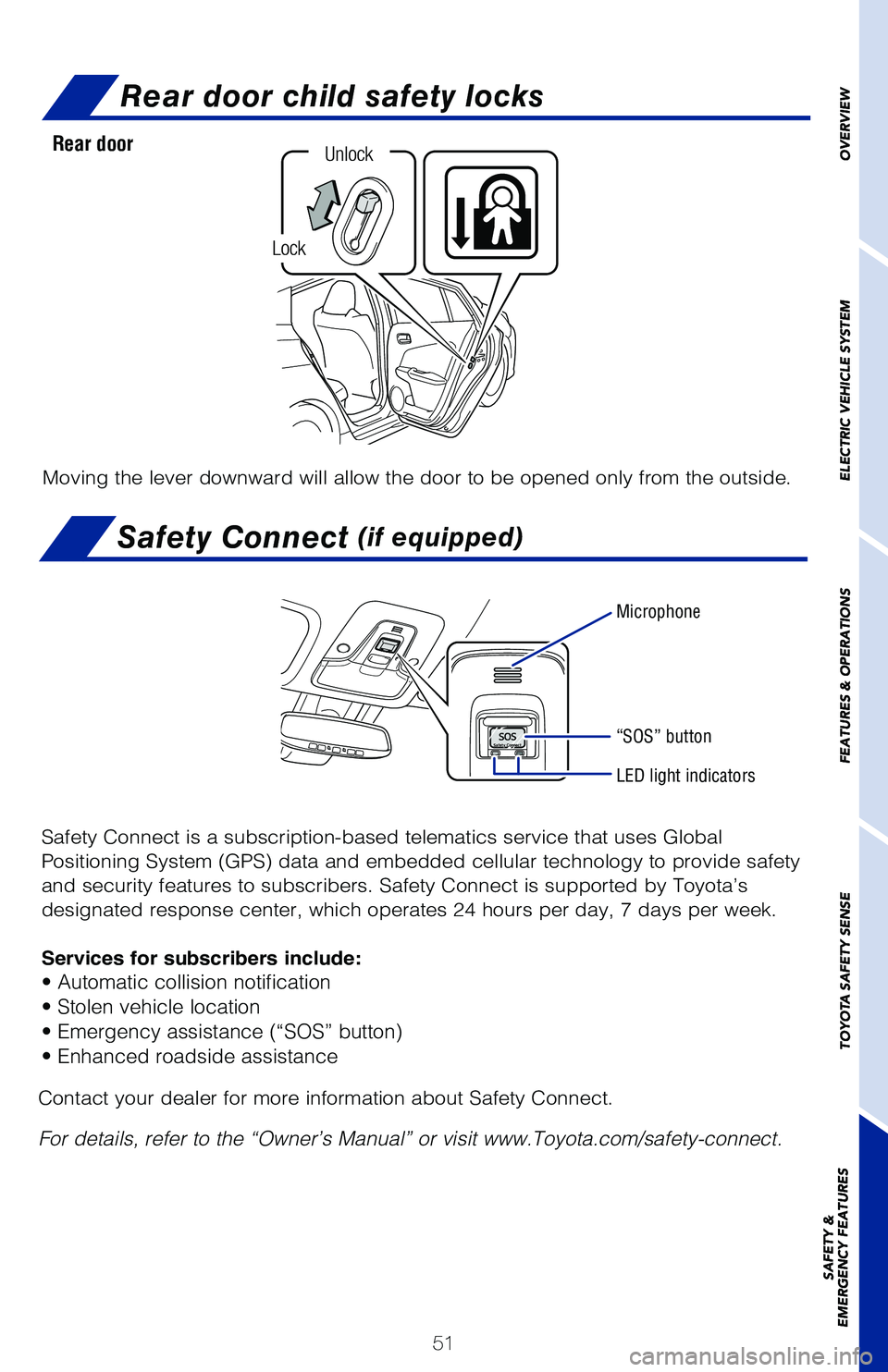
Rear door child safety locks
Moving the lever downward will allow the door to be opened only from the\
outside.
Rear door
Lock
Unlock
Safety Connect (if equipped)
Safety Connect is a subscription-based telematics service that uses Glob\
al
Positioning System (GPS) data and embedded cellular technology to provide safety
and security features to subscribers. Safety Connect is supported by Toy\
ota’s
designated response center, which operates 24 hours per day, 7 days per \
week.
Services for subscribers include:
• Automatic collision notification
• Stolen vehicle location
• Emergency assistance (“SOS” button)
• Enhanced roadside assistance
Microphone
LED light indicators
“SOS” button
Contact your dealer for more information about Safety Connect.
For details, refer to the “Owner’s Manual” or visit www.Toyota.\
com/safety-connect.
OVERVIEW
ELECTRIC VEHICLE SYSTEM
FEATURES & OPERATIONS
TOYOTA SAFETY SENSE
SAFETY &
EMERGENCY FEATURES
Page 61 of 68
59
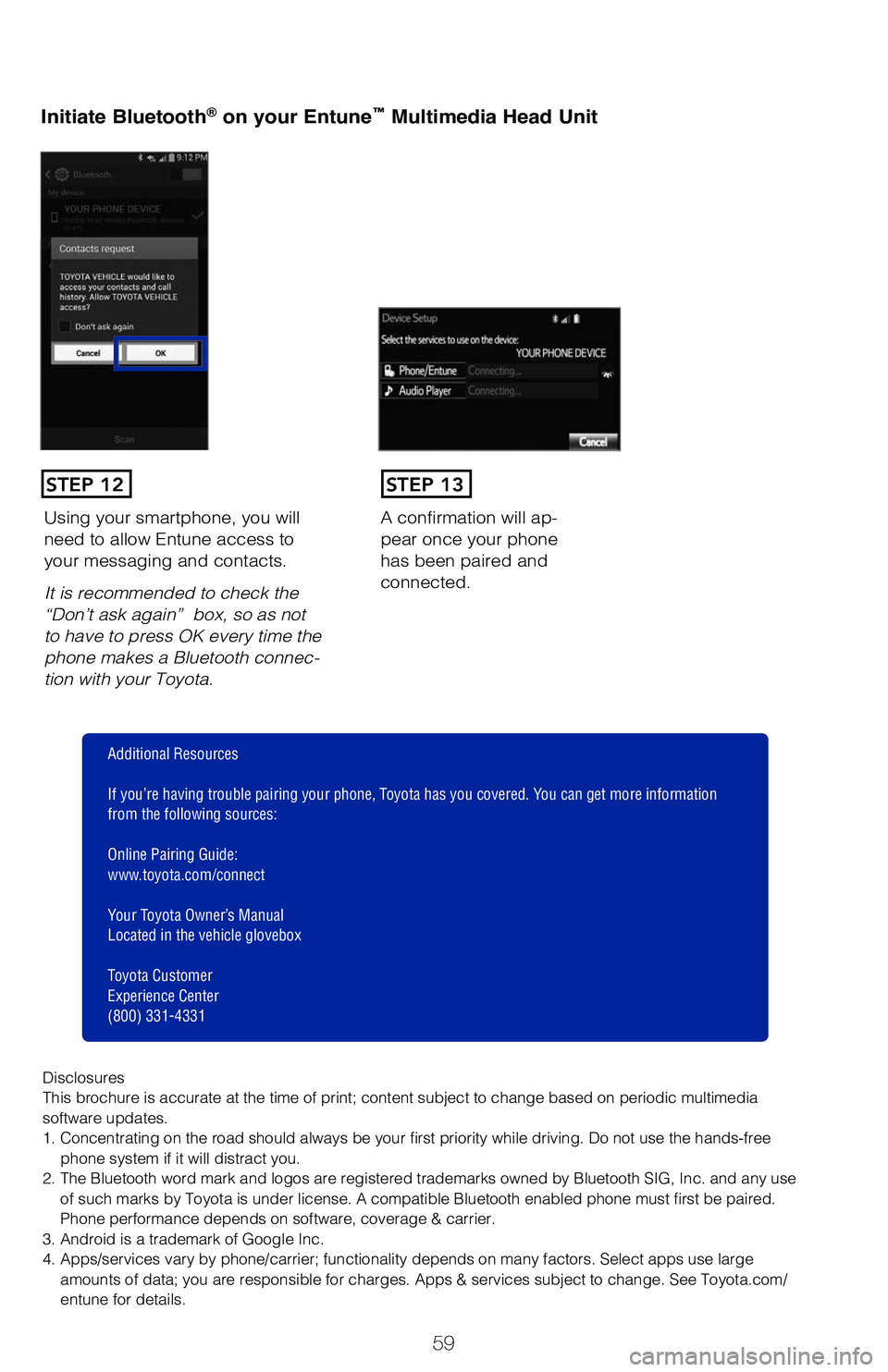
Initiate Bluetooth® on your Entune™ Multimedia Head Unit
A confirmation will ap-
pear once your phone
has been paired and
connected.Using your smartphone, you will
need to allow Entune access to
your messaging and contacts.
It is recommended to check the
“Don’t ask again” box, so as not
to have to press OK every time the
phone makes a Bluetooth connec
-
tion with your Toyota.
STEP 12STEP 13
Additional Resources
If you’re having trouble pairing your phone, Toyota has you covered. You can get more information
from the following sources:
Online Pairing Guide:
www.toyota.com/connect
Your Toyota Owner’s Manual
Located in the vehicle glovebox
Toyota Customer
Experience Center
(800) 331-4331
Disclosures
This brochure is accurate at the time of print; content subject to chang\
e based on periodic multimedia
software updates.
1. Concentrating on the road should always be your first priority while driving. Do not use the hands-free phone system if it will distract you.
2. The Bluetooth word mark and logos are registered trademarks owned by \
Bluetooth SIG, Inc. and any use of such marks by Toyota is under license. A compatible Bluetooth enabled phone must first be paired.
Phone performance depends on software, coverage & carrier.
3. Android is a trademark of Google Inc.
4. Apps/services vary by phone/carrier; functionality depends on many fa\
ctors. Select apps use large amounts of data; you are responsible for charges. Apps & services subjec\
t to change. See Toyota.com/
entune for details.
Page 64 of 68
62
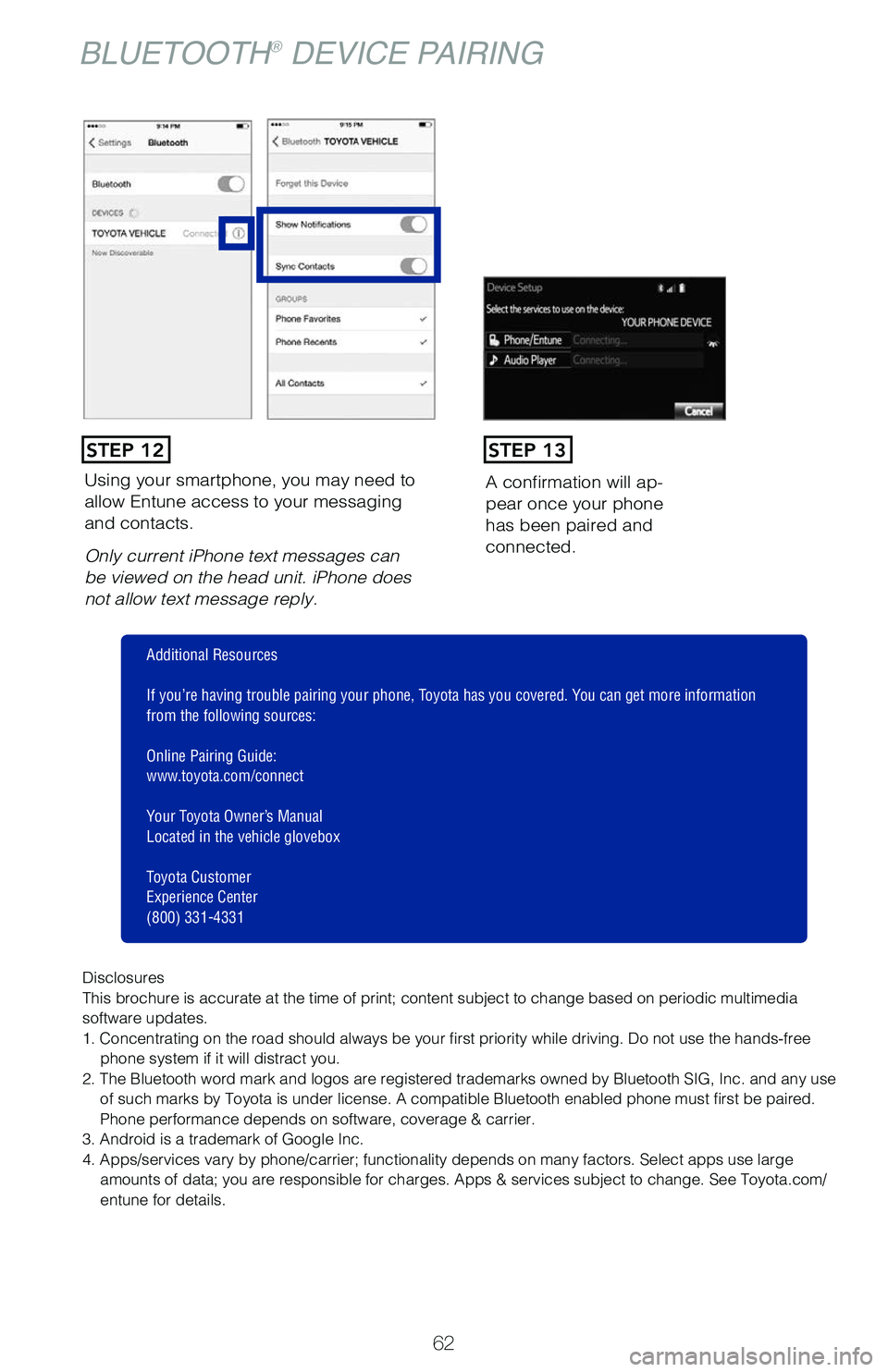
Using your smartphone, you may need to
allow Entune access to your messaging
and contacts.
Only current iPhone text messages can
be viewed on the head unit. iPhone does
not allow text message reply.A confirmation will ap
-
pear once your phone
has been paired and
connected.
STEP 12STEP 13
Disclosures
This brochure is accurate at the time of print; content subject to chang\
e based on periodic multimedia
software updates.
1. Concentrating on the road should always be your first priority while driving. Do not use the hands-free
phone system if it will distract you.
2. The Bluetooth word mark and logos are registered trademarks owned by \
Bluetooth SIG, Inc. and any use of such marks by Toyota is under license. A compatible Bluetooth enabled phone must first be paired.
Phone performance depends on software, coverage & carrier.
3. Android is a trademark of Google Inc.
4. Apps/services vary by phone/carrier; functionality depends on many fa\
ctors. Select apps use large amounts of data; you are responsible for charges. Apps & services subjec\
t to change. See Toyota.com/
entune for details.
Additional Resources
If you’re having trouble pairing your phone, Toyota has you covered. You can get more information
from the following sources:
Online Pairing Guide:
www.toyota.com/connect
Your Toyota Owner’s Manual
Located in the vehicle glovebox
Toyota Customer
Experience Center
(800) 331-4331
BLUETOOTH® DEVICE PAIRING