brake TOYOTA PRIUS PRIME 2021 (in English) Owner's Guide
[x] Cancel search | Manufacturer: TOYOTA, Model Year: 2021, Model line: PRIUS PRIME, Model: TOYOTA PRIUS PRIME 2021Pages: 808, PDF Size: 74.05 MB
Page 339 of 808
PRIUS PRIME_OM_OM47D71U_(U)
3395-2. Driving procedures
5
Driving
Stop the vehicle completely.
Set the parking brake. (P. 3 5 2 )
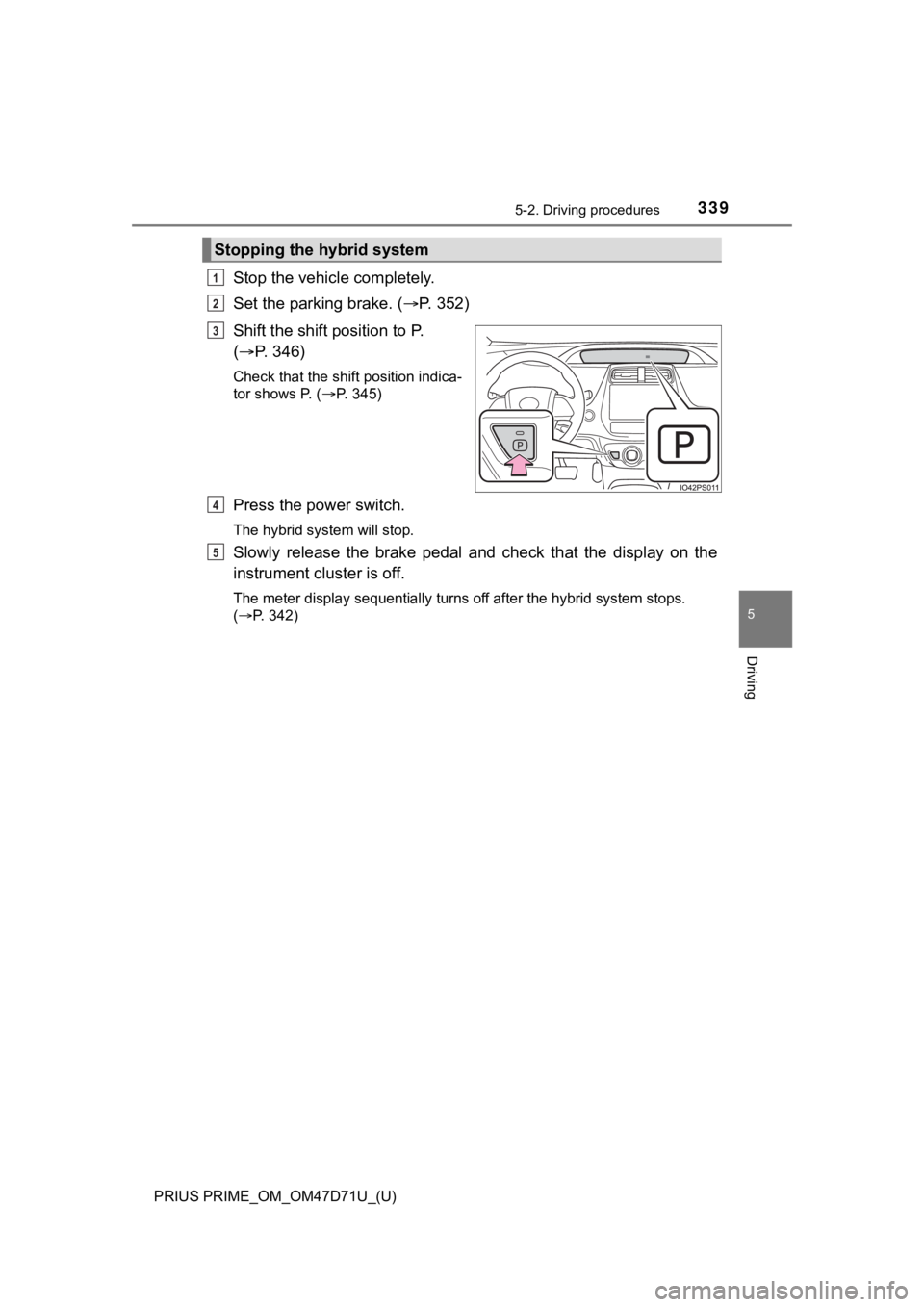
Shift the shift position to P.
(P. 346)
Check that the shift position indica-
tor shows P. (P. 345)
Press the power switch.
The hybrid system will stop.
Slowly release the brake pedal and check that the display on the
instrument cluster is off.
The meter display sequentially turns off after the hybrid system stops.
(P. 342)
Stopping the hybrid system
1
2
3
4
5
Page 340 of 808
340
PRIUS PRIME_OM_OM47D71U_(U)
5-2. Driving procedures
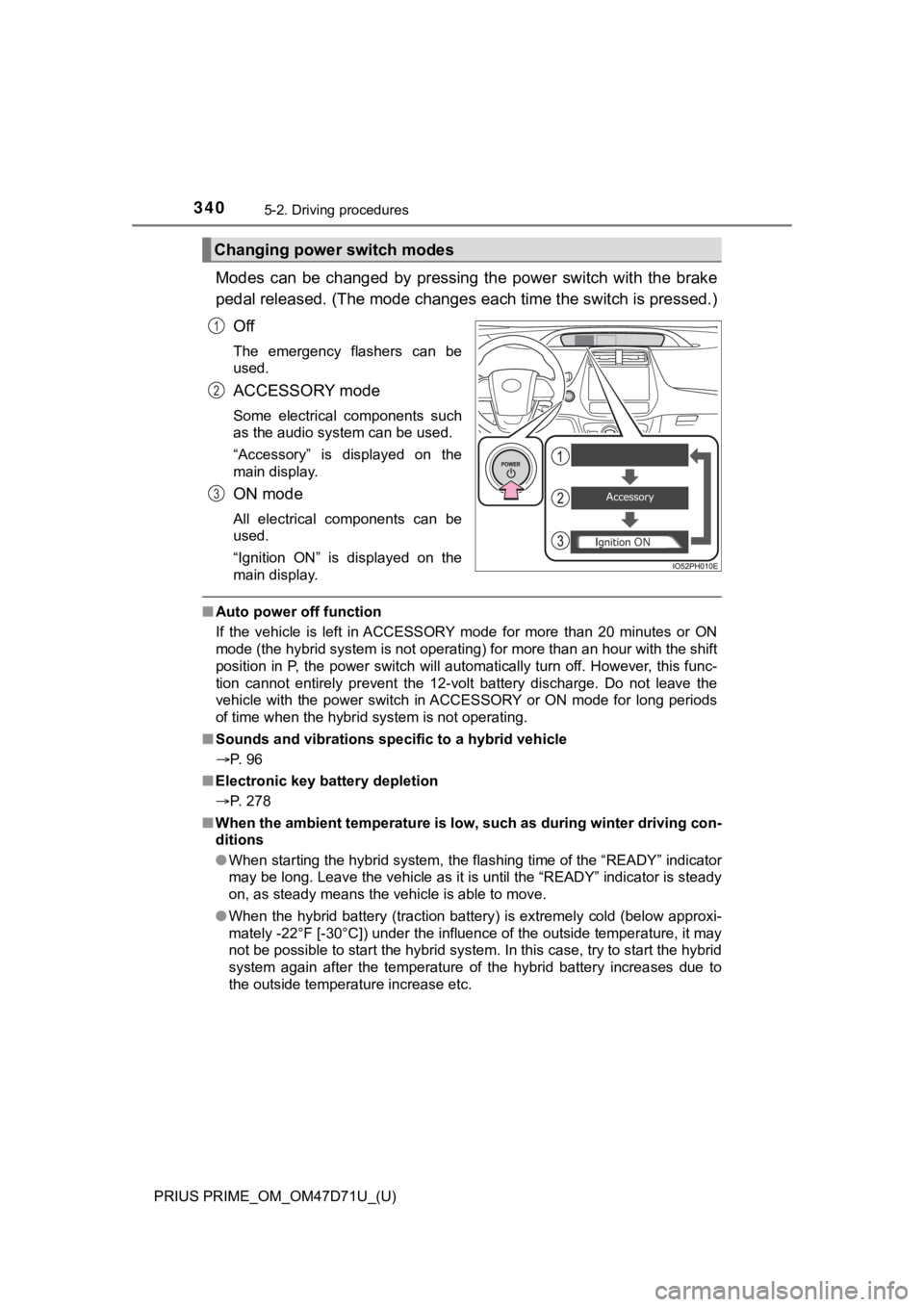
Modes can be changed by pressing the power switch with the brake
pedal released. (The mode changes each time the switch is pressed.)
Off
The emergency flashers can be
used.
ACCESSORY mode
Some electrical components such
as the audio system can be used.
“Accessory” is displayed on the
main display.
ON mode
All electrical components can be
used.
“Ignition ON” is displayed on the
main display.
■Auto power off function
If the vehicle is left in ACCESSORY mode for more than 20 minutes or ON
mode (the hybrid system is not operating) for more than an hour with the shift
position in P, the power switch will automatically turn off. However, this func-
tion cannot entirely prevent the 12-volt battery discharge. Do not leave the
vehicle with the power switch in ACCESSORY or ON mode for long periods
of time when the hybrid system is not operating.
■Sounds and vibrations specific to a hybrid vehicle
P. 96
■Electronic key battery depletion
P. 278
■When the ambient temperature is low, such as during winter driving con-
ditions
●When starting the hybrid system, the flashing time of the “READY” indicator
may be long. Leave the vehicle as it is until the “READY” indicator is steady
on, as steady means the vehicle is able to move.
●When the hybrid battery (traction battery) is extremely cold (below approxi-
mately -22°F [-30°C]) under the influence of the outside temperature, it may
not be possible to start the hybrid system. In this case, try to start the hybrid
system again after the temperature of the hybrid battery increases due to
the outside temperature increase etc.
Changing power switch modes
1
2
3
Page 341 of 808

PRIUS PRIME_OM_OM47D71U_(U)
3415-2. Driving procedures
5
Driving
■Conditions affecting operation
P. 295
■Note for the entry function
P. 296
■If the hybrid system does not start
●The immobilizer system may not have been deactivated. (P. 83)
Contact your Toyota dealer.
●The charging cable may be connected to the vehicle. (P. 1 4 2 )
●If a message related to start-up is shown on the multi-information display,
read the message and follow the instructions.
■If the “READY” indicator does not come on
In the event that the “READY” indicator does not come on even after perform-
ing the proper procedures for starting the vehicle, contact your Toyota dealer
immediately.
■If the hybrid system is malfunctioning
P. 99
■If the electronic key battery is depleted
P. 647
■Operation of the power switch
●If the switch is not pressed shortly and firmly, the power switch mode may
not change or the hybrid system may not start.
●If attempting to restart the hybrid system immediately after turning the power
switch off, the hybrid system may not start in some cases. After turning the
power switch off, please wait a few seconds before restarting the hybrid sys-
tem.
■Automatic hybrid system shut off feature
●The vehicle is equipped with a feature that automatically shuts off the hybrid
system when the shift position is in P with the hybrid system operating for an
extended period.
●The hybrid system will automatically shut off after approximately 1 hour if it
has been left running while the shift position is in P.
●The timer for the automatic hybrid system shut off feature will reset if the
brake pedal is depressed or if the shift position is in a position other than P.
●After the vehicle is parked, if the door is locked with the door lock switch
(P. 283) from the inside or the mechanical key (P. 711) from the outside,
the automatic hybrid system shut off feature will be disabled. The timer for
the automatic hybrid system shut off feature will be re-enabled if the driver’s
door is opened.
Page 342 of 808

342
PRIUS PRIME_OM_OM47D71U_(U)
5-2. Driving procedures
■Automatic P position selection function
P. 348
■When the shift control system malfunctions
When attempting to turn the power switch off while there is a malfunction in
the shift control system, the power switch mode may change to ACCES-
SORY mode. In this case, ACCESSORY mode may be turned off by applying
the parking brake and pressing the power switch again. If there is a malfunc-
tion in the system, have the vehicle inspected by your Toyota dealer immedi-
ately.
■Meter display
When the power switch is turned off, each display will turn off as follows.
●The shift position indicator will turn off after approximately 2 seconds.
●The multi-information display, clock, etc. will turn off after approximately 30
seconds. (Each display will also turn off immediately if a door is locked
before 30 seconds has elapsed.)
■If the smart key system has been deactivated in a customized setting
P. 712
Page 345 of 808
345
PRIUS PRIME_OM_OM47D71U_(U)
5-2. Driving procedures
5
Driving
Hybrid transmission
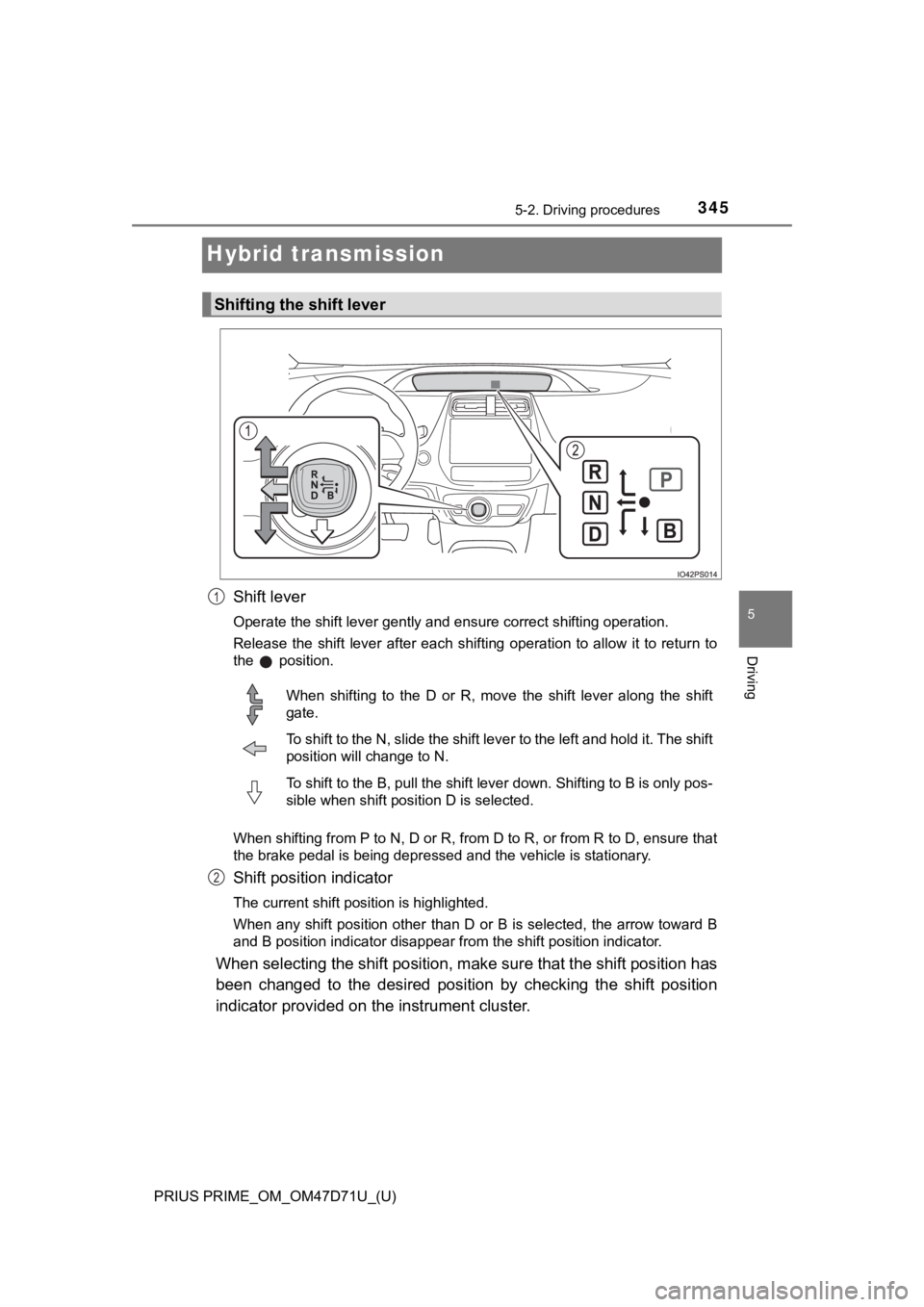
Shift lever
<003200530048005500440057004800030057004b004800030056004b004c004900570003004f00480059004800550003004a004800510057004f005c0003004400510047000300480051005600580055004800030046005200550055004800460057000300
56004b004c00490057004c0051004a00030052005300480055[ation.
Release the shift lever after each shifting operation to allow it to return to
the position.
When shifting from P to N, D or R, from D to R, or from R to D, ensure that
the brake pedal is being depressed and the vehicle is stationary.
Shift position indicator
The current shift position is highlighted.
When any shift position other than D or B is selected, the arrow toward B
and B position indicator disappear from the shift position indicator.
When selecting the shift position, make sure that the shift position has
been changed to the desired position by checking the shift position
indicator provided on the instrument cluster.
Shifting the shift lever
1
When shifting to the D or R, move the shift lever along the shift
gate.
To shift to the N, slide the shift lever to the left and hold it. The shift
position will change to N.
To shift to the B, pull the shift lever down. Shifting to B is only pos-
sible when shift position D is selected.
2
Page 346 of 808
346
PRIUS PRIME_OM_OM47D71U_(U)
5-2. Driving procedures
*: For good fuel economy and noise reduction, the D position should usually
be used.
P. 4 3 0
■When shifting the shift position to P
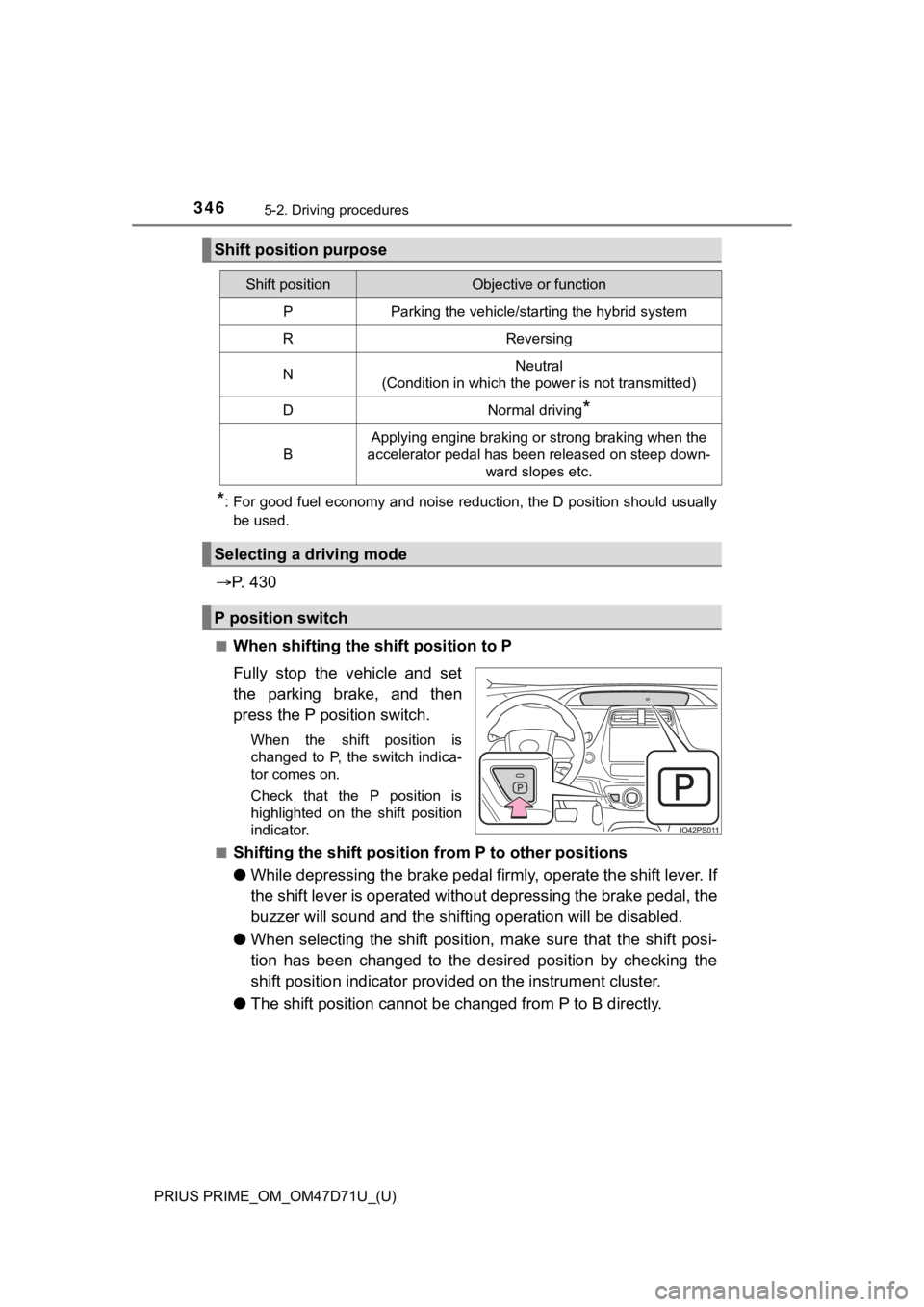
Fully stop the vehicle and set
the parking brake, and then
press the P position switch.
When the shift position is
changed to P, the switch indica-
tor comes on.
Check that the P position is
highlighted on the shift position
indicator.
■
Shifting the shift position from P to other positions
●While depressing the brake pedal firmly, operate the shift lever. I f
the shift lever is operated without depressing the brake pedal, the
buzzer will sound and the shifting operation will be disabled.
●When selecting the shift position, make sure that the shift posi-
tion has been changed to the desired position by checking the
shift position indicator provided on the instrument cluster.
●The shift position cannot be changed from P to B directly.
Shift position purpose
Shift positionObjective or function
PParking the vehicle/starting the hybrid system
RReversing
NNeutral
(Condition in which the power is not transmitted)
DNormal driving*
B
Applying engine braking or strong braking when the
accelerator pedal has been released on steep down-
ward slopes etc.
Selecting a driving mode
P position switch
Page 347 of 808

PRIUS PRIME_OM_OM47D71U_(U)
3475-2. Driving procedures
5
Driving
■For the shift positions
●When the power switch is off, the shift position cannot be changed.
●When the power switch is in ON mode (the hybrid system is not operating),
the shift position can only be changed to N. The shift position will be
changed to N even if the shift lever is shifted to D or R and held in that posi-
tion.
●When the “READY” indicator is on, the shift position can be changed from P
to D, N or R.
●When the “READY” indicator is flashing, the shift position cannot be
changed from P to another position even if the shift lever is operated. Wait
until the “READY” indicator changes from a flashing to a solid light, and then
operate the shift lever again.
●The shift position can only be changed to B directly from D.
In addition, if an attempt is made to change the shift position by moving the
shift lever or by pressing the P position switch in any of the following situa-
tions, the buzzer will sound and the shifting operation will be disabled or the
shift position will automatically change to N. When this happens, select an
appropriate shift position.
●Situations where the shifting operation will be disabled:
• When an attempt is made to change the shift position from P to another
position by moving the shift lever without depressing the brake pedal.
• When an attempt is made to change the shift position from P or N to B by
moving the shift lever.
• When an attempt is made to change the shift position from P to another
position by moving the shift lever while the charging cable is connected to
the vehicle.
●Situations where the shift position will automatically change to N:
• When the P position switch is pressed while the vehicle is running.
*1
• When an attempt is made to select the R position by moving the shift
lever when the vehicle is moving forward.
*2
• When an attempt is made to select the D position by moving the shift
lever when the vehicle is moving in reverse.
*3
• When an attempt is made to change the shift position from R to B by
moving the shift lever.
*1: Shift position may be changed to P when driving at extremely low
speeds.
*2: Shift position may be changed to R when driving at low speeds.
*3: Shift position may be changed to D when driving at low speeds.
●If N is selected while driving at a certain speed, even if the shift lever is not
held in the N position, the shift position changes to N. In this situation, the
buzzer sounds and a confirmation message is displayed on the multi-infor-
mation display to inform the driver that the shift position has changed to N.
Page 350 of 808
350
PRIUS PRIME_OM_OM47D71U_(U)
5-2. Driving procedures
NOTICE
■Hybrid battery (traction battery) charge
If the shift position is in N, the hybrid battery (traction battery) will not be
charged. To help prevent the battery from discharging, avoid leaving the N
position selected for an extended period of time.
■Situations where shift control system malfunctions are possible
If any of the following situations occurs, shift control system malfunctions
are possible.
Immediately stop the vehicle in a safe place on level ground, apply the park-
ing brake, and then contact your Toyota dealer.
●When the warning message indicating the shift control system appears on
the multi-information display.
●The display indicates that no shift position is selected for more than a few
seconds.
■Notes regarding shift lever and P position switch operation
Avoid repeatedly operating the shift lever and P position switch in quick suc-
cession.
The system protection function may activate and it will not be temporarily
possible to shift the shift position other than P. If this happens, please wait
for approximately 20 seconds before attempting to change the shift position
again.
Page 352 of 808
352
PRIUS PRIME_OM_OM47D71U_(U)
5-2. Driving procedures
Parking brake
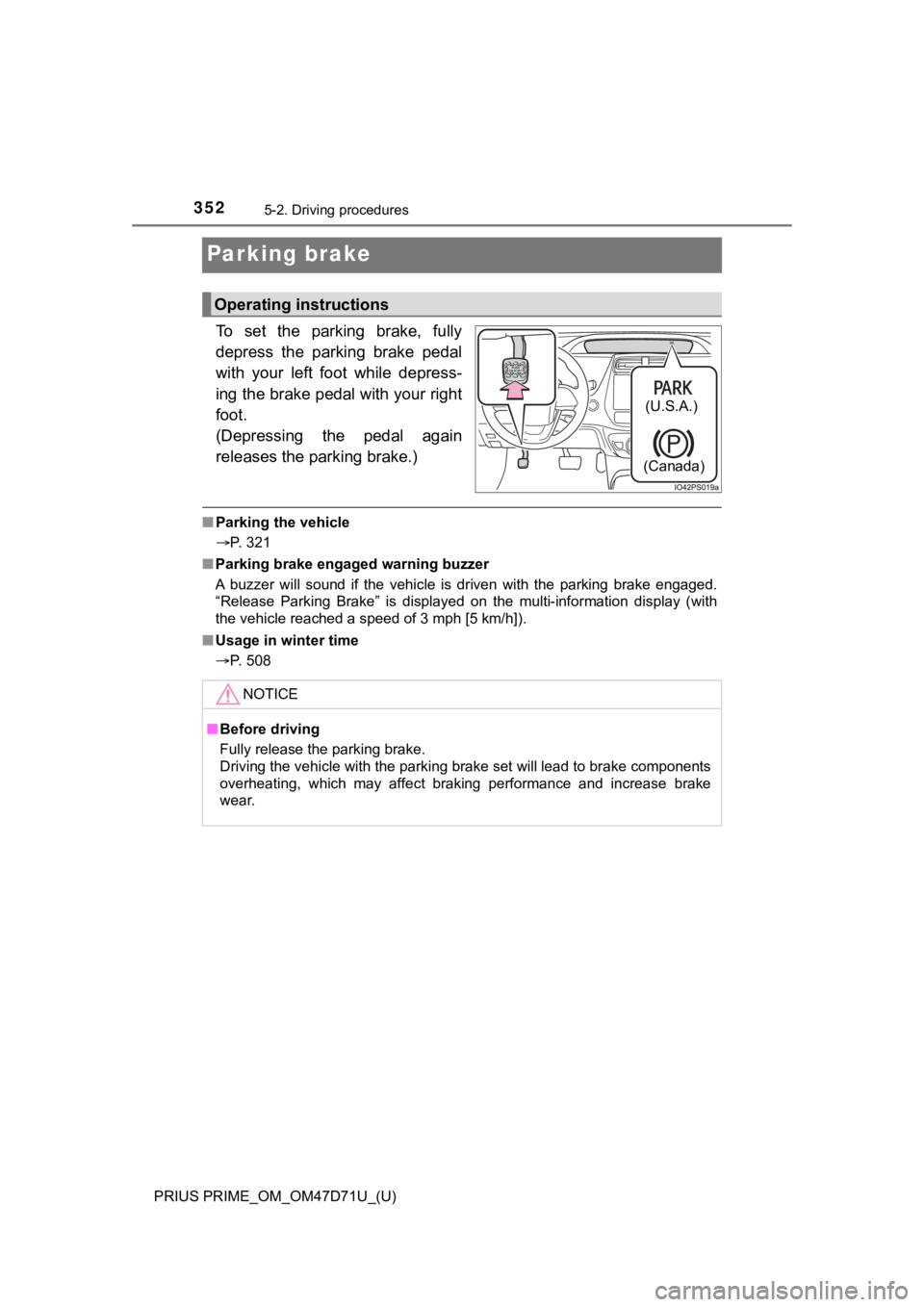
To set the parking brake, fully
depress the parking brake pedal
with your left foot while depress-
ing the brake pedal with your right
foot.
(Depressing the pedal again
releases the parking brake.)
■Parking the vehicle
P. 321
■Parking brake engaged warning buzzer
A buzzer will sound if the vehicle is driven with the parking brake engaged.
“Release Parking Brake” is displayed on the multi-information display (with
the vehicle reached a speed of 3 mph [5 km/h]).
■Usage in winter time
P. 508
Operating instructions
(U.S.A.)
(Canada)
NOTICE
■Before driving
Fully release the parking brake.
Driving the vehicle with the parking brake set will lead to brake components
overheating, which may affect braking performance and increase brake
wear.
Page 356 of 808
356
PRIUS PRIME_OM_OM47D71U_(U)
5-3. Operating the lights and wipers
■Daytime running light system
●The daytime running lights illuminate using the same lights as the head-
lights, and illuminate dimmer than the headlights.
●To make your vehicle more visible to other drivers during daytime driving,
the daytime running lights turn on automatically when all of the following
conditions are met. (The daytime running lights are not designed for use at
night.)
• The hybrid system is operating
• The parking brake is released
• The headlight switch is in the , , or
* position
*: When the surroundings are bright
The daytime running lights remain on after they illuminate, even if the park-
ing brake is set again.
●For the U.S.A.: Daytime running lights can be turned off by operating the
switch.
●Compared to turning on the headlights, the daytime running light system
offers greater durability and consumes less electricity, so it can help improve
fuel economy.
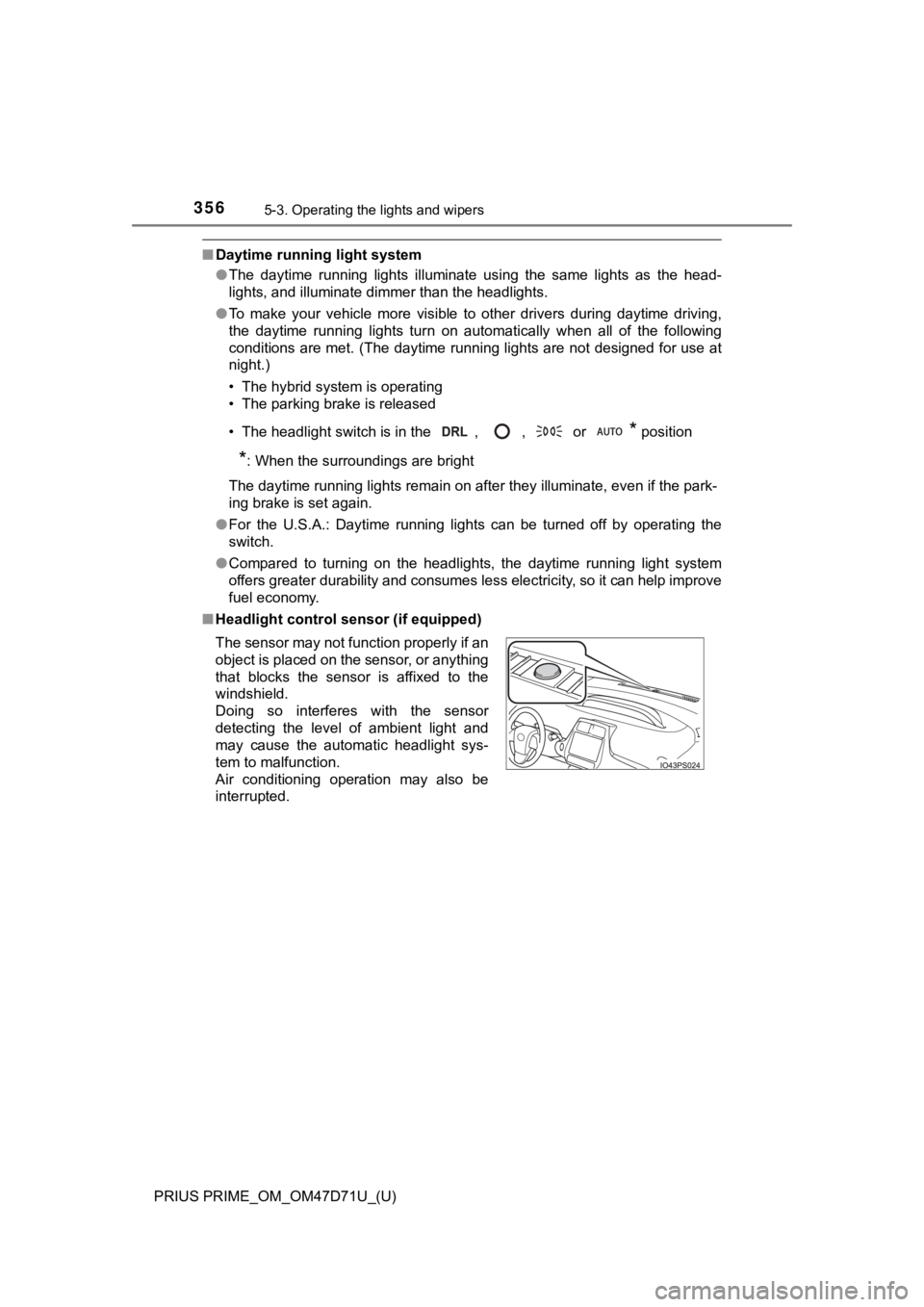
■Headlight control sensor (if equipped)
The sensor may not function properly if an
object is placed on the sensor, or anything
that blocks the sensor is affixed to the
windshield.
Doing so interferes with the sensor
detecting the level of ambient light and
may cause the automatic headlight sys-
tem to malfunction.
Air conditioning operation may also be
interrupted.