display TOYOTA PRIUS PRIME 2022 Owners Manual
[x] Cancel search | Manufacturer: TOYOTA, Model Year: 2022, Model line: PRIUS PRIME, Model: TOYOTA PRIUS PRIME 2022Pages: 808, PDF Size: 14.72 MB
Page 442 of 808
442
PRIUS PRIME_OM_OM47E74U_(U)
5-5. Using the driving support systems
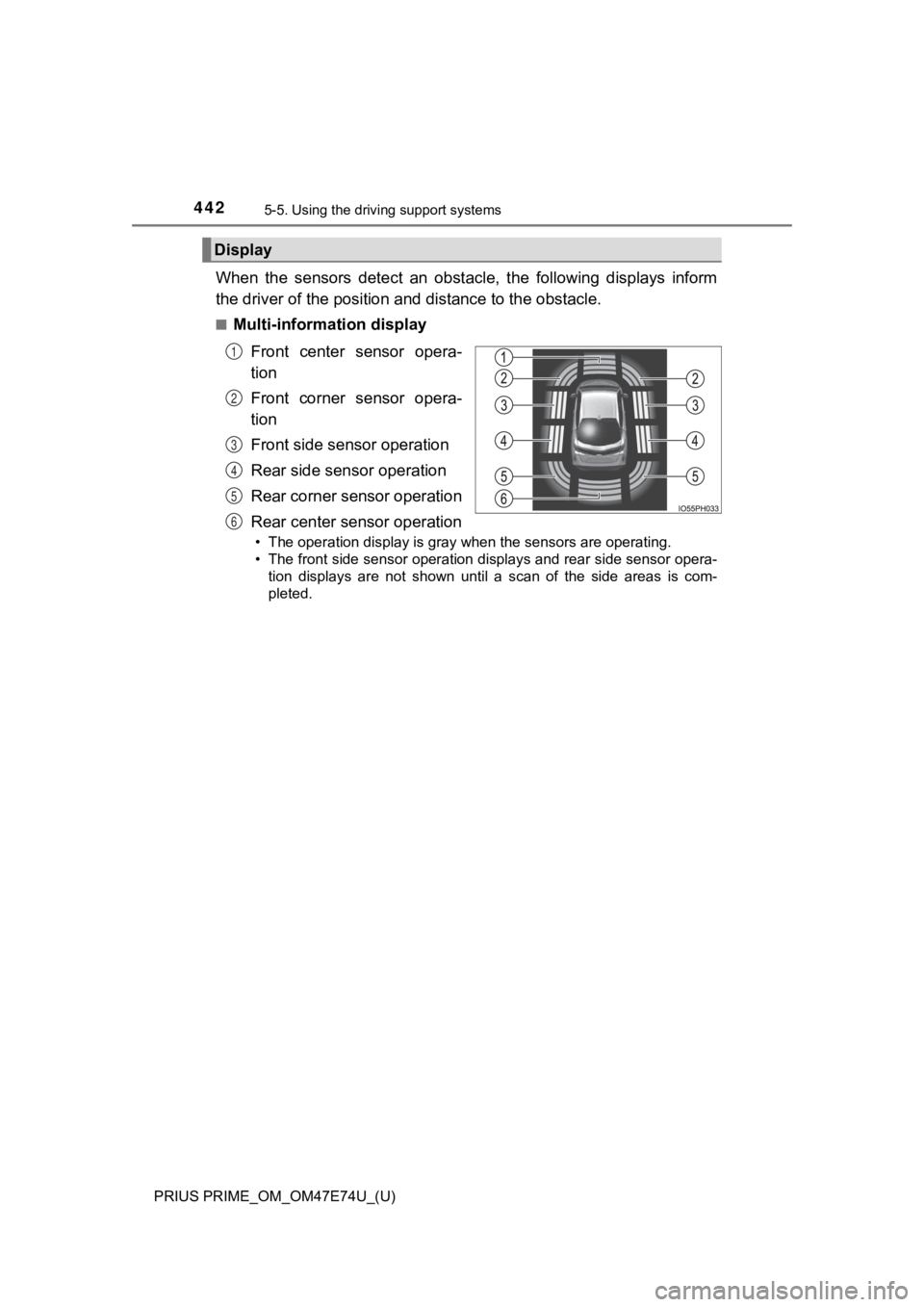
When the sensors detect an obstacle, the following displays inf orm
the driver of the position and distance to the obstacle.
■Multi-information display
Front center sensor opera-
tion
Front corner sensor opera-
tion
Front side sensor operation
Rear side sensor operation
Rear corner sensor operation
Rear center sensor operation
• The operation display is gray when the sensors are operating.
• The front side sensor operation displays and rear side sensor opera-
tion displays are not shown until a scan of the side areas is com-
pleted.
Display
1
2
3
4
5
6
Page 443 of 808
PRIUS PRIME_OM_OM47E74U_(U)
4435-5. Using the driving support systems
5
Driving
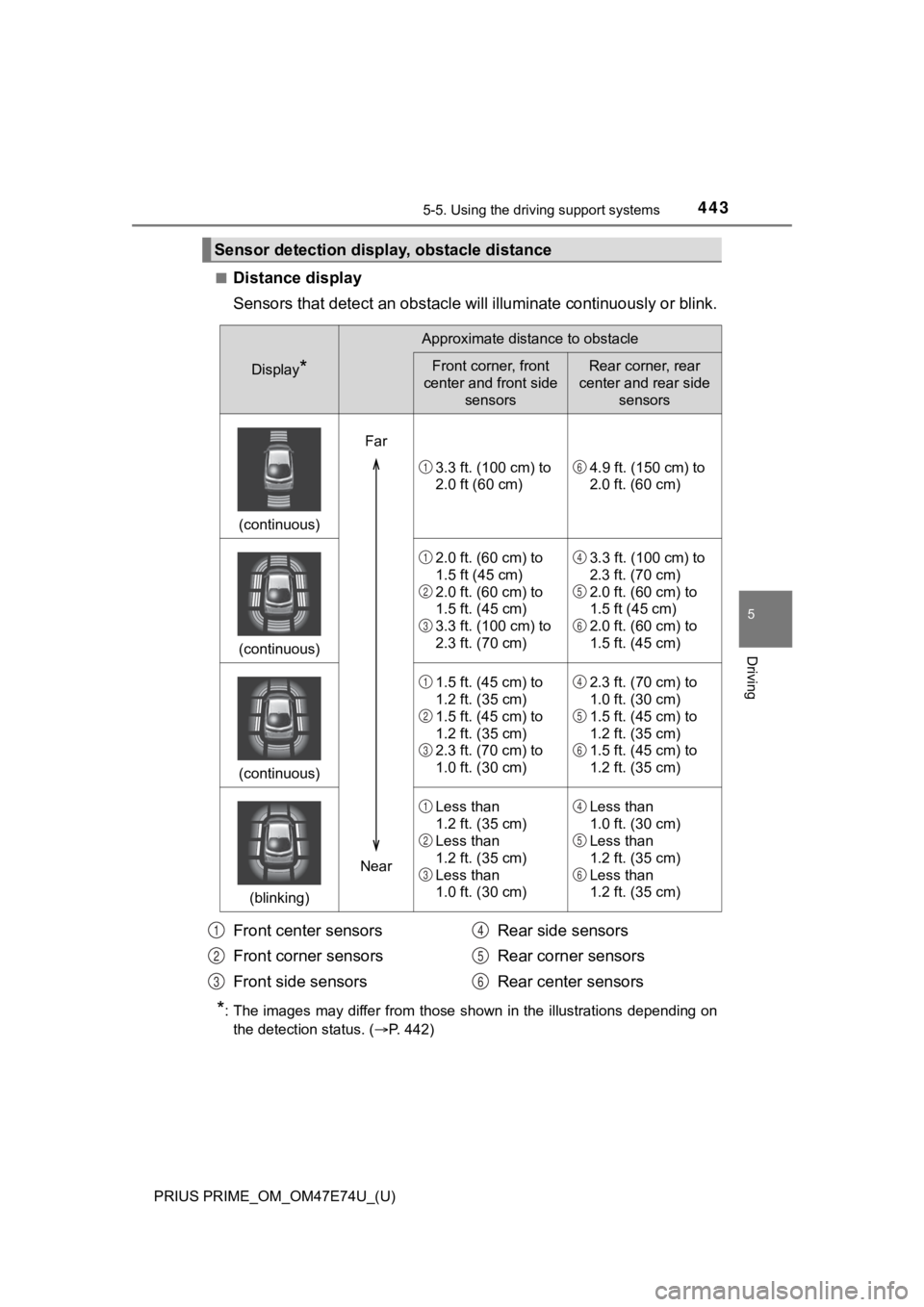
■Distance display
Sensors that detect an obstacle will illuminate continuously or blink.
*: The images may differ from those shown in the illustrations de pending on
the detection status. ( P. 442)
Sensor detection displa y, obstacle distance
Display*
Approximate distance to obstacle
Front corner, front
center and front side sensorsRear corner, rear
center and rear side sensors
(continuous)
3.3 ft. (100 cm) to
2.0 ft (60 cm)4.9 ft. (150 cm) to
2.0 ft. (60 cm)
(continuous)
2.0 ft. (60 cm) to
1.5 ft (45 cm)
2.0 ft. (60 cm) to
1.5 ft. (45 cm)
3.3 ft. (100 cm) to
2.3 ft. (70 cm)3.3 ft. (100 cm) to
2.3 ft. (70 cm)
2.0 ft. (60 cm) to
1.5 ft (45 cm)
2.0 ft. (60 cm) to
1.5 ft. (45 cm)
(continuous)
1.5 ft. (45 cm) to
1.2 ft. (35 cm)
1.5 ft. (45 cm) to
1.2 ft. (35 cm)
2.3 ft. (70 cm) to
1.0 ft. (30 cm)2.3 ft. (70 cm) to
1.0 ft. (30 cm)
1.5 ft. (45 cm) to
1.2 ft. (35 cm)
1.5 ft. (45 cm) to
1.2 ft. (35 cm)
(blinking)
Less than
1.2 ft. (35 cm)
Less than
1.2 ft. (35 cm)
Less than
1.0 ft. (30 cm)Less than
1.0 ft. (30 cm)
Less than
1.2 ft. (35 cm)
Less than
1.2 ft. (35 cm)
Far
Near
16
1
2
3
4
5
6
1
2
3
4
5
6
1
2
3
4
5
6
Front center sensors
Front corner sensors
Front side sensors Rear side sensors
Rear corner sensors
Rear center sensors1
2
3
4
5
6
Page 445 of 808
PRIUS PRIME_OM_OM47E74U_(U)
4455-5. Using the driving support systems
5
Driving
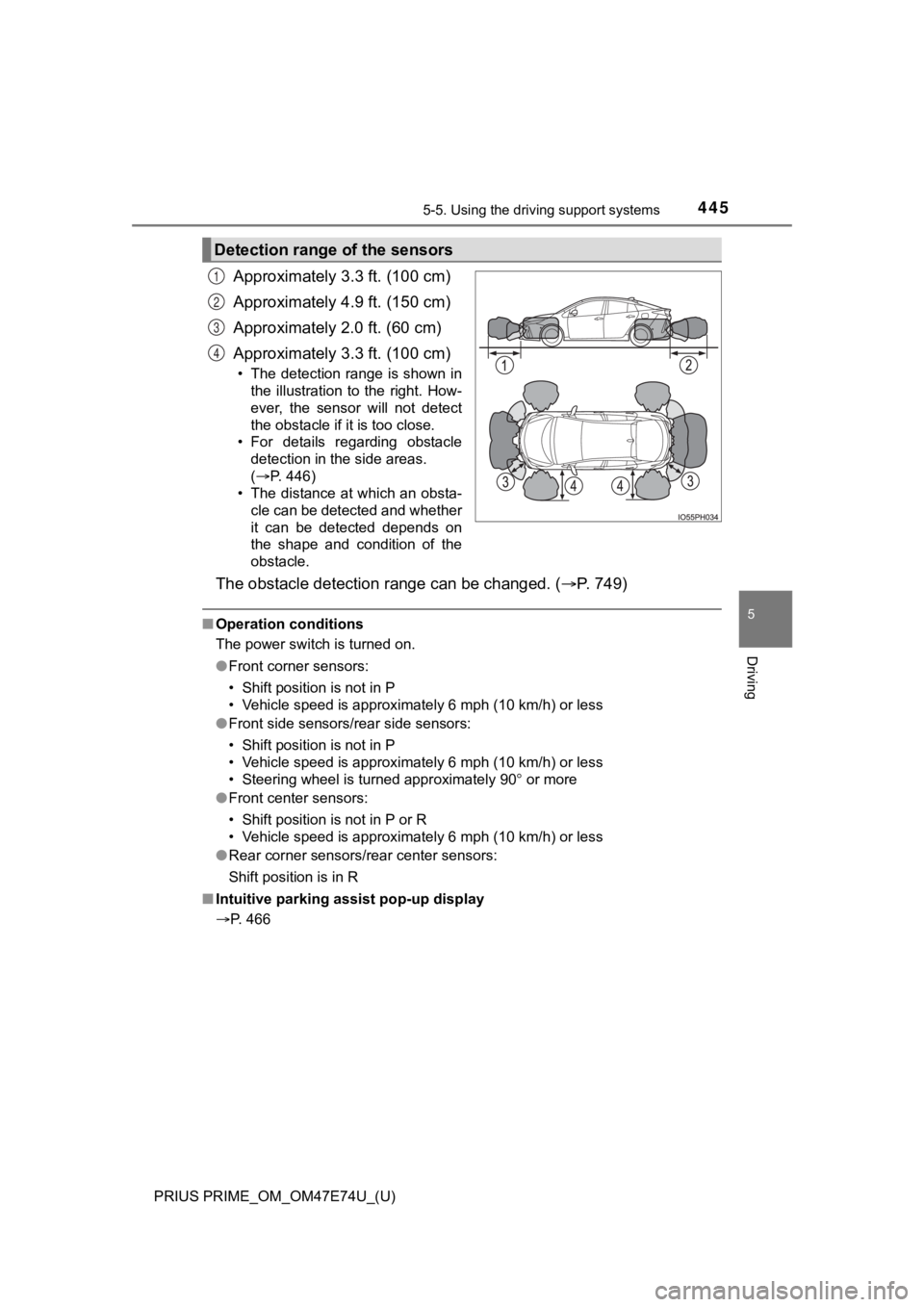
Approximately 3.3 ft. (100 cm)
Approximately 4.9 ft. (150 cm)
Approximately 2.0 ft. (60 cm)
Approximately 3.3 ft. (100 cm)
• The detection range is shown in
the illustration to the right. How-
ever, the sensor will not detect
the obstacle if it is too close.
• For details regarding obstacle detection in the side areas.
(P. 446)
• The distance at which an obsta- cle can be detected and whether
it can be detected depends on
the shape and condition of the
obstacle.
The obstacle detecti on range can be changed. ( P. 7 4 9 )
■Operation conditions
The power switch is turned on.
●Front corner sensors:
• Shift position is not in P
• Vehicle speed is approximately 6 mph (10 km/h) or less
● Front side sensors/rear side sensors:
• Shift position is not in P
• Vehicle speed is approximately 6 mph (10 km/h) or less
• Steering wheel is turned approximately 90 or more
● Front center sensors:
• Shift position is not in P or R
• Vehicle speed is approximately 6 mph (10 km/h) or less
● Rear corner sensors/rear center sensors:
Shift position is in R
■ Intuitive parking assist pop-up display
P. 466
Detection range of the sensors
1
2
3
4
Page 446 of 808
446
PRIUS PRIME_OM_OM47E74U_(U)
5-5. Using the driving support systems
■Sensor detection information
●The sensor’s detection areas are limited to the areas around th e vehicle’s
bumper.
● Depending on the shape of the obstacle and other factors, the detection dis-
tance may shorten, or detection may be impossible.
● Obstacles may not be detected if they are too close to the sens or.
● There will be a short delay between obstacle detection and disp lay. Even
when traveling at a low speed, if you come too close to an obstacle before
the display and buzzer activate, the display and buzzer may not activate at
all.
● Thin posts or objects lower than the sensor may not be detected when
approached, even if they have been detected once.
● It might be difficult to hear beeps due to the volume of audio system or air
flow noise of the air conditioning system.
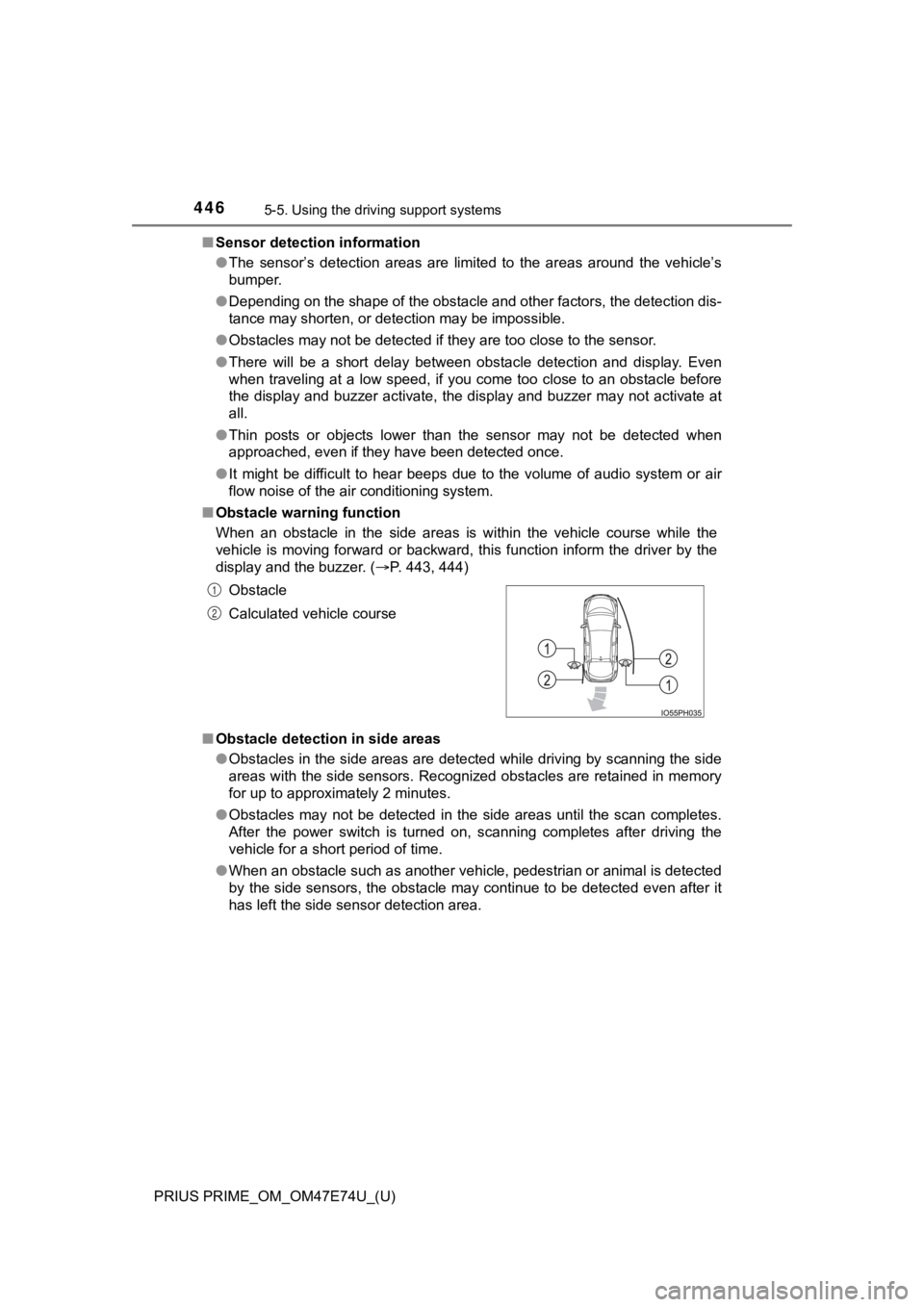
■ Obstacle warning function
When an obstacle in the side areas is within the vehicle course while the
vehicle is moving forward or backward, this function inform the driver by the
display and the buzzer. ( P. 443, 444)
■ Obstacle detection in side areas
●Obstacles in the side areas are detected while driving by scann ing the side
areas with the side sensors. Recognized obstacles are retained in memory
for up to approximately 2 minutes.
● Obstacles may not be detected in the side areas until the scan completes.
After the power switch is turned on, scanning completes after driving the
vehicle for a short period of time.
● When an obstacle such as another vehicle, pedestrian or animal is detected
by the side sensors, the obstacle may continue to be detected e ven after it
has left the side sensor detection area. Obstacle
Calculated vehicle course
1
2
Page 447 of 808
PRIUS PRIME_OM_OM47E74U_(U)
4475-5. Using the driving support systems
5
Driving
■If “Clean Parking Assist Sensor” is displayed on the multi-information
display
A sensor may be dirty or covered with snow or ice. In such case s, if it is
removed from the sensor, the system should return to normal.
Also, due to the sensor being frozen at low temperatures, a mal function dis-
play may appear or an obstacle may not be detected. If the sens or thaws out,
the system should return to normal.
■ If “Parking Assist Malfunction” is displayed on the multi-information dis-
play
Depending on the malfunction of the sensor, the device may not be working
normally. Have the vehicle inspected by your Toyota dealer.
■ Certification (Canada only)
This ISM device complies with Canadian ICES-001.
■ Customization
Settings (e.g. buzzer volume) can be changed.
(Customizable features: P. 749)
■ Objects which the system may not properly detect
The shape of the object may prevent the sensor from detecting it. Pay partic-
ular attention to the following objects:
● Wires, fences, ropes, etc.
● Cotton, snow and other materials that absorb sound waves
● Sharply-angled objects
● Low objects
● Tall objects with upper sections projecting outwards in the dir ection of your
vehicle
■ Situations in which the syst em may not operate properly
Certain vehicle conditions and the surrounding environment may affect the
ability of a sensor to correctly detect objects. Particular instances where this
may occur are listed below.
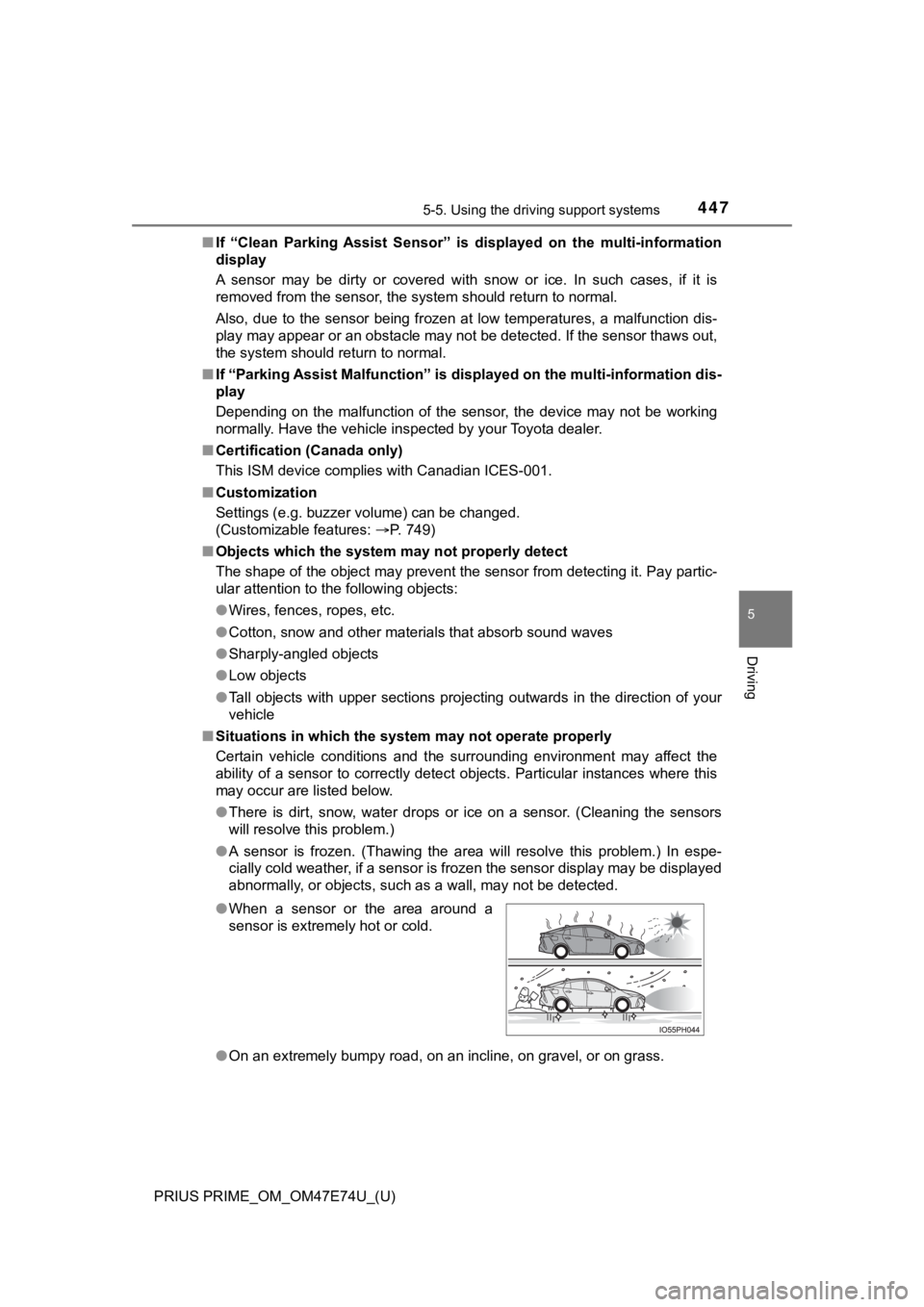
● There is dirt, snow, water drops or ice on a sensor. (Cleaning the sensors
will resolve this problem.)
● A sensor is frozen. (Thawing the area will resolve this problem .) In espe-
cially cold weather, if a sensor is frozen the sensor display m ay be displayed
abnormally, or objects, such as a wall, may not be detected.
● On an extremely bumpy road, on an incline, on gravel, or on grass.
●
When a sensor or the area around a
sensor is extremely hot or cold.
Page 450 of 808
450
PRIUS PRIME_OM_OM47E74U_(U)
5-5. Using the driving support systems
WARNING
■Cautions regarding the use of the system
There is a limit to the degree of recognition accuracy and cont rol perfor-
mance that this system can provide, do not overly rely on this system. The
driver is always responsible for paying attention to the vehicl e’s surround-
ings and driving safely.
■ To ensure the system can operate properly
Observe the following precautions to avoid an unexpected accident.
● Do not damage the sensors, and always keep them clean.
● Do not attach a sticker or install an electronic component, such as a backlit
license plate (especially fluorescent type), fog lights, fender pole or wire-
less antenna near a radar sensor.
● Do not subject the surrounding area of the sensor to a strong impact. If
subjected to an impact, have the vehicle inspected by your Toyota dealer.
If the front or rear bumper needs to be removed/installed or replaced, con-
tact your Toyota dealer.
● Do not modify, disassemble or paint the sensors.
● Do not attach a license plate cover.
● Keep your tires properly inflated.
■ When to disable the function
In the following situations, disable the function as it may operate even
though there is no possibility of a collision.
● Failing to observe the warnings above.
● A non-genuine Toyota suspension (lowered suspension, etc.) is installed.
■ Side sensors
In the following situations, the intuitive parking assist may n ot operate nor-
mally and may result in an unexpected accident. Drive carefully.
● Obstacles may not be detected in the side areas until the vehicle is driven
for a short time and a scan of the side areas is completed. ( P. 446)
● Even after the scan of the side areas is completed, obstacles s uch as
other vehicles, people or animals that approach from the sides cannot be
detected.
● Even after the scan of the side areas is completed, obstacles may not be
detected depending on the surrounding situation of the vehicle.
At that time, the side sensor operation displays ( P. 442) temporary turn
off.
Page 451 of 808

PRIUS PRIME_OM_OM47E74U_(U)
4515-5. Using the driving support systems
5
Driving
WARNING
■Notes when washing the vehicle
● Do not apply intensive bursts of water or steam to the sensor area.
Doing so may result in the sensor malfunctioning.
● When using steam to wash the vehicle, do not direct steam too c lose to
the sensors. The sensors may not function properly if subjected to steam.
NOTICE
■ When using intuitive parking assist
In the following situations, the system may not function correctly due to a
sensor malfunction etc. Have the vehicle checked by your Toyota dealer.
● Intuitive parking assist operation display flashes, and a beep sounds when
no obstacles are detected.
● If the area around a sensor collides with something, or is subjected to
strong impact.
● If the bumper collides with something.
● If the display shows up and remains on without a beep.
● If a display error occurs, first check the sensor.
If the error occurs even when there is no ice, snow or mud on the sensor, it
is likely that the sensor is malfunctioning.
Page 453 of 808
PRIUS PRIME_OM_OM47E74U_(U)
4535-5. Using the driving support systems
5
Driving
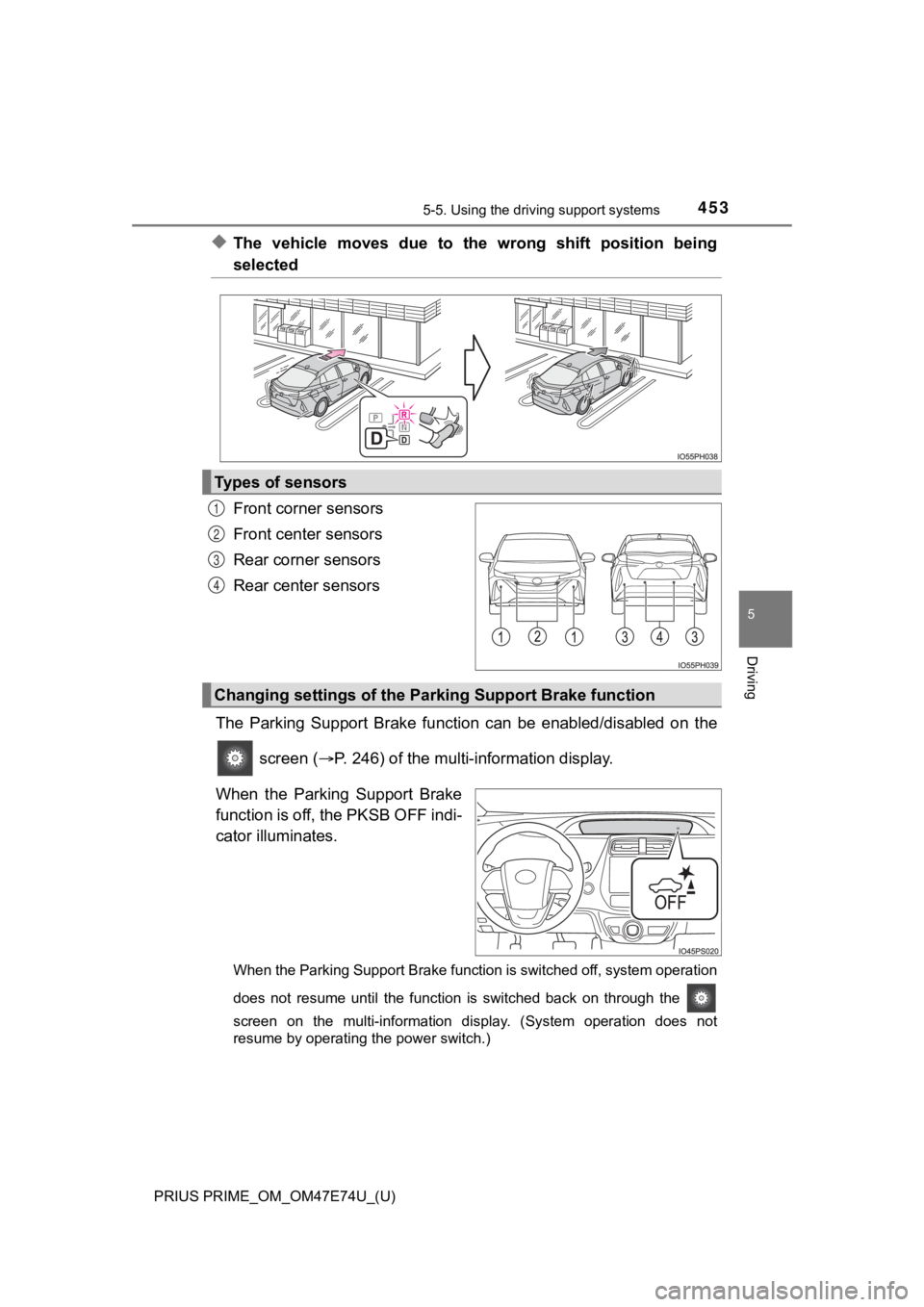
◆The vehicle moves due to the wrong shift position being
selected
Front corner sensors
Front center sensors
Rear corner sensors
Rear center sensors
The Parking Support Brake funct ion can be enabled/disabled on the
screen ( P. 246) of the multi-information display.
When the Parking Support Brake
function is off, the PKSB OFF indi-
cator illuminates.
When the Parking Support Brake function is switched off, system operation
does not resume until the function is switched back on through the
screen on the multi-information display. (System operation does not
resume by operating the power switch.)
Types of sensors
1
2
3
4
Changing settings of the Park ing Support Brake function
Page 457 of 808
PRIUS PRIME_OM_OM47E74U_(U)
4575-5. Using the driving support systems
5
Driving
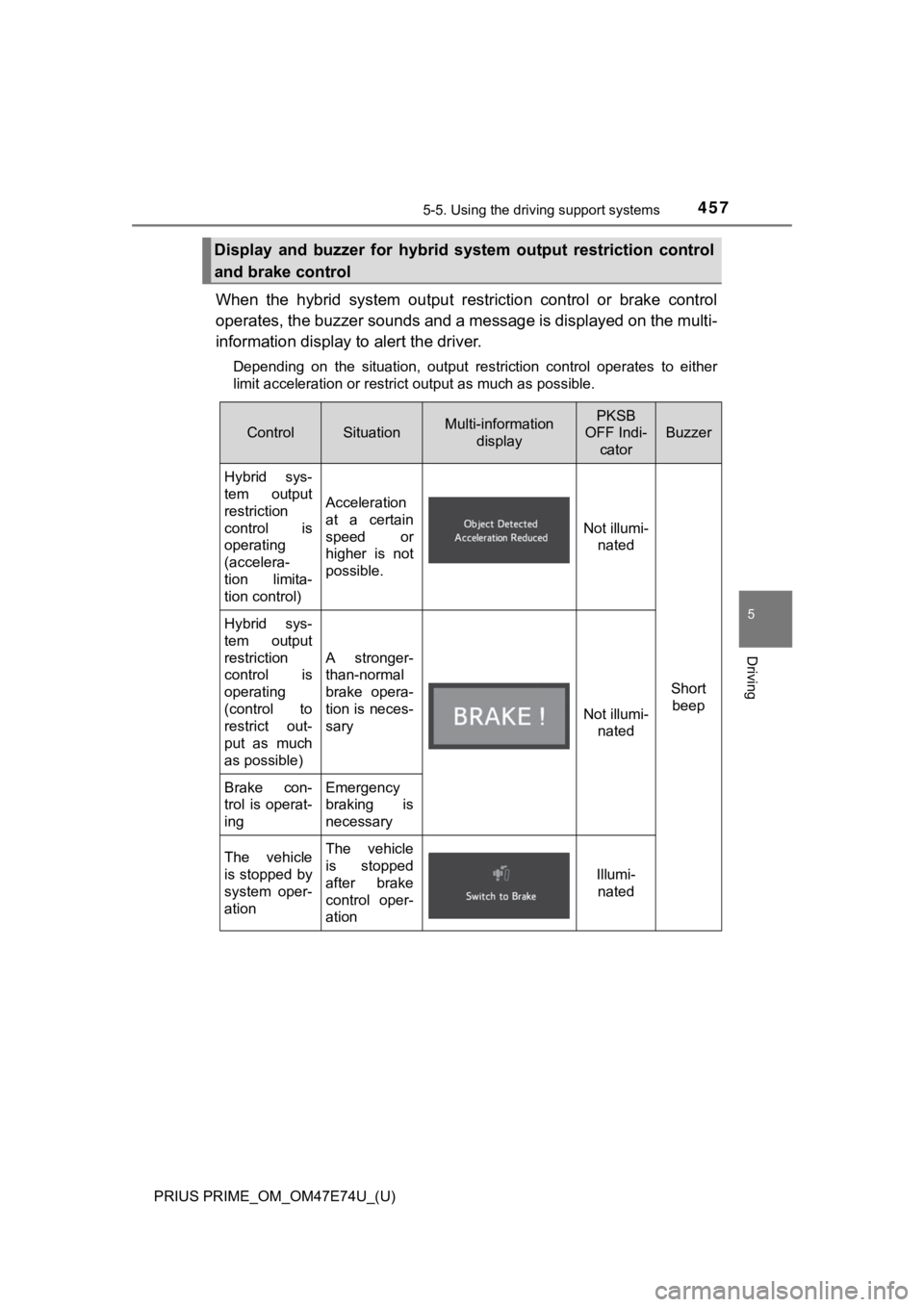
When the hybrid system output restriction control or brake cont rol
operates, the buzzer sounds and a message is displayed on the m ulti-
information display to alert the driver.
Depending on the situation, output restriction control operates to either
limit acceleration or restrict output as much as possible.
Display and buzzer for hybrid system output restriction control
and brake control
ControlSituationMulti-information displayPKSB
OFF Indi- cator
Buzzer
Hybrid sys-
tem output
restriction
control is
operating
(accelera-
tion limita-
tion control)
Acceleration
at a certain
speed or
higher is not
possible.
Not illumi-nated
Short beep
Hybrid sys-
tem output
restriction
control is
operating
(control to
restrict out-
put as much
as possible)
A stronger-
than-normal
brake opera-
tion is neces-
sary
Not illumi- nated
Brake con-
trol is operat-
ingEmergency
braking is
necessary
The vehicle
is stopped by
system oper-
ationThe vehicle
is stopped
after brake
control oper-
ation
Illumi-nated
Page 459 of 808
PRIUS PRIME_OM_OM47E74U_(U)
4595-5. Using the driving support systems
5
Driving
■When “PKSB Unavailable” is displayed on the multi-information display
and the PKSB OFF indicator flashes
●Ice, snow, dirt, etc., may have adhered to the sensor. If this occurs, remove
the ice, snow, dirt, etc., from the sensor to return the system to normal.
Also, a warning message may be displayed at low temperatures du e to ice
forming on the sensor, and the sensor may not detect obstacles. Once the
ice melts, the system will return to normal.
● If this message is shown even after removing dirt from the sensor, or shown
when the sensor was not dirty to begin with, have the vehicle inspected at
your Toyota dealer.
■ When “PKSB Malfunction Visit You r Dealer” is displayed on the multi-
information display, the PKSB OFF indicator flashes and the buz zer
sounds
The system may not be operating properly. Have the vehicle inspected at
your Toyota dealer.
WARNING
■ Cautions regarding the use of the system
Do not rely solely upon the system. Relying solely upon the system may
lead to an unexpected accident.
● Driving safely is the sole responsibility of the driver. Pay careful attention
to the surrounding conditions in order to ensure safe driving. The Parking
Support Brake function can provide support to lessen the severity of colli-
sions. However, it may not operate depending on the situation.
● The Parking Support Brake function is not a system designed to com-
pletely stop the vehicle. Furthermore, even if the Parking Support Brake
function is able to stop the vehicle, brake control is canceled after approxi-
mately 2 seconds, so depress the brake pedal immediately.
● It is extremely dangerous to check the system operations by int entionally
driving the vehicle into the direction of a wall, etc. Never at tempt such
actions.