display TOYOTA PRIUS PRIME 2022 Owners Manual
[x] Cancel search | Manufacturer: TOYOTA, Model Year: 2022, Model line: PRIUS PRIME, Model: TOYOTA PRIUS PRIME 2022Pages: 808, PDF Size: 14.72 MB
Page 561 of 808
PRIUS PRIME_OM_OM47E74U_(U)
5616-4. Using the other interior features
6
Interior features
NOTICE
■Conditions in which the function may not operate correctly
In the following conditions, it may not operate correctly
● The portable device is fully charged
● There is foreign matter between the charge area and portable device
● The temperature of the portable device gets higher from charging
● The charging surface of the portable device is facing up
● The placement of the portable device is out of alignment with t he charge
area
● Near a TV tower, electric power plant, gas station, radio station, large dis-
play, airport or other facility that generates strong radio wav es or electrical
noise
● When the electronic key is in contact with, or is covered by the following
metallic objects
• Cards to which aluminum foil is attached
• Cigarette boxes that have aluminum foil inside
• Metallic wallets or bags
• Coins
• Hand warmers made of metal
• Media such as CDs and DVDs
● When other wireless keys (that emit radio waves) are being used nearby
In addition, excluding the above-mentioned, when the charger does not per-
form normally or the operation display lamp is flashing continu ously, it is
considered that the wireless charger is malfunctioning. Contact your Toyota
dealer.
■ To prevent failure or damage to data
● Do not bring magnetic cards, such as credit cards, or magnetic recording
media, etc., close to the charger while charging, otherwise, da ta may dis-
appear under the influence of magnetism. Also, do not bring pre cision
instruments such as wrist watches, etc., close to the charger, as such
objects may break.
● Do not leave portable devices in the cabin. The temperature ins ide the
cabin may become high, when under the sun, and cause damage to the
device.
■ To prevent 12-volt battery discharge
When the hybrid system is stopped, do not use the wireless char ger for a
long time.
Page 568 of 808
568
PRIUS PRIME_OM_OM47E74U_(U)
6-4. Using the other interior features
■Reprogramming a single HomeLink® button
When the following procedure is performed, buttons which alread y
have devices registered to them can be overwritten:
With one hand, press and hold the desired HomeLink
® button.
When the HomeLink
® indicator starts flashing orange, continue
to hold the HomeLink® button and perform “Programming the
HomeLink®” step (it takes 20 seconds for the HomeLink® indi-
cator to start flashing).
Press the appropriate HomeLink
® button. The HomeLink® indicator
light should turn on.
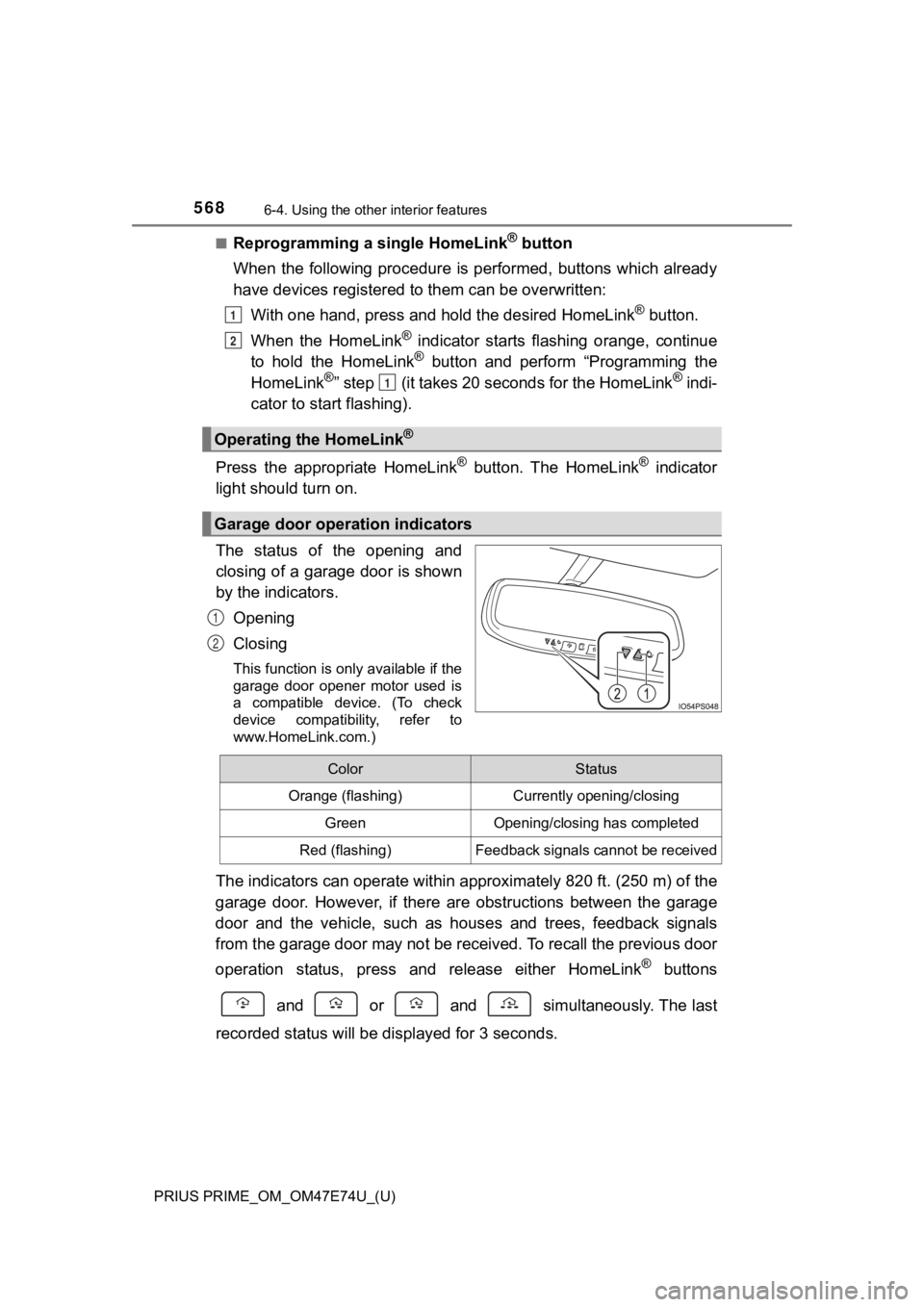
The status of the opening and
closing of a garage door is shown
by the indicators.
Opening
Closing
This function is only available if the
garage door opener motor used is
a compatible device. (To check
device compatibility, refer to
www.HomeLink.com.)
The indicators can operate within approximately 820 ft. (250 m) of the
garage door. However, if there are obstructions between the gar age
door and the vehicle, such as h ouses and trees, feedback signal s
from the garage door may not be received. To recall the previou s door
operation status, press an d release either HomeLink
® buttons
and or and simultaneously. The last
recorded sta tus will be display ed for 3 seconds.
Operating the HomeLink®
Garage door operation indicators
1
2
1
1
2
ColorStatus
Orange (flashing)Currently opening/closing
GreenOpening/closing has completed
Red (flashing)Feedback signals cannot be received
Page 580 of 808
580
PRIUS PRIME_OM_OM47E74U_(U)
7-1. Maintenance and care
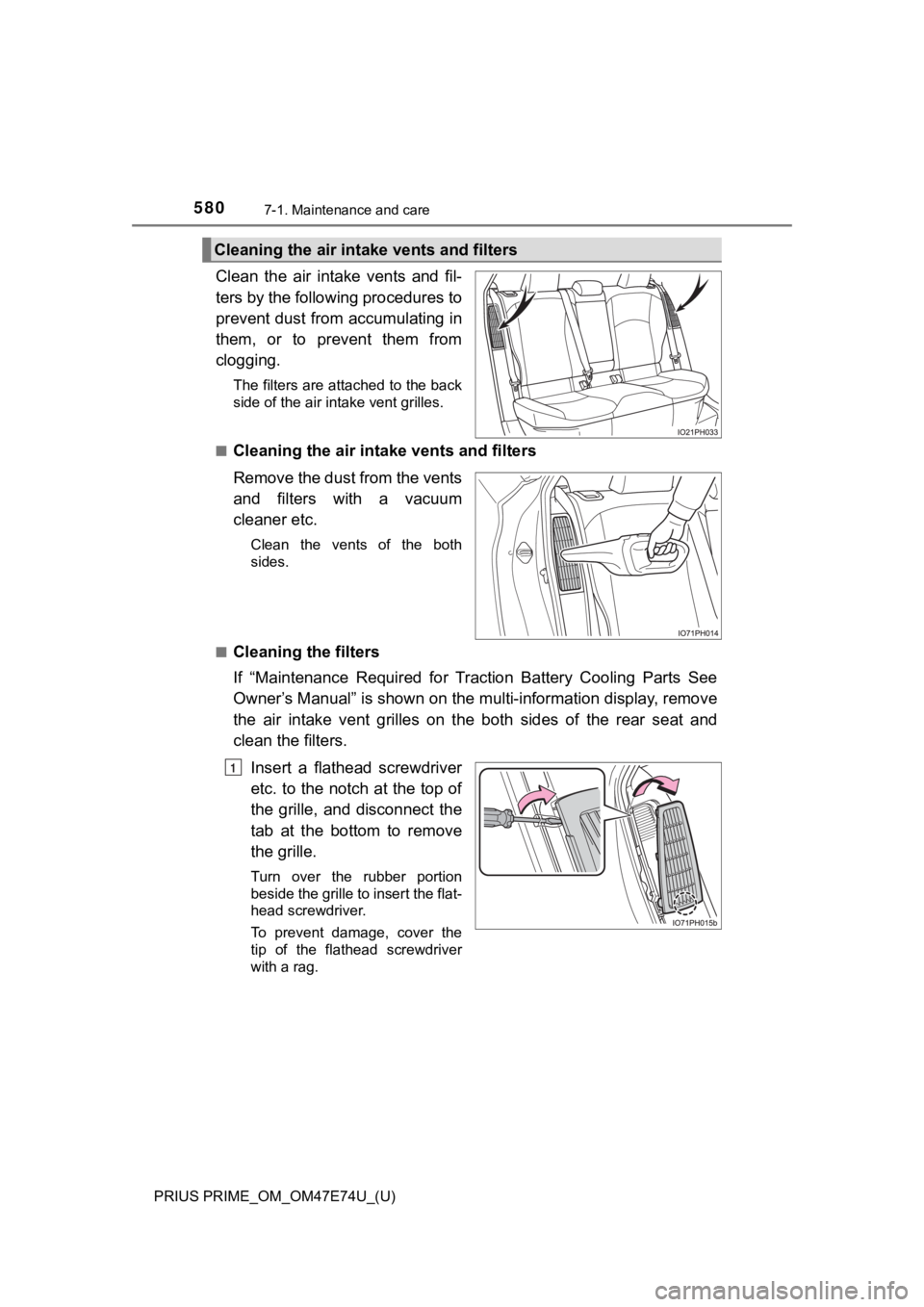
Clean the air intake vents and fil-
ters by the following procedures to
prevent dust from accumulating in
them, or to prevent them from
clogging.
The filters are attached to the back
side of the air intake vent grilles.
■
Cleaning the air intake vents and filters
Remove the dust from the vents
and filters with a vacuum
cleaner etc.
Clean the vents of the both
sides.
■
Cleaning the filters
If “Maintenance Required for Traction Battery Cooling Parts See
Owner’s Manual” is shown on the multi-information display, remo ve
the air intake vent grilles on t he both sides of the rear seat and
clean the filters.
Insert a flathead screwdriver
etc. to the notch at the top of
the grille, and disconnect the
tab at the bottom to remove
the grille.
Turn over the rubber portion
beside the grille to insert the flat-
head screwdriver.
To prevent damage, cover the
tip of the flathead screwdriver
with a rag.
Cleaning the air intake vents and filters
1
Page 581 of 808
PRIUS PRIME_OM_OM47E74U_(U)
5817-1. Maintenance and care
7
Maintenance and care
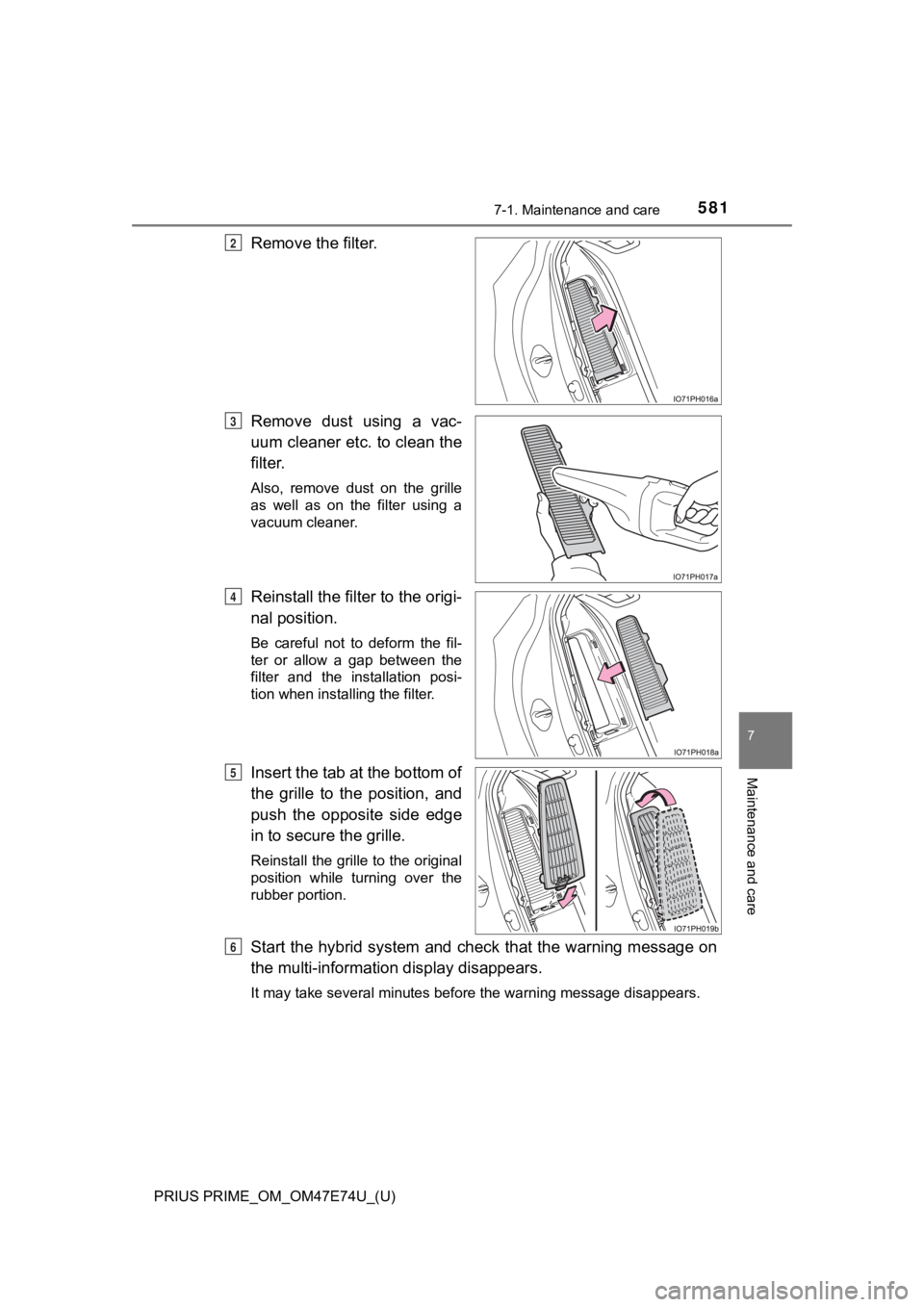
Remove the filter.
Remove dust using a vac-
uum cleaner etc. to clean the
filter.
Also, remove dust on the grille
as well as on the filter using a
vacuum cleaner.
Reinstall the filter to the origi-
nal position.
Be careful not to deform the fil-
ter or allow a gap between the
filter and the installation posi-
tion when installing the filter.
Insert the tab at the bottom of
the grille to the position, and
push the opposite side edge
in to secure the grille.
Reinstall the grille to the original
position while turning over the
rubber portion.
Start the hybrid system and check that the warning message on
the multi-information display disappears.
It may take several minutes before the warning message disappea rs.
2
3
4
5
6
Page 582 of 808

582
PRIUS PRIME_OM_OM47E74U_(U)
7-1. Maintenance and care
■Caring for leather areas
Toyota recommends cleaning the interior of the vehicle at least twice a year to
maintain the quality of the vehicle’s interior.
■ Shampooing the carpets
There are several commercial foaming-type cleaners available. U se a sponge
or brush to apply the foam. Rub in overlapping circles. Do not use water.
Wipe dirty surfaces and let them dry. Excellent results are obt ained by keep-
ing the carpet as dry as possible.
■ Seat belts
Clean with mild soap and lukewarm water using a cloth or sponge . Also
check the belts periodically for excessive wear, fraying or cut s.
■ Cleaning the air intake vents and filters
●Dust on the air intake vents or filters may interferes cooling of the hybrid bat-
tery (traction battery) and results in poor electricity and fue l consumption.
Clean the air intake vents and filters periodically.
● If continuing to drive the vehicle with “Maintenance Required f or Traction
Battery Cooling Parts See Owner’s Manual” shown on the multi-in formation
display, the hybrid battery (traction battery) may overheat, le ading to
decreasing in distance that can be driven using the electric mo tor. It may
cause poor electricity and fuel consumption or a malfunction. If the warning
message is shown, clean the air intake vents and filters immediately.
● Improper handling may result in damage to the grille or filters. If you have
any concerns about cleaning the filters, contact your Toyota dealer.
● If the warning message on the multi-information display does not disappear
after cleaning the filters, have the vehicle inspected by your Toyota dealer.
● Timing of cleaning filters differs depending on the use environ ment of the
vehicle.
Page 586 of 808
586
PRIUS PRIME_OM_OM47E74U_(U)
7-2. Maintenance
■Repair and replacement
It is recommended that genuine Toyota parts be used for repairs to ensure
performance of each system. If non-Toyota parts are used in rep lacement or if
a repair shop other than a Toyota dealer performs repairs, conf irm the war-
ranty coverage.
■ Resetting the message indicating ma intenance is required (U.S.A. only)
After the required maintenance is preformed according to the ma intenance
schedule, please reset the message.
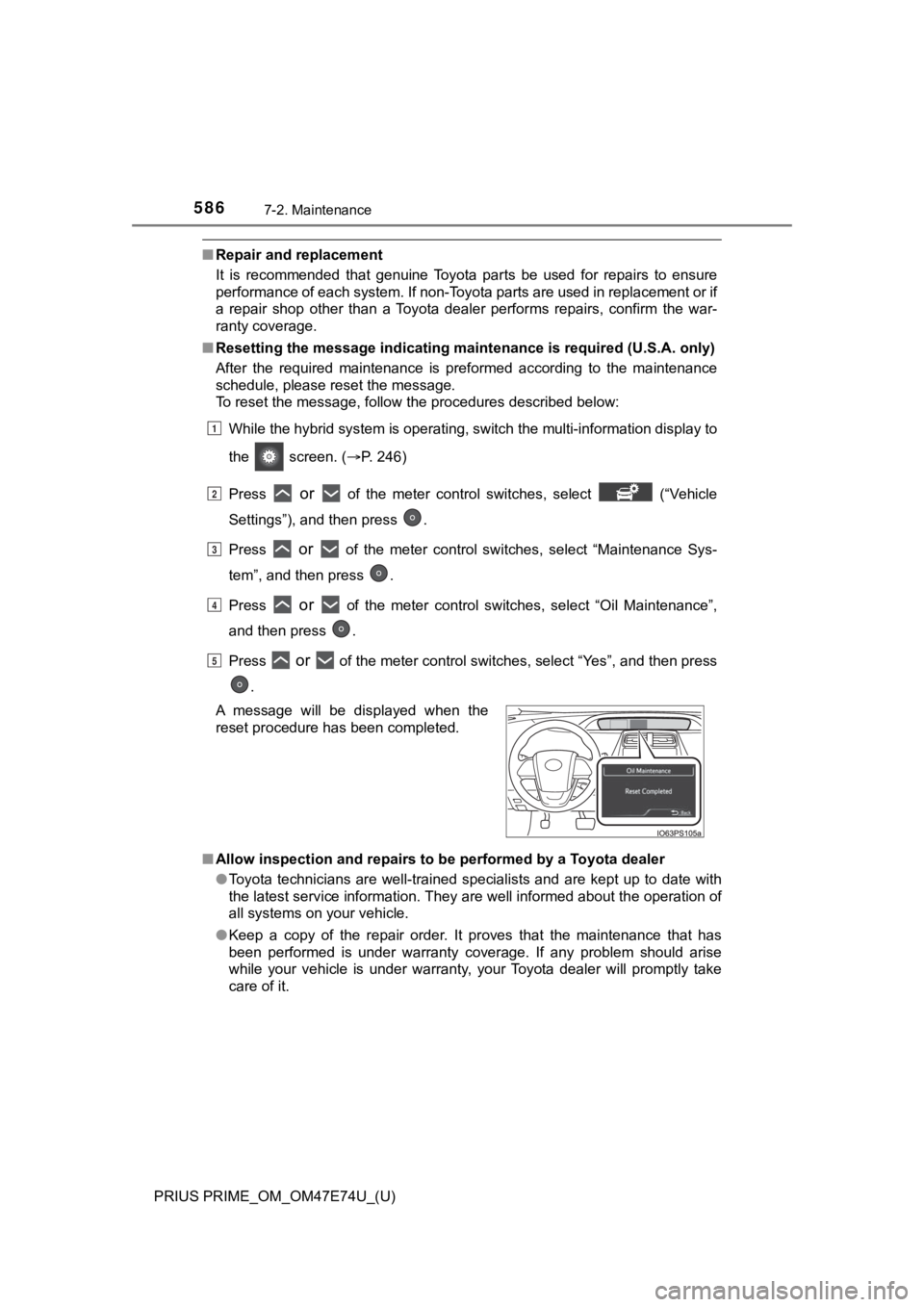
To reset the message, follow the procedures described below:
While the hybrid system is operating, switch the multi-informat ion display to
the screen. ( P. 246)
Press
or of the meter control switches, select (“Vehicle
Settings”), and then press .
Press
or of the meter control switches, select “Maintenance Sys-
tem”, and then press .
Press
or of the meter control switches, select “Oil Maintenance”,
and then press .
Press
or of the meter control switches, select “Yes”, and then press
.
■ Allow inspection and repairs to be performed by a Toyota dealer
●Toyota technicians are well-trained specialists and are kept up to date with
the latest service information. They are well informed about th e operation of
all systems on your vehicle.
● Keep a copy of the repair order. It proves that the maintenance that has
been performed is under warranty coverage. If any problem should arise
while your vehicle is under warranty, your Toyota dealer will p romptly take
care of it.
A message will be displayed when the
reset procedure has been completed.
1
2
3
4
5
Page 593 of 808
PRIUS PRIME_OM_OM47E74U_(U)
5937-3. Do-it-yourself maintenance
7
Maintenance and care
Tire inflation
pressure
( P. 620)• Tire pressure gauge
• Compressed air source
Washer fluid
( P. 610)• Water or washer fluid containing antifreeze (for win-
ter use)
• Funnel (used only for adding water or washer fluid)
WARNING
The engine compartment contains many mechanisms and fluids that may
move suddenly, become hot, or become electrically energized. To avoid death
or serious injury, observe the following precautions.
■ When working on the engine compartment
● Make sure that the “Accessory”, “Ignition ON” or mileage display
(P. 210) on the main display and the “READY” indicator are both off.
● Keep hands, clothing and tools away from the moving fan.
● Be careful not to touch the engine, power control unit, radiato r, exhaust
manifold, etc. right after driving as they may be hot. Oil and other fluids
may also be hot.
● Do not leave anything that may burn easily, such as paper and r ags, in the
engine compartment.
● Do not smoke, cause sparks or expose an open flame to fuel. Fuel fumes
are flammable.
● Be extremely cautious when working on the 12-volt battery. It contains poi-
sonous and corrosive sulfuric acid.
■ When working near the electric cooling fans or radiator grille
Be sure the power switch is off.
With the power switch in ON mode, the electric cooling fans may automati-
cally start to run if the air conditioning is on and/or the coolant temperature
is high. (P. 604)
■ Safety glasses
Wear safety glasses to prevent flying or falling material, fluid spray, etc.
from getting in your eyes.
ItemsParts and tools
Page 614 of 808
614
PRIUS PRIME_OM_OM47E74U_(U)
7-3. Do-it-yourself maintenance
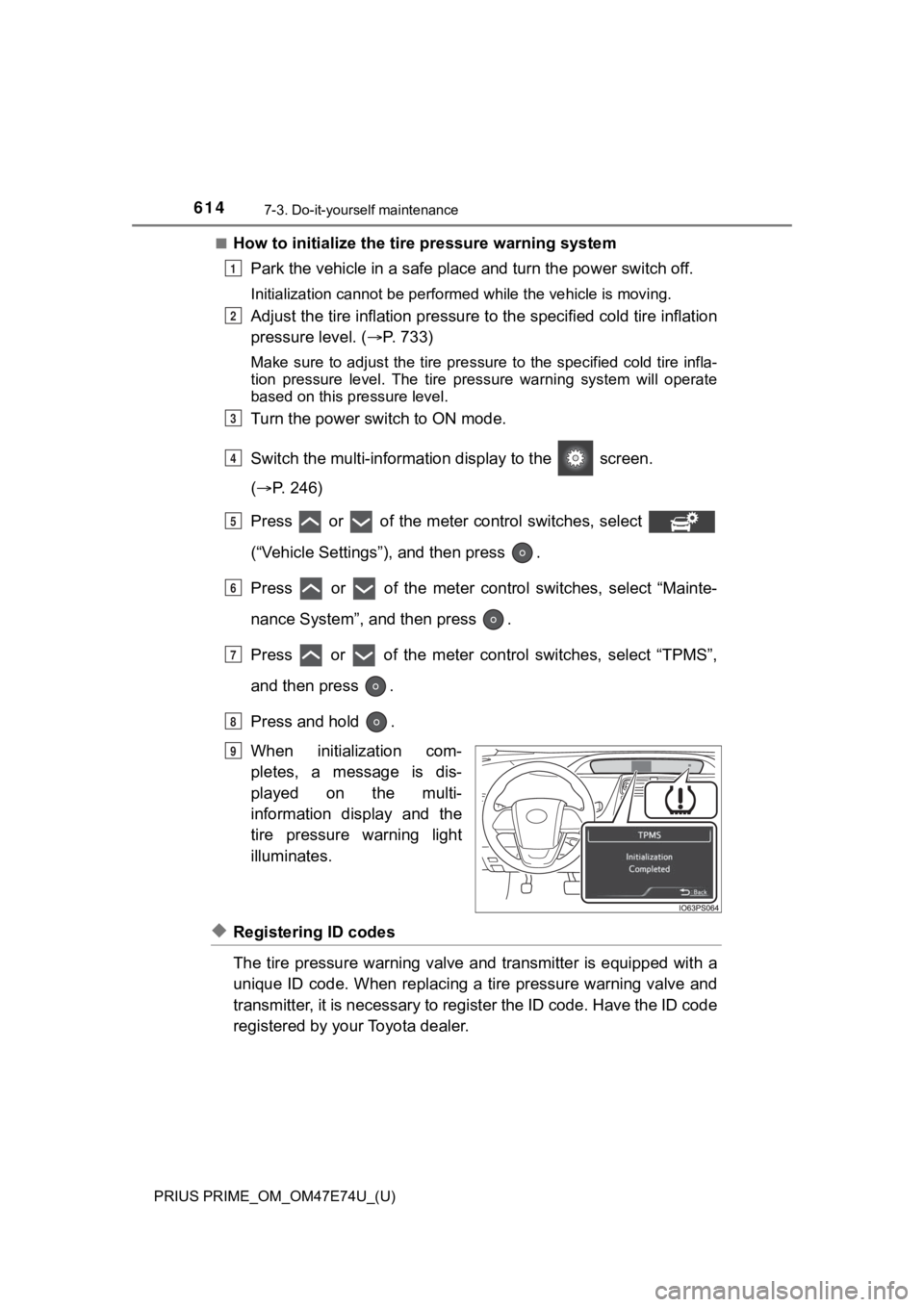
■How to initialize the tire pressure warning systemPark the vehicle in a s afe place and turn the power switch off.
Initialization cannot be perfo rmed while the vehicle is moving.
Adjust the tire inflation pressure to the specified cold tire i nflation
pressure level. ( P. 733)
Make sure to adjust the tire pre ssure to the specified cold tire infla-
tion pressure level. The tire pressure warning system will oper ate
based on this pr essure level.
Turn the power switch to ON mode.
Switch the multi-informatio n display to the screen.
( P. 246)
Press or of the meter control switches, select
(“Vehicle Settings”), and then press .
Press or of the meter control switches, select “Mainte-
nance System”, a nd then press .
Press or of the meter control switches, select “TPMS”,
and then press .
Press and hold .
When initialization com-
pletes, a message is dis-
played on the multi-
information display and the
tire pressure warning light
illuminates.
◆Registering ID codes
The tire pressure warning valve and transmitter is equipped wit h a
unique ID code. When replacing a tire pressure warning valve an d
transmitter, it is necessary to register the ID code. Have the ID code
registered by your Toyota dealer.
1
2
3
4
5
6
7
8
Until Complete
9
Page 617 of 808

PRIUS PRIME_OM_OM47E74U_(U)
6177-3. Do-it-yourself maintenance
7
Maintenance and care
■Situations in which the tire pressure warning system may not oper-
ate properly
●In the following cases, the tire pressure warning system may no t operate
properly.
• If non-genuine Toyota wheels are used.
• When a replacement tire is used, the system may not operate cor-
rectly due to the structure of the replacement tire.
• A tire has been replac ed with a tire that is not of the specif ied size.
• Tire chains etc . are equipped.
• An auxiliary-supported ru n-flat tire is equipped.
• If a window tint that affects the radio wave signals is instal led.
• If there is a lot of snow or ice on the vehicle, particularly around the
wheels or wheel housings.
• If the tire inflation pressure is extremely higher than the sp ecified
level.
• If wheel without the tire pressure warning valve and transmitt er is
used.
• If the ID code on the tire pressure warning valves and transmi tters is
not registered in the tire pressure warning computer.
●Performance may be affected in the following situations.
• Near a TV tower, electric power plant, gas station, radio stat ion, large
display, airport or other facilit y that generates strong radio waves or
electrical noise
• When carrying a portable radio, cellular phone, cordless phone or
other wireless communication device
●When the vehicle is parked, the time taken for the warning to s tart or go
off could be extended.
●When tire inflation pressure declines rapidly for example when a tire has
burst, the warning may not function.
■The initialization operation
●Make sure to carry out initializ ation after adjusting the tire inflation pres-
sure.
Also, make sure the tires are co ld before carrying out initialization or tire
inflation pressure adjustment.
●If you have accidentally turned the power switch off during ini tialization,
it is not necessary to press the reset swit ch again as initialization will
restart automatically when the power switch has been turned to ON
mode for the next time.
●If you accidentally press the reset switch when initialization is not neces-
sary, adjust the tire inflation pressure to the specified level when the
tires are cold, and cond uct initialization again.
Page 618 of 808

618
PRIUS PRIME_OM_OM47E74U_(U)
7-3. Do-it-yourself maintenance
■When initialization of the tire pressure warning system has fai led
Initialization can be completed in a few minutes. However, in the following
cases, the settings have not been record ed and the system will not oper-
ate properly. If repeated attempts to record tire inflation pre ssure settings
are unsuccessful, have the vehicle inspected by your Toyota dealer.
●When operating the initializatio n of the system, the tire pressure warning
light does not flash 3 times an d the setting message does not a ppear on
the multi-information display.
●After driving for a certain period of time since the initializa tion has been
completed, the warning light comes on after blinking for 1 minute.
WARNING
■When inspecting or replacing tires
Observe the following precaut ions to prevent accidents.
Failure to do so may cause damage to parts of the drive train as well as
dangerous handling characteristics, which may lead to an accide nt
resulting in death o r serious injury.
●Do not mix tires of different ma kes, models or tread patterns.
Also, do not mix tires of remarkably different treadwear.
●Do not use tire sizes other th an those recommended by Toyota.
●Do not mix differently constructed tires (radial, bias-belted o r bias-ply
tires).
●Do not mix summer, all season and snow tires.
●Do not use tires that have been used on another vehicle.
Do not use tires if you do not kn ow how they were used previously.
■When initializing the tire pressure warning system
Do not initialize the tire press ure warning system without firs t adjusting
the tire inflation pressure to t he specified level. Otherwise, the tire pres-
sure warning light may not come on even if the tire inflation p ressure is
low, or it may come on when the tire inflation pressure is actu ally nor-
mal.