display TOYOTA PRIUS PRIME 2023 Owners Manual
[x] Cancel search | Manufacturer: TOYOTA, Model Year: 2023, Model line: PRIUS PRIME, Model: TOYOTA PRIUS PRIME 2023Pages: 680, PDF Size: 14.97 MB
Page 379 of 680
3795-5. Using the driving support systems
5
Driving
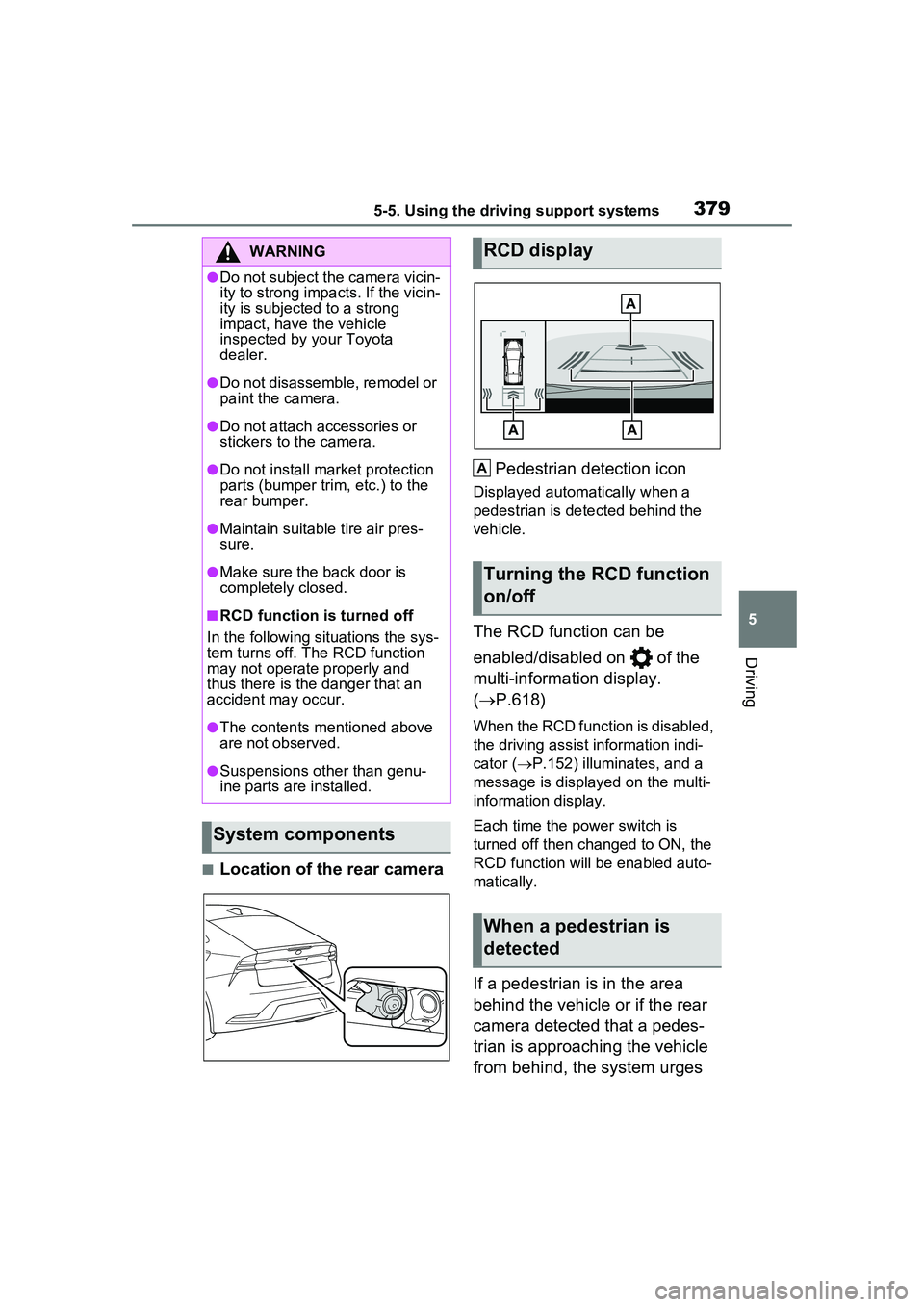
■Location of the rear cameraPedestrian detection icon
Displayed automatically when a
pedestrian is detected behind the
vehicle.
The RCD function can be
enabled/disabled on of the
multi-information display.
(
P.618)
When the RCD function is disabled,
the driving assist information indi-
cator ( P.152) illumina tes, and a
message is displayed on the multi-
information display.
Each time the power switch is
turned off then changed to ON, the
RCD function will be enabled auto-
matically.
If a pedestrian is in the area
behind the vehicle or if the rear
camera detected that a pedes-
trian is approaching the vehicle
from behind, the system urges
WARNING
●Do not subject the camera vicin-
ity to strong impacts. If the vicin-
ity is subjected to a strong
impact, have the vehicle
inspected by your Toyota
dealer.
●Do not disassemble, remodel or
paint the camera.
●Do not attach accessories or
stickers to the camera.
●Do not install market protection
parts (bumper trim, etc.) to the
rear bumper.
●Maintain suitable tire air pres-
sure.
●Make sure the back door is
completely closed.
■RCD function is turned off
In the following situations the sys-
tem turns off. The RCD function
may not operate properly and
thus there is the danger that an
accident may occur.
●The contents mentioned above
are not observed.
●Suspensions other than genu-
ine parts are installed.
System components
RCD display
Turning the RCD function
on/off
When a pedestrian is
detected
A
Page 380 of 680
3805-5. Using the driving support systems
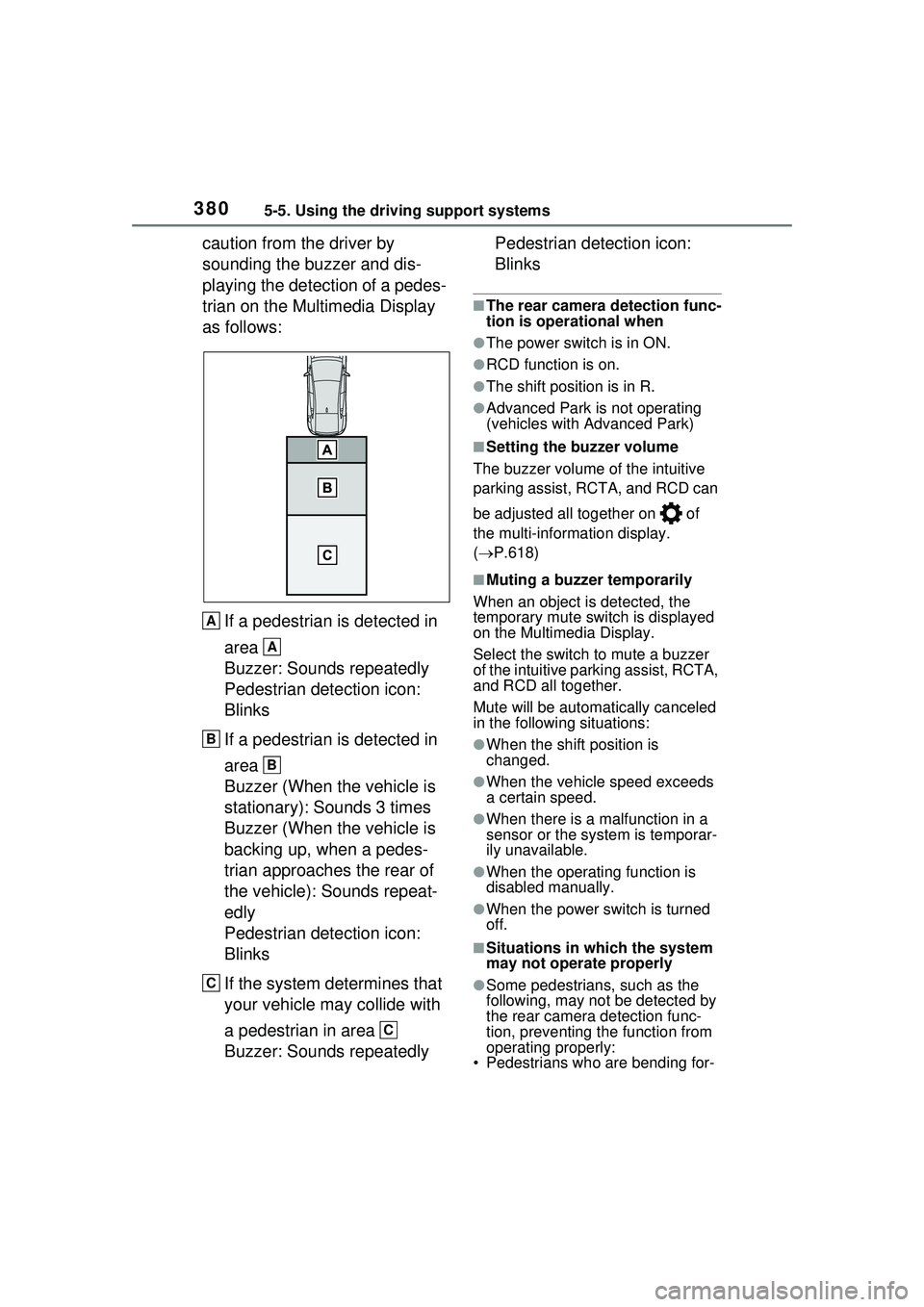
caution from the driver by
sounding the buzzer and dis-
playing the detection of a pedes-
trian on the Multimedia Display
as follows:If a pedestrian is detected in
area
Buzzer: Sounds repeatedly
Pedestrian detection icon:
Blinks
If a pedestrian is detected in
area
Buzzer (When the vehicle is
stationary): Sounds 3 times
Buzzer (When the vehicle is
backing up, when a pedes-
trian approaches the rear of
the vehicle): Sounds repeat-
edly
Pedestrian detection icon:
Blinks
If the system determines that
your vehicle may collide with
a pedestrian in area
Buzzer: Sounds repeatedly Pedestrian detection icon:
Blinks
■The rear camera detection func-
tion is operational when
●The power switch is in ON.
●RCD function is on.
●The shift position is in R.
●Advanced Park is not operating
(vehicles with Advanced Park)
■Setting the buzzer volume
The buzzer volume of the intuitive
parking assist, RCTA, and RCD can
be adjusted all together on of
the multi-information display.
( P.618)
■Muting a buzzer temporarily
When an object is detected, the
temporary mute switch is displayed
on the Multimedia Display.
Select the switch to mute a buzzer
of the intuitive parking assist, RCTA,
and RCD all together.
Mute will be automatically canceled
in the following situations:
●When the shift position is
changed.
●When the vehicle speed exceeds
a certain speed.
●When there is a malfunction in a
sensor or the system is temporar-
ily unavailable.
●When the operating function is
disabled manually.
●When the power switch is turned
off.
■Situations in which the system
may not operate properly
●Some pedestrians, such as the
following, may not be detected by
the rear camera detection func-
tion, preventing the function from
operating properly:
• Pedestrians who are bending for-
A
A
B
B
C
C
Page 382 of 680
3825-5. Using the driving support systems
camera
• If the orientation of the rear cam- era has been changed due to a
collision or other impact, or
removal and installation
• If a towing eyelet is installed to the
rear of the vehicle
• When towing with the vehicle
• When water is flowing over the rear camera lens
• When the rear camera is obscured (dirt, snow, ice, etc. are
attached) or scratched
• If there is a flashing light in the detection area, such as the emer-
gency flashers of another vehicle
• When tire chains or an emergency tire puncture repair kit are used.
●Situations in which the rear cam-
era detection function may be diffi-
cult to notice
• The buzzer may be difficult to hear if the surrounding area is noisy or
the audio system volume is high.
• If the temperature in the cabin is extremely high or low, the Multi-
media Display may not operate
correctly.
*: If equipped
PKSB (Parking Sup-
port Brake)*
The PKSB (Parking Support
Brake) is a system that
issues warnings and auto-
matically performs braking
to help reduce collision
damage with operation tar-
gets that were detected
when traveling at a low
speed such as when park-
ing.
This system consists of the
following functions: a Park-
ing Support Brake function
(static objects to the front
and rear) that detects static
objects such as walls, a
Parking Support Brake
function (rear-crossing
vehicles)
* that detects vehi-
cles approaching from the
rear while backing up, a
Parking Support Brake
function (rear pedestrians)
*
that detects pedestrians
behind the vehicle, and a
Parking Support Brake
function (static objects
around the vehicle) (vehi-
cles with Advanced Park)
that detects static objects
around the vehicle.
*: If equipped
Page 384 of 680
![TOYOTA PRIUS PRIME 2023 Owners Manual 3845-5. Using the driving support systems
All of the Parking Support Brake
functions (static objects to the
front and rear, rear-crossing
vehicles [if equipped], rear
pedestrians [if equipped], an](/img/14/68572/w960_68572-383.png "TOYOTA PRIUS PRIME 2023 Owners Manual 3845-5. Using the driving support systems
All of the Parking Support Brake
functions (static objects to the
front and rear, rear-crossing
vehicles [if equipped], rear
pedestrians [if equipped], an")
3845-5. Using the driving support systems
All of the Parking Support Brake
functions (static objects to the
front and rear, rear-crossing
vehicles [if equipped], rear
pedestrians [if equipped], and
static objects around the vehicle
[vehicles with Advanced Park])
are enabled/disabled simultane-
ously.
The Parking Support Brake
function can be enabled/dis-
abled on of the multi-infor-
WARNING
●When inspecting the vehicle
using a chassis roller, chassis
dynamo or free roller
●When loading the vehicle onto a
boat, truck or other transport
vessel
●If the suspension has been
modified or tires of a size other
than specified are installed
●If the front of the vehicle is
raised or lowered due to the
carried load
●When equipment that may
obstruct a sensor is installed,
such as a towing eyelet, trans-
port hook, bumper protector (an
additional trim strip, etc.), bicy-
cle carrier, or snow plow
●When using automatic car
washing devices
●If the vehicle cannot be driven in
a stable manner, such as when
the vehicle has been in an acci-
dent or is malfunctioning
●When the vehicle is driven in a
sporty manner or off-road
●When the tires are not properly
inflated
●When the tires are very worn
●When tire chains, a compact
spare tire or an emergency tire
puncture repair kit are used.
●When towing with the vehicle
■Precautions for the suspen-
sion
Do not modify the suspension of
the vehicle. If the height or tilt of
the vehicle is changed, the sen-
sors may not be able to detect
detectable objects and the system
may not operate correctly, possi-
bly leading to an accident.
NOTICE
■If “System Stopped See
Owner’s Manual” is displayed
on the multi-information dis-
play and the driving assist
information indi cator is illu-
minated
If this message is displayed
immediately after the power
switch is changed to ON, operate
the vehicle carefully, paying atten-
tion to your surr oundings. It may
be necessary to drive the vehicle
for a certain amount of time
before the system returns to nor-
mal. (If the system is not return to
normal after driv ing for a while,
clean the sensor or rear camera
lens.)
Enabling/Disabling the
Parking Support Brake
Page 385 of 680
3855-5. Using the driving support systems
5
Driving
mation display. (P.167)
When the PKSB (Parking Support
Brake) is disabled, the driving
assist information indicator
( P.152) illuminates, and a mes-
sage is displayed on the multi-infor-
mation display.
If the system switches to OFF (dis-
abled) and the PKSB (Parking Sup-
port Brake) is st opped, the PKSB
(Parking Support Br ake) will not be
re-enabled until ON (enabled) is
selected again on the multi-infor-
mation display and the system
operates.
If the system is disabled, it will
remain off even if the power switch
is turned to ON after the power
switch has been turned to OFF.
If the hybrid system output
restriction control or brake con-
trol operates, a buzzer will
sound and a message will be
displayed on the Multimedia
Display and multi-information
display, to alert the driver.
Depending on the situation, hybrid
system output rest riction control will
operate to either limit acceleration
or restrict output as much as possi-
ble.
Hybrid system output restric-
tion control is operating
(acceleration restriction)
Acceleration greater than a certain amount is restricted by the system.
Multimedia Display (vehicles with
panoramic view monitor): No warn-
ing displayed
Multi-information
display: “Object
Detected Acceleration Reduced”
Driving assist info rmation indicator:
Not illuminated
Buzzer: Does not sound
Hybrid system output restric-
tion control is operating (out-
put restricted as much as
possible)
The system has determined that
stronger-than-normal brake opera-
tion is necessary.
Multimedia Display (vehicles with
panoramic view monitor): “BRAKE!”
Multi-information display: “BRAKE!”
Driving assist info rmation indicator:
Not illuminated
Buzzer: Short beep
Brake control is operating
The system determined that emer-
gency braking is necessary.
Multimedia Display (vehicles with
panoramic view monitor): “BRAKE!”
Multi-information display: “BRAKE!”
Driving assist info rmation indicator:
Not illuminated
Buzzer: Short beep
Vehicle stopped by system
operation
The vehicle has been stopped by
brake control operation.
Multimedia Display (vehicles with
panoramic view monitor): “Press
Brake Pedal”
Display and buzzer for
hybrid system output
restriction control and
brake control
Page 386 of 680
3865-5. Using the driving support systems
Multi-information display: “Acceler-
ator Pedal is Pressed Press Brake
Pedal” (If the accelerator pedal is
not depressed, “Press Brake Pedal”
will be displayed.)
Driving assist info rmation indicator:
Illuminated
Buzzer: Sounds repeatedly
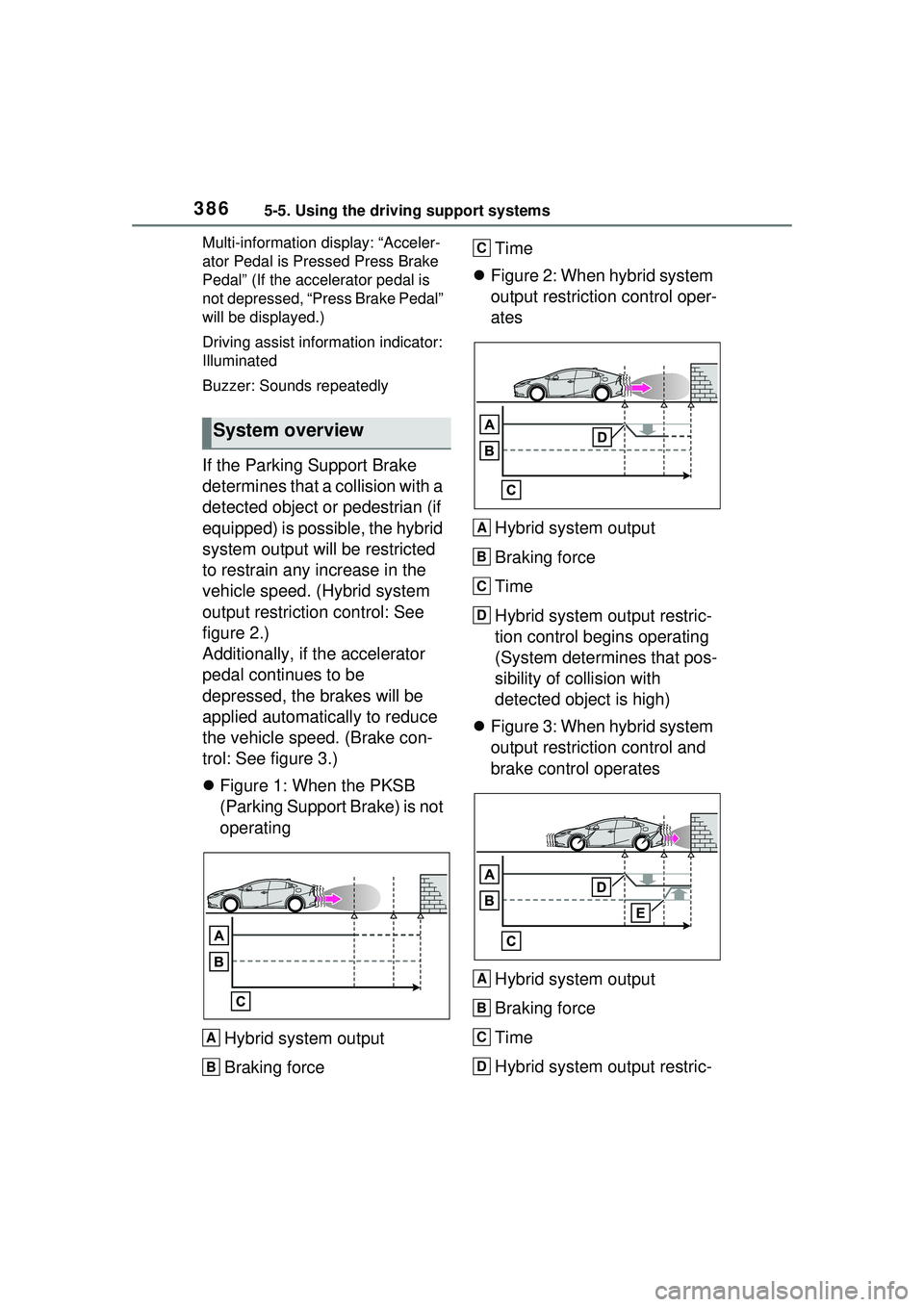
If the Parking Support Brake
determines that a collision with a
detected object or pedestrian (if
equipped) is possible, the hybrid
system output will be restricted
to restrain any increase in the
vehicle speed. (Hybrid system
output restriction control: See
figure 2.)
Additionally, if the accelerator
pedal continues to be
depressed, the brakes will be
applied automatically to reduce
the vehicle speed. (Brake con-
trol: See figure 3.)
Figure 1: When the PKSB
(Parking Support Brake) is not
operating
Hybrid system output
Braking force Time
Figure 2: When hybrid system
output restriction control oper-
ates
Hybrid system output
Braking force
Time
Hybrid system output restric-
tion control begins operating
(System determines that pos-
sibility of collision with
detected object is high)
Figure 3: When hybrid system
output restriction control and
brake control operates
Hybrid system output
Braking force
Time
Hybrid system output restric-
System overview
A
B
C
A
B
C
D
A
B
C
D
Page 394 of 680
3945-5. Using the driving support systems
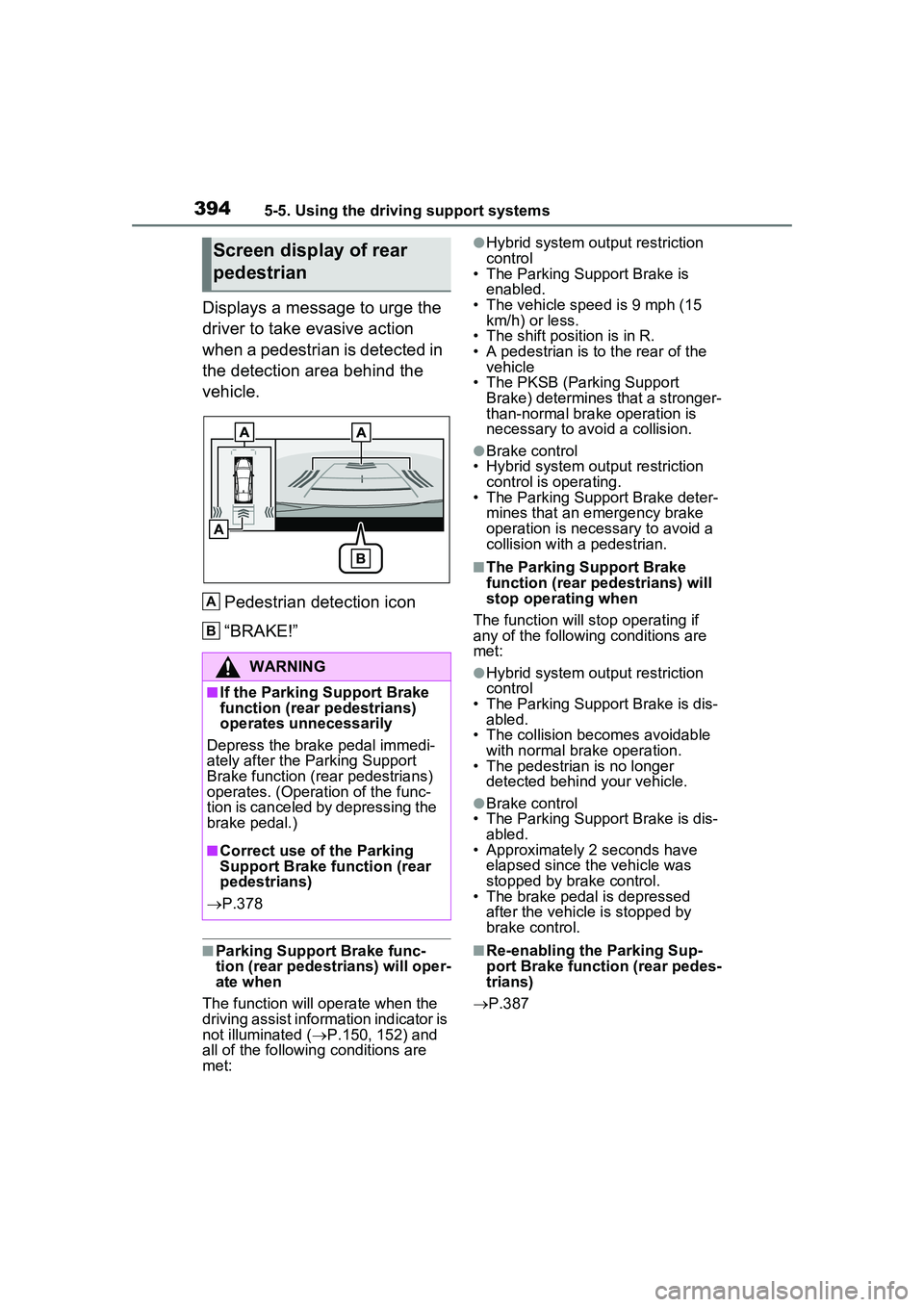
Displays a message to urge the
driver to take evasive action
when a pedestrian is detected in
the detection area behind the
vehicle.Pedestrian detection icon
“BRAKE!”
■Parking Support Brake func-
tion (rear pedestrians) will oper-
ate when
The function will operate when the
driving assist information indicator is
not illuminated ( P.150, 152) and
all of the followin g conditions are
met:
●Hybrid system output restriction
control
• The Parking Support Brake is
enabled.
• The vehicle speed is 9 mph (15 km/h) or less.
• The shift position is in R.
• A pedestrian is to the rear of the vehicle
• The PKSB (Parking Support Brake) determines that a stronger-
than-normal brake operation is
necessary to avoid a collision.
●Brake control
• Hybrid system output restriction control is operating.
• The Parking Support Brake deter-
mines that an emergency brake
operation is necessary to avoid a
collision with a pedestrian.
■The Parking Support Brake
function (rear pedestrians) will
stop operating when
The function will st op operating if
any of the following conditions are
met:
●Hybrid system output restriction
control
• The Parking Support Brake is dis- abled.
• The collision becomes avoidable
with normal brake operation.
• The pedestrian is no longer detected behind your vehicle.
●Brake control
• The Parking Support Brake is dis-
abled.
• Approximately 2 seconds have elapsed since the vehicle was
stopped by brake control.
• The brake pedal is depressed after the vehicle is stopped by
brake control.
■Re-enabling the Parking Sup-
port Brake function (rear pedes-
trians)
P.387
Screen display of rear
pedestrian
WARNING
■If the Parking Support Brake
function (rear pedestrians)
operates unnecessarily
Depress the brake pedal immedi-
ately after the Parking Support
Brake function (rear pedestrians)
operates. (Operation of the func-
tion is canceled by depressing the
brake pedal.)
■Correct use of the Parking
Support Brake function (rear
pedestrians)
P.378
A
B
Page 395 of 680
3955-5. Using the driving support systems
5
Driving
■Detection area of the Parking
Support Brake function (rear
pedestrians)
The detection area of the Parking
Support Brake function (rear pedes-
trians) differs from the detection
area of the RCD function ( P.378).
Therefore, even if the RCD function
detects a pedestrian and provides
an alert, the Parking Support Brake
function (rear pedestrians) may not
start operating.
■Situations in which the system
may not operate properly
P.380
■Situations in which the system
may operate unexpectedly
P.381
*: If equipped
The Advanced Park is a system
which assists in a safe and
smooth parking or exiting from a
parking space by displaying the
blind spots around the vehicle
and the target parking spot
through a bird’s eye view, deliv-
ering operation guidance
through displays and buzzer
operation, and changing the
shift position, operating the
steering wheel, accelerator
pedal, and brake pedal.
Additionally, the panoramic view
monitor
* can display the area in
front, behind, and from above
the vehicle, helping confirm the
condition of the area around the
vehicle.
The turn signal lights will blink
automatically when the parking
assistance starts until the vehi-
cle reaches the target parking
spot, to notify people around the
vehicle that parking is being per-
formed.
Depending on the condition of
the road surface or the vehicle,
the distance between the vehi-
cle and a parking space, etc., it
may not be possible to assist in
parking in the target space.
Toyota Teammate
Advanced Park*
Function description
Page 397 of 680
3975-5. Using the driving support systems
5
Driving
WARNING
●As following objects may not be
detected, make sure to check
the safety of the area around
your vehicle and depress the
brake pedal to stop the vehicle if
it may collide with an object.
• Wires, fences, ropes, etc.
• Cotton, snow and other materi- als that absorb sound waves
• Sharply-angled objects
• Low objects (curb stones, park- ing blocks, etc.)
• Tall objects with upper sections projecting outwards in the direc-
tion of your vehicle
●Even if there is an object in the
target parking space, it may not
be detected and assistance
may be performed.
●While the system is operating, if
it is likely that your vehicle will
collide with a nearby vehicle,
parking block, object, or person,
depress the brake pedal to stop
the vehicle and press the
Advanced Park main switch to
disable the system.
●Never use only the Multimedia
Display to view the area behind
the vehicle. The image dis-
played may differ than the
actual situation. Using only the
screen when backing up may
lead to an accident, such as a
collision with anot her vehicle.
When backing up, make sure to
look directly or use the mirrors
to check the safety of the area
around your vehicle, especially
behind the vehicle.
●When the ambient temperature
is extremely low, the screen
may appear dark or the dis-
played image may become
unclear. Also, as moving
objects may appear distorted or
may not be able to be seen on
the screen, make sure to
directly check the safety of the
area around your vehicle.
●In the following situations, while
the vehicle is stopped and held
by Advanced Park, it may be
canceled and the vehicle may
start moving. Immediately
depress the brake pedal. Fail-
ure to do so may lead to an
accident.
• When the driver’s door is opened
• When operations instructed by the system are not performed
within a certain amount of time
• When the brake pedal is depressed and the vehicle is
stopped for a certain amount of
time
• When the system malfunctions
●As the steering wheel will turn
while this system is operating,
pay attention to the following.
• Be careful so that a necktie, scarf, or arm does not get
caught. Keep your upper body
away from the steering wheel.
Also, keep children away from
the steering wheel.
• Long fingernails may be caught and when the steering wheel is
rotating, leading to injury.
• In an emergency, depress the brake pedal to stop the vehicle,
and then press the Advanced
Park main switch to disable the
system.
Page 398 of 680
3985-5. Using the driving support systems
WARNING
●Do not allow anyone to put their
hands outside of a window while
this system is operating.
■To ensure correct operation
of the Advanced Park
Observe the following precau-
tions. Failing to do so may result
in the vehicle being unable to be
driven safely and possibly cause
an accident.
●Do not use this system in situa-
tions such as the following:
• When in areas other than com- mon parking spaces
• When the surface of the parking space is sand or gravel and is
not clearly defined with parking
space lines
• When the parking space is not level, such as when on a slope
or has differences in height
• Mechanical parking system
• Parking lot with a device which raises to contact the bottom of
the vehicle
• When the road surface is fro- zen, slick, or covered with snow
• When it is extremely hot and the asphalt is melting
• When there are objects around the vehicle
• When there is an object between your vehicle and the
target parking spot or within the
target parking spot (within the
displayed blue box)
• When there is a gutter between your vehicle and the target park-
ing space or within the target
parking spot (within the dis-
played blue box)
• When there is a hole or gutter in the exit direction
• When in high pedestrian or vehicle traffic areas
• When the parking space is in a location that is difficult to park in
(too narrow for your vehicle,
etc.)
• When images are unclear due to dirt or snow attached to the
camera lens, light being shined
into the camera or shadows
• When tire chains or a compact spare tire is installed to the vehi-
cle
• When the doors or back door are not completely closed
• When an arm is held outside of a window
• In inclement weather such as heavy rain or snow
●Make sure to use only standard
sized tires, such as those that
were installed to the vehicle
when it was shipped from the
factory. Otherwise, Advanced
Park may not operate properly.
Also, when the tires have been
replaced, the displayed position
of the lines or box displayed on
the screen may become incor-
rect. When replacing the tires,
contact your Toyota dealer.
●In situations such as the follow-
ing, it may not be possible for
the system to provide assis-
tance to a registered parking
spot:
• When the tires are extremely worn or the tire inflation pres-
sure is low
• When carrying a heavy load
• When the vehicle is tilted due to the carried load