display TOYOTA PRIUS PRIME 2023 Owners Manual
[x] Cancel search | Manufacturer: TOYOTA, Model Year: 2023, Model line: PRIUS PRIME, Model: TOYOTA PRIUS PRIME 2023Pages: 680, PDF Size: 14.97 MB
Page 352 of 680
3525-5. Using the driving support systems
■When a warning message is
displayed
●“Traffic Jam Asst System Malfunc-
tion Visit Your Dealer”
The Traffic Jam Assist function may
not be operating properly.
●“Traffic Jam Asst Unavailable
Stop Assist Activated”
The system temporarily cannot be
used as the driver emergency stop
assist function has operated.
The setting of Traffic Jam
Assist can be enabled/dis-
abled through a customize
setting. ( P.628)
The setting of driver monitor
camera recording can be
enabled/disabled through a
customize setting. ( P.628)
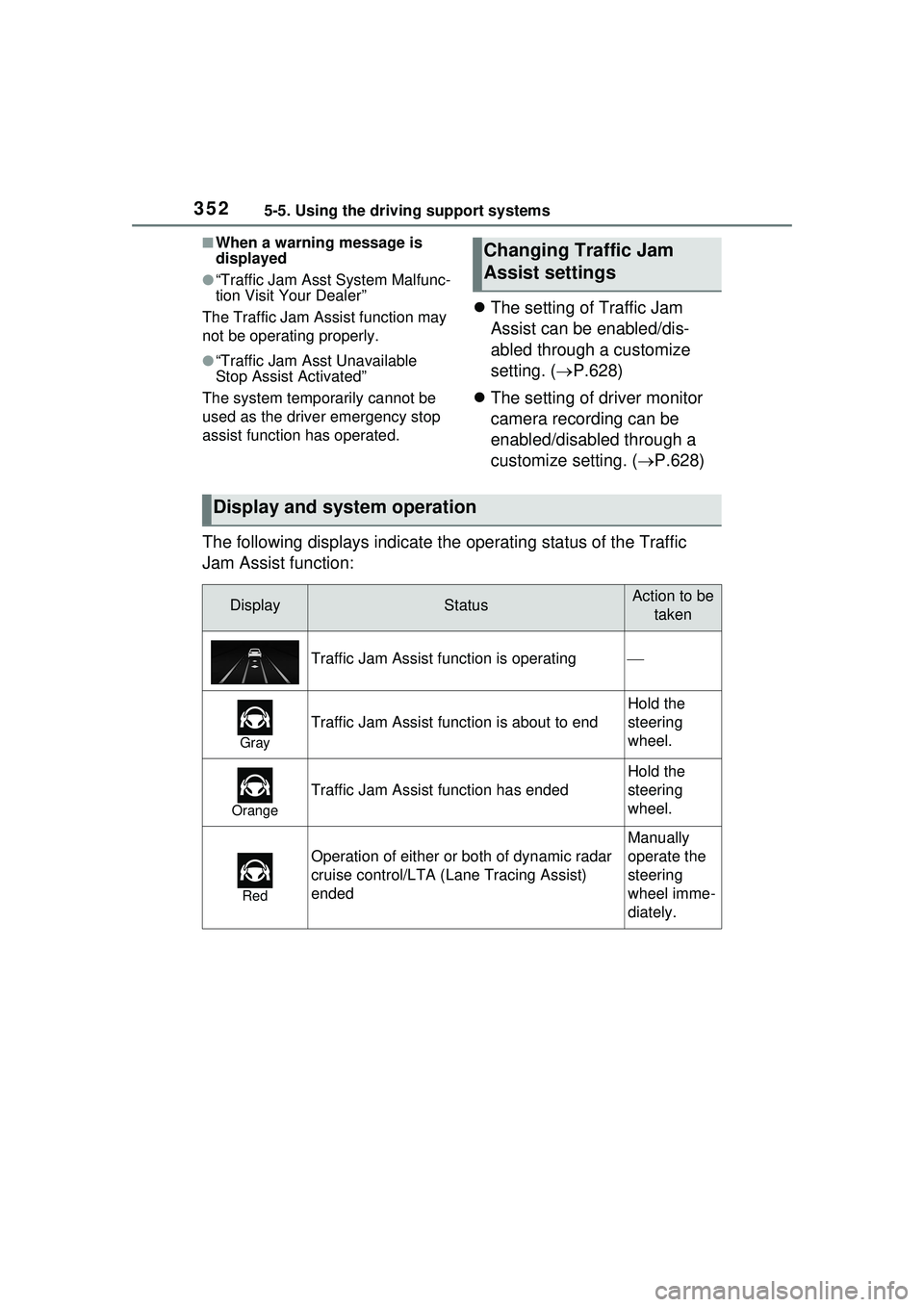
The following displays indicate the operating status of the Traffic
Jam Assist function:
Changing Traffic Jam
Assist settings
Display and system operation
DisplayStatusAction to be taken
Traffic Jam Assist function is operating
Gray
Traffic Jam Assist function is about to end
Hold the
steering
wheel.
Orange
Traffic Jam Assist function has ended
Hold the
steering
wheel.
Red
Operation of either or both of dynamic radar
cruise control/LTA ( Lane Tracing Assist)
ended
Manually
operate the
steering
wheel imme-
diately.
Page 353 of 680
3535-5. Using the driving support systems
5
Driving
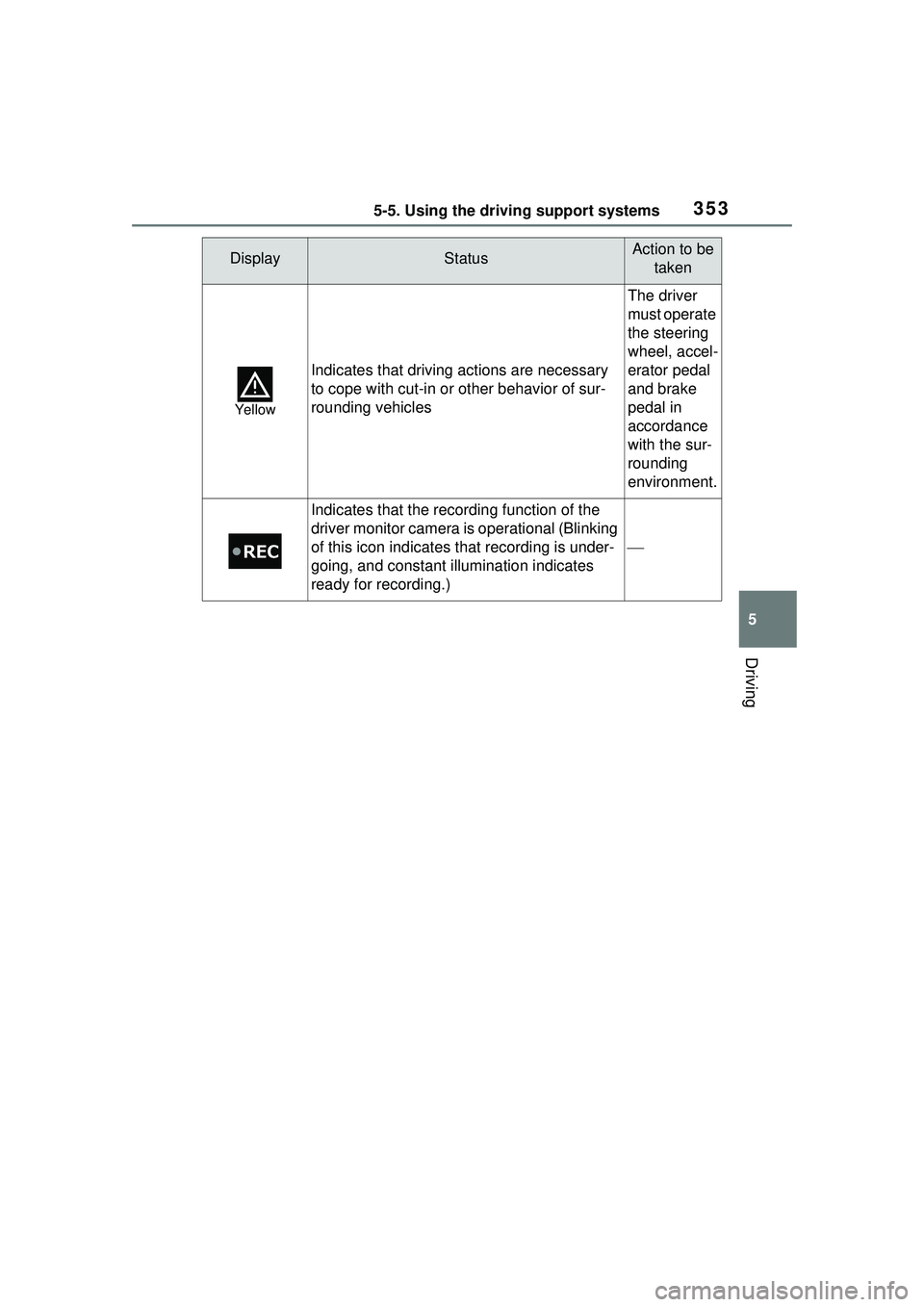
Yellow
Indicates that driving actions are necessary
to cope with cut-in or other behavior of sur-
rounding vehicles
The driver
must operate
the steering
wheel, accel-
erator pedal
and brake
pedal in
accordance
with the sur-
rounding
environment.
Indicates that the recording function of the
driver monitor camera is operational (Blinking
of this icon indicates that recording is under-
going, and constant illumination indicates
ready for recording.)
DisplayStatusAction to be taken
Page 354 of 680
3545-5. Using the driving support systems
*: If equipped
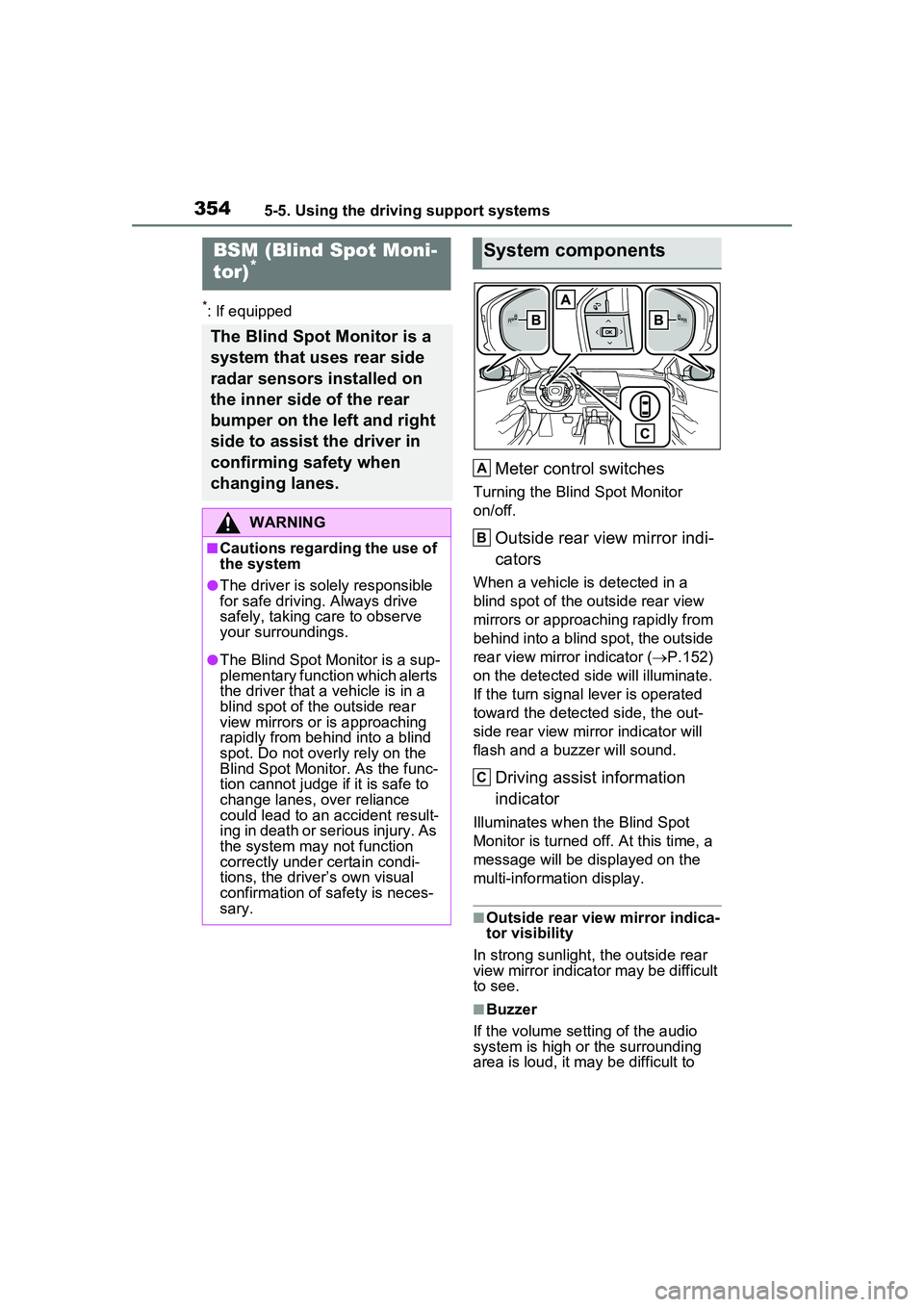
Meter control switches
Turning the Blind Spot Monitor
on/off.
Outside rear view mirror indi-
cators
When a vehicle is detected in a
blind spot of the outside rear view
mirrors or approaching rapidly from
behind into a blind spot, the outside
rear view mirror indicator (P.152)
on the detected side will illuminate.
If the turn signal lever is operated
toward the detected side, the out-
side rear view mirror indicator will
flash and a buzzer will sound.
Driving assist information
indicator
Illuminates when the Blind Spot
Monitor is turned off. At this time, a
message will be displayed on the
multi-informat ion display.
■Outside rear view mirror indica-
tor visibility
In strong sunlight, the outside rear
view mirror indicator may be difficult
to see.
■Buzzer
If the volume setting of the audio
system is high or the surrounding
area is loud, it may be difficult to
BSM (Blind Spot Moni-
tor)*
The Blind Spot Monitor is a
system that uses rear side
radar sensors installed on
the inner side of the rear
bumper on the left and right
side to assist the driver in
confirming safety when
changing lanes.
WARNING
■Cautions regarding the use of
the system
●The driver is solely responsible
for safe driving. Always drive
safely, taking care to observe
your surroundings.
●The Blind Spot Monitor is a sup-
plementary function which alerts
the driver that a vehicle is in a
blind spot of the outside rear
view mirrors or is approaching
rapidly from behind into a blind
spot. Do not overly rely on the
Blind Spot Monitor. As the func-
tion cannot judge if it is safe to
change lanes, over reliance
could lead to an accident result-
ing in death or serious injury. As
the system may not function
correctly under certain condi-
tions, the driver’s own visual
confirmation of safety is neces-
sary.
System components
A
B
C
Page 355 of 680
3555-5. Using the driving support systems
5
Driving
hear the buzzer.
■Customization
Some functions can be customized.
( P.618)
The Blind Spot Monitor can be
enabled/disabled through a cus-
tomize setting. ( P.618)
When the Blind Spot Monitor is
off, the driving assist information
indicator ( P.152) will illumi-
nate and a message will be dis-
played on the multi-information
WARNING
■To ensure the system can
operate properly
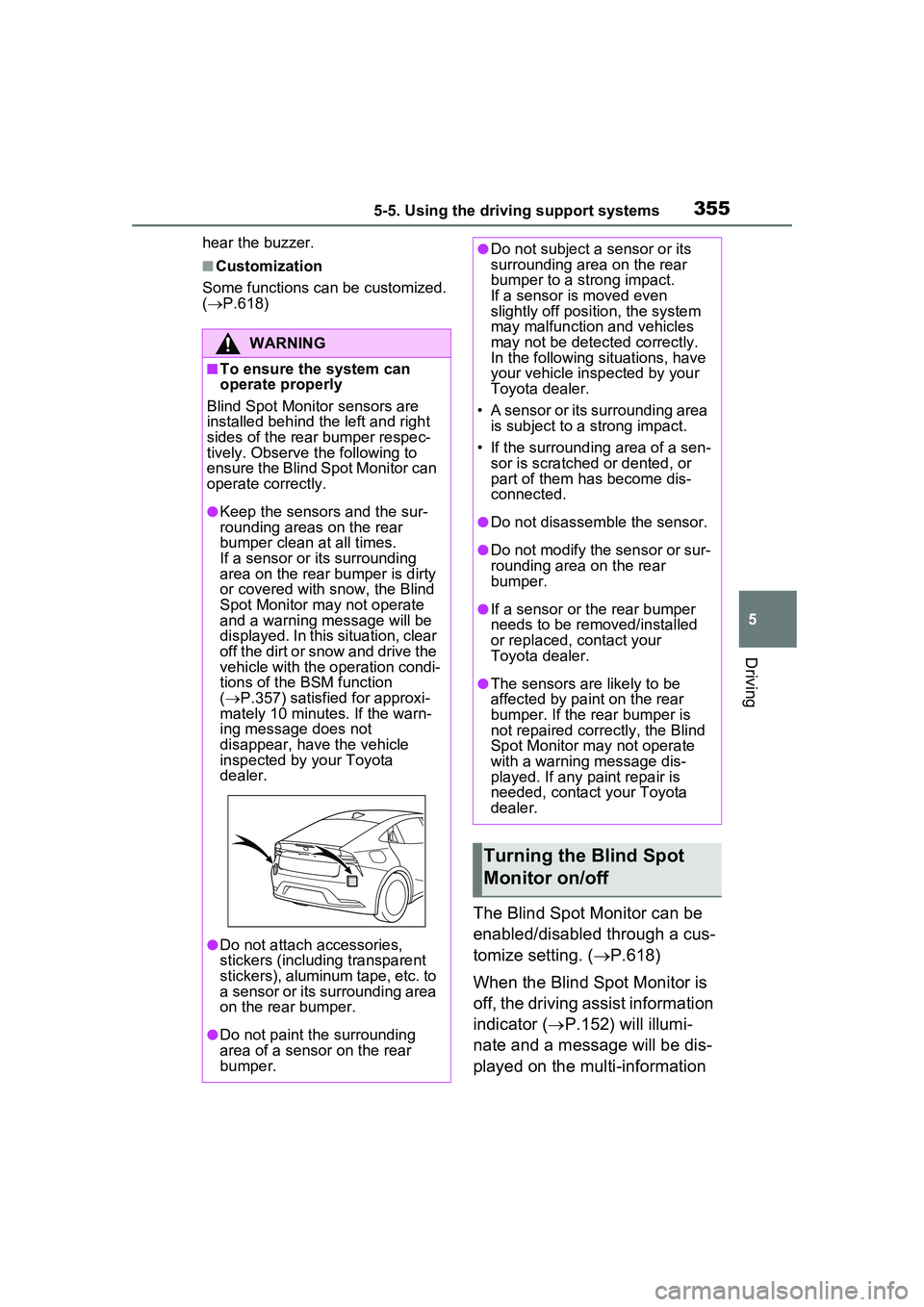
Blind Spot Monitor sensors are
installed behind the left and right
sides of the rear bumper respec-
tively. Observe the following to
ensure the Blind Spot Monitor can
operate correctly.
●Keep the sensors and the sur-
rounding areas on the rear
bumper clean at all times.
If a sensor or its surrounding
area on the rear bumper is dirty
or covered with snow, the Blind
Spot Monitor may not operate
and a warning message will be
displayed. In this situation, clear
off the dirt or snow and drive the
vehicle with the operation condi-
tions of the BSM function
( P.357) satisfied for approxi-
mately 10 minutes. If the warn-
ing message does not
disappear, have the vehicle
inspected by your Toyota
dealer.
●Do not attach accessories,
stickers (including transparent
stickers), aluminum tape, etc. to
a sensor or its surrounding area
on the rear bumper.
●Do not paint the surrounding
area of a sensor on the rear
bumper.
●Do not subject a sensor or its
surrounding area on the rear
bumper to a strong impact.
If a sensor is moved even
slightly off position, the system
may malfunction and vehicles
may not be detected correctly.
In the following si tuations, have
your vehicle inspected by your
Toyota dealer.
• A sensor or its surrounding area is subject to a strong impact.
• If the surrounding area of a sen- sor is scratched or dented, or
part of them has become dis-
connected.
●Do not disassemble the sensor.
●Do not modify the sensor or sur-
rounding area on the rear
bumper.
●If a sensor or the rear bumper
needs to be removed/installed
or replaced, contact your
Toyota dealer.
●The sensors are likely to be
affected by paint on the rear
bumper. If the rear bumper is
not repaired correctly, the Blind
Spot Monitor may not operate
with a warning message dis-
played. If any paint repair is
needed, contact your Toyota
dealer.
Turning the Blind Spot
Monitor on/off
Page 356 of 680
3565-5. Using the driving support systems
display.
Each time the power switch is turned to ON, the Blind Spot
Monitor is enabled.
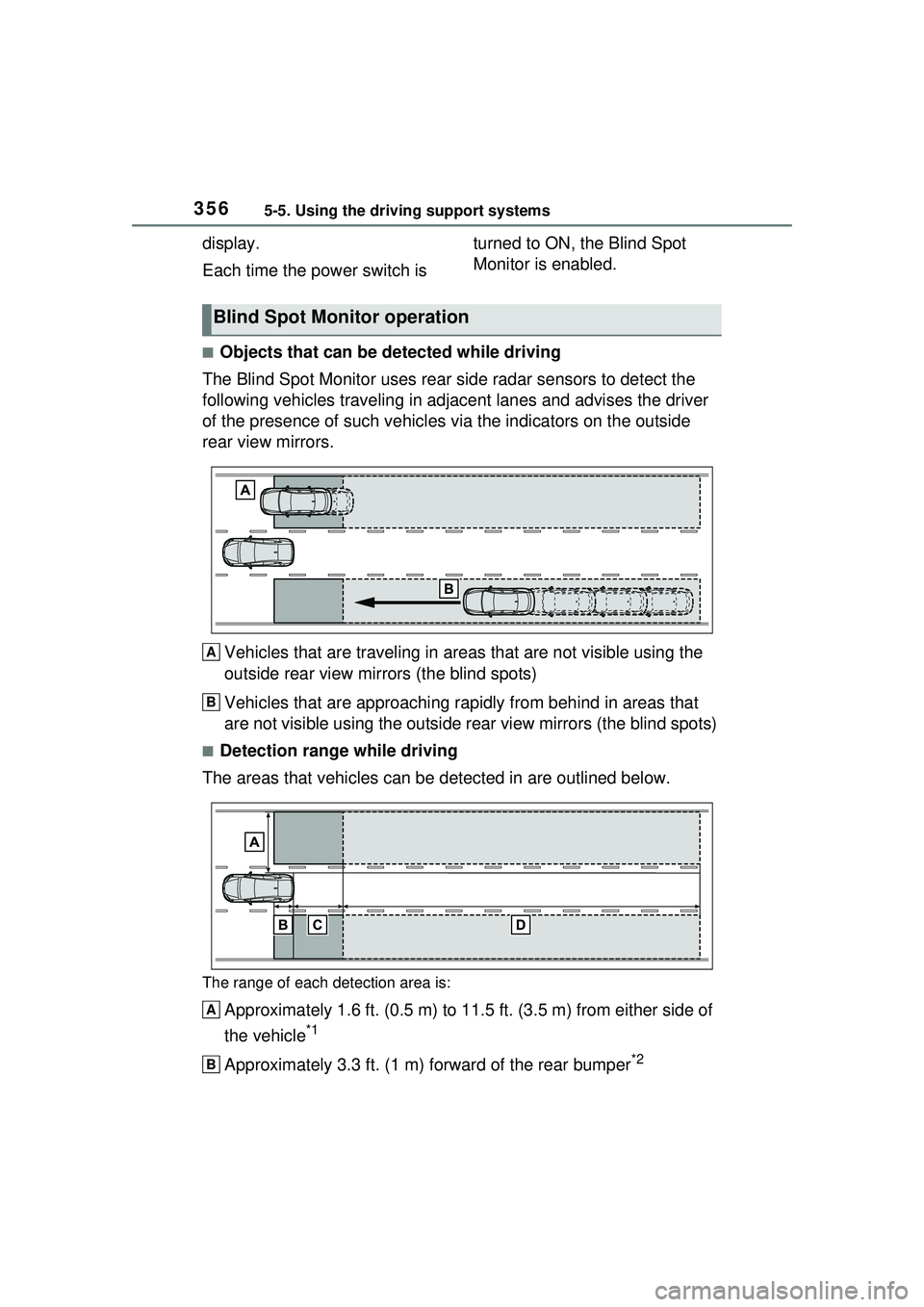
■Objects that can be detected while driving
The Blind Spot Monitor uses rear side radar sensors to detect the
following vehicles trav eling in adjacent lanes and advises the driver
of the presence of such vehicles via the indicators on the outside
rear view mirrors.
Vehicles that are traveling in areas that are not visible using the
outside rear view mirrors (the blind spots)
Vehicles that are approaching r apidly from behind in areas that
are not visible using the outside rear view mirrors (the blind spots)
■Detection range while driving
The areas that vehicles can be detected in are outlined below.
The range of each detection area is:
Approximately 1.6 ft. (0.5 m) to 11.5 ft. (3.5 m) from either side of
the vehicle
*1
Approximately 3.3 ft. (1 m) forward of the rear bumper*2
Blind Spot Monitor operation
A
B
A
B
Page 359 of 680
3595-5. Using the driving support systems
5
Driving
*: If equipped
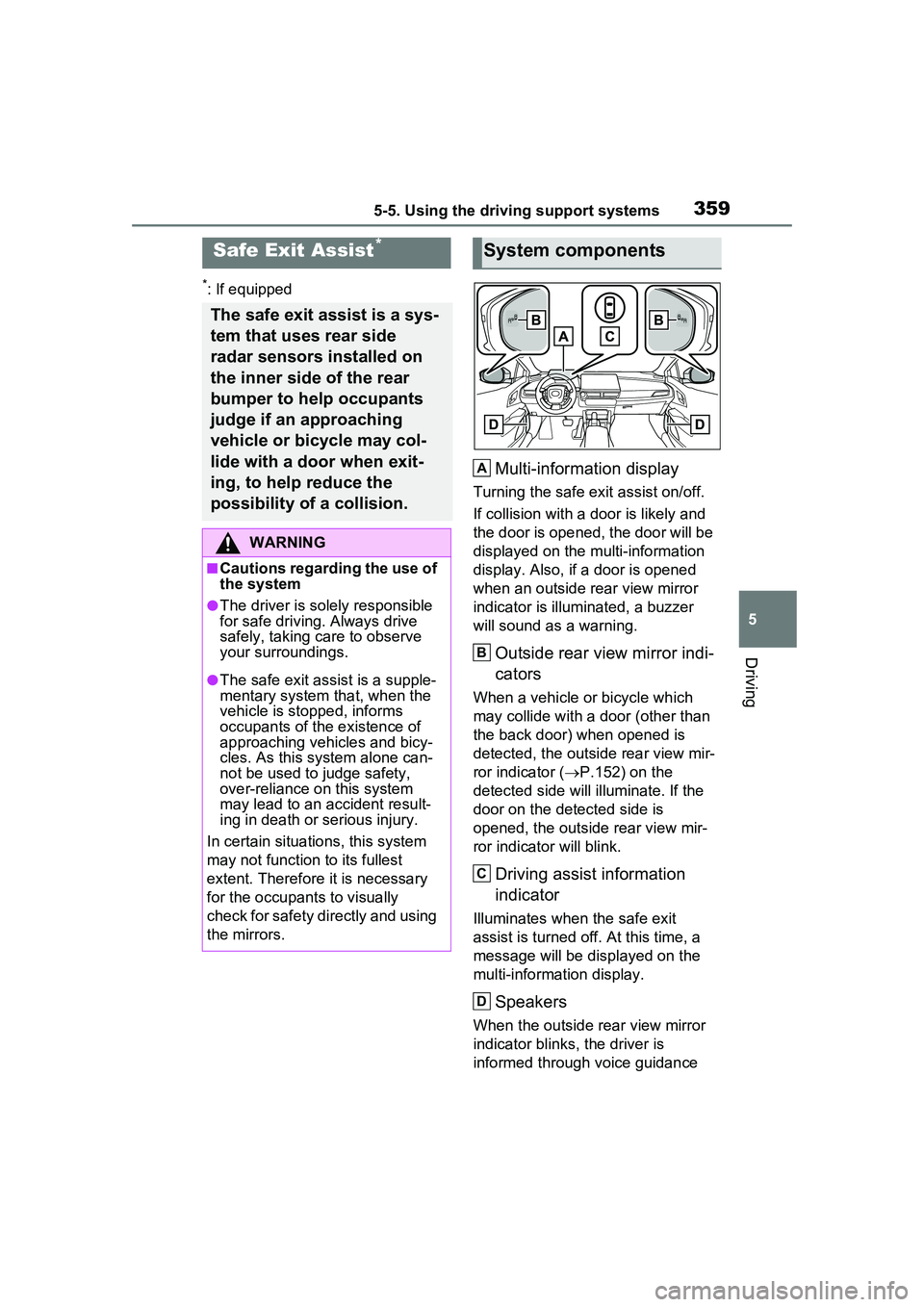
Multi-information display
Turning the safe exit assist on/off.
If collision with a door is likely and
the door is opened, the door will be
displayed on the multi-information
display. Also, if a door is opened
when an outside rear view mirror
indicator is illuminated, a buzzer
will sound as a warning.
Outside rear view mirror indi-
cators
When a vehicle or bicycle which
may collide with a door (other than
the back door) when opened is
detected, the outside rear view mir-
ror indicator ( P.152) on the
detected side will illuminate. If the
door on the detected side is
opened, the outside rear view mir-
ror indicator will blink.
Driving assist information
indicator
Illuminates when the safe exit
assist is turned of f. At this time, a
message will be displayed on the
multi-informat ion display.
Speakers
When the outside rear view mirror
indicator blinks, the driver is
informed through voice guidance
Safe Exit Assist*
The safe exit assist is a sys-
tem that uses rear side
radar sensors installed on
the inner side of the rear
bumper to help occupants
judge if an approaching
vehicle or bicycle may col-
lide with a door when exit-
ing, to help reduce the
possibility of a collision.
WARNING
■Cautions regarding the use of
the system
●The driver is solely responsible
for safe driving. Always drive
safely, taking care to observe
your surroundings.
●The safe exit assist is a supple-
mentary system that, when the
vehicle is stopped, informs
occupants of th e existence of
approaching vehicles and bicy-
cles. As this system alone can-
not be used to judge safety,
over-reliance on this system
may lead to an accident result-
ing in death or serious injury.
In certain situations, this system
may not function to its fullest
extent. Therefore it is necessary
for the occupants to visually
check for safety directly and using
the mirrors.
System components
A
B
C
D
Page 360 of 680
3605-5. Using the driving support systems
that the system has operated. After
the notification through voice guid-
ance is made, no more voice guid-
ance notifications will be made
again until the door is fully closed.
■Outside rear view mirror indica-
tor visibility
In strong sunlight, the outside rear
view mirror indicator may be difficult
to see.
■Buzzer
If the volume setting of the audio
system is high or the surrounding
area is loud, it may be difficult to
hear the buzzer.
■Voice notifications
In the following situations, voice
notifications will not be output:
●When it is estimated that no occu-
pants are on board*
●After opening a door and entering
the vehicle, until the hybrid system
is started
●When 3 minutes or more have
elapsed since the hybrid system
was stopped
●When the language setting of the
Multimedia Display has been set
to a language that does not sup-
port voice notifications
●When all of the doors have been
locked from outside the vehicle
●When a door remains open for 1
minute or more after the hybrid
system is stopped
●When the ACC mode ( P.618)
has been enabled through a cus- tomize setting on the Multimedia
Display and the hybrid system has
been stopped
●When the parking assist volume
setting on the Multimedia Display
has been set to off
*: For each seating position, judg-
ment is made based on the open-
ing and closing of a door, before
driving for ingress and after driv-
ing for egress.
■Customization
Some functions can be customized.
( P.618)
The safe exit assist system can
be enabled/disabled through a
customize setting. ( P.618)
When the safe exit assist is off,
the driving assist information
indicator will illuminate and a
message will be displayed on
the multi-information display.
Each time the power switch is
turned to ON, the safe exit
assist is enabled.
■Objects that can be detected by the safe exit assist
When the safe exit assist detects the following vehicles or bicycles
behind your vehicle using a rear si de radar sensor, the occupants of
the vehicle are informed through an outside rear view mirror indica-
WARNING
■To ensure the system can
operate properly
P.355
Turning the safe exit
assist system ON/OFF
Safe exit assist operation
Page 361 of 680
3615-5. Using the driving support systems
5
Driving
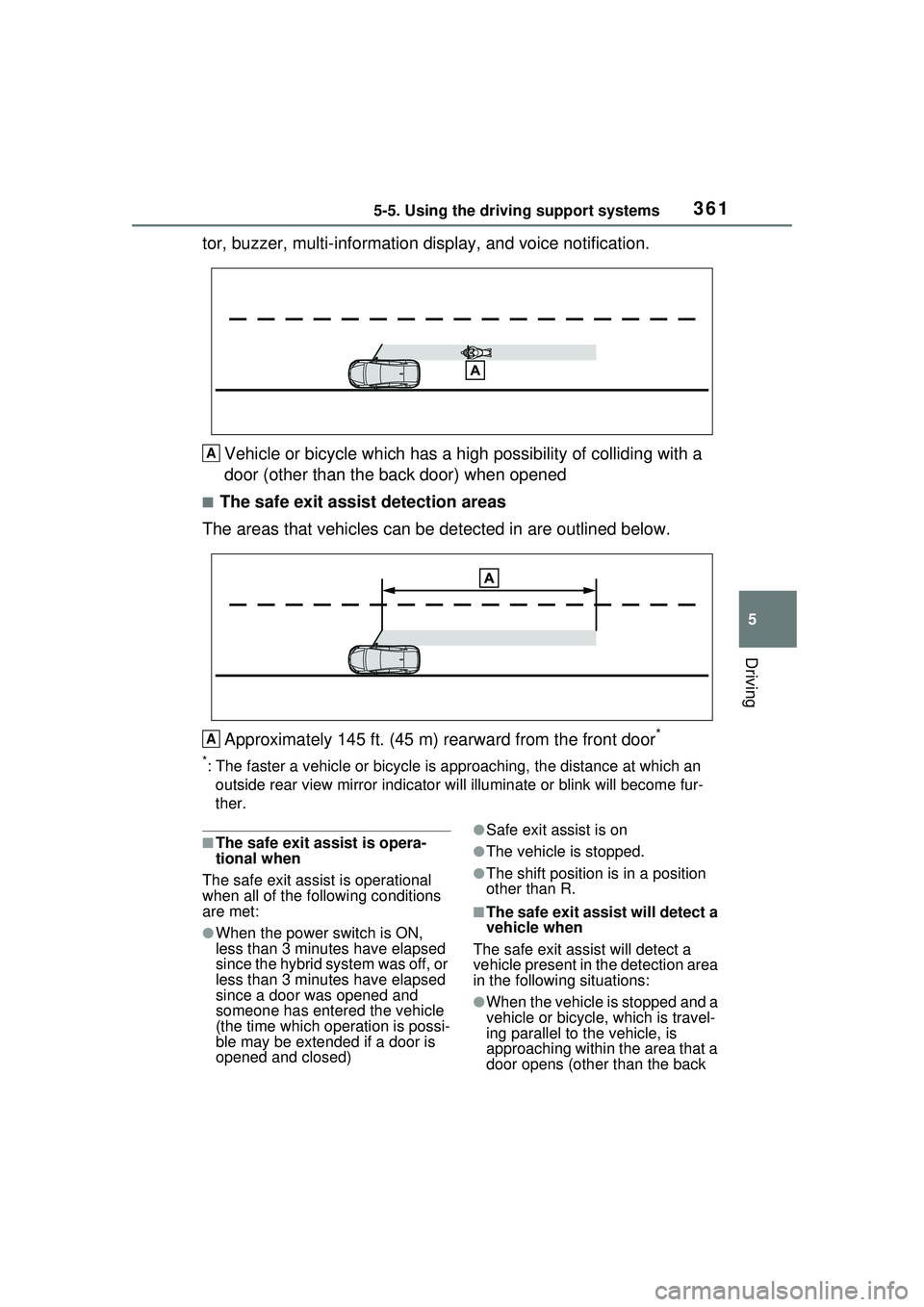
tor, buzzer, multi-information display, and voice notification.Vehicle or bicycle which has a high possibility of colliding with a
door (other than the back door) when opened
■The safe exit assist detection areas
The areas that vehicles can be detected in are outlined below.
Approximately 145 ft. (45 m) rearward from the front door
*
*: The faster a vehicle or bicycle is approaching, the distance at which an
outside rear view mirror indicato r will illuminate or blink will become fur-
ther.
■The safe exit assist is opera-
tional when
The safe exit assist is operational
when all of the following conditions
are met:
●When the power switch is ON,
less than 3 minutes have elapsed
since the hybrid system was off, or
less than 3 minutes have elapsed
since a door was opened and
someone has entered the vehicle
(the time which operation is possi-
ble may be extended if a door is
opened and closed)
●Safe exit assist is on
●The vehicle is stopped.
●The shift position is in a position
other than R.
■The safe exit assist will detect a
vehicle when
The safe exit assist will detect a
vehicle present in the detection area
in the following situations:
●When the vehicle is stopped and a
vehicle or bicycle, which is travel-
ing parallel to the vehicle, is
approaching within the area that a
door opens (other than the back
A
A
Page 363 of 680
3635-5. Using the driving support systems
5
Driving
back of the vehicle
• When a vehicle or bicycle is approaching at high speed
• When towing with the vehicle
• When stopped on a steep slope
• When stopped on a curve or at the exit of a curve
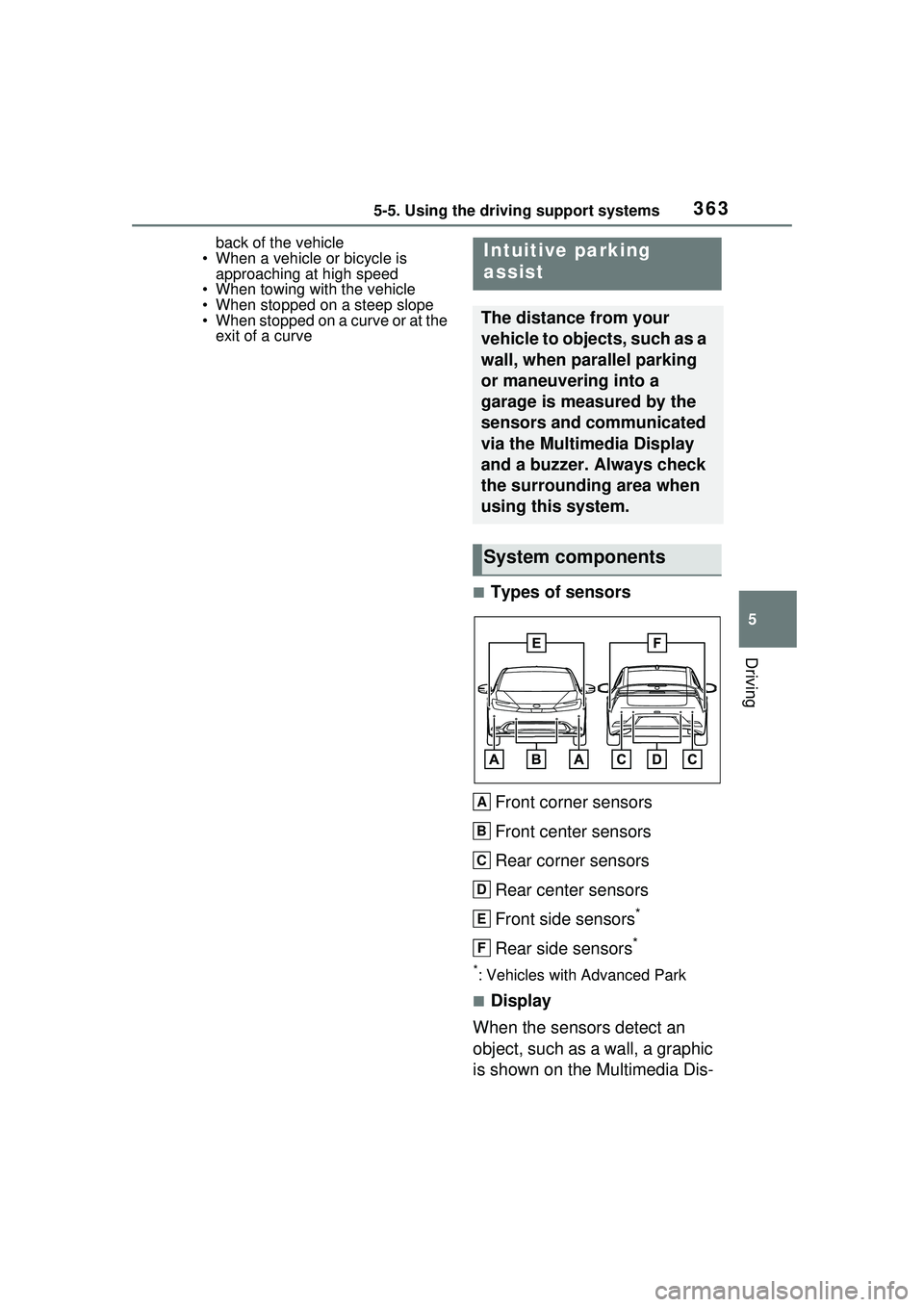
■Types of sensors
Front corner sensors
Front center sensors
Rear corner sensors
Rear center sensors
Front side sensors
*
Rear side sensors*
*: Vehicles with Advanced Park
■Display
When the sensors detect an
object, such as a wall, a graphic
is shown on the Multimedia Dis-
Intuitive parking
assist
The distance from your
vehicle to objects, such as a
wall, when parallel parking
or maneuvering into a
garage is measured by the
sensors and communicated
via the Multimedia Display
and a buzzer. Always check
the surrounding area when
using this system.
System components
A
B
C
D
E
F
Page 364 of 680
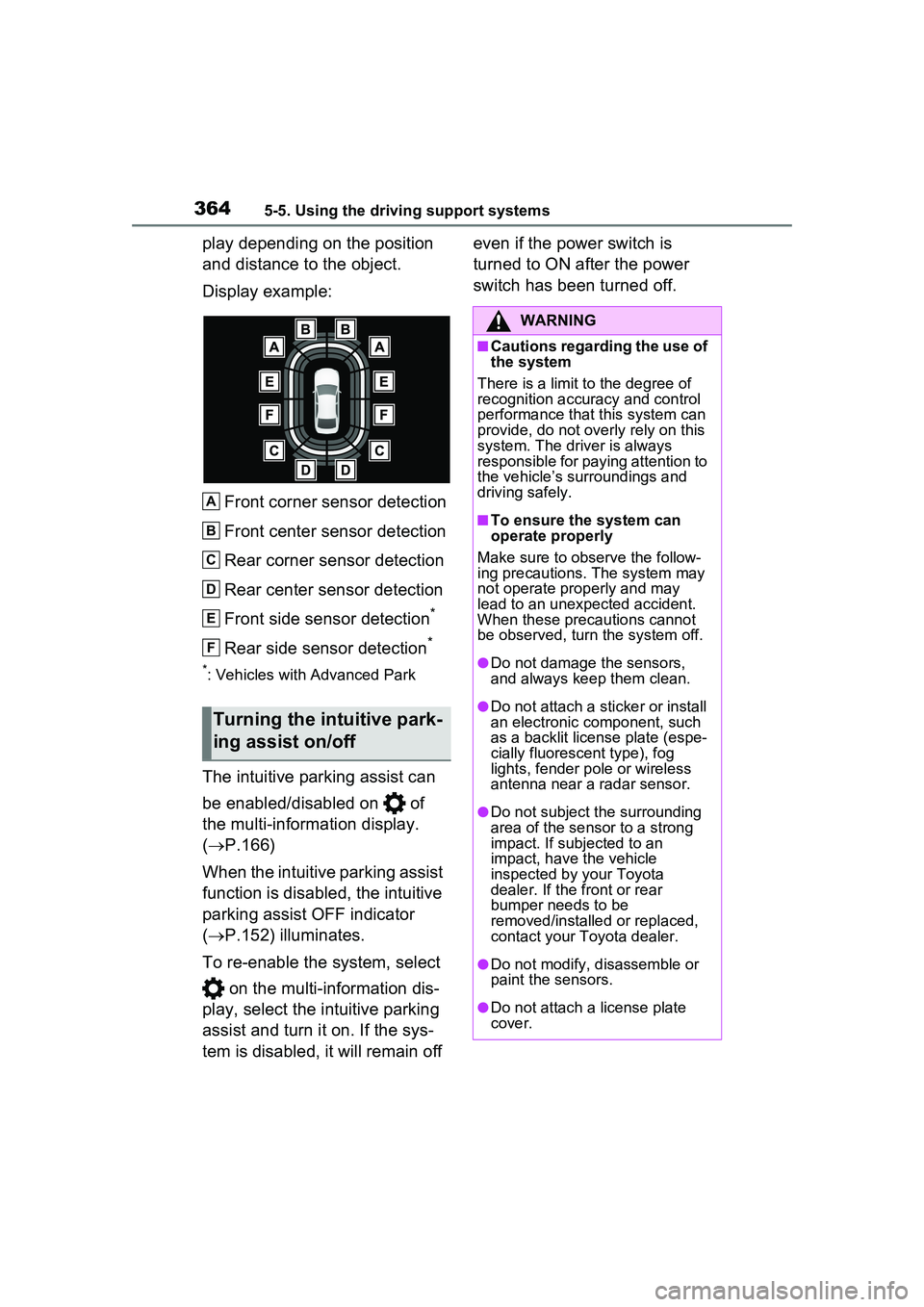
3645-5. Using the driving support systems
play depending on the position
and distance to the object.
Display example:Front corner sensor detection
Front center sensor detection
Rear corner sensor detection
Rear center sensor detection
Front side sensor detection
*
Rear side sensor detection*
*: Vehicles with Advanced Park
The intuitive parking assist can
be enabled/disabled on of
the multi-information display.
( P.166)
When the intuitive parking assist
function is disabled, the intuitive
parking assist OFF indicator
( P.152) illuminates.
To re-enable the system, select on the multi-information dis-
play, select the intuitive parking
assist and turn it on. If the sys-
tem is disabled, it will remain off even if the power switch is
turned to ON after the power
switch has been turned off.
Turning the intuitive park-
ing assist on/off
A
B
C
D
E
F
WARNING
■Cautions regarding the use of
the system
There is a limit to the degree of
recognition accuracy and control
performance that this system can
provide, do not overly rely on this
system. The driver is always
responsible for paying attention to
the vehicle’s surroundings and
driving safely.
■To ensure the system can
operate properly
Make sure to observe the follow-
ing precautions. The system may
not operate properly and may
lead to an unexpected accident.
When these precautions cannot
be observed, turn the system off.
●Do not damage the sensors,
and always keep them clean.
●Do not attach a st icker or install
an electronic component, such
as a backlit license plate (espe-
cially fluorescent type), fog
lights, fender pole or wireless
antenna near a radar sensor.
●Do not subject the surrounding
area of the sensor to a strong
impact. If subjected to an
impact, have the vehicle
inspected by your Toyota
dealer. If the front or rear
bumper needs to be
removed/installed or replaced,
contact your Toyota dealer.
●Do not modify, disassemble or
paint the sensors.
●Do not attach a license plate
cover.