instrument panel TOYOTA PRIUS PRIME 2023 User Guide
[x] Cancel search | Manufacturer: TOYOTA, Model Year: 2023, Model line: PRIUS PRIME, Model: TOYOTA PRIUS PRIME 2023Pages: 680, PDF Size: 14.97 MB
Page 243 of 680
2435-1. Before driving
5
Driving
WARNING
■If you hear a squealing or
scraping noise (brake pad
wear limit indicators)
Have the brake pads checked and
replaced by your Toyota dealer as
soon as possible.
Rotor damage may result if the
pads are not replaced when
needed.
It is dangerous to drive the vehicle
when the wear limits of the brake
pads and/or those of the brake
discs are exceeded.
■When the vehicle is stopped
●Do not depress the accelerator
pedal unnecessarily.
If the shift position is in any
position other than P or N, the
vehicle may accelerate sud-
denly and unexpectedly, caus-
ing an accident.
●In order to prevent accidents
due to the vehicle rolling away,
always keep depressing the
brake pedal while stopped with
the “READY” indicator is illumi-
nated, and apply the parking
brake as necessary.
●If the vehicle is stopped on an
incline, in order to prevent acci-
dents caused by the vehicle roll-
ing forward or backward, always
depress the brake pedal and
securely apply the parking
brake as needed.
●Avoid revving or racing the
engine.
Running the engine at high
speed while the vehicle is
stopped may cause the exhaust
system to overheat, which could
result in a fire if combustible
material is nearby.
■When the vehicle is parked
●Do not leave glasses, cigarette
lighters, spray cans, or soft
drink cans in the vehicle when it
is in the sun.
Doing so may result in the fol-
lowing:
• Gas may leak from a cigarette lighter or spray can, and may
lead to a fire.
• The temperature inside the vehicle may cause the plastic
lenses and plastic material of
glasses to deform or crack.
• Soft drink cans may fracture, causing the contents to spray
over the interior of the vehicle,
and may also cause a short cir-
cuit in the vehicle’s electrical
components.
●Do not leave cigarette lighters in
the vehicle. If a cigarette lighter
is in a place such as the glove
box or on the floor, it may be lit
accidentally when luggage is
loaded or the seat is adjusted,
causing a fire.
●Do not attach adhesive discs to
the windshield or windows. Do
not place containers such as air
fresheners on the instrument
panel or dashboard. Adhesive
discs or containers may act as
lenses, causing a fire in the
vehicle.
●Do not leave a door or window
open if the curved glass is
coated with a metallized film
such as a silver-colored one.
Reflected sunlight may cause
the glass to act as a lens, caus-
ing a fire.
Page 247 of 680
2475-1. Before driving
5
Driving
Cargo capacity depends on the
total weight of the occupants.
(Cargo capacity) = (Total load
capacity) - (Total weight of occu-
pants)
Steps for Determining Correct
Load Limit
(1) Locate the statement “The
combined weight of occupants
and cargo should never exceed
XXX kg or XXX lbs.” on your
vehicle’s placard.
(2) Determine the combined
weight of the driver and passen-
gers that will be riding in your
vehicle.
(3) Subtract the combined
weight of the driver and passen-
gers from XXX kg or XXX lbs.
(4) The resulting figure equals
the available amount of cargo
and luggage load capacity.
For example, if the “XXX”
amount equals 1400 lbs. and
there will be five 150 lb passen-
gers in your vehicle, the amount
of available cargo and luggage
load capacity is 650 lbs. (1400 -
750 (5 150) = 650 lbs.)
(5) Determine the combined
weight of luggage and cargo
being loaded on the vehicle.
That weight may not safely
exceed the available cargo and
luggage load capacity calcu-
lated in Step 4.
WARNING
●Do not place cargo or luggage
in or on the following locations.
• At the feet of the driver
• On the front passenger or rear seats (when stacking items)
• On the luggage cover
• On the instrument panel
• On the dashboard
●Secure all items in the occupant
compartment.
NOTICE
■If luggage is loaded on the
roof (vehicles with solar
charging system)
Observe the following precau-
tions. Failure to observe them
could lead to the solar roof being
damaged, or the roof rack falling
off.
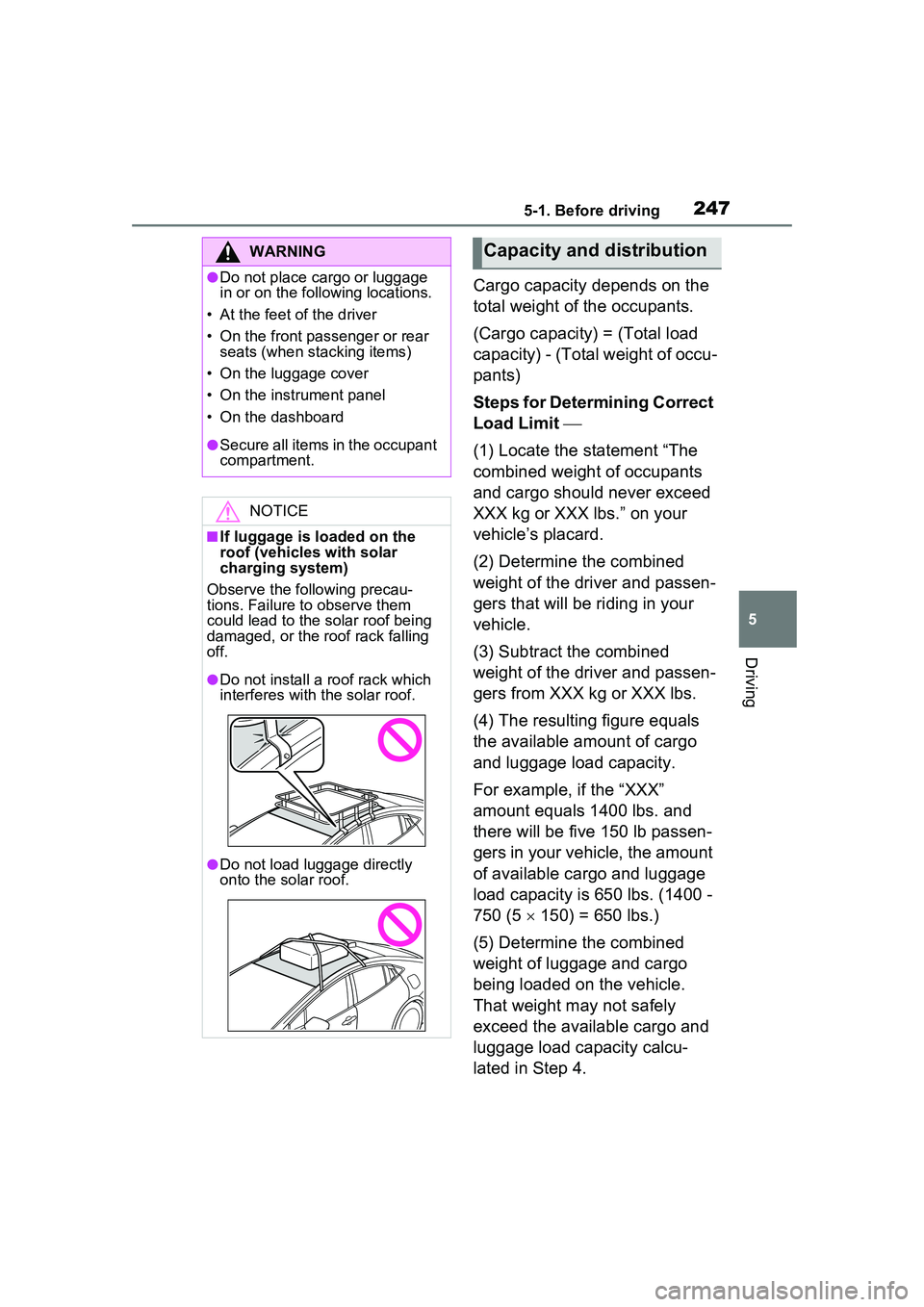
●Do not install a roof rack which
interferes with the solar roof.
●Do not load luggage directly
onto the solar roof.
Capacity and distribution
Page 269 of 680
2695-3. Operating the lights and wipers
5
Driving
5-3.Operating the lights and wipers
Operating the switch
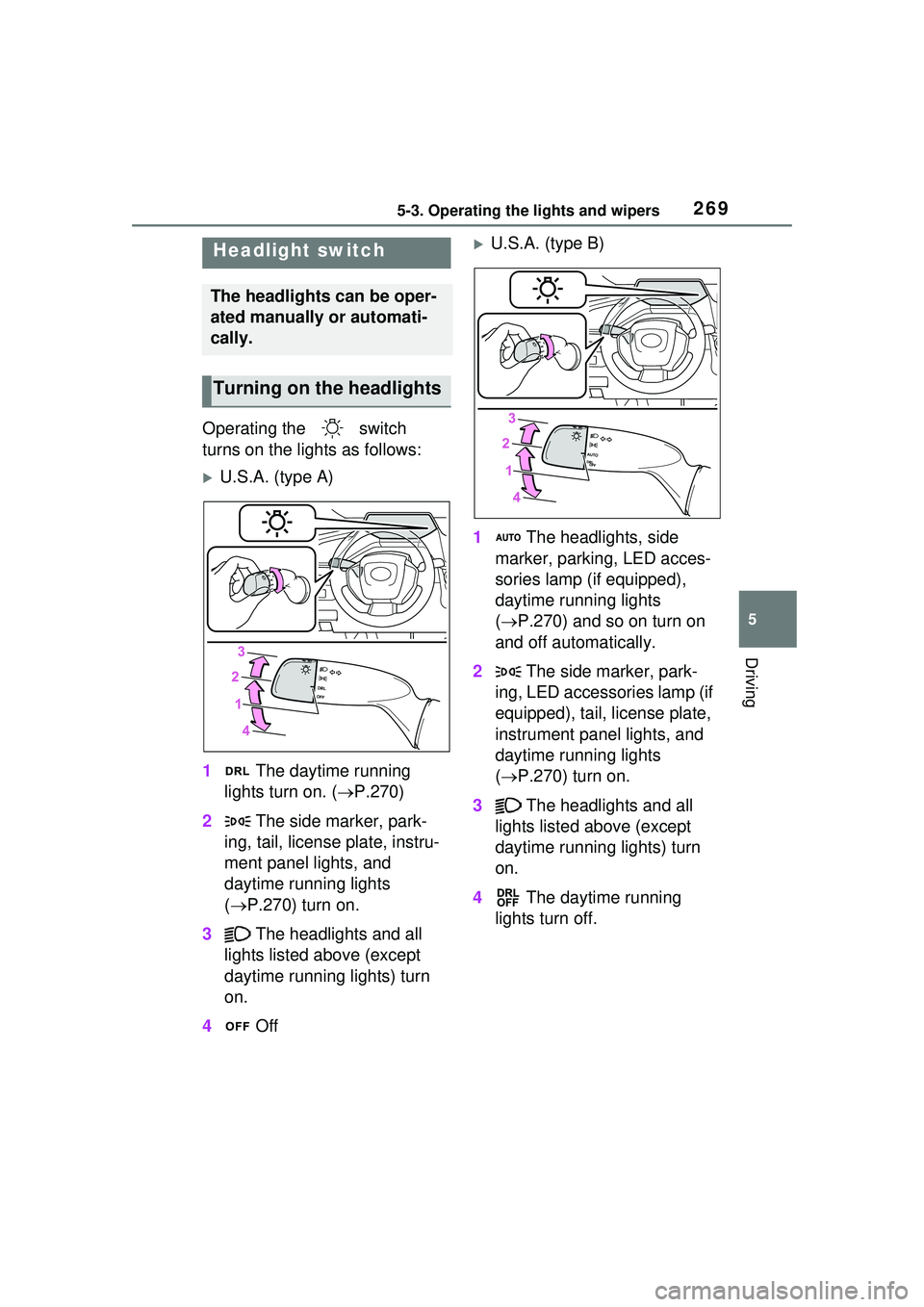
turns on the lights as follows:
U.S.A. (type A)
1 The daytime running
lights turn on. ( P.270)
2 The side marker, park-
ing, tail, license plate, instru-
ment panel lights, and
daytime running lights
( P.270) turn on.
3 The headlights and all
lights listed above (except
daytime running lights) turn
on.
4 Off
U.S.A. (type B)
1 The headlights, side
marker, parking, LED acces-
sories lamp (if equipped),
daytime running lights
( P.270) and so on turn on
and off automatically.
2 The side marker, park-
ing, LED accessories lamp (if
equipped), tail, license plate,
instrument panel lights, and
daytime running lights
( P.270) turn on.
3 The headlights and all
lights listed above (except
daytime running lights) turn
on.
4 The daytime running
lights turn off.Headlight switch
The headlights can be oper-
ated manually or automati-
cally.
Turning on th e headlights
Page 270 of 680
2705-3. Operating the lights and wipers
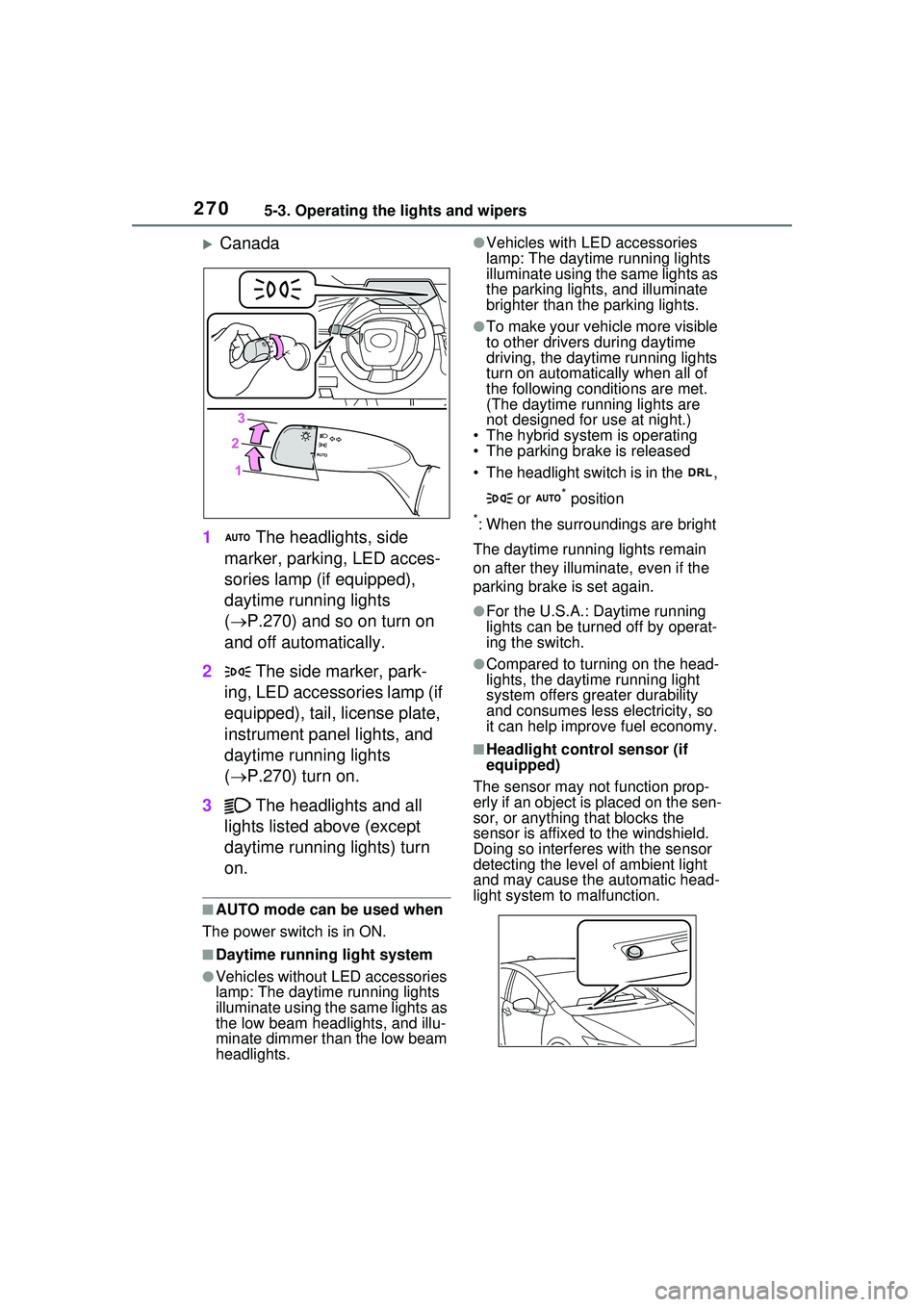
Canada
1 The headlights, side
marker, parking, LED acces-
sories lamp (if equipped),
daytime running lights
( P.270) and so on turn on
and off automatically.
2 The side marker, park-
ing, LED accessories lamp (if
equipped), tail, license plate,
instrument panel lights, and
daytime running lights
( P.270) turn on.
3 The headlights and all
lights listed above (except
daytime running lights) turn
on.
■AUTO mode can be used when
The power switch is in ON.
■Daytime running light system
●Vehicles without LED accessories
lamp: The daytime running lights
illuminate using the same lights as
the low beam head lights, and illu-
minate dimmer than the low beam
headlights.
●Vehicles with LED accessories
lamp: The daytime running lights
illuminate using the same lights as
the parking lights, and illuminate
brighter than the parking lights.
●To make your vehicle more visible
to other drivers during daytime
driving, the daytime running lights
turn on automatically when all of
the following conditions are met.
(The daytime running lights are
not designed for use at night.)
• The hybrid system is operating
• The parking brake is released
• The headlight switch is in the ,
or
* position
*: When the surroundings are bright
The daytime running lights remain
on after they illuminate, even if the
parking brake is set again.
●For the U.S.A.: Daytime running
lights can be turned off by operat-
ing the switch.
●Compared to turning on the head-
lights, the daytime running light
system offers gr eater durability
and consumes less electricity, so
it can help improve fuel economy.
■Headlight control sensor (if
equipped)
The sensor may not function prop-
erly if an object is placed on the sen-
sor, or anything that blocks the
sensor is affixed to the windshield.
Doing so interferes with the sensor
detecting the level of ambient light
and may cause the automatic head-
light system to malfunction.
Page 442 of 680
4426-1. Using the air conditioning system and defogger
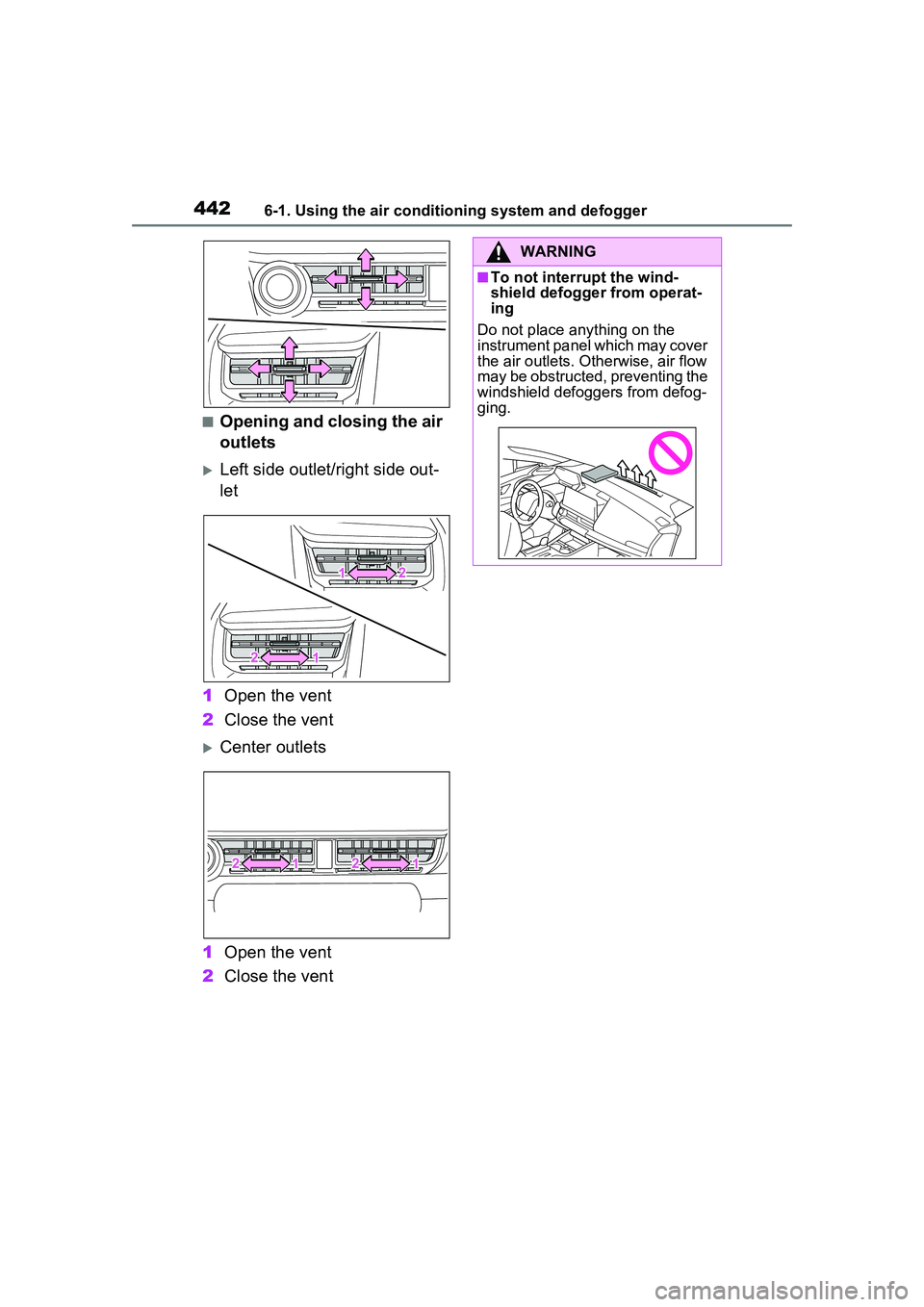
■Opening and closing the air
outlets
Left side outlet/right side out-
let
1 Open the vent
2 Close the vent
Center outlets
1 Open the vent
2 Close the vent
WARNING
■To not interrupt the wind-
shield defogger from operat-
ing
Do not place anything on the
instrument panel which may cover
the air outlets. Otherwise, air flow
may be obstructed, preventing the
windshield defoggers from defog-
ging.
Page 446 of 680
4466-2. Using the interior lights
6-2.Using the interior lights
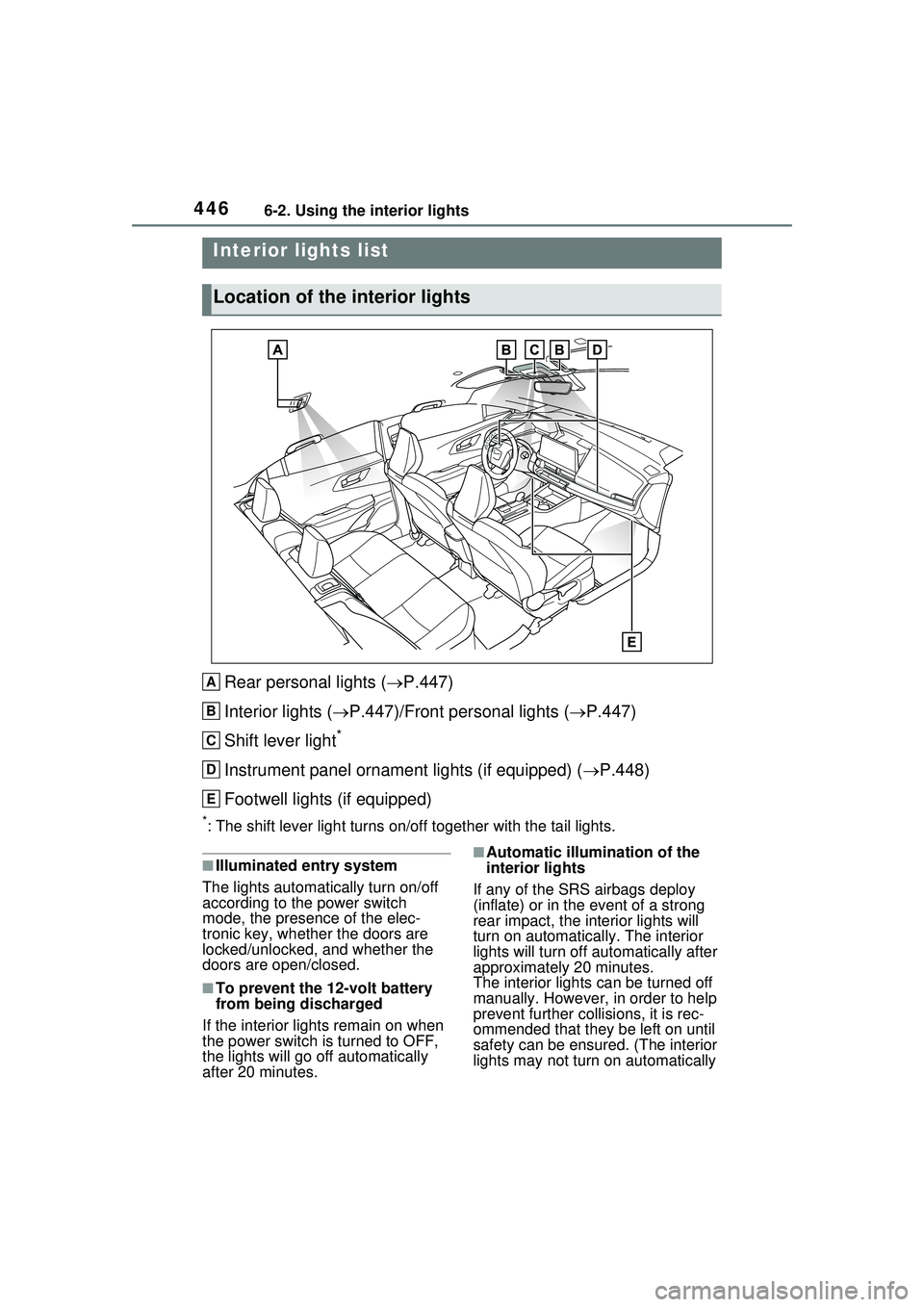
Rear personal lights (P.447)
Interior lights ( P.447)/Front personal lights ( P.447)
Shift lever light
*
Instrument panel ornament lights (if equipped) ( P.448)
Footwell lights (if equipped)
*: The shift lever light turns on/off together with the tail lights.
■Illuminated entry system
The lights automatically turn on/off
according to the power switch
mode, the presence of the elec-
tronic key, whether the doors are
locked/unlocked, and whether the
doors are open/closed.
■To prevent the 12-volt battery
from being discharged
If the interior light s remain on when
the power switch is turned to OFF,
the lights will go off automatically
after 20 minutes.
■Automatic illumina tion of the
interior lights
If any of the SRS airbags deploy
(inflate) or in the event of a strong
rear impact, the interior lights will
turn on automatically. The interior
lights will turn off au tomatically after
approximately 20 minutes.
The interior lights can be turned off
manually. However, in order to help
prevent further collisions, it is rec-
ommended that they be left on until
safety can be ensured. (The interior
lights may not turn on automatically
Interior lights list
Location of the interior lights
A
B
C
D
E
Page 448 of 680
4486-2. Using the interior lights
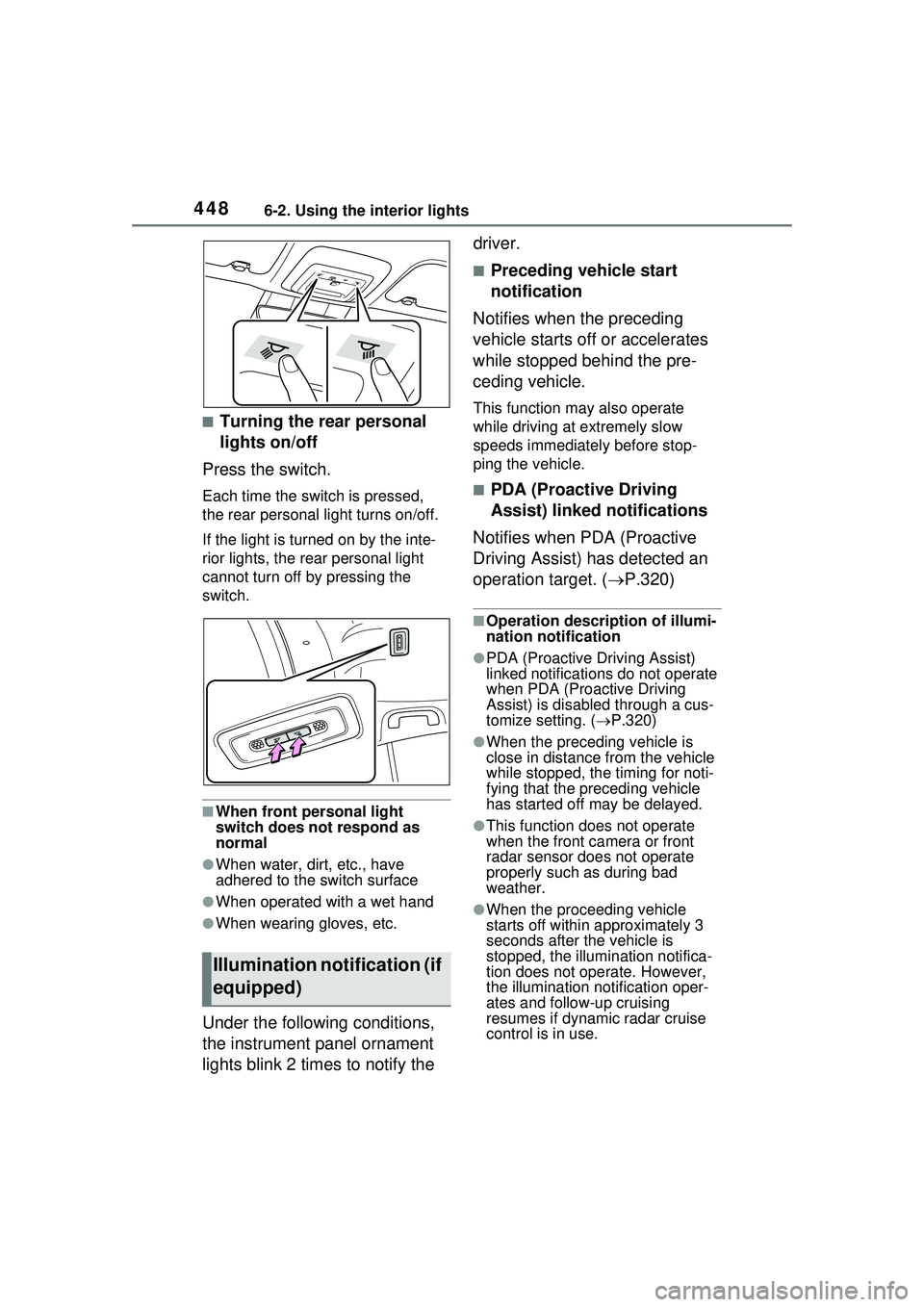
■Turning the rear personal
lights on/off
Press the switch.
Each time the switch is pressed,
the rear personal light turns on/off.
If the light is turned on by the inte-
rior lights, the rear personal light
cannot turn off by pressing the
switch.
■When front personal light
switch does not respond as
normal
●When water, dirt, etc., have
adhered to the switch surface
●When operated with a wet hand
●When wearing gloves, etc.
Under the following conditions,
the instrument panel ornament
lights blink 2 times to notify the driver.
■Preceding vehicle start
notification
Notifies when the preceding
vehicle starts off or accelerates
while stopped behind the pre-
ceding vehicle.
This function may also operate
while driving at extremely slow
speeds immediately before stop-
ping the vehicle.
■PDA (Proactive Driving
Assist) linked notifications
Notifies when PDA (Proactive
Driving Assist) has detected an
operation target. ( P.320)
■Operation description of illumi-
nation notification
●PDA (Proactive Driving Assist)
linked notifications do not operate
when PDA (Proactive Driving
Assist) is disabled through a cus-
tomize setting. (P.320)
●When the preceding vehicle is
close in distance from the vehicle
while stopped, the timing for noti-
fying that the preceding vehicle
has started off may be delayed.
●This function does not operate
when the front ca mera or front
radar sensor does not operate
properly such as during bad
weather.
●When the proceeding vehicle
starts off within approximately 3
seconds after the vehicle is
stopped, the illumi nation notifica-
tion does not operate. However,
the illumination notification oper-
ates and follow-up cruising
resumes if dynamic radar cruise
control is in use.
Illumination notification (if
equipped)
Page 491 of 680
4917-1. Maintenance and care
7
Maintenance and care
damage to the UV protective coat-
ing, observe the following:
●If the windows are dirty, gently
wipe them with a cloth soaked in
water or lukewarm water as soon
as possible.
●If the windows are very dirty, do
not open and close them repeat-
edly.
WARNING
■Water in the vehicle
●Do not splash or spill liquid in
the vehicle, such as on the floor,
on the rear seats or in the lug-
gage compartment.
Doing so may cause the hybrid
battery, electrical components,
etc. to malfunction or catch fire.
●Do not get any of the SRS com-
ponents or wiring in the vehicle
interior wet.
( P.36)
An electrical malfunction may
cause the airbags to deploy or
not function properly, resulting
in death or serious injury.
●Do not let the wireless charger
( P.458) get wet. Failure to do
so may cause the charger to
become hot and cause burns or
could cause electric shock
resulting in death or serious
injury.
■Cleaning the interior (espe-
cially instrument panel)
Do not use polish wax or polish
cleaner. The instrument panel
may reflect off the windshield,
obstructing the driver’s view and
leading to an accident, resulting in
death or serious injury.
NOTICE
■Cleaning detergents
●Do not use the following types
of detergent, as they may dis-
color the vehicle interior or
cause streaks or damage to
painted surfaces:
• Non-seat portions: Organic sub- stances such as benzene or
gasoline, alkaline or acidic solu-
tions, dye, and bleach
• Seats: Alkaline or acidic solu- tions, such as thinner, benzene,
and alcohol
●Do not use polish wax or polish
cleaner. The instrument panel’s
or other interior part’s painted
surface may be damaged.
■Preventing damage to leather
surfaces
Observe the following precautions
to avoid damage to and deteriora-
tion of leather surfaces:
●Remove any dust or dirt from
leather surfaces immediately.
●Do not expose the vehicle to
direct sunlight for extended peri-
ods of time. Park the vehicle in
the shade, especially during
summer.
●Do not place items made of
vinyl, plastic, or containing wax
on the upholstery, as they may
stick to the leather surface if the
vehicle interior heats up signifi-
cantly.
■Water on the floor
Do not wash the vehicle floor with
water.
Vehicle systems such as the
audio system may be damaged if
water comes into contact with
electrical components such as the
audio system above or under the
floor of the vehicle. Water may
also cause the body to rust.
Page 540 of 680
5407-3. Do-it-yourself maintenance
1Turn the power switch off.
Confirm that the charging connec-
tor is not connected.
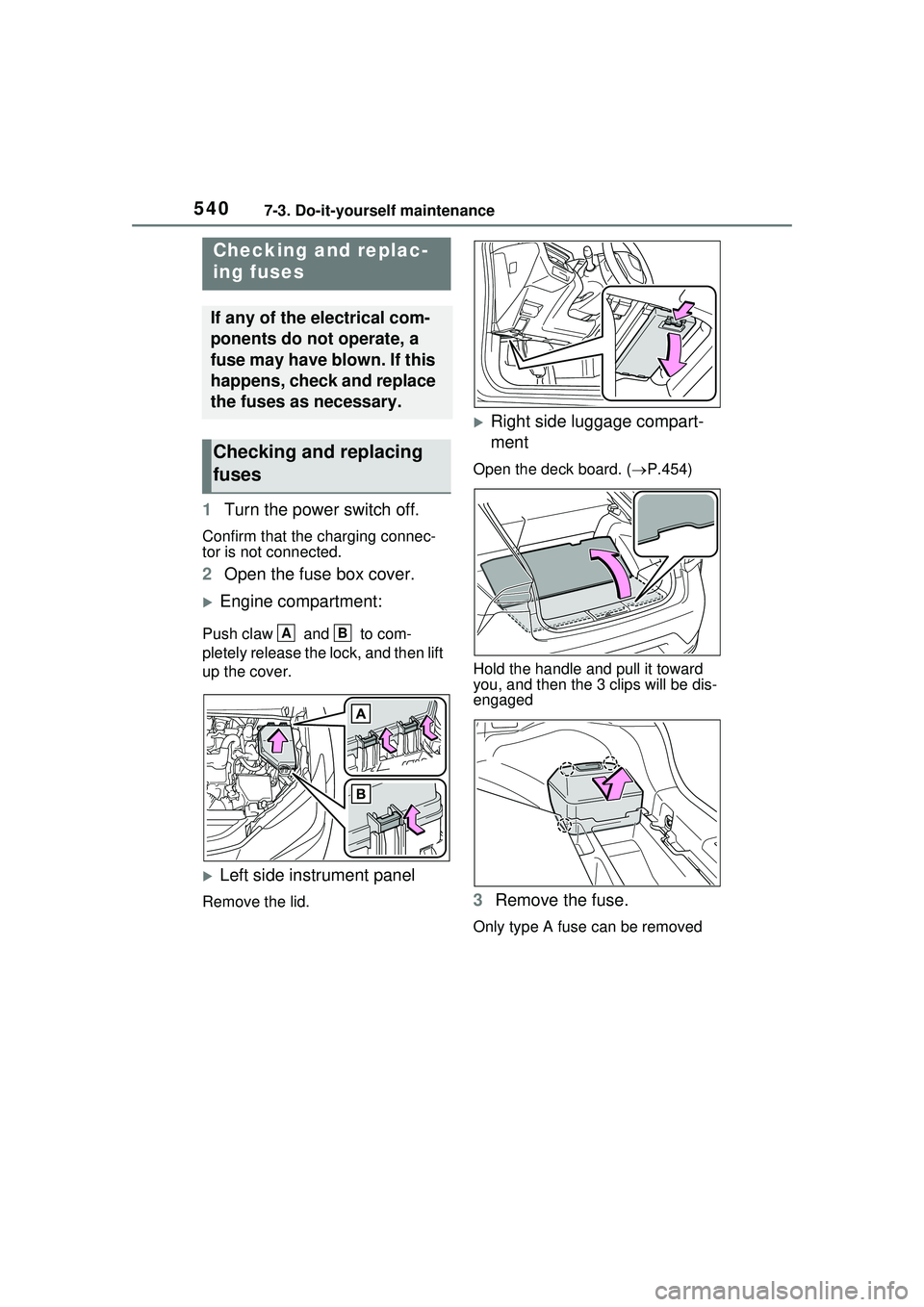
2Open the fuse box cover.
Engine compartment:
Push claw and to com-
pletely release the lock, and then lift
up the cover.
Left side instrument panel
Remove the lid.
Right side luggage compart-
ment
Open the deck board. ( P.454)
Hold the handle and pull it toward
you, and then the 3 clips will be dis-
engaged
3 Remove the fuse.
Only type A fuse can be removed
Checking and replac-
ing fuses
If any of the electrical com-
ponents do not operate, a
fuse may have blown. If this
happens, check and replace
the fuses as necessary.
Checking and replacing
fuses
AB
Page 600 of 680
6009-1. Specifications
9-1.Specifications
*: Unladen vehicle
■Vehicle identification num-
ber
The vehicle identification num-
ber (VIN) is the legal identifier
for your vehicle. This is the pri-
mary identification number for
your Toyota. It is used in regis-
tering the ownership of your
vehicle.
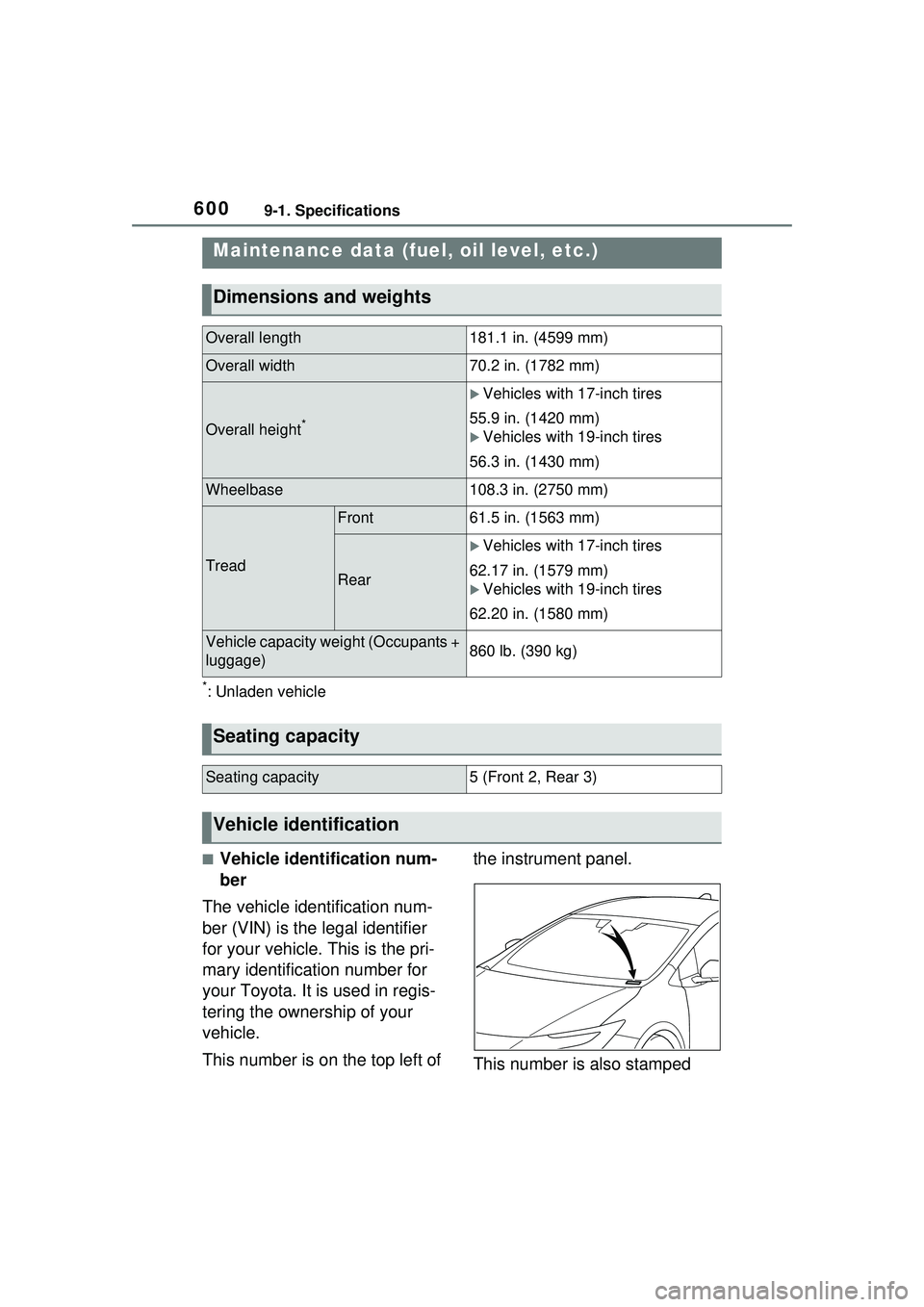
This number is on the top left of the instrument panel.
This number is also stamped
Maintenance data (fuel, oil level, etc.)
Dimensions and weights
Overall length181.1 in. (4599 mm)
Overall width70.2 in. (1782 mm)
Overall height*
Vehicles with 17-inch tires
55.9 in. (1420 mm)
Vehicles with 19-inch tires
56.3 in. (1430 mm)
Wheelbase108.3 in. (2750 mm)
Tread
Front61.5 in. (1563 mm)
Rear
Vehicles with 17-inch tires
62.17 in. (1579 mm)
Vehicles with 19-inch tires
62.20 in. (1580 mm)
Vehicle capacity weight (Occupants +
luggage)860 lb. (390 kg)
Seating capacity
Seating capacity5 (Front 2, Rear 3)
Vehicle identification