reset TOYOTA PRIUS PRIME 2023 User Guide
[x] Cancel search | Manufacturer: TOYOTA, Model Year: 2023, Model line: PRIUS PRIME, Model: TOYOTA PRIUS PRIME 2023Pages: 680, PDF Size: 14.97 MB
Page 175 of 680
1753-1. Instrument cluster
3
Vehicle status information and indicators
The image is an example only, and
may vary slightly from actual condi-
tions.
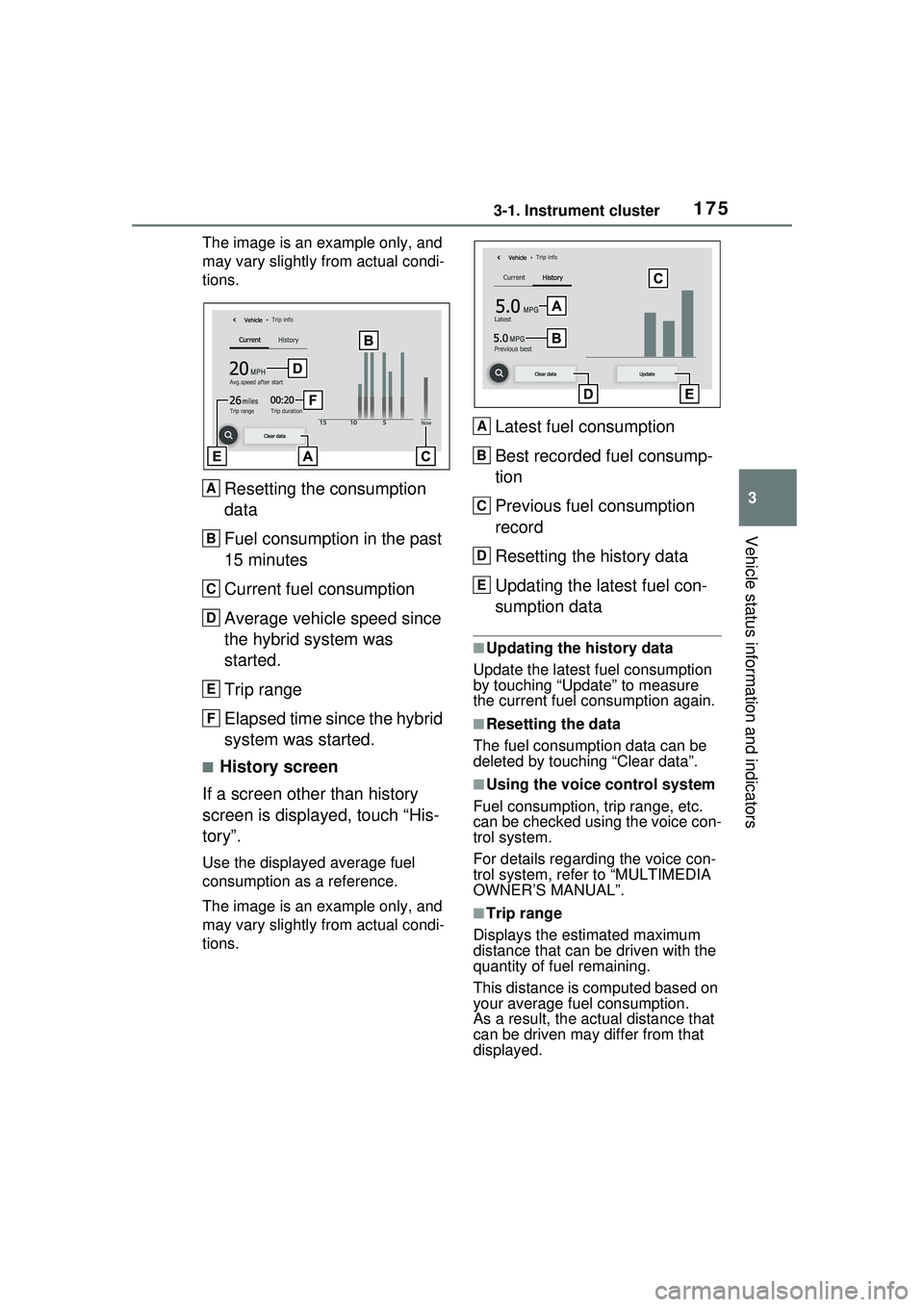
Resetting the consumption
data
Fuel consumption in the past
15 minutes
Current fuel consumption
Average vehicle speed since
the hybrid system was
started.
Trip range
Elapsed time since the hybrid
system was started.
■History screen
If a screen other than history
screen is displayed, touch “His-
tory”.
Use the displayed average fuel
consumption as a reference.
The image is an example only, and
may vary slightly from actual condi-
tions.
Latest fuel consumption
Best recorded fuel consump-
tion
Previous fuel consumption
record
Resetting the history data
Updating the latest fuel con-
sumption data
■Updating the history data
Update the latest fuel consumption
by touching “Update” to measure
the current fuel consumption again.
■Resetting the data
The fuel consumption data can be
deleted by touching “Clear data”.
■Using the voice control system
Fuel consumption, trip range, etc.
can be checked using the voice con-
trol system.
For details regarding the voice con-
trol system, refe r to “MULTIMEDIA
OWNER’S MANUAL”.
■Trip range
Displays the estimated maximum
distance that can be driven with the
quantity of fuel remaining.
This distance is computed based on
your average fuel consumption.
As a result, the actual distance that
can be driven may differ from that
displayed.
A
B
C
D
E
F
A
B
C
D
E
Page 176 of 680
1763-1. Instrument cluster
Information related to the solar
charging system can be dis-
played.
■Display procedure
Multi-information display
Solar charging information
screen can be displayed on
of the multi-information
display.
For detail regarding the multi-
information display, refer to
P.161.
Multimedia Display
Touch on the main menu,
then touch “Solar charging” on
the sub menu.
For detail regarding the Multimedia
Display, refer to “MULTIMEDIA
OWNER’S MANUAL”.
■Solar charging information
screen (multi-information
display)
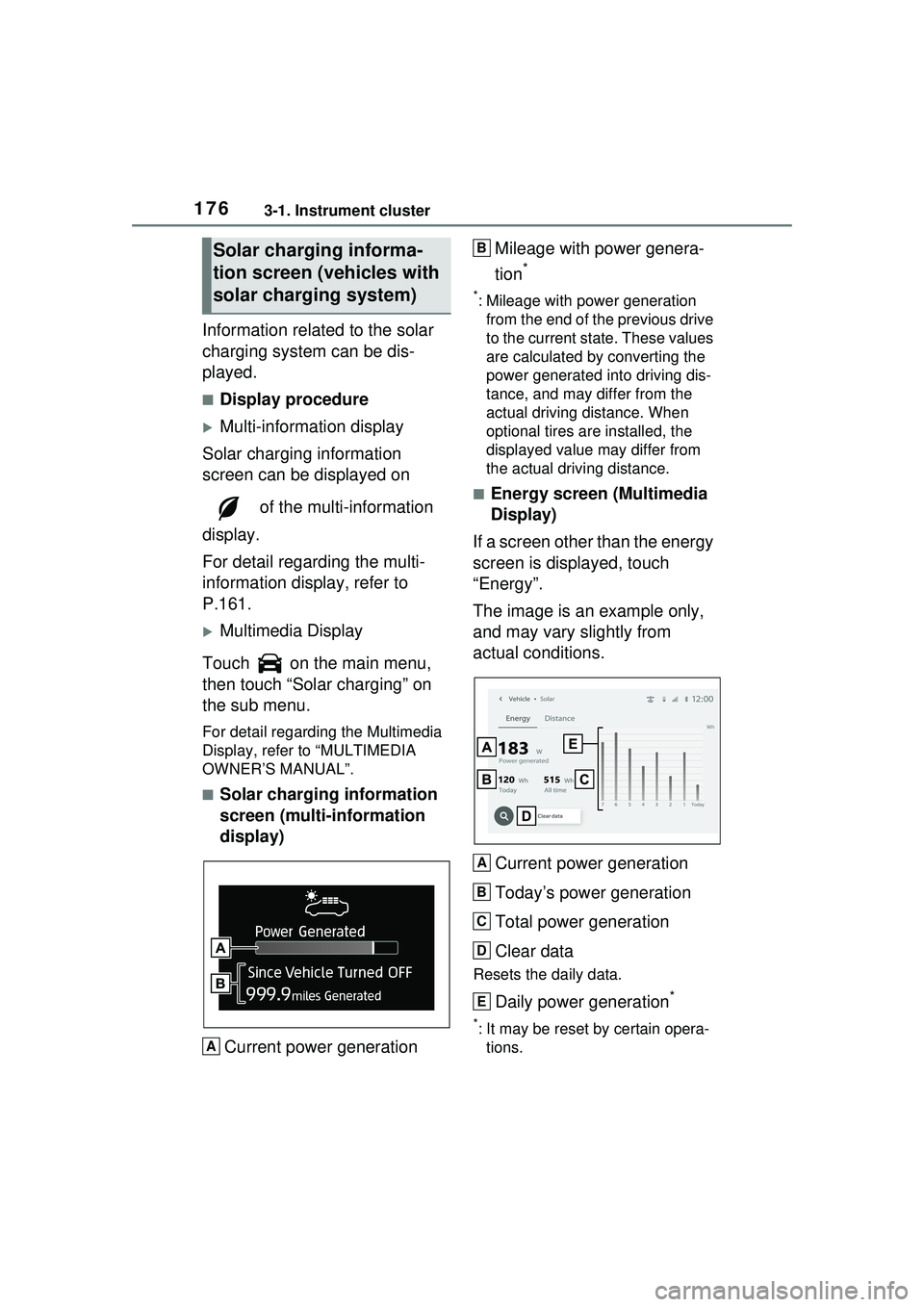
Current power generation Mileage with power genera-
tion
*
*: Mileage with power generation
from the end of the previous drive
to the current state. These values
are calculated by converting the
power generated into driving dis-
tance, and may differ from the
actual driving distance. When
optional tires are installed, the
displayed value may differ from
the actual driving distance.
■Energy screen (Multimedia
Display)
If a screen other than the energy
screen is displayed, touch
“Energy”.
The image is an example only,
and may vary slightly from
actual conditions.
Current power generation
Today’s power generation
Total power generation
Clear data
Resets the daily data.
Daily power generation*
*: It may be reset by certain opera-tions.
Solar charging informa-
tion screen ( vehicles with
solar charging system)
A
B
A
B
C
D
E
Page 177 of 680
1773-1. Instrument cluster
3
Vehicle status information and indicators
■Distance screen (Multime-
dia Display)
If a screen other than the dis-
tance screen is displayed, touch
“Distance”.
The image is an example only,
and may vary slightly from
actual conditions.
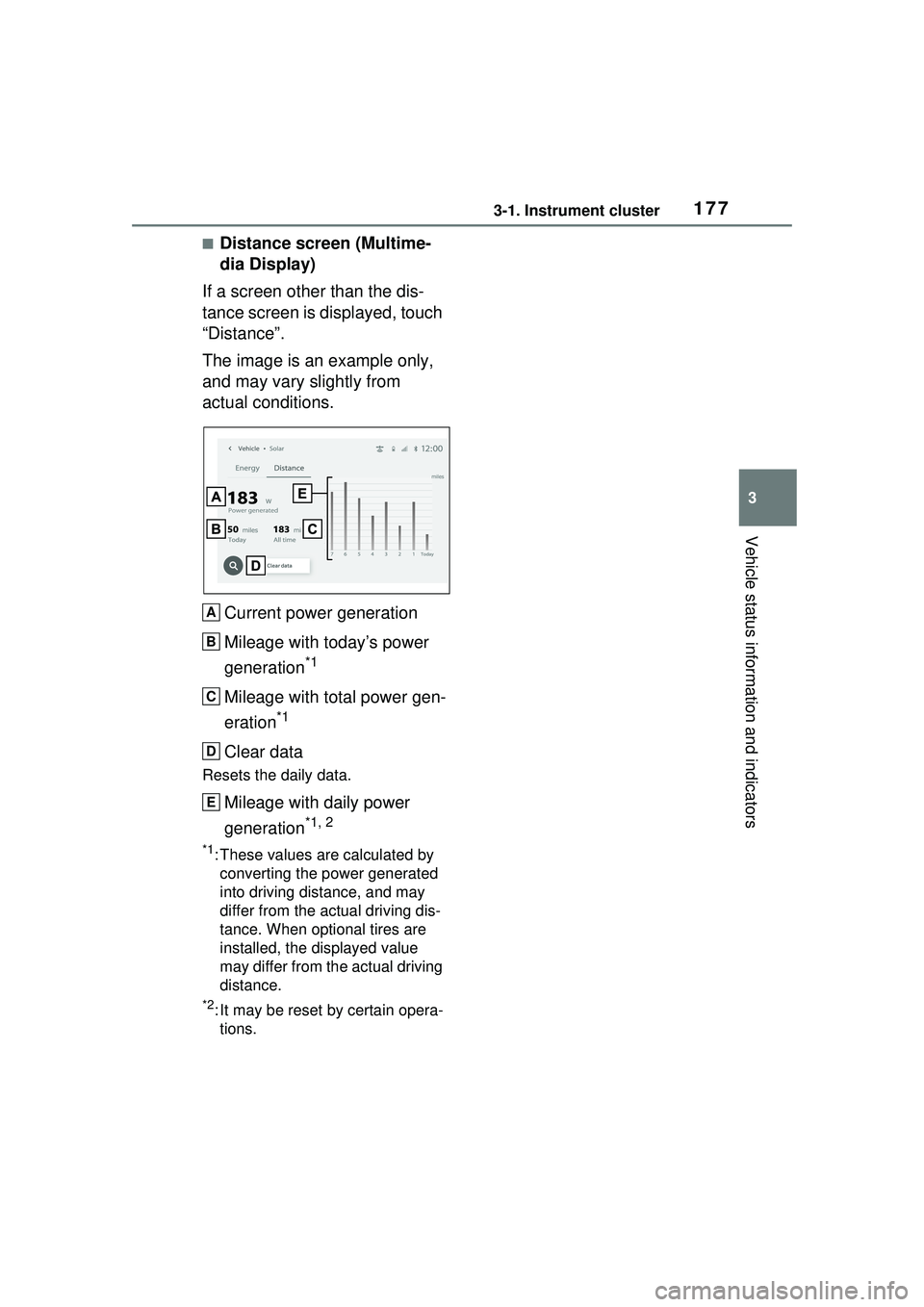
Current power generation
Mileage with today’s power
generation
*1
Mileage with total power gen-
eration
*1
Clear data
Resets the daily data.
Mileage with daily power
generation
*1, 2
*1: These values are calculated by converting the power generated
into driving distance, and may
differ from the actual driving dis-
tance. When optional tires are
installed, the displayed value
may differ from the actual driving
distance.
*2: It may be reset by certain opera-tions.
A
B
C
D
E
Page 187 of 680
1874-2. Opening, closing and locking the doors
4
Before driving
■If the 12-volt battery is dis-
charged
The doors cannot be locked and
unlocked using the smart key sys-
tem or wireless remote control. Lock
or unlock the doors using the
mechanical key. ( P.587)
■Customization
Settings (e.g. unlocking function
using a key) can be changed.
(Customizable features: P.618)
■Using the door lock
switches
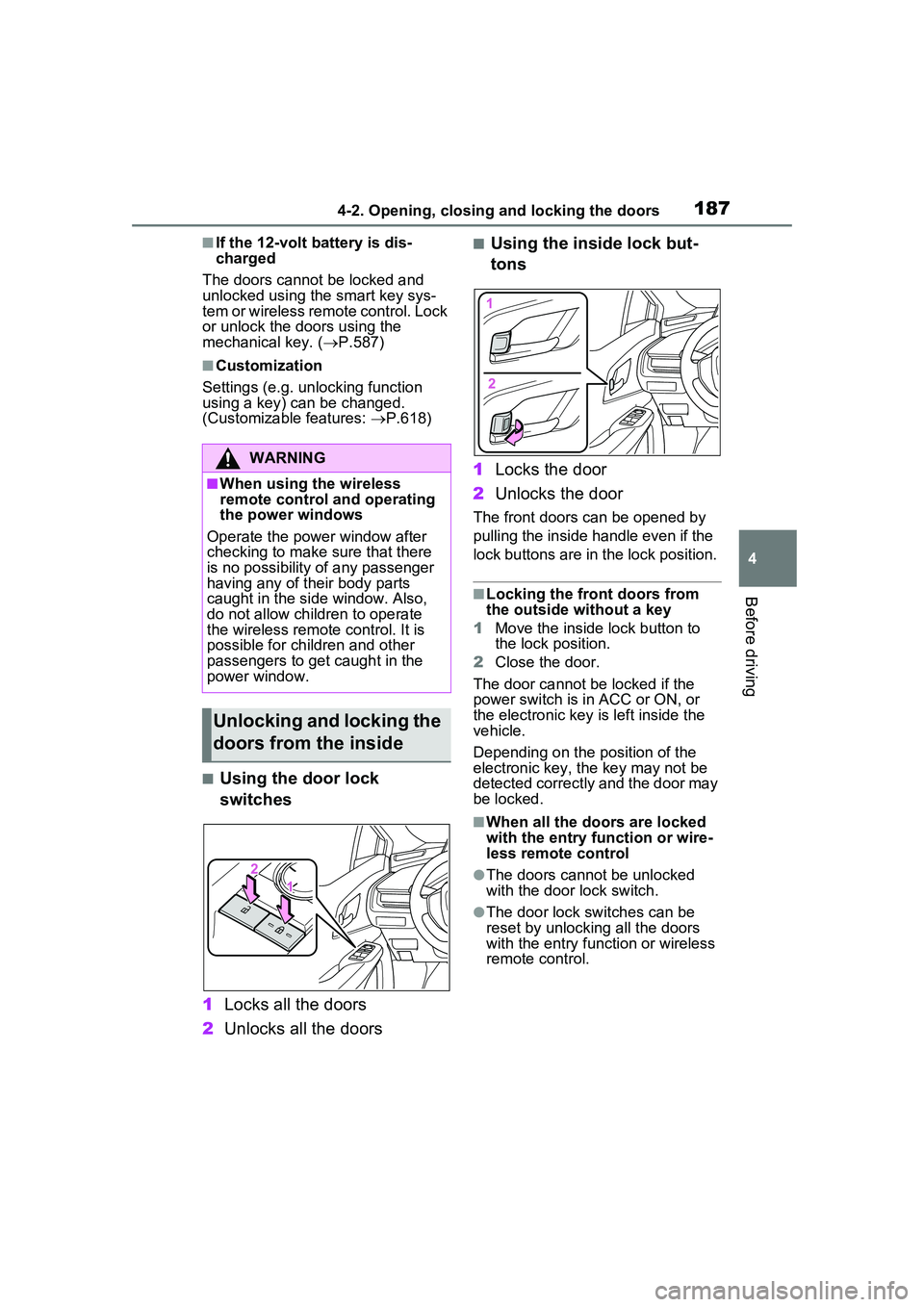
1 Locks all the doors
2 Unlocks all the doors
■Using the inside lock but-
tons
1 Locks the door
2 Unlocks the door
The front doors can be opened by
pulling the inside handle even if the
lock buttons are in the lock position.
■Locking the front doors from
the outside without a key
1 Move the inside lock button to
the lock position.
2 Close the door.
The door cannot be locked if the
power switch is in ACC or ON, or
the electronic key is left inside the
vehicle.
Depending on the position of the
electronic key, the key may not be
detected correctly and the door may
be locked.
■When all the doors are locked
with the entry function or wire-
less remote control
●The doors cannot be unlocked
with the door lock switch.
●The door lock switches can be
reset by unlocking all the doors
with the entry function or wireless
remote control.
WARNING
■When using the wireless
remote control and operating
the power windows
Operate the power window after
checking to make sure that there
is no possibility of any passenger
having any of their body parts
caught in the side window. Also,
do not allow children to operate
the wireless remote control. It is
possible for children and other
passengers to get caught in the
power window.
Unlocking and locking the
doors from the inside
Page 202 of 680
2024-2. Opening, closing and locking the doors
The settings of the power back
door system can be changed by
displaying “PBD” from “
Vehicle Settings” on of the
multi-information display. (
P.166)
The changed power back door set-
tings are not reset by turning the
power switch to OFF. In order to
restore the original settings, they
need to be changed back on the
of the multi-information display.
The open position of the power
back door can be adjusted.
1Stop the back door in the
desirable position. ( P.194)
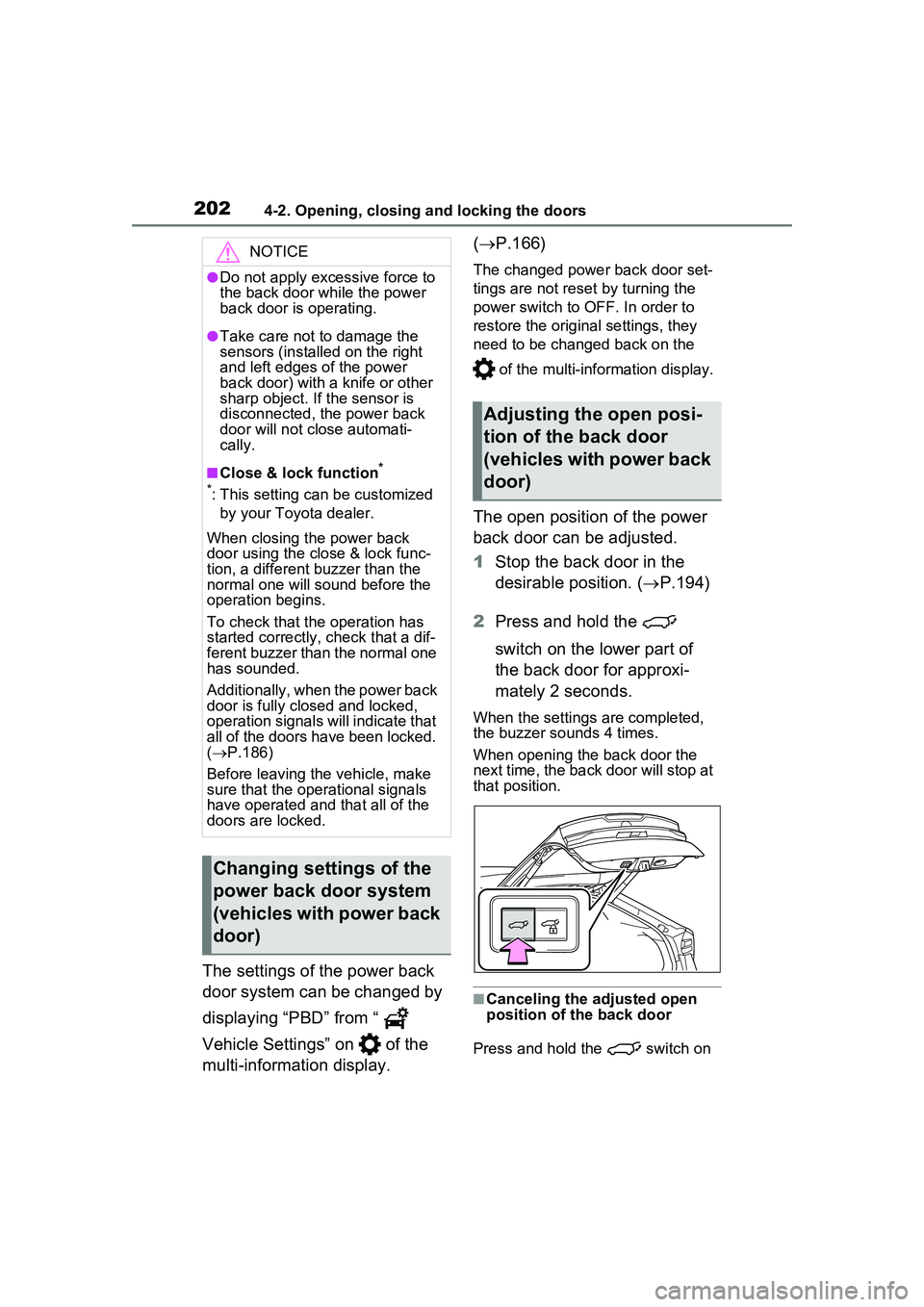
2 Press and hold the
switch on the lower part of
the back door for approxi-
mately 2 seconds.
When the settings are completed,
the buzzer sounds 4 times.
When opening the back door the
next time, the back door will stop at
that position.
■Canceling the adjusted open
position of the back door
Press and hold the switch on
NOTICE
●Do not apply excessive force to
the back door while the power
back door is operating.
●Take care not to damage the
sensors (installed on the right
and left edges of the power
back door) with a knife or other
sharp object. If the sensor is
disconnected, the power back
door will not close automati-
cally.
■Close & lock function*
*
: This setting can be customized by your Toyota dealer.
When closing the power back
door using the close & lock func-
tion, a different buzzer than the
normal one will sound before the
operation begins.
To check that the operation has
started correctly, check that a dif-
ferent buzzer than the normal one
has sounded.
Additionally, when the power back
door is fully closed and locked,
operation signals will indicate that
all of the doors have been locked.
( P.186)
Before leaving the vehicle, make
sure that the operational signals
have operated and that all of the
doors are locked.
Changing settings of the
power back door system
(vehicles with power back
door)
Adjusting the open posi-
tion of the back door
(vehicles with power back
door)
Page 231 of 680
2314-6. Favorite settings
4
Before driving
during power easy access system
operation, the automatic operation
will stop. (The seat will change to
manual operation.)
●If the seat position is adjusted
during or after the power easy
access system operation when
the driver is exiting the vehicle, the
power easy access system will not
operate when entering the vehi-
cle.
■Jam protection function
If a person or object interferes while
the seat is moving automatically, the
operation will stop.
■Customization
The seat movement amount set-
tings of the powe r easy access sys-
tem can be customized.
(Customizable features: P.618)
■Recording procedure
1 Check that the shift position
is in P.
2 Turn the power switch to ON.
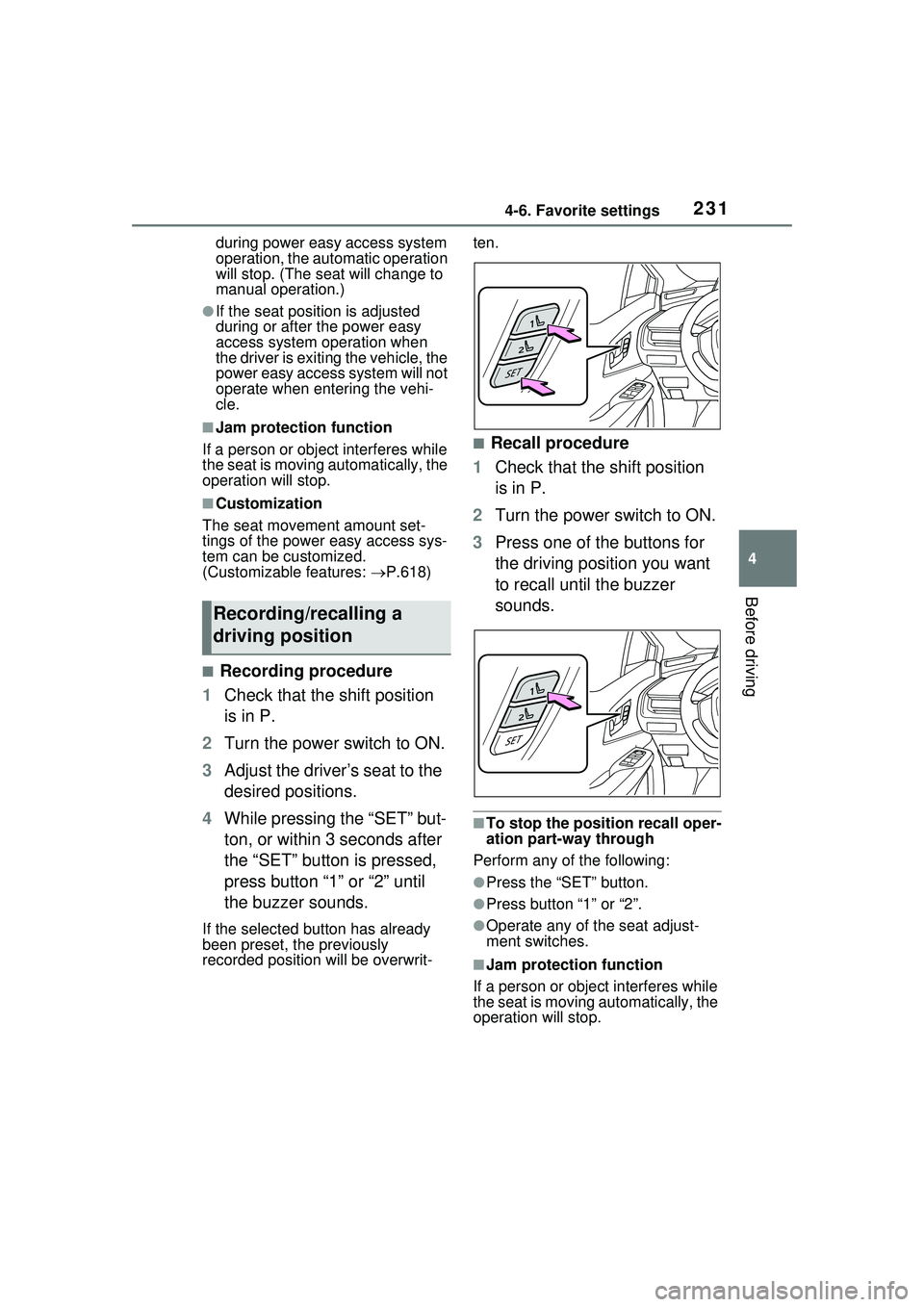
3 Adjust the driver’s seat to the
desired positions.
4 While pressing the “SET” but-
ton, or within 3 seconds after
the “SET” button is pressed,
press button “1” or “2” until
the buzzer sounds.
If the selected button has already
been preset, the previously
recorded position will be overwrit- ten.
■Recall procedure
1 Check that the shift position
is in P.
2 Turn the power switch to ON.
3 Press one of the buttons for
the driving position you want
to recall until the buzzer
sounds.
■To stop the position recall oper-
ation part-way through
Perform any of the following:
●Press the “SET” button.
●Press button “1” or “2”.
●Operate any of the seat adjust-
ment switches.
■Jam protection function
If a person or object interferes while
the seat is moving automatically, the
operation will stop.
Recording/recalling a
driving position
Page 253 of 680
2535-2. Driving procedures
5
Driving
1Stop the vehicle completely.
2 If the parking brake is in man-
ual mode, set the parking
brake. ( P.263)
3 Press the P position switch.
( P.257)
Check that the shift position indica-
tor shows P and the parking brake
indicator is illuminated.
4Press the power switch.
The hybrid system will stop, and the meter display will
be extinguished
(the shift position indicator will be
extinguished a few seconds after
the meter display).
5 Release the brake pedal and
check that “ACCESSORY” or
“POWER ON” is not shown
on the meter.
■When the shift control system
malfunctions
If the shift control system is malfunc-
tioning, when attempting to turn the
power switch off, it may not be able
to be turned off. In this situation, it
may be possible to turn the power
switch off by applying the parking
brake and then operating the power
switch.
If there is a malfunction in the sys-
tem, have the vehicle inspected by
your Toyota dealer immediately.
■Automatic hybrid system shut
off feature
●The vehicle is equipped with a
feature that automa tically shuts off
the hybrid system when the shift
position is in P with the hybrid sys-
tem operating for an extended
period.
●The hybrid system will automati-
cally shut off after approximately 1
hour if it has been left operating
while the shift position is in P.
●The timer for the automatic hybrid
system shut off fe ature will reset if
the brake pedal is depressed or if
the shift position is in a position
other than P.
●After the vehicle is parked, if the
door is locked with the door lock
switch ( P.187) from the inside
or the mechanical key ( P.587)
from the outside, the automatic
hybrid system shut off feature will
be disabled. The timer for the
automatic hybrid system shut off
feature will be re- enabled if the
driver’s door is opened.
WARNING
■When starting the hybrid sys-
tem
Always start the hybrid system
while sitting in the driver’s seat.
Do not depress the accelerator
pedal while starting the hybrid
system under any circumstances.
Doing so may cause an accident
resulting in death or serious
injury.
NOTICE
■When starting the hybrid sys-
tem
If the hybrid system becomes diffi-
cult to start, have your vehicle
checked by your Toyota dealer
immediately.
■Symptoms indicating a mal-
function with the power
switch
If the power switch seems to be
operating somewhat differently
than usual, such as the switch
sticking slightly, there may be a
malfunction. Contact your Toyota
dealer immediately.
Stopping the hybrid sys-
tem
Page 495 of 680
4957-2. Maintenance
7
Maintenance and care
■Resetting the message indicat-
ing maintenance is required
After the required maintenance is
performed according to the mainte-
nance schedule, please reset the
reminder light or message.
To reset the reminder light or mes-
sage, follow the procedure
described below:
1 Press or of the meter
control switches on the steering
wheel and select .
2 Press or of the meter
control switches and select
“ Vehicle Settings”.
Then press and hold .
3 Press or of the meter
control switches and select
“Scheduled Maintenance”, and
then press .
4 Select “Yes” and press .
You can perform some mainte-
nance procedures by yourself.
Please be aware that do-it-your-
self maintenance may affect
warranty coverage.
The use of Toyota Repair Manuals
is recommended.
For details about warranty cover-
age, refer to the separate “Owner’s
Warranty Information Booklet” or
“Owner’s Manual Supplement”.
Do-it-yourself mainte-
nance
General maintenance
Listed below are the general
maintenance items that
should be performed at the
intervals specified in the
“Owner’s Warranty Informa-
tion Booklet” or “Owner’s
Manual Supplement/Sched-
uled Maintenance Guide”. It
is recommended that any
problem you notice should
be brought to the attention
of your Toyota dealer or
qualified service shop for
advice.
WARNING
■If the hybrid system is run-
ning
Turn the hybrid system off and
ensure that there is adequate
ventilation before performing
maintenance checks.
Engine compartment
ItemsCheck points
Brake fluid
Is the brake fluid at
the correct level?
( P.509)
Engine/power
control unit
coolant
Is the
engine/power con-
trol unit coolant at
the correct level?
( P.507)
Engine oil
Is the engine oil at
the correct level?
( P.504)
Page 506 of 680
5067-3. Do-it-yourself maintenance
sure that the engine is warmed up. If
the engine oil level exceeds the refill
upper limit mark, contact your
Toyota dealer.
■Checking the oil type and
preparing the items needed
Make sure to check the oil type
and prepare the items needed
before adding oil.
Engine oil selection
P.602
Oil quantity (Low level mark
Refill upper limit mark)
1.6 qt. (1.5 L, 1.3 Imp. qt.)
Item
Clean funnel
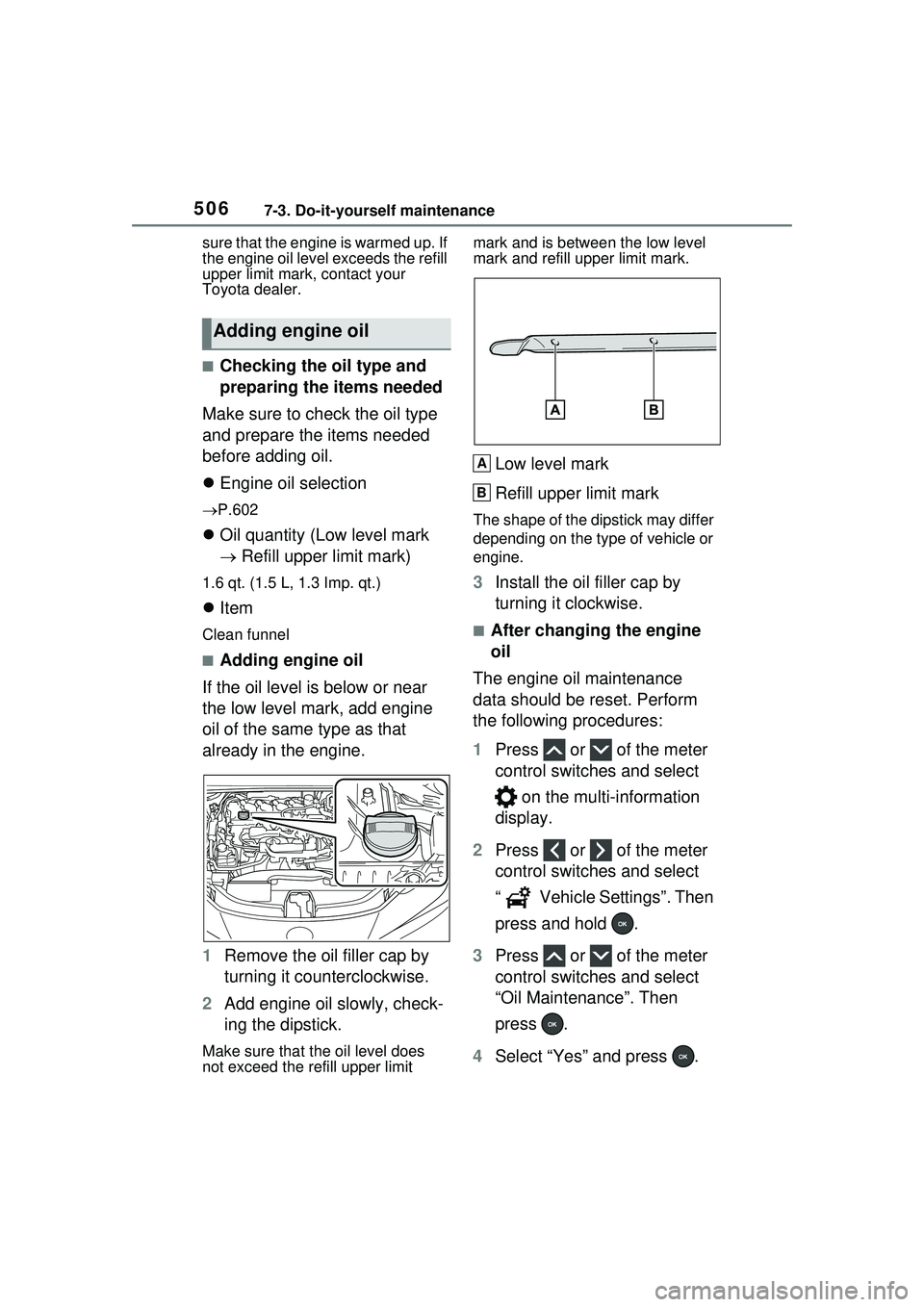
■Adding engine oil
If the oil level is below or near
the low level mark, add engine
oil of the same type as that
already in the engine.
1 Remove the oil filler cap by
turning it counterclockwise.
2 Add engine oil slowly, check-
ing the dipstick.
Make sure that the oil level does
not exceed the refill upper limit mark and is between the low level
mark and refill upp
er limit mark.
Low level mark
Refill upper limit mark
The shape of the dipstick may differ
depending on the type of vehicle or
engine.
3Install the oil filler cap by
turning it clockwise.
■After changing the engine
oil
The engine oil maintenance
data should be reset. Perform
the following procedures:
1 Press or of the meter
control switches and select
on the multi-information
display.
2 Press or of the meter
control switches and select
“ Vehicle Settings”. Then
press and hold .
3 Press or of the meter
control switches and select
“Oil Maintenance”. Then
press .
4 Select “Yes” and press .
Adding engine oil
A
B
Page 572 of 680
5728-2. Steps to take in an emergency
●LDA (Lane Departure Alert)
●LTA (Lane Tracing Assist)
● LCA (Lane Change Assist) (if
equipped)
●AHB (Automatic High Beam)
●Dynamic radar cruise control
●PDA (Proactive Driving Assist)
Follow the following correction
methods.
• Check if there is any foreign mat- ter attached to the radar sensor or
radar sensor cover and clean
them if necessary ( P.286)
• The radar sensor may be mis-
aligned and will be adjusted auto-
matically while driving. Continue
driving for a while.
■If “Unavailable Activation Con-
dition not Satisfied See Owner’s
Manual” is displayed
The LCA function cannot be
used as the operating conditions
have not been met.
Operate the turn signal lever again
after all of the op erating conditions
are met.
■If “Cruise Control Unavailable
See Owner’s Manual” is dis-
played
Indicates one of the following sys-
tems is disabled.
●Dynamic radar cruise control
●Cruise control
A message is displayed when the
driving assist switch is pushed
repeatedly.
Press the driving assist switch
quickly and firmly.
■If “Driver Monitor Out of Tem-
perature Range Wait until Nor-
mal Temperature” is displayed
Indicates one of the following sys-
tems is disabled.
●Driver monitor (if equipped)
●Traffic Jam Assist (if equipped)
The temperature of the driver moni-
tor camera is outside of the operat-
ing range. Wait for the temperature
to become appropriate.
■If “Driver Monitor Unavailable
See Owner’s Manual” is dis-
played
The lens of the driver monitor cam-
era may be dirty.
When there is dirt on the camera
lens, clean it with a dry, soft cloth so
as to not damage it.
■If “Engine Oil Level Low Add or
Replace” is displayed
The engine oil level may be low.
Check the level of the engine oil,
and add engine oil if necessary.
( P.506) This message may be
displayed if the vehicle is stopped
on a slope. Move the vehicle to a
level surface and check if the mes-
sage disappears.
■If “Maintenance Required
Soon” is shown
Indicates that all maintenance
according to the driven distance on
the maintenance schedule
* should
be performed soon.
Comes on approximately 4500
miles (7200 km) after the message
has been reset.
If necessary, perform maintenance.
Please reset the message after the
maintenance is performed.
( P.495)
*: Refer to the separate “Scheduled
Maintenance Guide” or “Owner’
Manual Supplement” for the main-
tenance interval applicable to your
vehicle.
■If “Maintenance Required Visit
Your Dealer” is shown
Indicates that all maintenance is
required to correspond to the driven