warning TOYOTA PRIUS PRIME 2023 Owners Manual
[x] Cancel search | Manufacturer: TOYOTA, Model Year: 2023, Model line: PRIUS PRIME, Model: TOYOTA PRIUS PRIME 2023Pages: 680, PDF Size: 14.97 MB
Page 453 of 680
4536-3. Using the storage features
6
Interior features
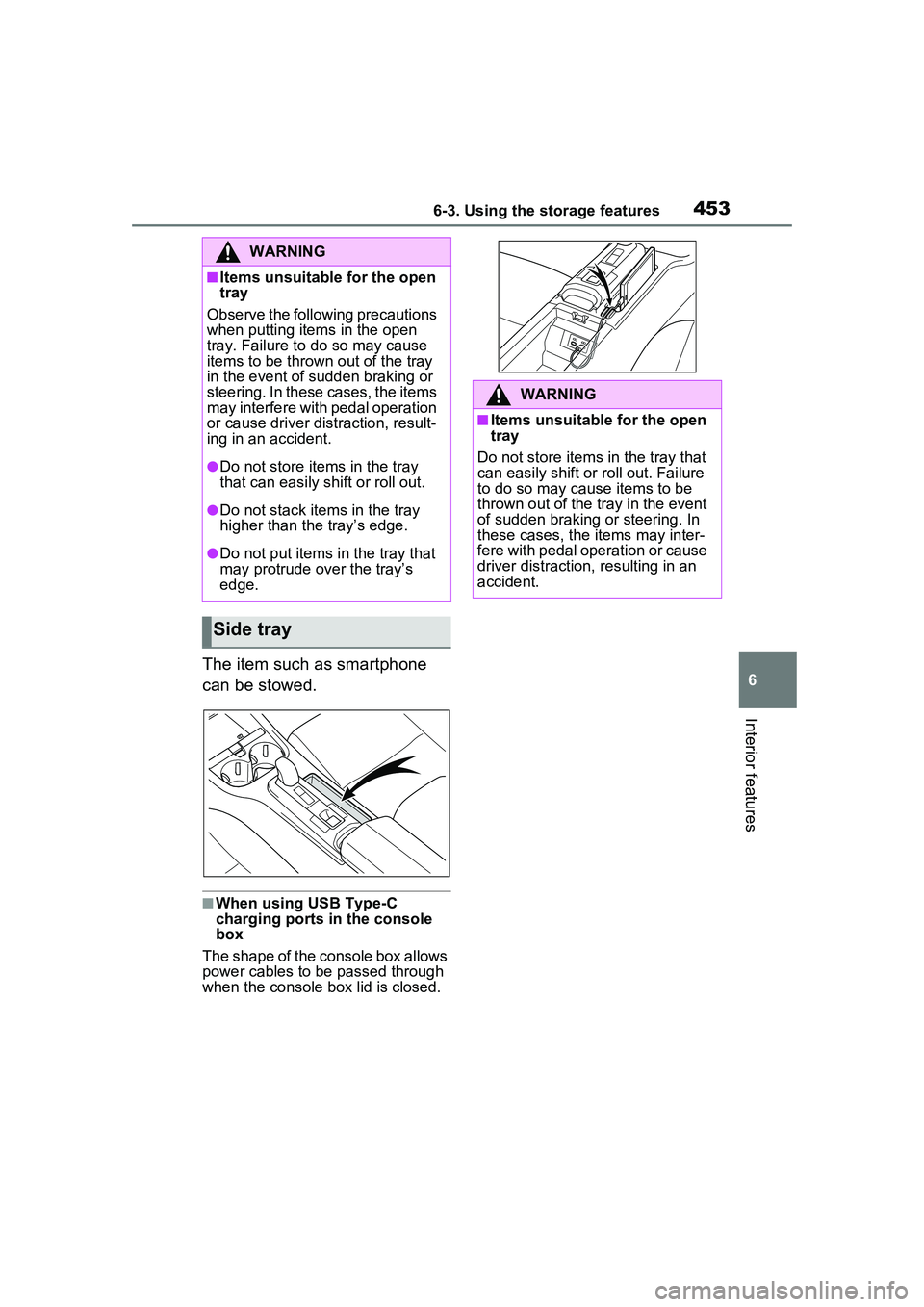
The item such as smartphone
can be stowed.
■When using USB Type-C
charging ports in the console
box
The shape of the console box allows
power cables to be passed through
when the console box lid is closed.
WARNING
■Items unsuitable for the open
tray
Observe the following precautions
when putting items in the open
tray. Failure to do so may cause
items to be thrown out of the tray
in the event of sudden braking or
steering. In these cases, the items
may interfere with pedal operation
or cause driver distraction, result-
ing in an accident.
●Do not store items in the tray
that can easily shift or roll out.
●Do not stack items in the tray
higher than the tray’s edge.
●Do not put items in the tray that
may protrude over the tray’s
edge.
Side tray
WARNING
■Items unsuitable for the open
tray
Do not store items in the tray that
can easily shift or roll out. Failure
to do so may cause items to be
thrown out of the tray in the event
of sudden braking or steering. In
these cases, the items may inter-
fere with pedal operation or cause
driver distraction, resulting in an
accident.
Page 454 of 680
4546-3. Using the storage features
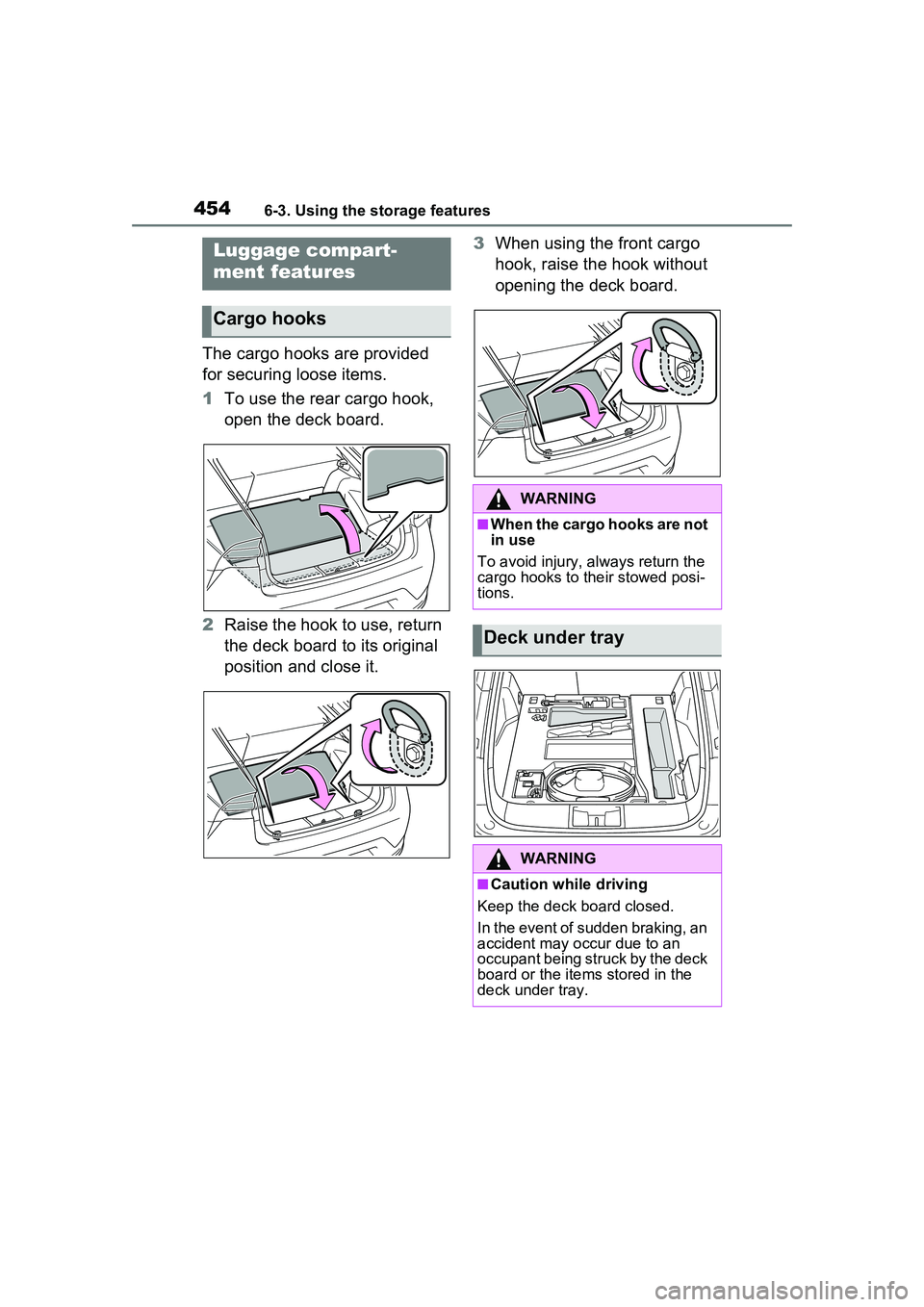
The cargo hooks are provided
for securing loose items.
1To use the rear cargo hook,
open the deck board.
2 Raise the hook to use, return
the deck board to its original
position and close it. 3
When using the front cargo
hook, raise the hook without
opening the deck board.
Luggage compart-
ment features
Cargo hooks
WARNING
■When the cargo hooks are not
in use
To avoid injury, always return the
cargo hooks to their stowed posi-
tions.
Deck under tray
WARNING
■Caution while driving
Keep the deck board closed.
In the event of sudden braking, an
accident may occur due to an
occupant being struck by the deck
board or the items stored in the
deck under tray.
Page 455 of 680
4556-3. Using the storage features
6
Interior features
■Warning reflector
●The warning reflector itself is not
included as an original equipment.
●Depending on the size or shape of
the reflector, it may not be able be
stowed.
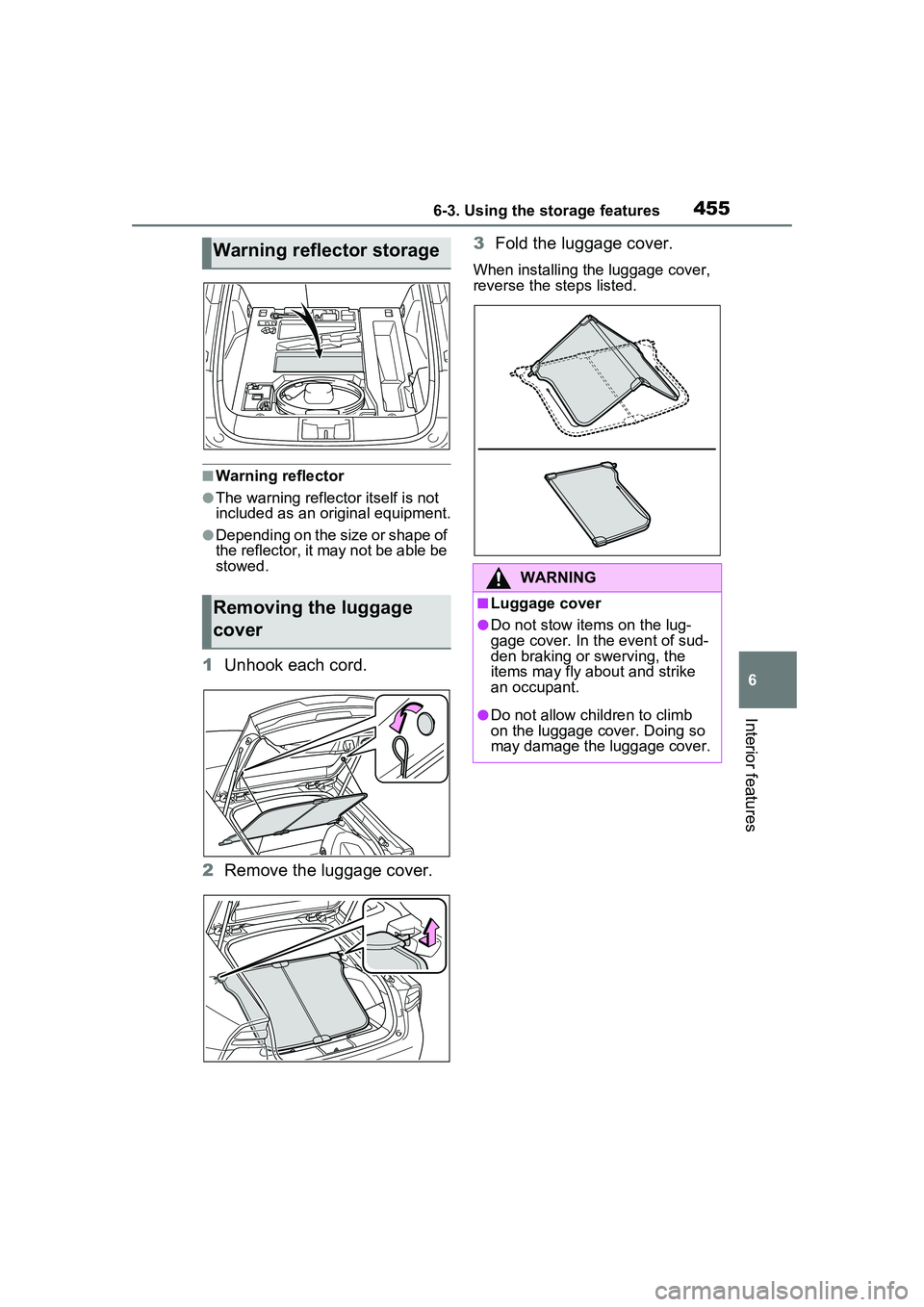
1Unhook each cord.
2 Remove the luggage cover. 3
Fold the luggage cover.
When installing the luggage cover,
reverse the steps listed.
Warning reflector storage
Removing the luggage
cover
WARNING
■Luggage cover
●Do not stow items on the lug-
gage cover. In the event of sud-
den braking or swerving, the
items may fly about and strike
an occupant.
●Do not allow children to climb
on the luggage cover. Doing so
may damage the luggage cover.
Page 464 of 680
4646-4. Using the other interior features
placed outside the charge area
●The vehicle is in an area where
strong electrical waves or noise
are emitted, such as near a televi-
sion tower, power plant, gasoline
station, broadcasting station, large
display, airport, etc.
●The electronic key is not inside the
vehicle
●Any of the following objects that is
0.08 in. (2 mm) or thicker is stuck
or installed between the charging
side of the smartphone and the
charge area.
• Thick cases or covers
• A case or cover attached with an
uneven or tilted surface, so that
the charging side is not flat
• Thick decorations
• Accessories, such as finger rings, straps, etc.
●When there is a gap between the
charging side of the smartphone
and the charge area due to a pro-
trusion such as a camera on the
charging side of the smartphone.
●When the smartphone is in con-
tact with, or is covered by any of
the following metallic objects:
• A card that has metal on it, such as aluminum foil, etc.
• A pack of cigarettes that includes aluminum foil
• A wallet or bag that is made of
metal
• Coins
• A heating pad
• CDs, DVDs or other media
• A metal accessory
• A case or cover made of metal
• A flip type case with a magnet on the charging side of the smart-
phone
●Electric wave type wireless
remote controls are being used
nearby
●2 or more smartphones are placed
on the wireless charger at the
same time
●When using a smartphone model
with an internal charging coil that is not located near the center of
the smartphone
If charging is abnormal or the opera-
tion indicator light continues to flash
for any other reason, the wireless
charger may be malfunctioning.
Contact your Toyota dealer.
■If the smartphone OS has been
updated
If the smartphone OS has been
updated to a newer version, its
charging specifications may have
changed significantly. For details,
check the information on the manu-
facturer’s website.
■Trademark information
iPhone is a trademark of Apple Inc.,
registered in the U.S. and other
countries.
WARNING
■Caution while driving
When charging a smartphone, for
safety reasons, the driver should
not operate the main part of the
smartphone while driving.
■Caution regarding interfer-
ence with electronic devices
People with implantable cardiac
pacemakers, cardiac resynchroni-
zation therapy-pacemakers or
implantable cardio verters, as well
as any other electrical medical
device, should consult their physi-
cian about the usage of the wire-
less charger.
■To prevent malfunctions or
burns
Observe the following precau-
tions. Failure to do so may result
in a equipment failure and dam-
age, catch fire, burns due to over-
heat or electric shock.
●This product is specialized for
use with smartphones and can-
not charge other devices.
Page 465 of 680
4656-4. Using the other interior features
6
Interior features
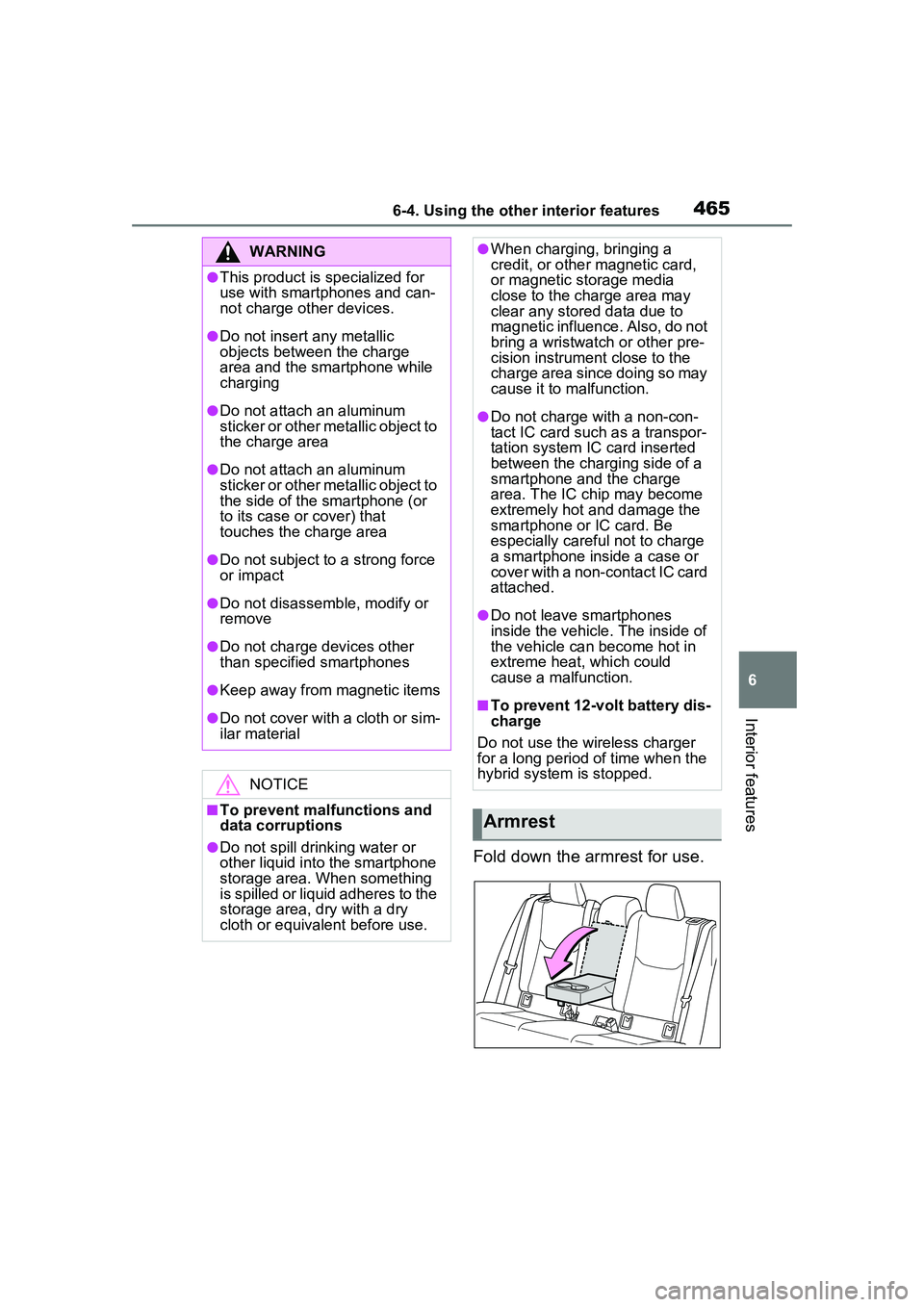
Fold down the armrest for use.
WARNING
●This product is specialized for
use with smartphones and can-
not charge other devices.
●Do not insert any metallic
objects between the charge
area and the smartphone while
charging
●Do not attach an aluminum
sticker or other metallic object to
the charge area
●Do not attach an aluminum
sticker or other metallic object to
the side of the smartphone (or
to its case or cover) that
touches the charge area
●Do not subject to a strong force
or impact
●Do not disassemble, modify or
remove
●Do not charge devices other
than specified smartphones
●Keep away from magnetic items
●Do not cover with a cloth or sim-
ilar material
NOTICE
■To prevent malfunctions and
data corruptions
●Do not spill drin king water or
other liquid into the smartphone
storage area. When something
is spilled or liquid adheres to the
storage area, dry with a dry
cloth or equivalent before use.
●When charging, bringing a
credit, or other magnetic card,
or magnetic storage media
close to the charge area may
clear any stored data due to
magnetic influence. Also, do not
bring a wristwatch or other pre-
cision instrument close to the
charge area since doing so may
cause it to malfunction.
●Do not charge with a non-con-
tact IC card such as a transpor-
tation system IC card inserted
between the charging side of a
smartphone and the charge
area. The IC chip may become
extremely hot and damage the
smartphone or IC card. Be
especially careful not to charge
a smartphone inside a case or
cover with a non-contact IC card
attached.
●Do not leave smartphones
inside the vehicle. The inside of
the vehicle can become hot in
extreme heat, which could
cause a malfunction.
■To prevent 12-volt battery dis-
charge
Do not use the wireless charger
for a long period of time when the
hybrid system is stopped.
Armrest
Page 466 of 680
4666-4. Using the other interior features
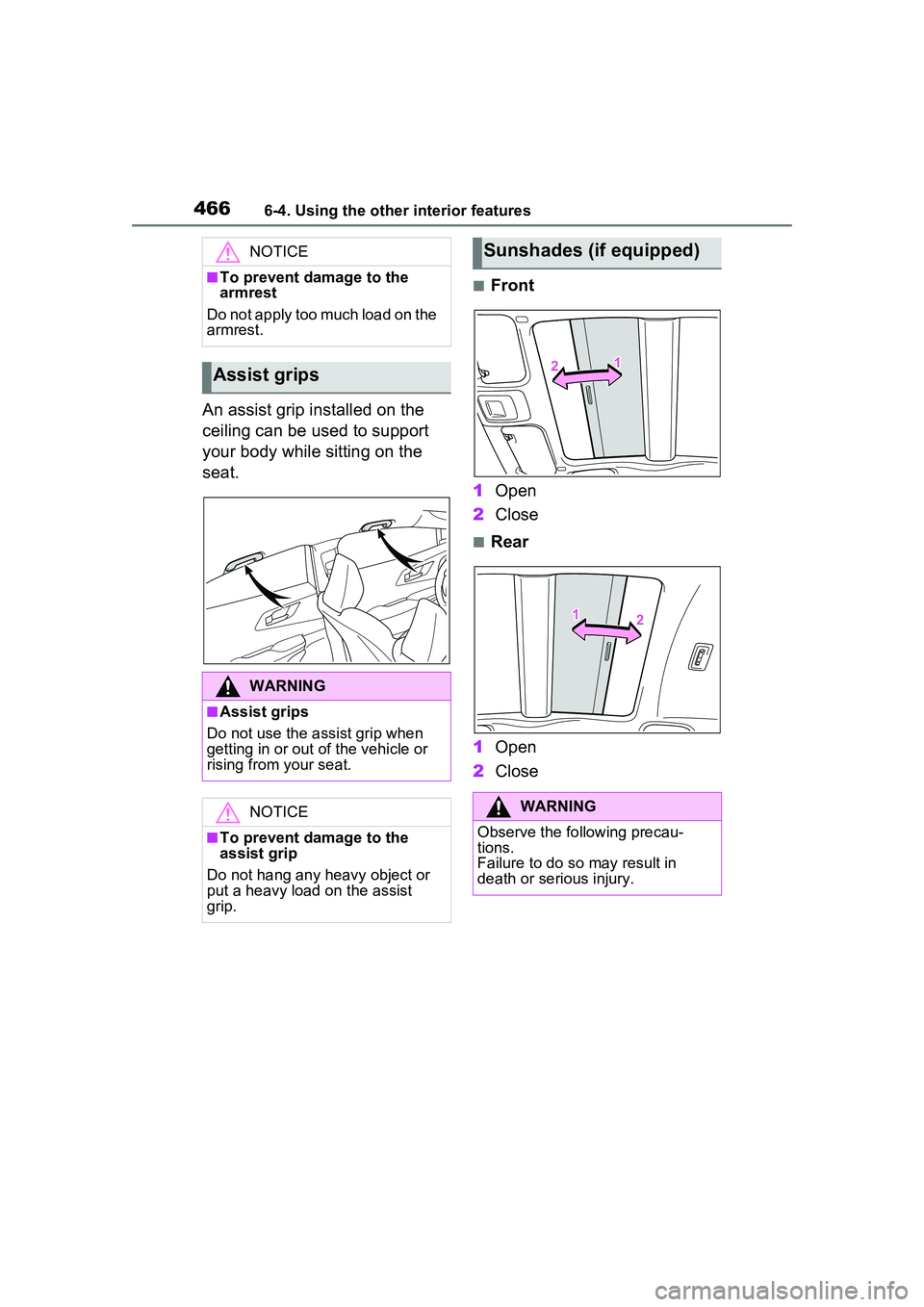
An assist grip installed on the
ceiling can be used to support
your body while sitting on the
seat.
■Front
1 Open
2 Close
■Rear
1 Open
2 Close
NOTICE
■To prevent damage to the
armrest
Do not apply too much load on the
armrest.
Assist grips
WARNING
■Assist grips
Do not use the assist grip when
getting in or out of the vehicle or
rising from your seat.
NOTICE
■To prevent damage to the
assist grip
Do not hang any heavy object or
put a heavy load on the assist
grip.
Sunshades (if equipped)
WARNING
Observe the following precau-
tions.
Failure to do so may result in
death or serious injury.
Page 467 of 680
4676-4. Using the other interior features
6
Interior features
WARNING
■Opening and closing the sun-
shade
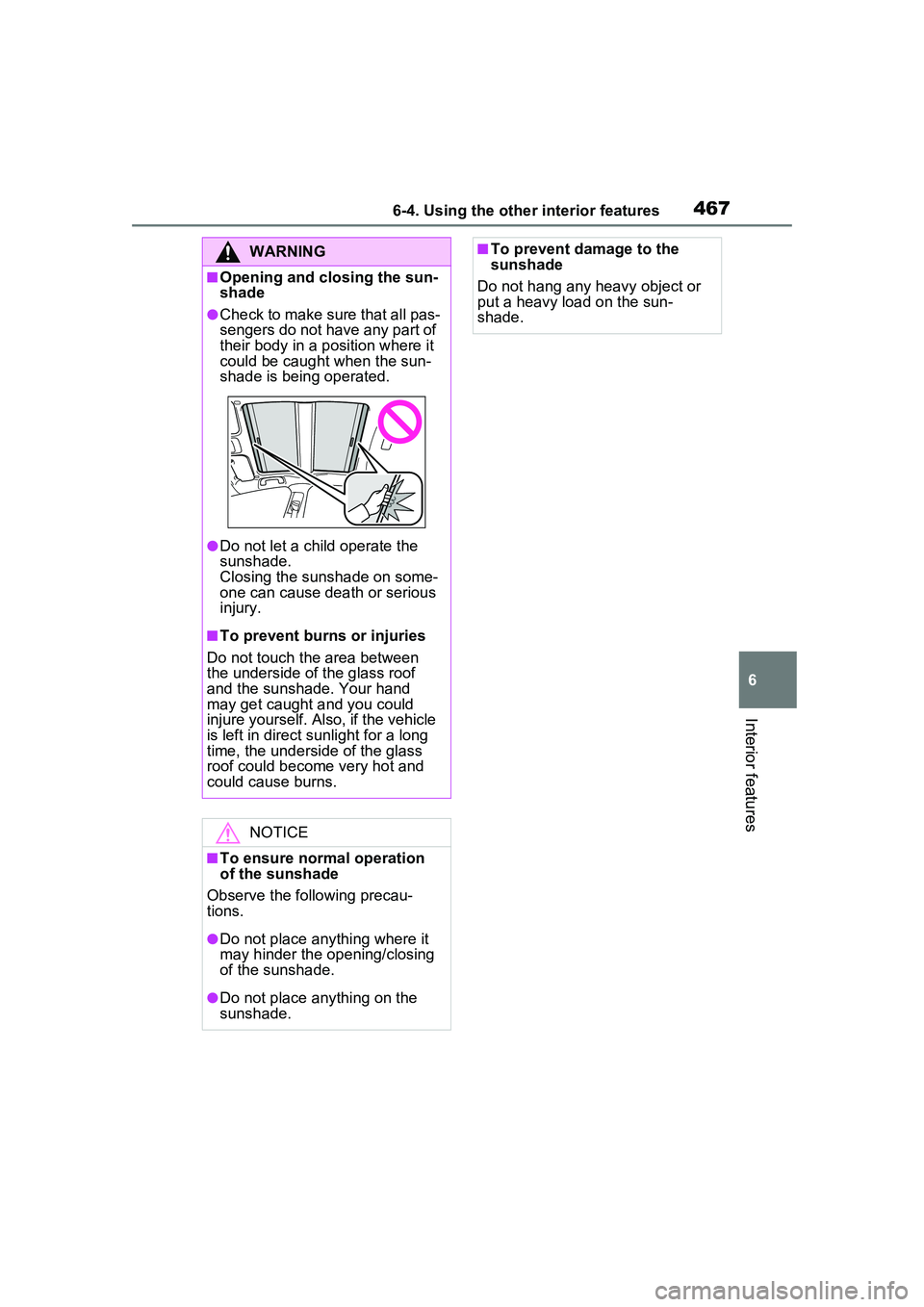
●Check to make sure that all pas-
sengers do not have any part of
their body in a position where it
could be caught when the sun-
shade is being operated.
●Do not let a child operate the
sunshade.
Closing the sunshade on some-
one can cause death or serious
injury.
■To prevent burns or injuries
Do not touch the area between
the underside of the glass roof
and the sunshade. Your hand
may get caught and you could
injure yourself. Also, if the vehicle
is left in direct sunlight for a long
time, the underside of the glass
roof could become very hot and
could cause burns.
NOTICE
■To ensure normal operation
of the sunshade
Observe the following precau-
tions.
●Do not place anything where it
may hinder the opening/closing
of the sunshade.
●Do not place anything on the
sunshade.
■To prevent damage to the
sunshade
Do not hang any heavy object or
put a heavy load on the sun-
shade.
Page 469 of 680
4696-4. Using the other interior features
6
Interior features
after checking the regulations of the
applicable local government.
■When the power outlets are
used while the vehicle is parked
or stopped
●The doors cannot be
locked/unlocked using the smart
key system.
●The doors cannot be
locked/unlocked using an elec-
tronic key. The doors can only be
locked/unlocked using a mechani-
cal key.
●When a door is opened/closed, a
buzzer may sound or “Key Not
Detected Check Key Location”
may be displayed on the multi-
information display. Check that an
electronic key is carried with you.
●When the vehicle’s surroundings
become dark while supplying
power, the headlights etc. turn on
automatically. For the U.S.A.,
refer to P.269 for information
about turning off the lights.
WARNING
■For safe use
Observe the following precau-
tions. Failure to do so may lead to
an accident, resulting in death or
serious injury.
●Do not allow children or other
people not used to the opera-
tion to perform the power supply
by themselves.
●Do not disconnect the plug of a
device while your hands are wet
or insert a pin or other object
into the power outlet. Also, if a
liquid or snow is on the power
outlet, dry the outlet before
using it.
●Do not attempt to modify, disas-
semble or repair a power outlet.
For information on repairs, con-
tact your Toyota dealer.
●Keep the power outlets free of
dust and foreign matter. Also,
make sure to clean the power
outlets periodically.
●Hold the plug body to plug in/out
of a power outlet. Do not touch
the plug blades. Do not pull on a
cord for unplugging, as other-
wise the plug or cord may be
damaged.
●Stop the use immediately if
abnormal heat is observed on a
cord or power outlet. To prevent
the cord or power outlet from
becoming hot, observe the fol-
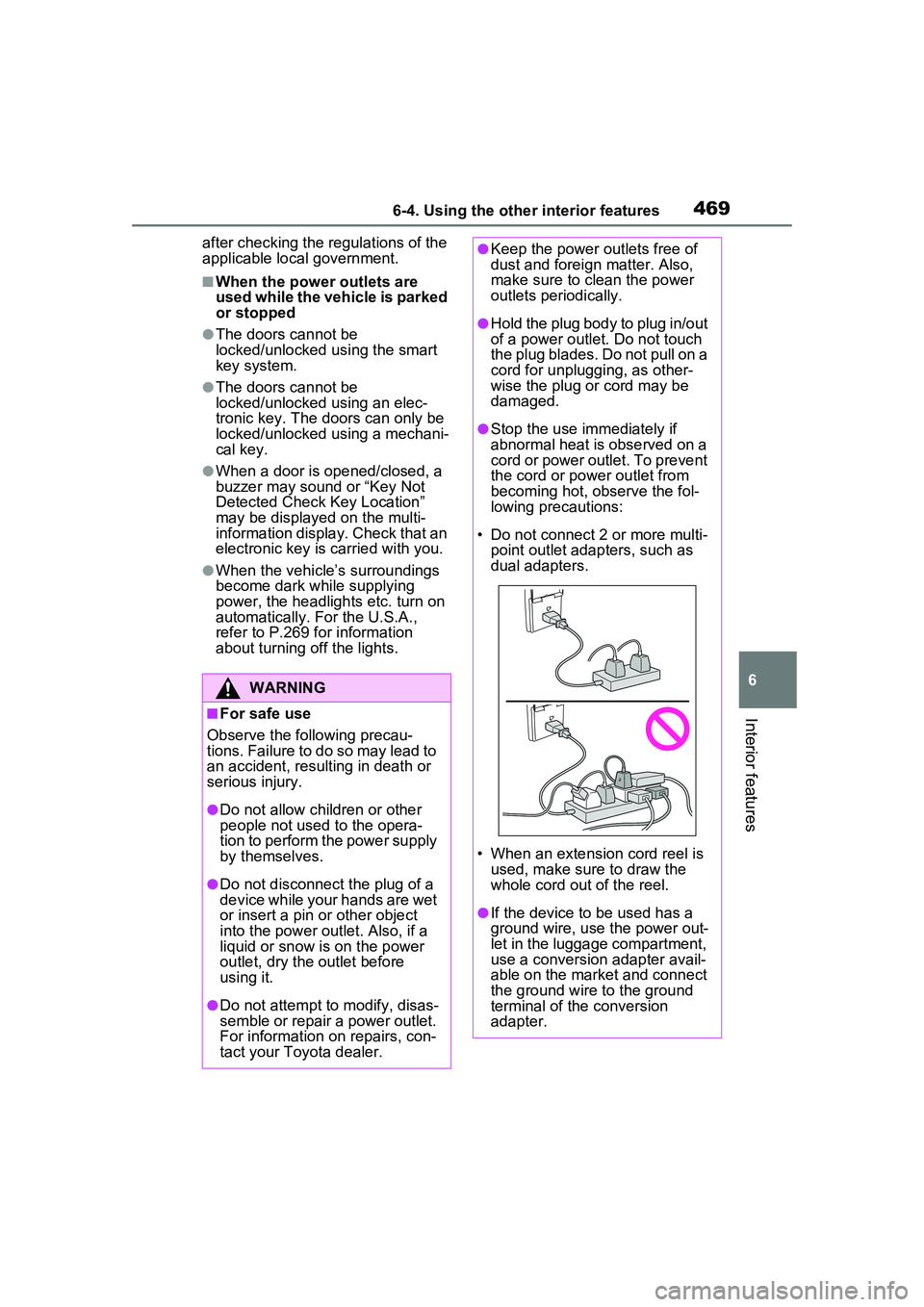
lowing precautions:
• Do not connect 2 or more multi- point outlet adapters, such as
dual adapters.
• When an extension cord reel is used, make sure to draw the
whole cord out of the reel.
●If the device to be used has a
ground wire, use the power out-
let in the luggage compartment,
use a conversion adapter avail-
able on the market and connect
the ground wire to the ground
terminal of the conversion
adapter.
Page 470 of 680
4706-4. Using the other interior features
WARNING
●If the plug of a device fits
loosely in a power outlet, even
though it is fully inserted,
replace the power outlet. For
information on replacement,
contact your Toyota dealer.
■Devices to be connected
●Make sure to read any instruc-
tion manual which came with a
device and observe any warn-
ings on the device.
●Do not connect a device to a
power outlet if the device is mal-
functioning or its plug is dam-
aged.
●Otherwise, the device may be
further malfunctioning, espe-
cially when the outside tem-
perature is high or low.
●Devices requiring to be installed
on a level place may not oper-
ate properly.
●Do not use devices, other than
waterproof devices, in a place
where water, such as rain, is
splashed over or where it is
humid.
●Do not use a device that has
been or likely to have been
merged in water or absorbed
water within.
●Do not connect a medical
device, as depending on the
vehicle condition, the power
supply function may be tempo-
rarily stopped.
■When the power outlets are
used while the vehicle is
parked or stopped
●The power outlets are designed
to be connected to electric
devices, such as lighting
devices. Do not use them as a
generator that supplies power to
a house, etc. Also, when they
are to be used on an emer-
gency power supply device for
homes, such as an exclusive
device having connection to an
external power source, or a
device whose power supply cir-
cuit for external power source is
separate from electric wiring of
power companies, consult with
the manufacturer or a retailer of
the device.
●When using a power outlet,
make sure to securely engage
the parking brake and shift the
shift position to P. Otherwise,
the vehicle may move, possibly
leading to an accident.
●When using a power outlet, do
not move away from the vehicle.
●Do not perform power supply
during weather when lightning
may occur. Stop supplying
power if lightning is observed
during power supply.
●Do not use the power outlets if
the vehicle has a vehicle cover
installed.
●Do not use a power outlet when
the vehicle is parked on a
slanted place or a slope. When
a power outlet is being used, do
not move the vehicle or cause it
to be inclined.
●Observe the following precau-
tions when a connected cord is
to be brought outside the vehi-
cle:
Page 471 of 680
4716-4. Using the other interior features
6
Interior features
WARNING
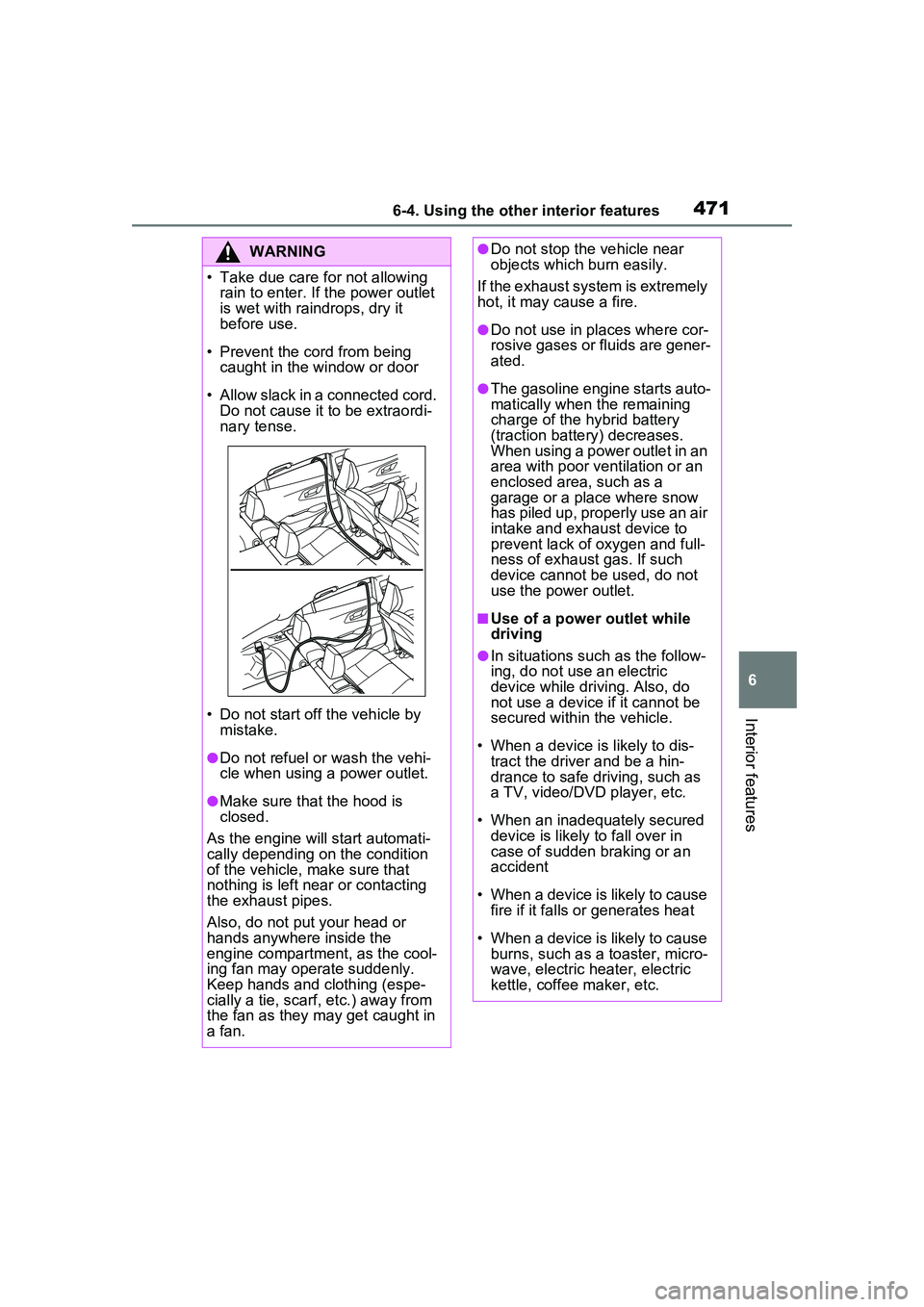
• Take due care for not allowing rain to enter. If the power outlet
is wet with raindrops, dry it
before use.
• Prevent the cord from being caught in the window or door
• Allow slack in a connected cord. Do not cause it to be extraordi-
nary tense.
• Do not start off the vehicle by mistake.
●Do not refuel or wash the vehi-
cle when using a power outlet.
●Make sure that the hood is
closed.
As the engine will start automati-
cally depending on the condition
of the vehicle, make sure that
nothing is left near or contacting
the exhaust pipes.
Also, do not put your head or
hands anywhere inside the
engine compartment, as the cool-
ing fan may operate suddenly.
Keep hands and clothing (espe-
cially a tie, scarf, etc.) away from
the fan as they may get caught in
a fan.
●Do not stop the vehicle near
objects which burn easily.
If the exhaust system is extremely
hot, it may cause a fire.
●Do not use in places where cor-
rosive gases or fluids are gener-
ated.
●The gasoline engine starts auto-
matically when the remaining
charge of the hybrid battery
(traction battery) decreases.
When using a power outlet in an
area with poor ventilation or an
enclosed area, such as a
garage or a place where snow
has piled up, properly use an air
intake and exhaust device to
prevent lack of oxygen and full-
ness of exhaust gas. If such
device cannot be used, do not
use the power outlet.
■Use of a power outlet while
driving
●In situations such as the follow-
ing, do not use an electric
device while driving. Also, do
not use a device if it cannot be
secured within the vehicle.
• When a device is likely to dis- tract the driver and be a hin-
drance to safe driving, such as
a TV, video/DVD player, etc.
• When an inadequately secured device is likely to fall over in
case of sudden braking or an
accident
• When a device is likely to cause fire if it falls or generates heat
• When a device is likely to cause burns, such as a toaster, micro-
wave, electric heater, electric
kettle, coffee maker, etc.