warning TOYOTA PRIUS PRIME 2023 Owners Manual
[x] Cancel search | Manufacturer: TOYOTA, Model Year: 2023, Model line: PRIUS PRIME, Model: TOYOTA PRIUS PRIME 2023Pages: 680, PDF Size: 14.97 MB
Page 429 of 680
4295-6. Driving tips
5
Driving
5-6.Driving tips
Use fluids that are appropriate
to the prevailing outside tem-
peratures.
• Engine oil
• Engine coolant
• Power control unit coolant
• Washer fluid
Have a service technician
inspect the condition of the
12-volt battery.
Have the vehicle fitted with
four snow tires or purchase a
set of tire chains for the front
tires.
*
Ensure that all tires are the same
size and brand, and that chains
match the size of the tires.
*: Tire chains cannot be mounted
on vehicles with 195/50R19 tires.
Winter driving tips
Carry out the necessary
preparations and inspec-
tions before driving the
vehicle in winter. Always
drive the vehicle in a man-
ner appropriate to the pre-
vailing weather conditions.
Preparation for winter
WARNING
■Driving with snow tires
Observe the following precautions
to reduce the risk of accidents.
Failure to do so may result in a
loss of vehicle control and cause
death or serious injury.
●Use tires of the specified size.
●Maintain the recommended
level of air pressure.
●Do not drive in excess of 75
mph (120 km/h), regardless of
the type of snow tires being
used.
●Use snow tires on all, not just
some wheels.
■Driving with tire chains
(except 195/50R19 tires)
Observe the following precautions
to reduce the risk of accidents.
Failure to do so may result in the
vehicle being unable to be driven
safely, and may cause death or
serious injury.
●Do not drive in excess of the
speed limit specified for the tire
chains being used, or 30 mph
(50 km/h), whichever is lower.
●Avoid driving on bumpy road
surfaces or over potholes.
●Avoid sudden acceleration,
abrupt steering, sudden brak-
ing and shifting operations that
cause sudden engine braking.
●Slow down sufficiently before
entering a curve to ensure that
vehicle control is maintained.
●Do not use LTA (Lane Tracing
Assist) system.
●Do not use LDA (Lane Depar-
ture Alert) system.
Page 430 of 680
4305-6. Driving tips
Perform the following according
to the driving conditions:
Do not try to forcibly open a
window or move a wiper that
is frozen. Pour warm water
over the frozen area to melt
the ice. Wipe away the water
immediately to prevent it from
freezing.
To ensure proper operation of
the climate control system
fan, remove any snow that
has accumulated on the air
inlet vents in front of the wind-
shield.
Check for and remove any
excess ice or snow that may
have accumulated on the
exterior lights, outside rear
view mirrors, windows, vehi-
cle’s roof, chassis, around the
tires or on the brakes.
Remove any snow or mud
from the bottom of your shoes
before getting in the vehicle. Accelerate the vehicle slowly,
keep a safe distance between
you and the vehicle ahead, and
drive at a reduced speed suit-
able to road conditions.
Turn automatic mode of the
parking brake off.
Otherwise, the parking brake
may freeze and not be able to
be released automatically.
Also, avoid using the following as
the parking brake may operate
automatically, even if automatic
mode is off.
• Brake hold system
Park the vehicle and shift the
shift position to P without set-
ting the parking brake. The
parking brake may freeze up,
preventing it from being
released. If the vehicle is
parked without setting the
parking brake, make sure to
block the wheels. Failure to
do so may be dangerous
because it may cause the
vehicle to move unexpect-
edly, possibly leading to an
accident.
When the parking brake is in
automatic mode, release the
parking brake after shifting
the shift position to P.
( P.264)
NOTICE
■Repairing or replacing snow
tires
Request repairs or replacement of
snow tires from your Toyota
dealer or legitimate tire retailers.
This is because the removal and
attachment of snow tires affects
the operation of the tire pressure
warning valves and transmitters.
Before driving the vehicle
When driving the vehicle
When parking the vehicle
Page 431 of 680
4315-6. Driving tips
5
Driving
If the vehicle is parked without
setting the parking brake,
confirm that the shift position
cannot be moved out of P.
If the vehicle is left parked
with the brakes damp in cold
temperatures, there is a pos-
sibility of the brakes freezing.
Vehicles without 195/50R19
tires
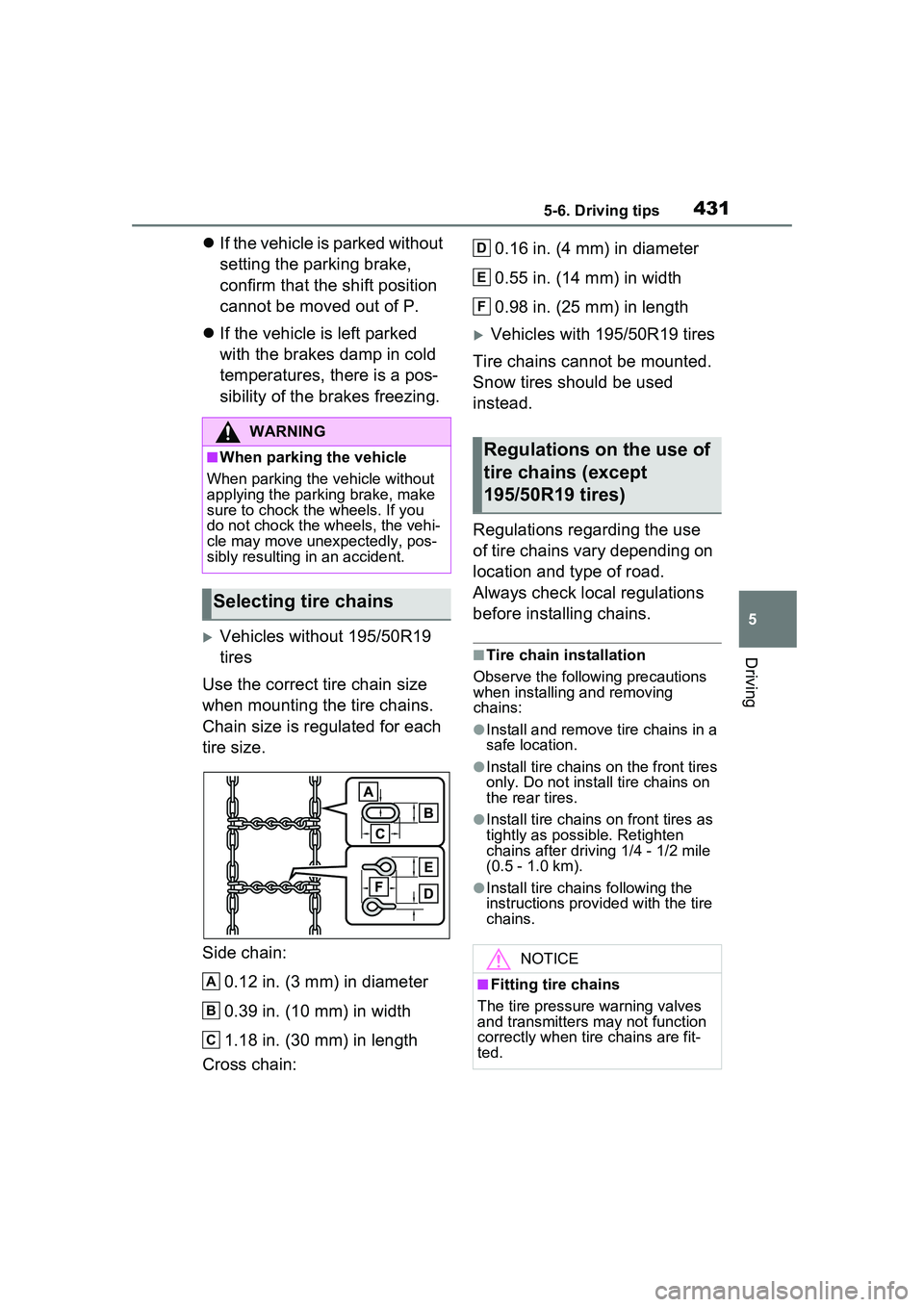
Use the correct tire chain size
when mounting the tire chains.
Chain size is regulated for each
tire size.
Side chain:
0.12 in. (3 mm) in diameter
0.39 in. (10 mm) in width
1.18 in. (30 mm) in length
Cross chain: 0.16 in. (4 mm) in diameter
0.55 in. (14 mm) in width
0.98 in. (25 mm) in length
Vehicles with 195/50R19 tires
Tire chains cannot be mounted.
Snow tires should be used
instead.
Regulations regarding the use
of tire chains vary depending on
location and type of road.
Always check local regulations
before installing chains.
■Tire chain installation
Observe the following precautions
when installing and removing
chains:
●Install and remove tire chains in a
safe location.
●Install tire chains on the front tires
only. Do not install tire chains on
the rear tires.
●Install tire chains on front tires as
tightly as possible. Retighten
chains after driving 1/4 - 1/2 mile
(0.5 - 1.0 km).
●Install tire chains following the
instructions provid ed with the tire
chains.
WARNING
■When parking the vehicle
When parking the vehicle without
applying the parking brake, make
sure to chock the wheels. If you
do not chock the wheels, the vehi-
cle may move unexpectedly, pos-
sibly resulting in an accident.
Selecting tire chains
A
B
C
Regulations on the use of
tire chains (except
195/50R19 tires)
NOTICE
■Fitting tire chains
The tire pressure warning valves
and transmitters may not function
correctly when tire chains are fit-
ted.
D
E
F
Page 439 of 680
4396-1. Using the air conditioning system and defogger
6
Interior features
1Press the “AUTO” switch.
2 Adjust the temperature set-
ting.
3 To stop the operation, press
the “OFF” switch.
If the fan speed setting or air
flow modes are operated, the
automatic mode indicator goes
off. However, automatic mode
for functions other than that
operated is maintained.
■Using automatic mode
Fan speed is adjusted automati-
cally according to the temperature
setting and the ambient conditions.
Therefore, the fan may stop for a
while until warm or cool air is ready
to flow immediately after the auto-
matic mode switch is pressed.
Cool air may blow around the upper
body even when the heater is on
due to sunlight.
■Windshield fog detection func-
tion
When automatic mode is set, the
humidity sensor detects fog on the
windshield and controls the air con-
ditioning system to prevent fog.
WARNING
■Cautions for using “My Room
Mode”
Do not leave children, people who
need assistance, or pets inside
the vehicle. The system may turn
off automatically and the interior
temperature may become high or
low, resulting in heat stroke, dehy-
dration or hypothermia. Failure to
do so may result in death or seri-
ous injury.
■To prevent the windshield
from fogging up
Do not use the windshield defog-
ger switch during cool air opera-
tion in extremely humid weather.
The difference between the tem-
perature of the outside air and
that of the windshield can cause
the outer surface of the wind-
shield to fog up, blocking your
vision.
■When the outside rear view
mirror defoggers are operat-
ing (if equipped)
Do not touch the rear view mirror
surfaces when the outside rear
view mirror defoggers are on.
NOTICE
■To prevent 12-volt battery dis-
charge
Do not leave the air conditioning
system on longer than necessary
when the hybrid system is off.
■When repairing/replacing
parts of the air conditioning
system
Have repair/replacement per-
formed by your Toyota dealer.
When a part of the air condition-
ing system, such as the evapora-
tor, is to be replaced, it must be
replaced with a new one.
Using automatic mode
NOTICE
■Humidity sensor
In order to detect fog on the wind-
shield, a sensor which monitors
the temperature of the windshield,
the surround humidity, etc. is
installed.
Follow these points to avoid dam-
aging the sensor:
●Do not disassemble the sensor
Page 440 of 680
4406-1. Using the air conditioning system and defogger
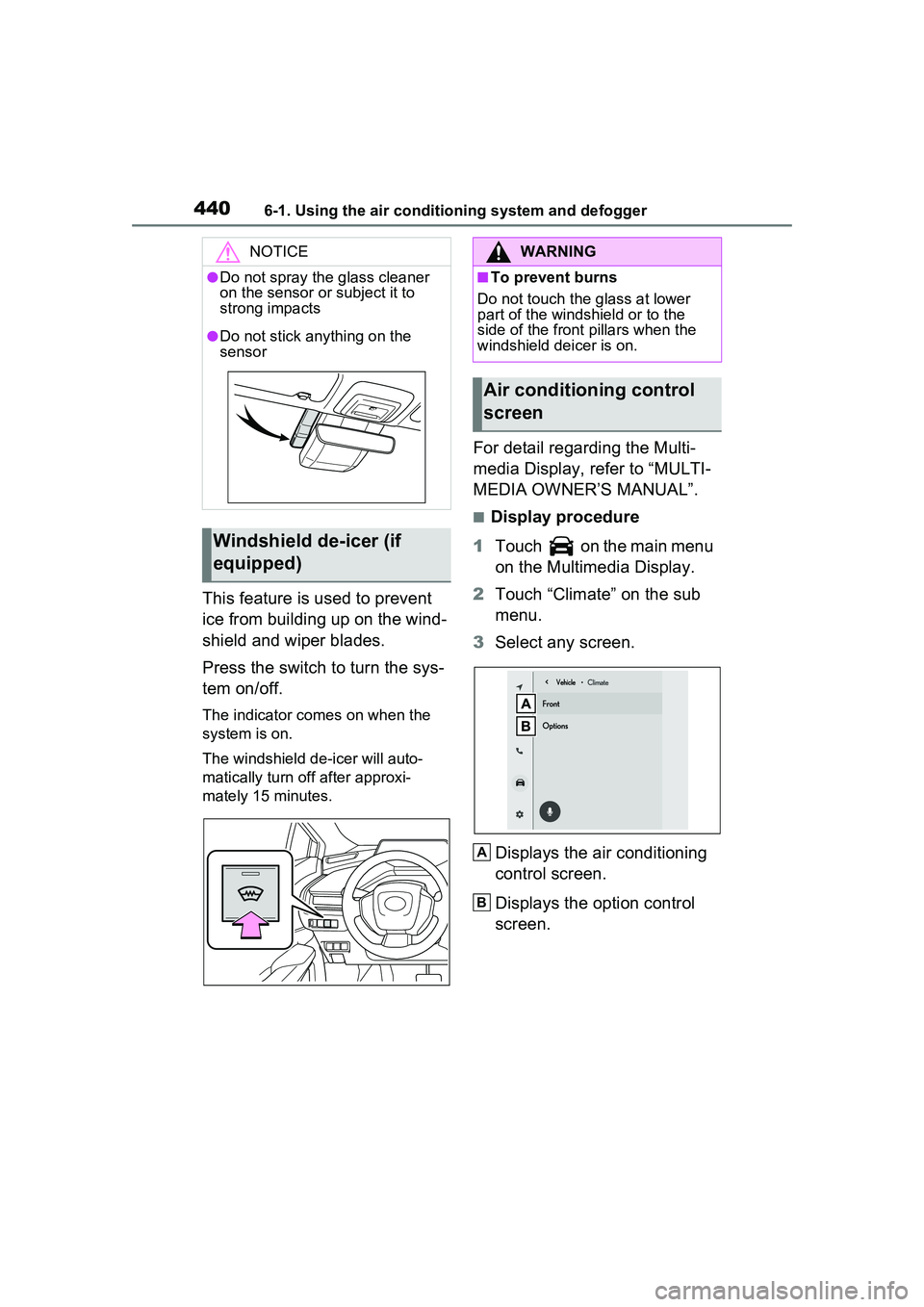
This feature is used to prevent
ice from building up on the wind-
shield and wiper blades.
Press the switch to turn the sys-
tem on/off.
The indicator comes on when the
system is on.
The windshield de-icer will auto-
matically turn off after approxi-
mately 15 minutes.
For detail regarding the Multi-
media Display, refer to “MULTI-
MEDIA OWNER’S MANUAL”.
■Display procedure
1 Touch on the main menu
on the Multimedia Display.
2 Touch “Climate” on the sub
menu.
3 Select any screen.
Displays the air conditioning
control screen.
Displays the option control
screen.
NOTICE
●Do not spray the glass cleaner
on the sensor or subject it to
strong impacts
●Do not stick anything on the
sensor
Windshield de-icer (if
equipped)
WARNING
■To prevent burns
Do not touch the glass at lower
part of the windshield or to the
side of the front pillars when the
windshield deicer is on.
Air conditioning control
screen
A
B
Page 442 of 680
4426-1. Using the air conditioning system and defogger
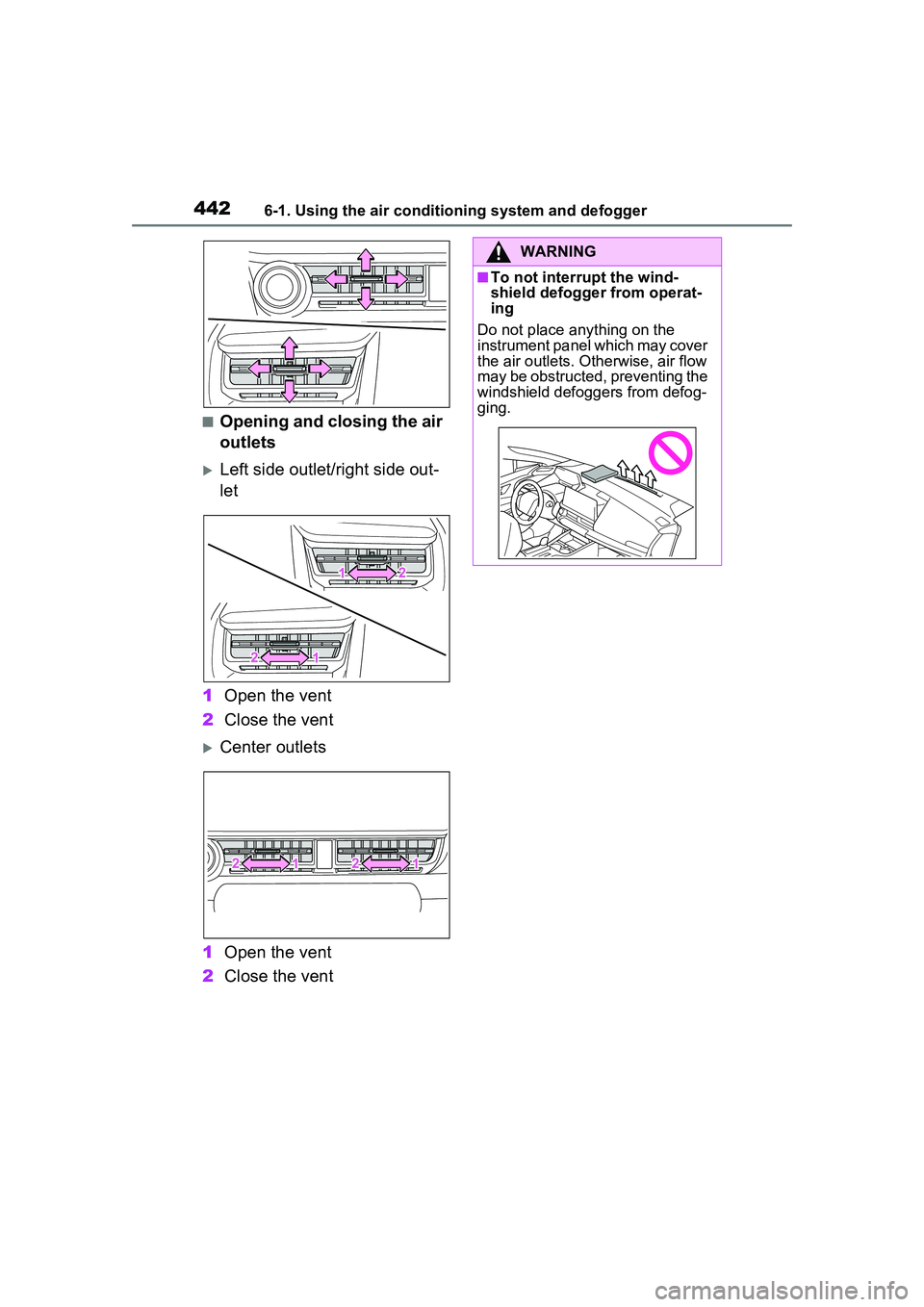
■Opening and closing the air
outlets
Left side outlet/right side out-
let
1 Open the vent
2 Close the vent
Center outlets
1 Open the vent
2 Close the vent
WARNING
■To not interrupt the wind-
shield defogger from operat-
ing
Do not place anything on the
instrument panel which may cover
the air outlets. Otherwise, air flow
may be obstructed, preventing the
windshield defoggers from defog-
ging.
Page 443 of 680
4436-1. Using the air conditioning system and defogger
6
Interior features
*: If equipped
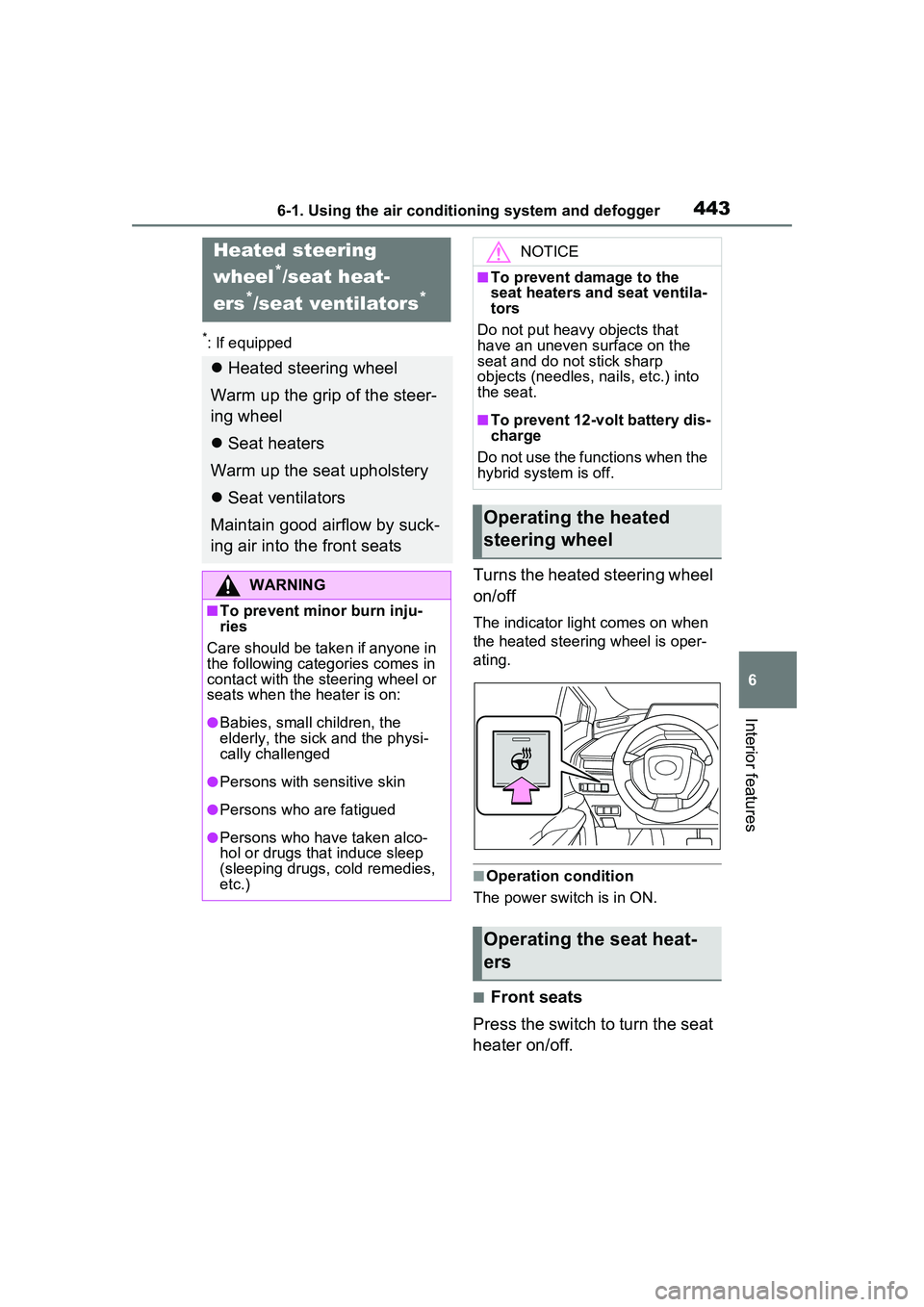
Turns the heated steering wheel
on/off
The indicator light comes on when
the heated steering wheel is oper-
ating.
■Operation condition
The power switch is in ON.
■Front seats
Press the switch to turn the seat
heater on/off.
Heated steering
wheel
*/seat heat-
ers
*/seat ventilators*
Heated steering wheel
Warm up the grip of the steer-
ing wheel
Seat heaters
Warm up the seat upholstery
Seat ventilators
Maintain good airflow by suck-
ing air into the front seats
WARNING
■To prevent minor burn inju-
ries
Care should be take n if anyone in
the following catego ries comes in
contact with the steering wheel or
seats when the heater is on:
●Babies, small children, the
elderly, the sick and the physi-
cally challenged
●Persons with sensitive skin
●Persons who are fatigued
●Persons who have taken alco-
hol or drugs that induce sleep
(sleeping drugs, cold remedies,
etc.)
NOTICE
■To prevent damage to the
seat heaters and seat ventila-
tors
Do not put heavy objects that
have an uneven surface on the
seat and do not stick sharp
objects (needles, nails, etc.) into
the seat.
■To prevent 12-volt battery dis-
charge
Do not use the functions when the
hybrid system is off.
Operating the heated
steering wheel
Operating the seat heat-
ers
Page 444 of 680
4446-1. Using the air conditioning system and defogger
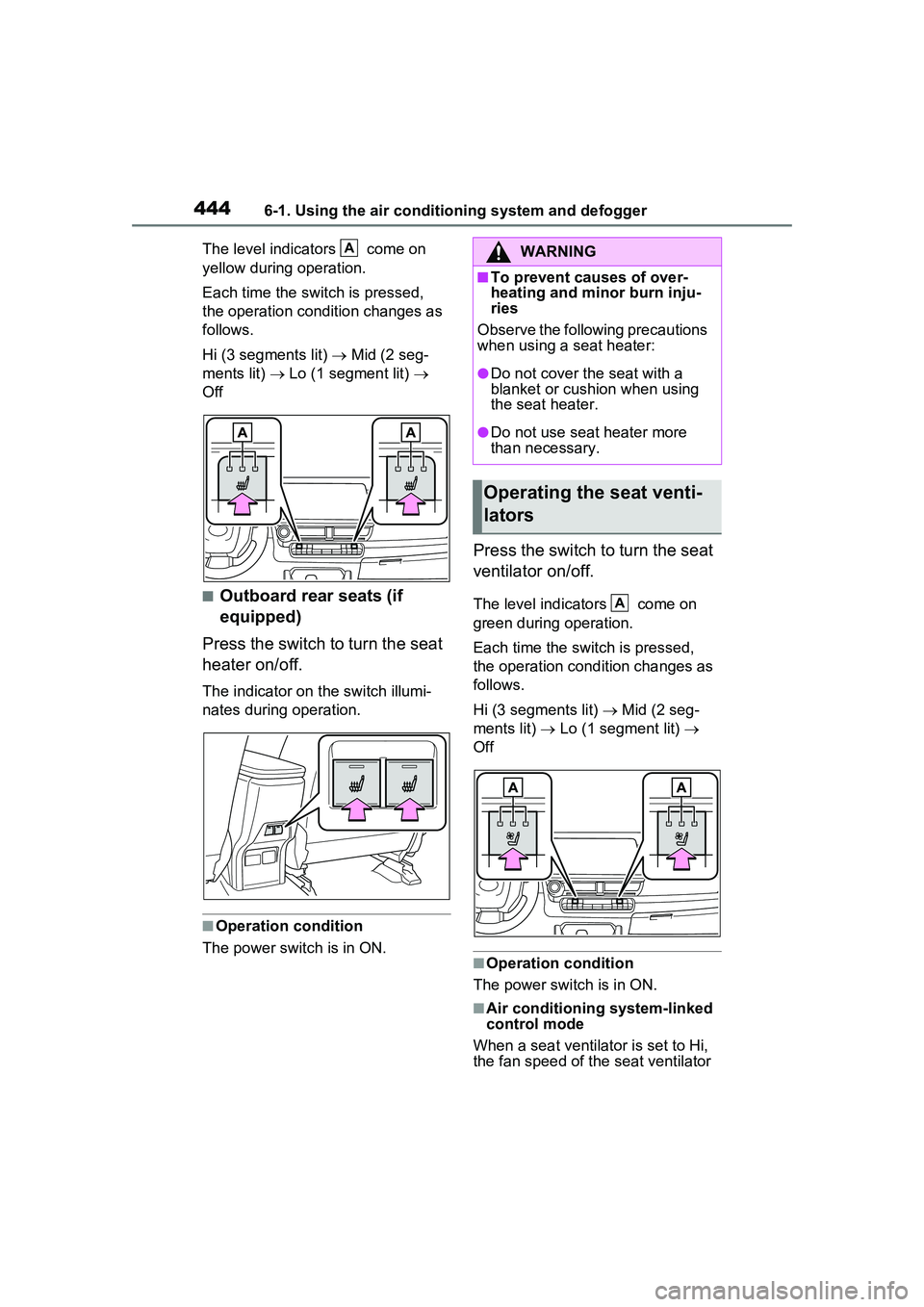
The level indicators come on
yellow during operation.
Each time the switch is pressed,
the operation condition changes as
follows.
Hi (3 segments lit) Mid (2 seg-
ments lit) Lo (1 segment lit)
Off
■Outboard rear seats (if
equipped)
Press the switch to turn the seat
heater on/off.
The indicator on the switch illumi-
nates during operation.
■Operation condition
The power switch is in ON.
Press the switch to turn the seat
ventilator on/off.
The level indicators come on
green during operation.
Each time the switch is pressed,
the operation condition changes as
follows.
Hi (3 segments lit) Mid (2 seg-
ments lit) Lo (1 segment lit)
Off
■Operation condition
The power switch is in ON.
■Air conditioning system-linked
control mode
When a seat ventilator is set to Hi,
the fan speed of the seat ventilator
AWARNING
■To prevent causes of over-
heating and minor burn inju-
ries
Observe the following precautions
when using a seat heater:
●Do not cover the seat with a
blanket or cushion when using
the seat heater.
●Do not use seat heater more
than necessary.
Operating the seat venti-
lators
A
Page 450 of 680
4506-3. Using the storage features
6-3.Using the storage features
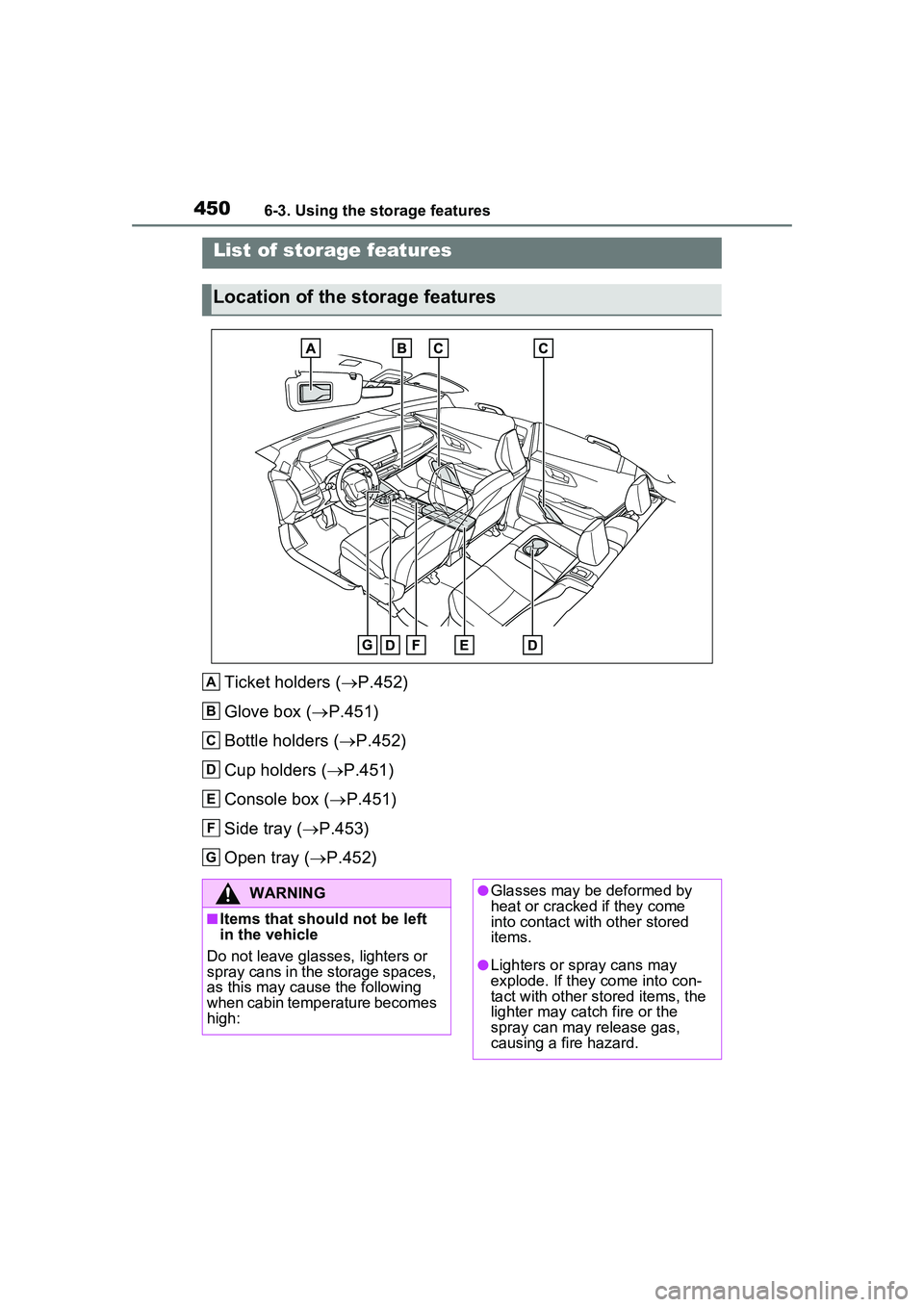
Ticket holders (P.452)
Glove box ( P.451)
Bottle holders ( P.452)
Cup holders ( P.451)
Console box ( P.451)
Side tray ( P.453)
Open tray ( P.452)
List of storage features
Location of the storage features
A
B
C
D
E
F
G
WARNING
■Items that should not be left
in the vehicle
Do not leave glasses, lighters or
spray cans in the storage spaces,
as this may cause the following
when cabin temperature becomes
high:
●Glasses may be deformed by
heat or cracked if they come
into contact with other stored
items.
●Lighters or spray cans may
explode. If they come into con-
tact with other stored items, the
lighter may catch fire or the
spray can may release gas,
causing a fire hazard.
Page 451 of 680
4516-3. Using the storage features
6
Interior features
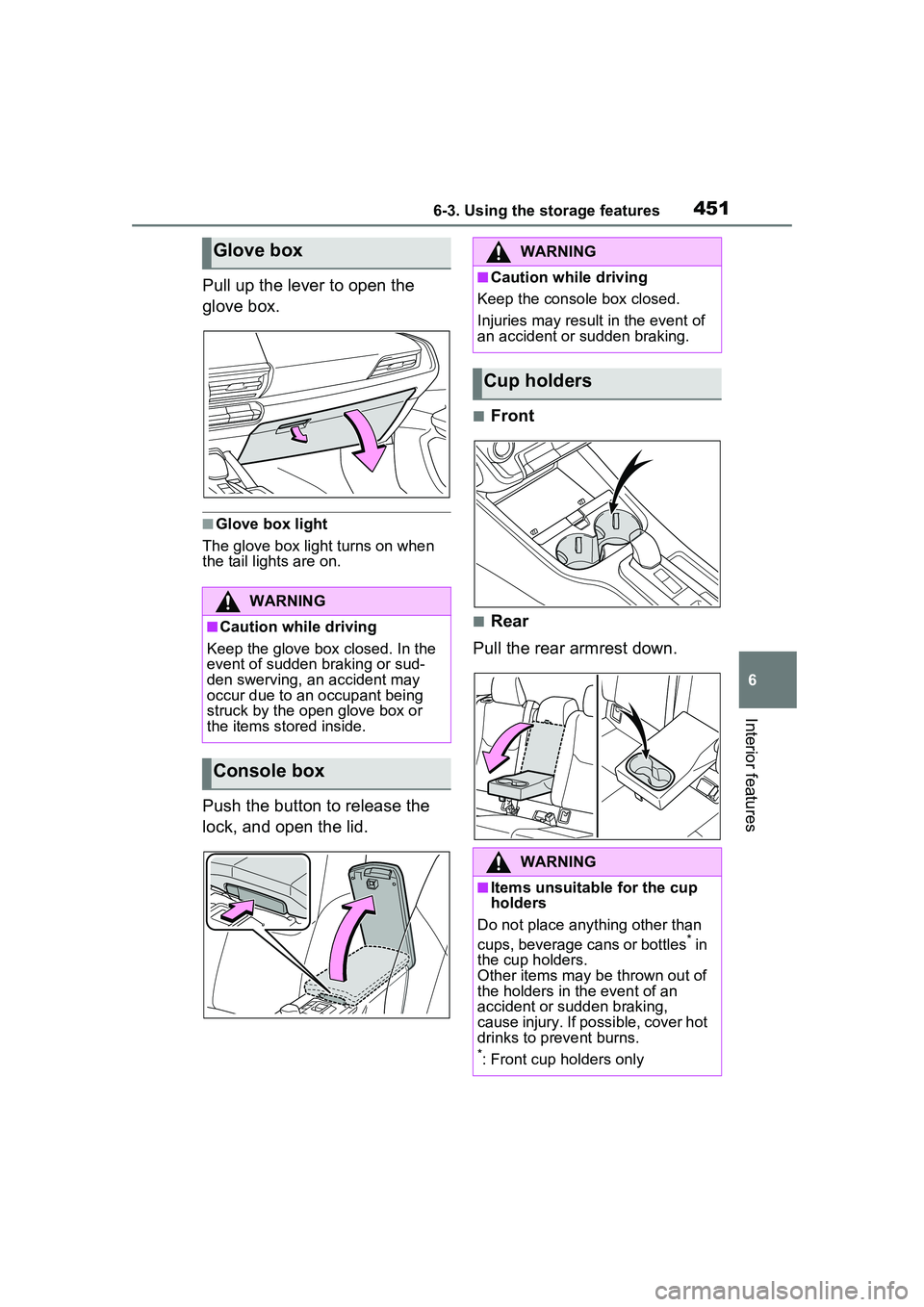
Pull up the lever to open the
glove box.
■Glove box light
The glove box light turns on when
the tail lights are on.
Push the button to release the
lock, and open the lid.
■Front
■Rear
Pull the rear armrest down.
Glove box
WARNING
■Caution while driving
Keep the glove box closed. In the
event of sudden braking or sud-
den swerving, an accident may
occur due to an occupant being
struck by the open glove box or
the items stored inside.
Console box
WARNING
■Caution while driving
Keep the console box closed.
Injuries may result in the event of
an accident or sudden braking.
Cup holders
WARNING
■Items unsuitable for the cup
holders
Do not place anything other than
cups, beverage cans or bottles
* in
the cup holders.
Other items may be thrown out of
the holders in the event of an
accident or sudden braking,
cause injury. If possible, cover hot
drinks to prevent burns.
*: Front cup holders only