warning TOYOTA PRIUS PRIME 2023 Owners Manual
[x] Cancel search | Manufacturer: TOYOTA, Model Year: 2023, Model line: PRIUS PRIME, Model: TOYOTA PRIUS PRIME 2023Pages: 680, PDF Size: 14.97 MB
Page 372 of 680
3725-5. Using the driving support systems
■Detection of objects along the
sides of the vehicle
●Objects along the sides of the
vehicle are not instantaneously
detected. The location of objects
in relation to the vehicle is esti-
mated after they are first detected
by the front or rear side sensors,
or side cameras. Therefore, after
the power switch is changed to
ON, even if an object is along the
side of the vehicle, it may not be
detected until the vehicle has
been driven a small amount and
the side sensors or side cameras
completely scan the areas along
the sides of the vehicle.
●If a vehicle, person, animal, etc., is
detected by a side sensors or side
cameras, but then leaves the
detection area of the side sensors
or side cameras, the system will
assume the object has not moved.
WARNING
■Side sensors and side cam-
eras
In situations such as the following,
the function may not operate cor-
rectly, possibly leading to an acci-
dent. Proceed carefully.
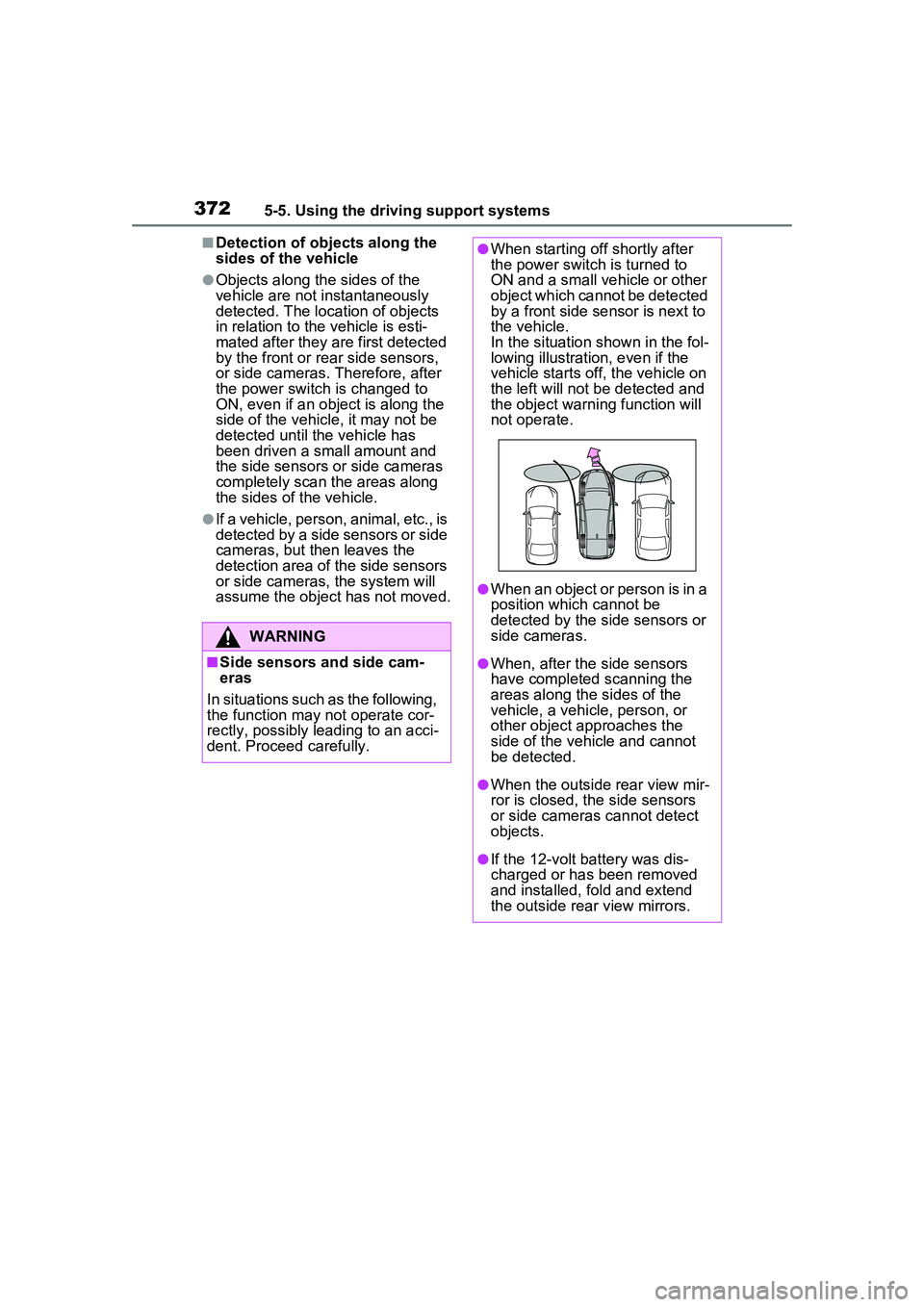
●When starting off shortly after
the power switch is turned to
ON and a small vehicle or other
object which cannot be detected
by a front side sensor is next to
the vehicle.
In the situation shown in the fol-
lowing illustration, even if the
vehicle starts off, the vehicle on
the left will not be detected and
the object warning function will
not operate.
●When an object or person is in a
position which cannot be
detected by the side sensors or
side cameras.
●When, after the side sensors
have completed scanning the
areas along the sides of the
vehicle, a vehicle, person, or
other object approaches the
side of the vehicle and cannot
be detected.
●When the outside rear view mir-
ror is closed, the side sensors
or side cameras cannot detect
objects.
●If the 12-volt battery was dis-
charged or has been removed
and installed, fold and extend
the outside rear view mirrors.
Page 373 of 680
3735-5. Using the driving support systems
5
Driving
*: If equipped
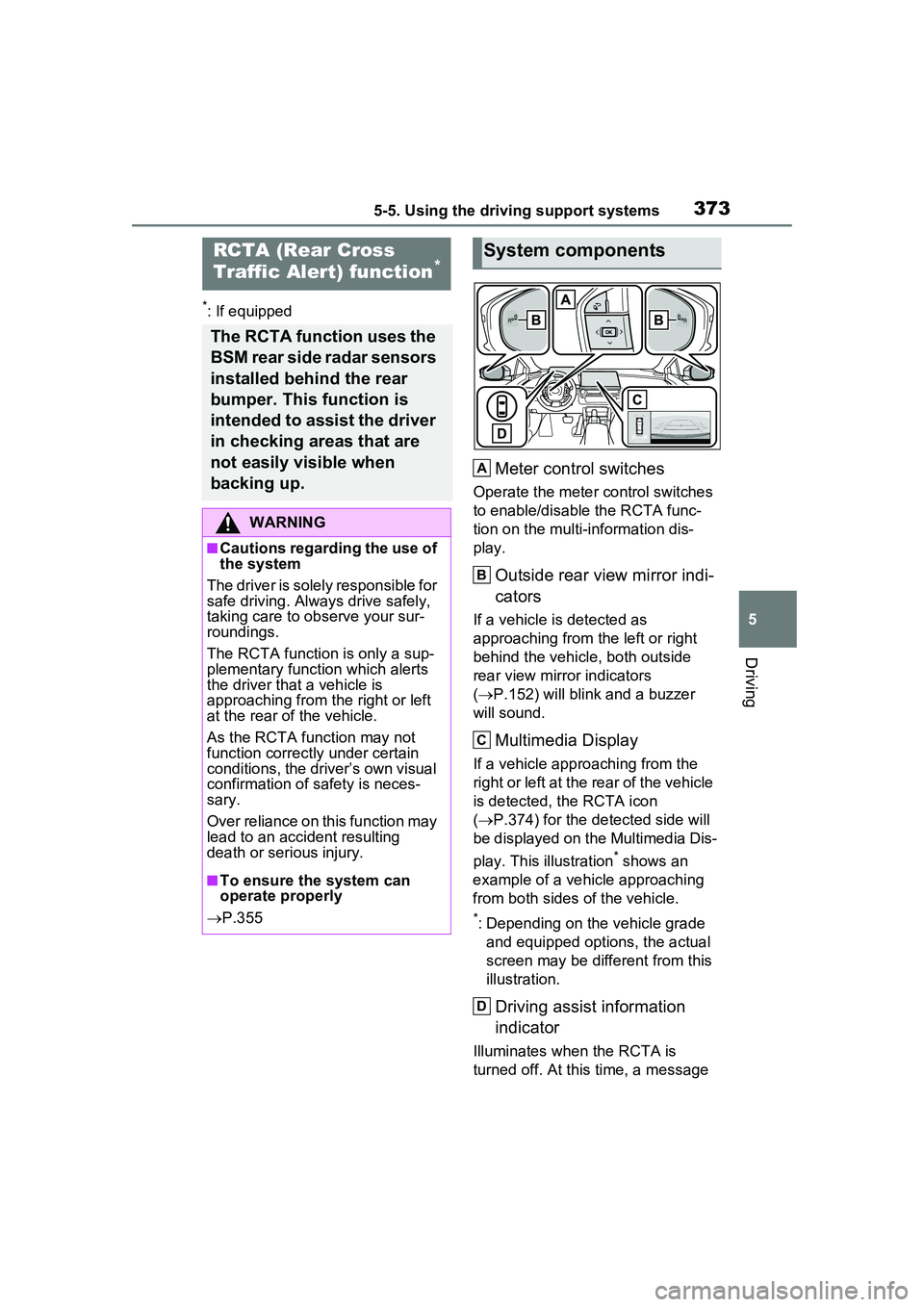
Meter control switches
Operate the meter control switches
to enable/disable the RCTA func-
tion on the multi-information dis-
play.
Outside rear view mirror indi-
cators
If a vehicle is detected as
approaching from the left or right
behind the vehicle, both outside
rear view mirror indicators
( P.152) will blink and a buzzer
will sound.
Multimedia Display
If a vehicle approaching from the
right or left at the rear of the vehicle
is detected, the RCTA icon
( P.374) for the detected side will
be displayed on the Multimedia Dis-
play. This illustration
* shows an
example of a vehicle approaching
from both sides of the vehicle.
*: Depending on the vehicle grade and equipped options, the actual
screen may be different from this
illustration.
Driving assist information
indicator
Illuminates when the RCTA is
turned off. At this time, a message
RCTA (Rear Cross
Traffic Alert) function*
The RCTA function uses the
BSM rear side radar sensors
installed behind the rear
bumper. This function is
intended to assist the driver
in checking areas that are
not easily visible when
backing up.
WARNING
■Cautions regarding the use of
the system
The driver is solely responsible for
safe driving. Always drive safely,
taking care to observe your sur-
roundings.
The RCTA function is only a sup-
plementary function which alerts
the driver that a vehicle is
approaching from the right or left
at the rear of the vehicle.
As the RCTA function may not
function correctly under certain
conditions, the driver’s own visual
confirmation of safety is neces-
sary.
Over reliance on this function may
lead to an accident resulting
death or serious injury.
■To ensure the system can
operate properly
P.355
System components
A
B
C
D
Page 378 of 680
3785-5. Using the driving support systems
●When a sensor or the area around
a sensor is extremely hot or cold
●If the suspension has been modi-
fied or tires of a size other than
specified are installed
●If the front of the vehicle is raised
or lowered due to the carried load
●When towing with the vehicle
*: If equipped
RCD (Rear Camera
Detection) function*
When the vehicle is back-
ing up, the rear camera
detection function can
detect pedestrians in the
detection area behind the
vehicle. If a pedestrian is
detected, a buzzer will
sound and an icon will be
displayed on the Multimedia
Display to inform the driver
of the pedestrian.
WARNING
■Cautions regarding the use of
the system
The recognition and control capa-
bilities for this system are limited.
The driver should always drive
safely by always being responsi-
ble without over relying on the
system and have a understanding
of the surrounding situations.
■To ensure the system can
operate properly
Observe the following, otherwise
there is the danger that could lead
to an accident.
●Always clean the camera with-
out damaging it.
●Do not install market electronic
parts (such as Illuminated
license plate, fog lamps, etc.) in
the camera vicinity.
Page 379 of 680
3795-5. Using the driving support systems
5
Driving
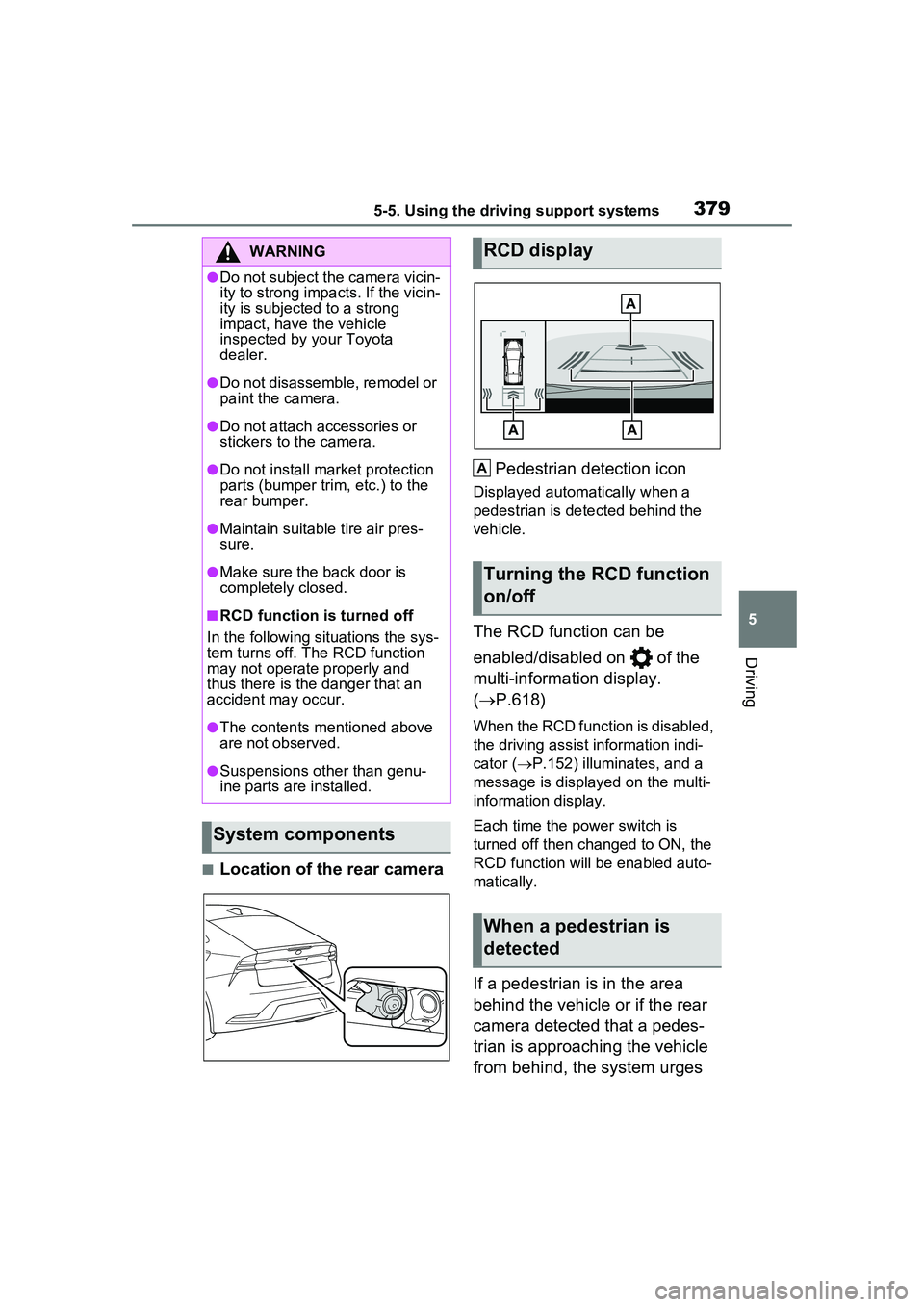
■Location of the rear cameraPedestrian detection icon
Displayed automatically when a
pedestrian is detected behind the
vehicle.
The RCD function can be
enabled/disabled on of the
multi-information display.
(
P.618)
When the RCD function is disabled,
the driving assist information indi-
cator ( P.152) illumina tes, and a
message is displayed on the multi-
information display.
Each time the power switch is
turned off then changed to ON, the
RCD function will be enabled auto-
matically.
If a pedestrian is in the area
behind the vehicle or if the rear
camera detected that a pedes-
trian is approaching the vehicle
from behind, the system urges
WARNING
●Do not subject the camera vicin-
ity to strong impacts. If the vicin-
ity is subjected to a strong
impact, have the vehicle
inspected by your Toyota
dealer.
●Do not disassemble, remodel or
paint the camera.
●Do not attach accessories or
stickers to the camera.
●Do not install market protection
parts (bumper trim, etc.) to the
rear bumper.
●Maintain suitable tire air pres-
sure.
●Make sure the back door is
completely closed.
■RCD function is turned off
In the following situations the sys-
tem turns off. The RCD function
may not operate properly and
thus there is the danger that an
accident may occur.
●The contents mentioned above
are not observed.
●Suspensions other than genu-
ine parts are installed.
System components
RCD display
Turning the RCD function
on/off
When a pedestrian is
detected
A
Page 382 of 680
3825-5. Using the driving support systems
camera
• If the orientation of the rear cam- era has been changed due to a
collision or other impact, or
removal and installation
• If a towing eyelet is installed to the
rear of the vehicle
• When towing with the vehicle
• When water is flowing over the rear camera lens
• When the rear camera is obscured (dirt, snow, ice, etc. are
attached) or scratched
• If there is a flashing light in the detection area, such as the emer-
gency flashers of another vehicle
• When tire chains or an emergency tire puncture repair kit are used.
●Situations in which the rear cam-
era detection function may be diffi-
cult to notice
• The buzzer may be difficult to hear if the surrounding area is noisy or
the audio system volume is high.
• If the temperature in the cabin is extremely high or low, the Multi-
media Display may not operate
correctly.
*: If equipped
PKSB (Parking Sup-
port Brake)*
The PKSB (Parking Support
Brake) is a system that
issues warnings and auto-
matically performs braking
to help reduce collision
damage with operation tar-
gets that were detected
when traveling at a low
speed such as when park-
ing.
This system consists of the
following functions: a Park-
ing Support Brake function
(static objects to the front
and rear) that detects static
objects such as walls, a
Parking Support Brake
function (rear-crossing
vehicles)
* that detects vehi-
cles approaching from the
rear while backing up, a
Parking Support Brake
function (rear pedestrians)
*
that detects pedestrians
behind the vehicle, and a
Parking Support Brake
function (static objects
around the vehicle) (vehi-
cles with Advanced Park)
that detects static objects
around the vehicle.
*: If equipped
Page 383 of 680
3835-5. Using the driving support systems
5
Driving
The system has detected the
following as operation targets.
(The operation targets vary
depending on the function.)
Parking Support Brake func-
tion (static objects to the front
and rear):
P.388
Parking Support Brake func-
tion (rear-crossing vehicles)
(if equipped):
P.392
Parking Support Brake func-
tion (rear pedestrians) (if
equipped):
P.393
Parking Support Brake func-
tion (static objects around the
vehicle) (vehicles with
Advanced Park):
P.388
PKSB (Parking Support
Brake) systemWARNING
■Cautions regarding the use of
the system
Do not overly rely on the system,
as doing so may lead to an acci-
dent.
Always drive while checking the
safety of the surroundings of the
vehicle.
Depending on the vehicle and
road conditions, weather, etc., the
system may not operate.
The detection capabilities of sen-
sors and radars are limited.
Always drive while checking the
safety of the surroundings of the
vehicle.
●The driver is solely responsible
for safe driving. Always drive
carefully, taking care to observe
your surroundings. The Parking
Support Brake system is
designed to provide support to
lessen the severity of collisions.
However, it may not operate in
some situations.
●The Parking Support Brake sys-
tem is not designed to stop the
vehicle completely. Addition-
ally, even if the system has
stopped the vehicle, it is neces-
sary to depress the brake pedal
immediately as brake control
will be canceled after approxi-
mately 2 seconds.
●It is extremely dangerous to
check the system operations by
intentionally driving the vehicle
into the direction of a wall, etc.
Never attempt such actions.
■When to disable the Parking
Support Brake
In the following situations, disable
the Parking Support Brake as the
system may operate even though
there is no possibility of a colli-
sion.
Page 384 of 680
![TOYOTA PRIUS PRIME 2023 Owners Manual 3845-5. Using the driving support systems
All of the Parking Support Brake
functions (static objects to the
front and rear, rear-crossing
vehicles [if equipped], rear
pedestrians [if equipped], an](/img/14/68572/w960_68572-383.png "TOYOTA PRIUS PRIME 2023 Owners Manual 3845-5. Using the driving support systems
All of the Parking Support Brake
functions (static objects to the
front and rear, rear-crossing
vehicles [if equipped], rear
pedestrians [if equipped], an")
3845-5. Using the driving support systems
All of the Parking Support Brake
functions (static objects to the
front and rear, rear-crossing
vehicles [if equipped], rear
pedestrians [if equipped], and
static objects around the vehicle
[vehicles with Advanced Park])
are enabled/disabled simultane-
ously.
The Parking Support Brake
function can be enabled/dis-
abled on of the multi-infor-
WARNING
●When inspecting the vehicle
using a chassis roller, chassis
dynamo or free roller
●When loading the vehicle onto a
boat, truck or other transport
vessel
●If the suspension has been
modified or tires of a size other
than specified are installed
●If the front of the vehicle is
raised or lowered due to the
carried load
●When equipment that may
obstruct a sensor is installed,
such as a towing eyelet, trans-
port hook, bumper protector (an
additional trim strip, etc.), bicy-
cle carrier, or snow plow
●When using automatic car
washing devices
●If the vehicle cannot be driven in
a stable manner, such as when
the vehicle has been in an acci-
dent or is malfunctioning
●When the vehicle is driven in a
sporty manner or off-road
●When the tires are not properly
inflated
●When the tires are very worn
●When tire chains, a compact
spare tire or an emergency tire
puncture repair kit are used.
●When towing with the vehicle
■Precautions for the suspen-
sion
Do not modify the suspension of
the vehicle. If the height or tilt of
the vehicle is changed, the sen-
sors may not be able to detect
detectable objects and the system
may not operate correctly, possi-
bly leading to an accident.
NOTICE
■If “System Stopped See
Owner’s Manual” is displayed
on the multi-information dis-
play and the driving assist
information indi cator is illu-
minated
If this message is displayed
immediately after the power
switch is changed to ON, operate
the vehicle carefully, paying atten-
tion to your surr oundings. It may
be necessary to drive the vehicle
for a certain amount of time
before the system returns to nor-
mal. (If the system is not return to
normal after driv ing for a while,
clean the sensor or rear camera
lens.)
Enabling/Disabling the
Parking Support Brake
Page 390 of 680
3905-5. Using the driving support systems
■The Parking Support Brake
function (static objects to the
front and rear) will operate
when
The function will operate when the
driving assist information indicator is
not illuminated ( P.150, 152) and
all of the followin g conditions are
met:
●Hybrid system output restriction
control
• The Parking Support Brake is enabled.
• The vehicle speed is approxi-
mately 9 mph (15 km/h) or less.
• There is a static object in the trav-
eling direction of the vehicle and
approximately 6 to 13 ft. (2 to 4 m)
away.
• The Parking Support Brake deter-
mines that a stronger-than-nor-
mal brake operation is necessary
to avoid a collision.
●Brake control
• Hybrid system output restriction
control is operating
• The Parking Support Brake deter- mines that an immediate brake
operation is necessary to avoid a
collision.
■The Parking Support Brake
function (static objects around
the vehicle)
* will operate when*: Vehicles with Advanced Park
This function is operable when any
of the following conditions are met in
addition to the operating conditions
for stationary objects in around the
vehicle.
●After the hybrid system has been
started, the vehicle has moved
approximately 23.0 ft. (7 m) or
less
●The R shift position is selected
●After the shift position has been
changed from R to D, the vehicle
has moved approximately 23.0 ft.
(7 m) or less
■The Parking Support Brake
function (static objects to the
front and rear/static objects
around the vehicle
*) will stop
operating when
*: Vehicles with Advanced Park
The function will st op operating if
any of the following conditions are
met:
●Hybrid system output restriction
control
• The Parking Support Brake is dis- abled.
• The system determines that the collision has become avoidable
with normal brake operation.
• The static object is no longer
approximately 6 to 13 ft. (2 to 4 m)
away from the vehicle or in the
traveling direction of the vehicle.
●Brake control
• The Parking Support Brake is dis- abled.
• Approximately 2 seconds have
elapsed since the vehicle was
stopped by brake control.
• The brake pedal is depressed
after the vehicle is stopped by
brake control.
• The static object is no longer
approximately 6 to 13 ft. (2 to 4 m)
WARNING
■To ensure the system can
operate properly
P.364
■If the PKSB (Parking Support
Brake) operates unnecessar-
ily, such as at a railroad
crossing
P.387
■Notes when washing the vehi-
cle
P.365
Page 391 of 680
3915-5. Using the driving support systems
5
Driving
away from the vehicle or in the
traveling direction of the vehicle.
■Detection range of the Parking
Support Brake function (static
objects to the front and
rear/static objects around the
vehicle
*)*: Vehicles with Advanced Park
The detection range of the Parking
Support Brake function (static
objects to the front and rear/static
objects around the vehicle) differs
from the detection range of the intui-
tive parking assist ( P.363). There-
fore, even if the intuitive parking
assist detects an object and pro-
vides a warning, the Parking Sup-
port Brake function (static objects to
the front and rear/static objects
around the vehicle) may not start
operating.
■Situations in which the system
may not operate properly
P.366
■Situations in which the system
may operate even if there is no
possibility of a collision
P.367
■Situations in which the system
may operate even though there
is no possibility of a collision
(static objects around the vehi-
cle) (vehicles with Advanced
Park)
In addition to the situations in which
stationary objects front and rear
( P.390) may not be detected,
objects may not be detected by the
sensors in the following situations:
●When moving sideways, such as
when parallel parking ( P.408)
■Detection of objects along the
sides of the vehicle (static
objects around the vehicle)
(vehicles with Advanced Park)
●Objects along the sides of the
vehicle are not instantaneously
detected. The location of objects in relation to the vehicle is esti-
mated after they are first detected
by the front or rear side sensors,
or side cameras. Therefore, after
the power switch is changed to
ON, even if an object is along the
side of the vehicle, it may not be
detected until the vehicle has
been driven a small amount and
the side sensors or side cameras
completely scan the areas along
the sides of the vehicle.
●If a vehicle, person, animal, etc., is
detected by a side sensors or side
cameras, but then leaves the
detection area of the side sensors
or side cameras, the system will
assume the object has not moved.
Page 392 of 680
3925-5. Using the driving support systems
*: If equipped
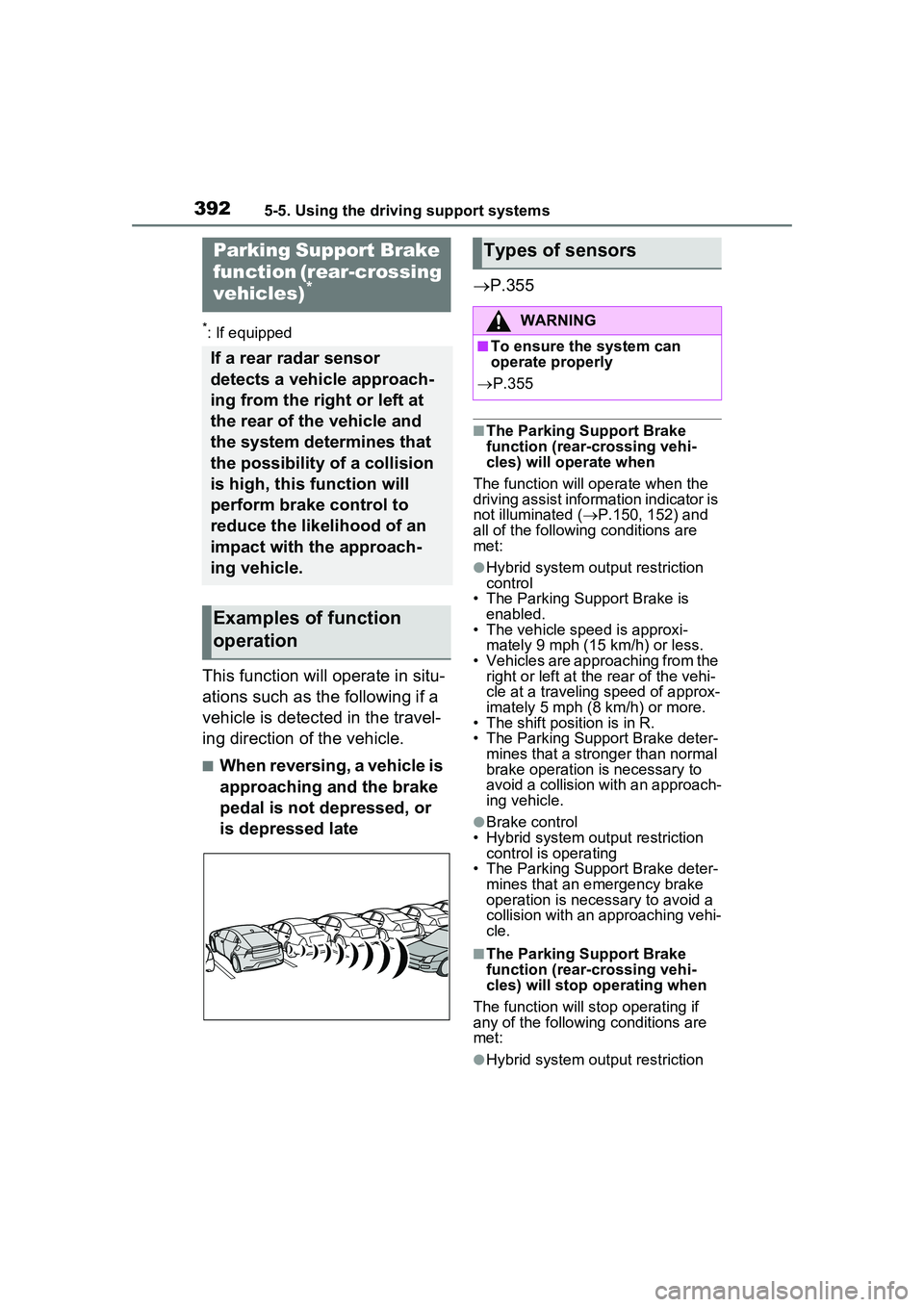
This function will operate in situ-
ations such as the following if a
vehicle is detected in the travel-
ing direction of the vehicle.
■When reversing, a vehicle is
approaching and the brake
pedal is not depressed, or
is depressed late
P.355
■The Parking Support Brake
function (rear-crossing vehi-
cles) will operate when
The function will operate when the
driving assist information indicator is
not illuminated ( P.150, 152) and
all of the following conditions are
met:
●Hybrid system output restriction
control
• The Parking Support Brake is enabled.
• The vehicle speed is approxi- mately 9 mph (15 km/h) or less.
• Vehicles are approaching from the
right or left at the rear of the vehi-
cle at a traveling speed of approx-
imately 5 mph (8 km/h) or more.
• The shift position is in R.
• The Parking Support Brake deter- mines that a stronger than normal
brake operation is necessary to
avoid a collision wit h an approach-
ing vehicle.
●Brake control
• Hybrid system output restriction
control is operating
• The Parking Support Brake deter- mines that an emergency brake
operation is necessary to avoid a
collision with an approaching vehi-
cle.
■The Parking Support Brake
function (rear-crossing vehi-
cles) will stop operating when
The function will st op operating if
any of the following conditions are
met:
●Hybrid system output restriction
Parking Support Brake
function (rear-crossing
vehicles)
*
If a rear radar sensor
detects a vehicle approach-
ing from the right or left at
the rear of the vehicle and
the system determines that
the possibility of a collision
is high, this function will
perform brake control to
reduce the likelihood of an
impact with the approach-
ing vehicle.
Examples of function
operation
Types of sensors
WARNING
■To ensure the system can
operate properly
P.355