warning TOYOTA PRIUS PRIME 2023 Owners Manual
[x] Cancel search | Manufacturer: TOYOTA, Model Year: 2023, Model line: PRIUS PRIME, Model: TOYOTA PRIUS PRIME 2023Pages: 680, PDF Size: 14.97 MB
Page 394 of 680
3945-5. Using the driving support systems
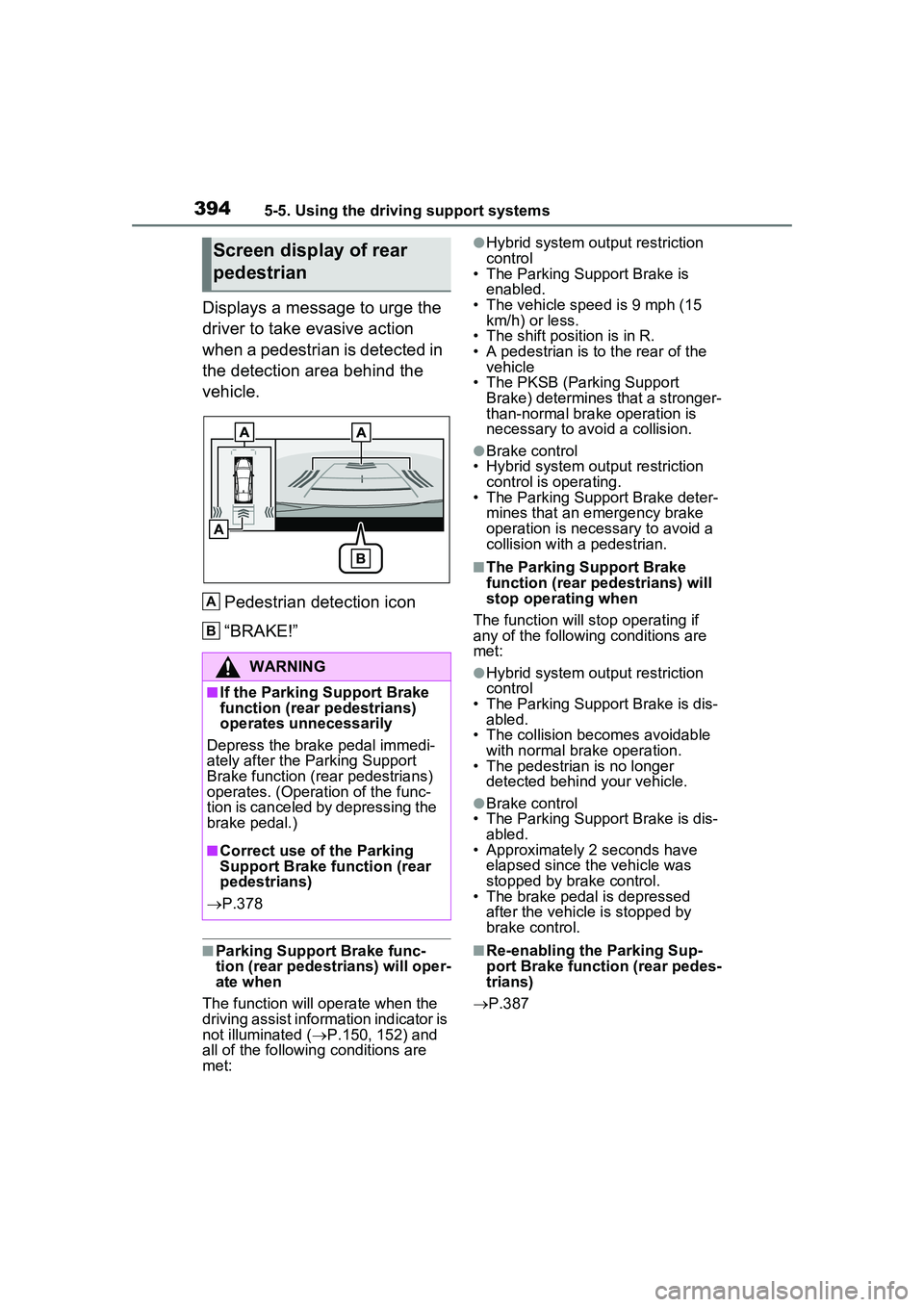
Displays a message to urge the
driver to take evasive action
when a pedestrian is detected in
the detection area behind the
vehicle.Pedestrian detection icon
“BRAKE!”
■Parking Support Brake func-
tion (rear pedestrians) will oper-
ate when
The function will operate when the
driving assist information indicator is
not illuminated ( P.150, 152) and
all of the followin g conditions are
met:
●Hybrid system output restriction
control
• The Parking Support Brake is
enabled.
• The vehicle speed is 9 mph (15 km/h) or less.
• The shift position is in R.
• A pedestrian is to the rear of the vehicle
• The PKSB (Parking Support Brake) determines that a stronger-
than-normal brake operation is
necessary to avoid a collision.
●Brake control
• Hybrid system output restriction control is operating.
• The Parking Support Brake deter-
mines that an emergency brake
operation is necessary to avoid a
collision with a pedestrian.
■The Parking Support Brake
function (rear pedestrians) will
stop operating when
The function will st op operating if
any of the following conditions are
met:
●Hybrid system output restriction
control
• The Parking Support Brake is dis- abled.
• The collision becomes avoidable
with normal brake operation.
• The pedestrian is no longer detected behind your vehicle.
●Brake control
• The Parking Support Brake is dis-
abled.
• Approximately 2 seconds have elapsed since the vehicle was
stopped by brake control.
• The brake pedal is depressed after the vehicle is stopped by
brake control.
■Re-enabling the Parking Sup-
port Brake function (rear pedes-
trians)
P.387
Screen display of rear
pedestrian
WARNING
■If the Parking Support Brake
function (rear pedestrians)
operates unnecessarily
Depress the brake pedal immedi-
ately after the Parking Support
Brake function (rear pedestrians)
operates. (Operation of the func-
tion is canceled by depressing the
brake pedal.)
■Correct use of the Parking
Support Brake function (rear
pedestrians)
P.378
A
B
Page 396 of 680
3965-5. Using the driving support systems
*: For details on the panoramic view monitor refer to “MULTIMEDIA
OWNER’S MANUAL”.
■Perpendicular parking (for-
ward/reverse) function
Assistance is provided from the
position the vehicle is stopped
near the target parking space
until the vehicle is in the parking
space. ( P.403)
■Perpendicular exiting (for-
ward/reverse) function
Assistance is provided from the
parked position until the vehicle
is in a position where you can
easily exit from the parking
space. ( P.406)
■Parallel parking function
Assistance is provided from the
position the vehicle is stopped
near the target parking space
until the vehicle is in the parking
space. ( P.408)
■Parallel exiting function
Assistance is provided from the
parked position until the vehicle
is in a position where you can
easily exit from the parking
space. ( P.412)
■Memory function
Assistance is provided until the
vehicle is guided into a previ-
ously registered parking space.
( P.414)
Functions
WARNING
■Cautions regarding the use of
the system
The recognition and control capa-
bilities for this system are limited.
The driver should always drive
safety by always being responsi-
ble without over relying on the
system and have a understanding
of the surrounding situations.
●As with a normal vehicle, take
care to observe your surround-
ings while the vehicle is moving.
●Always pay attention to the
vehicle’s surroundings while the
system is operating and
depress the brake pedal as nec-
essary to slow or stop the vehi-
cle.
●When parking, make sure that
the vehicle can be parked in the
target parking space before
beginning operation.
●Depending on the condition of
the road surface or the vehicle,
the distance between the vehi-
cle and a parking space, etc., it
may not be possible to detect a
parking space or the system
may not be able to provide
assistance to the point the vehi-
cle is fully parked.
●This system will guide the vehi-
cle to appropriate positions for
changing the direction of travel,
however, if you feel that the
vehicle is approaching too close
to an adjacent parked vehicle at
any time, depress the brake
pedal and change the shift posi-
tion. However, if this is per-
formed, the number of times the
vehicle changes direction may
increase, and the vehicle may
be parked at an angle.
Page 397 of 680
3975-5. Using the driving support systems
5
Driving
WARNING
●As following objects may not be
detected, make sure to check
the safety of the area around
your vehicle and depress the
brake pedal to stop the vehicle if
it may collide with an object.
• Wires, fences, ropes, etc.
• Cotton, snow and other materi- als that absorb sound waves
• Sharply-angled objects
• Low objects (curb stones, park- ing blocks, etc.)
• Tall objects with upper sections projecting outwards in the direc-
tion of your vehicle
●Even if there is an object in the
target parking space, it may not
be detected and assistance
may be performed.
●While the system is operating, if
it is likely that your vehicle will
collide with a nearby vehicle,
parking block, object, or person,
depress the brake pedal to stop
the vehicle and press the
Advanced Park main switch to
disable the system.
●Never use only the Multimedia
Display to view the area behind
the vehicle. The image dis-
played may differ than the
actual situation. Using only the
screen when backing up may
lead to an accident, such as a
collision with anot her vehicle.
When backing up, make sure to
look directly or use the mirrors
to check the safety of the area
around your vehicle, especially
behind the vehicle.
●When the ambient temperature
is extremely low, the screen
may appear dark or the dis-
played image may become
unclear. Also, as moving
objects may appear distorted or
may not be able to be seen on
the screen, make sure to
directly check the safety of the
area around your vehicle.
●In the following situations, while
the vehicle is stopped and held
by Advanced Park, it may be
canceled and the vehicle may
start moving. Immediately
depress the brake pedal. Fail-
ure to do so may lead to an
accident.
• When the driver’s door is opened
• When operations instructed by the system are not performed
within a certain amount of time
• When the brake pedal is depressed and the vehicle is
stopped for a certain amount of
time
• When the system malfunctions
●As the steering wheel will turn
while this system is operating,
pay attention to the following.
• Be careful so that a necktie, scarf, or arm does not get
caught. Keep your upper body
away from the steering wheel.
Also, keep children away from
the steering wheel.
• Long fingernails may be caught and when the steering wheel is
rotating, leading to injury.
• In an emergency, depress the brake pedal to stop the vehicle,
and then press the Advanced
Park main switch to disable the
system.
Page 398 of 680
3985-5. Using the driving support systems
WARNING
●Do not allow anyone to put their
hands outside of a window while
this system is operating.
■To ensure correct operation
of the Advanced Park
Observe the following precau-
tions. Failing to do so may result
in the vehicle being unable to be
driven safely and possibly cause
an accident.
●Do not use this system in situa-
tions such as the following:
• When in areas other than com- mon parking spaces
• When the surface of the parking space is sand or gravel and is
not clearly defined with parking
space lines
• When the parking space is not level, such as when on a slope
or has differences in height
• Mechanical parking system
• Parking lot with a device which raises to contact the bottom of
the vehicle
• When the road surface is fro- zen, slick, or covered with snow
• When it is extremely hot and the asphalt is melting
• When there are objects around the vehicle
• When there is an object between your vehicle and the
target parking spot or within the
target parking spot (within the
displayed blue box)
• When there is a gutter between your vehicle and the target park-
ing space or within the target
parking spot (within the dis-
played blue box)
• When there is a hole or gutter in the exit direction
• When in high pedestrian or vehicle traffic areas
• When the parking space is in a location that is difficult to park in
(too narrow for your vehicle,
etc.)
• When images are unclear due to dirt or snow attached to the
camera lens, light being shined
into the camera or shadows
• When tire chains or a compact spare tire is installed to the vehi-
cle
• When the doors or back door are not completely closed
• When an arm is held outside of a window
• In inclement weather such as heavy rain or snow
●Make sure to use only standard
sized tires, such as those that
were installed to the vehicle
when it was shipped from the
factory. Otherwise, Advanced
Park may not operate properly.
Also, when the tires have been
replaced, the displayed position
of the lines or box displayed on
the screen may become incor-
rect. When replacing the tires,
contact your Toyota dealer.
●In situations such as the follow-
ing, it may not be possible for
the system to provide assis-
tance to a registered parking
spot:
• When the tires are extremely worn or the tire inflation pres-
sure is low
• When carrying a heavy load
• When the vehicle is tilted due to the carried load
Page 399 of 680
3995-5. Using the driving support systems
5
Driving
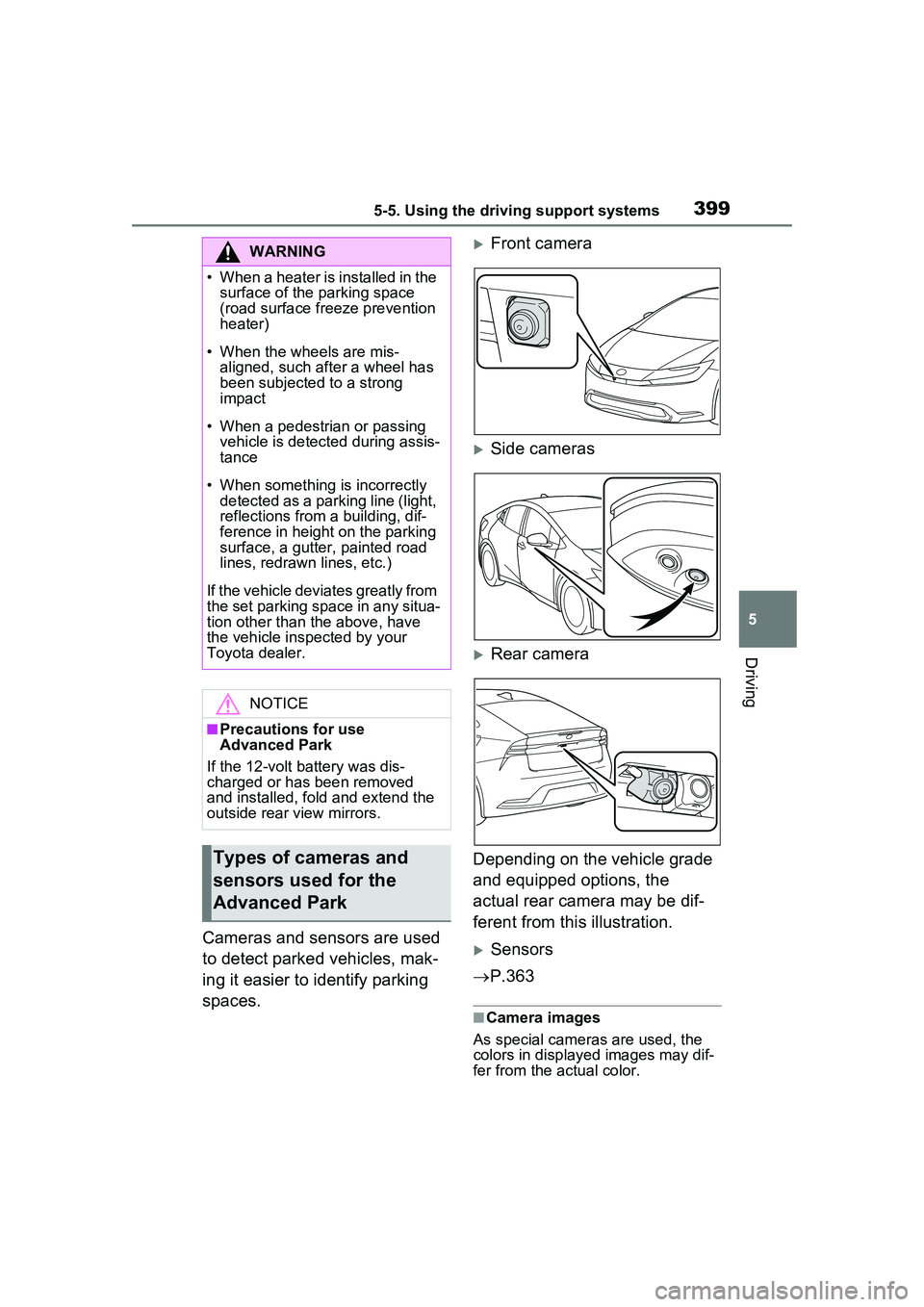
Cameras and sensors are used
to detect parked vehicles, mak-
ing it easier to identify parking
spaces.
Front camera
Side cameras
Rear camera
Depending on the vehicle grade
and equipped options, the
actual rear camera may be dif-
ferent from this illustration.
Sensors
P.363
■Camera images
As special cameras are used, the
colors in displa yed images may dif-
fer from the actual color.
WARNING
• When a heater is installed in the surface of the parking space
(road surface freeze prevention
heater)
• When the wheels are mis- aligned, such a fter a wheel has
been subjected to a strong
impact
• When a pedestrian or passing vehicle is detected during assis-
tance
• When something is incorrectly detected as a parking line (light,
reflections from a building, dif-
ference in height on the parking
surface, a gutter, painted road
lines, redrawn lines, etc.)
If the vehicle deviates greatly from
the set parking space in any situa-
tion other than the above, have
the vehicle inspected by your
Toyota dealer.
NOTICE
■Precautions for use
Advanced Park
If the 12-volt battery was dis-
charged or has been removed
and installed, fold and extend the
outside rear view mirrors.
Types of cameras and
sensors used for the
Advanced Park
Page 401 of 680
4015-5. Using the driving support systems
5
Driving
unclear
• When the appearance of the park- ing space is affected by the
shadow of the vehicle or trees
■Sensor detection information
P.365
■Objects which the sensor may
not be properly detected
P.366
■Situations in which the sensor
may not operate properly
P.366
■Situations in which parking
assistance may not operate
even if there is no possibility of
a collision
P.367
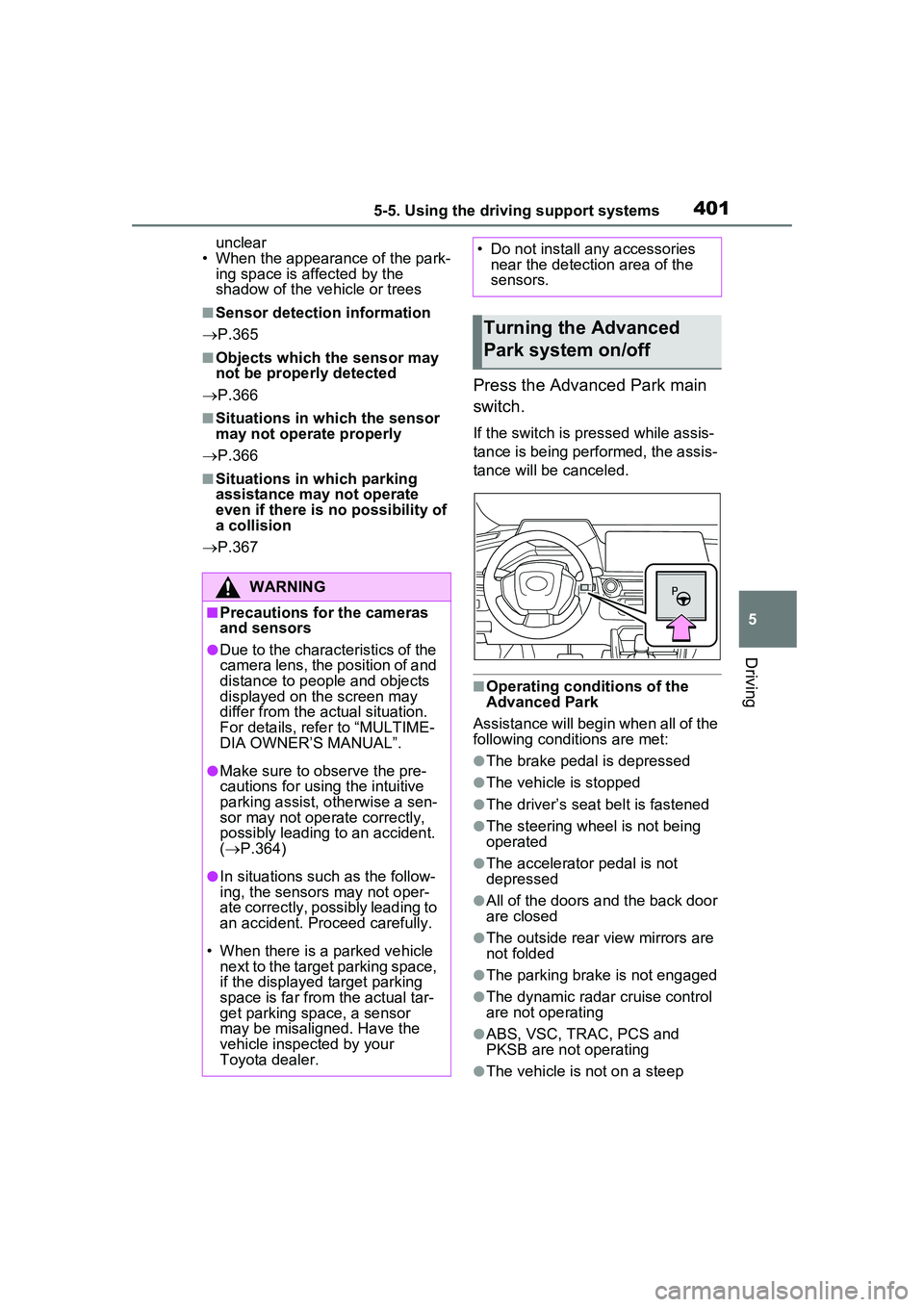
Press the Advanced Park main
switch.
If the switch is pressed while assis-
tance is being performed, the assis-
tance will be canceled.
■Operating conditions of the
Advanced Park
Assistance will begin when all of the
following conditions are met:
●The brake pedal is depressed
●The vehicle is stopped
●The driver’s seat belt is fastened
●The steering wheel is not being
operated
●The accelerator pedal is not
depressed
●All of the doors and the back door
are closed
●The outside rear view mirrors are
not folded
●The parking brake is not engaged
●The dynamic radar cruise control
are not operating
●ABS, VSC, TRAC, PCS and
PKSB are not operating
●The vehicle is not on a steep
WARNING
■Precautions for the cameras
and sensors
●Due to the characteristics of the
camera lens, the position of and
distance to people and objects
displayed on the screen may
differ from the actual situation.
For details, refer to “MULTIME-
DIA OWNER’S MANUAL”.
●Make sure to observe the pre-
cautions for using the intuitive
parking assist, otherwise a sen-
sor may not operate correctly,
possibly leading to an accident.
( P.364)
●In situations such as the follow-
ing, the sensors may not oper-
ate correctly, possibly leading to
an accident. Proceed carefully.
• When there is a parked vehicle next to the target parking space,
if the displayed target parking
space is far from the actual tar-
get parking space, a sensor
may be misaligned. Have the
vehicle inspected by your
Toyota dealer.
• Do not install any accessories near the detection area of the
sensors.
Turning the Advanced
Park system on/off
Page 403 of 680
4035-5. Using the driving support systems
5
Driving
the edge of the front or rear bumper
to the target stopping position (yel-
low)
*1 and approximately 1 ft. (0.3
m) (red) from the vehicle.
Moving object warning icon
Emergency support brake
control operation display
“BRAKE!” is displayed.
Intuitive parking assist dis-
play
P.363
Rear camera washer switch*2
(if equipped)
Press shortly:
The rear camera washer operates
for a certain period of time.
Press and hold:
The rear camera washer operates
while the rear camera washer
switch remains pressed.
*1: The yellow lateral line is not dis- played when the target stopping
position is approximately 8.2 ft.
(2.5 m) or more away from the
vehicle.
*2: Refer to “Panoramic view moni-tor” of “Parking assist system” in
the “MULTIMEDIA OWNER’S
MANUAL”.
■Intuitive parking assist pop-up
display
Regardless of whether the intuitive
parking assist is off or on ( P.364),
if an object is de tected by the intui-
tive parking assist when the
Advanced Park is operating, the
intuitive parking assist pop up dis-
play will automatically be displayed
over the guidance display.
■Brake control operation when
Advanced Park is operating
While the Advanced Park is operat-
ing, if the system determines that
the possibility of collision with
detected moving or stationary object
is high, the hybrid system output
restriction control and brake control
will operate.
If brake control operates, Advanced
Park operation will be suspended
and a message will be displayed on
the multi-information display.
■Buzzer
Depending on surrounding sounds
or sounds from other systems, it
may be difficult to hear the buzzer of
this system.
■If a black screen is displayed on
the Multimedia Display when
the Advanced Park is operating
The system is being affected by
radio waves or may be malfunction-
ing. If a radio antenna is installed
near a camera, move it to a location
as far from the cameras as possible.
If a radio antenna is not installed
near a camera, and the screen does
not return to normal after turning the
power switch off and then starting
the hybrid system again, have the
vehicle inspected by your Toyota
dealer.
The perpendicular parking (for-
ward/reverse) function can be
used if the target parking space
can be detected when the vehi-
cle is stopped close and perpen-
dicular to the center of the
parking space. Also, depending
on the condition of the parking
space, etc., if it is necessary to
change the direction of travel of
C
D
E
F
Perpendicular parking
(forward/reverse) function
Page 425 of 680
4255-5. Using the driving support systems
5
Driving
wheel.
■The Secondary Collision
Brake
When the SRS airbag sensor
detects a collision and the sys-
tem operates, the brakes and
brake lights are automatically
controlled to reduce the vehicle
speed and help reduce the pos-
sibility of further damage due to
a secondary collision.
■When the TRAC/VSC/ABS sys-
tems are operating
The slip indicator light will flash
while the TRAC/VSC/ABS systems
are operating.
■Disabling the TRAC system
If the vehicle gets stuck in mud, dirt
or snow, the TRAC system may
reduce power from the hybrid sys-
tem to the wheels.
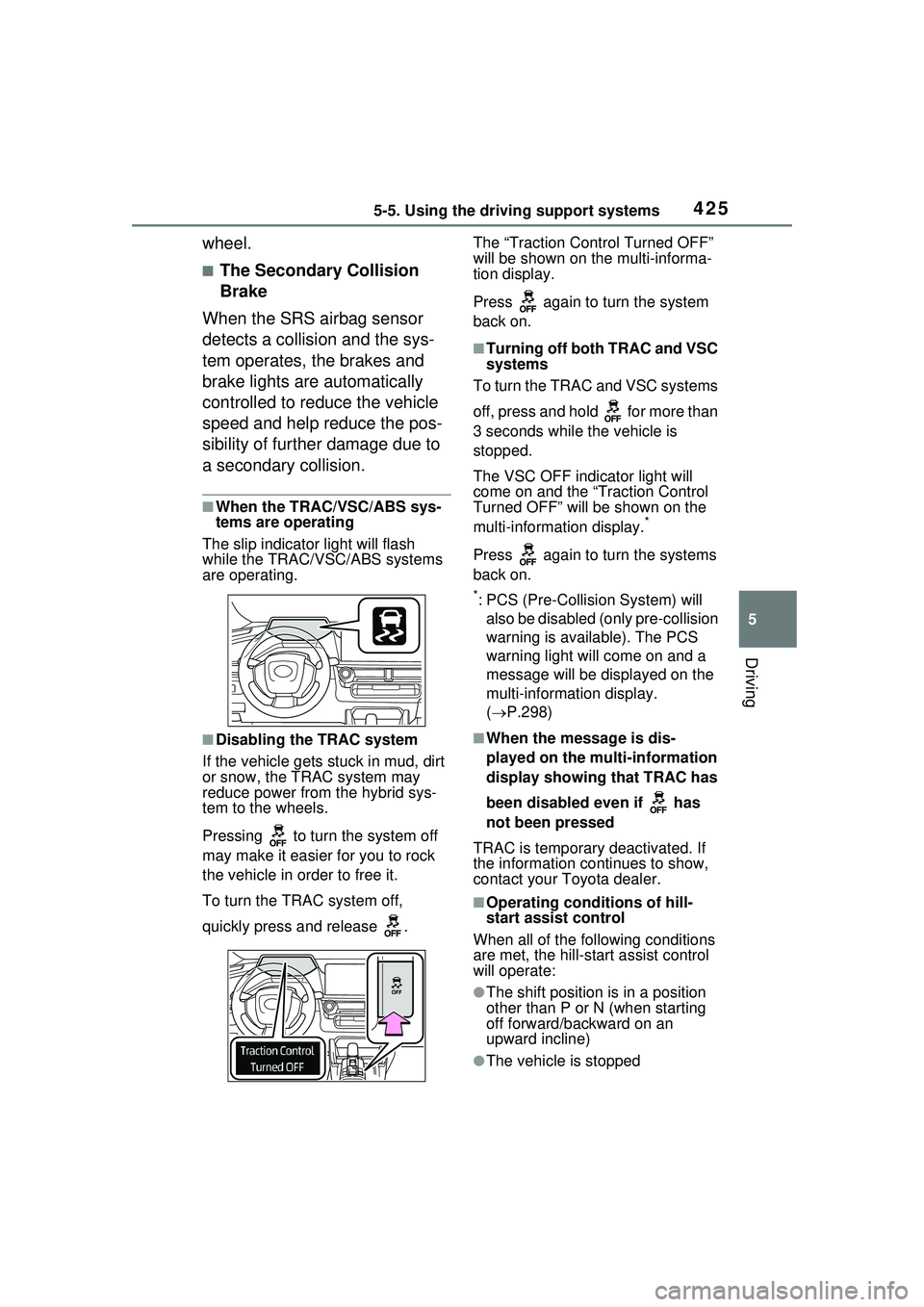
Pressing to turn the system off
may make it easier for you to rock
the vehicle in order to free it.
To turn the TRAC system off,
quickly press and release . The “Traction Control Turned OFF”
will be shown on the multi-informa-
tion display.
Press again to turn the system
back on.
■Turning off both TRAC and VSC
systems
To turn the TRAC and VSC systems
off, press and hold for more than
3 seconds while the vehicle is
stopped.
The VSC OFF indicator light will
come on and the “Traction Control
Turned OFF” will be shown on the
multi-informat ion display.
*
Press again to turn the systems
back on.
*: PCS (Pre-Collision System) will
also be disabled (only pre-collision
warning is available). The PCS
warning light will come on and a
message will be disp layed on the
multi-information display.
( P.298)
■When the message is dis-
played on the mu lti-information
display showing that TRAC has
been disabled even if has
not been pressed
TRAC is temporary deactivated. If
the information continues to show,
contact your Toyota dealer.
■Operating conditions of hill-
start assist control
When all of the following conditions
are met, the hill-start assist control
will operate:
●The shift position is in a position
other than P or N (when starting
off forward/backward on an
upward incline)
●The vehicle is stopped
Page 427 of 680
4275-5. Using the driving support systems
5
Driving
■Secondary Collision Brake
operating conditions
The system operates when the SRS
airbag sensor detects a collision
while the vehicle is in motion.
However, the system does not oper-
ate when the components are dam-
aged.
■Secondary Collision Brake
automatic cancellation
The system is automatically can-
celed in any of the following situa-
tions.
●The vehicle speed drops to
approximately 0 mph (0 km/h).
●A certain amount of time elapses
during operation
●The accelerator pedal is
depressed a large amount
WARNING
■The ABS does not operate
effectively when
●The limits of tire gripping perfor-
mance have been exceeded
(such as excessively worn tires
on a snow-covered road).
●The vehicle hydroplanes while
driving at high speed on wet or
slick roads.
■Stopping distance when the
ABS is operating may exceed
that of normal conditions
The ABS is not designed to
shorten the vehicle’s stopping dis-
tance. Always maintain a safe dis-
tance from the vehicle in front of
you, especially in the following sit-
uations:
●When driving on dirt, gravel or
snow-covered roads
●When driving with tire chains
●When driving over bumps in the
road
●When driving over roads with
potholes or uneven surfaces
■TRAC/VSC may not operate
effectively when
Directional control and power may
not be achievable while driving on
slippery road surfaces, even if the
TRAC/VSC system is operating.
Drive the vehicle carefully in con-
ditions where stability and power
may be lost.
■Active Cornering Assist does
not operate effectively when
●Do not overly rely on Active
Cornering Assist. Active Corner-
ing Assist may not operate
effectively when accelerating
down slopes or driving on slip-
pery road surfaces.
●When Active Cornering Assist
frequently operates, Active Cor-
nering Assist may temporarily
stop operating to ensure proper
operation of the brakes, TRAC
and VSC.
■Hill-start assist control does
not operate effectively when
●Do not overly rely on hill-start
assist control. Hill-start assist
control may not operate effec-
tively on steep inclines and
roads covered with ice.
●Unlike the parking brake, hill-
start assist control is not
intended to hold the vehicle sta-
tionary for an extended period
of time. Do not attempt to use
hill-start assist control to hold
the vehicle on an incline, as
doing so may lead to an acci-
dent.
Page 428 of 680
4285-5. Using the driving support systems
WARNING
■When the TRAC/ABS/VSC is
activated
The slip indicator light flashes.
Always drive care fully. Reckless
driving may cause an accident.
Exercise particular care when the
indicator light flashes.
■When the TRAC/VSC systems
are turned off
Be especially careful and drive at
a speed appropriate to the road
conditions. As these are the sys-
tems to help ensure vehicle stabil-
ity and driving force, do not turn
the TRAC/VSC systems off
unless necessary.
■Replacing tires
Make sure that all tires are of the
specified size, brand, tread pat-
tern and total load capacity. In
addition, make sure that the tires
are inflated to the recommended
tire inflation pressure level.
The ABS, TRAC and VSC sys-
tems will not function correctly if
different tires are installed on the
vehicle.
Contact your Toyota dealer for
further information when replacing
tires or wheels.
■Handling of tires and the sus-
pension
Using tires with any kind of prob-
lem or modifying the suspension
will affect the driv ing assist sys-
tems, and may cause a system to
malfunction.
■Secondary Collision Brake
Do not rely solely upon the Sec-
ondary Collision Brake. This sys-
tem is designed to help reduce
the possibility of further damage
due to a secondary collision, how-
ever, that effect changes accord-
ing to various conditions. Overly
relying on the system may result
in death or serious injury.