warning TOYOTA PRIUS PRIME 2023 Owners Manual
[x] Cancel search | Manufacturer: TOYOTA, Model Year: 2023, Model line: PRIUS PRIME, Model: TOYOTA PRIUS PRIME 2023Pages: 680, PDF Size: 14.97 MB
Page 605 of 680

6059-1. Specifications
9
Vehicle specifications
*1: Minimum pedal clearance when depressed with a force of 67.4 lbf (300 N, 30.6 kgf) while the hybr id system is operating.
When performing the brake pedal inspection, also be sure to check that the
brake system warning light is not illuminated when the hybrid system is
operating. (If the brake system warning light is illuminated, refer to P.555.)
*2: Make sure to confirm that the brake system warning light (yellow) does
not illuminate. (If the br ake system warning light illuminates, refer to
P.555.)
Vehicles with 17-inch tires
Brake pad wear limit
Front
0.06 in. (1.5 mm)
Rear
0.08 in. (2.0 mm)
Parking brake indicator*2
When pushing the parking brake switch for
1 to 2 seconds: turns off
When pulling the parking brake switch for
1 to 2 seconds: comes on
Fluid typeFMVSS No.116 DOT 3 or SAE J1703
FMVSS No.116 DOT 4 or SAE J1704
Steering
Free playLess than 1.2 in. (30 mm)
Tires and wheels
Tire size195/60R17 90H
Tire inflation pressure (Recom-
mended cold tire inflation pres-
sure)
Front:
36 psi (250 kPa, 2.5 kgf/cm
2 or bar)
Rear:
35 psi (240 kPa, 2.4 kgf/cm
2 or bar)
Spare:
None
Wheel size17 6 1/2J
Wheel nut torque76 ft•lbf (103 N•m, 10.5 kgf•m)
Page 612 of 680
6129-1. Specifications
ing.
Your Toyota dealer will help answer
any questions you may have as you
read this information.
■DOT quality grades
All passenger vehicle tires must
conform to Federal Safety
Requirements in addition to
these grades. Quality grades
can be found where applicable
on the tire sidewall between
tread shoulder and maximum
section width.
For example: Treadwear 200 Trac-
tion AA Temperature A
■Treadwear
The treadwear grade is a com-
parative rating based on the
wear rate of the tire when tested
under controlled conditions on a
specified government test
course.
For example, a tire graded 150
would wear one and a half (1 - 1/2)
times as well on the government
course as a tire graded 100.
The relative performance of tires
depends upon the actual conditions
of their use. Performance may dif-
fer significantly from the norm due
to variations in driving habits, ser-
vice practices and differences in
road characteristics and climate.
■Traction AA, A, B, C
The traction grades, from high-
est to lowest, are AA, A, B and
C, and they represent the tire’s
ability to stop on wet pavement
as measured under controlled conditions on specified govern-
ment test surfaces of asphalt
and concrete.
A tire marked C may have poor
traction performance.
Warning: The traction grade
assigned to this tire is based on
braking (straight ahead) traction
tests and does not include corner-
ing (turning) traction.
■Temperature A, B, C
The temperature grades are A
(the highest), B, and C, repre-
senting the tire’s resistance to
the generation of heat and its
ability to dissipate heat when
tested under controlled condi-
tions on a specified indoor labo-
ratory test wheel.
Sustained high temperature can
cause the material of the tire to
degenerate and reduce tire life, and
excessive temperature can lead to
sudden tire failure.
Grade C corresponds to a level of
performance which all passenger
car tires must meet under the Fed-
eral Motor Vehicle Safety Standard
No. 109.
Grades B and A represent higher
levels of performance on the labo-
ratory test wheel than the minimum
required by law.
Warning: The temperature grades
of a tire assume that it is properly
inflated and not overloaded.
Excessive speed, underinflation, or
excessive loading, either sepa-
rately or in combination, can cause
heat buildup and possible tire fail-
ure.
Page 618 of 680
6189-2. Customization
9-2.Customization
■Changing by using the Mul-
timedia Display
Except for Advanced Park
1 Select on the main menu.
2 Select “Vehicle customize”
on the sub menu.
3 Select the item to change the
settings of from the list.
Various setting can be changed.
Refer to the list of settings that can
be changed for details.
For functions that can be turned
on/off, select (ON)/
(OFF).
For Advanced Park (if
equipped)
1 Press the Advanced Park
main switch. 2
Select on the Multimedia
Display, and then select
“Advanced Park”.
■Changing by using the
multi-information display
Use the meter control switches
to change settings. ( P.162)
1 Operate the meter control
switch to select .
( P.166)
2 Operate the meter control
switches to select the desired
item to be customized.
3 According to the display,
select the desired setting.
To go back to the previous screen
or exit the customize mode, press
.
■During customization
Stop the vehicle in a safe place,
apply the parking brake, and shift
the shift position to P. Also, to pre-
vent 12-volt battery discharge, leave
the hybrid system operating while
customizing the features.
Customizable features
Your vehicle includes a vari-
ety of electronic features
that can be personalized to
your preferences. The set-
tings of these features can
be changed by using the
multi-information display,
the Multimedia Display or at
your Toyota dealer.
Some of the customizable
features are changed in
conjunction with the set-
tings of My Set-
tings.( P.234)
Customizing vehicle fea-
tures
WARNING
■During customization
As the hybrid system needs to be
operating during customization,
ensure that the vehicle is parked
in a place with adequate ventila-
tion. In a closed area such as a
garage, exhaust gases including
harmful carbon monoxide (CO)
may collect and enter the vehicle.
This may lead to death or a seri-
ous health hazard.
Page 622 of 680
6229-2. Customization
■Rear seat reminder (P.188)
*: This setting changes in accordance with My Settings.
■Smart key system and wireless remote control ( P.185, 191,
203)
*: This setting changes in accordance with My Settings.
■Smart key system ( P.185, 191, 203)
FunctionDefault settingCustomized
setting
Rear seat reminder func-
tion
*OnOffOO
FunctionDefault settingCustomized setting
Operating signal (Buzz-
ers)
*StandardDesired volumeOO
Operation signal (Emer-
gency flashers)
*OnOffOO
Time elapsed before auto-
matic door lock function is
activated if door is not
opened after being
unlocked
*
60 seconds
Off
OO30 seconds
120 seconds
Open door warning
buzzer (When locking the
vehicle)
OnOffO
FunctionDefault settingCustomized setting
Smart door unlocking*1Driver’s doorAll the doorsOO
Smart key systemOnOffO
Time elapsed before
unlocking all the door
when gripping and holding
the driver’s door handle
*2
2 seconds
Off
O1.5 seconds
2.5 seconds
ABC
ABC
ABC
Page 625 of 680
6259-2. Customization
9
Vehicle specifications
■Power switch (P.254)
■Regeneration Boost ( P.260)
■Reverse warning buzzer ( P.256)
■Automatic light control system ( P.269)
Wireless remote control
linked operation (open)OffOnO
Wireless remote control
linked operation signal
(buzzer)
OnOffO
FunctionCustomized setting
ACC customization
Enabling/Disabling ACC
mode
On/OffOO
FunctionDefault settingCustomized
setting
Deceleration (regenera-
tive braking force)LowMediumOHigh
Deceleration MemoryOnOffO
FunctionDefault settingCustomized setting
Signal (buzzer) when the
shift position is in ROffOnO
FunctionDefault settingCustomized setting
Daytime running lights*1, 2OnOffOO
Light sensor sensitivity*1Normal
Brighter
OOBright
Dark
Darker
FunctionDefault settingCustomized settingABC
ABC
ABC
ABC
ABC
Page 626 of 680
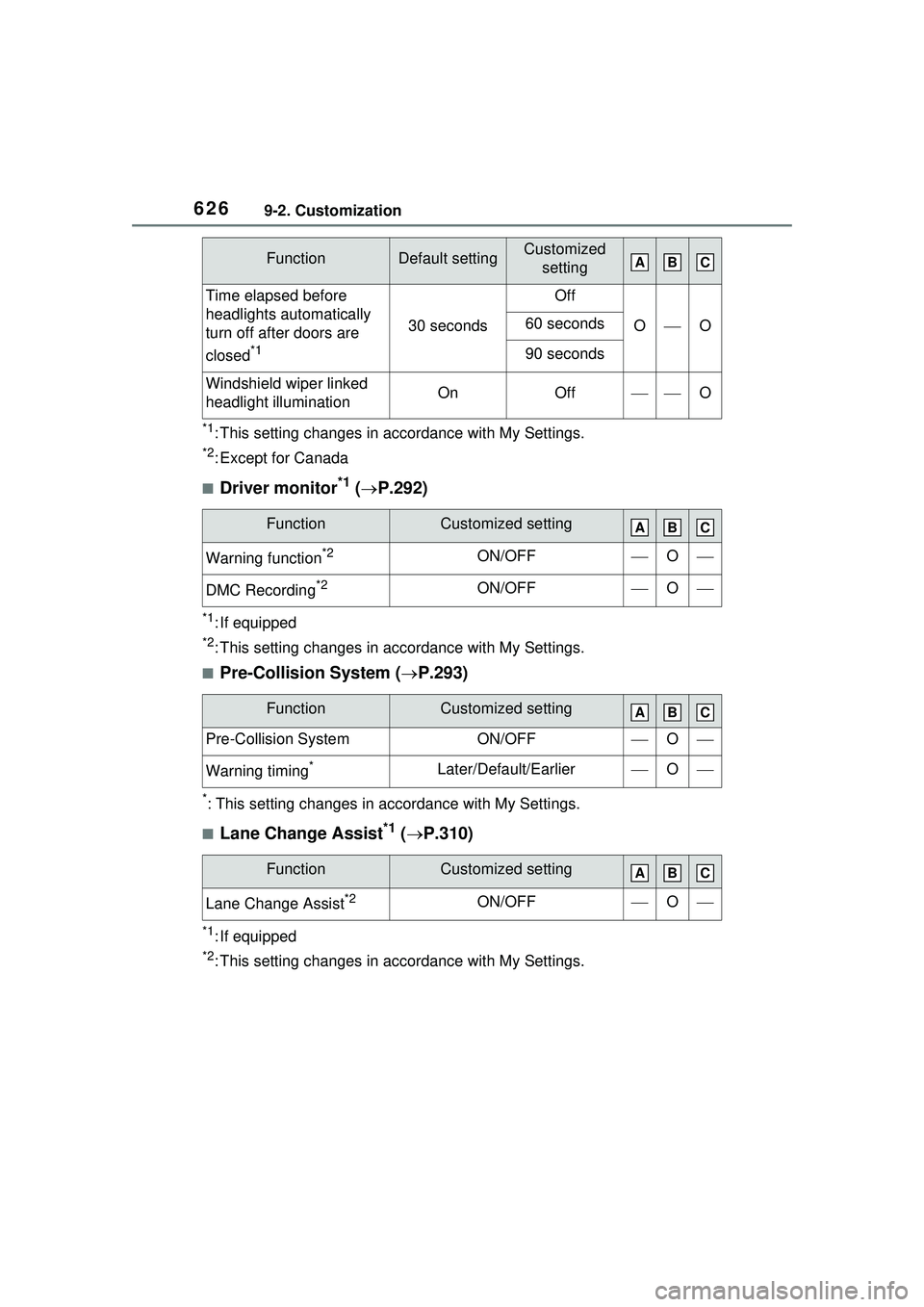
6269-2. Customization
*1: This setting changes in accordance with My Settings.
*2: Except for Canada
■Driver monitor*1 ( P.292)
*1: If equipped
*2: This setting changes in ac cordance with My Settings.
■Pre-Collision System (P.293)
*: This setting changes in accordance with My Settings.
■Lane Change Assist*1 ( P.310)
*1: If equipped
*2: This setting changes in ac cordance with My Settings.
Time elapsed before
headlights automatically
turn off after doors are
closed
*1
30 seconds
Off
OO60 seconds
90 seconds
Windshield wiper linked
headlight illuminationOnOffO
FunctionCustomized setting
Warning function*2ON/OFFO
DMC Recording*2ON/OFFO
FunctionCustomized setting
Pre-Collision SystemON/OFFO
Warning timing*Later/Default/EarlierO
FunctionCustomized setting
Lane Change Assist*2ON/OFFO
FunctionDefault settingCustomized
settingABC
ABC
ABC
ABC
Page 629 of 680
6299-2. Customization
9
Vehicle specifications
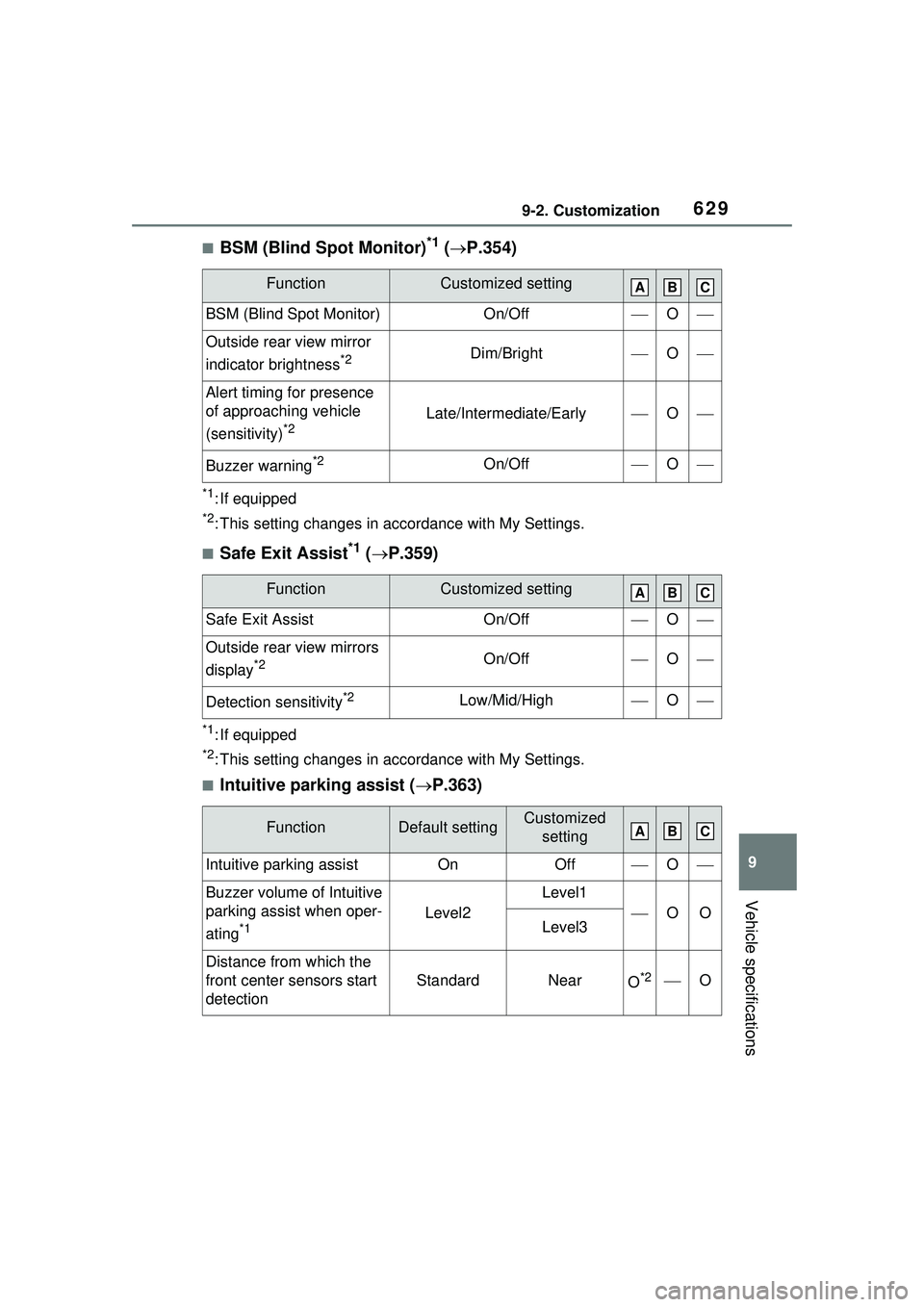
■BSM (Blind Spot Monitor)*1 ( P.354)
*1: If equipped
*2: This setting changes in ac cordance with My Settings.
■Safe Exit Assist*1 ( P.359)
*1: If equipped
*2: This setting changes in ac cordance with My Settings.
■Intuitive parking assist (P.363)
FunctionCustomized setting
BSM (Blind Spot Monitor)On/OffO
Outside rear view mirror
indicator brightness
*2Dim/BrightO
Alert timing for presence
of approaching vehicle
(sensitivity)
*2Late/Intermediate/EarlyO
Buzzer warning*2On/OffO
FunctionCustomized setting
Safe Exit AssistOn/OffO
Outside rear view mirrors
display
*2On/OffO
Detection sensitivity*2Low/Mid/HighO
FunctionDefault settingCustomized
setting
Intuitive parking assistOnOffO
Buzzer volume of Intuitive
parking assist when oper-
ating
*1Level2
Level1
OOLevel3
Distance from which the
front center sensors start
detection
StandardNearO*2O
ABC
ABC
ABC
Page 649 of 680
649What to do if... (Troubleshooting)
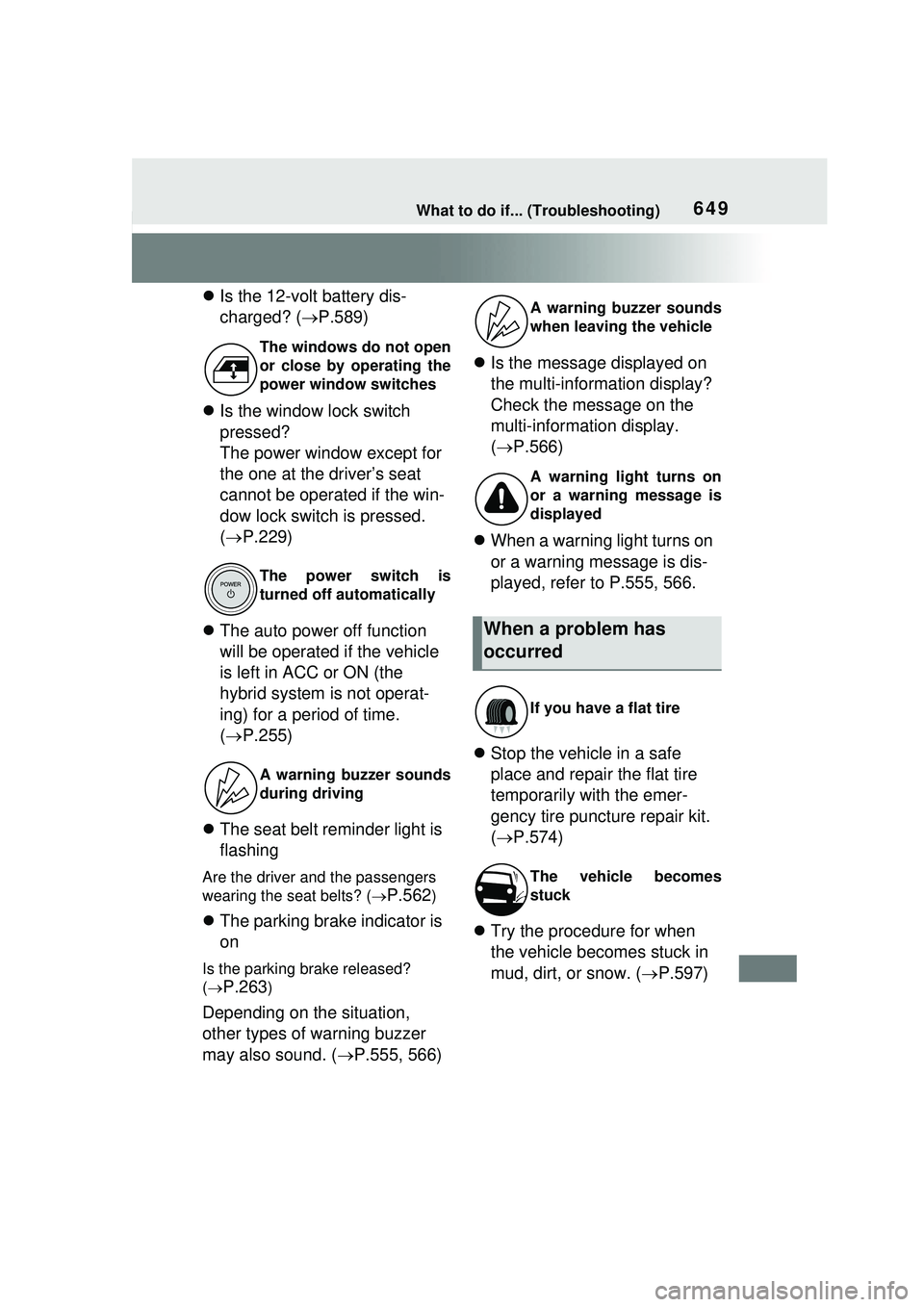
Is the 12-volt battery dis-
charged? ( P.589)
Is the window lock switch
pressed?
The power window except for
the one at the driver’s seat
cannot be operated if the win-
dow lock switch is pressed.
( P.229)
The auto power off function
will be operated if the vehicle
is left in ACC or ON (the
hybrid system is not operat-
ing) for a period of time.
( P.255)
The seat belt reminder light is
flashing
Are the driver and the passengers
wearing the seat belts? (
P.562)
The parking brake indicator is
on
Is the parking brake released?
(
P.263)
Depending on the situation,
other types of warning buzzer
may also sound. ( P.555, 566)
Is the message displayed on
the multi-information display?
Check the message on the
multi-information display.
( P.566)
When a warning light turns on
or a warning message is dis-
played, refer to P.555, 566.
Stop the vehicle in a safe
place and repair the flat tire
temporarily with the emer-
gency tire puncture repair kit.
( P.574)
Try the procedure for when
the vehicle becomes stuck in
mud, dirt, or snow. ( P.597)
The windows do not open
or close by operating the
power window switches
The power switch is
turned off automatically
A warning buzzer sounds
during driving
A warning buzzer sounds
when leaving the vehicle
A warning light turns on
or a warning message is
displayed
When a problem has
occurred
If you have a flat tire
The vehicle becomes
stuck
Page 650 of 680
650Alphabetical Index
Alphabetical Index
A
A/C ........................................... 434“My Room Mode” ................. 134
Air conditioning eco mode .... 437
Air conditioning filter ............. 535
Automatic air conditioning sys-tem ..................................... 434
Humidity sensor ................... 439
ABS (Anti-lock Brake System) ............................................... 424Function ............................... 424
Warning light ........................ 557
ACA (Active Cornering Assist) ............................................... 424
AC charging cable .................... 97 CCID (Charging Ci rcuit Interrupt-
ing Device) indicator............. 99
CCID (Charging Ci rcuit Interrupt-
ing Device) ........................... 98
Charging cable indicator ...... 118
If the charging connector cannot be unlocked ........................ 104
Locking and unlocking.......... 102
Maintenance......................... 101
Safety functions...................... 99
Acoustic Vehicle Alerting Sys- tem ........................................... 81
Active Cornering Assist (ACA) ............................................... 424
AHB (Automatic High Beam) . 272
Airbags ...................................... 35 Airbag operating conditions.... 37
Airbag precautions for your child............................................. 40
Airbag warning light.............. 557
Correct driving posture ........... 29
Curtain shield airbag operating conditions ............................. 38
Curtain shield airbag precautions ............................................. 40
Front passenger occupant clas- sification system ...................44
General airbag precautions ....40
Location of the SRS airbags...35
Locations of airbags ...............35
Modification and disposal of air- bags......................................42
Seat cushion airbag................35
Side airbag operating conditions .............................................38
Side airbag precautions..........40
Side and curtain shield airbags operating conditions .............38
Side and curtain shield airbags precautions ...........................40
SRS airbags ...........................35
SRS warning light .................557
Air conditioning filter .............535
Air conditioning system.........434 “My Room Mode” ..................134
Air conditioning eco mode ....437
Air conditioning filter .............535
Automatic air conditioning sys-tem .....................................434
Humidity sensor....................439
Alarm Warning buzzer .. ..................555
Anchor brackets .................53, 62
Antenna Smart key system .................203
Anti-lock brake system (ABS)424 Function................................424
Warning light ........................557
Armrest ......... ......................... ..465
Assist grips .............................466
AUTO EV/HV mode ...................73
AUTO EV/HV mode switch .......74
Automatic air conditioning sys- tem .........................................434“My Room Mode” ..................134
Air conditioning eco mode ....437
Air conditioning filter .............535
Humidity sensor....................439
Page 651 of 680
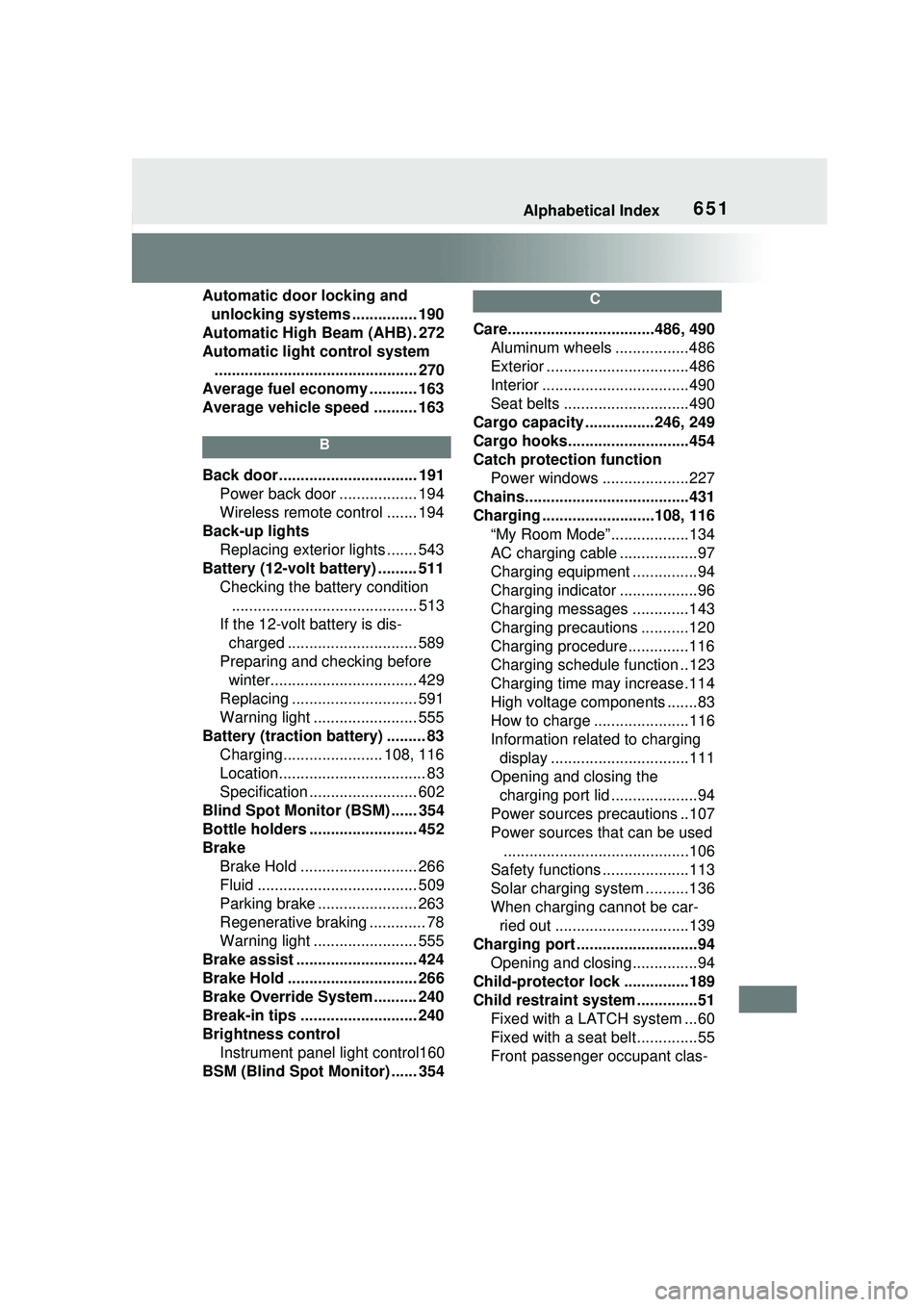
Alphabetical Index651
Automatic door locking and unlocking systems ............... 190
Automatic High Beam (AHB) . 272
Automatic light control system ............................................... 270
Average fuel economy ........... 163
Average vehicle speed .......... 163
B
Back door ................................ 191 Power back door .................. 194
Wireless remote control ....... 194
Back-up lights Replacing exterior lights ....... 543
Battery (12-volt battery) ......... 511 Checking the battery condition........................................... 513
If the 12-volt battery is dis- charged .............................. 589
Preparing and checking before winter.................................. 429
Replacing ............................. 591
Warning light ........................ 555
Battery (traction battery) ......... 83 Charging....................... 108, 116
Location.................................. 83
Specification ......................... 602
Blind Spot Monitor (BSM) ...... 354
Bottle holders ......................... 452
Brake Brake Hold ........................... 266
Fluid ..................................... 509
Parking brake ....................... 263
Regenerative braking ............. 78
Warning light ........................ 555
Brake assist ............................ 424
Brake Hold .............................. 266
Brake Override System .......... 240
Break-in tips ........................... 240
Brightness control Instrument panel light control160
BSM (Blind Spot Monitor) ...... 354
C
Care..................................486, 490 Aluminum wheels .................486
Exterior .................................486
Interior ..................................490
Seat belts .............................490
Cargo capacity ................246, 249
Cargo hooks............................454
Catch protection function Power windows ....................227
Chains......................................431
Charging ..........................108, 116 “My Room Mode” ..................134
AC charging cable ..................97
Charging equipment ...............94
Charging indicator ..................96
Charging messages .............143
Charging precautions ...........120
Charging procedure..............116
Charging schedule function ..123
Charging time may increase.114
High voltage components .......83
How to charge ......................116
Information related to charging display ................................111
Opening and closing the charging port lid ....................94
Power sources precautions ..107
Power sources that can be used ...........................................106
Safety functions ....................113
Solar charging system ..........136
When charging cannot be car- ried out ...............................139
Charging port ............................94 Opening and closing...............94
Child-protector lock ...............189
Child restraint system ..............51 Fixed with a LATCH system ...60
Fixed with a seat belt..............55
Front passenger occupant clas-