warning TOYOTA PRIUS PRIME 2023 Service Manual
[x] Cancel search | Manufacturer: TOYOTA, Model Year: 2023, Model line: PRIUS PRIME, Model: TOYOTA PRIUS PRIME 2023Pages: 680, PDF Size: 14.97 MB
Page 86 of 680
862-1. Plug-in hybrid system
WARNING
●Never resell, hand over or mod-
ify the hybrid battery. To prevent
accidents, hybrid batteries that
have been removed from a dis-
posed vehicle are collected
through Toyota dealer. Do not
dispose of the battery yourself.
Unless the battery is properly
collected, the following may
occur, resulting in death or seri-
ous injury:
• The hybrid battery may be ille- gally disposed of or dumped,
and it is hazardous to the envi-
ronment or someone may touch
a high voltage part, resulting in
an electric shock.
• The hybrid battery is intended to be used exclusively with your
Hybrid Electric Vehicle. If the
hybrid battery is used outside of
your vehicle or modified in any
way, accidents such as electric
shock, heat generation, smoke
generation, an explosion and
electrolyte leakage may occur.
When reselling or handing over
your vehicle, the possibility of
an accident is extremely high
because the person receiving
the vehicle may not be aware of
these dangers.
●If your vehicle is disposed of
without the hybrid battery hav-
ing been removed, there is a
danger of serious electric shock
if high voltage parts, cables and
their connectors are touched. In
the event that your vehicle must
be disposed of, the hybrid bat-
tery must be disposed of by
your Toyota dealer or a qualified
service shop. If the hybrid bat-
tery is not disposed of properly,
it may cause electric shock that
can result in death or serious
injury.
■Caution while driving
If the vehicle under floor area
receives strong shock or impact
while driving, stop the vehicle in a
safe area and check around the
bottom of the vehicle. If there is
damage to the hybrid battery
(traction battery) or liquid leakage,
it may lead to a vehicle fire, etc.
Do not touch the vehicle and
immediately contact your Toyota
dealer.
Even if no damage can be seen
under the floor, the hybrid battery
(traction battery) may be dam-
aged. If the vehicle under floor
area receives strong shock or
impact, have the hybrid battery
(traction battery) inspected by
your Toyota dealer.
■Modifications
Do not modify the vehicle to make
the height lower.
It is easier for the hybrid battery
(traction battery) in the under floor
area to come in contact with the
ground when the vehicle is low-
ered. If the hybrid battery (traction
battery) is damaged, a vehicle fire
may occur which could lead to
death or serious injury.
NOTICE
■Notice about fuel
●For Plug-in Hybrid Electric Vehi-
cles, fuel may remain in the tank
for a long time and undergo
changes in quality depending
on the how the vehicle is used.
Refuel at least 5.3 gal. (20 L,
4.4 Imp.gal.) of fuel every 12
months (refuel a total of at least
5.3 gal. [20 L, 4.4 Imp.gal.] over
a 12-month period), as this may
affect components of the fuel
system or the gasoline engine.
Page 87 of 680
872-1. Plug-in hybrid system
2
Plug-in hybrid system
When a certain level of impact is
detected by the impact sensor,
the emergency shut off system
blocks off the high voltage cur-
rent and stops the fuel pump to
minimize the risk of electrocu-
tion and fuel leakage.
If the emergency shut off system
activates, your vehicle will not
restart. To restart the hybrid sys-
tem, contact your Toyota dealer.
A message is automatically dis-
played when a malfunction
occurs in the hybrid system or
an improper operation is
attempted.
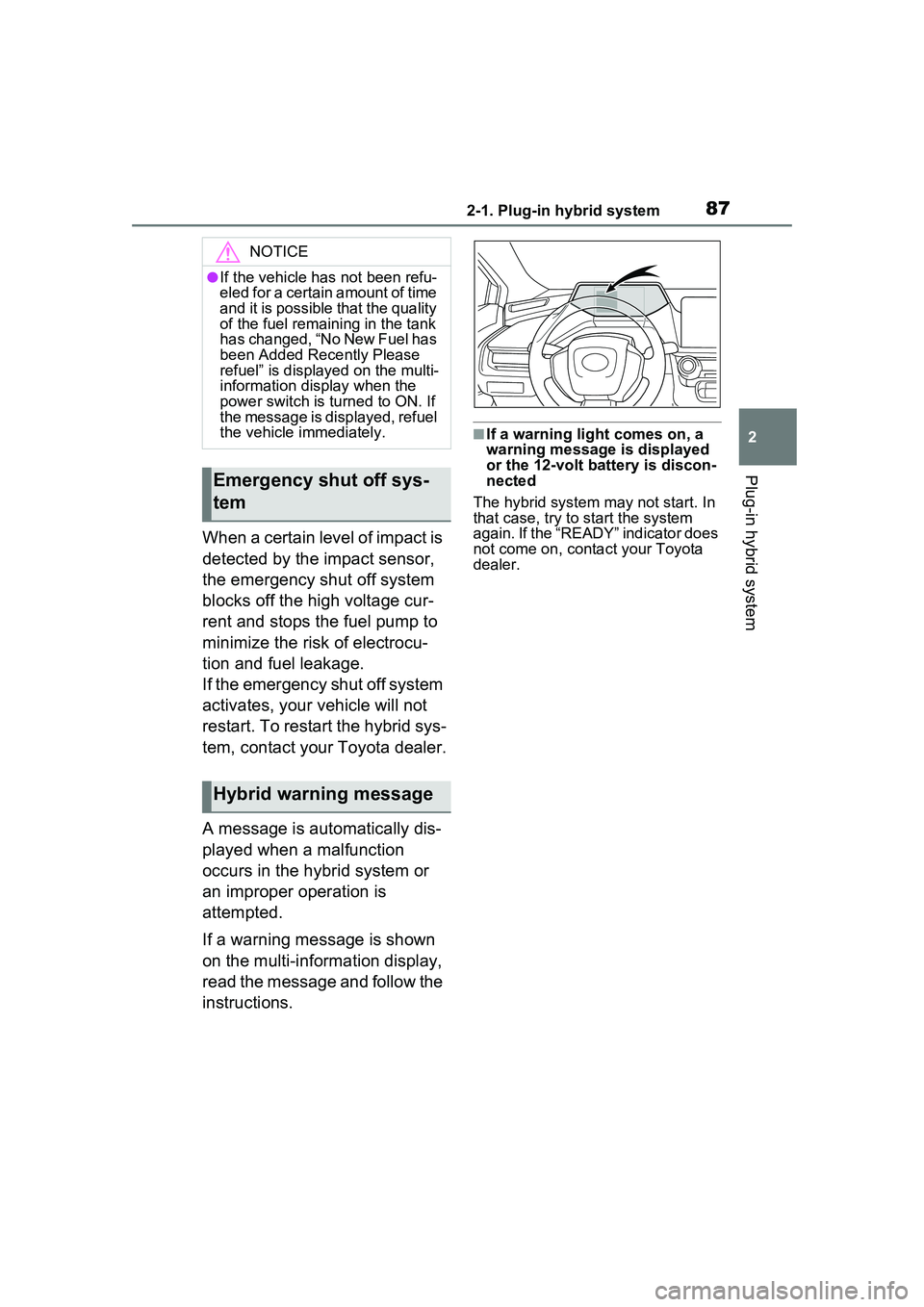
If a warning message is shown
on the multi-information display,
read the message and follow the
instructions.
■If a warning light comes on, a
warning message is displayed
or the 12-volt battery is discon-
nected
The hybrid system may not start. In
that case, try to start the system
again. If the “READY” indicator does
not come on, contact your Toyota
dealer.
NOTICE
●If the vehicle has not been refu-
eled for a certain amount of time
and it is possible that the quality
of the fuel remaining in the tank
has changed, “No New Fuel has
been Added Recently Please
refuel” is displayed on the multi-
information display when the
power switch is turned to ON. If
the message is displayed, refuel
the vehicle immediately.
Emergency shut off sys-
tem
Hybrid warning message
Page 97 of 680
972-2. Charging
2
Plug-in hybrid system
AC charging cable
The function, correct oper-
ating procedure, etc. of the
AC charging cable are
explained.
WARNING
■When using the AC charging
cable and CCID (Charging
Circuit Interrupting Device)
Observe the following precau-
tions.
Failure to do so may cause an
unexpected accident, resulting in
death or serious injury.
●Do not attempt to disassemble
or repair the AC charging cable,
charging connector, plug or
CCID (Charging Circuit Inter-
rupting Device).
If a problem arises with the AC
charging cable or the CCID
(Charging Circuit Interrupting
Device), stop charging immedi-
ately and contact your Toyota
dealer.
●Do not subject the AC charging
cable, charging connector, plug
or CCID (Charging Circuit Inter-
rupting Device) to strong force
or impact.
●Do not apply excessive force to
the AC charging cable by force-
fully folding, twisting, pulling or
dragging the AC charging cable.
●Do not damage the AC charging
cable with sharp objects.
●Do not fold the charging con-
nector or plug or insert foreign
objects into them.
●Do not put the charging connec-
tor and plug into water.
●Do not bring the AC charging
cable to a high-temperature
item such as a heating device.
●Do not apply a load to the AC
charging cable and plug-cord
(such as wrapping the AC
charging cable around the CCID
(Charging Circuit Interrupting
Device) and the charging con-
nector).
●Do not use or leave the AC
charging cable in situations
where a load is applied to the
outlet and the plug (such as
when the CCID (Charging Cir-
cuit Interrupting Device) is
hanging in the air without con-
tacting the ground).
NOTICE
■Precautions when handling
AC charging cable
Make sure to observe the follow-
ing precautions. Failure to
observe these precautions may
result in damage to the AC
charging cable and AC charging
inlet.
●Insert the charging connector
straight into the AC charging
inlet.
●After inserting the charging con-
nector, do not apply excessive
force to or twis t the connector.
Also, do not lean on the connec-
tor or hang any objects from it.
●Do not step on or trip over the
AC charging cable.
●Before removing the charging
connector, make sure that it is
unlocked. ( P.102)
●After removing the AC charging
cable, promptly return it to its
proper location.
Page 99 of 680
992-2. Charging
2
Plug-in hybrid system
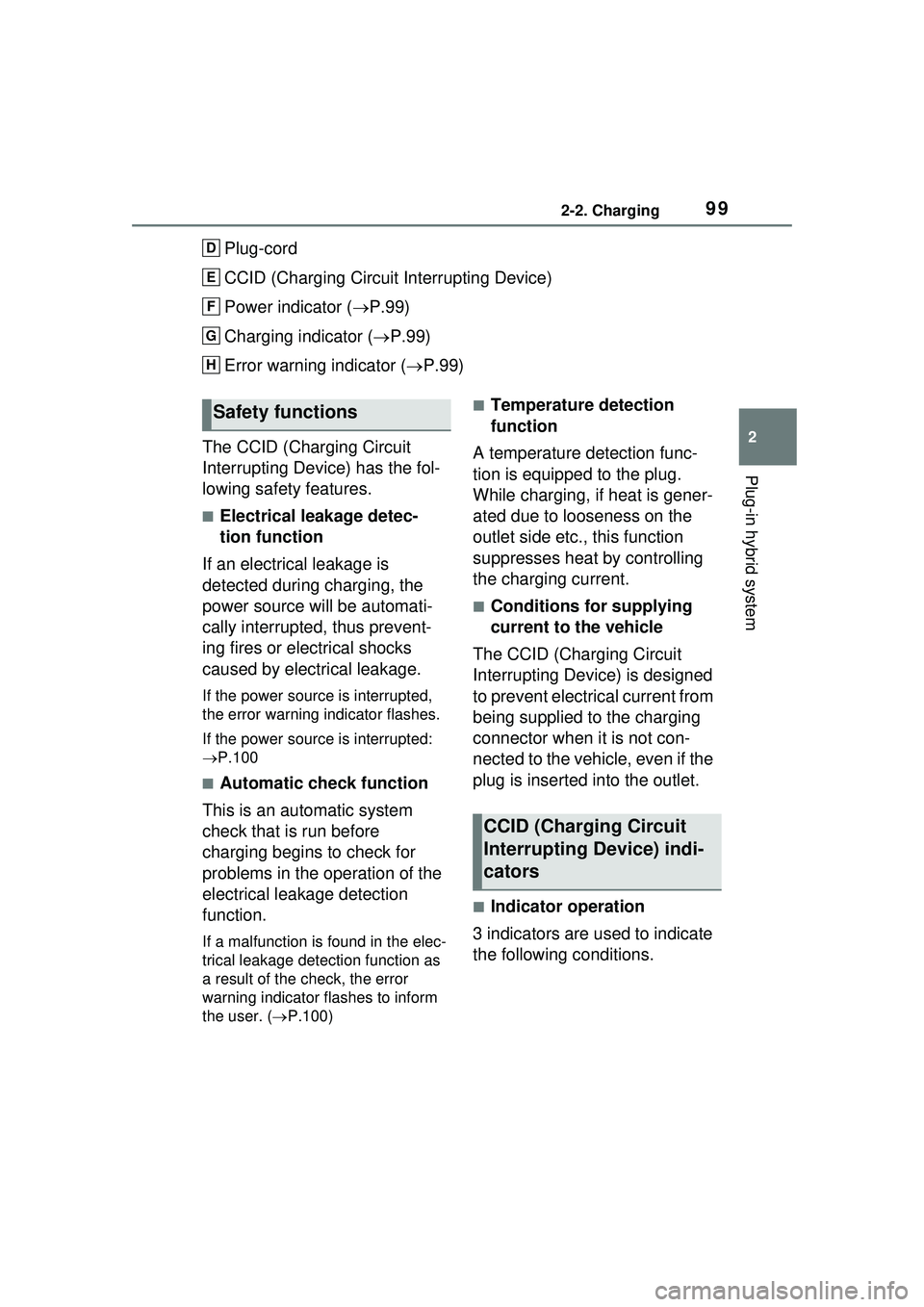
Plug-cord
CCID (Charging Circuit Interrupting Device)
Power indicator (P.99)
Charging indicator ( P.99)
Error warning indicator ( P.99)
The CCID (Charging Circuit
Interrupting Device) has the fol-
lowing safety features.
■Electrical leakage detec-
tion function
If an electrical leakage is
detected during charging, the
power source will be automati-
cally interrupted, thus prevent-
ing fires or electrical shocks
caused by electrical leakage.
If the power source is interrupted,
the error warning indicator flashes.
If the power source is interrupted:
P.100
■Automatic check function
This is an automatic system
check that is run before
charging begins to check for
problems in the operation of the
electrical leakage detection
function.
If a malfunction is found in the elec-
trical leakage detection function as
a result of the check, the error
warning indicator flashes to inform
the user. ( P.100)
■Temperature detection
function
A temperature detection func-
tion is equipped to the plug.
While charging, if heat is gener-
ated due to looseness on the
outlet side etc., this function
suppresses heat by controlling
the charging current.
■Conditions for supplying
current to the vehicle
The CCID (Charging Circuit
Interrupting Device) is designed
to prevent electrical current from
being supplied to the charging
connector when it is not con-
nected to the vehicle, even if the
plug is inserted into the outlet.
■Indicator operation
3 indicators are used to indicate
the following conditions.
D
E
F
G
H
Safety functions
CCID (Charging Circuit
Interrupting Device) indi-
cators
Page 100 of 680
1002-2. Charging
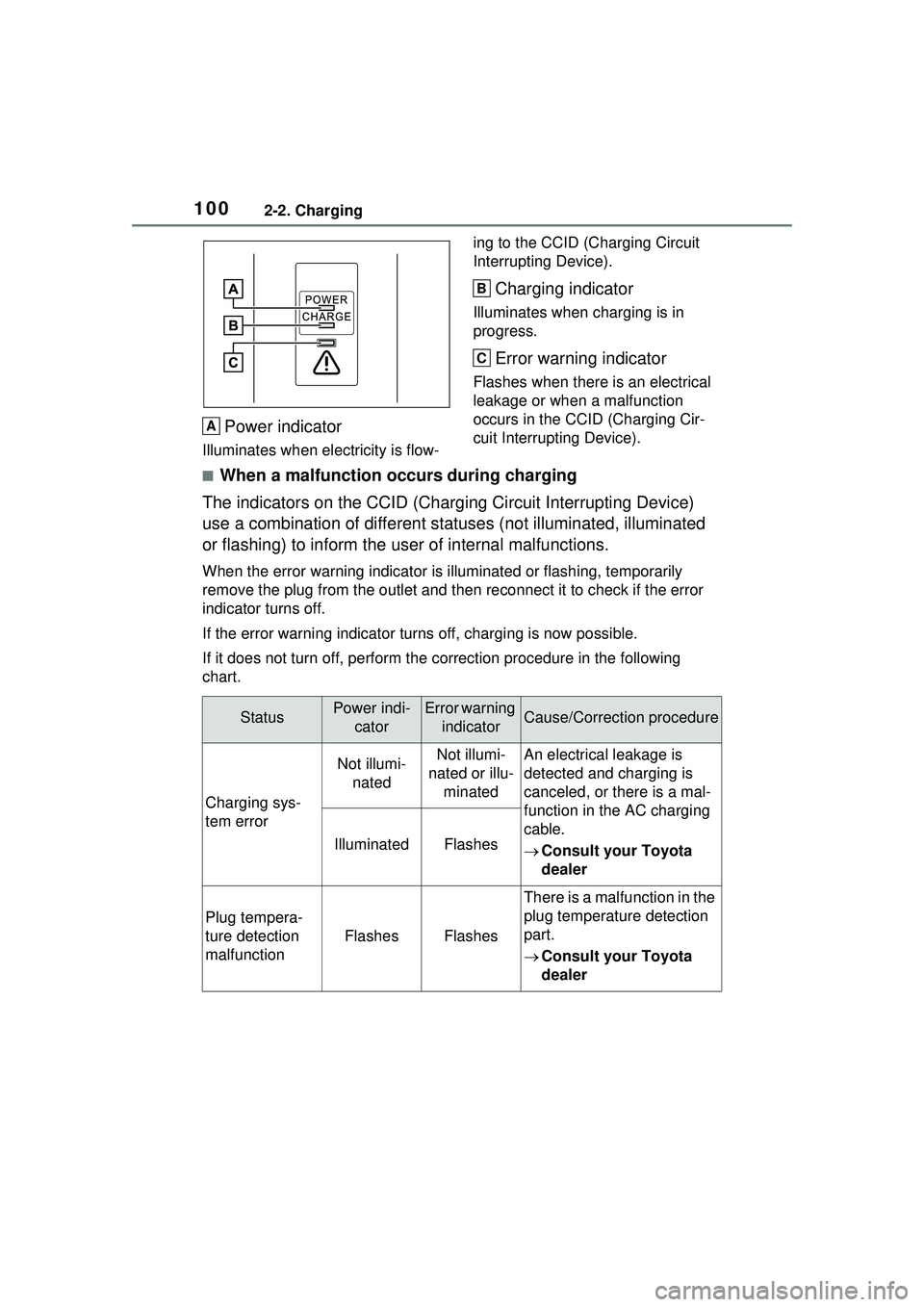
Power indicator
Illuminates when electricity is flow-ing to the CCID (C
harging Circuit
Interrupting Device).
Charging indicator
Illuminates when charging is in
progress.
Error warning indicator
Flashes when there is an electrical
leakage or when a malfunction
occurs in the CCI D (Charging Cir-
cuit Interrupting Device).
■When a malfunction occurs during charging
The indicators on the CCID (Chargi ng Circuit Interrupting Device)
use a combination of different statuses (not illuminated, illuminated
or flashing) to inform the user of internal malfunctions.
When the error warning indicator is illuminated or flashing, temporarily
remove the plug from the outlet and th en reconnect it to check if the error
indicator turns off.
If the error warning indicator turns off, charging is now possible.
If it does not turn off, perform the correction procedure in the following
chart.
A
B
C
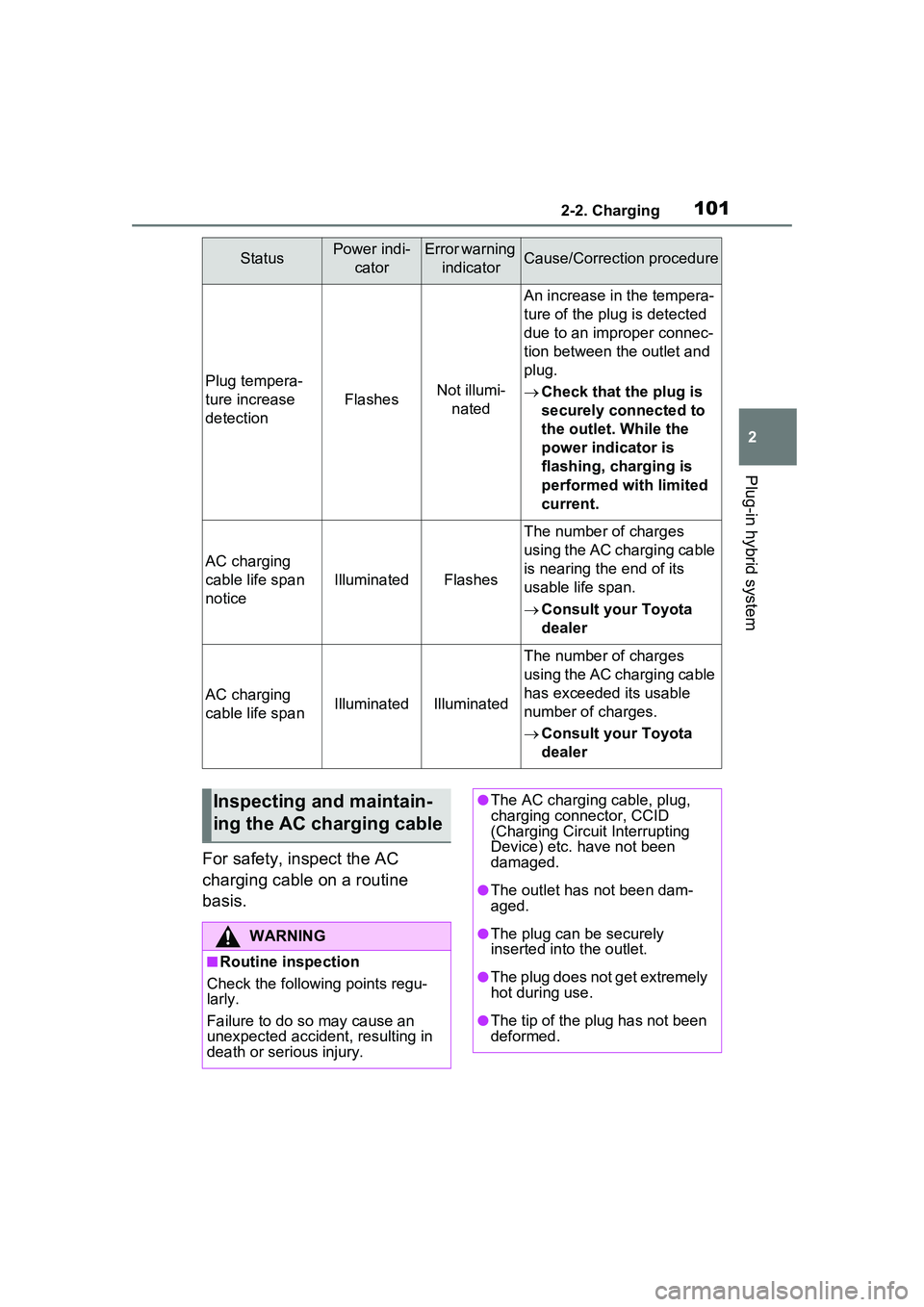
StatusPower indi- catorError warning indicatorCause/Correction procedure
Charging sys-
tem error
Not illumi-natedNot illumi-
nated or illu- minatedAn electrical leakage is
detected and charging is
canceled, or there is a mal-
function in the AC charging
cable.
Consult your Toyota
dealer
IlluminatedFlashes
Plug tempera-
ture detection
malfunction
FlashesFlashes
There is a malfunction in the
plug temperature detection
part.
Consult your Toyota
dealer
Page 101 of 680
1012-2. Charging
2
Plug-in hybrid system
For safety, inspect the AC
charging cable on a routine
basis.
Plug tempera-
ture increase
detection
FlashesNot illumi-nated
An increase in the tempera-
ture of the plug is detected
due to an improper connec-
tion between the outlet and
plug.
Check that the plug is
securely connected to
the outlet. While the
power indicator is
flashing, charging is
performed with limited
current.
AC charging
cable life span
notice
IlluminatedFlashes
The number of charges
using the AC charging cable
is nearing the end of its
usable life span.
Consult your Toyota
dealer
AC charging
cable life spanIlluminatedIlluminated
The number of charges
using the AC charging cable
has exceeded its usable
number of charges.
Consult your Toyota
dealer
StatusPower indi-
catorError warning indicatorCause/Correction procedure
Inspecting and maintain-
ing the AC charging cable
WARNING
■Routine inspection
Check the following points regu-
larly.
Failure to do so may cause an
unexpected accident, resulting in
death or serious injury.
●The AC charging cable, plug,
charging connector, CCID
(Charging Circuit Interrupting
Device) etc. have not been
damaged.
●The outlet has not been dam-
aged.
●The plug can be securely
inserted into the outlet.
●The plug does not get extremely
hot during use.
●The tip of the plug has not been
deformed.
Page 102 of 680
1022-2. Charging
■Locking the charging con-
nector
The charging connector will be
automatically locked when
inserting it into the AC charging
inlet.
(The setting can be changed:
P.103)
■Unlocking the charging
connector
The AC charging connector will
be unlocked when the doors are
unlocked using the smart key
system or wireless remote con-
trol.
The AC charging connector
locks when connected and
unlocks when the door is
unlocked, so locking/unlocking
the AC charging connector does
not necessarily correspond to
locking/unlocking the door.
WARNING
●The plug is not dirtied by dust
etc.
Remove the plug from the outlet
before inspecting it. If any abnor-
malities are found in the AC
charging cable as a result of the
inspection, immediately stop use
and consult your Toyota dealer.
■Maintaining the AC charging
cable
When the AC charging cable is
dirty, first remove the dirt with a
hard, wringed cloth, and then
wipe the cable with a dry cloth.
However, never wash it with
water. If the AC charging cable is
washed with water, fire or electric
shock may occur during charging,
possibly resulting in death or seri-
ous injury.
■When not using the AC
charging cable for a long time
Remove the plug from the outlet.
Dust could accumulate on the
plug or in the outlet, possibly
causing overheating which could
lead to a fire.
Also, keep the cable in a place
free from moisture.
Locking an d unlock-
ing AC char ging con-
nector
The AC charging connector
will be locked when it is
connected to the AC
charging inlet, preventing
the AC charging cable from
being disconnected while
charging.
Locking and unlocking
the AC charging connec-
tor
Page 105 of 680
1052-2. Charging
2
Plug-in hybrid system
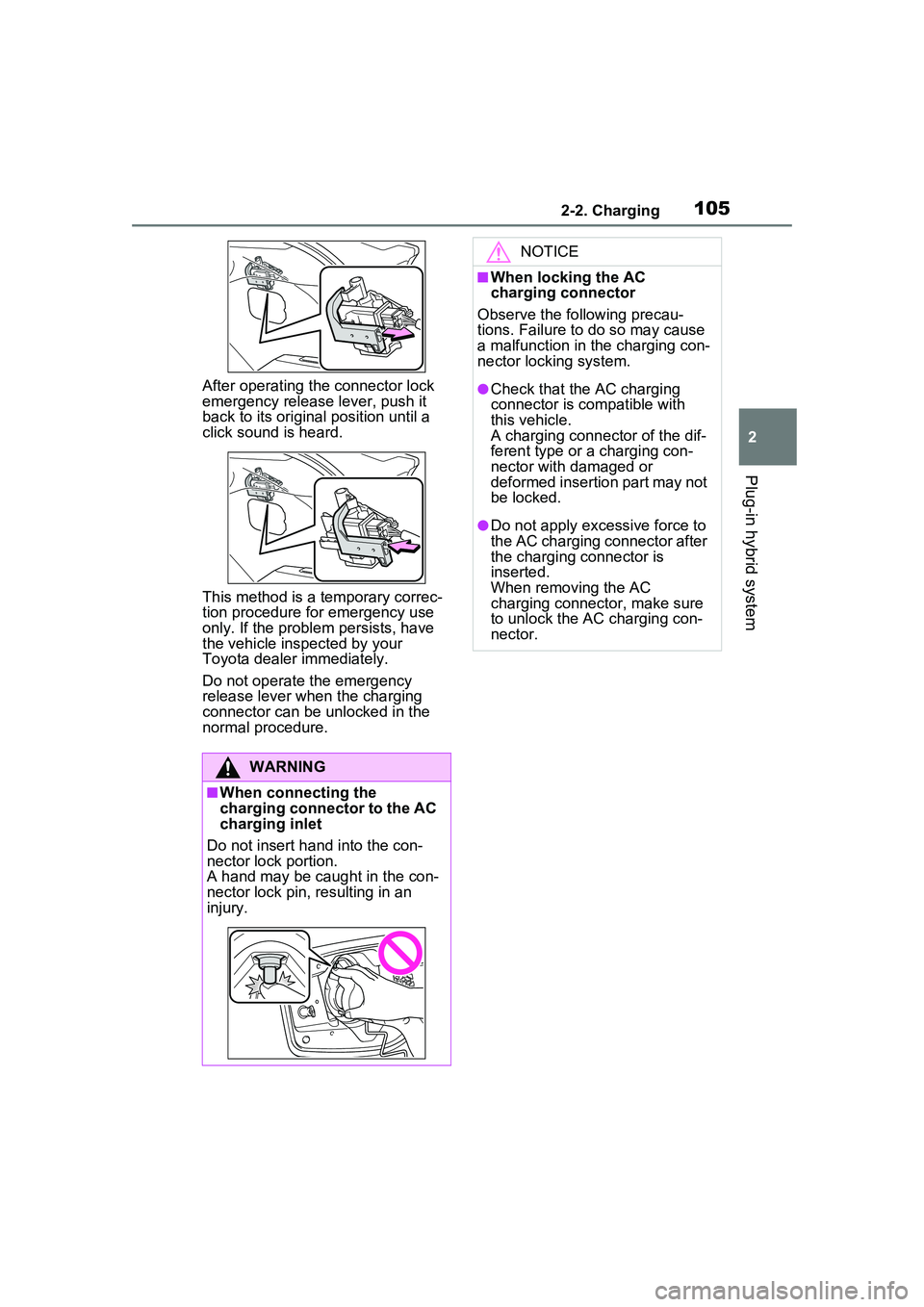
After operating the connector lock
emergency release lever, push it
back to its original position until a
click sound is heard.
This method is a temporary correc-
tion procedure for emergency use
only. If the problem persists, have
the vehicle inspected by your
Toyota dealer immediately.
Do not operate the emergency
release lever when the charging
connector can be unlocked in the
normal procedure.
WARNING
■When connecting the
charging connector to the AC
charging inlet
Do not insert hand into the con-
nector lock portion.
A hand may be caught in the con-
nector lock pin, resulting in an
injury.
NOTICE
■When locking the AC
charging connector
Observe the following precau-
tions. Failure to do so may cause
a malfunction in the charging con-
nector locking system.
●Check that the AC charging
connector is compatible with
this vehicle.
A charging connector of the dif-
ferent type or a charging con-
nector with damaged or
deformed insertion part may not
be locked.
●Do not apply excessive force to
the AC charging connector after
the charging connector is
inserted.
When removing the AC
charging connector, make sure
to unlock the AC charging con-
nector.
Page 106 of 680
1062-2. Charging
Connect to an AC 120 V out-
let (NEMA 5-15R) with a
Ground-Fault Circuit-Inter-
rupter (GFCI) and a circuit
breaker. Use of a 15A individ-
ual circuit is strongly recom-
mended to ensure AC
charging cable will operate
properly.
When charging outdoors,
make sure to connect to a
weatherproof outlet that is
certified for outdoor use.
Checking Ground-Fault Cir-
cuit-Interrupter (GFCI) opera-
tion before its use is
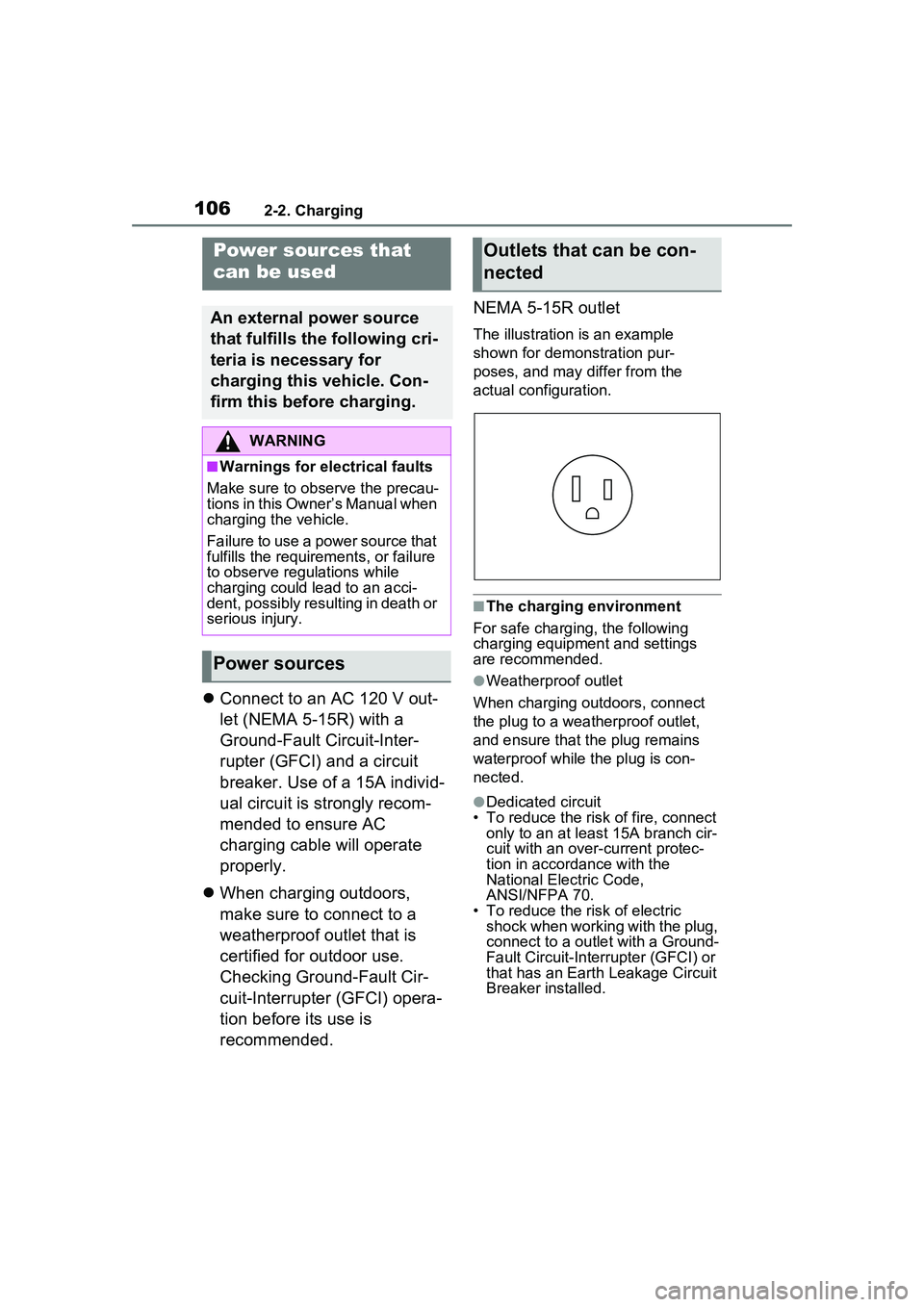
recommended. NEMA 5-15R outlet
The illustration is an example
shown for demonstration pur-
poses, and may differ from the
actual configuration.
■The charging environment
For safe charging, the following
charging equipment and settings
are recommended.
●Weatherproof outlet
When charging outdoors, connect
the plug to a weatherproof outlet,
and ensure that the plug remains
waterproof while the plug is con-
nected.
●Dedicated circuit
• To reduce the risk of fire, connect
only to an at least 15A branch cir-
cuit with an over-current protec-
tion in accordance with the
National Electric Code,
ANSI/NFPA 70.
• To reduce the risk of electric
shock when working with the plug,
connect to a outlet with a Ground-
Fault Circuit-Interr upter (GFCI) or
that has an Earth Leakage Circuit
Breaker installed.
Power sources that
can be used
An external power source
that fulfills the following cri-
teria is necessary for
charging this vehicle. Con-
firm this before charging.
WARNING
■Warnings for electrical faults
Make sure to observe the precau-
tions in this Owner’s Manual when
charging the vehicle.
Failure to use a power source that
fulfills the requirements, or failure
to observe regulations while
charging could lead to an acci-
dent, possibly resulting in death or
serious injury.
Power sources
Outlets that can be con-
nected
Page 107 of 680
1072-2. Charging
2
Plug-in hybrid system
WARNING
■Power sources precautions
Observe the following precau-
tions.
If you do not follow them, fire,
electrical shock or damage may
occur, possibly resulting in death
or serious injury.
●Connect to an AC 120 V outlet
(NEMA 5-15R) with a Ground-
Fault Circuit-Interrupter (GFCI)
and supplied by a circuit
breaker per your local code.
Use of a 15A individual circuit is
strongly recommended.
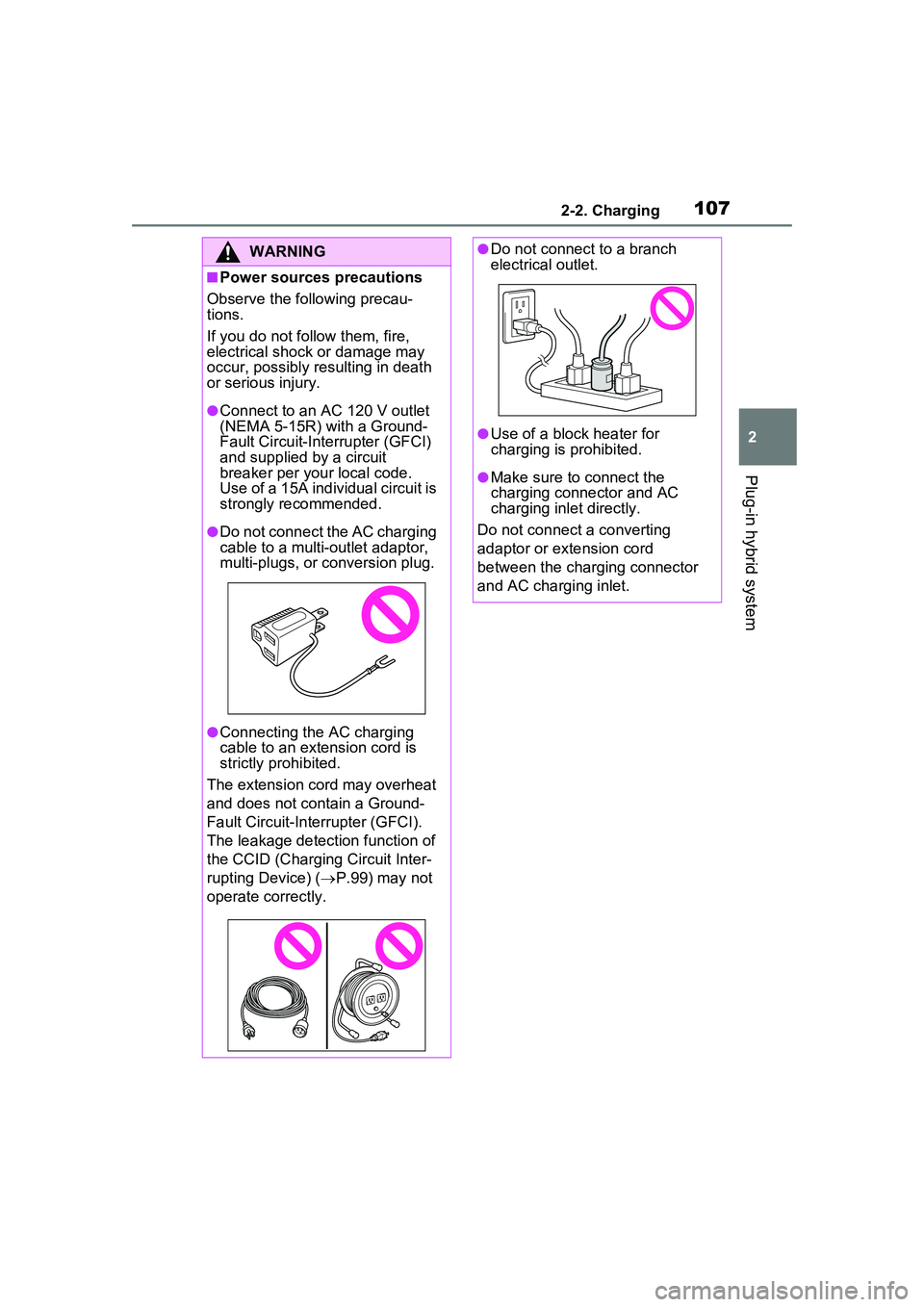
●Do not connect the AC charging
cable to a multi-outlet adaptor,
multi-plugs, or conversion plug.
●Connecting the AC charging
cable to an extension cord is
strictly prohibited.
The extension cord may overheat
and does not contain a Ground-
Fault Circuit-Inte rrupter (GFCI).
The leakage detection function of
the CCID (Charging Circuit Inter-
rupting Device) ( P.99) may not
operate correctly.
●Do not connect to a branch
electrical outlet.
●Use of a block heater for
charging is prohibited.
●Make sure to connect the
charging connector and AC
charging inlet directly.
Do not connect a converting
adaptor or extension cord
between the charging connector
and AC charging inlet.