warning TOYOTA PRIUS PRIME 2023 Repair Manual
[x] Cancel search | Manufacturer: TOYOTA, Model Year: 2023, Model line: PRIUS PRIME, Model: TOYOTA PRIUS PRIME 2023Pages: 680, PDF Size: 14.97 MB
Page 145 of 680
1452-2. Charging
2
Plug-in hybrid system
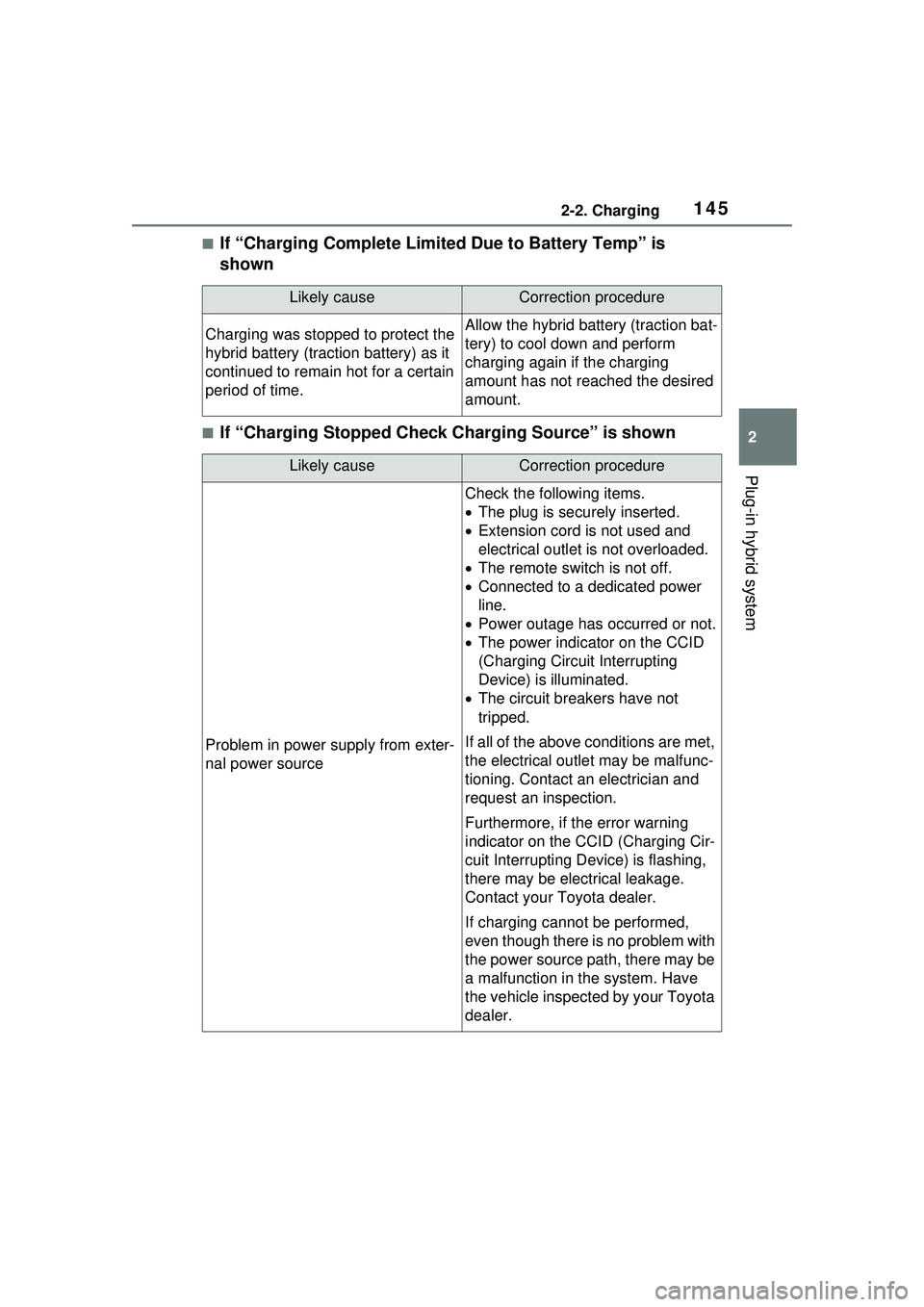
■If “Charging Complete Limited Due to Battery Temp” is
shown
■If “Charging Stopped Check Charging Source” is shown
Likely causeCorrection procedure
Charging was stopped to protect the
hybrid battery (traction battery) as it
continued to remain hot for a certain
period of time.Allow the hybrid battery (traction bat-
tery) to cool down and perform
charging again if the charging
amount has not reached the desired
amount.
Likely causeCorrection procedure
Problem in power supply from exter-
nal power source
Check the following items.
The plug is secu rely inserted.
Extension cord is not used and
electrical outlet is not overloaded.
The remote switch is not off.
Connected to a dedicated power
line.
Power outage has occurred or not.
The power indicator on the CCID
(Charging Circuit Interrupting
Device) is illuminated.
The circuit breakers have not
tripped.
If all of the above conditions are met,
the electrical outlet may be malfunc-
tioning. Contact an electrician and
request an inspection.
Furthermore, if the error warning
indicator on the CCID (Charging Cir-
cuit Interrupting Device) is flashing,
there may be electrical leakage.
Contact your Toyota dealer.
If charging cannot be performed,
even though there is no problem with
the power source path, there may be
a malfunction in the system. Have
the vehicle inspected by your Toyota
dealer.
Page 149 of 680
149
3
3
Vehicle status information and indicators
Vehicle status informa-tion and indicators
3-1. Instrument cluster
Warning lights and indica-tors ............................ 150
Gauges and meters .... 155
Multi-information display .................................. 161
Energy monitor/consump- tion screen/solar charging
information screen (if
equipped) .................. 173
Page 150 of 680
1503-1. Instrument cluster
3-1.Instrument cluster
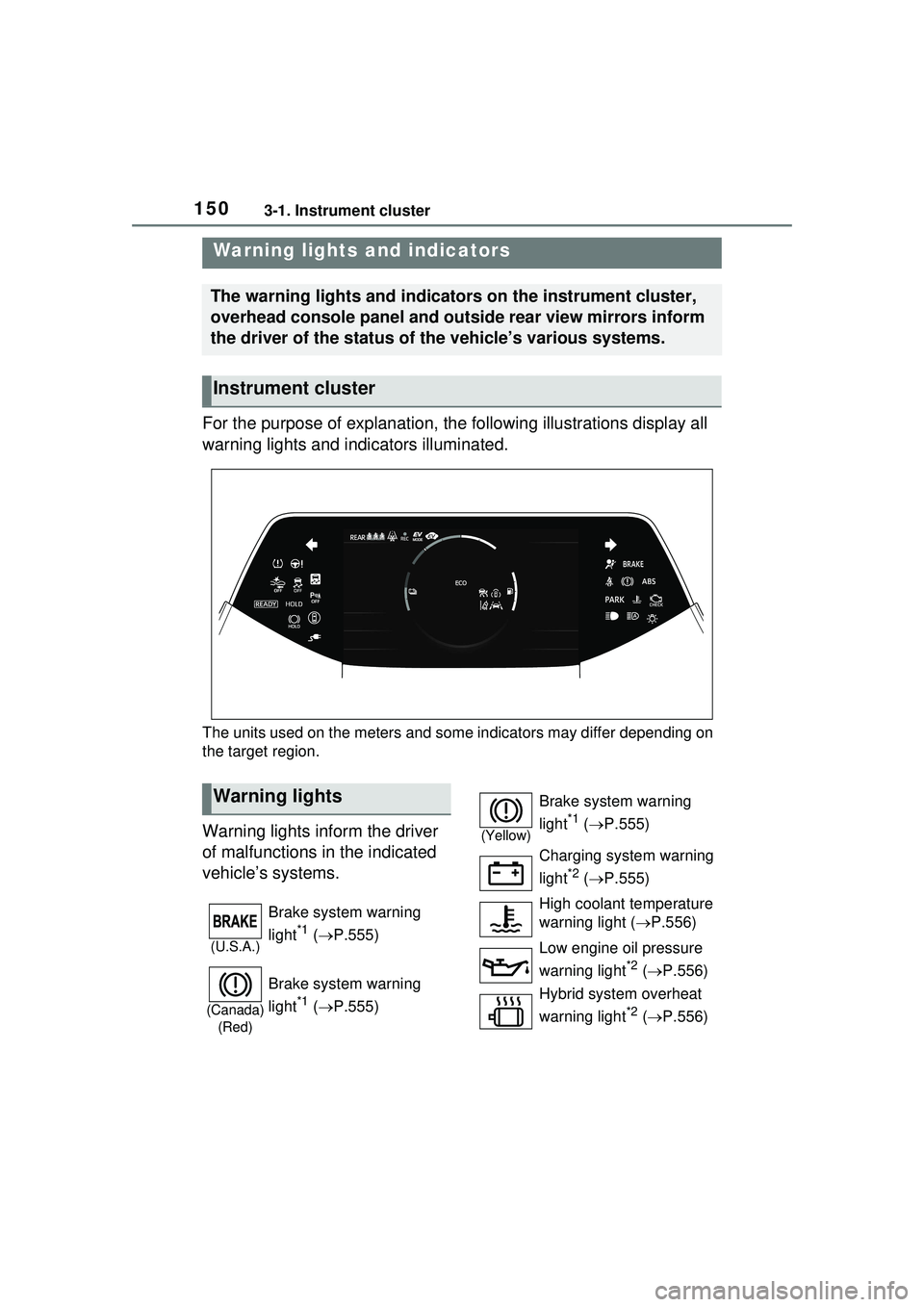
For the purpose of explanation, the following illustrations display all
warning lights and indicators illuminated.
The units used on the meters and some indicators may differ depending on
the target region.
Warning lights inform the driver
of malfunctions in the indicated
vehicle’s systems.
Warning lights and indicators
The warning lights and indicators on the instrument cluster,
overhead console panel and outside rear view mirrors inform
the driver of the status of the vehicle’s various systems.
Instrument cluster
Warning lights
(U.S.A.)
Brake system warning
light
*1 ( P.555)
(Canada)
(Red)
Brake system warning
light
*1 ( P.555)
(Yellow)
Brake system warning
light
*1 ( P.555)
Charging system warning
light
*2 ( P.555)
High coolant temperature
warning light ( P.556)
Low engine oil pressure
warning light
*2 ( P.556)
Hybrid system overheat
warning light
*2 ( P.556)
Page 151 of 680
1513-1. Instrument cluster
3
Vehicle status information and indicators
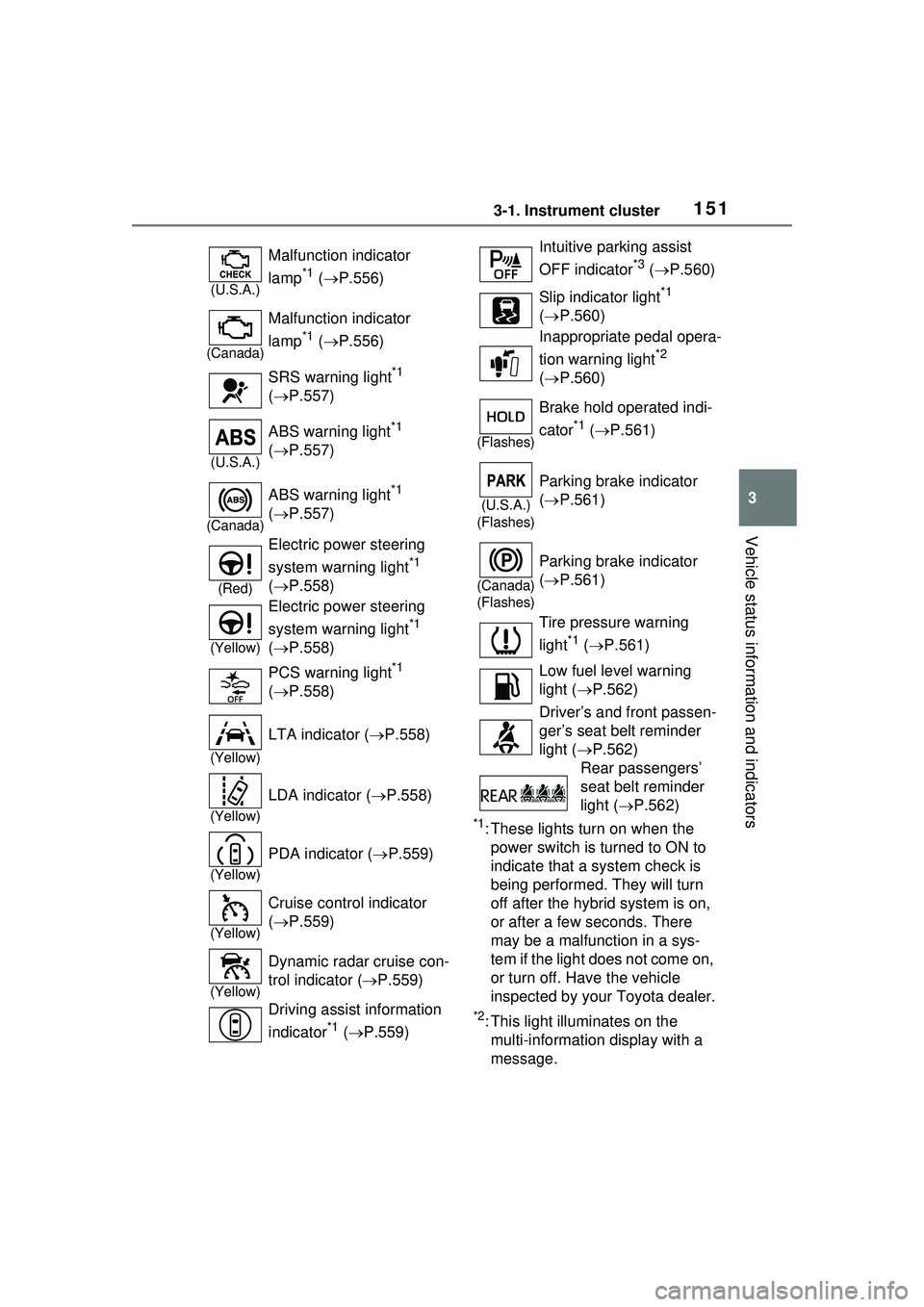
*1: These lights turn on when the power switch is turned to ON to
indicate that a system check is
being performed. They will turn
off after the hybrid system is on,
or after a few seconds. There
may be a malfunction in a sys-
tem if the light does not come on,
or turn off. Have the vehicle
inspected by your Toyota dealer.
*2: This light illuminates on the multi-informatio n display with a
message.
(U.S.A.)
Malfunction indicator
lamp
*1 ( P.556)
(Canada)
Malfunction indicator
lamp
*1 ( P.556)
SRS warning light
*1
( P.557)
(U.S.A.)
ABS warning light*1
( P.557)
(Canada)
ABS warning light*1
( P.557)
(Red)
Electric power steering
system warning light
*1
( P.558)
(Yellow)
Electric power steering
system warning light
*1
( P.558)
PCS warning light
*1
( P.558)
(Yellow)
LTA indicator ( P.558)
(Yellow)
LDA indicator ( P.558)
(Yellow)
PDA indicator ( P.559)
(Yellow)
Cruise control indicator
( P.559)
(Yellow)
Dynamic radar cruise con-
trol indicator ( P.559)
Driving assist information
indicator
*1 ( P.559)
Intuitive parking assist
OFF indicator
*3 ( P.560)
Slip indicator light
*1
( P.560)
Inappropriate pedal opera-
tion warning light
*2
( P.560)
(Flashes)
Brake hold operated indi-
cator
*1 ( P.561)
(U.S.A.)
(Flashes)
Parking brake indicator
( P.561)
(Canada)
(Flashes)
Parking brake indicator
( P.561)
Tire pressure warning
light
*1 ( P.561)
Low fuel level warning
light ( P.562)
Driver’s and front passen-
ger’s seat belt reminder
light ( P.562)
Rear passengers’
seat belt reminder
light ( P.562)
Page 152 of 680
1523-1. Instrument cluster
*3: Intuitive parking assist OFF indi-cator turns on when the power
switch is turned to ON while the
Intuitive parking assist function is
on. It will turn off after a few sec-
onds.
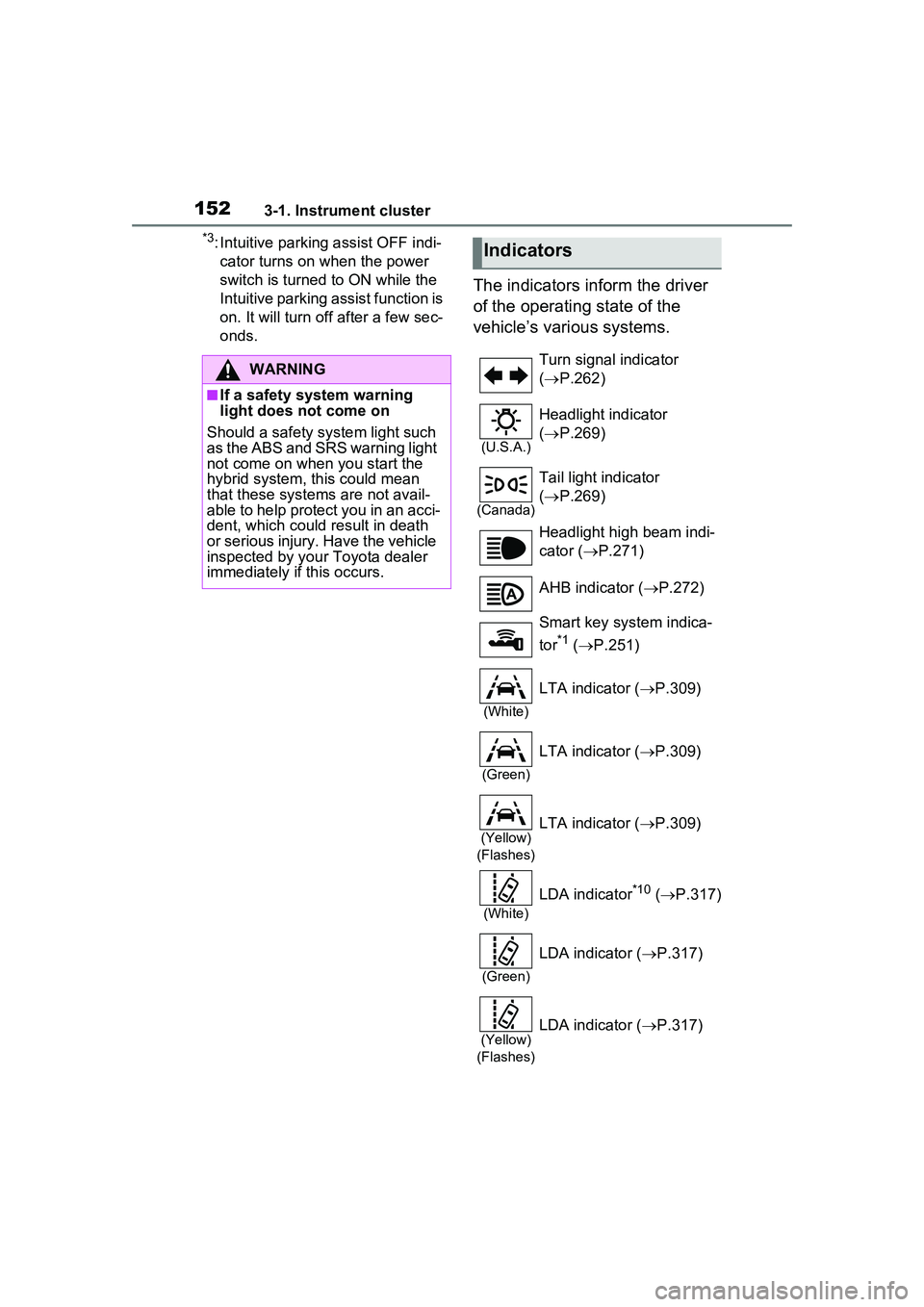
The indicators inform the driver
of the operating state of the
vehicle’s various systems.
WARNING
■If a safety system warning
light does not come on
Should a safety system light such
as the ABS and SRS warning light
not come on when you start the
hybrid system, this could mean
that these systems are not avail-
able to help protect you in an acci-
dent, which could result in death
or serious injury. Have the vehicle
inspected by your Toyota dealer
immediately if this occurs.
Indicators
Turn signal indicator
( P.262)
(U.S.A.)
Headlight indicator
( P.269)
(Canada)
Tail light indicator
( P.269)
Headlight high beam indi-
cator ( P.271)
AHB indicator ( P.272)
Smart key system indica-
tor
*1 ( P.251)
(White)
LTA indicator ( P.309)
(Green)
LTA indicator ( P.309)
(Yellow)
(Flashes)LTA indicator ( P.309)
(White)
LDA indicator*10 ( P.317)
(Green)
LDA indicator ( P.317)
(Yellow)
(Flashes)LDA indicator ( P.317)
Page 153 of 680
1533-1. Instrument cluster
3
Vehicle status information and indicators
*1: This light illuminates on the
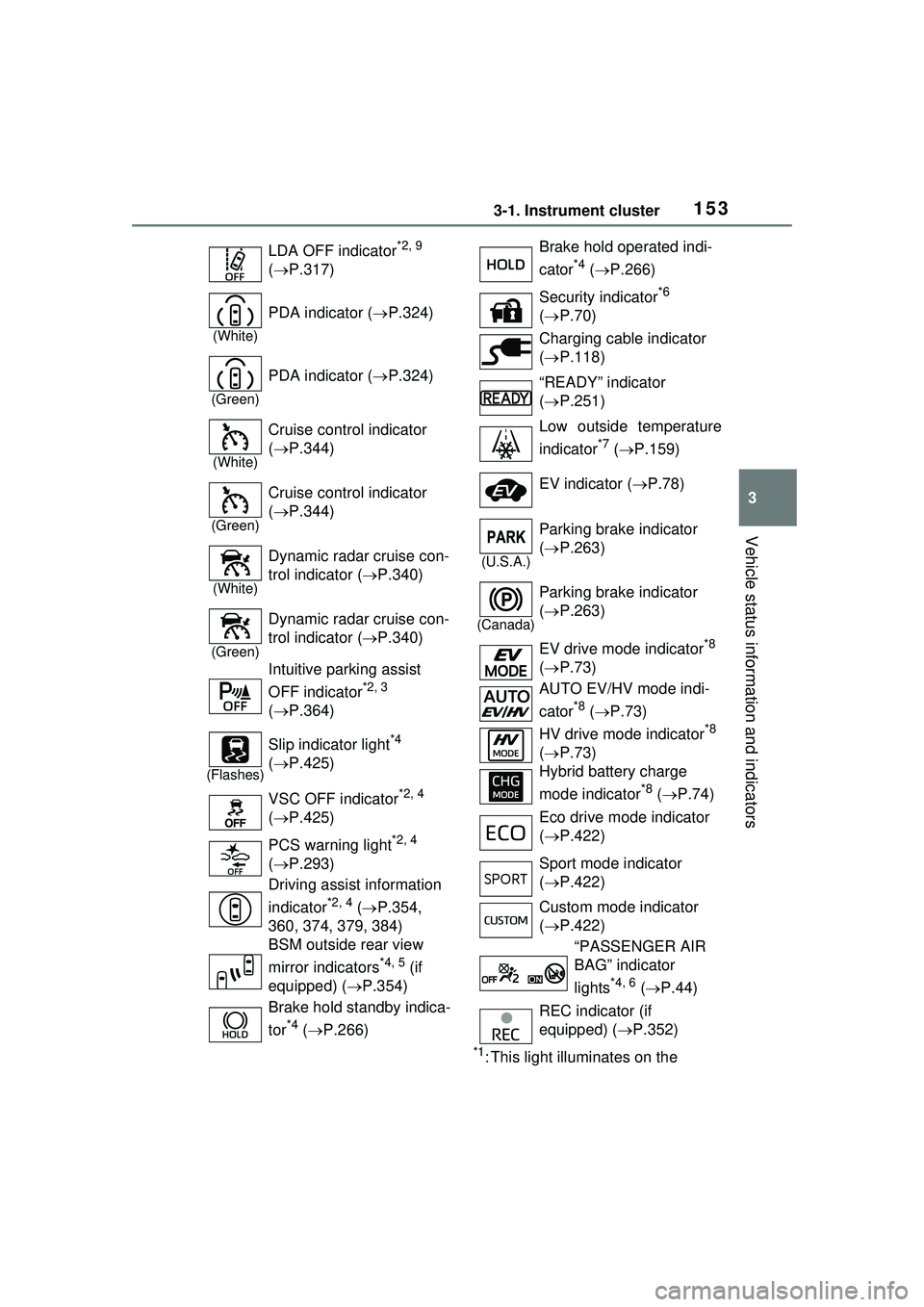
LDA OFF indicator
*2, 9
( P.317)
(White)
PDA indicator ( P.324)
(Green)
PDA indicator ( P.324)
(White)
Cruise control indicator
( P.344)
(Green)
Cruise control indicator
( P.344)
(White)
Dynamic radar cruise con-
trol indicator ( P.340)
(Green)
Dynamic radar cruise con-
trol indicator ( P.340)
Intuitive parking assist
OFF indicator
*2, 3
( P.364)
(Flashes)
Slip indicator light*4
( P.425)
VSC OFF indicator
*2, 4
( P.425)
PCS warning light
*2, 4
( P.293)
Driving assist information
indicator
*2, 4 ( P.354,
360, 374, 379, 384)
BSM outside rear view
mirror indicators
*4, 5 (if
equipped) ( P.354)
Brake hold standby indica-
tor
*4 ( P.266)
Brake hold operated indi-
cator
*4 ( P.266)
Security indicator
*6
( P.70)
Charging cable indicator
( P.118)
“READY” indicator
( P.251)
Low outside temperature
indicator
*7 ( P.159)
EV indicator ( P.78)
(U.S.A.)
Parking brake indicator
( P.263)
(Canada)
Parking brake indicator
( P.263)
EV drive mode indicator
*8
( P.73)
AUTO EV/HV mode indi-
cator
*8 ( P.73)
HV drive mode indicator
*8
( P.73)
Hybrid battery charge
mode indicator
*8 ( P.74)
Eco drive mode indicator
( P.422)
Sport mode indicator
( P.422)
Custom mode indicator
( P.422)
“PASSENGER AIR
BAG” indicator
lights
*4, 6 ( P.44)
REC indicator (if
equipped) ( P.352)
Page 156 of 680
1563-1. Instrument cluster
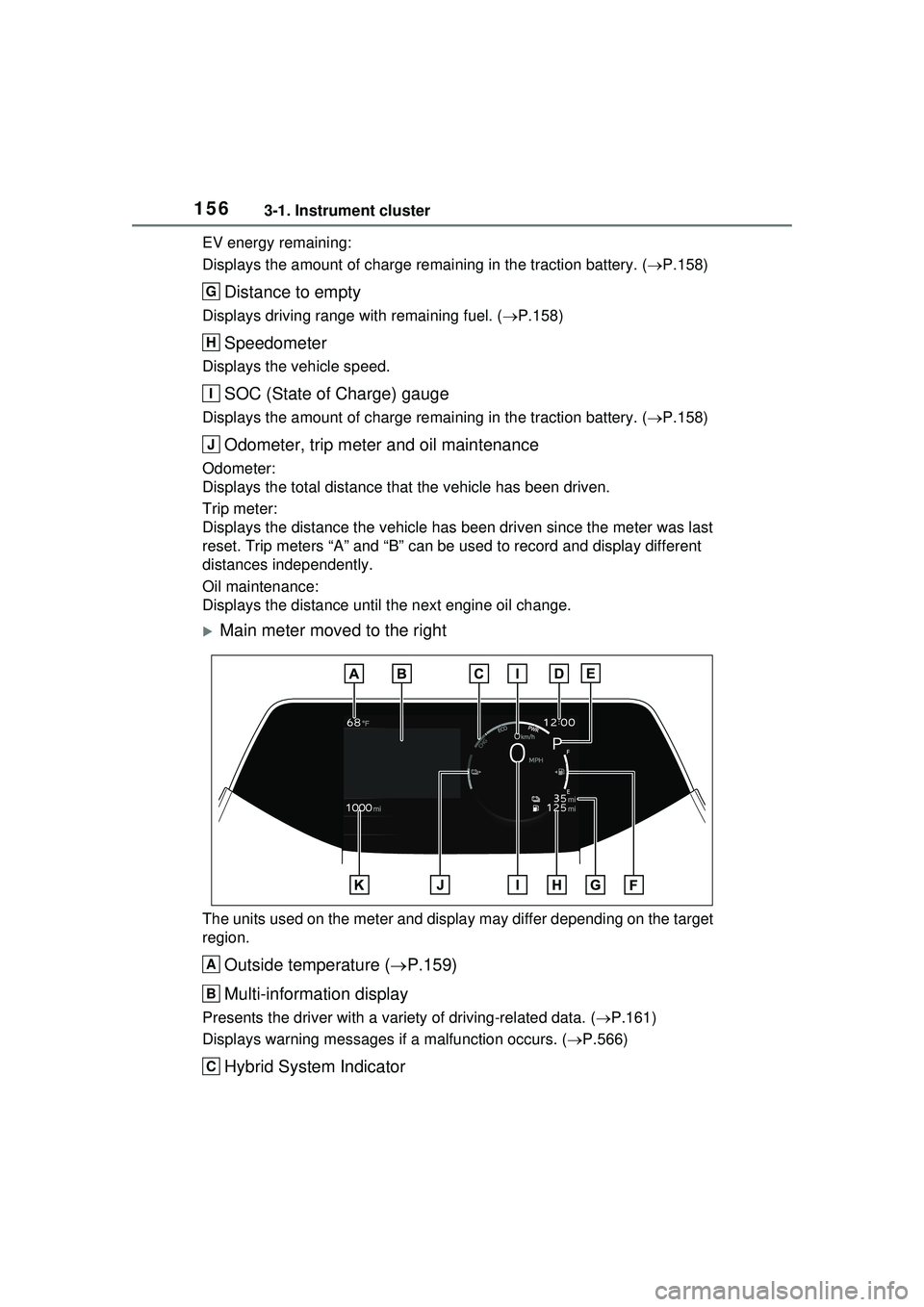
EV energy remaining:
Displays the amount of charge remaining in the traction battery. (P.158)
Distance to empty
Displays driving range with remaining fuel. ( P.158)
Speedometer
Displays the vehicle speed.
SOC (State of Charge) gauge
Displays the amount of charge remaining in the traction battery. ( P.158)
Odometer, trip meter and oil maintenance
Odometer:
Displays the total distance that the vehicle has been driven.
Trip meter:
Displays the distance the vehicle has been driven since the meter was last
reset. Trip meters “A” and “B” can be used to record and display different
distances independently.
Oil maintenance:
Displays the distance until the next engine oil change.
Main meter moved to the right
The units used on the meter and display may differ depending on the target
region.
Outside temperature ( P.159)
Multi-information display
Presents the driver with a vari ety of driving-related data. (P.161)
Displays warning me ssages if a malfunction occurs. ( P.566)
Hybrid System Indicator
G
H
I
J
A
B
C
Page 160 of 680
1603-1. Instrument cluster
compliance with the License.
You may obtain a copy of the
License at
http://www.apache.org/licenses/
LICENSE-2.0
Unless required by applicable law or
agreed to in writing, software distrib-
uted under the License is distributed
on an “AS IS” BASIS, WITHOUT
WARRANTIES OR CONDITIONS
OF ANY KIND, either express or
implied. See the License for the
specific language governing permis-
sions and limitations under the
License.
The multi-information display
can be switched between dis-
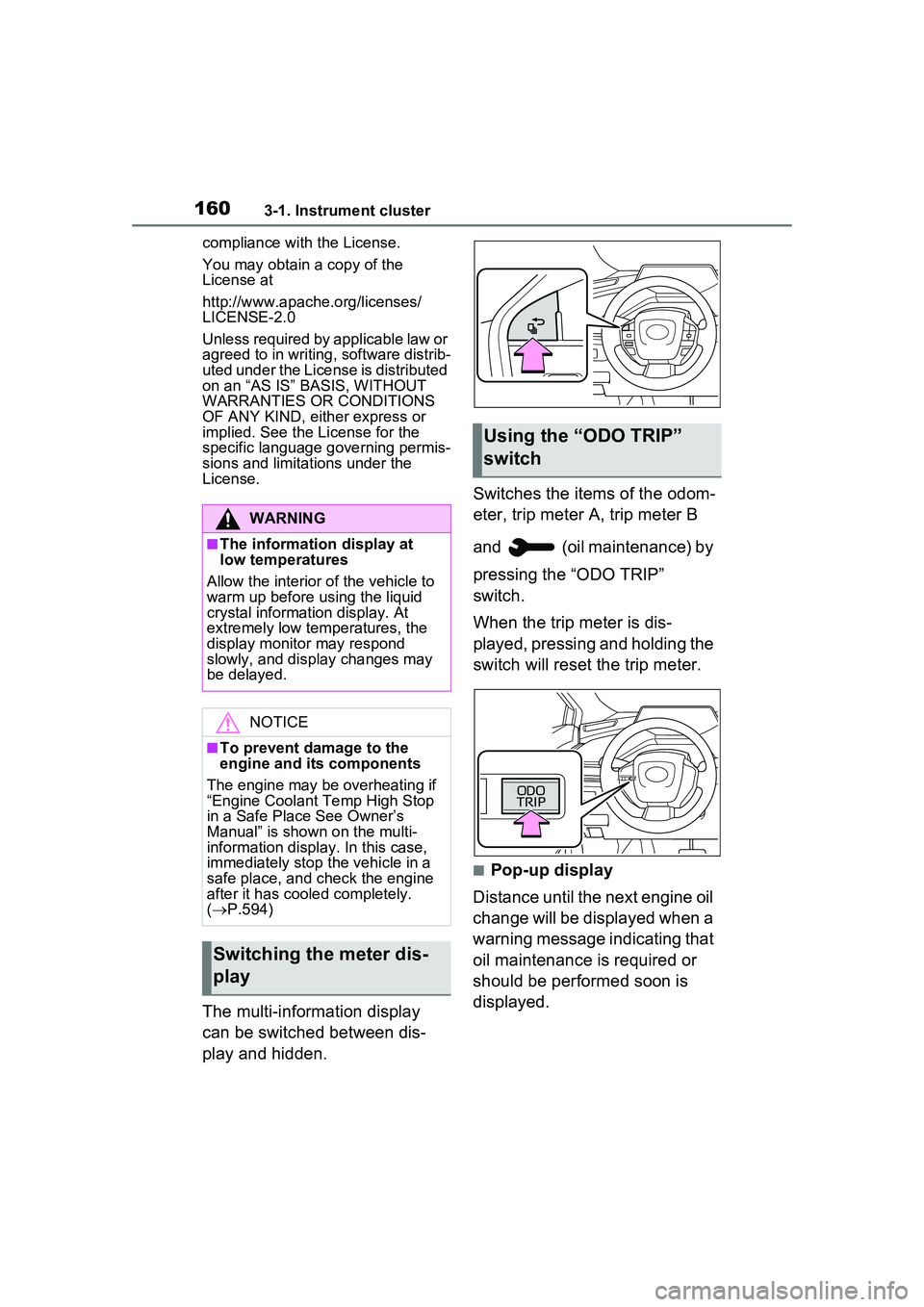
play and hidden. Switches the items of the odom-
eter, trip meter A, trip meter B
and (oil maintenance) by
pressing the “ODO TRIP”
switch.
When the trip meter is dis-
played, pressing and holding the
switch will reset the trip meter.
■Pop-up display
Distance until the next engine oil
change will be displayed when a
warning message indicating that
oil maintenance is required or
should be performed soon is
displayed.
WARNING
■The information display at
low temperatures
Allow the interior of the vehicle to
warm up before using the liquid
crystal information display. At
extremely low temperatures, the
display monitor may respond
slowly, and display changes may
be delayed.
NOTICE
■To prevent damage to the
engine and its components
The engine may be overheating if
“Engine Coolant Temp High Stop
in a Safe Place See Owner’s
Manual” is shown on the multi-
information display. In this case,
immediately stop the vehicle in a
safe place, and check the engine
after it has cooled completely.
( P.594)
Switching the meter dis-
play
Using the “O DO TRIP”
switch
Page 161 of 680
1613-1. Instrument cluster
3
Vehicle status information and indicators
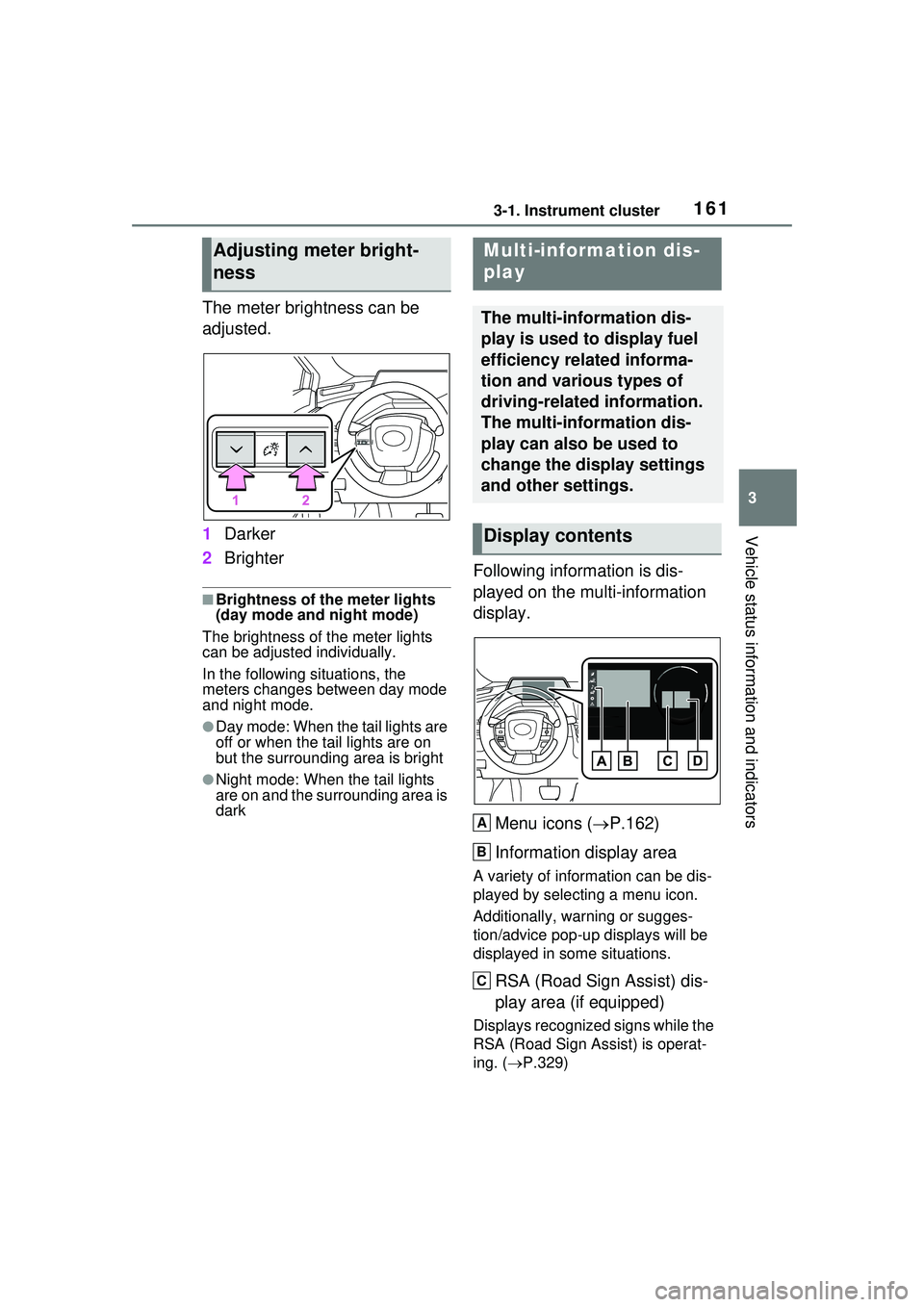
The meter brightness can be
adjusted.
1Darker
2 Brighter
■Brightness of the meter lights
(day mode and night mode)
The brightness of the meter lights
can be adjusted individually.
In the following situations, the
meters changes between day mode
and night mode.
●Day mode: When the tail lights are
off or when the tail lights are on
but the surrounding area is bright
●Night mode: When the tail lights
are on and the surrounding area is
dark
Following information is dis-
played on the multi-information
display.
Menu icons ( P.162)
Information display area
A variety of information can be dis-
played by selecting a menu icon.
Additionally, warning or sugges-
tion/advice pop-up displays will be
displayed in some situations.
RSA (Road Sign Assist) dis-
play area (if equipped)
Displays recognized signs while the
RSA (Road Sign Assist) is operat-
ing. ( P.329)
Adjusting meter bright-
nessMulti-information dis-
play
The multi-information dis-
play is used to display fuel
efficiency related informa-
tion and various types of
driving-related information.
The multi-information dis-
play can also be used to
change the display settings
and other settings.
Display contents
A
B
C
Page 162 of 680
1623-1. Instrument cluster
Driving support system infor-
mation (P.165)
■The multi-information display is
displayed when
The power switch is in ON.
■Liquid crystal display
( P.159)
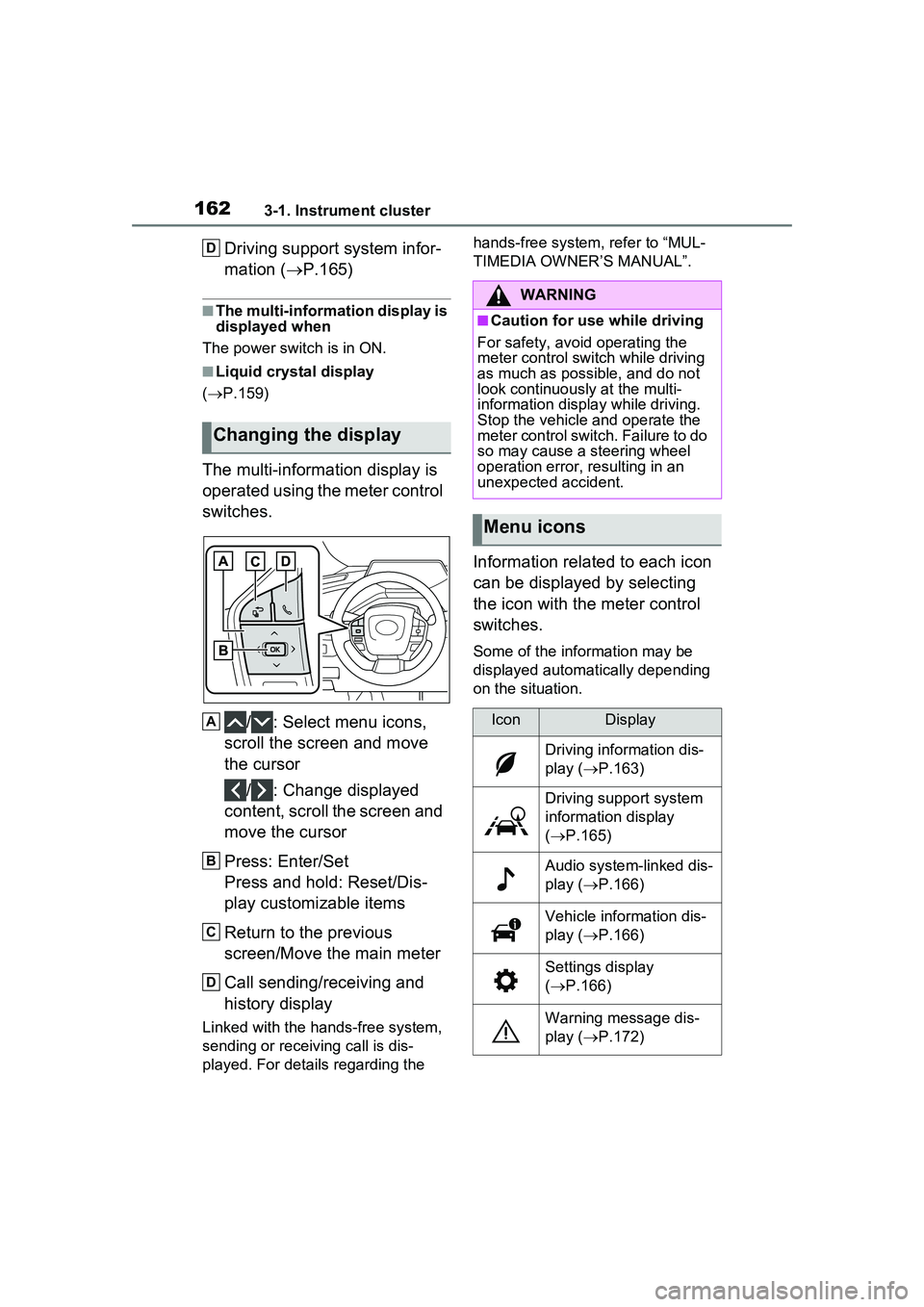
The multi-information display is
operated using the meter control
switches.
/ : Select menu icons,
scroll the screen and move
the cursor
/ : Change displayed
content, scroll the screen and
move the cursor
Press: Enter/Set
Press and hold: Reset/Dis-
play customizable items
Return to the previous
screen/Move the main meter
Call sending/receiving and
history display
Linked with the hands-free system,
sending or receiving call is dis-
played. For details regarding the hands-free system, refer to “MUL-
TIMEDIA OWNER’S MANUAL”.
Information related to each icon
can be displayed by selecting
the icon with the meter control
switches.
Some of the information may be
displayed automatically depending
on the situation.
Changing the display
D
A
B
C
D
WARNING
■Caution for use while driving
For safety, avoid operating the
meter control switch while driving
as much as possible, and do not
look continuously at the multi-
information displa y while driving.
Stop the vehicle and operate the
meter control switch. Failure to do
so may cause a steering wheel
operation error, resulting in an
unexpected accident.
Menu icons
IconDisplay
Driving information dis-
play ( P.163)
Driving support system
information display
( P.165)
Audio system-linked dis-
play ( P.166)
Vehicle information dis-
play ( P.166)
Settings display
( P.166)
Warning message dis-
play ( P.172)