light TOYOTA PRIUS PRIME 2023 Workshop Manual
[x] Cancel search | Manufacturer: TOYOTA, Model Year: 2023, Model line: PRIUS PRIME, Model: TOYOTA PRIUS PRIME 2023Pages: 680, PDF Size: 14.97 MB
Page 138 of 680
1382-2. Charging
and use the external power
source only at night. As a result,
the solar charging system can be
used effectively.
●When the vehicle is left in the hot
weather, the temperature preser-
vation function of the solar
charging system becomes easy to
operate due to high temperature
of the vehicle interior.
●Applying a glass coating to the
solar roof may change the refrac-
tive index of light and reduce the
amount of power generated.
●Small dots, lines, and stains may
be visible inside the solar roof,
however there is no problem with
the power generation function or
safety.
NOTICE
■To protect the solar charging
system from damage
●Make sure to observe the fol-
lowing precautions.
• Do not modify the solar roof
• Do not condense sunlight onto the solar roof
• Do not place anything on top of the solar roof
• Do not subject the solar roof to strong impacts or apply force
with sharp objects from the
inside roof of the vehicle.
●If the solar roof is damaged, do
not touch the damaged area
and immediately request repairs
from your Toyota dealer.
■If luggage is loaded on the
roof
P.247
Page 147 of 680
1472-2. Charging
2
Plug-in hybrid system
■If “Charging Stopped High Energy Use See Owner’s Manual”
is shown
■If “Charging System Malfunction See Owner’s Manual” is
shown
■If “The Traction Battery Temp is low System put priority on
charging to preserve battery condition” is shown (Alaska and
Canada only)
Likely causeCorrection procedure
Power is being consumed by electri-
cal components of vehicle
Check the following items, and then
carry out charging again.
If the headlights and audio are
turned on, turn them off.
Turn the power switch off.
If charging cannot be carried out,
even after performing the above, the
auxiliary battery may not be suffi-
ciently charged. Operate the hybrid
system for approximately 15 minutes
or more to charge the 12-volt battery.
Likely causeCorrection procedure
Malfunction occurred in charging
systemHave the vehicle inspected by your
Toyota dealer.
Likely causeCorrection procedure
The Hybrid battery (traction battery)
warming control was operated
( P.109)
When the hybrid battery (traction
battery) warming control operates,
the charging schedule is not used
and charging is performed.
This is a control to protect the hybrid
battery (traction battery), and not a
malfunction.
Page 149 of 680
149
3
3
Vehicle status information and indicators
Vehicle status informa-tion and indicators
3-1. Instrument cluster
Warning lights and indica-tors ............................ 150
Gauges and meters .... 155
Multi-information display .................................. 161
Energy monitor/consump- tion screen/solar charging
information screen (if
equipped) .................. 173
Page 150 of 680
1503-1. Instrument cluster
3-1.Instrument cluster
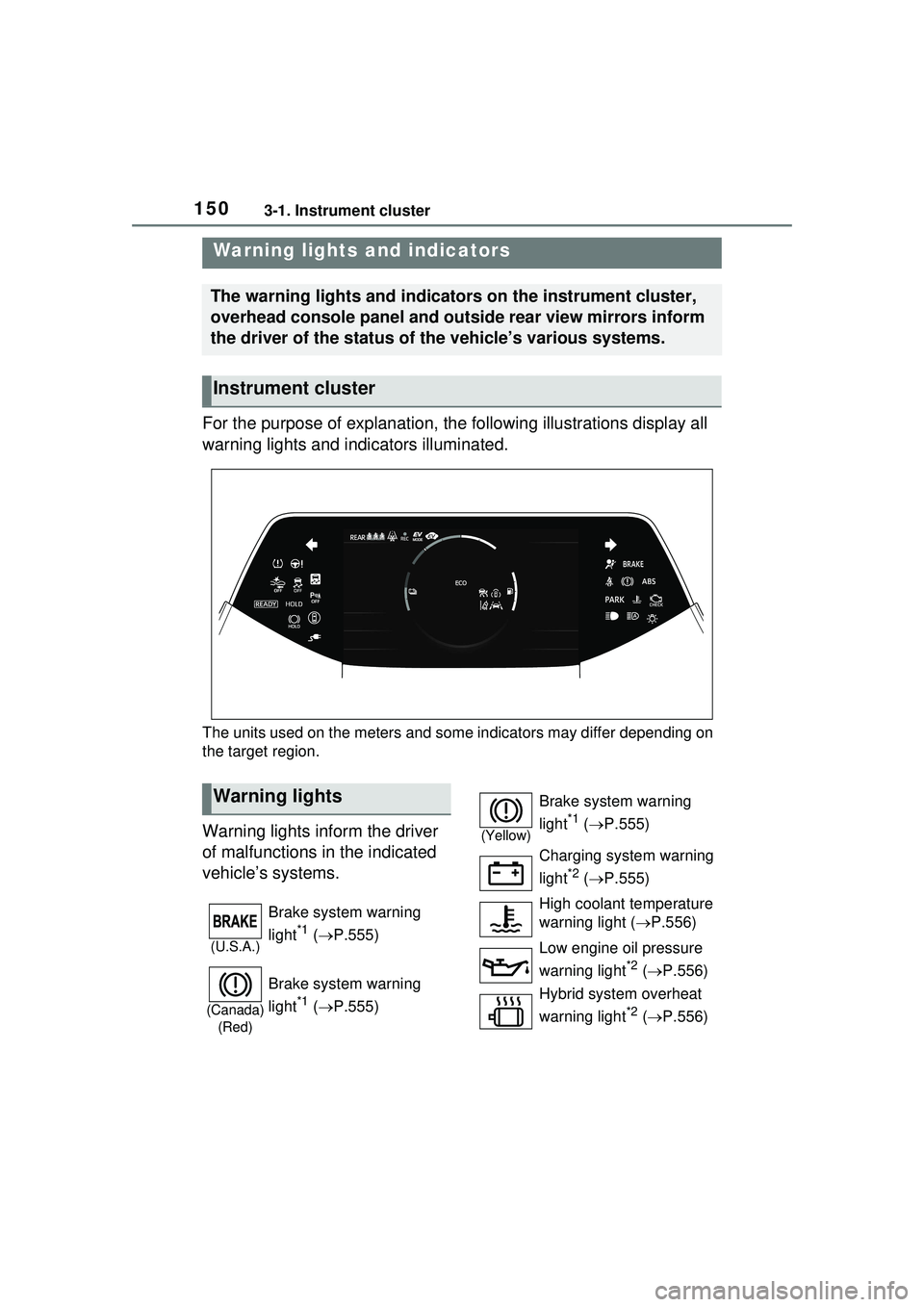
For the purpose of explanation, the following illustrations display all
warning lights and indicators illuminated.
The units used on the meters and some indicators may differ depending on
the target region.
Warning lights inform the driver
of malfunctions in the indicated
vehicle’s systems.
Warning lights and indicators
The warning lights and indicators on the instrument cluster,
overhead console panel and outside rear view mirrors inform
the driver of the status of the vehicle’s various systems.
Instrument cluster
Warning lights
(U.S.A.)
Brake system warning
light
*1 ( P.555)
(Canada)
(Red)
Brake system warning
light
*1 ( P.555)
(Yellow)
Brake system warning
light
*1 ( P.555)
Charging system warning
light
*2 ( P.555)
High coolant temperature
warning light ( P.556)
Low engine oil pressure
warning light
*2 ( P.556)
Hybrid system overheat
warning light
*2 ( P.556)
Page 151 of 680
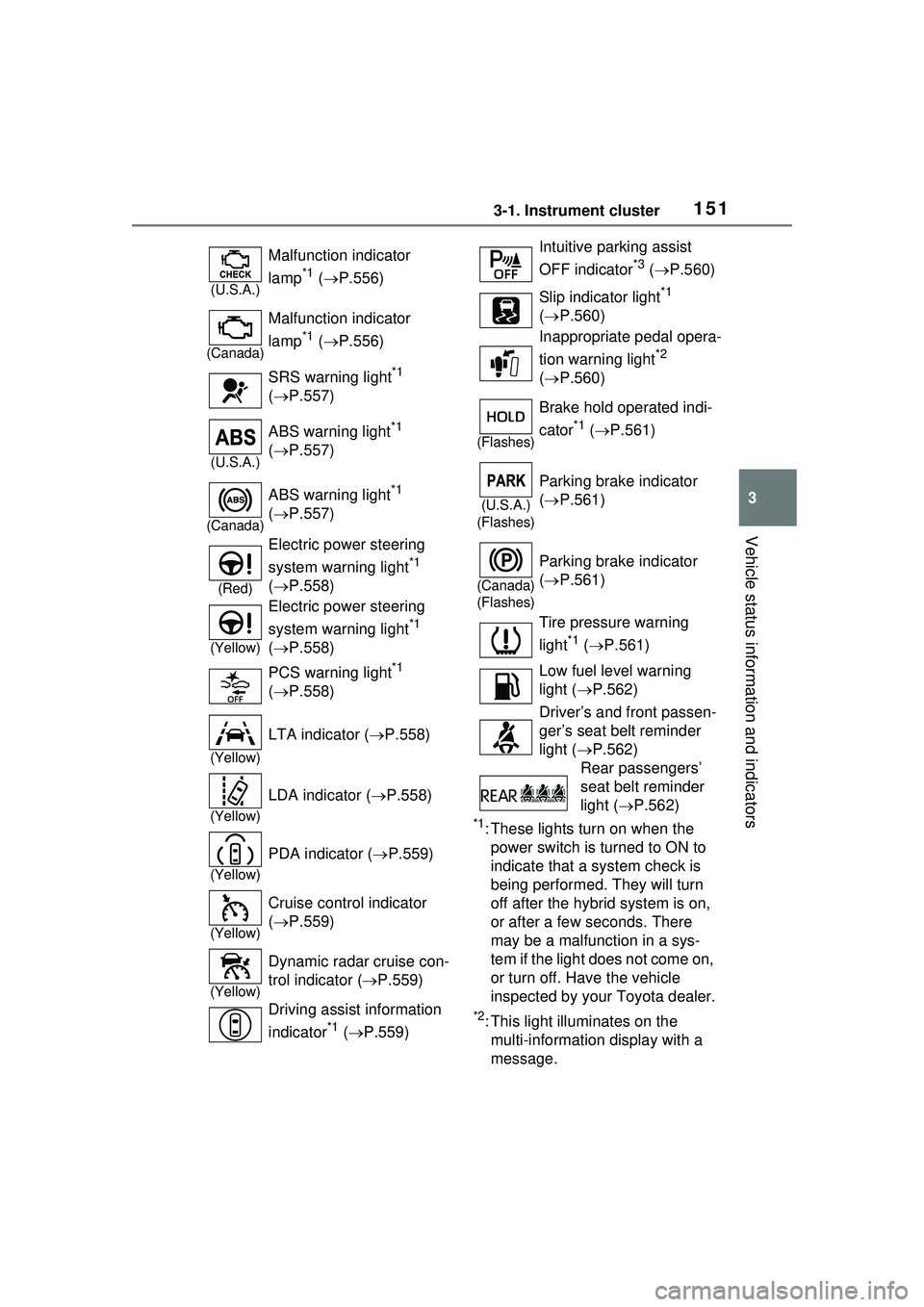
1513-1. Instrument cluster
3
Vehicle status information and indicators
*1: These lights turn on when the power switch is turned to ON to
indicate that a system check is
being performed. They will turn
off after the hybrid system is on,
or after a few seconds. There
may be a malfunction in a sys-
tem if the light does not come on,
or turn off. Have the vehicle
inspected by your Toyota dealer.
*2: This light illuminates on the multi-informatio n display with a
message.
(U.S.A.)
Malfunction indicator
lamp
*1 ( P.556)
(Canada)
Malfunction indicator
lamp
*1 ( P.556)
SRS warning light
*1
( P.557)
(U.S.A.)
ABS warning light*1
( P.557)
(Canada)
ABS warning light*1
( P.557)
(Red)
Electric power steering
system warning light
*1
( P.558)
(Yellow)
Electric power steering
system warning light
*1
( P.558)
PCS warning light
*1
( P.558)
(Yellow)
LTA indicator ( P.558)
(Yellow)
LDA indicator ( P.558)
(Yellow)
PDA indicator ( P.559)
(Yellow)
Cruise control indicator
( P.559)
(Yellow)
Dynamic radar cruise con-
trol indicator ( P.559)
Driving assist information
indicator
*1 ( P.559)
Intuitive parking assist
OFF indicator
*3 ( P.560)
Slip indicator light
*1
( P.560)
Inappropriate pedal opera-
tion warning light
*2
( P.560)
(Flashes)
Brake hold operated indi-
cator
*1 ( P.561)
(U.S.A.)
(Flashes)
Parking brake indicator
( P.561)
(Canada)
(Flashes)
Parking brake indicator
( P.561)
Tire pressure warning
light
*1 ( P.561)
Low fuel level warning
light ( P.562)
Driver’s and front passen-
ger’s seat belt reminder
light ( P.562)
Rear passengers’
seat belt reminder
light ( P.562)
Page 152 of 680
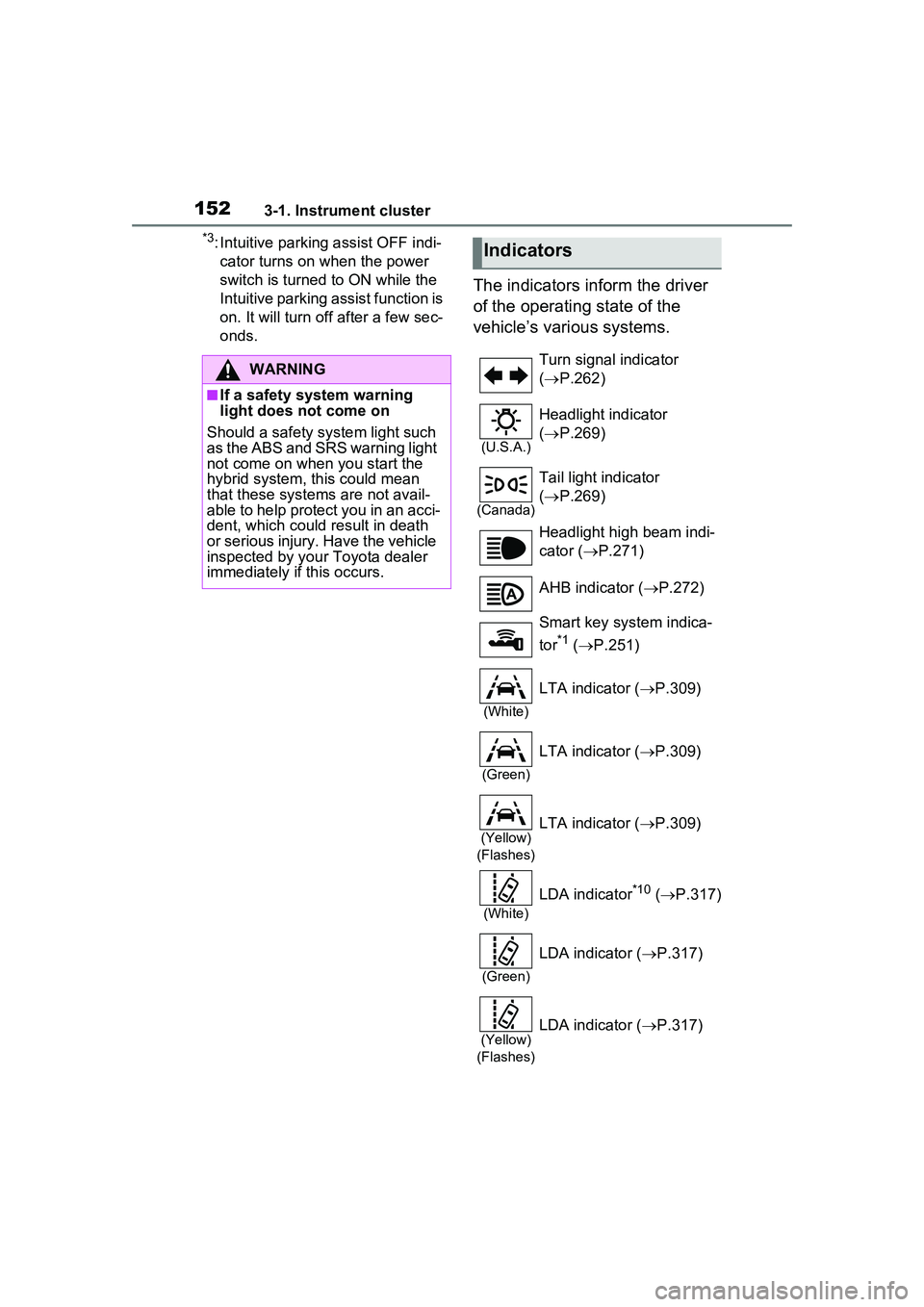
1523-1. Instrument cluster
*3: Intuitive parking assist OFF indi-cator turns on when the power
switch is turned to ON while the
Intuitive parking assist function is
on. It will turn off after a few sec-
onds.
The indicators inform the driver
of the operating state of the
vehicle’s various systems.
WARNING
■If a safety system warning
light does not come on
Should a safety system light such
as the ABS and SRS warning light
not come on when you start the
hybrid system, this could mean
that these systems are not avail-
able to help protect you in an acci-
dent, which could result in death
or serious injury. Have the vehicle
inspected by your Toyota dealer
immediately if this occurs.
Indicators
Turn signal indicator
( P.262)
(U.S.A.)
Headlight indicator
( P.269)
(Canada)
Tail light indicator
( P.269)
Headlight high beam indi-
cator ( P.271)
AHB indicator ( P.272)
Smart key system indica-
tor
*1 ( P.251)
(White)
LTA indicator ( P.309)
(Green)
LTA indicator ( P.309)
(Yellow)
(Flashes)LTA indicator ( P.309)
(White)
LDA indicator*10 ( P.317)
(Green)
LDA indicator ( P.317)
(Yellow)
(Flashes)LDA indicator ( P.317)
Page 153 of 680
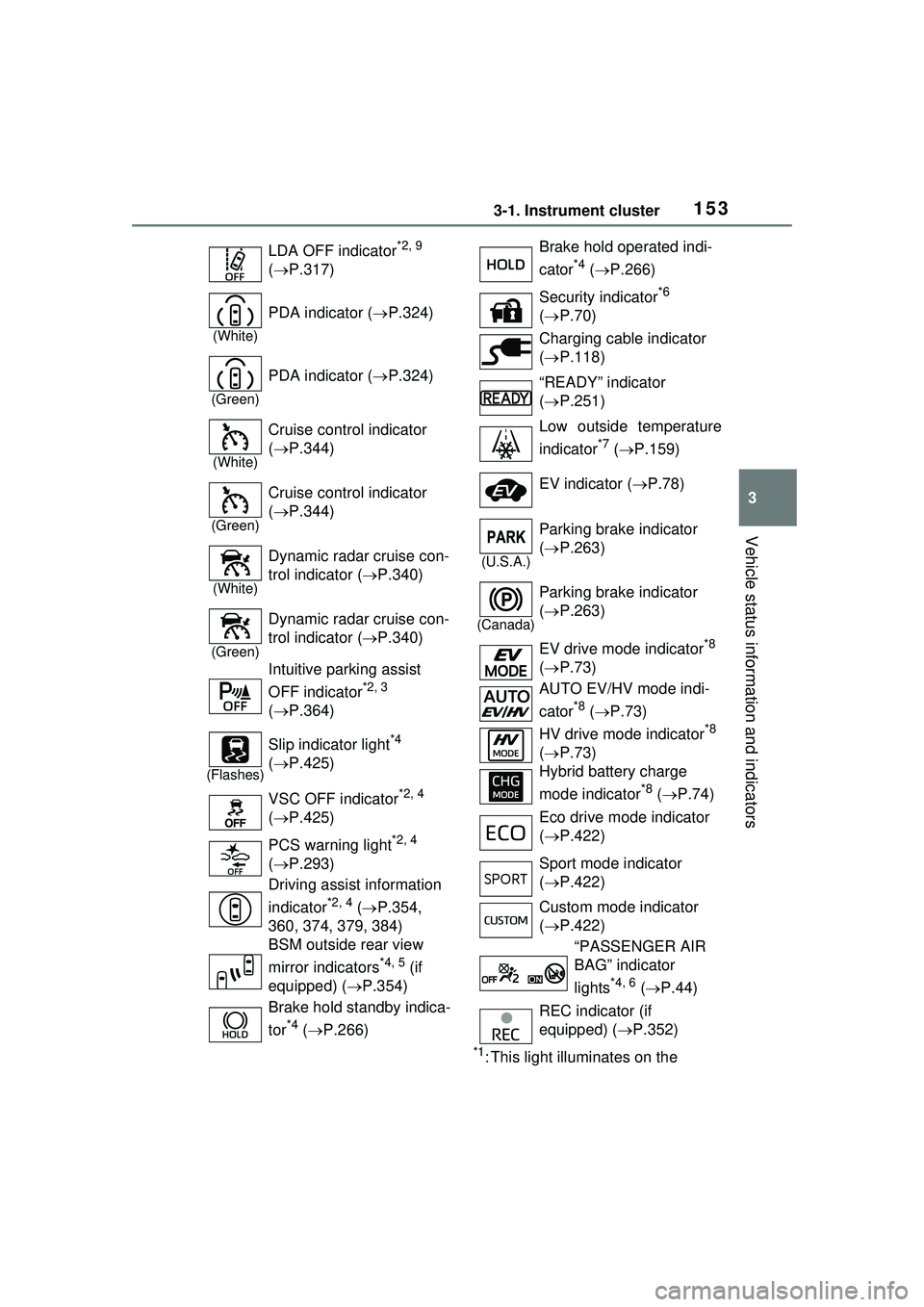
1533-1. Instrument cluster
3
Vehicle status information and indicators
*1: This light illuminates on the
LDA OFF indicator
*2, 9
( P.317)
(White)
PDA indicator ( P.324)
(Green)
PDA indicator ( P.324)
(White)
Cruise control indicator
( P.344)
(Green)
Cruise control indicator
( P.344)
(White)
Dynamic radar cruise con-
trol indicator ( P.340)
(Green)
Dynamic radar cruise con-
trol indicator ( P.340)
Intuitive parking assist
OFF indicator
*2, 3
( P.364)
(Flashes)
Slip indicator light*4
( P.425)
VSC OFF indicator
*2, 4
( P.425)
PCS warning light
*2, 4
( P.293)
Driving assist information
indicator
*2, 4 ( P.354,
360, 374, 379, 384)
BSM outside rear view
mirror indicators
*4, 5 (if
equipped) ( P.354)
Brake hold standby indica-
tor
*4 ( P.266)
Brake hold operated indi-
cator
*4 ( P.266)
Security indicator
*6
( P.70)
Charging cable indicator
( P.118)
“READY” indicator
( P.251)
Low outside temperature
indicator
*7 ( P.159)
EV indicator ( P.78)
(U.S.A.)
Parking brake indicator
( P.263)
(Canada)
Parking brake indicator
( P.263)
EV drive mode indicator
*8
( P.73)
AUTO EV/HV mode indi-
cator
*8 ( P.73)
HV drive mode indicator
*8
( P.73)
Hybrid battery charge
mode indicator
*8 ( P.74)
Eco drive mode indicator
( P.422)
Sport mode indicator
( P.422)
Custom mode indicator
( P.422)
“PASSENGER AIR
BAG” indicator
lights
*4, 6 ( P.44)
REC indicator (if
equipped) ( P.352)
Page 154 of 680
1543-1. Instrument cluster
multi-information display with a
message.
*2: The light comes on when the system is turned off.
*3: Intuitive parking assist OFF indi-cator turns on when the power
switch is turned to ON while the
Intuitive parking assist function is
on. It will turn off after a few sec-
onds.
*4: These lights turn on when the power switch is turned to ON to
indicate that a system check is
being performed. They will turn
off after the hybrid system is on,
or after a few seconds. There
may be a malfunction in a sys-
tem if the lights do not turn on, or
turn off. Have the vehicle
inspected by your Toyota dealer.
*5: This light illuminates on the out- side rear view mirrors.
*6: This light illuminates on the over-head console panel.
*7: When the outside temperature is approximately 37°F (3°C) or
lower, the indicator will flash for
approximately 10 seconds, then
stay on.
*8: The displayed indicator changes according to the current plug-in
hybrid system operation mode.
*9: For Puerto Rico
*10: Except for Puerto Rico
■BSM (Blind Spot Monitor) out-
side rear view mirror indicators
(if equipped)
In order to confirm operation, the
BSM outside rear view mirror indica-
tors illuminate in the turning the
BSM function/RCTA function on
( P.354, 373). If the system is functioning correctly,
the BSM outside rear view mirror
indicators will turn off after a few
seconds.
If the BSM outside rear view mirror
indicators do not illuminate or do not
turn off, there may be a malfunction
in the system. If this occurs, have
the vehicle inspected by your
Toyota dealer.
Page 159 of 680
1593-1. Instrument cluster
3
Vehicle status information and indicators
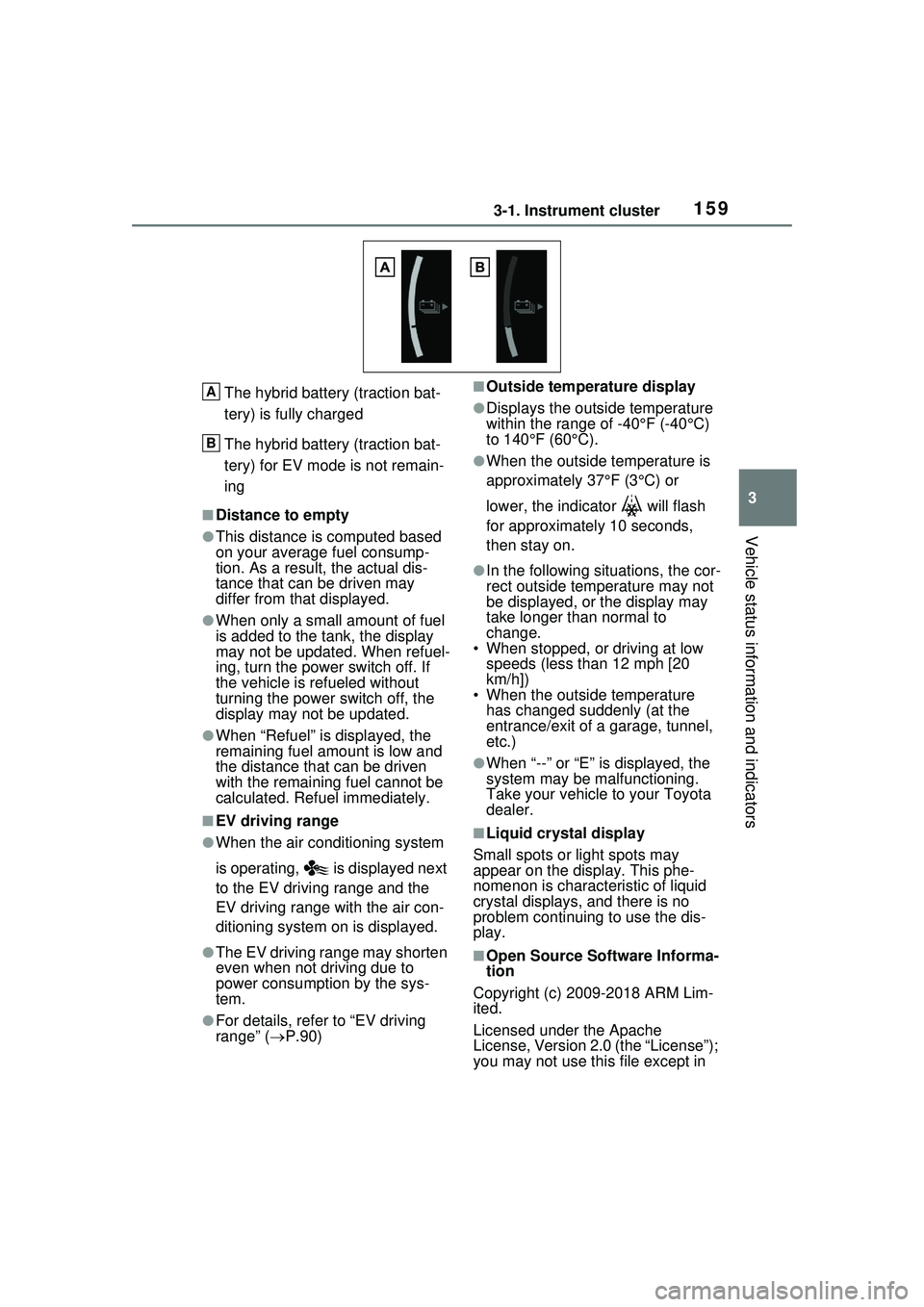
The hybrid battery (traction bat-
tery) is fully charged
The hybrid battery (traction bat-
tery) for EV mode is not remain-
ing
■Distance to empty
●This distance is computed based
on your average fuel consump-
tion. As a result, the actual dis-
tance that can be driven may
differ from that displayed.
●When only a small amount of fuel
is added to the tank, the display
may not be updated. When refuel-
ing, turn the power switch off. If
the vehicle is refueled without
turning the power switch off, the
display may not be updated.
●When “Refuel” is displayed, the
remaining fuel amount is low and
the distance that can be driven
with the remaining fuel cannot be
calculated. Refuel immediately.
■EV driving range
●When the air conditioning system
is operating, is displayed next
to the EV driving range and the
EV driving range with the air con-
ditioning system on is displayed.
●The EV driving range may shorten
even when not driving due to
power consumption by the sys-
tem.
●For details, refer to “EV driving
range” (P.90)
■Outside temperature display
●Displays the outside temperature
within the range of -40°F (-40°C)
to 140°F (60°C).
●When the outside temperature is
approximately 37°F (3°C) or
lower, the indicator will flash
for approximately 10 seconds,
then stay on.
●In the following situations, the cor-
rect outside temperature may not
be displayed, or the display may
take longer th an normal to
change.
• When stopped, or driving at low speeds (less than 12 mph [20
km/h])
• When the outside temperature has changed suddenly (at the
entrance/exit of a garage, tunnel,
etc.)
●When “--” or “E” is displayed, the
system may be malfunctioning.
Take your vehicle to your Toyota
dealer.
■Liquid crystal display
Small spots or light spots may
appear on the display. This phe-
nomenon is characteristic of liquid
crystal displays, and there is no
problem continuing to use the dis-
play.
■Open Source Software Informa-
tion
Copyright (c) 2009-2018 ARM Lim-
ited.
Licensed under the Apache
License, Version 2.0 (the “License”);
you may not use this file except in
A
B
Page 161 of 680
1613-1. Instrument cluster
3
Vehicle status information and indicators
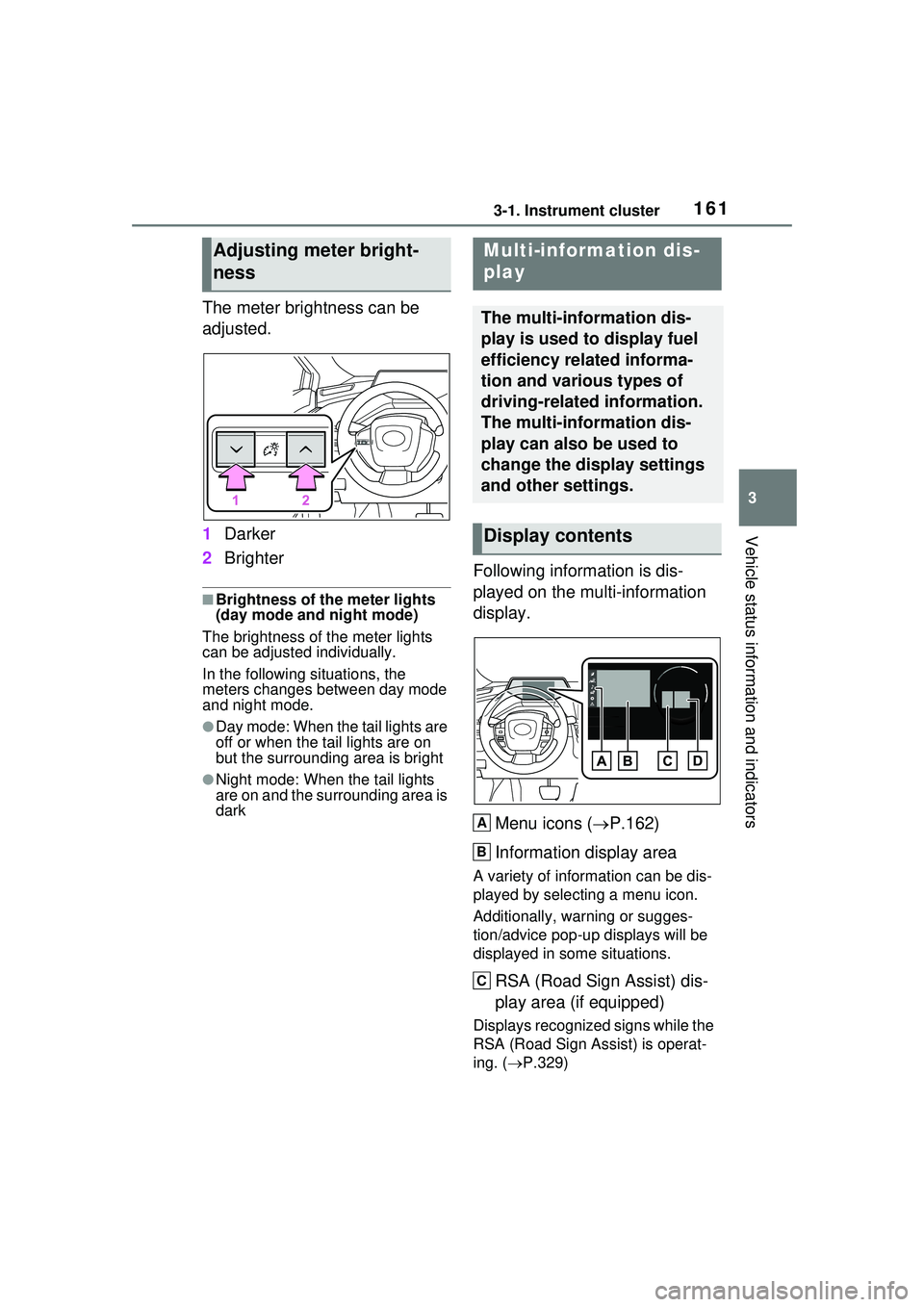
The meter brightness can be
adjusted.
1Darker
2 Brighter
■Brightness of the meter lights
(day mode and night mode)
The brightness of the meter lights
can be adjusted individually.
In the following situations, the
meters changes between day mode
and night mode.
●Day mode: When the tail lights are
off or when the tail lights are on
but the surrounding area is bright
●Night mode: When the tail lights
are on and the surrounding area is
dark
Following information is dis-
played on the multi-information
display.
Menu icons ( P.162)
Information display area
A variety of information can be dis-
played by selecting a menu icon.
Additionally, warning or sugges-
tion/advice pop-up displays will be
displayed in some situations.
RSA (Road Sign Assist) dis-
play area (if equipped)
Displays recognized signs while the
RSA (Road Sign Assist) is operat-
ing. ( P.329)
Adjusting meter bright-
nessMulti-information dis-
play
The multi-information dis-
play is used to display fuel
efficiency related informa-
tion and various types of
driving-related information.
The multi-information dis-
play can also be used to
change the display settings
and other settings.
Display contents
A
B
C