light TOYOTA PRIUS PRIME 2023 Repair Manual
[x] Cancel search | Manufacturer: TOYOTA, Model Year: 2023, Model line: PRIUS PRIME, Model: TOYOTA PRIUS PRIME 2023Pages: 680, PDF Size: 14.97 MB
Page 172 of 680
1723-1. Instrument cluster
●Settings for functions not
equipped to the vehicle are not
displayed.
●When a function is turned off, the
related settings for that function
are not selectable.
Select to display warning mes-
sages and measures to be
taken if a malfunction is
detected. (P.566)
Displays suggestions to the
driver in the following situations.
To select a response to a dis-
played suggestion, use the
meter control switches.
■Suggestion to enable the
power back door (if
equipped)
If the power back door system is
disabled (setting on set to
off) and the power back door
switch on the instrument panel
is operated, a suggestion mes-
sage will be displayed asking if
you wish to enable the power
back door system. To enable
the power back door system,
select “Yes”.
After enabling the power back door
system, press the power back door
switch again to open or close the
power back door.
■Suggestion to turn off the
headlights
If the headlights are left on for a
certain amount of time after the
power switch has been turned
off, a suggestion message will
be displayed.
When the headlight switch is in
the AUTO position: The mes-
sage asking if you wish to turn
the headlights off is displayed.
To turn the headlights off, select
“Yes”.
If the driver’s door is opened after
the power switch is turned off, this
suggestion message will not be dis-
played.
■Customization
The suggestion function can be
turned on/off. (Customizable fea-
tures: P.619)
WARNING
■Cautions during setting up
the display
As the hybrid system needs to be
operating during setting up the
display, ensure that the vehicle is
parked in a place with adequate
ventilation. In a closed area such
as a garage, exhaust gases
including harmful carbon monox-
ide (CO) may collect and enter
the vehicle. This may lead to
death or a serious health hazard.
NOTICE
■During setting up the display
To prevent 12-volt battery dis-
charge, ensure that the hybrid
system is operating while setting
up the display features.
Warning message display
Suggestion function
Page 175 of 680
1753-1. Instrument cluster
3
Vehicle status information and indicators
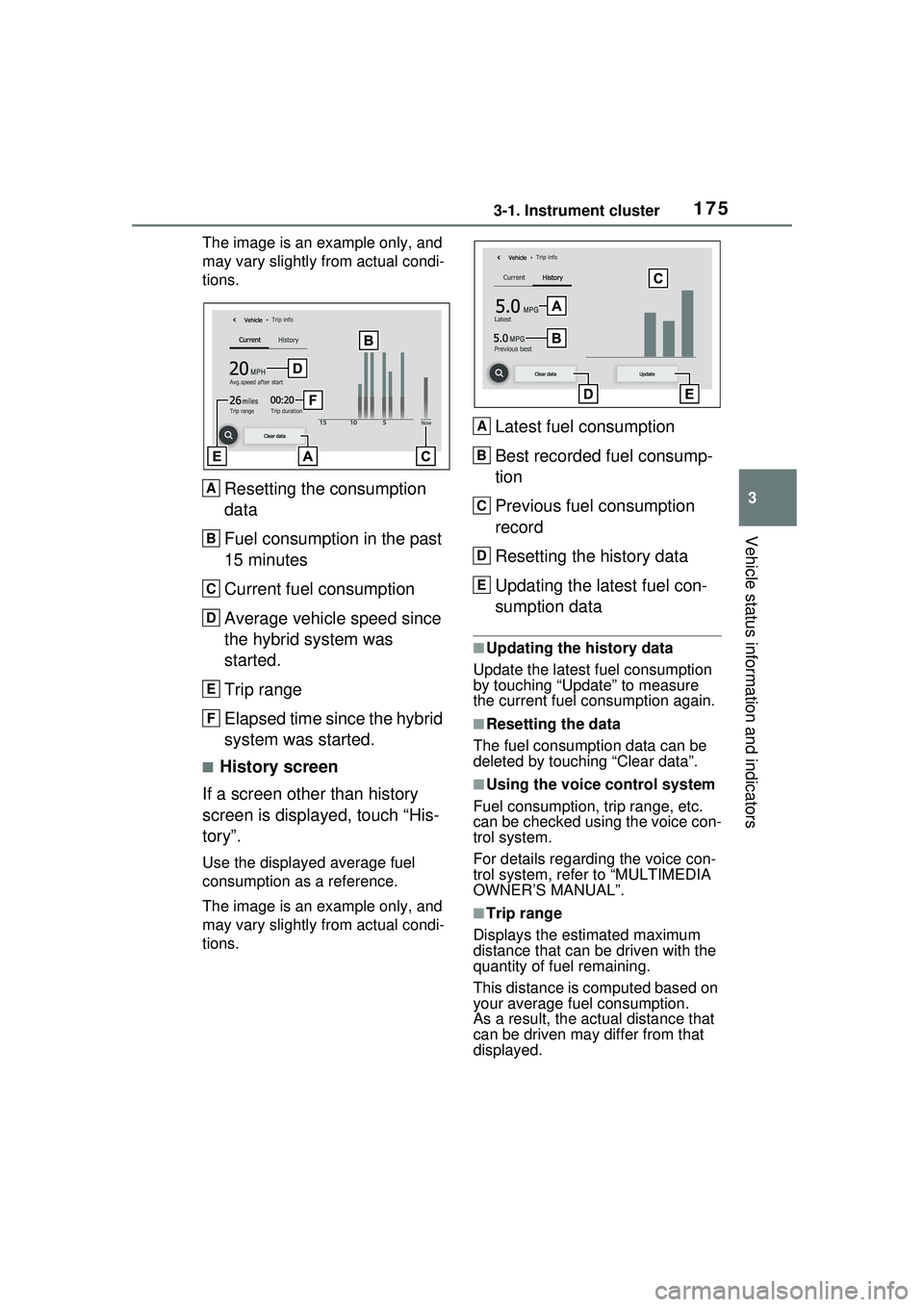
The image is an example only, and
may vary slightly from actual condi-
tions.
Resetting the consumption
data
Fuel consumption in the past
15 minutes
Current fuel consumption
Average vehicle speed since
the hybrid system was
started.
Trip range
Elapsed time since the hybrid
system was started.
■History screen
If a screen other than history
screen is displayed, touch “His-
tory”.
Use the displayed average fuel
consumption as a reference.
The image is an example only, and
may vary slightly from actual condi-
tions.
Latest fuel consumption
Best recorded fuel consump-
tion
Previous fuel consumption
record
Resetting the history data
Updating the latest fuel con-
sumption data
■Updating the history data
Update the latest fuel consumption
by touching “Update” to measure
the current fuel consumption again.
■Resetting the data
The fuel consumption data can be
deleted by touching “Clear data”.
■Using the voice control system
Fuel consumption, trip range, etc.
can be checked using the voice con-
trol system.
For details regarding the voice con-
trol system, refe r to “MULTIMEDIA
OWNER’S MANUAL”.
■Trip range
Displays the estimated maximum
distance that can be driven with the
quantity of fuel remaining.
This distance is computed based on
your average fuel consumption.
As a result, the actual distance that
can be driven may differ from that
displayed.
A
B
C
D
E
F
A
B
C
D
E
Page 176 of 680
1763-1. Instrument cluster
Information related to the solar
charging system can be dis-
played.
■Display procedure
Multi-information display
Solar charging information
screen can be displayed on
of the multi-information
display.
For detail regarding the multi-
information display, refer to
P.161.
Multimedia Display
Touch on the main menu,
then touch “Solar charging” on
the sub menu.
For detail regarding the Multimedia
Display, refer to “MULTIMEDIA
OWNER’S MANUAL”.
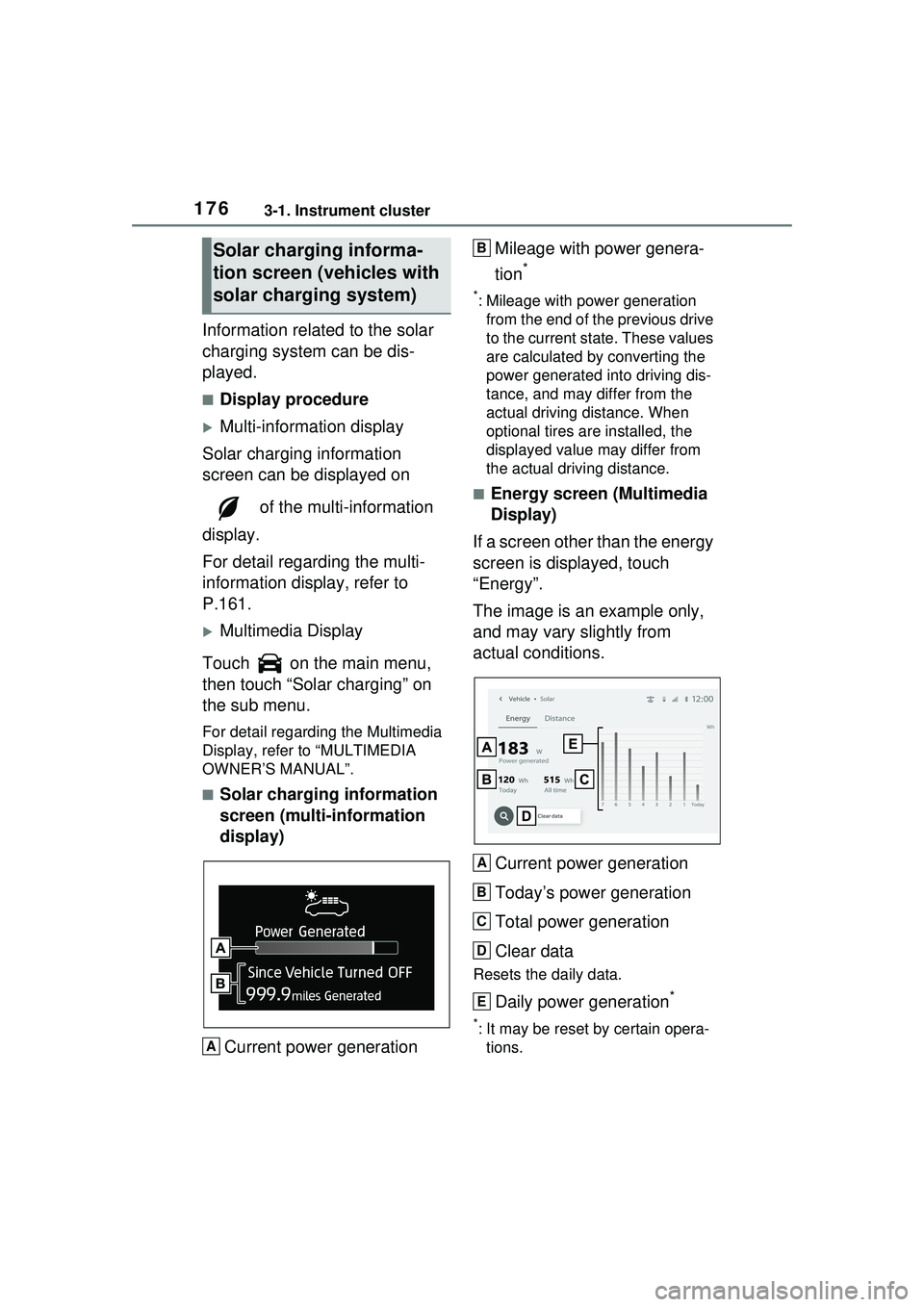
■Solar charging information
screen (multi-information
display)
Current power generation Mileage with power genera-
tion
*
*: Mileage with power generation
from the end of the previous drive
to the current state. These values
are calculated by converting the
power generated into driving dis-
tance, and may differ from the
actual driving distance. When
optional tires are installed, the
displayed value may differ from
the actual driving distance.
■Energy screen (Multimedia
Display)
If a screen other than the energy
screen is displayed, touch
“Energy”.
The image is an example only,
and may vary slightly from
actual conditions.
Current power generation
Today’s power generation
Total power generation
Clear data
Resets the daily data.
Daily power generation*
*: It may be reset by certain opera-tions.
Solar charging informa-
tion screen ( vehicles with
solar charging system)
A
B
A
B
C
D
E
Page 177 of 680
1773-1. Instrument cluster
3
Vehicle status information and indicators
■Distance screen (Multime-
dia Display)
If a screen other than the dis-
tance screen is displayed, touch
“Distance”.
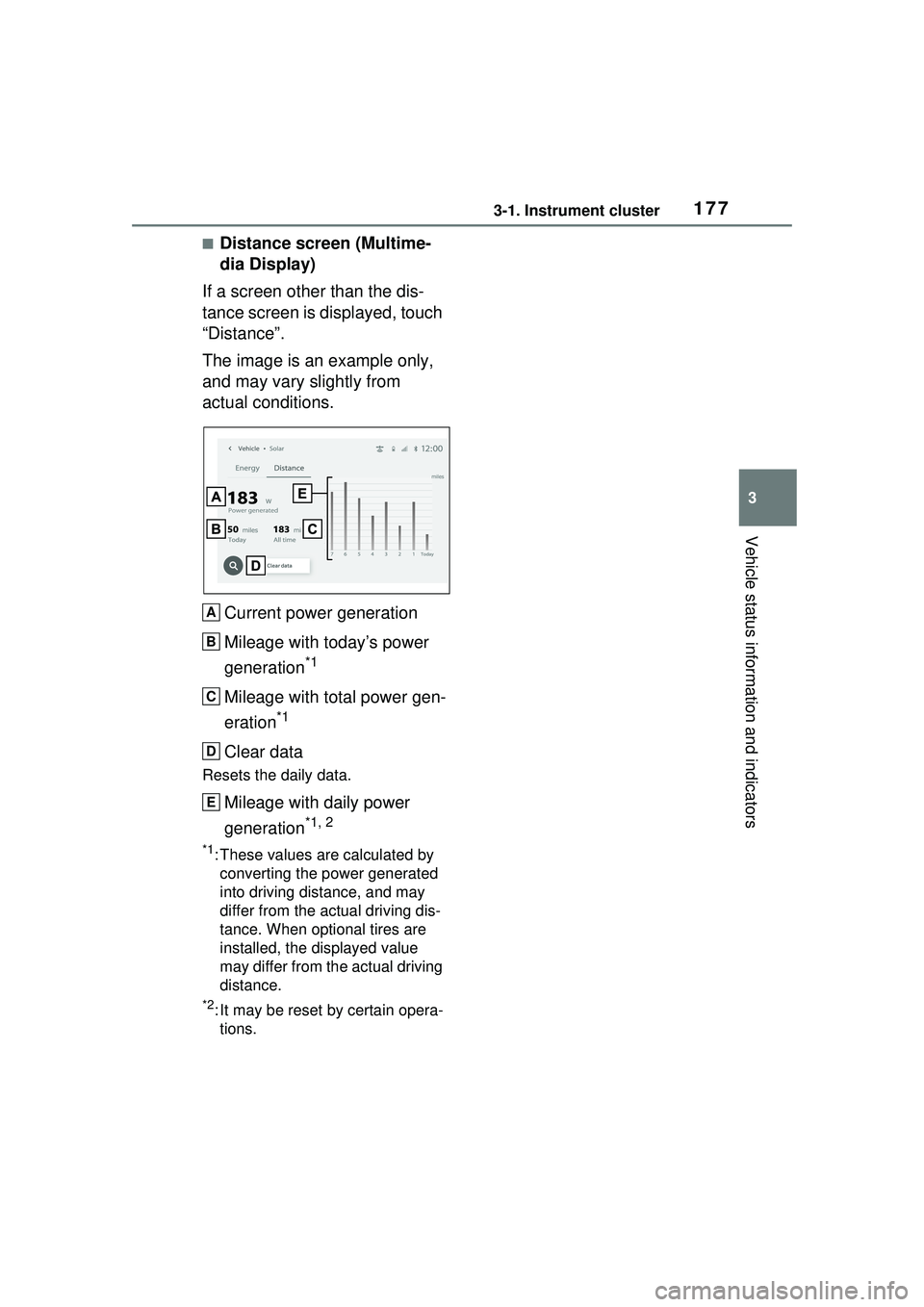
The image is an example only,
and may vary slightly from
actual conditions.
Current power generation
Mileage with today’s power
generation
*1
Mileage with total power gen-
eration
*1
Clear data
Resets the daily data.
Mileage with daily power
generation
*1, 2
*1: These values are calculated by converting the power generated
into driving distance, and may
differ from the actual driving dis-
tance. When optional tires are
installed, the displayed value
may differ from the actual driving
distance.
*2: It may be reset by certain opera-tions.
A
B
C
D
E
Page 182 of 680
1824-1. Key information
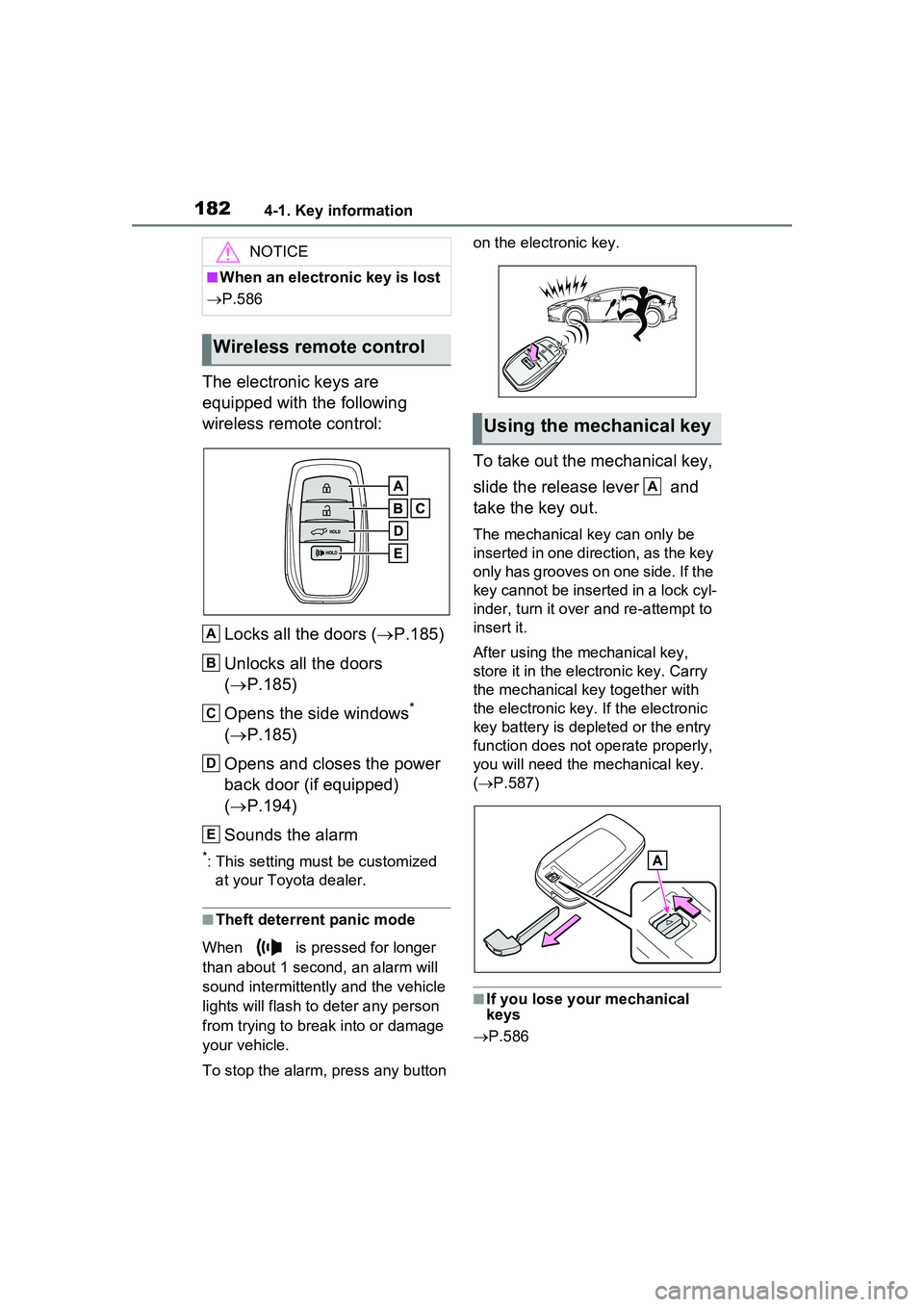
The electronic keys are
equipped with the following
wireless remote control:Locks all the doors ( P.185)
Unlocks all the doors
( P.185)
Opens the side windows
*
( P.185)
Opens and closes the power
back door (if equipped)
( P.194)
Sounds the alarm
*: This setting must be customized at your Toyota dealer.
■Theft deterrent panic mode
When is pressed for longer
than about 1 second, an alarm will
sound intermittently and the vehicle
lights will flash to deter any person
from trying to break into or damage
your vehicle.
To stop the alarm, press any button on the electronic key.
To take out the mechanical key,
slide the release lever and
take the key out.
The mechanical key can only be
inserted in one direction, as the key
only has grooves on one side. If the
key cannot be inserted in a lock cyl-
inder, turn it over
and re-attempt to
insert it.
After using the mechanical key,
store it in the electronic key. Carry
the mechanical key together with
the electronic key. If the electronic
key battery is depleted or the entry
function does not operate properly,
you will need the mechanical key.
( P.587)
■If you lose your mechanical
keys
P.586
NOTICE
■When an electronic key is lost
P.586
Wireless remote control
A
B
C
D
E
Using the mechanical key
A
Page 184 of 680
1844-1. Key information
Be sure to carry the electronic
key of the vehicle if traveling
to a location with unreliable
communications.
If the smartphone battery is
depleted, the smartphone
cannot be used as Digital
Key. If the battery level is low,
be sure to charge the smart-
phone prior to going out.
The Digital Key system is
related to the smart key sys-
tem. If the smart key system
has been deactivated in the
vehicle customization setting,
the Digital Key will also be
disabled.
Depending on the radio wave
environment, the Digital Key
may not be able to be used.
( P.205)
When transferring vehicle
ownership, make sure to
delete the Digital Keys.
If the vehicle is not operated
for 14 days or more, the Digi-
tal Key will not connect auto-
matically. Therefore, it may
take some time before the
system operates after a door
handle is touched.
A part of the services may be
stopped for a certain period of
time due to server mainte-
nance. However, registered
Digital Keys can be used
during the maintenance.
A smartphone with the Digital Key App enabled will be able
to lock and unlock the doors,
start the hybrid system and
perform any other operations
as same as the electronic key
of the vehicle. Be especially
careful not to lose the smart-
phone or allow it to be stolen.
If the smartphone is lost or
stolen, contact your Toyota
dealer immediately.
When taking your vehicle to a
Toyota dealer for an inspec-
tion or repairs, make sure to
bring an electronic key.
With the Digital Key alone, no
vehicle lights will illuminate
when approached to the vehi-
cle. Also, with the Digital Key
alone, some functions, such
as the power back door’s
close & lock (walk-away)
function, etc., cannot be used.
Page 185 of 680
1854-2. Opening, closing and locking the doors
4
Before driving
4-2.Opening, closing and locking the doors
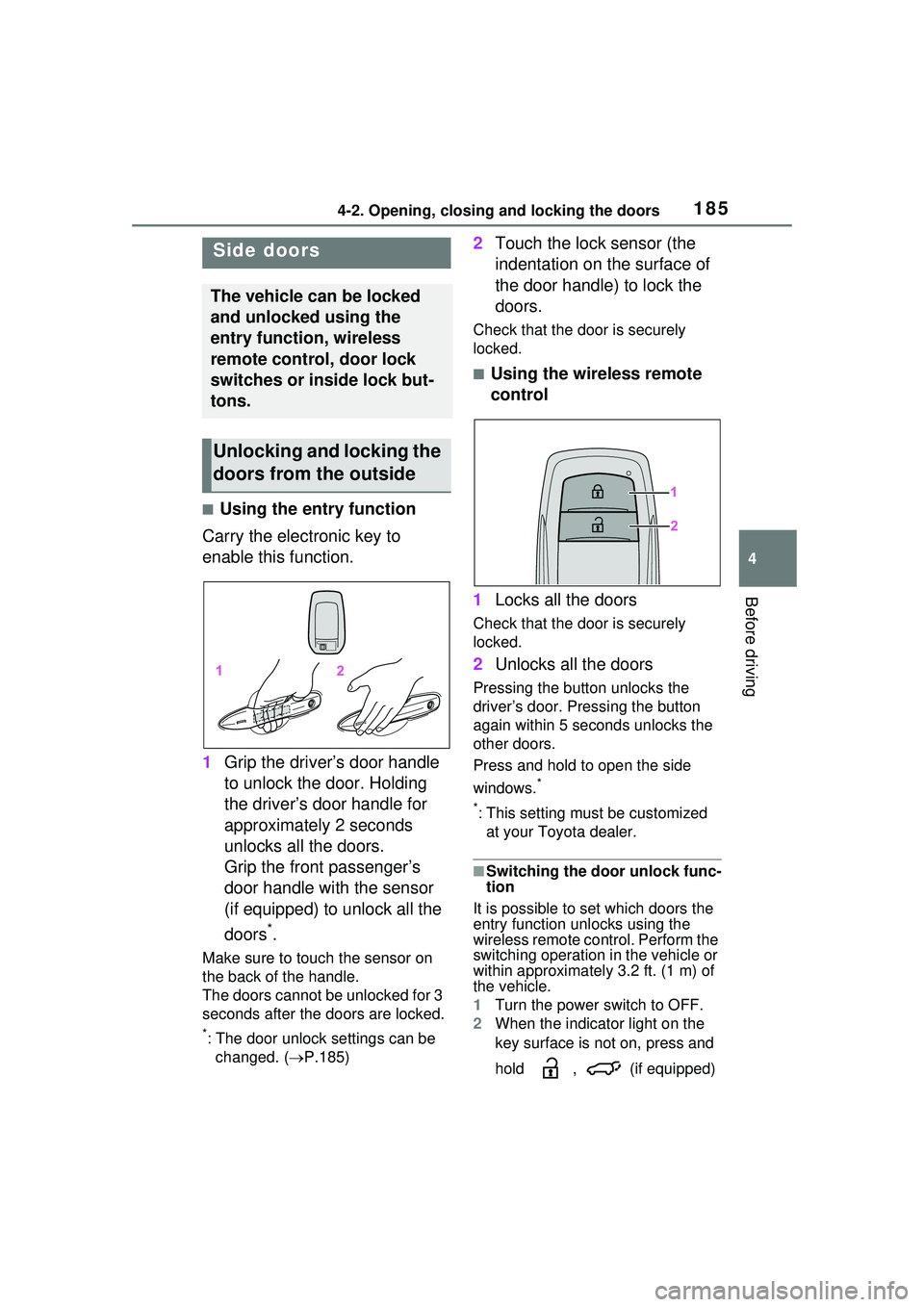
■Using the entry function
Carry the electronic key to
enable this function.
1 Grip the driver’s door handle
to unlock the door. Holding
the driver’s door handle for
approximately 2 seconds
unlocks all the doors.
Grip the front passenger’s
door handle with the sensor
(if equipped) to unlock all the
doors
*.
Make sure to touch the sensor on
the back of the handle.
The doors cannot be unlocked for 3
seconds after the doors are locked.
*: The door unlock settings can be
changed. ( P.185)
2 Touch the lock sensor (the
indentation on the surface of
the door handle) to lock the
doors.
Check that the do or is securely
locked.
■Using the wireless remote
control
1 Locks all the doors
Check that the do or is securely
locked.
2 Unlocks all the doors
Pressing the button unlocks the
driver’s door. Pressing the button
again within 5 seconds unlocks the
other doors.
Press and hold to open the side
windows.
*
*
: This setting must be customized at your Toyota dealer.
■Switching the door unlock func-
tion
It is possible to set which doors the
entry function unlocks using the
wireless remote control. Perform the
switching operation in the vehicle or
within approximately 3.2 ft. (1 m) of
the vehicle.
1 Turn the power switch to OFF.
2 When the indicator light on the
key surface is not on, press and
hold , (if equipped)
Side doors
The vehicle can be locked
and unlocked using the
entry function, wireless
remote control, door lock
switches or inside lock but-
tons.
Unlocking and locking the
doors from the outside
Page 192 of 680
1924-2. Opening, closing and locking the doors
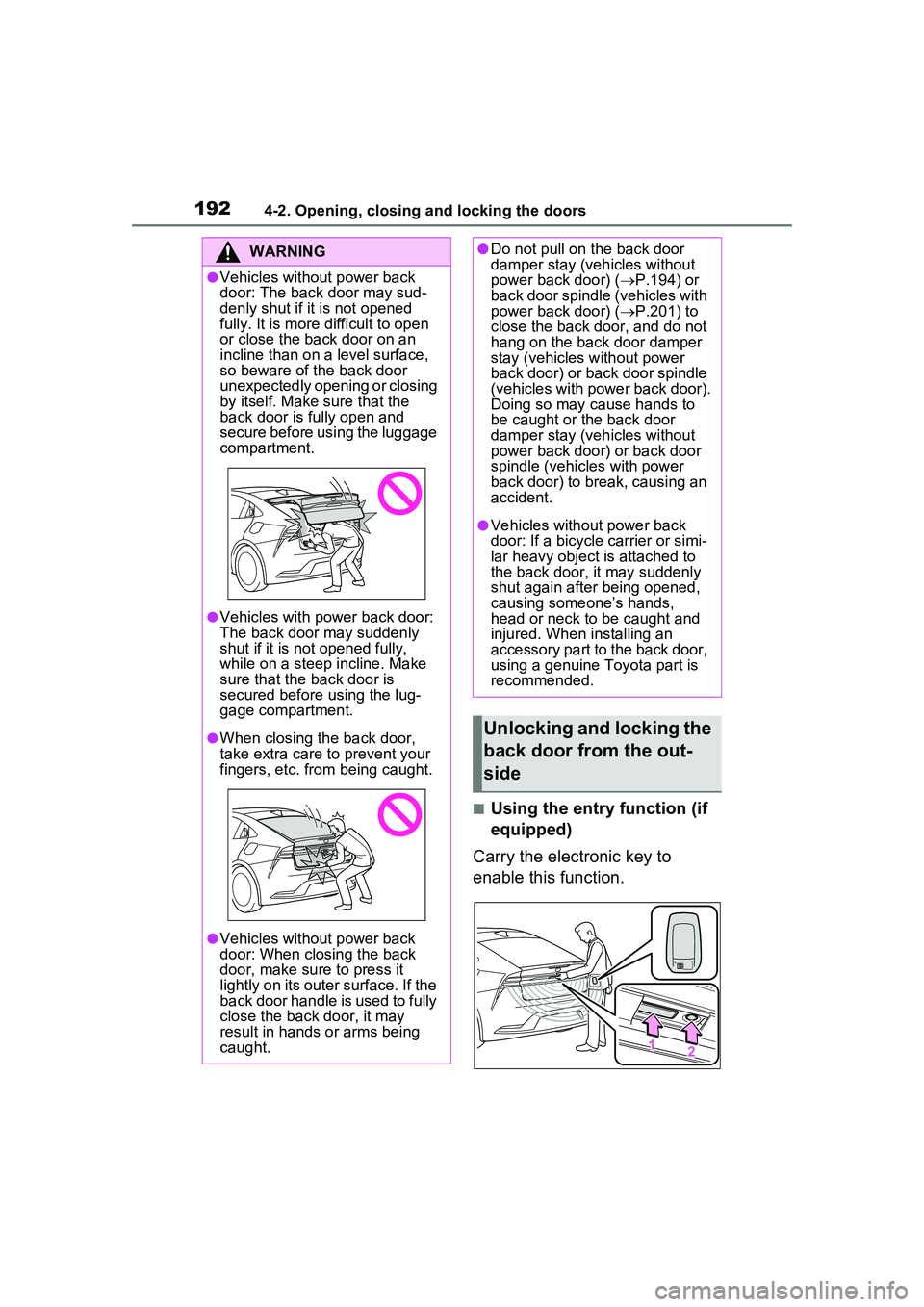
■Using the entry function (if
equipped)
Carry the electronic key to
enable this function.
WARNING
●Vehicles without power back
door: The back door may sud-
denly shut if it is not opened
fully. It is more difficult to open
or close the back door on an
incline than on a level surface,
so beware of the back door
unexpectedly opening or closing
by itself. Make sure that the
back door is fully open and
secure before using the luggage
compartment.
●Vehicles with power back door:
The back door may suddenly
shut if it is not opened fully,
while on a steep incline. Make
sure that the back door is
secured before using the lug-
gage compartment.
●When closing the back door,
take extra care to prevent your
fingers, etc. from being caught.
●Vehicles without power back
door: When closing the back
door, make sure to press it
lightly on its outer surface. If the
back door handle is used to fully
close the back door, it may
result in hands or arms being
caught.
●Do not pull on the back door
damper stay (vehicles without
power back door) ( P.194) or
back door spindle (vehicles with
power back door) ( P.201) to
close the back door, and do not
hang on the back door damper
stay (vehicles without power
back door) or back door spindle
(vehicles with power back door).
Doing so may cause hands to
be caught or the back door
damper stay (vehicles without
power back door) or back door
spindle (vehicles with power
back door) to break, causing an
accident.
●Vehicles without power back
door: If a bicycle carrier or simi-
lar heavy object is attached to
the back door, it may suddenly
shut again after being opened,
causing someone’s hands,
head or neck to be caught and
injured. When installing an
accessory part to the back door,
using a genuine Toyota part is
recommended.
Unlocking and locking the
back door from the out-
side
Page 193 of 680
1934-2. Opening, closing and locking the doors
4
Before driving
1Unlocks all the doors
The doors cannot be unlocked for 3
seconds after the doors are locked.
2Locks all the doors
Check that the door is securely
locked.
■Using the wireless remote
control
P.185
■Operation signals
P.186
■Security feature
P.186
■Using the door lock
switches
P.187
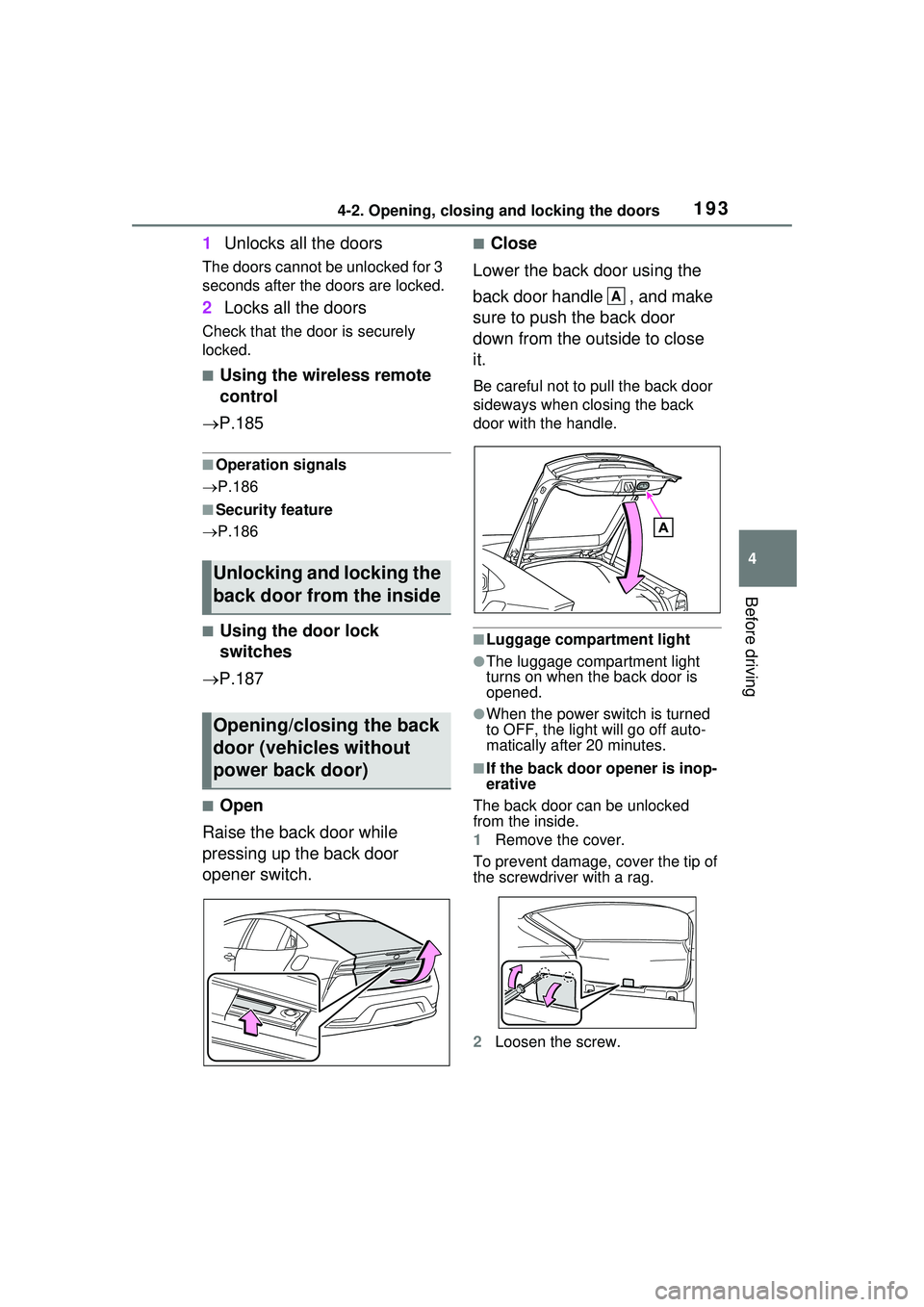
■Open
Raise the back door while
pressing up the back door
opener switch.
■Close
Lower the back door using the
back door handle , and make
sure to push the back door
down from the outside to close
it.
Be careful not to pull the back door
sideways when closing the back
door with the handle.
■Luggage compartment light
●The luggage compartment light
turns on when the back door is
opened.
●When the power switch is turned
to OFF, the light will go off auto-
matically after 20 minutes.
■If the back door opener is inop-
erative
The back door can be unlocked
from the inside.
1 Remove the cover.
To prevent damage, cover the tip of
the screwdriver with a rag.
2 Loosen the screw.
Unlocking and locking the
back door from the inside
Opening/closing the back
door (vehicles without
power back door)
A
Page 197 of 680
1974-2. Opening, closing and locking the doors
4
Before driving
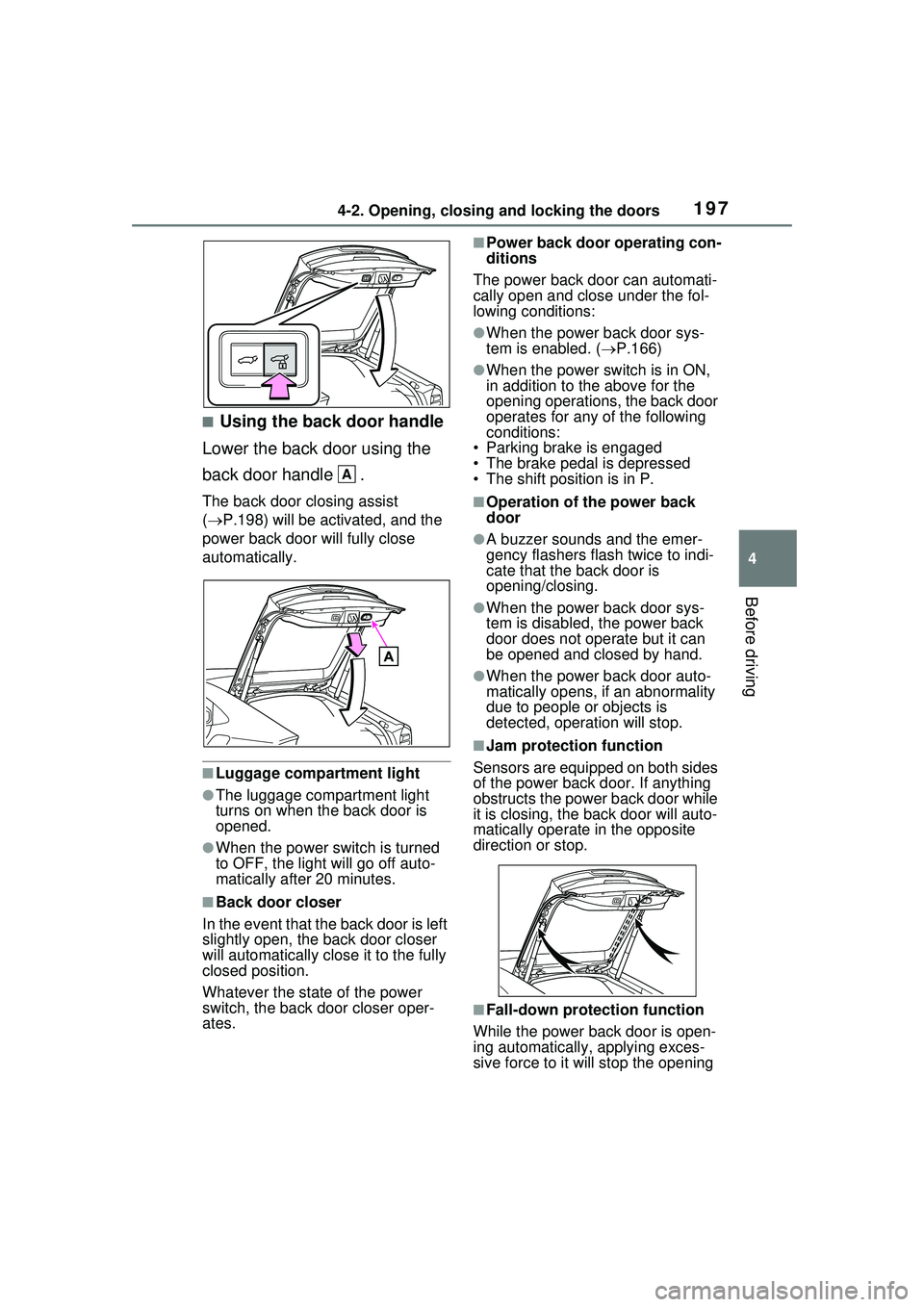
■Using the back door handle
Lower the back door using the
back door handle .
The back door closing assist
( P.198) will be activated, and the
power back door will fully close
automatically.
■Luggage compartment light
●The luggage compartment light
turns on when the back door is
opened.
●When the power switch is turned
to OFF, the light will go off auto-
matically after 20 minutes.
■Back door closer
In the event that the back door is left
slightly open, the back door closer
will automatically close it to the fully
closed position.
Whatever the stat e of the power
switch, the back door closer oper-
ates.
■Power back door operating con-
ditions
The power back door can automati-
cally open and close under the fol-
lowing conditions:
●When the power back door sys-
tem is enabled. ( P.166)
●When the power switch is in ON,
in addition to the above for the
opening operations, the back door
operates for any of the following
conditions:
• Parking brake is engaged
• The brake pedal is depressed
• The shift position is in P.
■Operation of the power back
door
●A buzzer sounds and the emer-
gency flashers flash twice to indi-
cate that the back door is
opening/closing.
●When the power back door sys-
tem is disabled, the power back
door does not operate but it can
be opened and closed by hand.
●When the power back door auto-
matically opens, if an abnormality
due to people or objects is
detected, operation will stop.
■Jam protection function
Sensors are equipped on both sides
of the power back door. If anything
obstructs the power back door while
it is closing, th e back door will auto-
matically operate in the opposite
direction or stop.
■Fall-down protection function
While the power back door is open-
ing automatically, applying exces-
sive force to it will stop the opening
A