light TOYOTA PRIUS PRIME 2023 Manual Online
[x] Cancel search | Manufacturer: TOYOTA, Model Year: 2023, Model line: PRIUS PRIME, Model: TOYOTA PRIUS PRIME 2023Pages: 680, PDF Size: 14.97 MB
Page 232 of 680
2324-6. Favorite settings
■Using the voice control system
(if equipped)
The following operations can be
performed using the voice control
system:
●Driving position registration
●Recalling the drivin g position (can
be operated only when the shift
position is in P)
For details regarding the voice con-
trol system, refer to the “MULTIME-
DIA OWNER’S MANUAL”.
■Seat positions that can be
memorized ( P.209)
The adjusted positions other than
the position adjusted by lumbar sup-
port switch can be recorded.
■Operating the driving position
memory after turning the power
switch to OFF
Recorded seat positions can be
activated up to 180 seconds after
the driver’s door is opened and
another 60 seconds after it is closed
again.
■In order to correctly use the
driving position memory func-
tion
If a seat position is already in the
furthest possible position and the
seat is operated in the same direc-
tion, the recorded position may be
slightly different when it is recalled.
■When recalling the driving posi-
tion
Take care when recalling the driving
position so that the head restraint
does not touch the ceiling.
■When the recorded seat posi-
tion cannot be recalled
The seat position may not be
recalled in some situations when the
seat position is recorded in a certain
range. For details, contact your
Toyota dealer.
■When My Settings is turned
off
Registering procedure
Record your driving position to
button “1” or “2” before perform-
ing the following:
Carry only the electronic key
you want to register, and then
close the driver’s door.
If 2 or more electronic keys are
in the vehicle, the driving posi-
tion cannot be recorded prop-
erly.
1 Check that the shift position
is in P.
2 Turn the power switch to ON.
3 Recall the driving position
that you want to record.
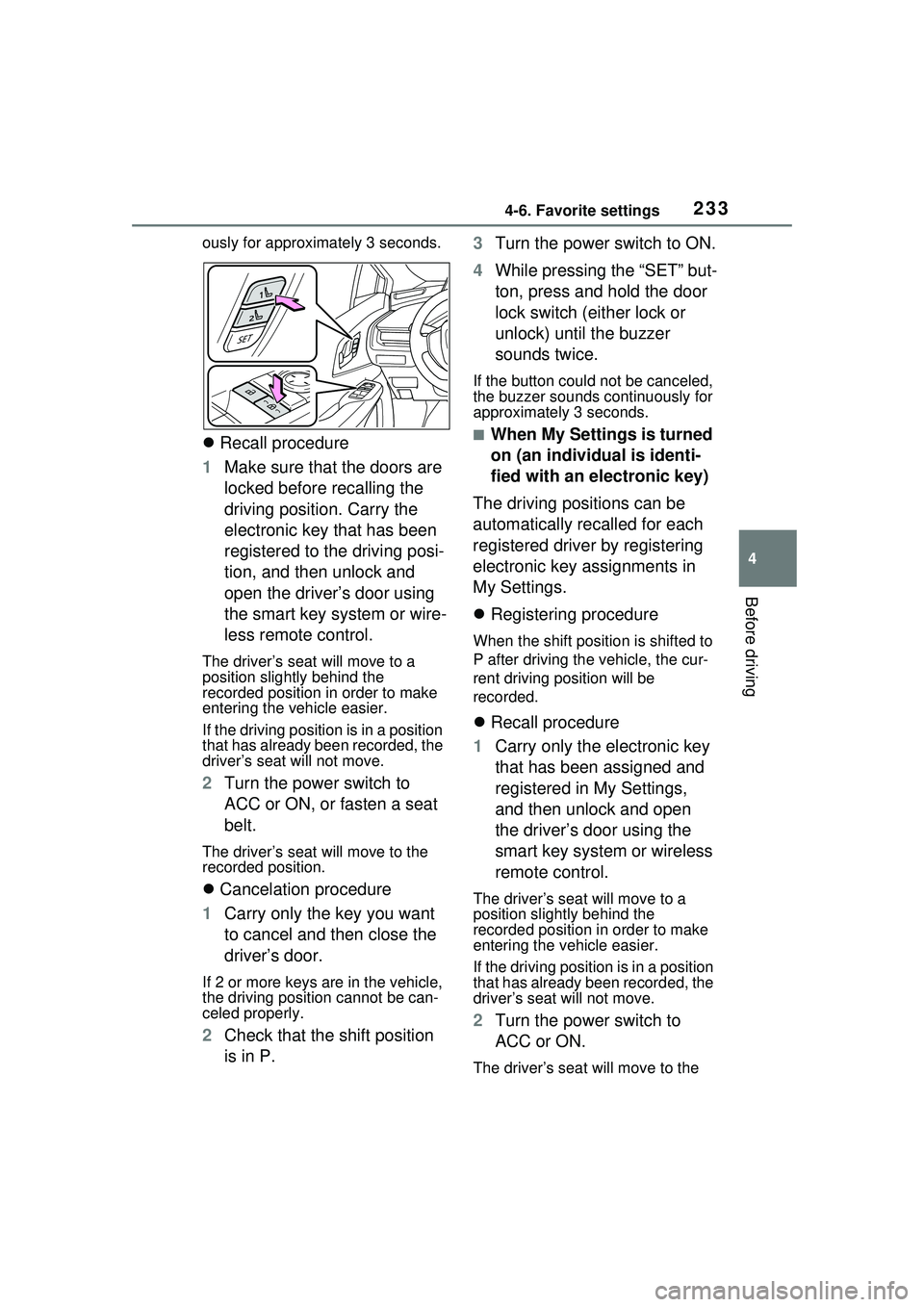
4 While pressing the recalled
button, press and hold the
door lock switch (either lock
or unlock) until the buzzer
sounds.
If the button could not be regis-
tered, the buzzer sounds continu-
WARNING
■Seat adjustment caution
Take care during seat adjustment
so that the seat does not strike
the rear passenger or squeeze
your body against the steering
wheel.
Registering/recalling/can-
celing a driving position
to an electronic key
(memory recall function)
Page 233 of 680
2334-6. Favorite settings
4
Before driving
ously for approximately 3 seconds.
Recall procedure
1 Make sure that the doors are
locked before recalling the
driving position. Carry the
electronic key that has been
registered to the driving posi-
tion, and then unlock and
open the driver’s door using
the smart key system or wire-
less remote control.
The driver’s seat will move to a
position slightly behind the
recorded position in order to make
entering the vehicle easier.
If the driving position is in a position
that has already been recorded, the
driver’s seat will not move.
2 Turn the power switch to
ACC or ON, or fasten a seat
belt.
The driver’s seat will move to the
recorded position.
Cancelation procedure
1 Carry only the key you want
to cancel and then close the
driver’s door.
If 2 or more keys are in the vehicle,
the driving position cannot be can-
celed properly.
2Check that the shift position
is in P. 3
Turn the power switch to ON.
4 While pressing the “SET” but-
ton, press and hold the door
lock switch (either lock or
unlock) until the buzzer
sounds twice.
If the button could not be canceled,
the buzzer sounds continuously for
approximately 3 seconds.
■When My Settings is turned
on (an individual is identi-
fied with an electronic key)
The driving positions can be
automatically recalled for each
registered driver by registering
electronic key assignments in
My Settings.
Registering procedure
When the shift position is shifted to
P after driving the vehicle, the cur-
rent driving position will be
recorded.
Recall procedure
1 Carry only the electronic key
that has been assigned and
registered in My Settings,
and then unlock and open
the driver’s door using the
smart key system or wireless
remote control.
The driver’s seat will move to a
position slightly behind the
recorded position in order to make
entering the vehicle easier.
If the driving position is in a position
that has already been recorded, the
driver’s seat will not move.
2Turn the power switch to
ACC or ON.
The driver’s seat will move to the
Page 237 of 680
237
5
5
Driving
Driving
5-1. Before drivingDriving the vehicle....... 239
Cargo and luggage ..... 246
Vehicle load limits ....... 249
Trailer towing .............. 250
Dinghy towing ............. 250
5-2. Driving procedures Power (ignition) switch 251
Transmission............... 256
Turn signal lever ......... 262
Parking brake .............. 263
Brake Hold .................. 266
5-3. Operating the lights and wipers
Headlight switch .......... 269
AHB (Automatic High Beam)........................ 272
Windshield wipers and washer....................... 275
5-4. Refueling Opening the fuel tank cap.................................. 279
5-5. Using the driving support systems
Toyota Safety Sense 3.0/Traffic Jam Assist soft-
ware update .............. 282
Toyota Safety Sense 3.0 .................................. 284
Driver monitor ............. 292PCS (Pre-Collision System)
.................................. 293
LTA (Lane Tracing Assist) .................................. 305
LCA (Lane Change Assist) .................................. 310
LDA (Lane Departure Alert) .................................. 313
PDA (Proactive driving assist) ........................ 320
FCTA (Front Cross Traffic Alert) .......................... 326
RSA (Road Sign Assist) .................................. 329
Dynamic radar cruise con- trol ............................. 331
Cruise control .............. 342
Emergency Driving Stop System ...................... 345
Traffic Jam Assist ........ 348
BSM (Blind Spot Monitor) .................................. 354
Safe Exit Assist ........... 359
Intuitive parking assist . 363
RCTA (Rear Cross Traffic Alert) function ............ 373
RCD (Rear Camera Detec- tion) function .............. 378
PKSB (Parking Support Brake) ........................ 382
Page 241 of 680
2415-1. Before driving
5
Driving
WARNING
■When driving the vehicle
●Do not drive if you are unfamil-
iar with the location of the brake
and accelerator pedals to avoid
depressing the wrong pedal.
• Accidentally depressing the accelerator pedal instead of the
brake pedal will result in sudden
acceleration that may lead to an
accident.
• When backing up, you may twist your body around, leading to a
difficulty in operating the pedals.
Make sure to operate the pedals
properly.
• Make sure to keep a correct driving posture even when mov-
ing the vehicle only slightly. This
allows you to depress the brake
and accelerator pedals properly.
• Depress the brake pedal using your right foot. Depressing the
brake pedal using your left foot
may delay response in an emer-
gency, resulting in an accident.
●The driver should pay extra
attention to pedestrians when
the vehicle is powered only by
the electric motor (traction
motor). As there is no engine
noise, the pedestrians may mis-
judge the vehicle’s movement.
Even if the Acoustic Vehicle
Alerting System is operating,
drive with care as pedestrians in
the vicinity may still not notice
the vehicle if the surrounding
area is noisy.
●Do not drive the vehicle over or
stop the vehicle near flammable
materials such as leaves, paper
or rags.
The exhaust system and
exhaust gases can be
extremely hot. These hot parts
may cause a fire if there is any
flammable material nearby.
●During normal driving, do not
turn off the hybrid system. Turn-
ing the hybrid s ystem off while
driving will not cause loss of
steering or braking control.
However, power assist for the
steering wheel may be lost mak-
ing it difficult to steer smoothly
before stopping the vehicle
depending on the remaining
charge in the 12-volt battery or
usage conditions. In this situa-
tion, you should pull over and
stop the vehicle as soon as it is
safe to do so.
In the event of an emergency,
such as if it be comes impossible
to stop the vehicle in the normal
way: P.547
●Use engine braking (downshift)
to maintain a safe speed when
driving down a steep hill.
Using the brakes continuously
may cause the brakes to over-
heat and lose effectiveness.
( P.256)
●Do not adjust the position of the
steering wheel, the seat, inside
rear view mirror (if equipped),
Digital Rear-view Mirror (if
equipped) or outside rear view
mirrors while driving.
Doing so may resu lt in a loss of
vehicle control.
●Always check that all passen-
gers’ arms, head or other parts
of their body are not outside the
vehicle.
Page 242 of 680
2425-1. Before driving
WARNING
●Do not drive across a river or
through other bodies of water.
This may cause electric/elec-
tronic components to short cir-
cuit, damage the hybrid system
or cause other serious damage
to the vehicle.
●Do not drive in excess of the
speed limit. Even if the legal
speed limit permits it, do not
drive over 85 mph (140 km/h)
unless your vehicle has high-
speed capability tires. Driving
over 85 mph (140 km/h) may
result in tire failure, loss of con-
trol and possible injury. Be sure
to consult a tire dealer to deter-
mine whether the tires on your
vehicle are high-speed capabil-
ity tires or not before driving at
such speeds.
■When driving on slippery
road surfaces
●Sudden braking, acceleration
and steering may cause tire
slippage and reduce your ability
to control the vehicle.
●Sudden acceleration, engine
braking due to shifting, or
changes in engine speed could
cause the vehicle to skid, result-
ing in an accident.
●After driving through a puddle,
lightly depress the brake pedal
to make sure that the brakes
are functioning properly. Wet
brake pads may prevent the
brakes from functioning prop-
erly. If the brakes on only one
side are wet and not functioning
properly, steering control may
be affected.
■When shifting the shift posi-
tion
●Do not let the vehicle roll back-
ward while a fo rward driving
position is selected, or roll for-
ward while the shift position is in
R.
Doing so may result in an acci-
dent or damage to the vehicle.
●Do not shift the shift position to
P while the vehicle is moving.
Doing so can damage the trans-
mission and may result in a loss
of vehicle control.
●Do not shift the shift position to
R while the vehicle is moving
forward. Doing so can damage
the transmission and may result
in a loss of vehicle control.
●Do not shift the shift position to
a driving position while the vehi-
cle is moving backward. Doing
so can damage the transmis-
sion and may result in a loss of
vehicle control.
●Changing the shift position to N
while the vehicle is moving will
disengage the hybrid system.
Regenerative braking is not
available with the hybrid system
disengaged.
●Do not shift the shift position
with the accelerator pedal
depressed. Changing the shift
position to any positions other
than P or N may lead to unex-
pected rapid acceleration of the
vehicle that may cause an acci-
dent and result in death or seri-
ous injury.
After changing the shift position,
make sure to confirm the cur-
rent shift position displayed on
the shift position indicator inside
the meter.
Page 243 of 680
2435-1. Before driving
5
Driving
WARNING
■If you hear a squealing or
scraping noise (brake pad
wear limit indicators)
Have the brake pads checked and
replaced by your Toyota dealer as
soon as possible.
Rotor damage may result if the
pads are not replaced when
needed.
It is dangerous to drive the vehicle
when the wear limits of the brake
pads and/or those of the brake
discs are exceeded.
■When the vehicle is stopped
●Do not depress the accelerator
pedal unnecessarily.
If the shift position is in any
position other than P or N, the
vehicle may accelerate sud-
denly and unexpectedly, caus-
ing an accident.
●In order to prevent accidents
due to the vehicle rolling away,
always keep depressing the
brake pedal while stopped with
the “READY” indicator is illumi-
nated, and apply the parking
brake as necessary.
●If the vehicle is stopped on an
incline, in order to prevent acci-
dents caused by the vehicle roll-
ing forward or backward, always
depress the brake pedal and
securely apply the parking
brake as needed.
●Avoid revving or racing the
engine.
Running the engine at high
speed while the vehicle is
stopped may cause the exhaust
system to overheat, which could
result in a fire if combustible
material is nearby.
■When the vehicle is parked
●Do not leave glasses, cigarette
lighters, spray cans, or soft
drink cans in the vehicle when it
is in the sun.
Doing so may result in the fol-
lowing:
• Gas may leak from a cigarette lighter or spray can, and may
lead to a fire.
• The temperature inside the vehicle may cause the plastic
lenses and plastic material of
glasses to deform or crack.
• Soft drink cans may fracture, causing the contents to spray
over the interior of the vehicle,
and may also cause a short cir-
cuit in the vehicle’s electrical
components.
●Do not leave cigarette lighters in
the vehicle. If a cigarette lighter
is in a place such as the glove
box or on the floor, it may be lit
accidentally when luggage is
loaded or the seat is adjusted,
causing a fire.
●Do not attach adhesive discs to
the windshield or windows. Do
not place containers such as air
fresheners on the instrument
panel or dashboard. Adhesive
discs or containers may act as
lenses, causing a fire in the
vehicle.
●Do not leave a door or window
open if the curved glass is
coated with a metallized film
such as a silver-colored one.
Reflected sunlight may cause
the glass to act as a lens, caus-
ing a fire.
Page 253 of 680
2535-2. Driving procedures
5
Driving
1Stop the vehicle completely.
2 If the parking brake is in man-
ual mode, set the parking
brake. ( P.263)
3 Press the P position switch.
( P.257)
Check that the shift position indica-
tor shows P and the parking brake
indicator is illuminated.
4Press the power switch.
The hybrid system will stop, and the meter display will
be extinguished
(the shift position indicator will be
extinguished a few seconds after
the meter display).
5 Release the brake pedal and
check that “ACCESSORY” or
“POWER ON” is not shown
on the meter.
■When the shift control system
malfunctions
If the shift control system is malfunc-
tioning, when attempting to turn the
power switch off, it may not be able
to be turned off. In this situation, it
may be possible to turn the power
switch off by applying the parking
brake and then operating the power
switch.
If there is a malfunction in the sys-
tem, have the vehicle inspected by
your Toyota dealer immediately.
■Automatic hybrid system shut
off feature
●The vehicle is equipped with a
feature that automa tically shuts off
the hybrid system when the shift
position is in P with the hybrid sys-
tem operating for an extended
period.
●The hybrid system will automati-
cally shut off after approximately 1
hour if it has been left operating
while the shift position is in P.
●The timer for the automatic hybrid
system shut off fe ature will reset if
the brake pedal is depressed or if
the shift position is in a position
other than P.
●After the vehicle is parked, if the
door is locked with the door lock
switch ( P.187) from the inside
or the mechanical key ( P.587)
from the outside, the automatic
hybrid system shut off feature will
be disabled. The timer for the
automatic hybrid system shut off
feature will be re- enabled if the
driver’s door is opened.
WARNING
■When starting the hybrid sys-
tem
Always start the hybrid system
while sitting in the driver’s seat.
Do not depress the accelerator
pedal while starting the hybrid
system under any circumstances.
Doing so may cause an accident
resulting in death or serious
injury.
NOTICE
■When starting the hybrid sys-
tem
If the hybrid system becomes diffi-
cult to start, have your vehicle
checked by your Toyota dealer
immediately.
■Symptoms indicating a mal-
function with the power
switch
If the power switch seems to be
operating somewhat differently
than usual, such as the switch
sticking slightly, there may be a
malfunction. Contact your Toyota
dealer immediately.
Stopping the hybrid sys-
tem
Page 254 of 680
2545-2. Driving procedures
Modes can be changed by
pressing the power switch with
the brake pedal released. (The
mode changes each time the
switch is pressed.)
WARNING
■Stopping the hybrid system
in an emergency
●If you want to stop the hybrid
system in an emergency while
driving the vehicle, press and
hold the power switch for more
than 2 seconds, or press it
briefly 3 times or more in suc-
cession. (P.547)
However, do not touch the
power switch while driving
except in an emergency. Turn-
ing the hybrid system off while
driving will not cause loss of
steering or braking control.
However, power assist for the
steering wheel may be lost mak-
ing it difficult to steer smoothly
before stopping the vehicle
depending on the remaining
charge in the 12-volt battery or
usage conditions. In this situa-
tion, you should pull over and
stop the vehicle as soon as it is
safe to do so.
●If the power switch is operated
while the vehicle is running, a
warning message will be shown
on the multi-information display
and a buzzer sounds.
●When restarting the hybrid sys-
tem after an emergency shut-
down, shift the shift position to
N and press the power switch
shortly and firmly.
■When parking
Exhaust gases include harmful
carbon monoxide (CO), which is
colorless and odorless. Observe
the following precautions.
Failure to do so may cause
exhaust gases to enter the vehicle
and may lead to an accident
caused by light-headedness, or
may lead to death or a serious
health hazard.
●If the vehicle is in a poorly venti-
lated area or a closed area,
such as a garage, stop the
hybrid system.
●Do not leave the vehicle with
the hybrid system operating for
a long time. If such a situation
cannot be avoided, park the
vehicle in an open space and
ensure that exhaust fumes do
not enter the vehicle interior.
●Do not leave the hybrid system
operating in an area with snow
build-up, or where it is snowing.
If snowbanks build up around
the vehicle while the hybrid sys-
tem is operating, exhaust gases
may collect and enter the vehi-
cle.
Changing power switch
modes
Page 261 of 680
2615-2. Driving procedures
5
Driving
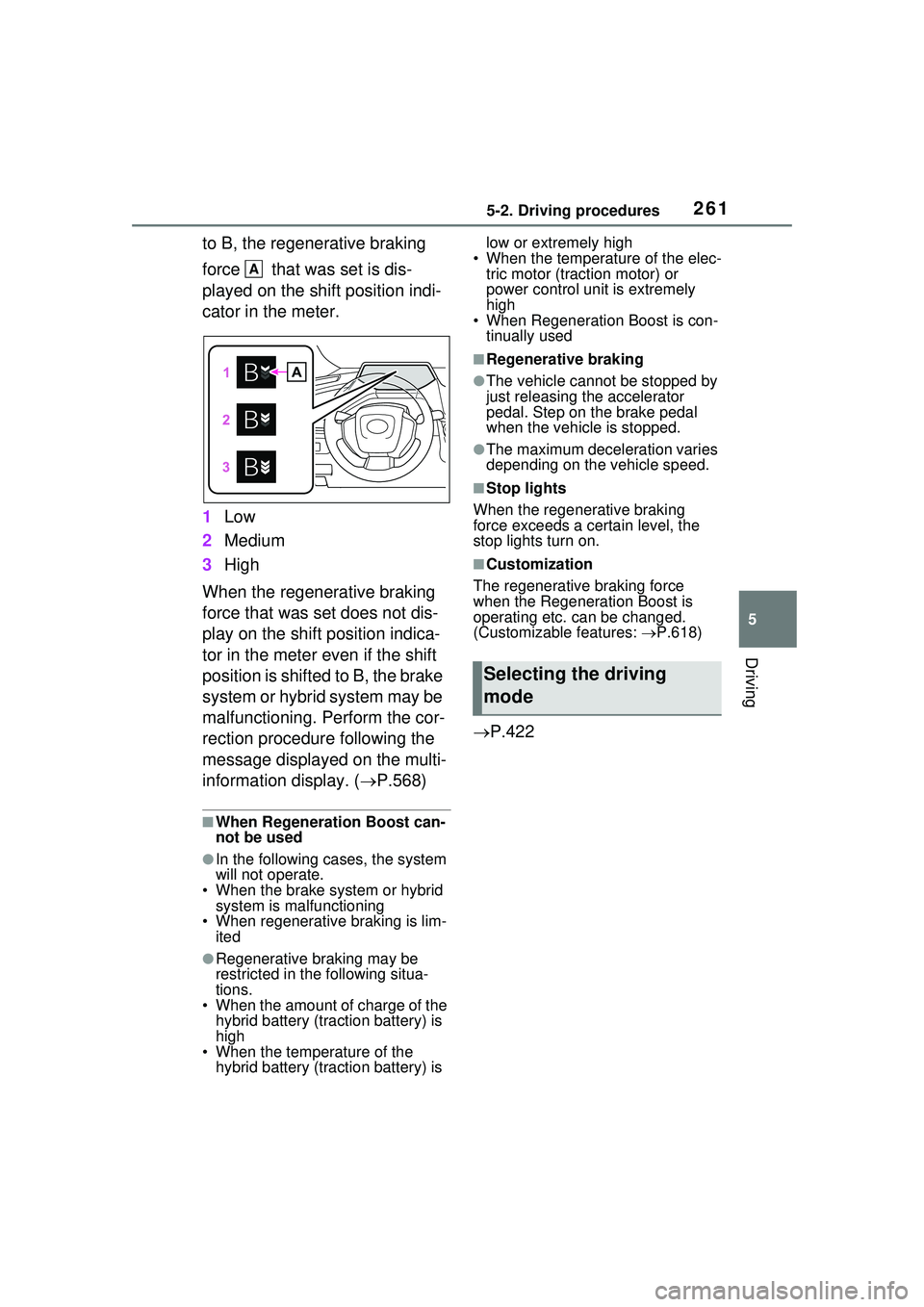
to B, the regenerative braking
force that was set is dis-
played on the shift position indi-
cator in the meter.
1Low
2 Medium
3 High
When the regenerative braking
force that was set does not dis-
play on the shift position indica-
tor in the meter even if the shift
position is shifted to B, the brake
system or hybrid system may be
malfunctioning. Perform the cor-
rection procedure following the
message displayed on the multi-
information display. ( P.568)
■When Regeneration Boost can-
not be used
●In the following cases, the system
will not operate.
• When the brake system or hybrid system is malfunctioning
• When regenerative braking is lim-
ited
●Regenerative braking may be
restricted in the following situa-
tions.
• When the amount of charge of the hybrid battery (traction battery) is
high
• When the temperature of the hybrid battery (traction battery) is low or extremely high
• When the temperature of the elec- tric motor (traction motor) or
power control unit is extremely
high
• When Regeneration Boost is con-
tinually used
■Regenerative braking
●The vehicle cannot be stopped by
just releasing the accelerator
pedal. Step on the brake pedal
when the vehicle is stopped.
●The maximum deceleration varies
depending on the vehicle speed.
■Stop lights
When the regenerative braking
force exceeds a certain level, the
stop lights turn on.
■Customization
The regenerative braking force
when the Regeneration Boost is
operating etc. can be changed.
(Customizable features: P.618)
P.422
A
Selecting the driving
mode
Page 263 of 680
2635-2. Driving procedures
5
Driving
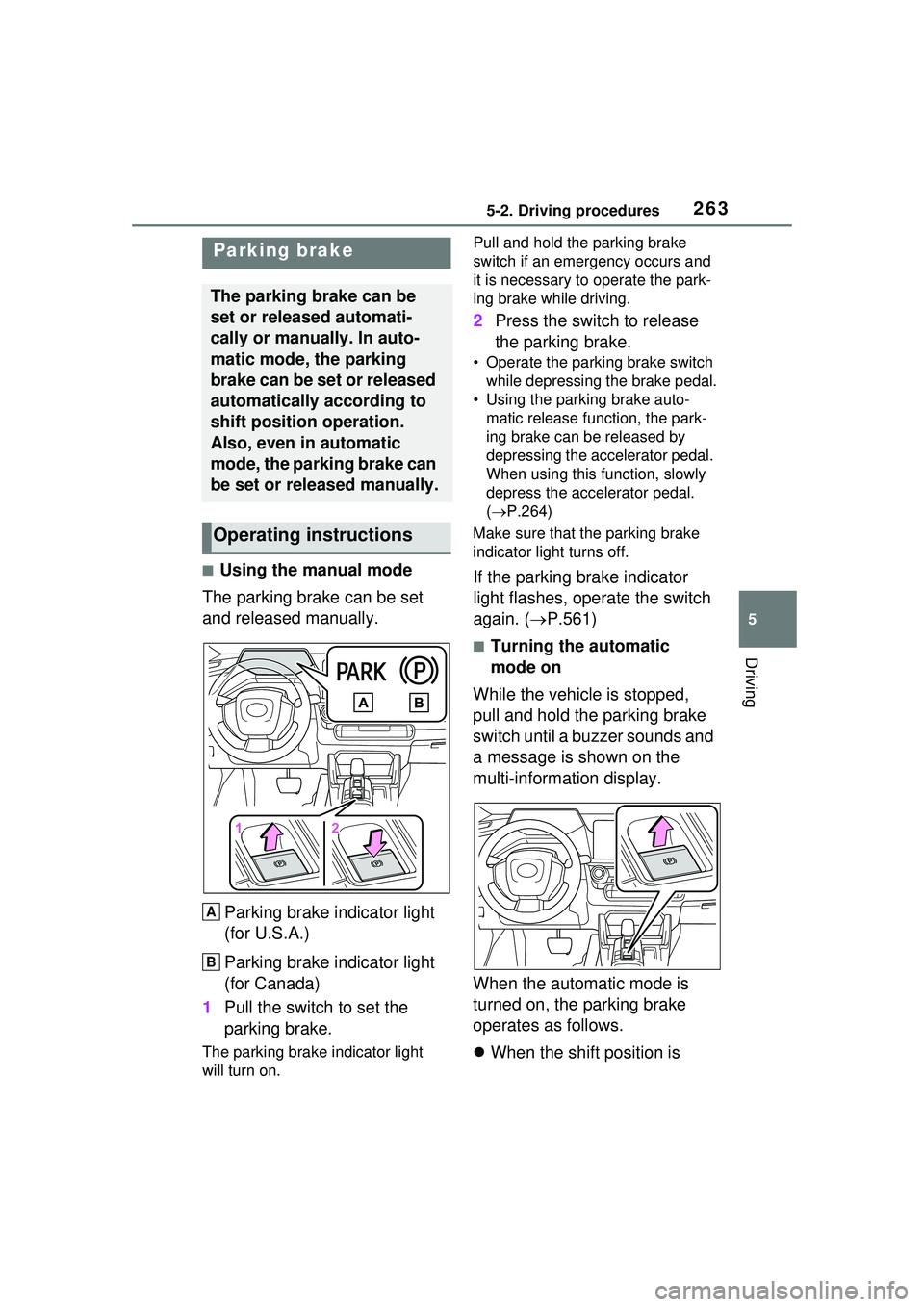
■Using the manual mode
The parking brake can be set
and released manually.
Parking brake indicator light
(for U.S.A.)
Parking brake indicator light
(for Canada)
1 Pull the switch to set the
parking brake.
The parking brake indicator light
will turn on. Pull and hold the parking brake
switch if an emergency occurs and
it is necessary to operate the park-
ing brake while driving.
2
Press the switch to release
the parking brake.
• Operate the parking brake switch
while depressing the brake pedal.
• Using the parking brake auto- matic release function, the park-
ing brake can be released by
depressing the accelerator pedal.
When using this function, slowly
depress the accelerator pedal.
( P.264)
Make sure that the parking brake
indicator light turns off.
If the parking brake indicator
light flashes, operate the switch
again. ( P.561)
■Turning the automatic
mode on
While the vehicle is stopped,
pull and hold the parking brake
switch until a buzzer sounds and
a message is shown on the
multi-information display.
When the automatic mode is
turned on, the parking brake
operates as follows.
When the shift position is
Parking brake
The parking brake can be
set or released automati-
cally or manually. In auto-
matic mode, the parking
brake can be set or released
automatically according to
shift position operation.
Also, even in automatic
mode, the parking brake can
be set or released manually.
Operating instructions
A
B