park assist TOYOTA PRIUS V 2013 Accessories, Audio & Navigation (in English)
[x] Cancel search | Manufacturer: TOYOTA, Model Year: 2013, Model line: PRIUS V, Model: TOYOTA PRIUS V 2013Pages: 411, PDF Size: 6.96 MB
Page 348 of 411
348
2. ADVANCED PARKING GUIDANCE SYSTEM
PRIUS_v_Navi_OM47828U_(U)
12.08.22 16:15
1Check that the assist mode switch is
ON.
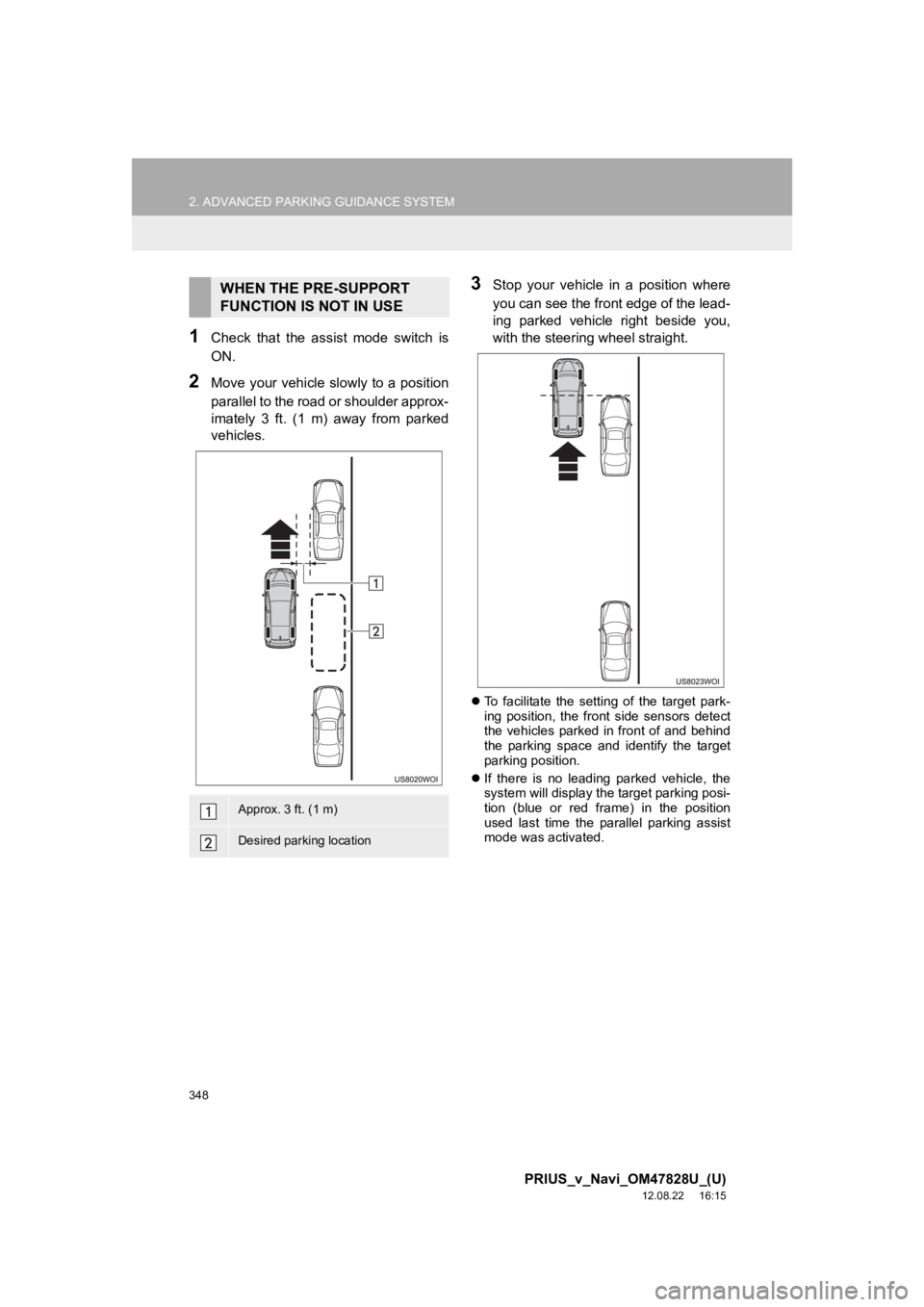
2Move your vehicle slowly to a position
parallel to the road or shoulder approx-
imately 3 ft. (1 m) away from parked
vehicles.
3Stop your vehicle in a position where
you can see the front edge of the lead-
ing parked vehicle right beside you,
with the steering wheel straight.
To facilitate the setting of the target park-
ing position, the front side sensors detect
the vehicles parked in front of and behind
the parking space and identify the target
parking position.
If there is no leading parked vehicle, the
system will display the target parking posi-
tion (blue or red frame) in the position
used last time the parallel parking assist
mode was activated.
WHEN THE PRE-SUPPORT
FUNCTION IS NOT IN USE
Approx. 3 ft. (1 m)
Desired parking location
Page 349 of 411
349
2. ADVANCED PARKING GUIDANCE SYSTEM
9
PRIUS_v_Navi_OM47828U_(U)
12.08.22 16:15
PERIPHERAL MONITORING SYSTEM
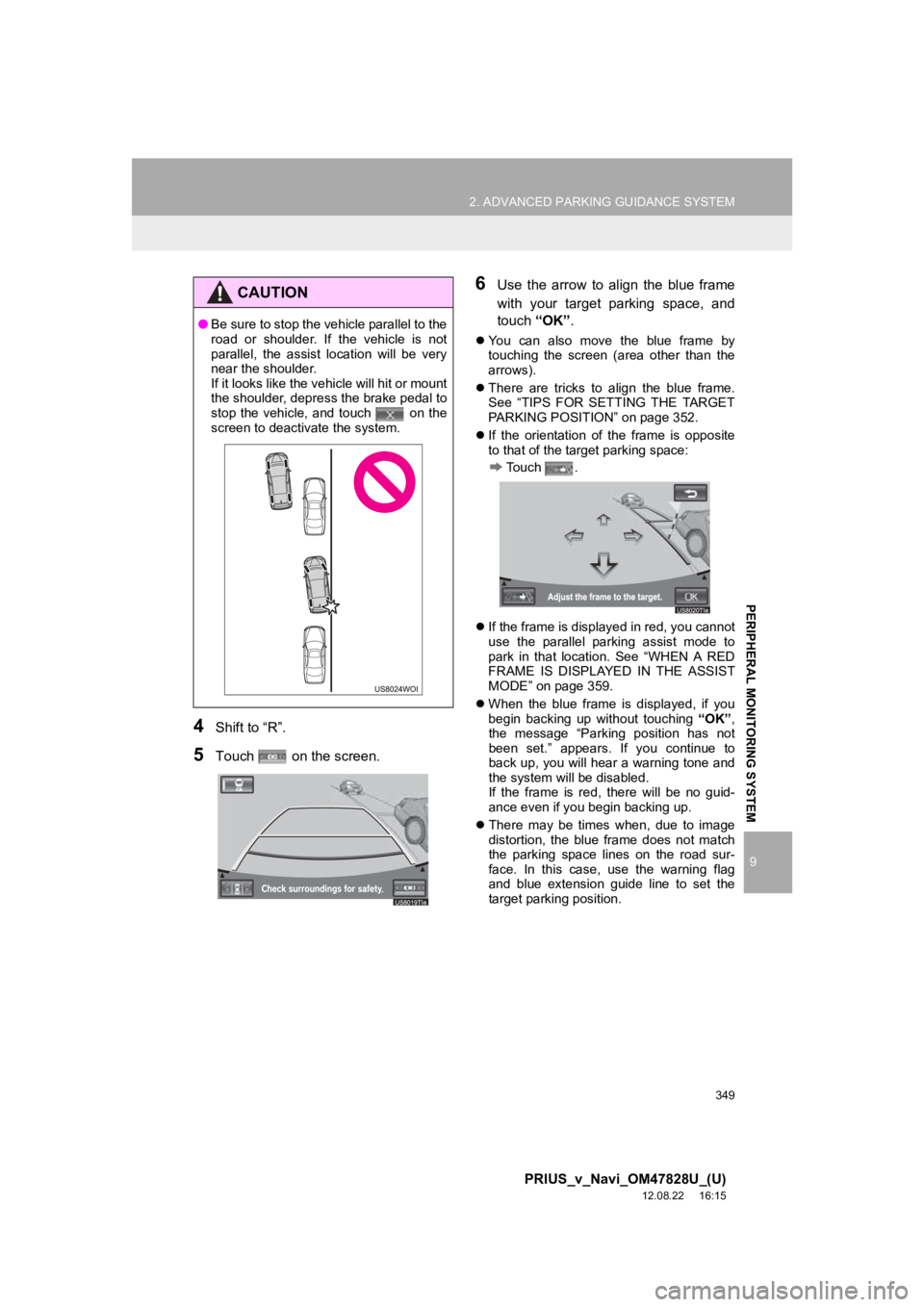
4Shift to “R”.
5Touch on the screen.
6Use the arrow to align the blue frame
with your target parking space, and
touch “OK”.
You can also move the blue frame by
touching the screen (area other than the
arrows).
There are tricks to align the blue frame.
See “TIPS FOR SETTING THE TARGET
PARKING POSITION” on page 352.
If the orientation of the frame is opposite
to that of the target parking space:
Touch .
If the frame is displayed in red, you cannot
use the parallel parking assist mode to
park in that location. See “WHEN A RED
FRAME IS DISPLAYED IN THE ASSIST
MODE” on page 359.
When the blue frame is displayed, if you
begin backing up without touching “OK”,
the message “Parking position has not
been set.” appears. If you continue to
back up, you will hear a warning tone and
the system will be disabled.
If the frame is red, there will be no guid-
ance even if you begin backing up.
There may be times when, due to image
distortion, the blue frame does not match
the parking space lines on the road sur-
face. In this case, use the warning flag
and blue extension guide line to set the
target parking position.
CAUTION
●Be sure to stop the vehicle parallel to the
road or shoulder. If the vehicle is not
parallel, the assist location will be very
near the shoulder.
If it looks like the vehicle will hit or mount
the shoulder, depress the brake pedal to
stop the vehicle, and touch on the
screen to deactivate the system.
Page 350 of 411
350
2. ADVANCED PARKING GUIDANCE SYSTEM
PRIUS_v_Navi_OM47828U_(U)
12.08.22 16:15
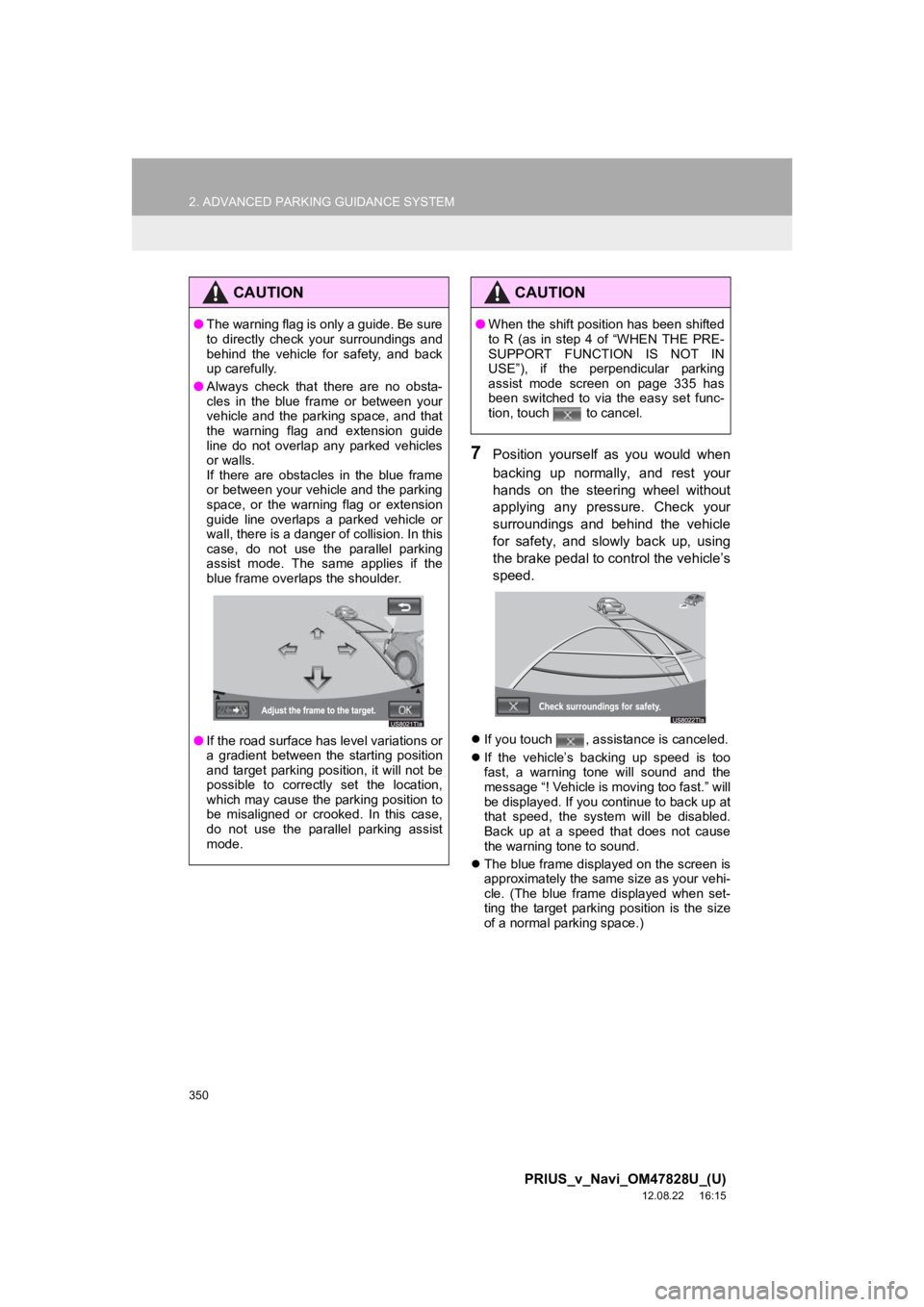
7Position yourself as you would when
backing up normally, and rest your
hands on the steering wheel without
applying any pressure. Check your
surroundings and behind the vehicle
for safety, and slowly back up, using
the brake pedal to control the vehicle’s
speed.
If you touch , assistance is canceled.
If the vehicle’s backing up speed is too
fast, a warning tone will sound and the
message “! Vehicle is moving too fast.” will
be displayed. If you continue to back up at
that speed, the system will be disabled.
Back up at a speed that does not cause
the warning tone to sound.
The blue frame displayed on the screen is
approximately the same size as your vehi-
cle. (The blue frame displayed when set-
ting the target parking position is the size
of a normal parking space.)
CAUTION
●The warning flag is only a guide. Be sure
to directly check your surroundings and
behind the vehicle for safety, and back
up carefully.
● Always check that there are no obsta-
cles in the blue frame or between your
vehicle and the parking space, and that
the warning flag and extension guide
line do not overlap any parked vehicles
or walls.
If there are obstacles in the blue frame
or between your vehicle and the parking
space, or the warning flag or extension
guide line overlaps a parked vehicle or
wall, there is a danger of collision. In this
case, do not use the parallel parking
assist mode. The same applies if the
blue frame overlaps the shoulder.
● If the road surface has level variations or
a gradient between the starting position
and target parking position, it will not be
possible to correctly set the location,
which may cause the parking position to
be misaligned or crooked. In this case,
do not use the parallel parking assist
mode.
CAUTION
●When the shift position has been shifted
to R (as in step 4 of “WHEN THE PRE-
SUPPORT FUNCTION IS NOT IN
USE”), if the perpendicular parking
assist mode screen on page 335 has
been switched to via the easy set func-
tion, touch to cancel.
Page 351 of 411
351
2. ADVANCED PARKING GUIDANCE SYSTEM
9
PRIUS_v_Navi_OM47828U_(U)
12.08.22 16:15
PERIPHERAL MONITORING SYSTEM
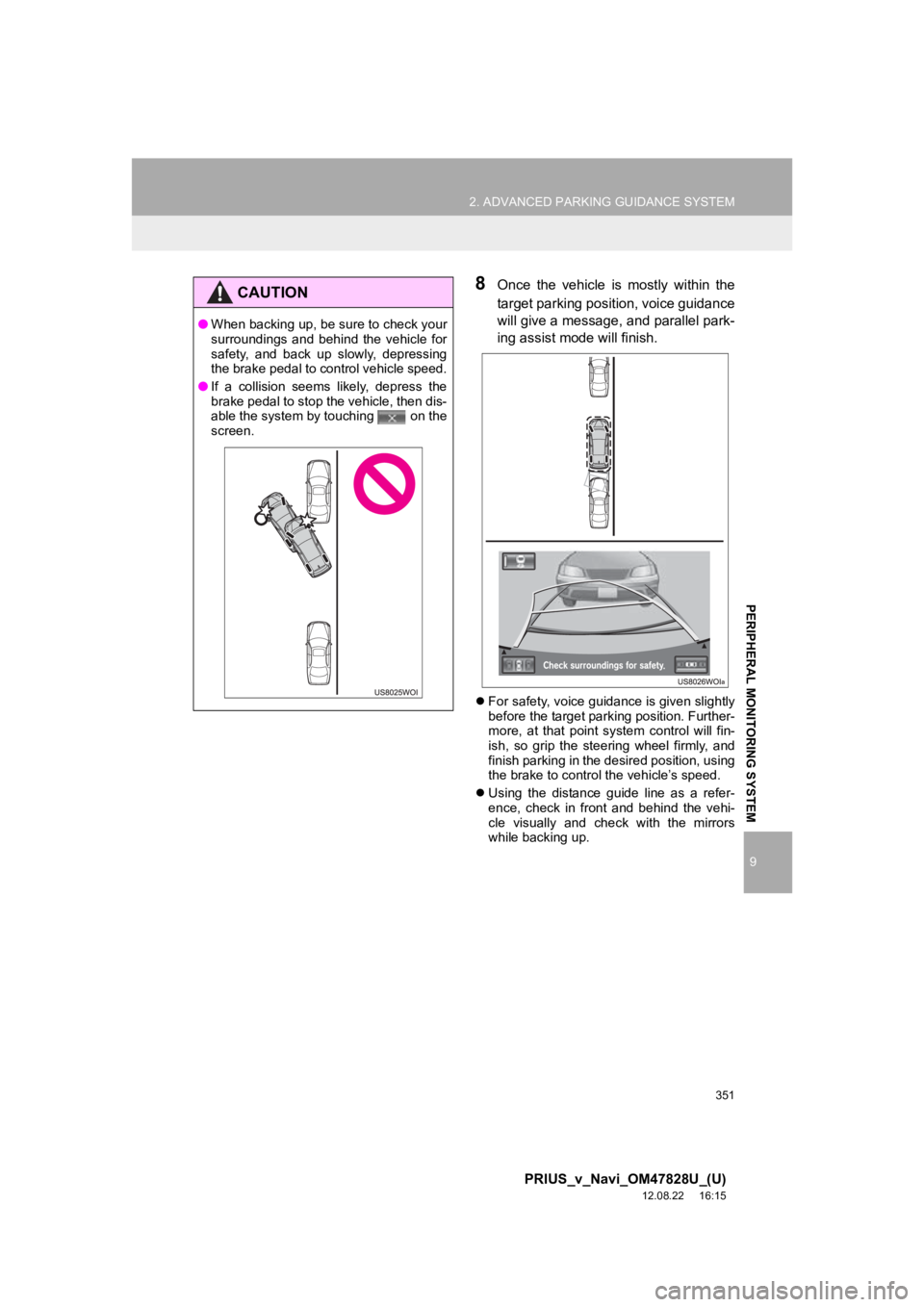
8Once the vehicle is mostly within the
target parking position, voice guidance
will give a message, and parallel park-
ing assist mode will finish.
For safety, voice guidance is given slightly
before the target parking position. Further-
more, at that point system control will fin-
ish, so grip the steering wheel firmly, and
finish parking in the desired position, using
the brake to control the vehicle’s speed.
Using the distance guide line as a refer-
ence, check in front and behind the vehi-
cle visually and check with the mirrors
while backing up.
CAUTION
●When backing up, be sure to check your
surroundings and behind the vehicle for
safety, and back up slowly, depressing
the brake pedal to control vehicle speed.
● If a collision seems likely, depress the
brake pedal to stop the vehicle, then dis-
able the system by touching on the
screen.
Page 353 of 411
353
2. ADVANCED PARKING GUIDANCE SYSTEM
9
PRIUS_v_Navi_OM47828U_(U)
12.08.22 16:15
PERIPHERAL MONITORING SYSTEM
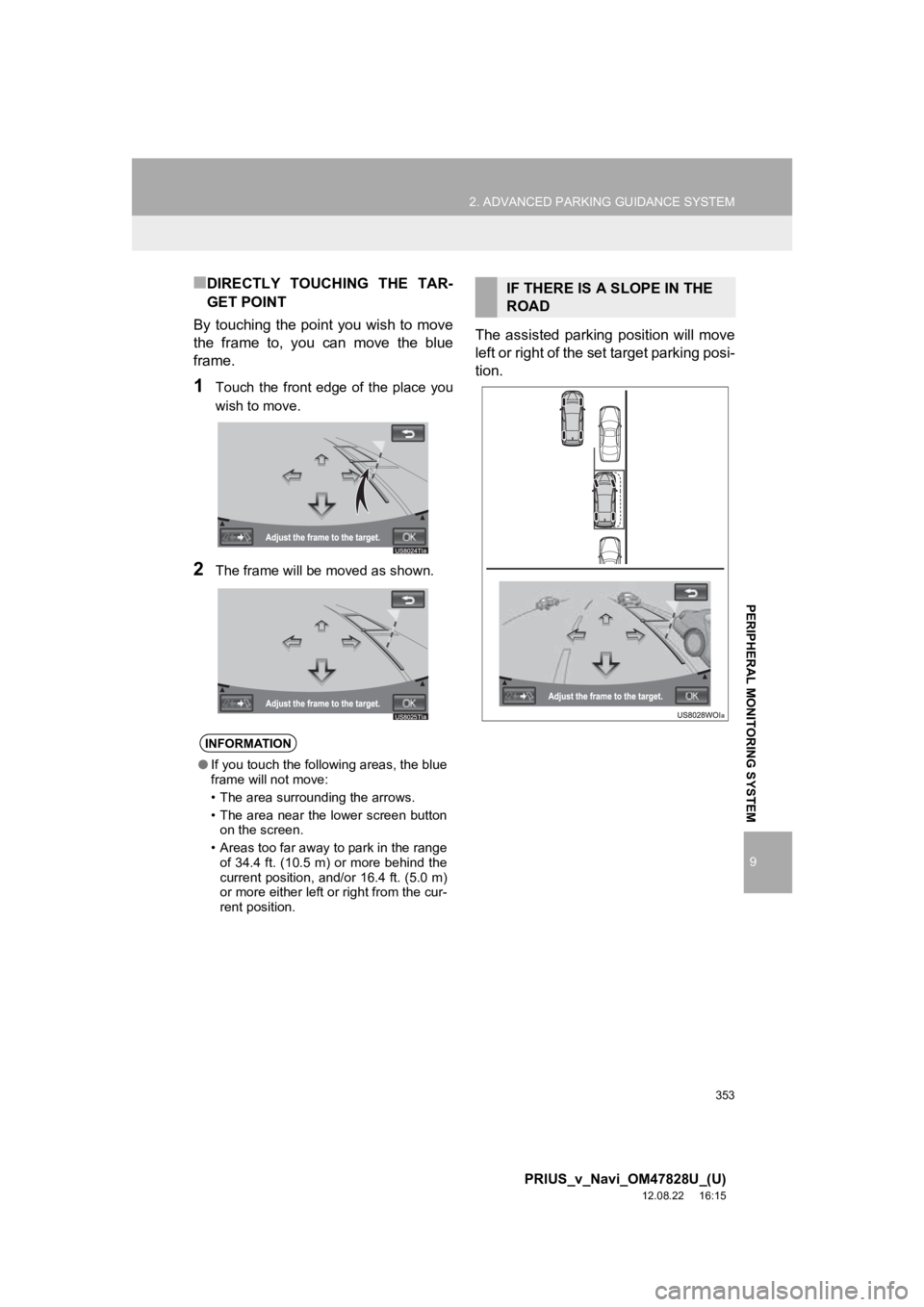
■DIRECTLY TOUCHING THE TAR-
GET POINT
By touching the point you wish to move
the frame to, you can move the blue
frame.
1Touch the front edge of the place you
wish to move.
2The frame will be moved as shown.
The assisted parking position will move
left or right of the set target parking posi-
tion.
INFORMATION
● If you touch the following areas, the blue
frame will not move:
• The area surrounding the arrows.
• The area near the lower screen button
on the screen.
• Areas too far away to park in the range of 34.4 ft. (10.5 m) or more behind the
current position, and/or 16.4 ft. (5.0 m)
or more either left or right from the cur-
rent position.
IF THERE IS A SLOPE IN THE
ROAD
Page 354 of 411
354
2. ADVANCED PARKING GUIDANCE SYSTEM
PRIUS_v_Navi_OM47828U_(U)
12.08.22 16:15
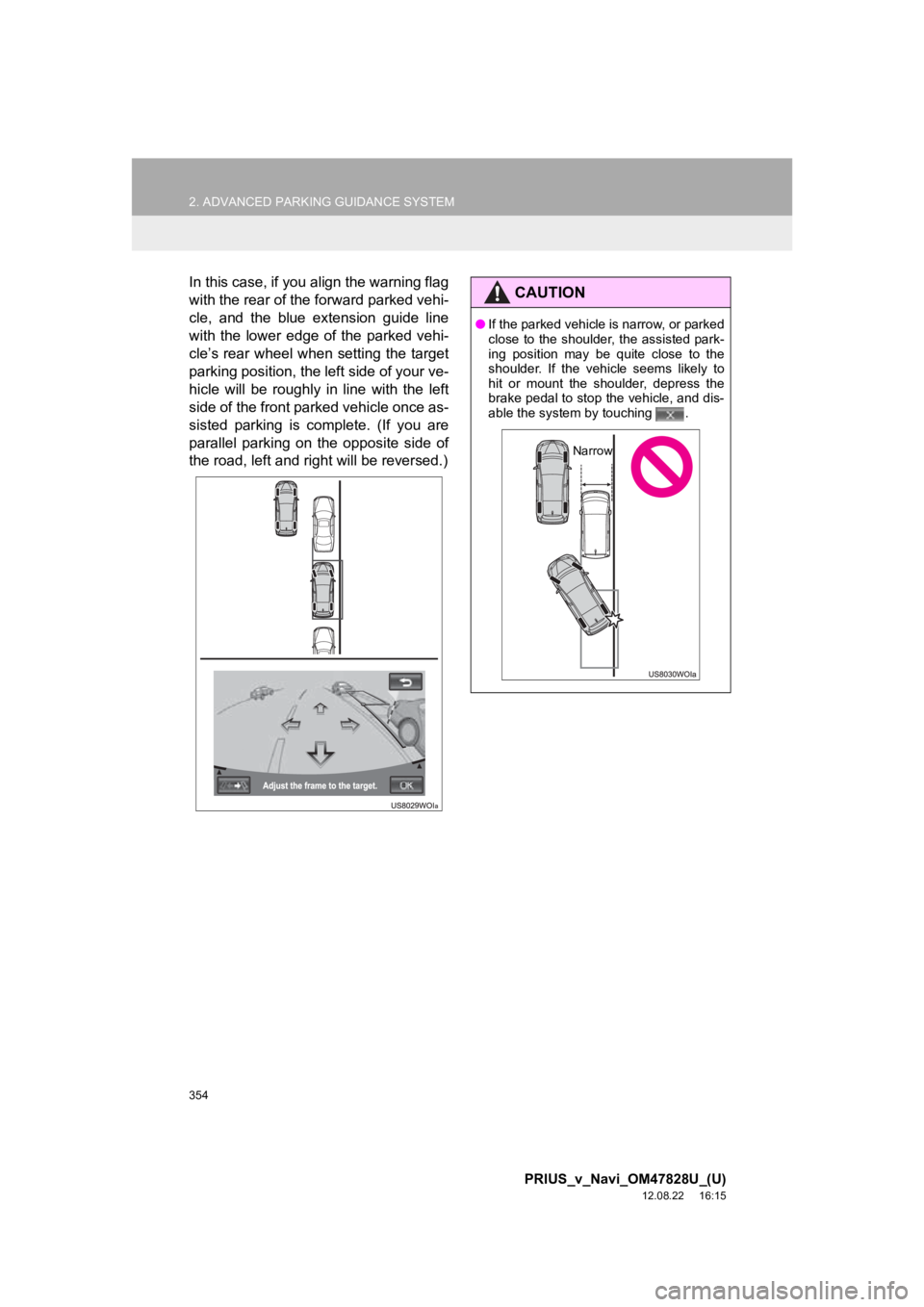
In this case, if you align the warning flag
with the rear of the forward parked vehi-
cle, and the blue extension guide line
with the lower edge of the parked vehi-
cle’s rear wheel when setting the target
parking position, the left side of your ve-
hicle will be roughly in line with the left
side of the front parked vehicle once as-
sisted parking is complete. (If you are
parallel parking on the opposite side of
the road, left and right will be reversed.)CAUTION
●If the parked vehicle is narrow, or parked
close to the shoulder, the assisted park-
ing position may be quite close to the
shoulder. If the vehicle seems likely to
hit or mount the shoulder, depress the
brake pedal to stop the vehicle, and dis-
able the system by touching .
Narrow
Page 355 of 411
355
2. ADVANCED PARKING GUIDANCE SYSTEM
9
PRIUS_v_Navi_OM47828U_(U)
12.08.22 16:15
PERIPHERAL MONITORING SYSTEM
5. WHAT TO DO WHEN THIS SORT OF MESSAGE IS DISPLAYED
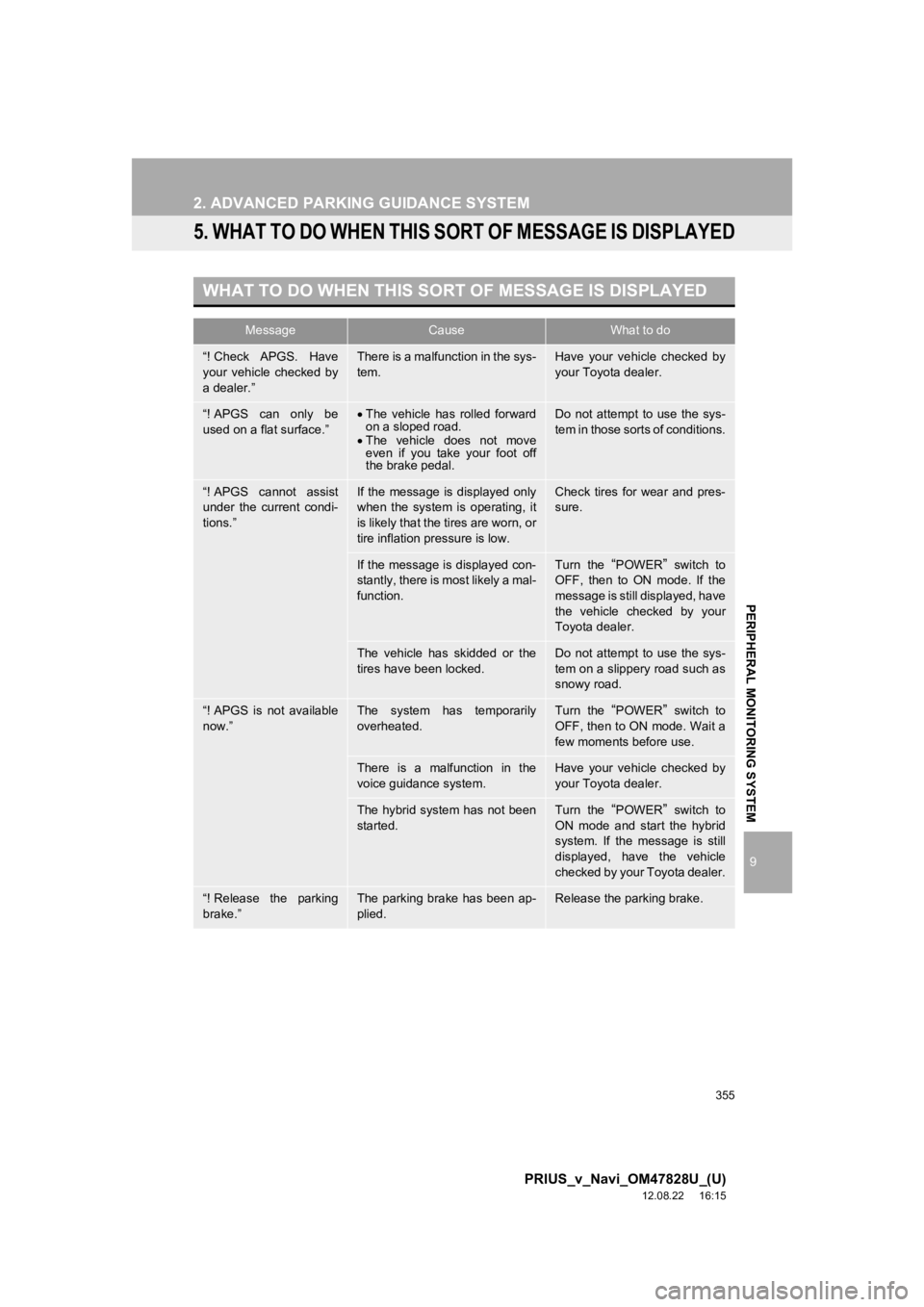
WHAT TO DO WHEN THIS SORT OF MESSAGE IS DISPLAYED
MessageCauseWhat to do
“! Check APGS. Have
your vehicle checked by
a dealer.”There is a malfunction in the sys-
tem.Have your vehicle checked by
your Toyota dealer.
“! APGS can only be
used on a flat surface.”The vehicle has rolled forward
on a sloped road.
The vehicle does not move
even if you take your foot off
the brake pedal.Do not attempt to use the sys-
tem in those sorts of conditions.
“! APGS cannot assist
under the current condi-
tions.”If the message is displayed only
when the system is operating, it
is likely that the tires are worn, or
tire inflation pressure is low.Check tires for wear and pres-
sure.
If the message is displayed con-
stantly, there is most likely a mal-
function.Turn the “POWER” switch to
OFF, then to ON mode. If the
message is still displayed, have
the vehicle checked by your
Toyota dealer.
The vehicle has skidded or the
tires have been locked.Do not attempt to use the sys-
tem on a slippery road such as
snowy road.
“! APGS is not available
now.”The system has temporarily
overheated.Turn the “POWER” switch to
OFF, then to ON mode. Wait a
few moments before use.
There is a malfunction in the
voice guidance system.Have your vehicle checked by
your Toyota dealer.
The hybrid system has not been
started.Turn the “POWER” switch to
ON mode and start the hybrid
system. If the message is still
displayed, have the vehicle
checked by your Toyota dealer.
“! Release the parking
brake.”The parking brake has been ap-
plied.Release the parking brake.
Page 356 of 411
356
2. ADVANCED PARKING GUIDANCE SYSTEM
PRIUS_v_Navi_OM47828U_(U)
12.08.22 16:15
“! Too much force is be-
ing applied to the steer-
ing wheel.”You are exerting too much pres-
sure on the steering wheel.Loosen your grip on the steer-
ing wheel.
“Steering position is not
straight. Turn the steer-
ing wheel to left (or
right).”The steering wheel is not
straight.Straighten the steering wheel.
“! Parking position has
not been set.”You have begun to back up with-
out touching “OK”.Stop the vehicle and touch“OK”.
“! Vehicle is moving too
fast.”The speed at which you are
backing up is too fast.Back up at a speed that does
not cause the warning chime to
sound, using the brake pedal.
The system will be disabled if
you back up too quickly.
“! APGS canceled by
user operation.”You have turned the steering
wheel or depressed the acceler-
ator pedal during the assist
mode.The system has been disabled,
so restart from the beginning.
“! Accelerator pedal has
been depressed.”You have depressed the acceler-
ator pedal when setting the tar-
get parking position.Do not depress the accelerator
pedal.
“! Guidance is unavail-
able.”Some sort of malfunction has oc-
curred within the system.Have the vehicle checked by
your Toyota dealer.
“! System not ready.”—Take your vehicle to your
Toyota dealer.
“! Clean the parking so-
nar sensors.”In extreme cold weather or for-
eign matter gets on the sensors.Have the vehicle checked by
your Toyota dealer.
“APGS will start after
backing up slightly.”The vehicle is too far away from
the parking space.Reverse straight from this loca-
tion until two beeps sound.
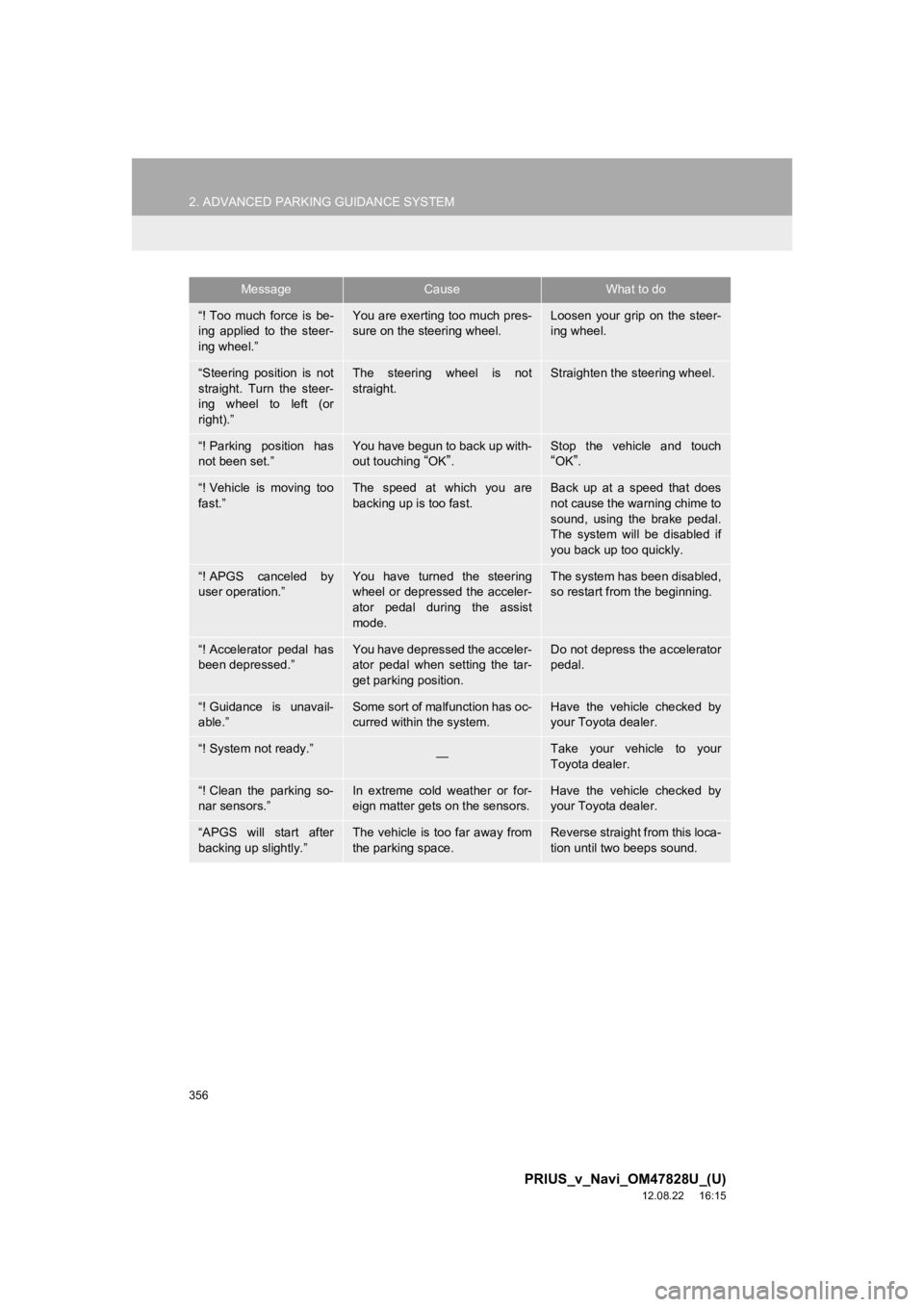
MessageCauseWhat to do
Page 358 of 411
358
2. ADVANCED PARKING GUIDANCE SYSTEM
PRIUS_v_Navi_OM47828U_(U)
12.08.22 16:15
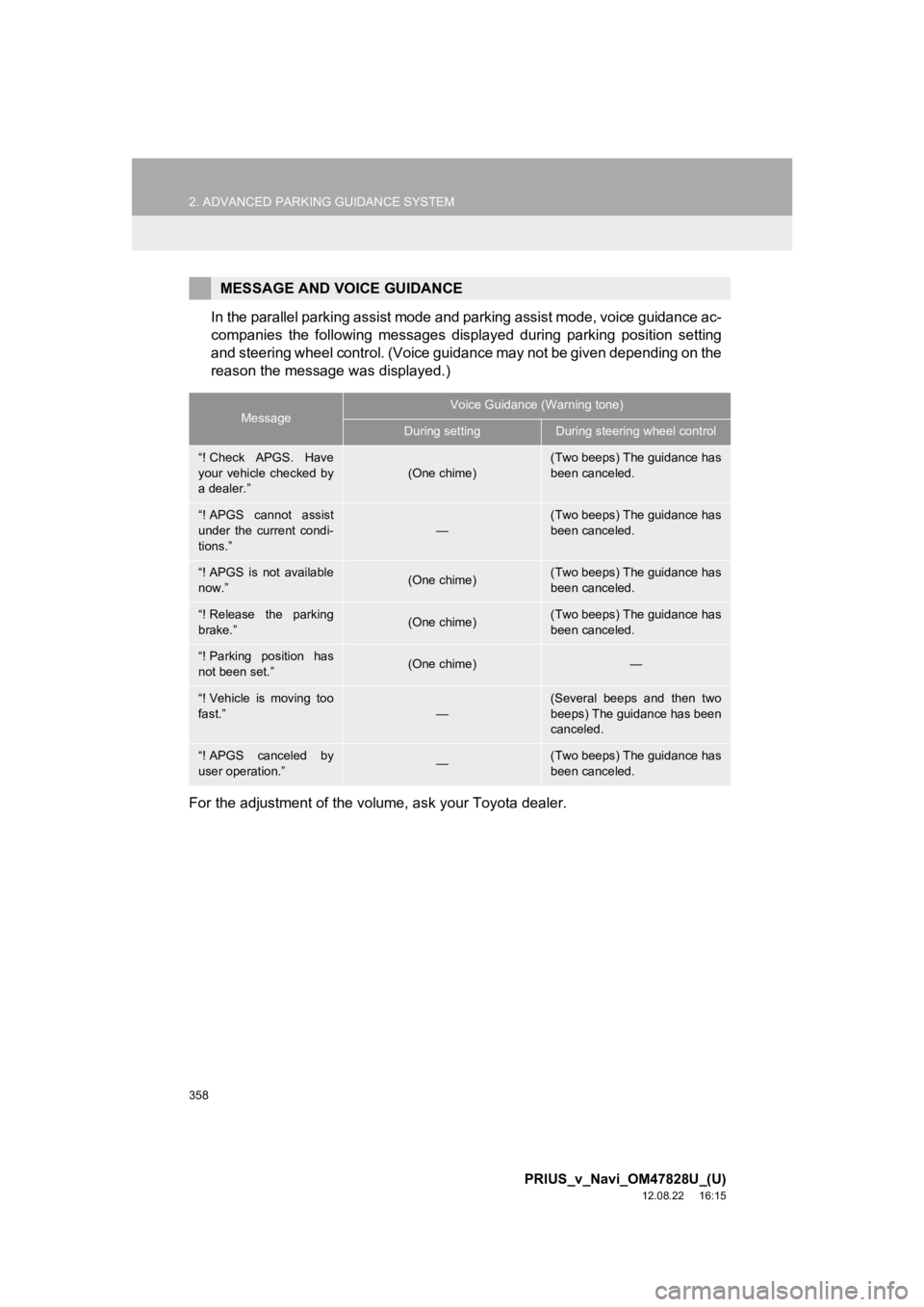
In the parallel parking assist mode and parking assist mode, voice guidance ac-
companies the following messages displayed during parking position setting
and steering wheel control. (Voice guidance may not be given depending on the
reason the message was displayed.)
For the adjustment of the volume, ask your Toyota dealer.
MESSAGE AND VOICE GUIDANCE
MessageVoice Guidance (Warning tone)
During settingDuring steering wheel control
“! Check APGS. Have
your vehicle checked by
a dealer.”(One chime)(Two beeps) The guidance has
been canceled.
“! APGS cannot assist
under the current condi-
tions.”
—
(Two beeps) The guidance has
been canceled.
“! APGS is not available
now.”(One chime)(Two beeps) The guidance has
been canceled.
“! Release the parking
brake.”(One chime)(Two beeps) The guidance has
been canceled.
“! Parking position has
not been set.”(One chime)—
“! Vehicle is moving too
fast.”
—
(Several beeps and then two
beeps) The guidance has been
canceled.
“! APGS canceled by
user operation.”—(Two beeps) The guidance has
been canceled.
Page 359 of 411
359
2. ADVANCED PARKING GUIDANCE SYSTEM
9
PRIUS_v_Navi_OM47828U_(U)
12.08.22 16:15
PERIPHERAL MONITORING SYSTEM
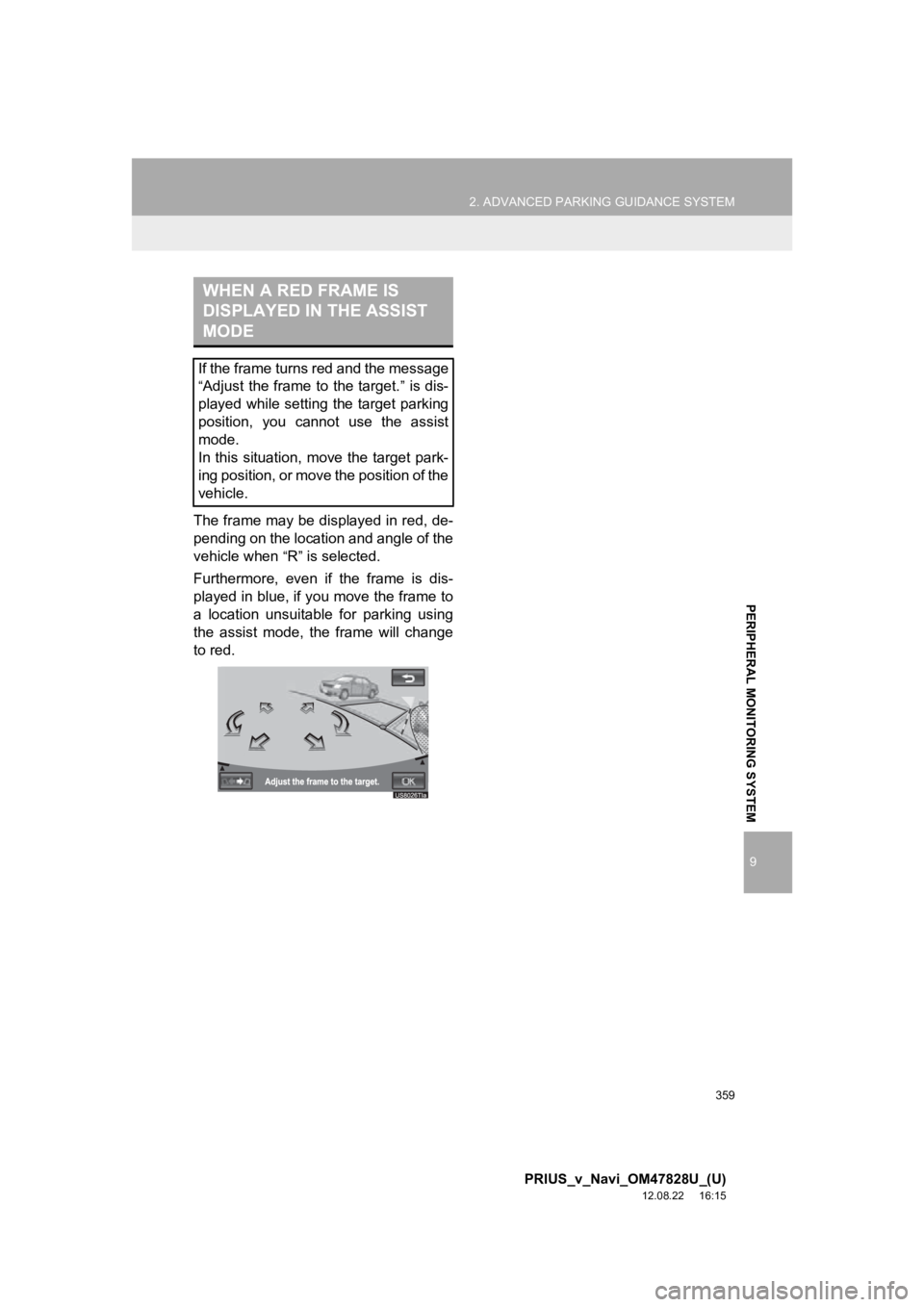
The frame may be displayed in red, de-
pending on the location and angle of the
vehicle when
“R” is selected.
Furthermore, even if the frame is dis-
played in blue, if you move the frame to
a location unsuitable for parking using
the assist mode, the frame will change
to red.
WHEN A RED FRAME IS
DISPLAYED IN THE ASSIST
MODE
If the frame turns red and the message
“Adjust the frame to the target.” is dis-
played while setting the target parking
position, you cannot use the assist
mode.
In this situation, move the target park-
ing position, or move the position of the
vehicle.