USB port TOYOTA PRIUS V 2013 Owners Manual (in English)
[x] Cancel search | Manufacturer: TOYOTA, Model Year: 2013, Model line: PRIUS V, Model: TOYOTA PRIUS V 2013Pages: 32, PDF Size: 4.4 MB
Page 4 of 32
2
OVERVIEW
Instrument panel
Air Conditioning controls
Outside rearview mirror/Rear window defogger button
AUX port/USB port
Power outlet
Seat heater switches
2
Tilt and telescopic steering lock release lever
Fuel filler door opener
Headlight cleaner switch
2
Advanced Parking Guidance System switch1,2
Instrument panel light control
Hood lock release lever
1 For vehicles with a display audio or navigation system, refer to the “Display
Audio System Owner’s Manual ” or “Navigation System Owner’s Manual .”
2
If equipped
NOTE: For vehicles equipped with Entune
TM, please consult the “Navigation
System With Entune Quick Reference Guide” or www.toyota.com/entune.
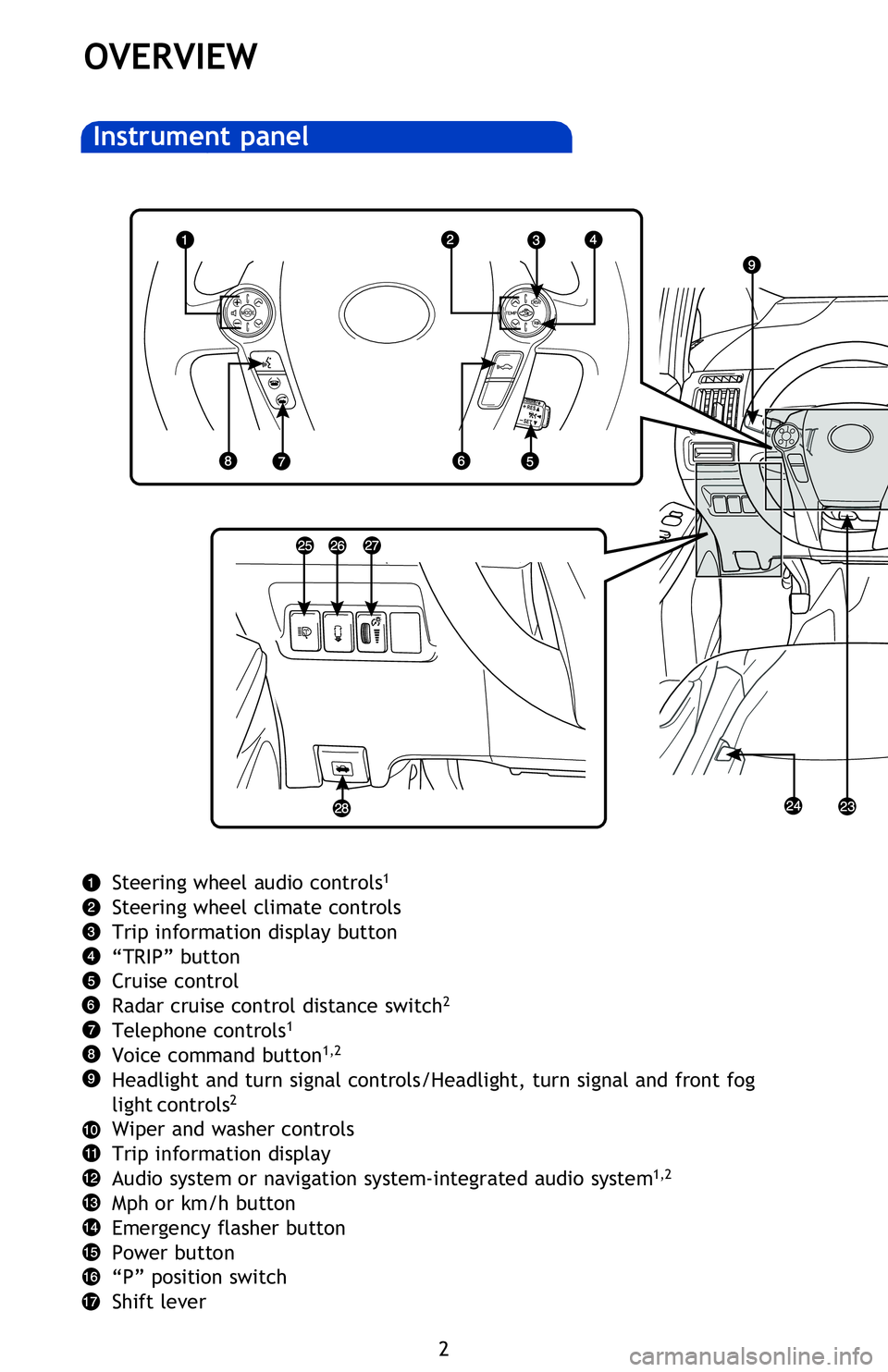
Steering wheel audio controls1
Steering wheel climate controls
Trip information display button
“TRIP” button
Cruise control
Radar cruise control distance switch
2
Telephone controls1
Voice command button1,2
Headlight and turn signal controls/Headlight, turn signal and front fog
light controls2
Wiper and washer controls
Trip information display
Audio system or navigation system-integrated audio system
1,2
Mph or km/h button
Emergency flasher button
Power button
“P” position switch
Shift lever
2013Prius-v.indd 210/2/12 6:50 PM
Page 5 of 32
OVERVIEW
FEATURES/OPERATIONS
SAFETY AND EMERGENCY FEATURES
3
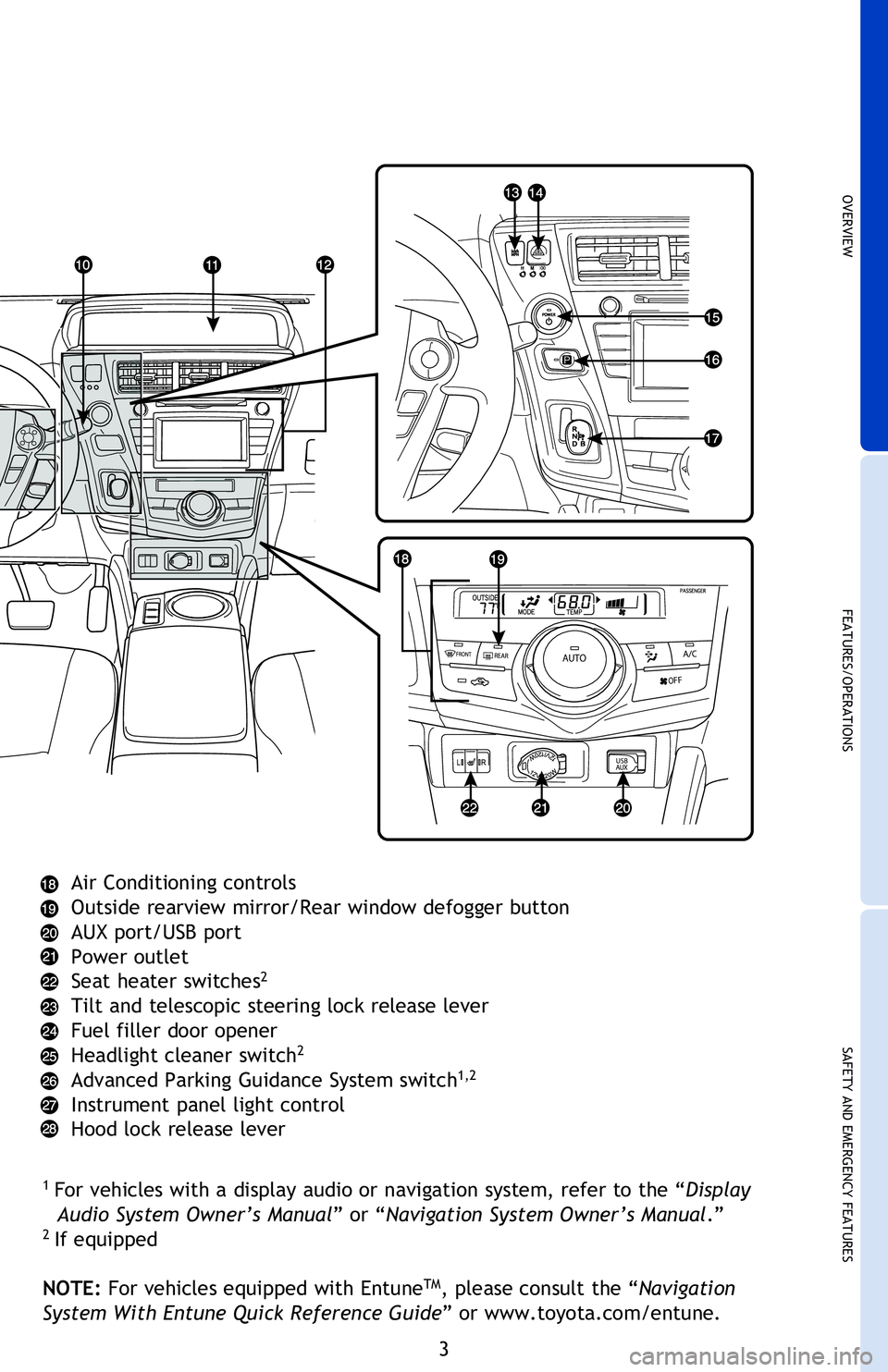
Air Conditioning controls
Outside rearview mirror/Rear window defogger button
AUX port/USB port
Power outlet
Seat heater switches
2
Tilt and telescopic steering lock release lever
Fuel filler door opener
Headlight cleaner switch
2
Advanced Parking Guidance System switch1,2
Instrument panel light control
Hood lock release lever
1 For vehicles with a display audio or navigation system, refer to the “Display
Audio System Owner’s Manual ” or “Navigation System Owner’s Manual .”
2
If equipped
NOTE: For vehicles equipped with Entune
TM, please consult the “Navigation
System With Entune Quick Reference Guide” or www.toyota.com/entune.
2013Prius-v.indd 310/2/12 6:50 PM
Page 20 of 32
18
FEATURES/OPERATIONS
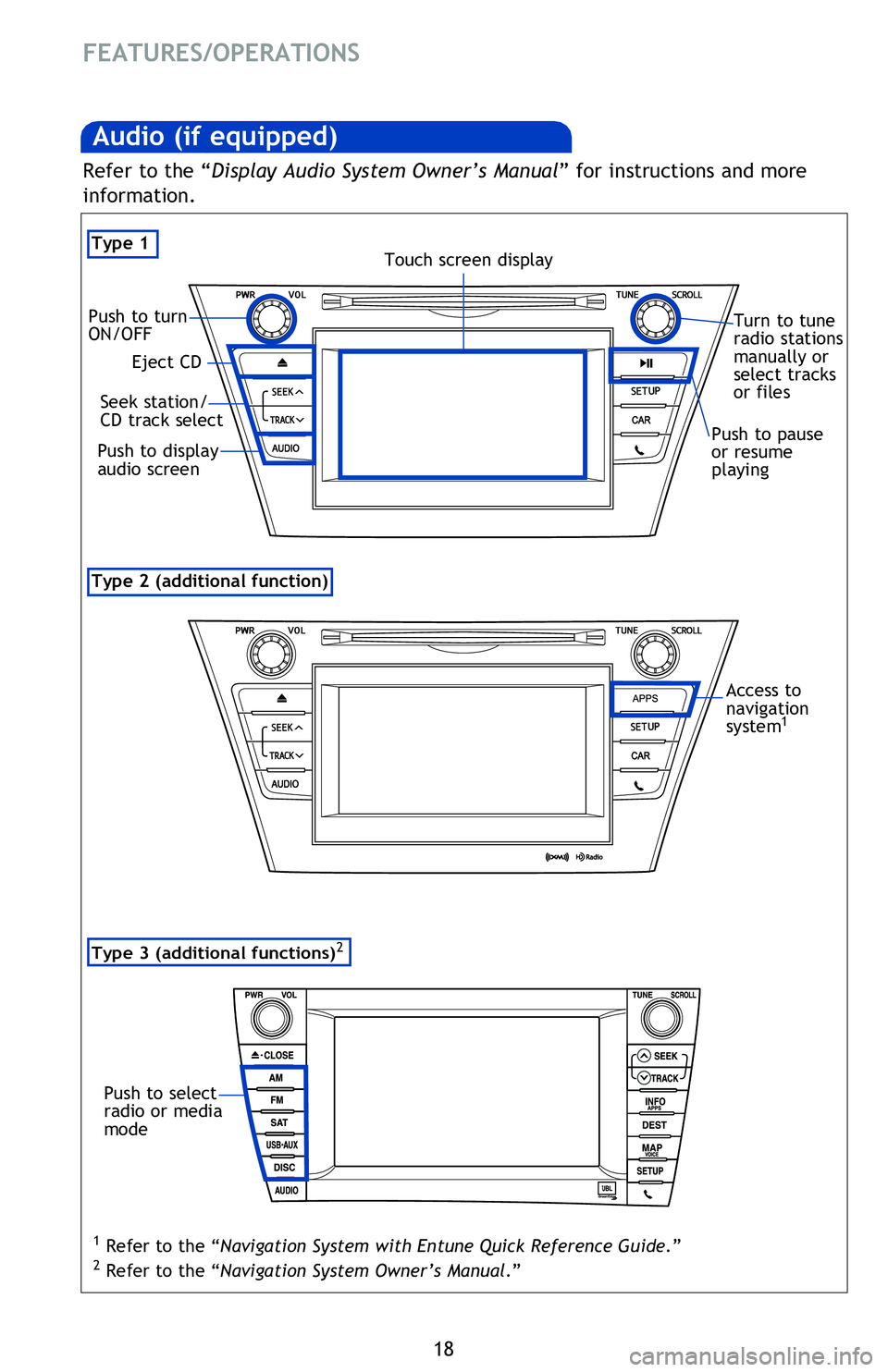
Type 2 (additional function)
Audio (if equipped)
Type 1
By inserting a mini plug into the USB/AUX port, you can listen to music from a
portable audio device through the vehicle’s speaker system while in USB/AUX mode.
Refer to the “Display Audio System Owner’s Manual ” for instructions and more
information.
USB/AUX port
Steering wheel switches
Audio control
“MODE”
Push to turn audio ON and select an audio mode. Push and hold to mute/
unmute or pause/resume audio.
“ ”
Use to search within the selected audio medium (radio, CD, iPod
®, etc.).
Volume control
Eject CD
Push to turn
ON/OFF
Seek station/
CD track select
Push to display
audio screen
Turn to tune
radio stations
manually or
select tracks
or files
Touch screen display
Push to pause
or resume
playing
Panoramic roof shades (if equipped)
Opening operation
Access to
navigation
system
1
Refer to the “Display Audio System Owner’s Manual ” for instructions and more
information.
Type 3 (additional functions)2
Push to select
radio or media
mode
1 Refer to the “Navigation System with Entune Quick Reference Guide.”
2 Refer to the “Navigation System Owner’s Manual .”
Push once to open. To stop
partway, press the switch lightly.
2013Prius-v.indd 1810/2/12 6:52 PM
Page 21 of 32
OVERVIEW
FEATURES/OPERATIONS
SAFETY AND EMERGENCY FEATURES
19
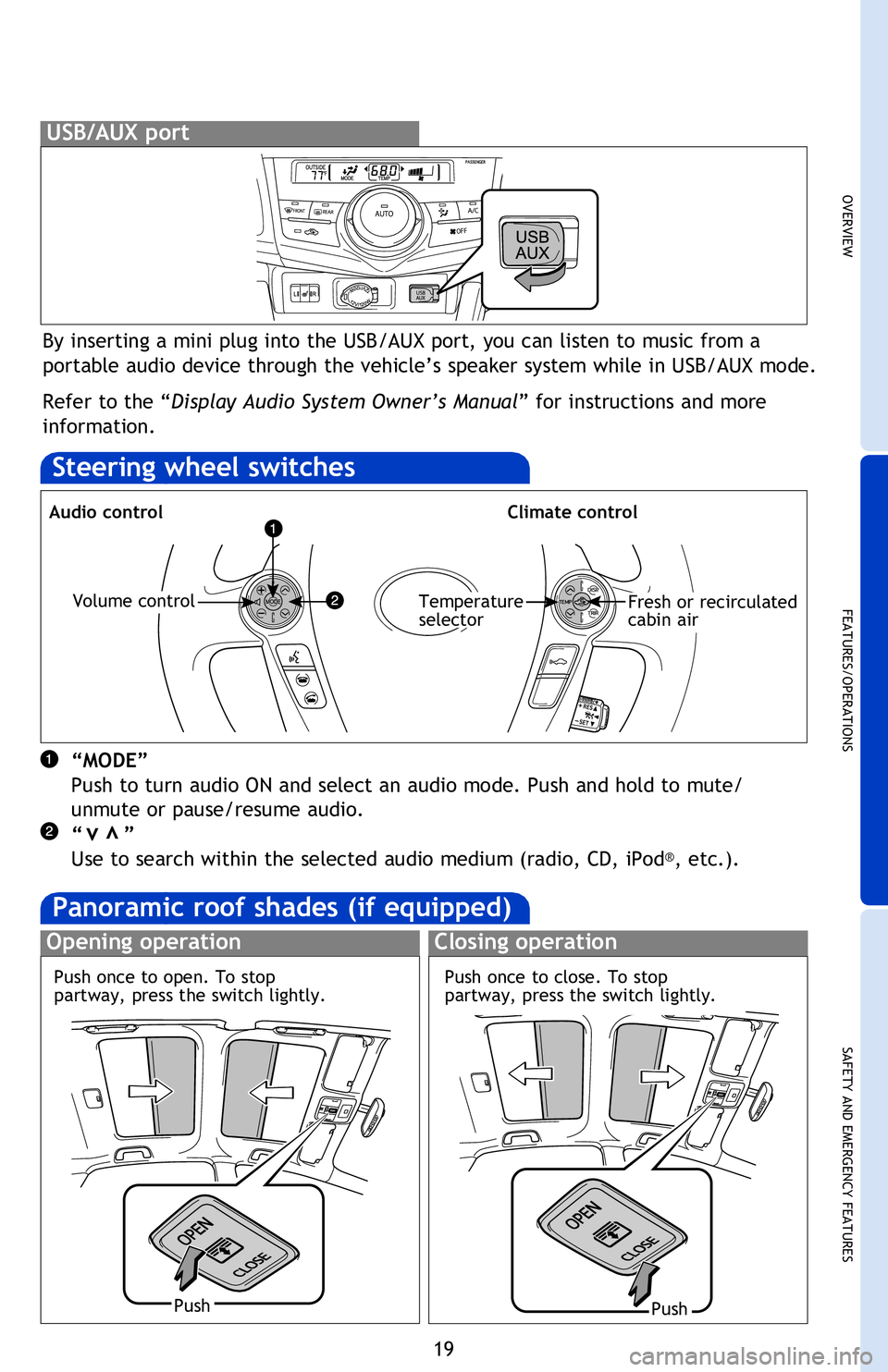
By inserting a mini plug into the USB/AUX port, you can listen to music from a
portable audio device through the vehicle’s speaker system while in USB/AUX mode.
Refer to the “Display Audio System Owner’s Manual” for instructions and more
information.
USB/AUX port
Steering wheel switches
Audio controlClimate control
“MODE”
Push to turn audio ON and select an audio mode. Push and hold to mute/
unmute or pause/resume audio.
“ ”
Use to search within the selected audio medium (radio, CD, iPod
®, etc.).
vv
Volume controlTemperature
selectorFresh or recirculated
cabin air
Turn to tune
radio stations
manually or
select tracks
or files
Push to pause
or resume
playing
Panoramic roof shades (if equipped)
Opening operationClosing operation
PushPush
Access to
navigation
system
1
Refer to the “Display Audio System Owner’s Manual ” for instructions and more
information.
1 Refer to the “Navigation System with Entune Quick Reference Guide.”
2 Refer to the “Navigation System Owner’s Manual .”
Push once to close. To stop
partway, press the switch lightly.
Push once to open. To stop
partway, press the switch lightly.
2013Prius-v.indd 1910/2/12 6:52 PM