eco TOYOTA PROACE 2018 Owners Manual
[x] Cancel search | Manufacturer: TOYOTA, Model Year: 2018, Model line: PROACE, Model: TOYOTA PROACE 2018Pages: 516, PDF Size: 90.91 MB
Page 415 of 516
415
1
8
9
1
1
13
14
15
16
11
10
12
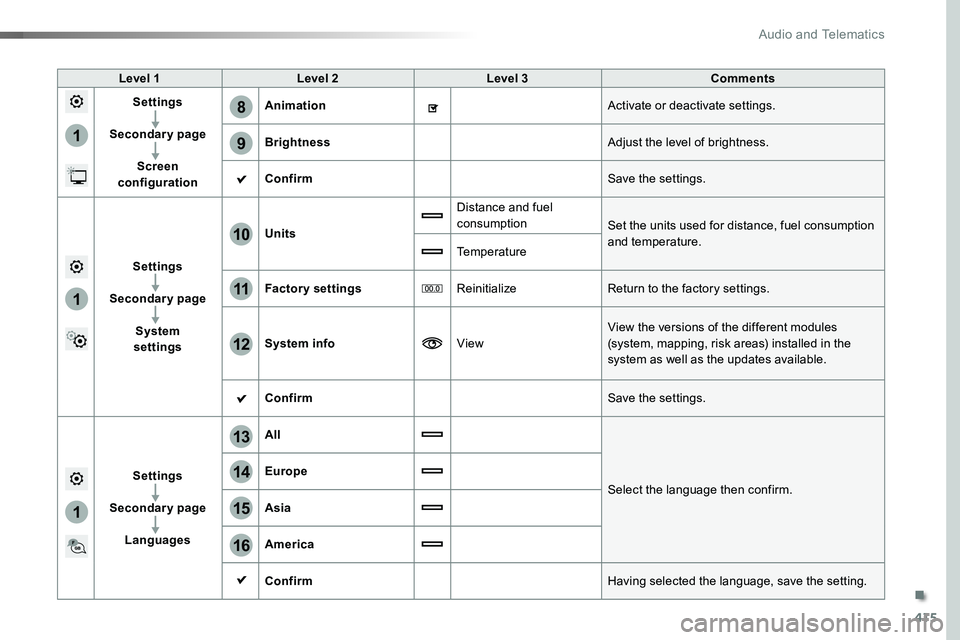
Level 1Level 2Level 3Comments
Settings
Secondary page
Screen configuration
AnimationActivate or deactivate settings.
BrightnessAdjust the level of brightness.
ConfirmSave the settings.
Settings
Secondary page
System settings
Units
Distance and fuel consumptionSet the units used for distance, fuel consumption and temperature.Temperature
Factory settingsReinitializeReturn to the factory settings.
System infoViewView the versions of the different modules (system, mapping, risk areas) installed in the system as well as the updates available.
ConfirmSave the settings.
Settings
Secondary page
Languages
All
Select the language then confirm.
Europe
Asia
America
ConfirmHaving selected the language, save the setting.
.
Audio and Telematics
Page 417 of 516
417
1
17
18
1
20
19
21
22
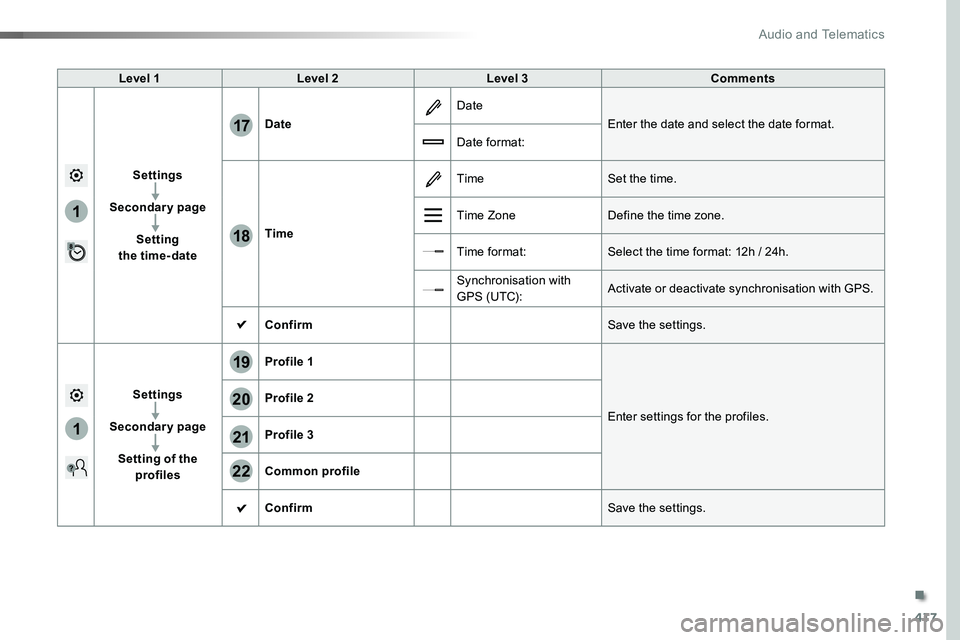
Level 1Level 2Level 3Comments
Settings
Secondary page
Setting the time-date
Date
Date
Enter the date and select the date format.
Date format:
Time
TimeSet the time.
Time ZoneDefine the time zone.
Time format:Select the time format: 12h / 24h.
Synchronisation with G PS (UTC):Activate or deactivate synchronisation with GPS.
ConfirmSave the settings.
Settings
Secondary page
Setting of the profiles
Profile 1
Enter settings for the profiles.
Profile 2
Profile 3
Common profile
ConfirmSave the settings.
.
Audio and Telematics
Page 418 of 516
418
3
4
5
6
7
1
19
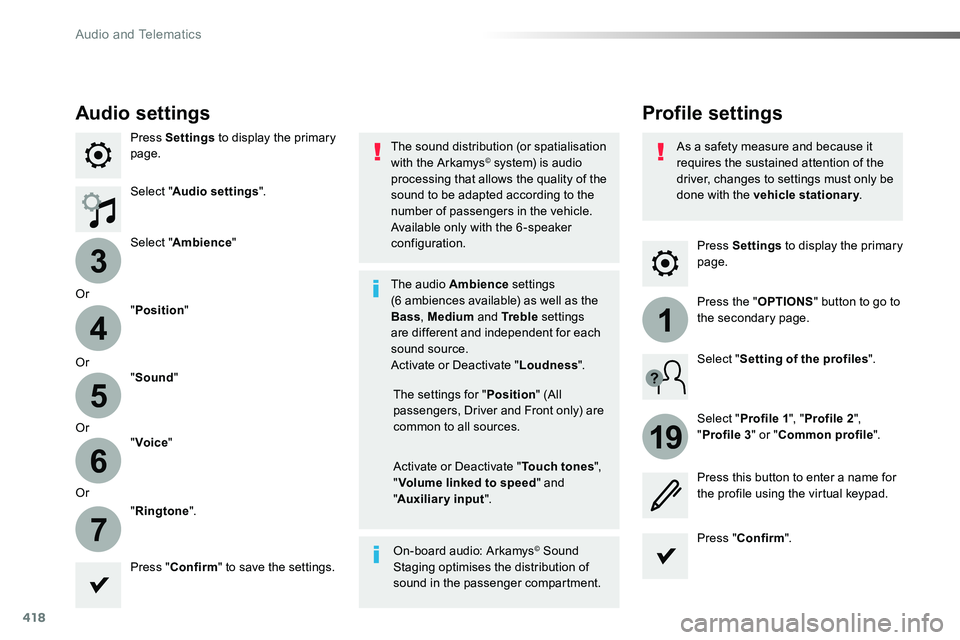
Press Settings to display the primary page.
Profile settingsAudio settings
Press Settings to display the primary page.
Select "Audio settings".
Select "Ambience"
Or
"Position"
Or"Sound"
Or"Voice"
Or
"Ringtone".
On-board audio: Arkamys© Sound Staging optimises the distribution of sound in the passenger compartment.
The settings for "Position" (All passengers, Driver and Front only) are common to all sources.
Activate or Deactivate "Touch tones", "Volume linked to speed" and "Auxiliary input".
The sound distribution (or spatialisation with the Arkamys© system) is audio processing that allows the quality of the sound to be adapted according to the number of passengers in the vehicle.
Available only with the 6 -speaker configuration.
The audio Ambience settings (6 ambiences available) as well as the Bass, Medium and Tr e b l e settings are different and independent for each sound source.Activate or Deactivate "Loudness".
Press "Confirm" to save the settings.
Press "Confirm".
Press the "OPTIONS" button to go to the secondary page.
Select "Profile 1", "Profile 2",
"Profile 3" or "Common profile".
Select "Setting of the profiles".
Press this button to enter a name for the profile using the virtual keypad.
As a safety measure and because it requires the sustained attention of the driver, changes to settings must only be done with the vehicle stationary.
Audio and Telematics
Page 420 of 516
420
111
10
11
12
8
91
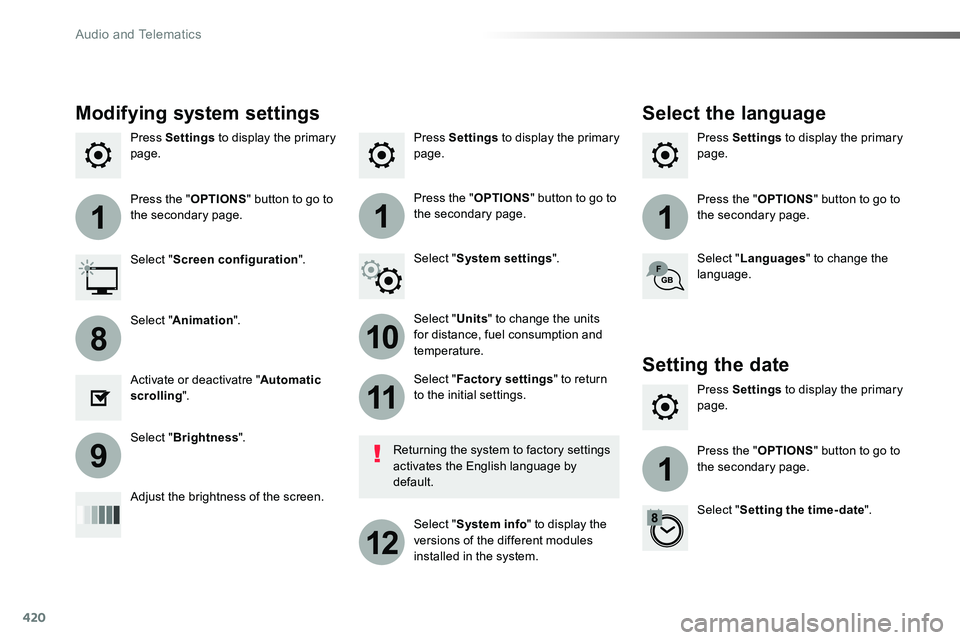
Press Settings to display the primary page.Press Settings to display the primary page.Press Settings to display the primary page.
Press the "OPTIONS" button to go to the secondary page.Press the "OPTIONS" button to go to the secondary page.Press the "OPTIONS" button to go to the secondary page.
Select "System settings".Select "Screen configuration".
Select "Units" to change the units for distance, fuel consumption and temperature.
Select "Languages" to change the language.
Activate or deactivatre "Automatic scrolling".
Adjust the brightness of the screen.
Select "Factory settings" to return to the initial settings.
Select "System info" to display the versions of the different modules installed in the system.
Modifying system settings
Returning the system to factory settings activates the English language by default.
Select "Animation".
Select "Brightness".
Select the language
Press Settings to display the primary page.
Press the "OPTIONS" button to go to the secondary page.
Select "Setting the time- date".
Setting the date
Audio and Telematics
Page 421 of 516
421
1
17
18
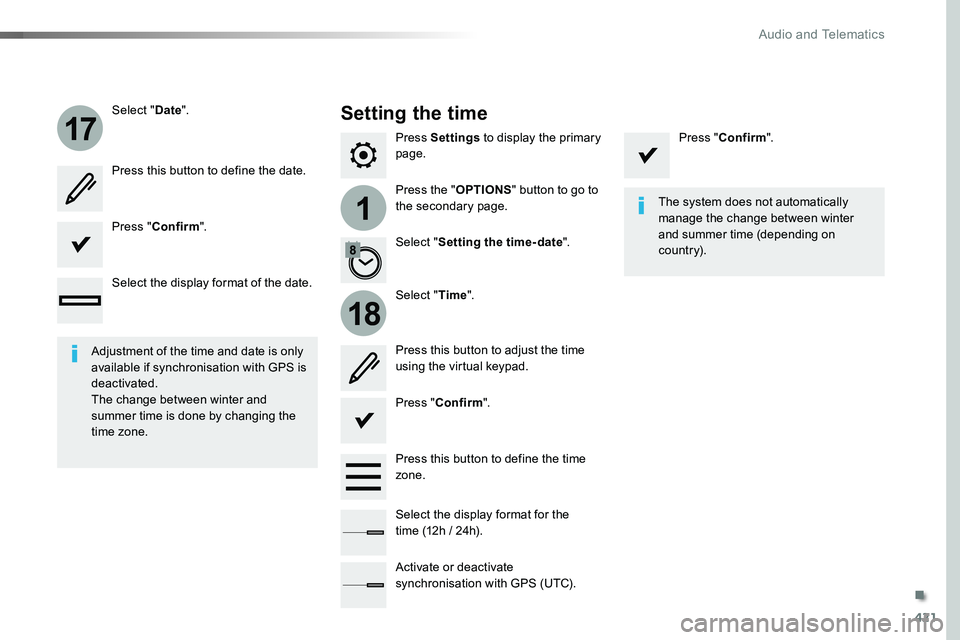
Press Settings to display the primary page.
Press the "OPTIONS" button to go to the secondary page.
Select "Date".
Select "Time".
Select "Setting the time- date".
Adjustment of the time and date is only available if synchronisation with GPS is deactivated.The change between winter and summer time is done by changing the time zone.
The system does not automatically manage the change between winter and summer time (depending on c ountr y).
Setting the time
Press this button to define the date.
Press this button to adjust the time using the virtual keypad.
Press "Confirm".
Press "Confirm".
Press "Confirm".
Press this button to define the time zone.
Select the display format of the date.
Select the display format for the time (12h / 24h).
Activate or deactivate synchronisation with GPS (UTC).
.
Audio and Telematics
Page 424 of 516
424
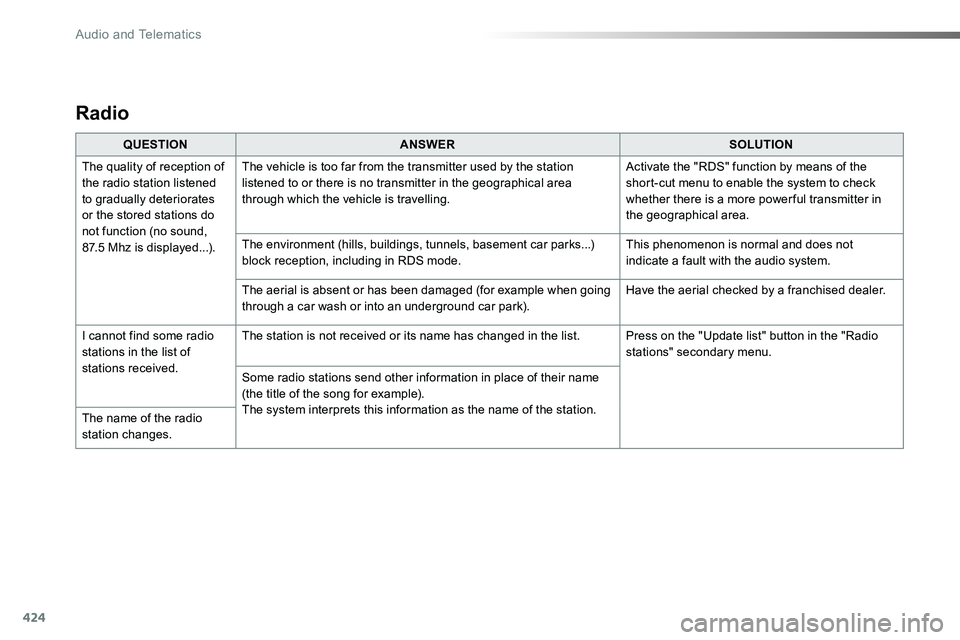
Radio
QUESTIONANSWERSOLUTION
The quality of reception of the radio station listened to gradually deteriorates or the stored stations do not function (no sound, 87.5 Mhz is displayed...).
The vehicle is too far from the transmitter used by the station listened to or there is no transmitter in the geographical area through which the vehicle is travelling.
Activate the "RDS" function by means of the short-cut menu to enable the system to check whether there is a more power ful transmitter in the geographical area.
The environment (hills, buildings, tunnels, basement car parks...) block reception, including in RDS mode.This phenomenon is normal and does not indicate a fault with the audio system.
The aerial is absent or has been damaged (for example when going through a car wash or into an underground car park).Have the aerial checked by a franchised dealer.
I cannot find some radio stations in the list of stations received.
The station is not received or its name has changed in the list.Press on the "Update list" button in the "Radio stations" secondary menu.
Some radio stations send other information in place of their name (the title of the song for example).The system interprets this information as the name of the station.The name of the radio station changes.
Audio and Telematics
Page 428 of 516
428
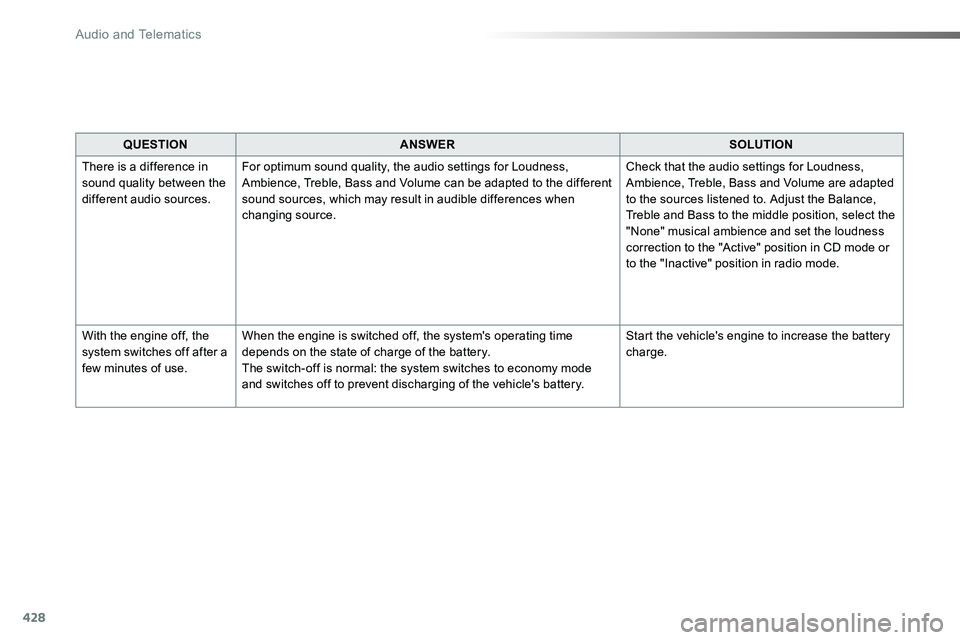
QUESTIONANSWERSOLUTION
There is a difference in sound quality between the different audio sources.
For optimum sound quality, the audio settings for Loudness, Ambience, Treble, Bass and Volume can be adapted to the different sound sources, which may result in audible differences when changing source.
Check that the audio settings for Loudness, Ambience, Treble, Bass and Volume are adapted to the sources listened to. Adjust the Balance, Treble and Bass to the middle position, select the "None" musical ambience and set the loudness correction to the "Active" position in CD mode or to the "Inactive" position in radio mode.
With the engine off, the system switches off after a few minutes of use.
When the engine is switched off, the system's operating time depends on the state of charge of the battery.The switch-off is normal: the system switches to economy mode and switches off to prevent discharging of the vehicle's battery.
Start the vehicle's engine to increase the battery charge.
Audio and Telematics
Page 429 of 516
429
To y o t a P r o To u c h
Connectivity - Multimedia audio - Bluetooth® telephone
ContentsFirst steps 430
Steering mounted controls 432
Menus 433
Connectivity 434
Radio Media 444
Telephone 456
Settings 468
Frequently asked questions 478
The system is protected in such a way that it will only operate in your vehicle.As a safety measure and because it requires sustained attention by the driver, the pairing of a Bluetooth mobile telephone with the Bluetooth hands-free system of your audio system must be done with the vehicle stationary and the ignition on.The display of the energy economy mode message signals that a change to standby is imminent. For more information on the Energy economy mode refer to the corresponding section.
.
Audio and Telematics
Page 430 of 516
430
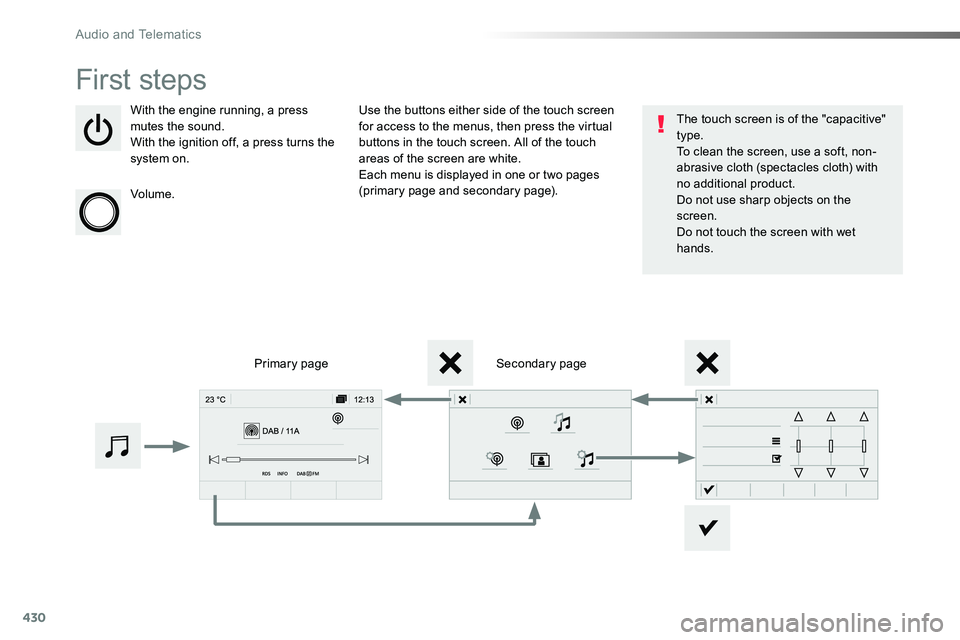
First steps
With the engine running, a press mutes the sound.With the ignition off, a press turns the system on.
Volume.
Use the buttons either side of the touch screen for access to the menus, then press the virtual buttons in the touch screen. All of the touch areas of the screen are white.Each menu is displayed in one or two pages (primary page and secondary page).
Secondary pagePrimary page
The touch screen is of the "capacitive" type.To clean the screen, use a soft, non-abrasive cloth (spectacles cloth) with no additional product.Do not use sharp objects on the screen.Do not touch the screen with wet hands.
Audio and Telematics
Page 435 of 516
435
1
1
1
6
7
8
2
3
4
5
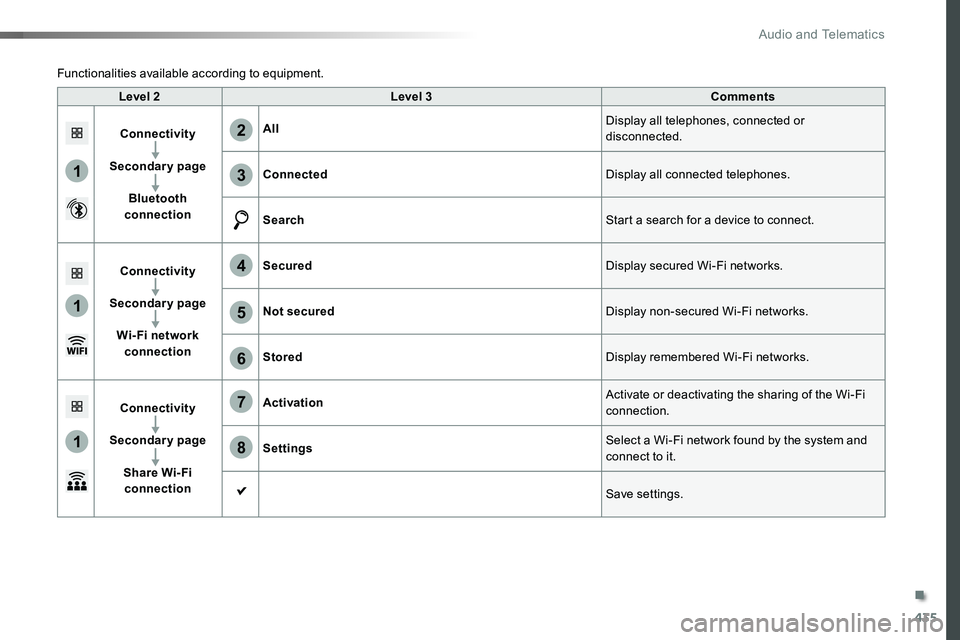
Level 2Level 3Comments
Connectivity
Secondary page
Bluetooth connection
AllDisplay all telephones, connected or disconnected.
ConnectedDisplay all connected telephones.
SearchStart a search for a device to connect.
Connectivity
Secondary page
Wi- Fi network connection
SecuredDisplay secured Wi-Fi networks.
Not securedDisplay non-secured Wi-Fi networks.
StoredDisplay remembered Wi-Fi networks.
Connectivity
Secondary page
Share Wi- Fi connection
ActivationActivate or deactivating the sharing of the Wi-Fi connection.
SettingsSelect a Wi-Fi network found by the system and connect to it.
Save settings.
Functionalities available according to equipment.
.
Audio and Telematics