tow bar TOYOTA PROACE CITY VERSO 2020 User Guide
[x] Cancel search | Manufacturer: TOYOTA, Model Year: 2020, Model line: PROACE CITY VERSO, Model: TOYOTA PROACE CITY VERSO 2020Pages: 272, PDF Size: 58.6 MB
Page 166 of 272
166
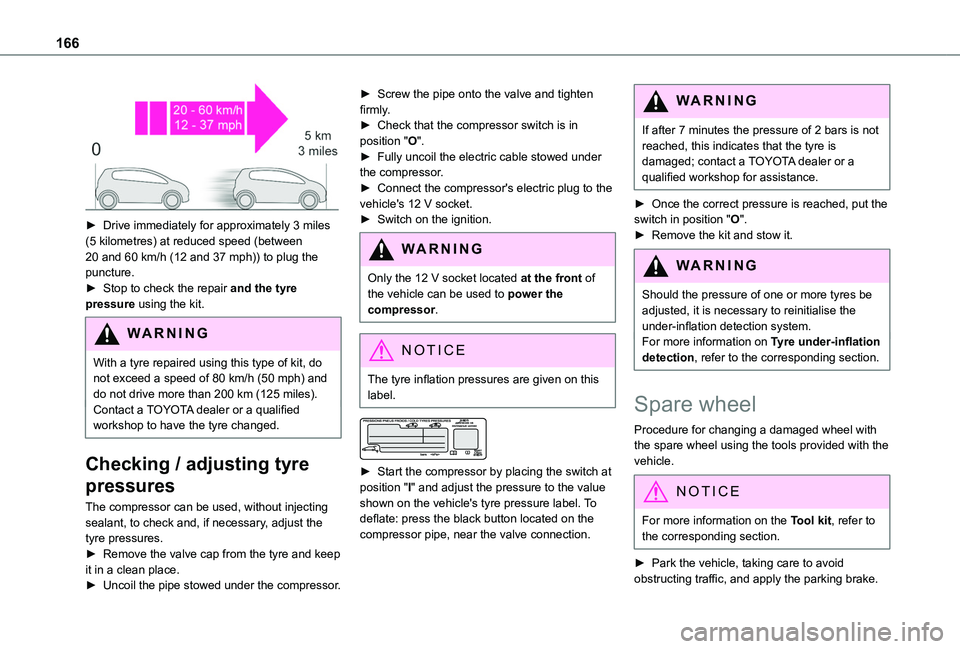
► Drive immediately for approximately 3 miles (5 kilometres) at reduced speed (between 20 and 60 km/h (12 and 37 mph)) to plug the puncture.► Stop to check the repair and the tyre pressure using the kit.
WARNI NG
With a tyre repaired using this type of kit, do not exceed a speed of 80 km/h (50 mph) and do not drive more than 200 km (125 miles).Contact a TOYOTA dealer or a qualified workshop to have the tyre changed.
Checking / adjusting tyre
pressures
The compressor can be used, without injecting sealant, to check and, if necessary, adjust the tyre pressures.► Remove the valve cap from the tyre and keep it in a clean place.► Uncoil the pipe stowed under the compressor.
► Screw the pipe onto the valve and tighten firmly.► Check that the compressor switch is in position "O".► Fully uncoil the electric cable stowed under the compressor.► Connect the compressor's electric plug to the vehicle's 12 V socket.► Switch on the ignition.
WARNI NG
Only the 12 V socket located at the front of the vehicle can be used to power the compressor.
NOTIC E
The tyre inflation pressures are given on this label.
► Start the compressor by placing the switch at position "I" and adjust the pressure to the value shown on the vehicle's tyre pressure label. To deflate: press the black button located on the compressor pipe, near the valve connection.
WARNI NG
If after 7 minutes the pressure of 2 bars is not reached, this indicates that the tyre is damaged; contact a TOYOTA dealer or a qualified workshop for assistance.
► Once the correct pressure is reached, put the switch in position "O".► Remove the kit and stow it.
WARNI NG
Should the pressure of one or more tyres be adjusted, it is necessary to reinitialise the under-inflation detection system.For more information on Tyre under-inflation detection, refer to the corresponding section.
Spare wheel
Procedure for changing a damaged wheel with
the spare wheel using the tools provided with the vehicle.
NOTIC E
For more information on the Tool kit, refer to the corresponding section.
► Park the vehicle, taking care to avoid obstructing traffic, and apply the parking brake.
Page 167 of 272
167
In the event of a breakdown
8
► Follow the safety instructions (hazard warning lamps, warning triangle, wearing high visibility vest, etc.) according to the legislation in force in the country where you are driving.► Switch off the ignition.
Access to the spare wheel
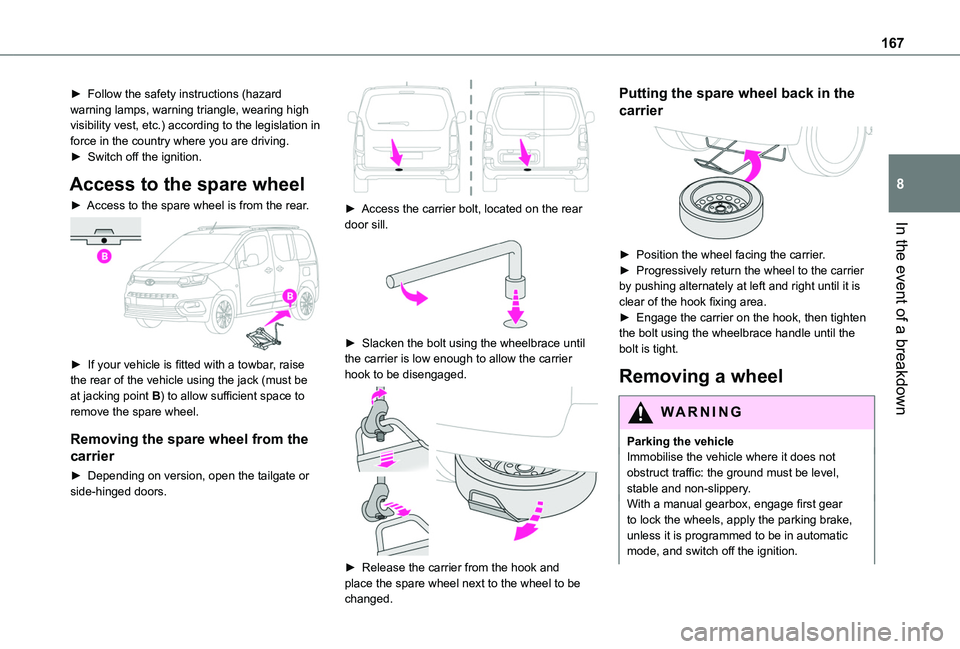
► Access to the spare wheel is from the rear.
► If your vehicle is fitted with a towbar, raise the rear of the vehicle using the jack (must be at jacking point B) to allow sufficient space to remove the spare wheel.
Removing the spare wheel from the
carrier
► Depending on version, open the tailgate or side-hinged doors.
► Access the carrier bolt, located on the rear door sill.
► Slacken the bolt using the wheelbrace until the carrier is low enough to allow the carrier hook to be disengaged.
► Release the carrier from the hook and place the spare wheel next to the wheel to be changed.
Putting the spare wheel back in the
carrier
► Position the wheel facing the carrier.► Progressively return the wheel to the carrier by pushing alternately at left and right until it is clear of the hook fixing area.► Engage the carrier on the hook, then tighten the bolt using the wheelbrace handle until the bolt is tight.
Removing a wheel
WARNI NG
Parking the vehicleImmobilise the vehicle where it does not obstruct traffic: the ground must be level, stable and non-slippery.With a manual gearbox, engage first gear to lock the wheels, apply the parking brake, unless it is programmed to be in automatic
mode, and switch off the ignition.
Page 176 of 272
176
► Take the tweezers from their housing.
Changing a fuse
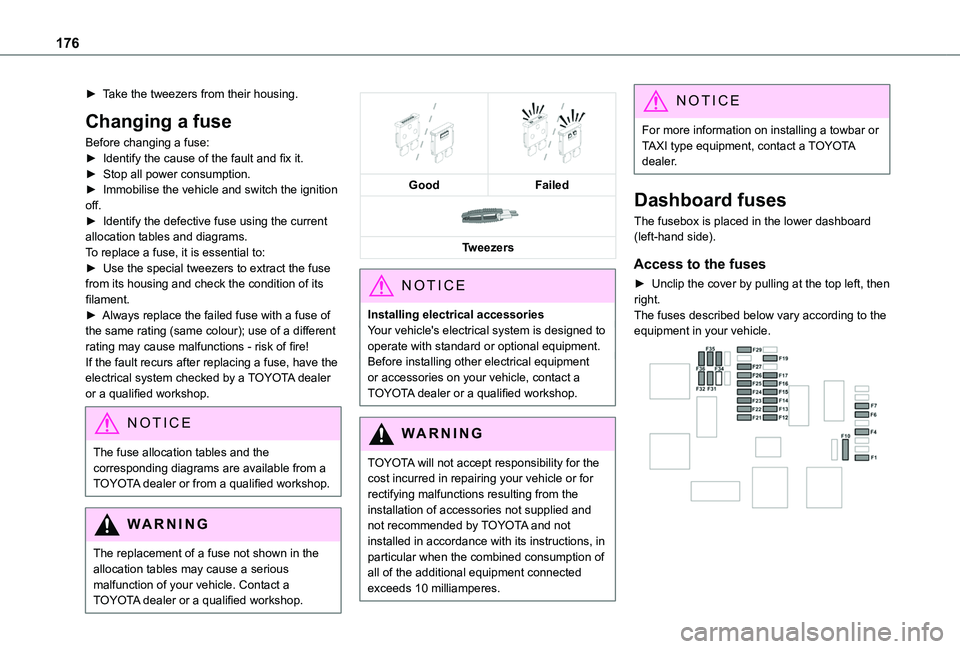
Before changing a fuse:► Identify the cause of the fault and fix it.► Stop all power consumption.► Immobilise the vehicle and switch the ignition off.► Identify the defective fuse using the current allocation tables and diagrams.To replace a fuse, it is essential to:► Use the special tweezers to extract the fuse from its housing and check the condition of its filament.► Always replace the failed fuse with a fuse of the same rating (same colour); use of a different rating may cause malfunctions - risk of fire!If the fault recurs after replacing a fuse, have the electrical system checked by a TOYOTA dealer or a qualified workshop.
NOTIC E
The fuse allocation tables and the corresponding diagrams are available from a TOYOTA dealer or from a qualified workshop.
WARNI NG
The replacement of a fuse not shown in the allocation tables may cause a serious malfunction of your vehicle. Contact a TOYOTA dealer or a qualified workshop.
GoodFailed
Tweezers
NOTIC E
Installing electrical accessoriesYour vehicle's electrical system is designed to operate with standard or optional equipment.Before installing other electrical equipment or accessories on your vehicle, contact a TOYOTA dealer or a qualified workshop.
WARNI NG
TOYOTA will not accept responsibility for the cost incurred in repairing your vehicle or for rectifying malfunctions resulting from the installation of accessories not supplied and not recommended by TOYOTA and not installed in accordance with its instructions, in
particular when the combined consumption of all of the additional equipment connected exceeds 10 milliamperes.
NOTIC E
For more information on installing a towbar or TAXI type equipment, contact a TOYOTA dealer.
Dashboard fuses
The fusebox is placed in the lower dashboard (left-hand side).
Access to the fuses
► Unclip the cover by pulling at the top left, then right.The fuses described below vary according to the equipment in your vehicle.
Page 181 of 272
181
In the event of a breakdown
8
– the remote control key or the electronic key (depending on version),– the electric windows,– the electric doors,– the date and time,– the radio preset stations.
NOTIC E
The Stop & Start system may not be operational during the trip following the first engine start.In this case, the system will only be available again after a continuous period of immobilisation of the vehicle, a period which depends on the exterior temperature and the state of charge of the battery (up to about 8 hours).
Towing
Procedure for having your vehicle towed or for towing another vehicle using the towing eye.
NOTIC E
General recommendationsObserve the legislation in force in the country where you are driving.Ensure that the weight of the towing vehicle is higher than that of the towed vehicle.The driver must remain at the wheel of the towed vehicle and must have a valid driving licence.When towing a vehicle with all four wheels on the ground, always use an approved towbar; ropes and straps are prohibited.
The towing vehicle must move off gently.When the vehicle is towed with its engine off, there is no longer braking and steering assistance.
WARNI NG
A professional recovery service must be called if:– broken down on a motorway or main road;
– not possible to put the gearbox into neutral, unlock the steering, or release the parking brake;– not possible to tow a vehicle with an automatic gearbox, with the engine running;– towing with only two wheels on the ground;– four-wheel drive vehicle;– no approved towbar available.
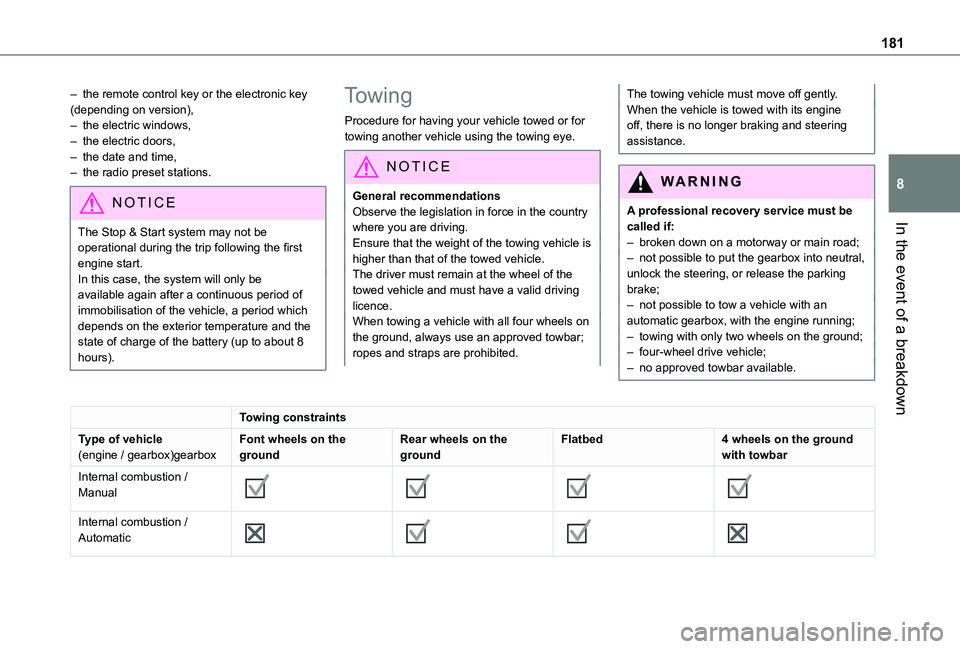
Towing constraints
Type of vehicle(engine / gearbox)gearboxFont wheels on the groundRear wheels on the groundFlatbed4 wheels on the ground with towbar
Internal combustion / Manual
Internal combustion / Automatic
Page 182 of 272
182
NOTIC E
In case of battery or electric parking brake failure, it is essential to call a professional using flatbed recovery vehicles (excluding manual gearbox).
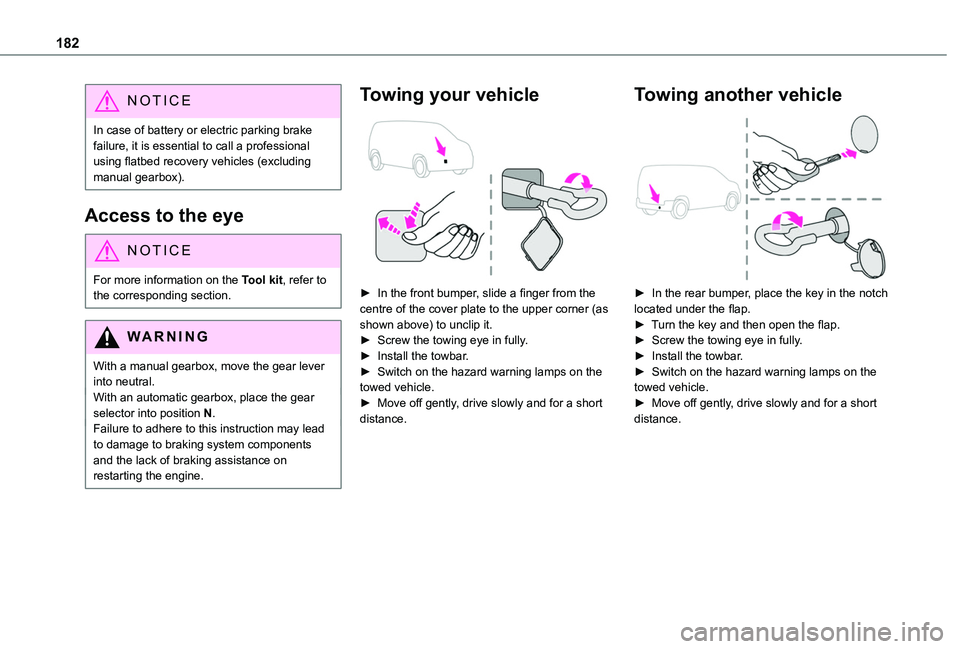
Access to the eye
NOTIC E
For more information on the Tool kit, refer to the corresponding section.
WARNI NG
With a manual gearbox, move the gear lever into neutral.With an automatic gearbox, place the gear selector into position N.Failure to adhere to this instruction may lead to damage to braking system components and the lack of braking assistance on restarting the engine.
Towing your vehicle
► In the front bumper, slide a finger from the centre of the cover plate to the upper corner (as shown above) to unclip it.► Screw the towing eye in fully.► Install the towbar.► Switch on the hazard warning lamps on the towed vehicle.► Move off gently, drive slowly and for a short distance.
Towing another vehicle
► In the rear bumper, place the key in the notch located under the flap.► Turn the key and then open the flap.► Screw the towing eye in fully.► Install the towbar.► Switch on the hazard warning lamps on the towed vehicle.► Move off gently, drive slowly and for a short distance.
Page 248 of 272
248
Radio, digital (Digital Audio Broadcasting - DAB) 193, 208, 233Range, AdBlue 156RDS 207, 232–233Rear screen, demisting 58–59Recharging the battery 179–180Recirculation, air 55–56Recovery 181Reduction of electrical load 152Regeneration of the particle filter 157Reinitialisation of the under-inflation detection system 11 2Reinitialising the remote control 30Reminder, key in ignition 99Reminder, lighting on 64Remote control 23–26, 28, 96Removing a wheel 167–170Removing the mat 47Replacing bulbs 170–171Replacing fuses 175–177Replacing the air filter 157Replacing the oil filter 157
Replacing the passenger compartment filter 157Reservoir, screenwash 156Reversing camera 11 5, 140Reversing lamps 174Roof 47Roof bars 152–153Running out of fuel (Diesel) 163
S
Safety, children 82, 84–87, 89, 92–94Saturation of the particle filter (Diesel) 157Screen menu map 210Screen, multifunction (with audio system) 192Screenwash, front 68Screenwash, rear 68–69SCR (Selective Catalytic Reduction) 158Seat belts 79–81, 88Seat, rear bench 42, 45Seats, front 38–40Seats, heated 40–41Seats, rear 38, 43–45, 86Sensors (warnings) 11 5Serial number, vehicle 189Service indicator 16Servicing 16, 156Settings, system 214, 239Sidelamps 63, 65, 171–172Side parking sensors 139Side repeater 172
Sliding side door, electric 27, 33Snow chains 11 2, 148Snow chains, link 148Socket, 12 V accessory 47–48Socket, 220 V 49Socket, auxiliary 195Socket, Jack 195Speed limiter 11 8–121, 128Speed limit recognition 11 6, 11 8Speedometer 11 6
Stability control (ESC) 74–77Starting a Diesel engine 146Starting the engine 97Starting the vehicle 98, 100, 105–108Starting using another battery 178Station, radio 192, 206–207, 232–233Stay, bonnet 153–154Steering mounted controls, audio 191, 204, 218Steering wheel, adjustment 41Stickers, customising ~ Stickers, expressive 162Stopping the vehicle 99–100, 105–108Stop & Start 22, 54, 58, 109–111, 146, 153, 157, 178, 181Storage 47Storage boxes 50Stowing rings 53Sunshine sensor 54Switching off the engine 97, 99Synchronising the remote control 30
T
Tables of fuses 175–177Tank, fuel 146–147Technical data 186–187Telephone 49, 197–200, 2 11–213, 235–238Telephone, Bluetooth with voice recognition 200Temperature, coolant 16Three flashes (direction indicators) 64Time (setting) 214, 239TMC (Traffic info) 226
Page 249 of 272
249
Alphabetical index
Tools 163Topping-up AdBlue® 160Top Rear Vision 140Towbar 76, 149–150Towed loads 185–187Towing another vehicle 181–182Towing device 150Towing eye 182Traction control (ASR) 75, 77Traffic information (TA) 192Traffic information (TMC) 226Trailer 76, 149Trailer stability assist (TSA) 76Trajectory control systems 74–75Triangle, warning 53Trip computer 21–22Type of bulbs 171Tyres 158, 189Tyre under-inflation detection 111–11 2, 166
U
Under-inflation (detection) 111Unlocking 23, 25–26Unlocking from the inside 31Updating the date 215, 239Updating the time 214, 239USB 194, 208–209, 229, 234
V
Ventilation 54–55, 59–61Video 234Voice commands 220–223
W
Warning and indicator lamps 11Warning lamp, driver''s seat belt not fastened 80Warning lamps 11Warning lamp, seat belts 80Warnings and indicators 11Washer jets, heated 58Washing 11 6Washing (advice) 161–162Weights 185–187Welcome lighting 24Wheel, spare 11 2, 158, 163–164, 166–167, 170Windows, rear doors 37Windscreen, heated 58
Windscreen wipers 68Wiper blades (changing) 69Wiper, rear 68–69Wipers 67, 70Wipers, automatic rain sensitive 68, 70