buttons TOYOTA PROACE CITY VERSO 2020 Owners Manual
[x] Cancel search | Manufacturer: TOYOTA, Model Year: 2020, Model line: PROACE CITY VERSO, Model: TOYOTA PROACE CITY VERSO 2020Pages: 272, PDF Size: 58.6 MB
Page 10 of 272
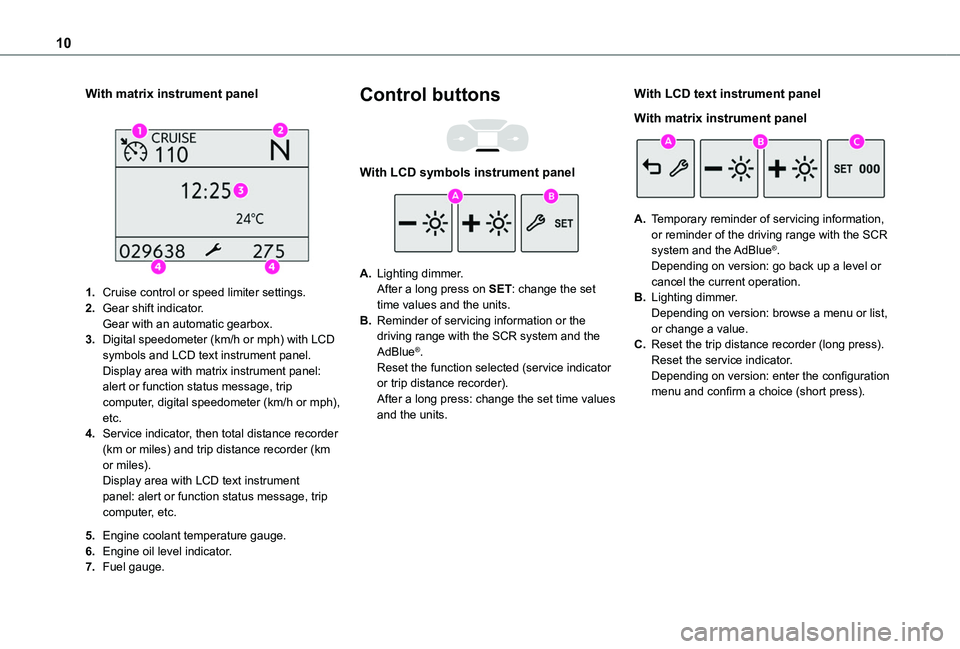
10
With matrix instrument panel
1.Cruise control or speed limiter settings.
2.Gear shift indicator.Gear with an automatic gearbox.
3.Digital speedometer (km/h or mph) with LCD symbols and LCD text instrument panel.Display area with matrix instrument panel: alert or function status message, trip computer, digital speedometer (km/h or mph), etc.
4.Service indicator, then total distance recorder (km or miles) and trip distance recorder (km or miles).Display area with LCD text instrument panel: alert or function status message, trip computer, etc.
5.Engine coolant temperature gauge.
6.Engine oil level indicator.
7.Fuel gauge.
Control buttons
With LCD symbols instrument panel
A.Lighting dimmer.After a long press on SET: change the set time values and the units.
B.Reminder of servicing information or the driving range with the SCR system and the AdBlue®.Reset the function selected (service indicator or trip distance recorder).After a long press: change the set time values and the units.
With LCD text instrument panel
With matrix instrument panel
A.Temporary reminder of servicing information, or reminder of the driving range with the SCR
system and the AdBlue®.Depending on version: go back up a level or cancel the current operation.
B.Lighting dimmer.Depending on version: browse a menu or list, or change a value.
C.Reset the trip distance recorder (long press).Reset the service indicator.Depending on version: enter the configuration menu and confirm a choice (short press).
Page 22 of 272
22
NOTIC E
This function is only displayed at speeds above 30 km/h (19 mph).
Average fuel consumption
(mpg or l/100 km or km/l)Calculated since the last trip computer reset.
Average speed
(km/h or mph)Calculated since the last trip computer reset.
Distance travelled
(km or miles)Calculated since the last trip computer reset.
Stop & Start time counter
(minutes/seconds or hours/minutes)
If your vehicle is fitted with Stop & Start, a time counter calculates the time spent in STOP mode during a journey.It resets to zero every time the ignition is switched on.
Setting the date and time
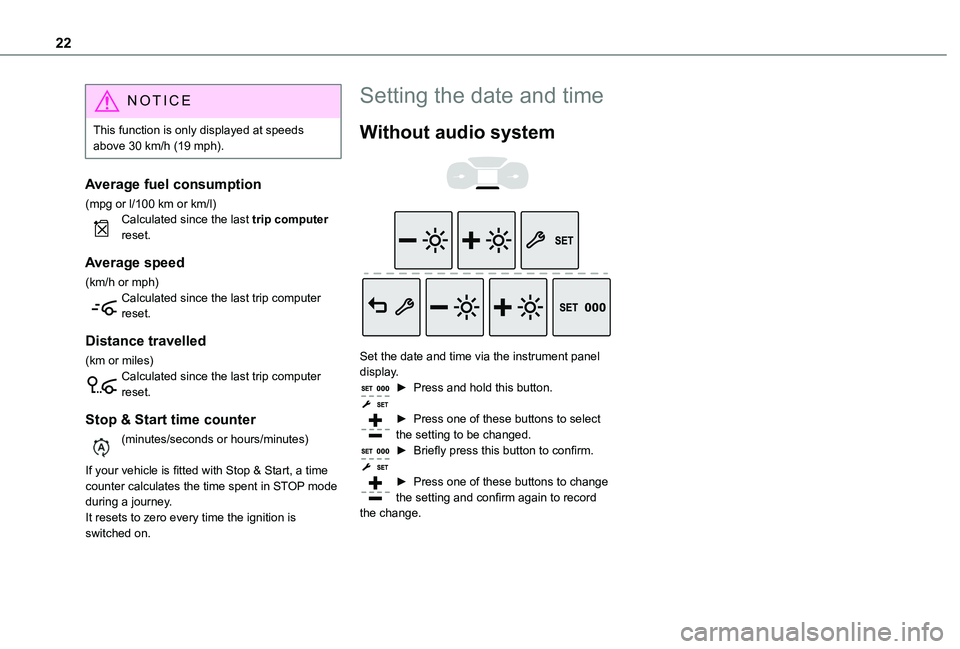
Without audio system
Set the date and time via the instrument panel display.► Press and hold this button.
► Press one of these buttons to select the setting to be changed.► Briefly press this button to confirm.
► Press one of these buttons to change the setting and confirm again to record the change.
Page 23 of 272
23
Access
2
Electronic key with
remote control function
and built-in key,
Remote control key
This allows the central locking or unlocking of the vehicle using the door lock or remotely.It also allows the vehicle to be located, the fuel filler cap to be removed and refitted and the engine to be started or switched off, as well as providing protection against theft.
NOTIC E
The remote control buttons are not active with the ignition switched on.
Unfolding / Folding the key
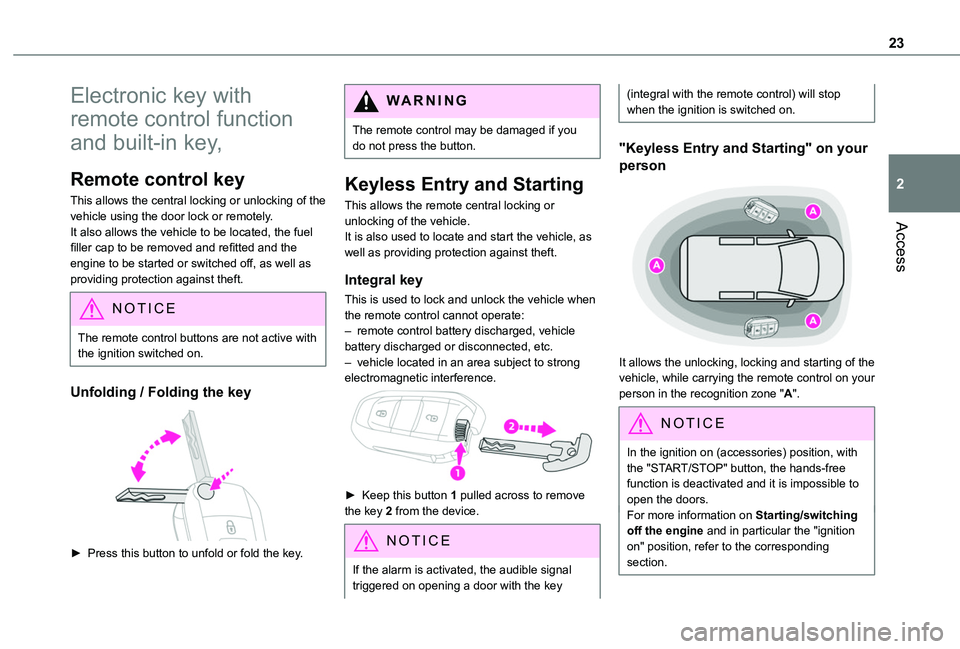
► Press this button to unfold or fold the key.
WARNI NG
The remote control may be damaged if you do not press the button.
Keyless Entry and Starting
This allows the remote central locking or unlocking of the vehicle.It is also used to locate and start the vehicle, as well as providing protection against theft.
Integral key
This is used to lock and unlock the vehicle when the remote control cannot operate:– remote control battery discharged, vehicle battery discharged or disconnected, etc.– vehicle located in an area subject to strong electromagnetic interference.
► Keep this button 1 pulled across to remove the key 2 from the device.
NOTIC E
If the alarm is activated, the audible signal triggered on opening a door with the key
(integral with the remote control) will stop when the ignition is switched on.
"Keyless Entry and Starting" on your
person
It allows the unlocking, locking and starting of the vehicle, while carrying the remote control on your person in the recognition zone "A".
NOTIC E
In the ignition on (accessories) position, with the "START/STOP" button, the hands-free function is deactivated and it is impossible to open the doors.For more information on Starting/switching off the engine and in particular the "ignition
on" position, refer to the corresponding section.
Page 24 of 272
24
NOTIC E
If one of the doors or the boot is still open or if the electronic key for the Keyless Entry and Starting system has been left inside the vehicle, central locking will be disabled.However, if the vehicle is fitted with an alarm, it will be activated after 45 seconds.
NOTIC E
If the vehicle is unlocked but the doors or tailgate are not subsequently opened, the vehicle will automatically lock itself again after approximately 30 seconds. If the vehicle is fitted with an alarm, it will also be reactivated automatically.
NOTIC E
Automatic door mirror folding and unfolding can be deactivated by a TOYOTA dealer or a qualified workshop.
WARNI NG
As a safety measure, never leave the vehicle, even for a short time, without taking the
Keyless Entry and Starting system’s electronic key with you.Be aware of the risk of theft of the vehicle if the key is present in one of the defined areas while the vehicle is unlocked.
WARNI NG
To preserve the battery charge in the electronic key and the vehicle's battery, the "hands-free" functions are set to hibernation mode after 21 days without use. To restore these functions, press one of the remote control buttons or start the engine with the electronic key in the reader.For more information on starting with the Keyless Entry and Starting system, refer to the corresponding section.
NOTIC E
Electrical interferenceThe electronic key may not operate if close to certain electronic devices: telephone (switched on or on standby), laptop computer, strong magnetic fields, etc.
Locating the vehicle
This function helps you to spot your vehicle from a distance, with the vehicle locked:
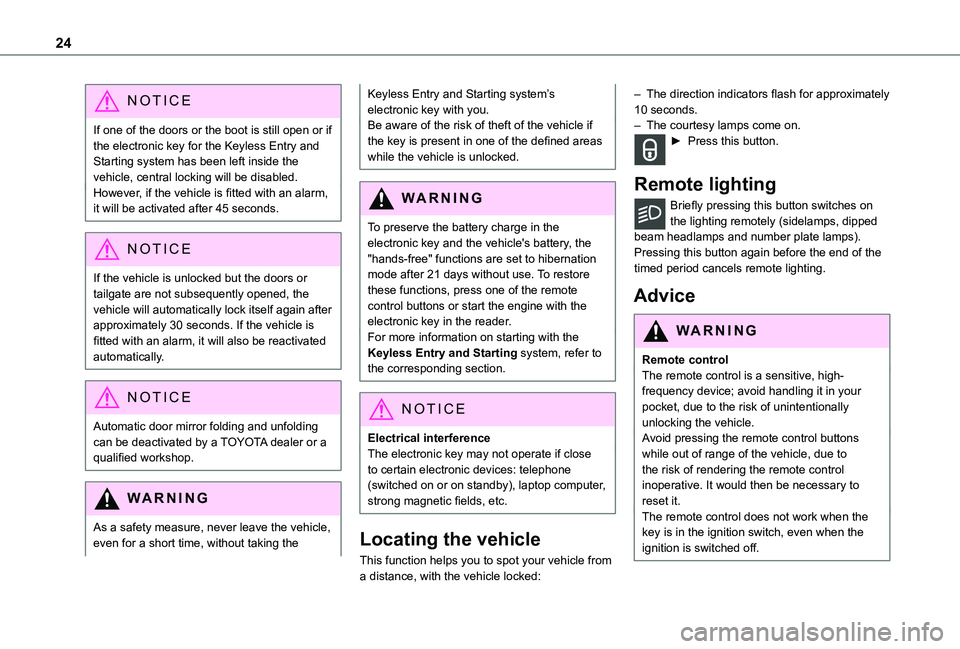
– The direction indicators flash for approximately 10 seconds.– The courtesy lamps come on.► Press this button.
Remote lighting
Briefly pressing this button switches on the lighting remotely (sidelamps, dipped beam headlamps and number plate lamps).Pressing this button again before the end of the timed period cancels remote lighting.
Advice
WARNI NG
Remote controlThe remote control is a sensitive, high-frequency device; avoid handling it in your pocket, due to the risk of unintentionally unlocking the vehicle.Avoid pressing the remote control buttons while out of range of the vehicle, due to the risk of rendering the remote control inoperative. It would then be necessary to reset it.The remote control does not work when the key is in the ignition switch, even when the ignition is switched off.
Page 55 of 272
55
Ease of use and comfort
3
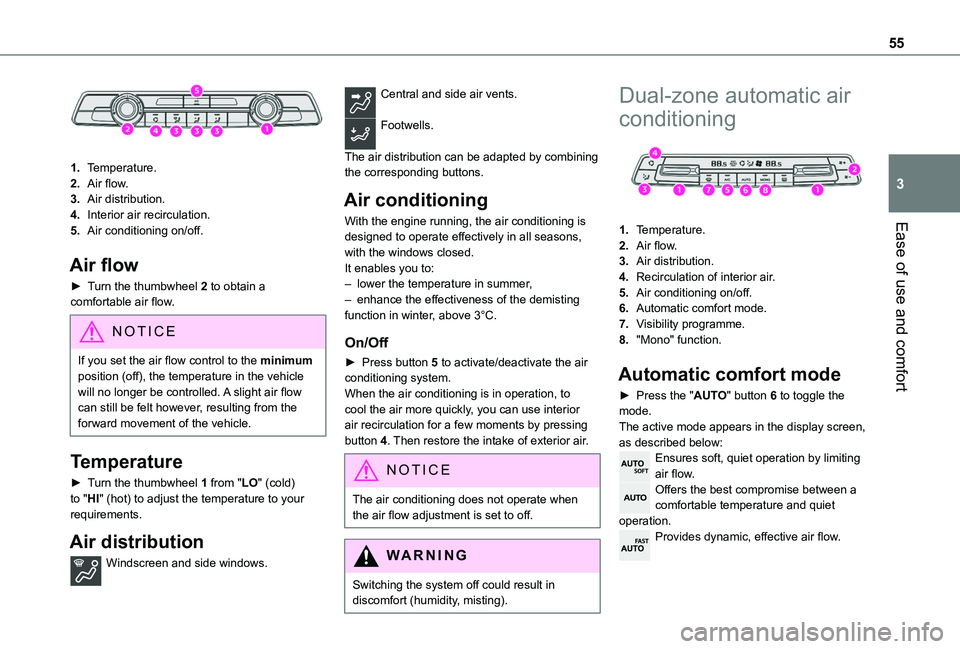
1.Temperature.
2.Air flow.
3.Air distribution.
4.Interior air recirculation.
5.Air conditioning on/off.
Air flow
► Turn the thumbwheel 2 to obtain a comfortable air flow.
NOTIC E
If you set the air flow control to the minimum position (off), the temperature in the vehicle will no longer be controlled. A slight air flow can still be felt however, resulting from the forward movement of the vehicle.
Temperature
► Turn the thumbwheel 1 from "LO" (cold) to "HI" (hot) to adjust the temperature to your requirements.
Air distribution
Windscreen and side windows.
Central and side air vents.
Footwells.
The air distribution can be adapted by combining the corresponding buttons.
Air conditioning
With the engine running, the air conditioning is designed to operate effectively in all seasons, with the windows closed.It enables you to:– lower the temperature in summer,– enhance the effectiveness of the demisting function in winter, above 3°C.
On/Off
► Press button 5 to activate/deactivate the air conditioning system.When the air conditioning is in operation, to cool the air more quickly, you can use interior air recirculation for a few moments by pressing button 4. Then restore the intake of exterior air.
NOTIC E
The air conditioning does not operate when the air flow adjustment is set to off.
WARNI NG
Switching the system off could result in discomfort (humidity, misting).
Dual-zone automatic air
conditioning
1.Temperature.
2.Air flow.
3.Air distribution.
4.Recirculation of interior air.
5.Air conditioning on/off.
6.Automatic comfort mode.
7.Visibility programme.
8."Mono" function.
Automatic comfort mode
► Press the "AUTO" button 6 to toggle the mode.The active mode appears in the display screen, as described below:Ensures soft, quiet operation by limiting air flow.Offers the best compromise between a comfortable temperature and quiet operation.Provides dynamic, effective air flow.
Page 57 of 272
57
Ease of use and comfort
3
Air conditioning
With the engine running, the air conditioning is designed to operate effectively in all seasons, with the windows closed.It enables you to:– lower the temperature in summer,– enhance the effectiveness of the demisting function in winter, above 3°C.
On/Off
► Press button 5 to activate/deactivate the air conditioning system.When the air conditioning is in operation, to cool the air more quickly, you can use interior air recirculation for a few moments by pressing button 4. Then restore the intake of exterior air.
NOTIC E
The air conditioning does not operate when the air flow adjustment is set to off.
WARNI NG
Switching the system off could result in discomfort (humidity, misting).
Air distribution
► Pressing button 3 successively directs the air flow towards:– windscreen, side windows and footwells,
– footwells,– central vents, side vents and footwells,– windscreen, side windows, central vents, side vents and footwells,– central and side vents, – windscreen and side windows (demisting or defrosting).
Air flow
► Press the buttons 2 to increase/decrease the air flow.The air flow symbol (a fan) appears. It is filled in or emptied gradually, according to the value set.
Recirculation of interior air
The intake of exterior air helps avoid and eliminate misting of the windscreen and side windows.Recirculating the interior air isolates the passenger compartment from exterior odours and fumes.
NOTIC E
When required, this function also allows faster heating or cooling of the air in the passenger compartment.
► Press button 4 to recirculate the interior air or allow the intake of exterior air.
WARNI NG
Avoid prolonged use of interior air recirculation (due to the risk of misting and deteriorating air quality).
Front demisting
- defrosting
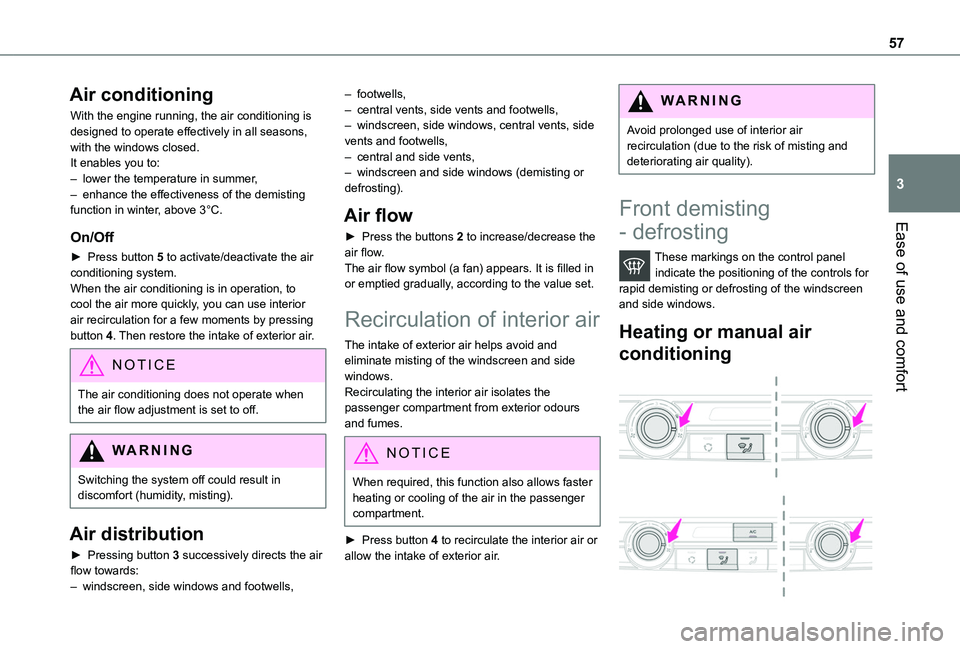
These markings on the control panel indicate the positioning of the controls for rapid demisting or defrosting of the windscreen and side windows.
Heating or manual air
conditioning
Page 59 of 272
59
Ease of use and comfort
3
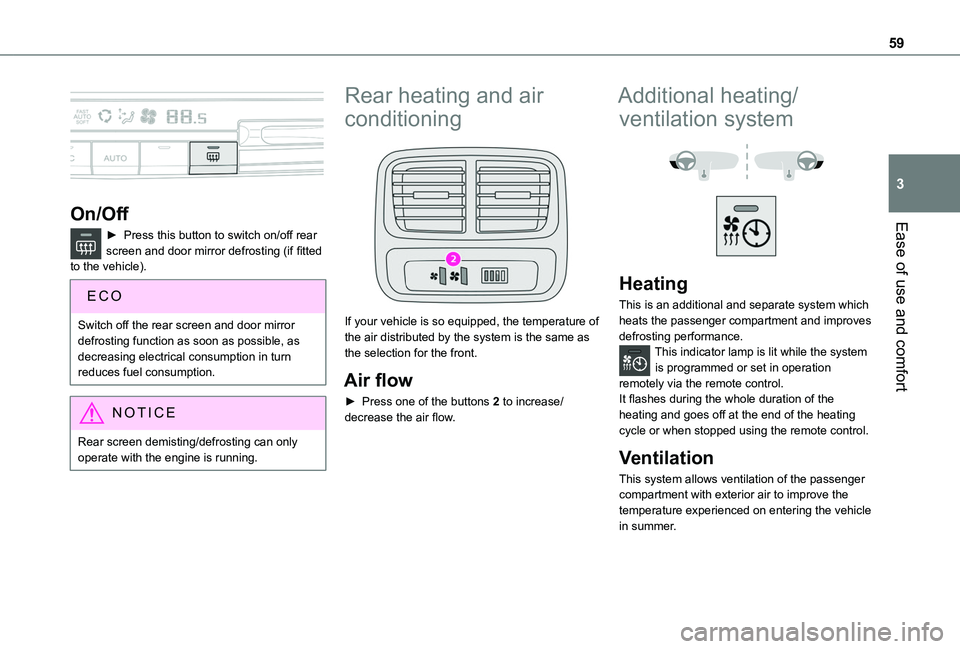
On/Off
► Press this button to switch on/off rear screen and door mirror defrosting (if fitted to the vehicle).
Switch off the rear screen and door mirror defrosting function as soon as possible, as decreasing electrical consumption in turn reduces fuel consumption.
NOTIC E
Rear screen demisting/defrosting can only operate with the engine is running.
Rear heating and air
conditioning
If your vehicle is so equipped, the temperature of the air distributed by the system is the same as the selection for the front.
Air flow
► Press one of the buttons 2 to increase/decrease the air flow.
Additional heating/
ventilation system
Heating
This is an additional and separate system which heats the passenger compartment and improves defrosting performance.This indicator lamp is lit while the system is programmed or set in operation remotely via the remote control.It flashes during the whole duration of the heating and goes off at the end of the heating cycle or when stopped using the remote control.
Ventilation
This system allows ventilation of the passenger compartment with exterior air to improve the temperature experienced on entering the vehicle in summer.
Page 114 of 272
11 4
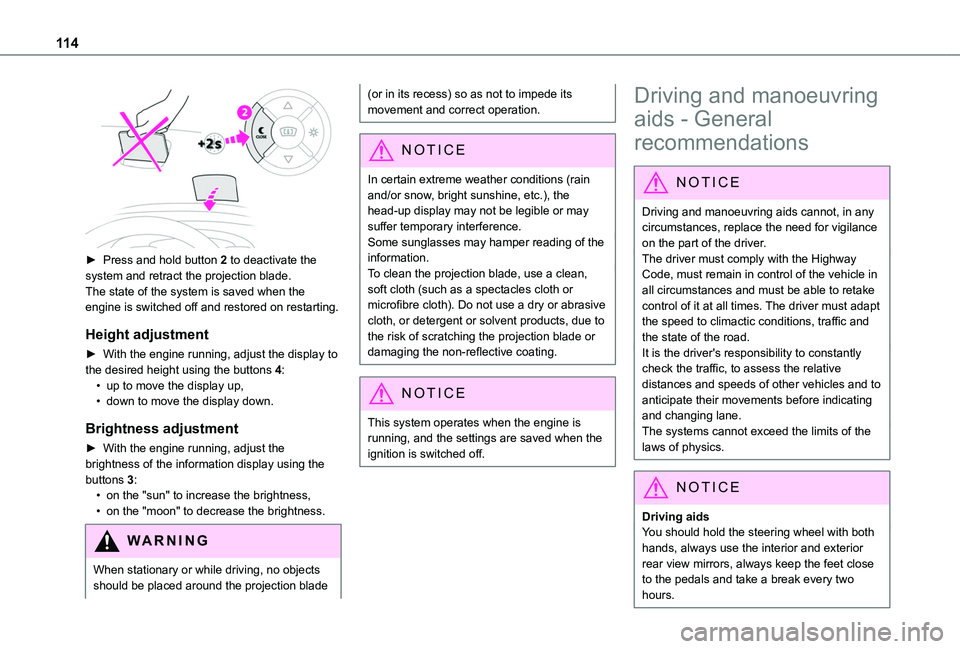
► Press and hold button 2 to deactivate the system and retract the projection blade.The state of the system is saved when the engine is switched off and restored on restarting.
Height adjustment
► With the engine running, adjust the display to the desired height using the buttons 4:• up to move the display up,• down to move the display down.
Brightness adjustment
► With the engine running, adjust the brightness of the information display using the buttons 3:• on the "sun" to increase the brightness,• on the "moon" to decrease the brightness.
W ARNI NG
When stationary or while driving, no objects should be placed around the projection blade
(or in its recess) so as not to impede its movement and correct operation.
NOTIC E
In certain extreme weather conditions (rain and/or snow, bright sunshine, etc.), the head-up display may not be legible or may suffer temporary interference.Some sunglasses may hamper reading of the
information.To clean the projection blade, use a clean, soft cloth (such as a spectacles cloth or microfibre cloth). Do not use a dry or abrasive cloth, or detergent or solvent products, due to the risk of scratching the projection blade or damaging the non-reflective coating.
NOTIC E
This system operates when the engine is running, and the settings are saved when the ignition is switched off.
Driving and manoeuvring
aids - General
recommendations
NOTIC E
Driving and manoeuvring aids cannot, in any circumstances, replace the need for vigilance on the part of the driver.The driver must comply with the Highway Code, must remain in control of the vehicle in all circumstances and must be able to retake control of it at all times. The driver must adapt the speed to climactic conditions, traffic and the state of the road.It is the driver's responsibility to constantly check the traffic, to assess the relative distances and speeds of other vehicles and to anticipate their movements before indicating and changing lane.The systems cannot exceed the limits of the
laws of physics.
NOTIC E
Driving aidsYou should hold the steering wheel with both hands, always use the interior and exterior rear view mirrors, always keep the feet close to the pedals and take a break every two hours.
Page 122 of 272
122
allow running at a constant speed and keeping an adequate safety distance.Remain vigilant when the cruise control is activated. If you hold one of the speed setting modification buttons, a very rapid change in the speed of your vehicle may occur.When descending a steep hill, the cruise control system cannot prevent the vehicle from exceeding the set speed. Brake if necessary to control the speed of your vehicle.On steep climbs or when towing, the set speed may not be reached or maintained.
NOTIC E
Exceeding the programmed speed settingYou can temporarily exceed the speed setting by pressing the accelerator pedal (the programmed speed flashes).To return to the speed setting, release the accelerator pedal (when the set speed is
reached again, the displayed speed stops flashing).
WARNI NG
Operating limitsNever use the system in the following situations:– in an urban area with the risk of
pedestrians crossing the road,
– in heavy traffic,– on winding or steep roads,– on slippery or flooded roads,– in unfavourable climatic conditions,– driving on a speed circuit,– driving on a rolling road,– use of snow chains, non-slip covers or studded tyres.
Programmable cruise
control
Refer to the General recommendations on the use of driving and manoeuvring aids and to Cruise control - particular recommendations.This system automatically keeps the vehicle’s speed at the cruise value programmed by the driver (speed setting), without using the accelerator pedal.The cruise control is switched on manually.It requires a minimum vehicle speed of 40 km/h (25 mph).
With a manual gearbox, third gear or higher must be engaged.With an automatic gearbox, mode D or second gear or higher in mode M must be engaged.
NOTIC E
The cruise control remains active after changing gear, regardless of the gearbox type, on engines fitted with Stop & Start.
NOTIC E
Switching off the ignition cancels any speed setting.
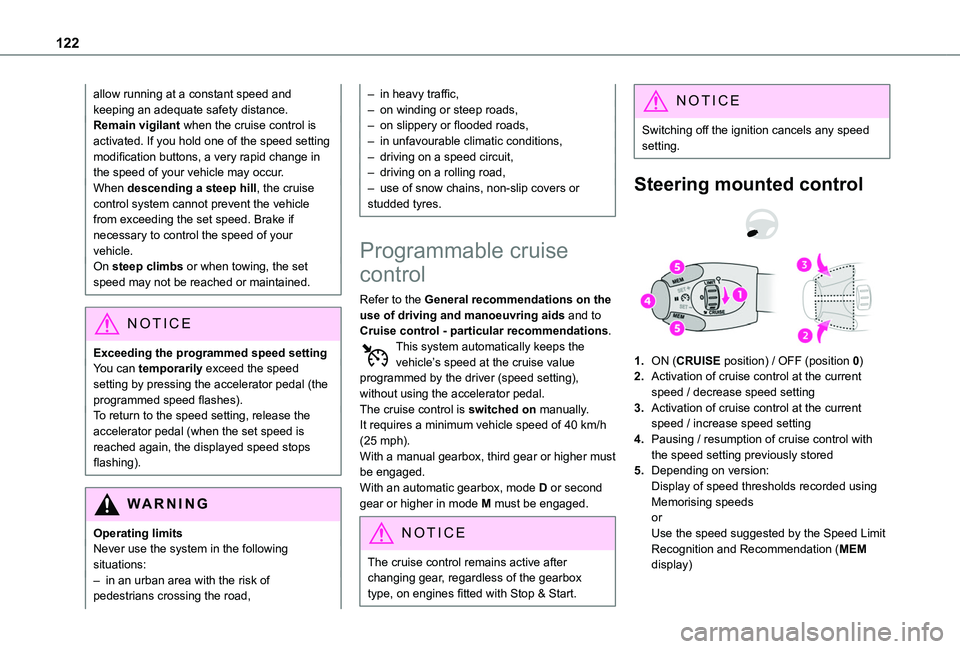
Steering mounted control
1.ON (CRUISE position) / OFF (position 0)
2.Activation of cruise control at the current speed / decrease speed setting
3.Activation of cruise control at the current speed / increase speed setting
4.Pausing / resumption of cruise control with the speed setting previously stored
5.Depending on version:Display of speed thresholds recorded using Memorising speedsorUse the speed suggested by the Speed Limit Recognition and Recommendation (MEM display)
Page 126 of 272
126
• press the electric parking brake control;► Press 4 to restart cruise control. Cruise control may have been paused automatically:• when the speed of the vehicle goes below 30 km/h (19 mph) with a manual gearbox;• when the speed of the engine goes below 1100 rpm with a manual gearbox;• by triggering of the ESC system.With a manual gearbox, the driver should press the accelerator pedal to move off, then above 30 km/h (19 mph), reactivate the system by pressing one of the buttons 2, 3 or 4.With an automatic gearbox, following braking of the vehicle bringing it to a complete stop, the system holds the vehicle stationary; the cruise control is paused. The driver should press the accelerator pedal to move off, then above 30 km/h (19 mph), reactivate the system by pressing one of the buttons 2, 3 or 4.If the driver takes no action following this immobilisation, the electric parking brake is applied automatically after about 5 minutes.
N OTIC E
Cruise control remains active after changing gear regardless of the gearbox type.
WARNI NG
When the driver attempts to reactivate cruise control which was paused, the message "Activation not possible, unsuitable
conditions" is briefly displayed if reactivation is not possible (safety conditions not met).
Modifying the programmed speed setting with the Speed Limit Recognition and Recommendation function
► Press 5 to accept the speed suggested by the function in the instrument panel, then press again to confirm.
WARNI NG
To prevent any sudden acceleration or deceleration of the vehicle, select a speed setting fairly close to the current speed of the vehicle.
Changing the inter-vehicle distance
► Press 6 to display the distance setting thresholds (“Distant”, “Normal”, “Close“), then press again to select a threshold.After a few seconds, the option is accepted and will be memorised when the ignition is switched off.
Temporarily exceeding the speed setting
► Press the accelerator pedal fully. Distance monitoring and cruise control are deactivated as long as acceleration is maintained. "Cruise control suspended" is displayed.
System deactivation
► Turn knob 1 upwards to the OFF position.
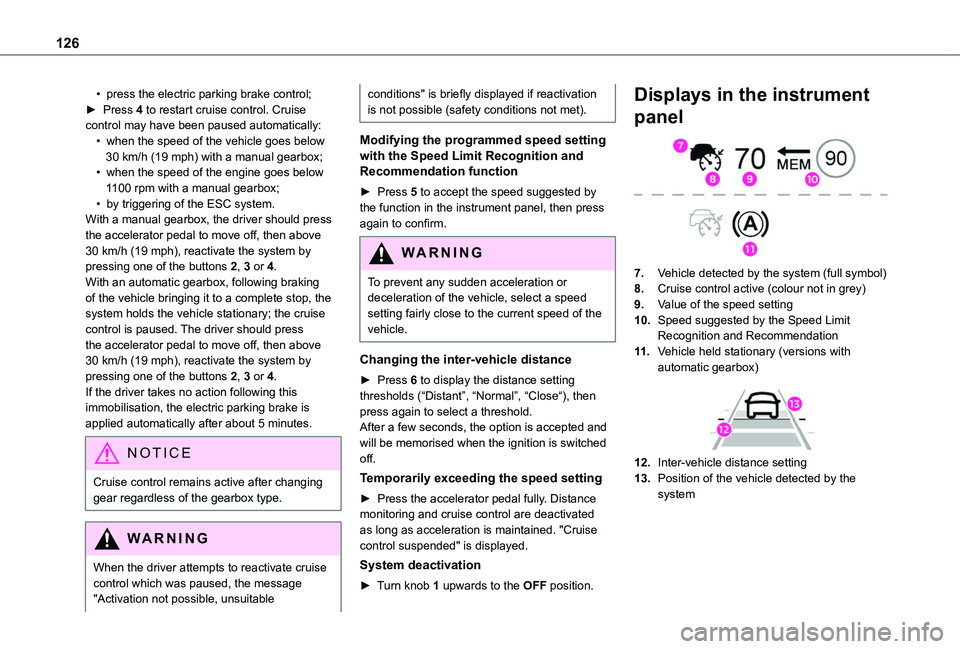
Displays in the instrument
panel
7.Vehicle detected by the system (full symbol)
8.Cruise control active (colour not in grey)
9.Value of the speed setting
10.Speed suggested by the Speed Limit Recognition and Recommendation
11 .Vehicle held stationary (versions with automatic gearbox)
12.Inter-vehicle distance setting
13.Position of the vehicle detected by the system