display TOYOTA PROACE VERSO 2020 Owners Manual
[x] Cancel search | Manufacturer: TOYOTA, Model Year: 2020, Model line: PROACE VERSO, Model: TOYOTA PROACE VERSO 2020Pages: 418, PDF Size: 39.32 MB
Page 357 of 418
357
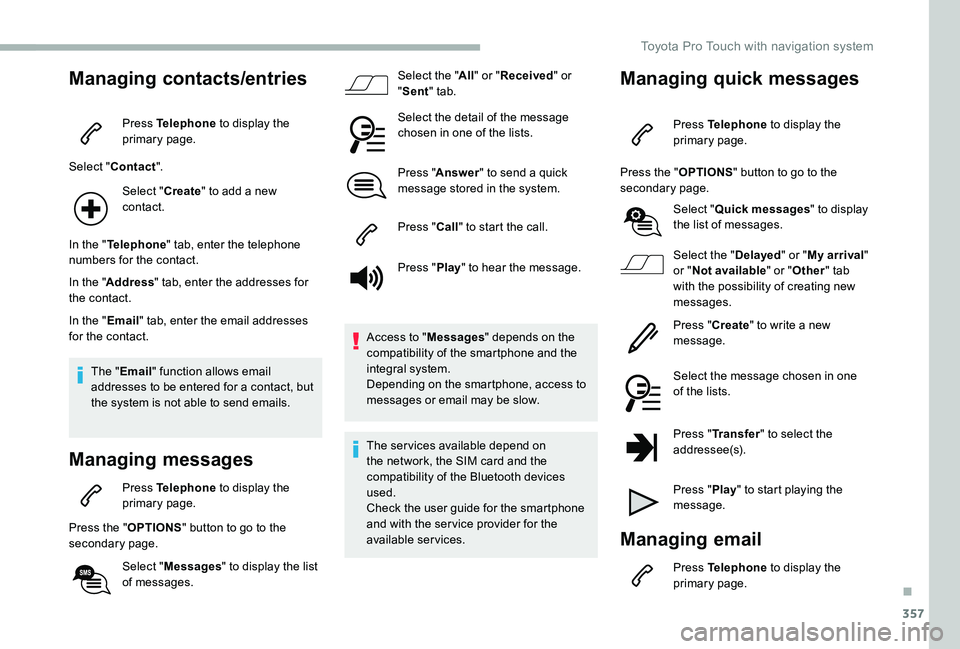
Managing contacts/entries
Press Telephone to display the primary page.
Select "Contact".
Select "Create" to add a new contact.
In the "Telephone" tab, enter the telephone numbers for the contact.
In the "Address" tab, enter the addresses for the contact.
In the "Email" tab, enter the email addresses for the contact.
The "Email" function allows email addresses to be entered for a contact, but the system is not able to send emails.
Managing messages
Press Telephone to display the primary page.
Press the "OPTIONS" button to go to the secondary page.
Select "Messages" to display the list of messages.
Select the "All" or "Received" or "Sent" tab.
Select the detail of the message chosen in one of the lists.
Press "Answer" to send a quick message stored in the system.
Press "Call" to start the call.
Press "Play" to hear the message.
Access to "Messages" depends on the compatibility of the smartphone and the integral system.Depending on the smartphone, access to messages or email may be slow.
The ser vices available depend on the network, the SIM card and the compatibility of the Bluetooth devices used.Check the user guide for the smartphone and with the ser vice provider for the available services.
Managing quick messages
Press Telephone to display the primary page.
Press the "OPTIONS" button to go to the secondary page.
Select "Quick messages" to display the list of messages.
Select the "Delayed" or "My arrival" or "Not available" or "Other" tab with the possibility of creating new messages.
Press "Create" to write a new message.
Select the message chosen in one of the lists.
Press "Transfer" to select the
addressee(s).
Press "Play" to start playing the message.
Managing email
Press Telephone to display the primary page.
.
Toyota Pro Touch with navigation system
Page 358 of 418
358
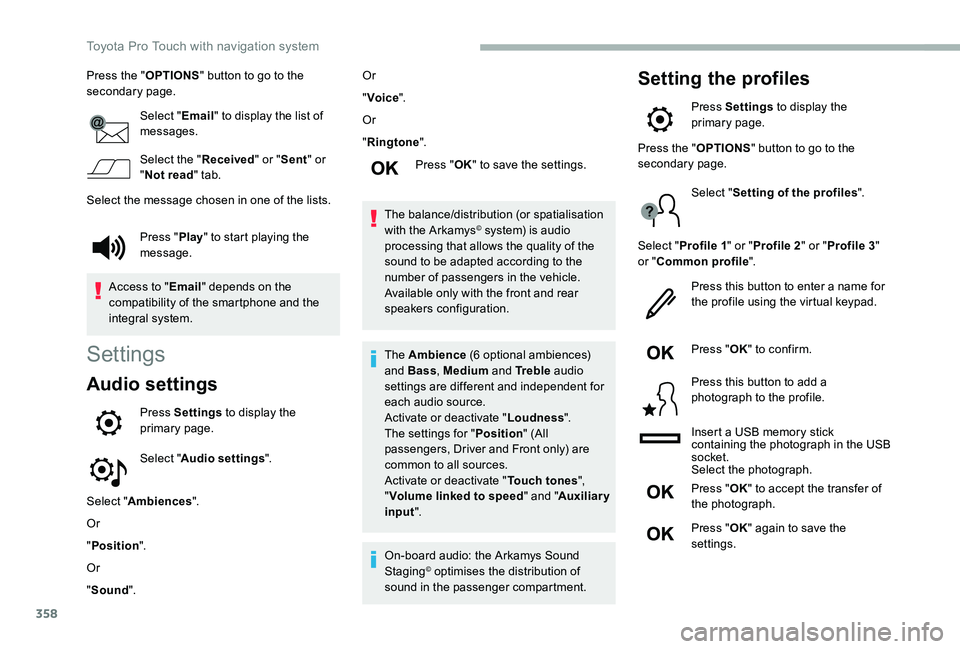
Press the "OPTIONS" button to go to the secondary page.
Select "Email" to display the list of messages.
Select the "Received" or "Sent" or "Not read" tab.
Select the message chosen in one of the lists.
Settings
Audio settings
Press Settings to display the primary page.
Select "Audio settings".
Select "Ambiences".
Or
"Position".
Or
"Sound".
Or
"Voice".
Or
"Ringtone".
Press "OK" to save the settings.
The balance/distribution (or spatialisation with the Arkamys© system) is audio processing that allows the quality of the sound to be adapted according to the number of passengers in the vehicle.Available only with the front and rear speakers configuration.
The Ambience (6 optional ambiences) and Bass, Medium and Tr e b l e audio settings are different and independent for each audio source.Activate or deactivate "Loudness".The settings for "Position" (All passengers, Driver and Front only) are common to all sources.Activate or deactivate "Touch tones", "Volume linked to speed" and "Auxiliary input".
On-board audio: the Arkamys Sound Staging© optimises the distribution of sound in the passenger compartment.
Setting the profiles
Press Settings to display the primary page.
Press "Play" to start playing the message.
Access to "Email" depends on the compatibility of the smartphone and the integral system.
Press the "OPTIONS" button to go to the secondary page.
Select "Setting of the profiles".
Select "Profile 1" or "Profile 2" or "Profile 3" or "Common profile".
Press this button to enter a name for the profile using the virtual keypad.
Press "OK" to confirm.
Press this button to add a photograph to the profile.
Insert a USB memory stick containing the photograph in the USB socket.Select the photograph.
Press "OK" to accept the transfer of the photograph.
Press "OK" again to save the settings.
Toyota Pro Touch with navigation system
Page 359 of 418
359
The location for the photograph is square ; the system reshapes the original photograph if in another format.
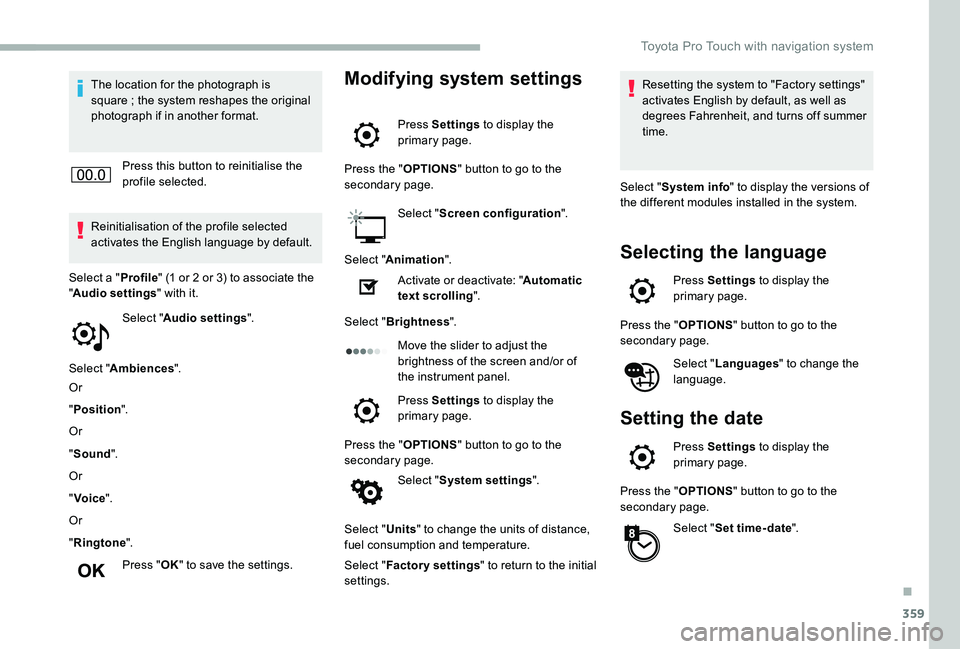
Press this button to reinitialise the profile selected.
Reinitialisation of the profile selected activates the English language by default.
Select "Audio settings".
Select "Ambiences".
Or
"Position".
Or
"Sound".
Or
"Voice".
Or
"Ringtone".
Press "OK" to save the settings.
Select a "Profile" (1 or 2 or 3) to associate the "Audio settings" with it.
Modifying system settings
Press Settings to display the primary page.
Press the "OPTIONS" button to go to the secondary page.
Select "Screen configuration".
Select "Animation".
Activate or deactivate: "Automatic text scrolling".
Select "Brightness".
Move the slider to adjust the brightness of the screen and/or of the instrument panel.
Press Settings to display the primary page.
Press the "OPTIONS" button to go to the secondary page.
Select "System settings".
Select "Units" to change the units of distance, fuel consumption and temperature.
Select "Factory settings" to return to the initial settings.
Resetting the system to "Factory settings" activates English by default, as well as degrees Fahrenheit, and turns off summer time.
Select "System info" to display the versions of the different modules installed in the system.
Selecting the language
Press Settings to display the primary page.
Press the "OPTIONS" button to go to the secondary page.
Select "Languages" to change the language.
Setting the date
Press Settings to display the primary page.
Press the "OPTIONS" button to go to the secondary page.
Select "Set time-date".
.
Toyota Pro Touch with navigation system
Page 360 of 418
360
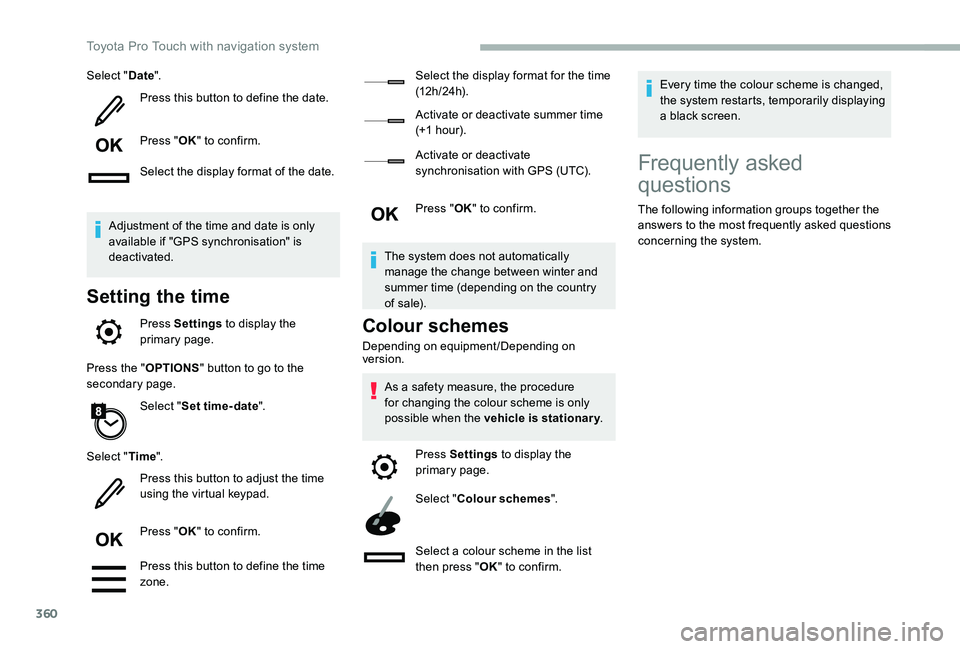
Select "Date".
Press this button to define the date.
Press "OK" to confirm.
Select the display format of the date.
Adjustment of the time and date is only available if "GPS synchronisation" is deactivated.
Setting the time
Press Settings to display the primary page.
Press the "OPTIONS" button to go to the secondary page.
Select "Set time-date".
Select "Time".
Press this button to adjust the time using the virtual keypad.
Press "OK" to confirm.
Press this button to define the time zone.
Select the display format for the time (12 h / 24 h).
Activate or deactivate summer time (+1 hour).
Activate or deactivate synchronisation with GPS (UTC).
Press "OK" to confirm.
The system does not automatically manage the change between winter and summer time (depending on the country of s a l e).
Colour schemes
Depending on equipment/Depending on version.
As a safety measure, the procedure for changing the colour scheme is only possible when the vehicle is stationary.
Press Settings to display the primary page.
Select "Colour schemes".
Select a colour scheme in the list then press "OK" to confirm.
Every time the colour scheme is changed, the system restarts, temporarily displaying a black screen.
Frequently asked
questions
The following information groups together the answers to the most frequently asked questions concerning the system.
Toyota Pro Touch with navigation system
Page 361 of 418
361
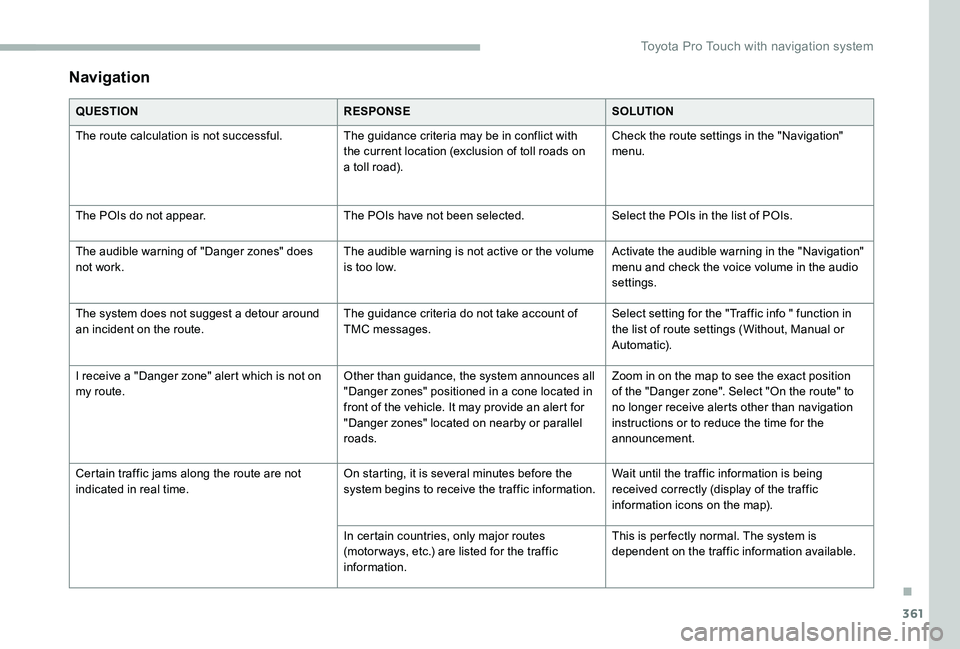
Navigation
QUESTIONRESPONSESOLUTION
The route calculation is not successful.The guidance criteria may be in conflict with the current location (exclusion of toll roads on a toll road).
Check the route settings in the "Navigation" menu.
The POIs do not appear.The POIs have not been selected.Select the POIs in the list of POIs.
The audible warning of "Danger zones" does not work.The audible warning is not active or the volume is too low.Activate the audible warning in the "Navigation" menu and check the voice volume in the audio settings.
The system does not suggest a detour around an incident on the route.The guidance criteria do not take account of TMC messages.Select setting for the "Traffic info " function in the list of route settings (Without, Manual or Automatic).
I receive a "Danger zone" alert which is not on my route.Other than guidance, the system announces all "Danger zones" positioned in a cone located in front of the vehicle. It may provide an alert for "Danger zones" located on nearby or parallel roads.
Zoom in on the map to see the exact position of the "Danger zone". Select "On the route" to no longer receive alerts other than navigation instructions or to reduce the time for the announcement.
Certain traffic jams along the route are not indicated in real time.On starting, it is several minutes before the system begins to receive the traffic information.Wait until the traffic information is being received correctly (display of the traffic information icons on the map).
In certain countries, only major routes (motor ways, etc.) are listed for the traffic information.
This is per fectly normal. The system is dependent on the traffic information available.
.
Toyota Pro Touch with navigation system
Page 362 of 418
362
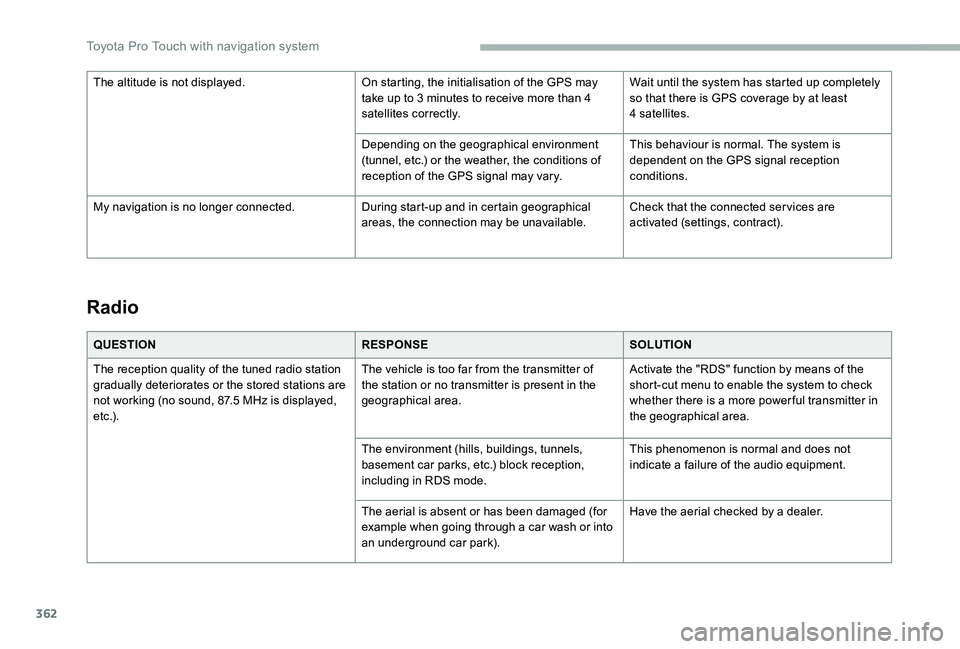
Radio
QUESTIONRESPONSESOLUTION
The reception quality of the tuned radio station gradually deteriorates or the stored stations are not working (no sound, 87.5 MHz is displayed, e t c .) .
The vehicle is too far from the transmitter of the station or no transmitter is present in the geographical area.
Activate the "RDS" function by means of the short-cut menu to enable the system to check whether there is a more power ful transmitter in the geographical area.
The environment (hills, buildings, tunnels, basement car parks, etc.) block reception, including in RDS mode.
This phenomenon is normal and does not indicate a failure of the audio equipment.
The aerial is absent or has been damaged (for example when going through a car wash or into an underground car park).
Have the aerial checked by a dealer.
The altitude is not displayed.On starting, the initialisation of the GPS may take up to 3 minutes to receive more than 4 satellites correctly.
Wait until the system has started up completely so that there is GPS coverage by at least 4 satellites.
Depending on the geographical environment (tunnel, etc.) or the weather, the conditions of reception of the GPS signal may vary.
This behaviour is normal. The system is dependent on the GPS signal reception conditions.
My navigation is no longer connected.During start-up and in certain geographical areas, the connection may be unavailable.Check that the connected ser vices are activated (settings, contract).
Toyota Pro Touch with navigation system
Page 364 of 418
364
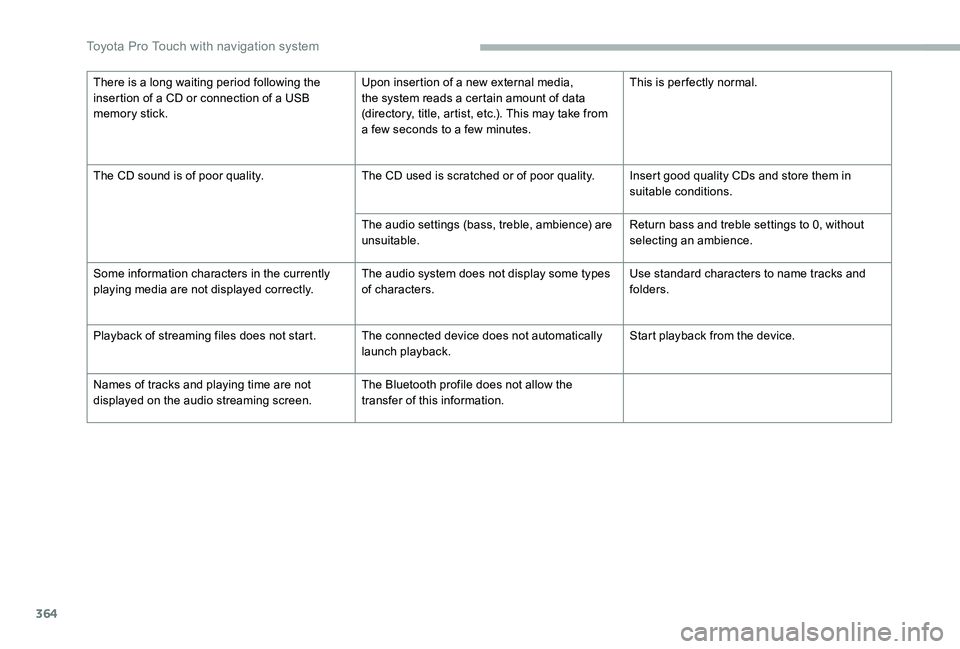
There is a long waiting period following the insertion of a CD or connection of a USB memory stick.
Upon insertion of a new external media, the system reads a certain amount of data (directory, title, artist, etc.). This may take from a few seconds to a few minutes.
This is per fectly normal.
The CD sound is of poor quality.The CD used is scratched or of poor quality.Insert good quality CDs and store them in suitable conditions.
The audio settings (bass, treble, ambience) are unsuitable.Return bass and treble settings to 0, without selecting an ambience.
Some information characters in the currently playing media are not displayed correctly.The audio system does not display some types of characters.Use standard characters to name tracks and folders.
Playback of streaming files does not start.The connected device does not automatically launch playback.Start playback from the device.
Names of tracks and playing time are not displayed on the audio streaming screen.The Bluetooth profile does not allow the transfer of this information.
Toyota Pro Touch with navigation system
Page 365 of 418
365
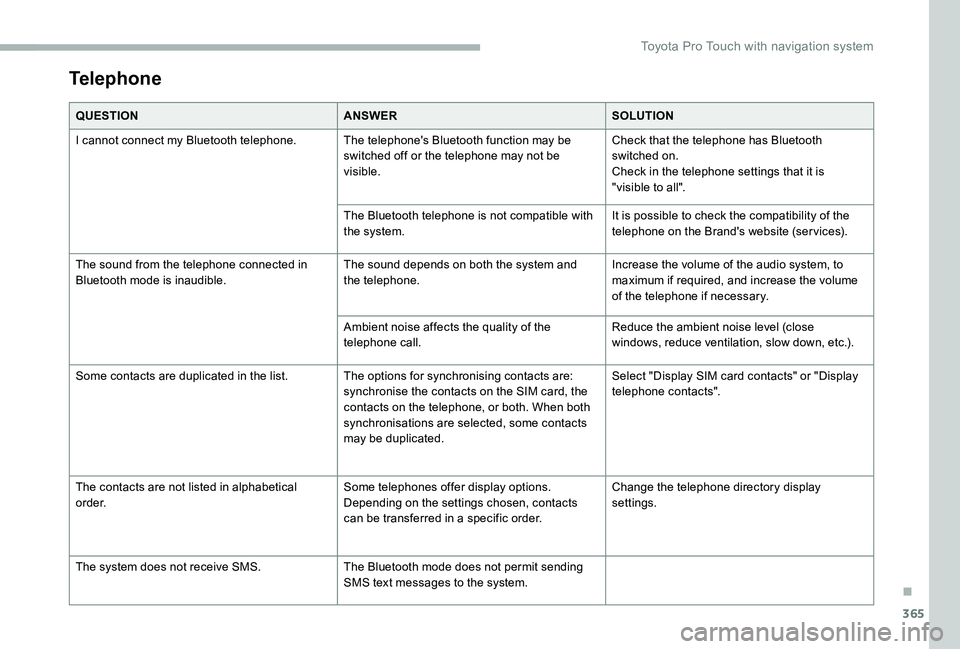
Telephone
QUESTIONANSWERSOLUTION
I cannot connect my Bluetooth telephone.The telephone's Bluetooth function may be switched off or the telephone may not be visible.
Check that the telephone has Bluetooth switched on.Check in the telephone settings that it is "visible to all".
The Bluetooth telephone is not compatible with the system.It is possible to check the compatibility of the telephone on the Brand's website (ser vices).
The sound from the telephone connected in Bluetooth mode is inaudible.The sound depends on both the system and the telephone.Increase the volume of the audio system, to maximum if required, and increase the volume of the telephone if necessary.
Ambient noise affects the quality of the telephone call.Reduce the ambient noise level (close windows, reduce ventilation, slow down, etc.).
Some contacts are duplicated in the list.The options for synchronising contacts are: synchronise the contacts on the SIM card, the contacts on the telephone, or both. When both synchronisations are selected, some contacts may be duplicated.
Select "Display SIM card contacts" or "Display telephone contacts".
The contacts are not listed in alphabetical o r d e r.Some telephones offer display options. Depending on the settings chosen, contacts can be transferred in a specific order.
Change the telephone directory display settings.
The system does not receive SMS.The Bluetooth mode does not permit sending SMS text messages to the system.
.
Toyota Pro Touch with navigation system
Page 367 of 418
367
To y o t a P r o To u c h
Multimedia audio system -
Applications - Bluetooth®
telephone
The various functions and settings described differ according to the version and configuration of the vehicle.
For safety reasons and because they require continued attention on the part of the driver, the following operations must be carried out with the vehicle stationary and the ignition on:- Using a smartphone.- Pairing a Bluetooth mobile phone to the hands-free Bluetooth system of the car radio.- Smartphone connection operations for CarPlay®, MirrorLinkTM or Android Auto (certain applications interrupt their display when the vehicle starts to move again).- The configuration of profiles.
The system is protected in such a way that it will only operate in the vehicle.The display of the message Energy Economy Mode signals that a change to standby is imminent.
First steps
With the engine running, a press mutes the sound.With the ignition off, a press turns the system on.
Increase or decrease the volume using the wheel or the "plus" or "minus" buttons (depending on the equipment).
Use the buttons on either side of or below the touch screen for access to the menus, then press the virtual buttons in the touch screen.
Depending on the model, use the "Source" or "Menu" buttons on the left of the touch screen for access to the menus, then press the virtual buttons in the touch screen.
At all times it is possible to display the rolling menus by pressing the screen briefly with three fingers.
All of the touch areas of the screen are white.For pages with multiple tabs at the bottom of
the screen, it is possible to switch between pages either by tapping the tab for the desired page, or by using a finger, sliding the pages to the left or to the right.Press in the grey zone to go back up a level or to confirm.
ContentsFirst steps 367Steering mounted controls 368Menus 369Applications 371R adi o 371DAB (Digital Audio Broadcasting) radio 373M e d i a 3 74Telephone 376Frequently asked questions 382
.
Toyota Pro Touch
Page 368 of 418
368
The touch screen is of the "capacitive" type.To clean the screen, use a soft, non-abrasive cloth (e.g. spectacles cloth) with no additional product.Do not use sharp objects on the screen.Do not touch the screen with wet hands.
Certain information is displayed permanently in the upper bar of the touch screen:- Reminder of the air conditioning information (depending on version), and direct access to the corresponding menu.- Reminder of the Radio Media and Telephone menu information.- Reminder of the privacy information.- Access to the Settings of the touch screen and digital instrument panel.
Selection of the audio source (depending on
equipment):- FM/DAB/AM radio stations (depending on equipment).- Telephone connected via Bluetooth and Bluetooth multimedia broadcast (streaming).- USB memory stick.- Media player connected via the auxiliary socket (depending on equipment).- CD player (depending on equipment).
In the "Settings" menu it is possible to create a profile for just one person or a group of people with shared interests, with the possibility of entering multiple settings (radio presets, audio settings, ambiences, etc.) ; these settings are taken into account automatically.
In very hot conditions, the volume may
be limited to protect the system. It may go into standby (screen and sound off) for at least 5 minutes.The return to normal takes place when the temperature in the passenger compartment has dropped.
Press the back arrow to go back a level or confirm.Steering mounted controls
Steering mounted controls -
Ty p e 1
Radio:Select the previous/next preset radio station.Select the previous/next item in a menu or a list.Media:Select the previous/next track.Select the previous/next item in a menu or a list.
Radio:Short press: display the list of radio stations.Long press: update the list.Media:Short press: display the list of folders.Long press: display the available sorting options.
Change audio source (radio ; USB ; AUX if equipment connected ; CD ; streaming).
Confirm a selection.
Toyota Pro Touch