reset TOYOTA RAV4 2006 Service Repair Manual
[x] Cancel search | Manufacturer: TOYOTA, Model Year: 2006, Model line: RAV4, Model: TOYOTA RAV4 2006Pages: 2000, PDF Size: 45.84 MB
Page 188 of 2000
2AZ-FE ENGINE CONTROL SYSTEM – ECMES–431
ES
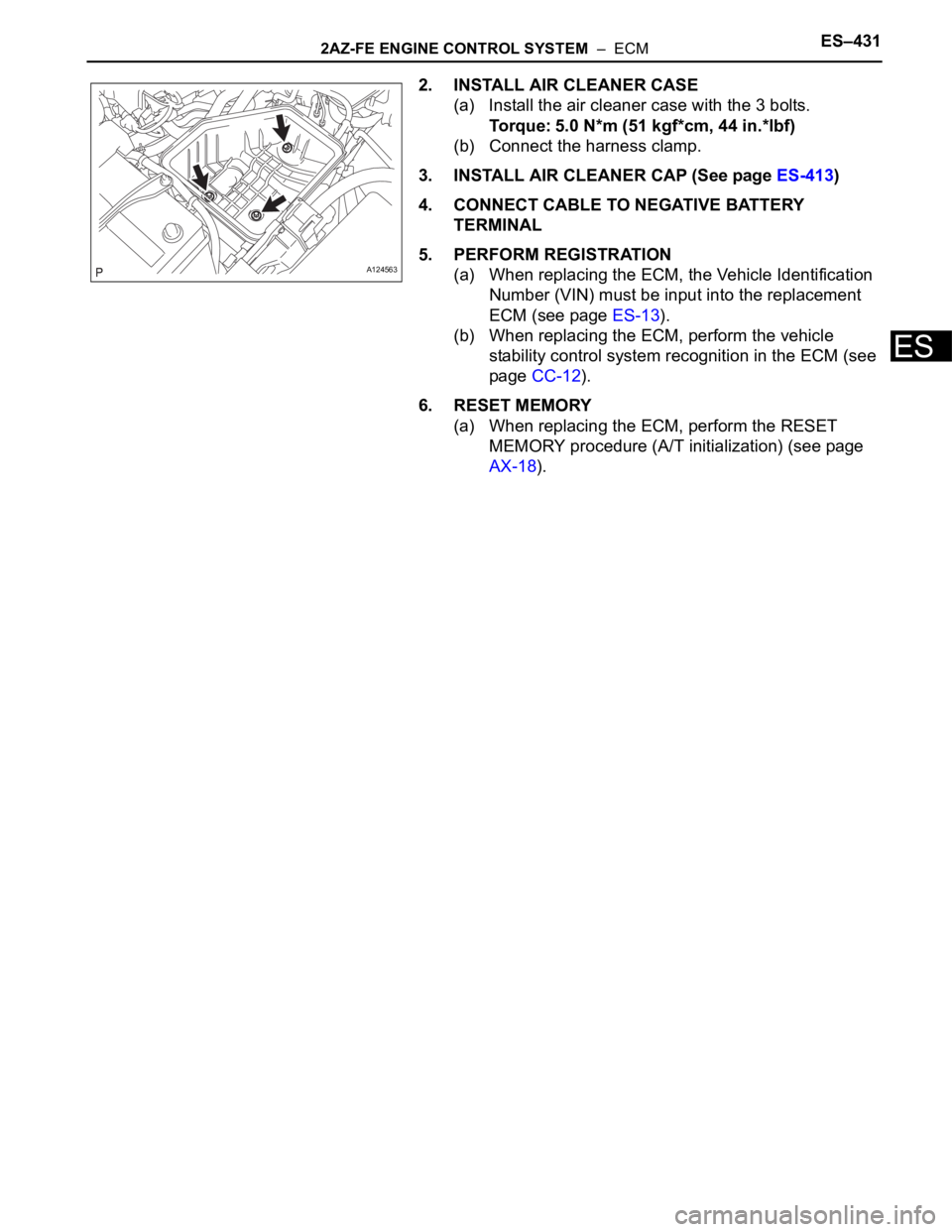
2. INSTALL AIR CLEANER CASE
(a) Install the air cleaner case with the 3 bolts.
Torque: 5.0 N*m (51 kgf*cm, 44 in.*lbf)
(b) Connect the harness clamp.
3. INSTALL AIR CLEANER CAP (See page ES-413)
4. CONNECT CABLE TO NEGATIVE BATTERY
TERMINAL
5. PERFORM REGISTRATION
(a) When replacing the ECM, the Vehicle Identification
Number (VIN) must be input into the replacement
ECM (see page ES-13).
(b) When replacing the ECM, perform the vehicle
stability control system recognition in the ECM (see
page CC-12).
6. RESET MEMORY
(a) When replacing the ECM, perform the RESET
MEMORY procedure (A/T initialization) (see page
AX-18).
A124563
Page 194 of 2000
2GR-FE ENGINE CONTROL SYSTEM – ECMES–471
ES
INSTALLATION
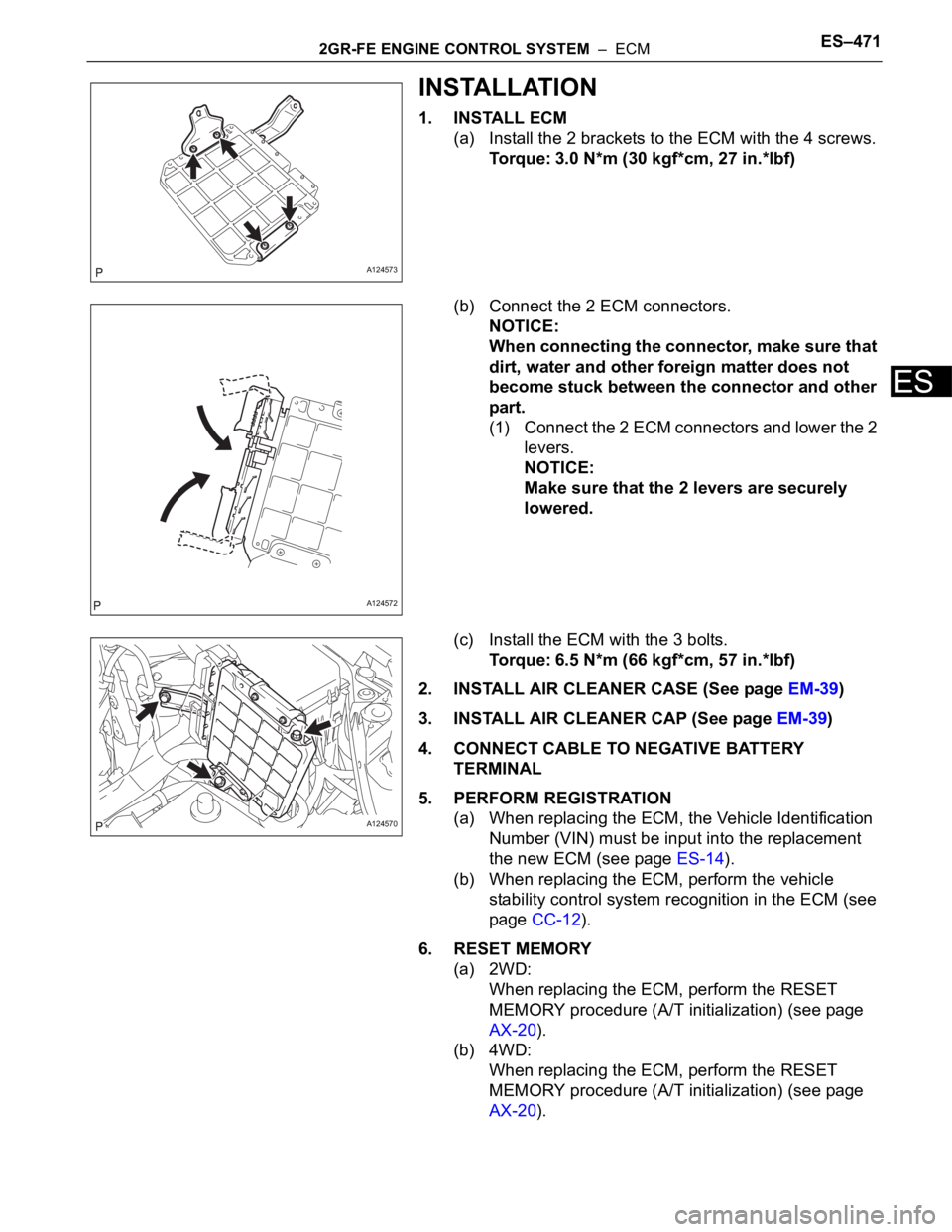
1. INSTALL ECM
(a) Install the 2 brackets to the ECM with the 4 screws.
Torque: 3.0 N*m (30 kgf*cm, 27 in.*lbf)
(b) Connect the 2 ECM connectors.
NOTICE:
When connecting the connector, make sure that
dirt, water and other foreign matter does not
become stuck between the connector and other
part.
(1) Connect the 2 ECM connectors and lower the 2
levers.
NOTICE:
Make sure that the 2 levers are securely
lowered.
(c) Install the ECM with the 3 bolts.
Torque: 6.5 N*m (66 kgf*cm, 57 in.*lbf)
2. INSTALL AIR CLEANER CASE (See page EM-39)
3. INSTALL AIR CLEANER CAP (See page EM-39)
4. CONNECT CABLE TO NEGATIVE BATTERY
TERMINAL
5. PERFORM REGISTRATION
(a) When replacing the ECM, the Vehicle Identification
Number (VIN) must be input into the replacement
the new ECM (see page ES-14).
(b) When replacing the ECM, perform the vehicle
stability control system recognition in the ECM (see
page CC-12).
6. RESET MEMORY
(a) 2WD:
When replacing the ECM, perform the RESET
MEMORY procedure (A/T initialization) (see page
AX-20).
(b) 4WD:
When replacing the ECM, perform the RESET
MEMORY procedure (A/T initialization) (see page
AX-20).
A124573
A124572
A124570
Page 478 of 2000

ES–242AZ-FE ENGINE CONTROL SYSTEM – SFI SYSTEM
ES
READINESS MONITOR DRIVE
PAT T E R N
1. PURPOSE OF READINESS TESTS
• The On-Board Diagnostic (OBD II) system is designed to
monitor the performance of emission related components,
and indicate any detected abnormalities with DTC
(Diagnostic Trouble Codes). Since various components
need to be monitored during different driving conditions,
the OBD II system is designed to run separate monitoring
programs called Readiness Monitors.
• The intelligent tester's software must be version 9.0 or
newer to view the Readiness Monitor Status. To view the
status, select the following menu items: DIAGNOSIS /
ENHANCED OBD II / MONITOR INFO / MONITOR
STATUS.
• When the Readiness Monitor status reads COMPL
(complete), the necessary conditions have been met for
running the performance tests for that Readiness Monitor.
• A generic OBD II scan tool can also be used to view the
Readiness Monitor status.
HINT:
Many state Inspection and Maintenance (I/M) programs
require a vehicle's Readiness Monitor status to show COMPL
before beginning emission tests.
The Readiness Monitor will be reset to INCMPL (incomplete)
if:
• The ECM has lost battery power or blown a fuse.
• DTCs have been cleared.
• The conditions for running the Readiness Monitor have not
been met.
If the Readiness Monitor status shows INCMPL, follow the
appropriate Readiness Monitor Drive Pattern to change the
status to COMPL.
CAUTION:
Strictly observe posted speed limits, traffic laws, and
road conditions when performing these drive patterns.
NOTICE:
These drive patterns represent the fastest method of
satisfying all conditions necessary to achieve complete
status for each specific Readiness Monitor.
In the event of a drive pattern being interrupted (possibly
due to factors such as traffic conditions), the drive
pattern can be resumed. In most cases, the Readiness
Monitor will still achieve complete status upon
completion of the drive pattern.
To ensure completion of the Readiness Monitors, avoid
sudden changes in vehicle load and speed (driving up
and down hills and/or sudden acceleration).
Page 551 of 2000

2GR-FE ENGINE CONTROL SYSTEM – SFI SYSTEMES–27
ES
READINESS MONITOR DRIVE
PAT T E R N
1. PURPOSE OF READINESS TESTS
• The On-Board Diagnostic (OBD II) system is designed to
monitor the performance of emission related components,
and indicate any detected abnormalities with DTC
(Diagnostic Trouble Codes). Since various components
need to be monitored during different driving conditions,
the OBD II system is designed to run separate monitoring
programs called Readiness Monitors.
• The intelligent tester's software must be version 9.0 or
newer to view the Readiness Monitor Status. To view the
status, select the following menu items: DIAGNOSIS /
ENHANCED OBD II / MONITOR INFO / MONITOR
STATUS.
• When the Readiness Monitor status reads COMPL
(complete), the necessary conditions have been met for
running the performance tests for that Readiness Monitor.
• A generic OBD II scan tool can also be used to view the
Readiness Monitor status.
HINT:
Many state Inspection and Maintenance (I/M) programs
require a vehicle's Readiness Monitor status to show COMPL
before beginning emission tests.
The Readiness Monitor will be reset to INCMPL (incomplete)
if:
• The ECM has lost battery power or blown a fuse.
• DTCs have been cleared.
• The conditions for running the Readiness Monitor have not
been met.
If the Readiness Monitor status shows INCMPL, follow the
appropriate Readiness Monitor Drive Pattern to change the
status to COMPL.
CAUTION:
Strictly observe posted speed limits, traffic laws, and
road conditions when performing these drive patterns.
NOTICE:
These drive patterns represent the fastest method of
satisfying all conditions necessary to achieve complete
status for each specific Readiness Monitor.
In the event of a drive pattern being interrupted (possibly
due to factors such as traffic conditions), the drive
pattern can be resumed. In most cases, the Readiness
Monitor will still achieve complete status upon
completion of the drive pattern.
To ensure completion of the Readiness Monitors, avoid
sudden changes in vehicle load and speed (driving up
and down hills and/or sudden acceleration).
Page 649 of 2000
EM–1142AZ-FE ENGINE MECHANICAL – ENGINE ASSEMBLY
EM
58. INSTALL HOOD SUB-ASSEMBLY
(a) Install the hood (see page ED-7).
(b) Adjust the hood (see page ED-5).
59. INSPECT AND ADJUST FRONT WHEEL ALIGNMENT
(a) Inspect and adjust the front wheel alignment (see
page SP-3).
60. PERFORM REGISTRATION
(a) When replacing the engine assembly, perform
vehicle stability control system recognition in ECM
(see page CC-12).
61. RESET MEMORY (for Automatic Transaxle)
(a) When replacing the engine assembly, perform the
RESET MEMORY procedure (A/T initialization) for
U241E (2WD) (see page AX-18) and for U140F
(4WD) (see page AX-18).
Page 956 of 2000

AX–22U140F AUTOMATIC TRANSAXLE – AUTOMATIC TRANSAXLE SYSTEM
AX
INITIALIZATION
1. RESET MEMORY
NOTICE:
• Perform the RESET MEMORY procedures (A/T
initialization) when replacing the automatic
transaxle assembly, engine assembly or ECM.
• RESET MEMORY can be performed only with the
intelligent tester.
HINT:
The ECM memorizes the vehicle conditions when the
ECT controls the automatic transaxle assembly and
engine assembly. Therefore, when the automatic
transaxle assembly, engine assembly, or ECM has been
replaced, it is necessary to reset the memory so that the
ECM can memorize the new information.
The reset procedures are as follows.
(a) Turn the ignition switch OFF.
(b) Connect the intelligent tester to the CAN VIM. Then
connect the CAN VIM to the DLC3.
(c) Turn the ignition switch ON and turn the tester ON.
(d) Enter the following menus: DIAGNOSIS /
ENHANCED OBD II.
(e) Perform the reset memory procedures from the
Engine menu.
CAUTION:
After performing the RESET MEMORY
procedures, be sure to perform the ROAD TEST
(see page AX-12) as described earlier.
HINT:
The ECM learns through the ROAD TEST.
Page 980 of 2000
AX–152U140F AUTOMATIC TRANSAXLE – AUTOMATIC TRANSAXLE ASSEMBLY
AX
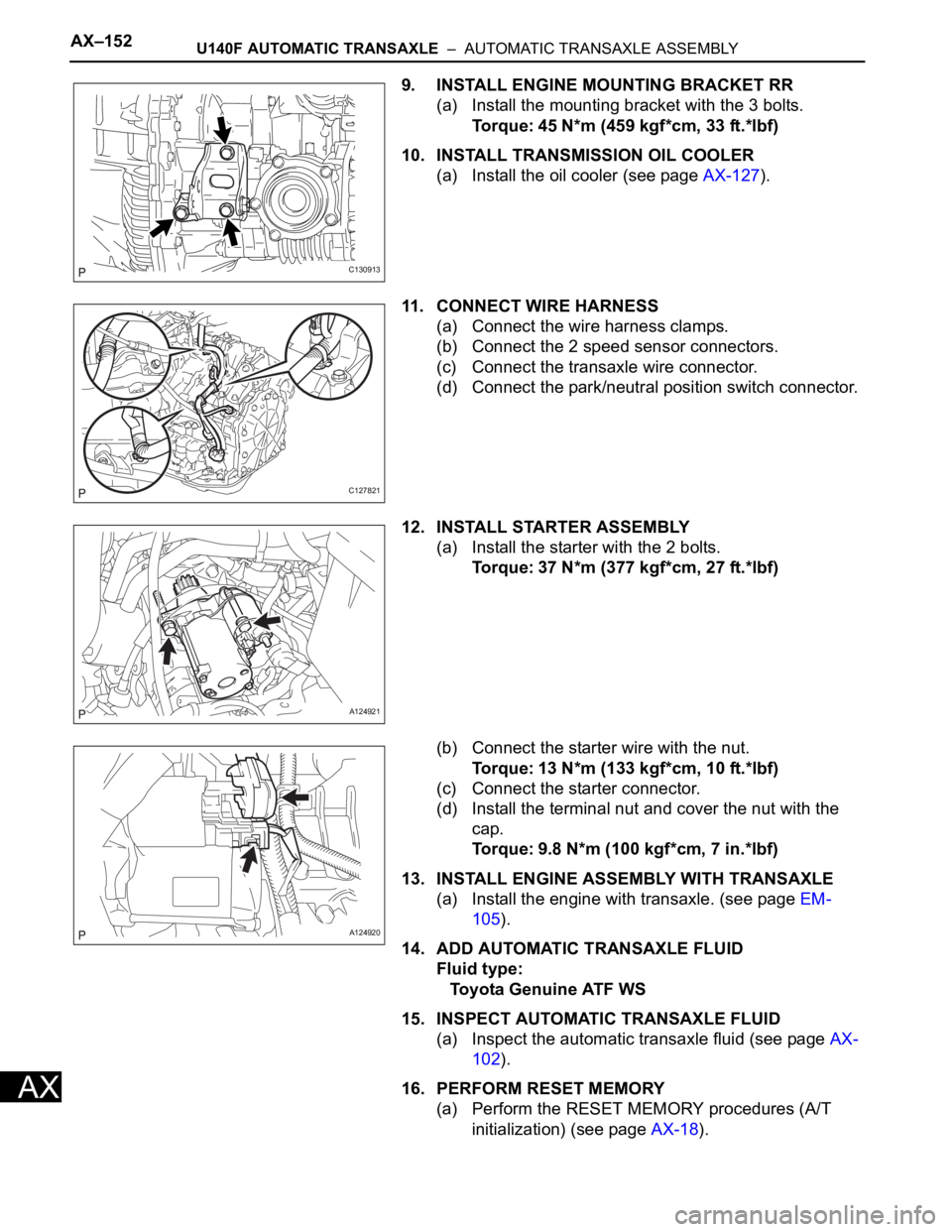
9. INSTALL ENGINE MOUNTING BRACKET RR
(a) Install the mounting bracket with the 3 bolts.
Torque: 45 N*m (459 kgf*cm, 33 ft.*lbf)
10. INSTALL TRANSMISSION OIL COOLER
(a) Install the oil cooler (see page AX-127).
11. CONNECT WIRE HARNESS
(a) Connect the wire harness clamps.
(b) Connect the 2 speed sensor connectors.
(c) Connect the transaxle wire connector.
(d) Connect the park/neutral position switch connector.
12. INSTALL STARTER ASSEMBLY
(a) Install the starter with the 2 bolts.
Torque: 37 N*m (377 kgf*cm, 27 ft.*lbf)
(b) Connect the starter wire with the nut.
Torque: 13 N*m (133 kgf*cm, 10 ft.*lbf)
(c) Connect the starter connector.
(d) Install the terminal nut and cover the nut with the
cap.
Torque: 9.8 N*m (100 kgf*cm, 7 in.*lbf)
13. INSTALL ENGINE ASSEMBLY WITH TRANSAXLE
(a) Install the engine with transaxle. (see page EM-
105).
14. ADD AUTOMATIC TRANSAXLE FLUID
Fluid type:
Toyota Genuine ATF WS
15. INSPECT AUTOMATIC TRANSAXLE FLUID
(a) Inspect the automatic transaxle fluid (see page AX-
102).
16. PERFORM RESET MEMORY
(a) Perform the RESET MEMORY procedures (A/T
initialization) (see page AX-18).
C130913
C127821
A124921
A124920
Page 1039 of 2000

U151E AUTOMATIC TRANSAXLE – AUTOMATIC TRANSAXLE SYSTEMAX–23
AX
INITIALIZATION
1. RESET MEMORY
NOTICE:
• Perform the RESET MEMORY procedures (A/T
initialization) when replacing the automatic
transaxle assembly, engine assembly or ECM.
• RESET MEMORY can be performed only with the
intelligent tester.
HINT:
The ECM memorizes the vehicle conditions when the
ECT controls the automatic transaxle assembly and
engine assembly. Therefore, when the automatic
transaxle assembly, engine assembly, or ECM has been
replaced, it is necessary to reset the memory so that the
ECM can memorize the new information.
The reset procedures are as follows.
(a) Turn the ignition switch OFF.
(b) Connect the intelligent tester to the CAN VIM. Then
connect the CAN VIM to the DLC3.
(c) Turn the ignition switch ON and turn the tester ON.
(d) Enter the following menus: DIAGNOSIS /
ENHANCED OBD II.
(e) Perform the reset memory procedures from the
Engine menu.
CAUTION:
After performing the RESET MEMORY
procedures, be sure to perform the ROAD TEST
(see page AX-13) as described earlier.
HINT:
The ECM learns through the ROAD TEST.
Page 1062 of 2000

AX–178U151E AUTOMATIC TRANSAXLE – AUTOMATIC TRANSAXLE ASSEMBLY
AX
15. INSPECT AUTOMATIC TRANSAXLE FLUID
(a) Inspect the automatic transaxle fluid (see page AX-
126).
16. PERFORM RESET MEMORY
(a) Perform the RESET MEMORY procedures (A/T
initialization) (see page AX-20).
Page 1142 of 2000

U151F AUTOMATIC TRANSAXLE – AUTOMATIC TRANSAXLE SYSTEMAX–23
AX
INITIALIZATION
1. RESET MEMORY
NOTICE:
• Perform the RESET MEMORY procedures (A/T
initialization) when replacing the automatic
transaxle assembly, engine assembly or ECM.
• RESET MEMORY can be performed only with the
intelligent tester.
HINT:
The ECM memorizes the vehicle conditions when the
ECT controls the automatic transaxle assembly and
engine assembly. Therefore, when the automatic
transaxle assembly, engine assembly, or ECM has been
replaced, it is necessary to reset the memory so that the
ECM can memorize the new information.
The reset procedures are as follows.
(a) Turn the ignition switch OFF.
(b) Connect the intelligent tester to the CAN VIM. Then
connect the CAN VIM to the DLC3.
(c) Turn the ignition switch ON and turn the tester ON.
(d) Enter the following menus: DIAGNOSIS /
ENHANCED OBD II.
(e) Perform the reset memory procedures from the
Engine menu.
CAUTION:
After performing the RESET MEMORY
procedures, be sure to perform the ROAD TEST
(see page AX-13) as described earlier.
HINT:
The ECM learns through the ROAD TEST.