navigation system TOYOTA RAV4 2017 XA40 / 4.G Navigation Manual
[x] Cancel search | Manufacturer: TOYOTA, Model Year: 2017, Model line: RAV4, Model: TOYOTA RAV4 2017 XA40 / 4.GPages: 366, PDF Size: 12.77 MB
Page 263 of 366
8
263
RAV4_RAV4 HV_Navi+MM_OM0R007U_(U)
16.06.10 19:05
1
2
3
4
5
6
7
8
9
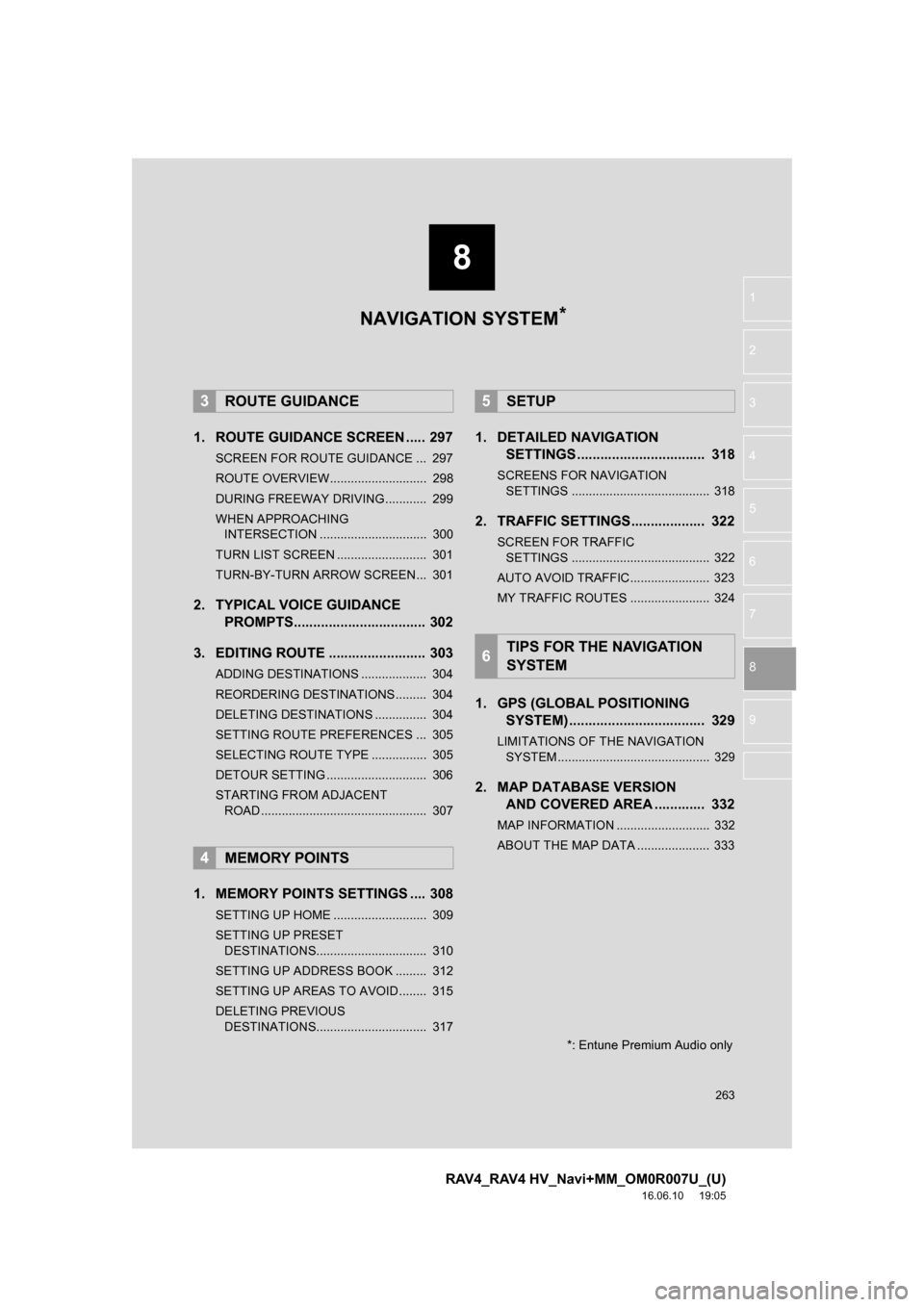
1. ROUTE GUIDANCE SCREEN ..... 297
SCREEN FOR ROUTE GUIDANCE ... 297
ROUTE OVERVIEW............................ 298
DURING FREEWAY DRIVING............ 299
WHEN APPROACHING INTERSECTION ............................... 300
TURN LIST SCREEN .......................... 301
TURN-BY-TURN ARROW SCREEN ... 301
2. TYPICAL VOICE GUIDANCE PROMPTS.................................. 302
3. EDITING ROUTE ......................... 303
ADDING DESTINATIONS ................... 304
REORDERING DESTINATIONS ......... 304
DELETING DESTINATIONS ............... 304
SETTING ROUTE PREFERENCES ... 305
SELECTING ROUTE TYPE ................ 305
DETOUR SETTING ............................. 306
STARTING FROM ADJACENT ROAD ................................................ 307
1. MEMORY POINTS SETTINGS .... 308
SETTING UP HOME ........................... 309
SETTING UP PRESET DESTINATIONS................................ 310
SETTING UP ADDRESS BOOK ......... 312
SETTING UP AREAS TO AVOID ........ 315
DELETING PREVIOUS DESTINATIONS................................ 317
1. DETAILED NAVIGATION SETTINGS ................................. 318
SCREENS FOR NAVIGATION
SETTINGS ........................................ 318
2. TRAFFIC SETTINGS................... 322
SCREEN FOR TRAFFIC SETTINGS ........................................ 322
AUTO AVOID TRAFFIC....................... 323
MY TRAFFIC ROUTES ....................... 324
1. GPS (GLOBAL POSITIONING SYSTEM) ................................ ... 329
LIMITATIONS OF THE NAVIGATION
SYSTEM ............................................ 329
2. MAP DATABASE VERSION AND COVERED AREA ............. 332
MAP INFORMATION ........................... 332
ABOUT THE MAP DATA ..................... 333
3ROUTE GUIDANCE
4MEMORY POINTS
5SETUP
6TIPS FOR THE NAVIGATION
SYSTEM
NAVIGATION SYSTEM*
*: Entune Premium Audio only
Page 264 of 366
264
RAV4_RAV4 HV_Navi+MM_OM0R007U_(U)
16.06.10 19:05
1. BASIC OPERATION
1. QUICK REFERENCE
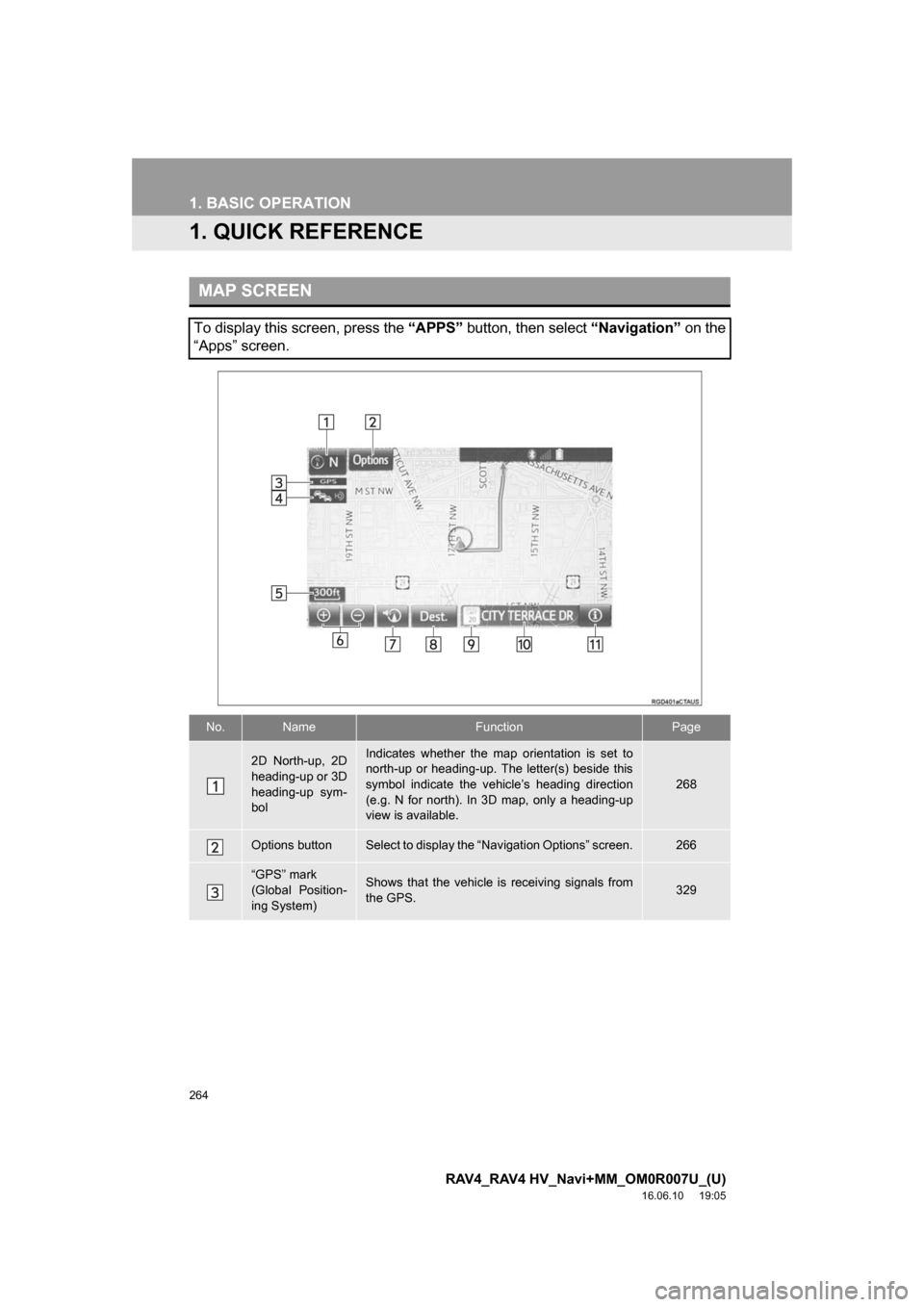
MAP SCREEN
To display this screen, press the “APPS” button, then select “Navigation” on the
“Apps” screen.
No.NameFunctionPage
2D North-up, 2D
heading-up or 3D
heading-up sym-
bolIndicates whether the map orientation is set to
north-up or heading-up. The letter(s) beside this
symbol indicate the vehicle’s heading direction
(e.g. N for north). In 3D map, only a heading-up
view is available.
268
Options buttonSelect to display the “Navigation Options” screen.266
“GPS” mark
(Global Position-
ing System)Shows that the vehicle is receiving signals from
the GPS.329
Page 265 of 366
265
1. BASIC OPERATION
RAV4_RAV4 HV_Navi+MM_OM0R007U_(U)
16.06.10 19:05
NAVIGATION SYSTEM
8
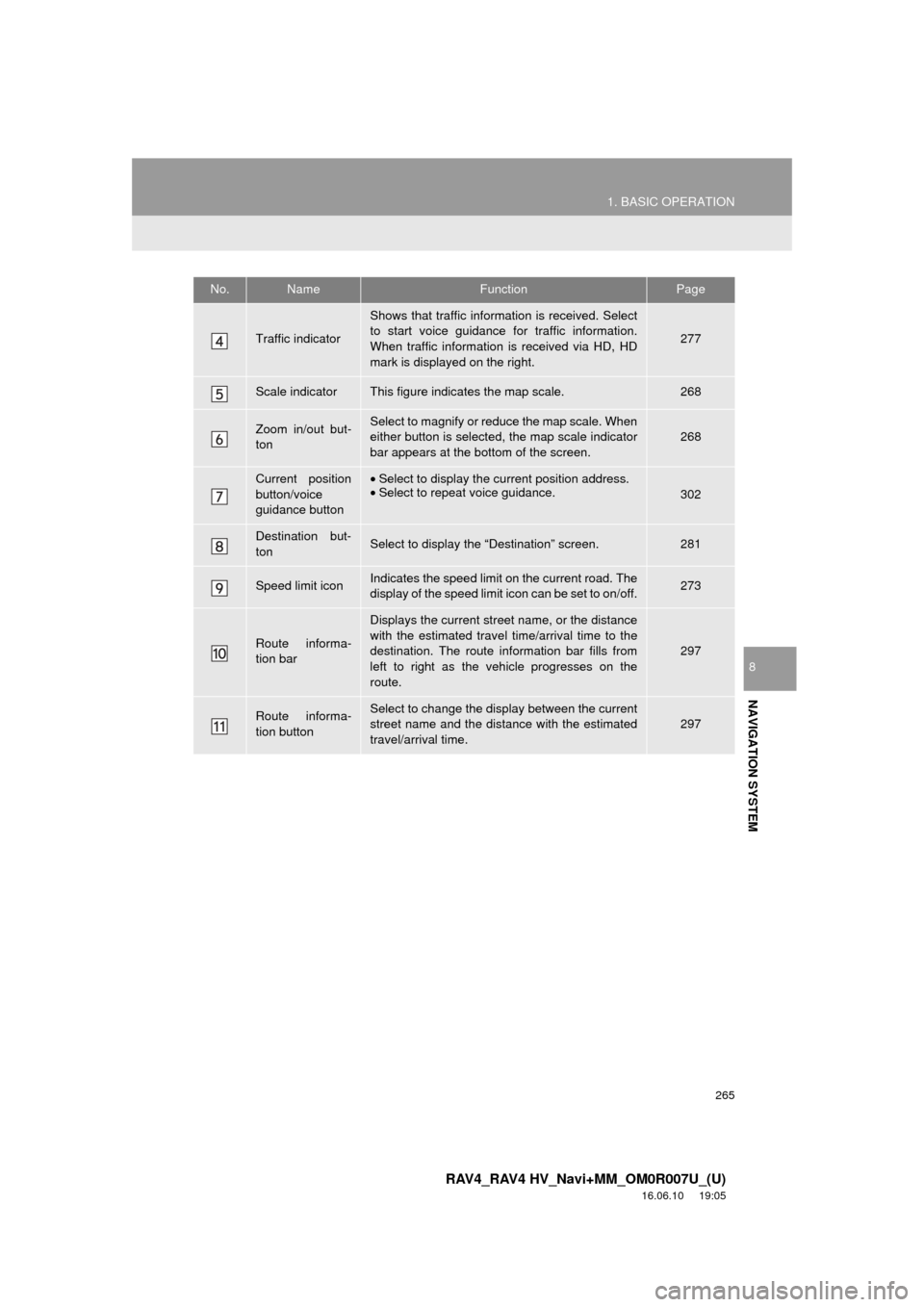
Traffic indicator
Shows that traffic information is received. Select
to start voice guidance for traffic information.
When traffic information is received via HD, HD
mark is displayed on the right.
277
Scale indicatorThis figure indicates the map scale.268
Zoom in/out but-
tonSelect to magnify or reduce the map scale. When
either button is selected, the map scale indicator
bar appears at the bottom of the screen.268
Current position
button/voice
guidance button•Select to display the current position address.
• Select to repeat voice guidance.
302
Destination but-
tonSelect to display the “Destination” screen.281
Speed limit iconIndicates the speed limit on the current road. The
display of the speed limit icon can be set to on/off.273
Route informa-
tion bar
Displays the current street name, or the distance
with the estimated travel time/arrival time to the
destination. The route information bar fills from
left to right as the vehicle progresses on the
route.
297
Route informa-
tion buttonSelect to change the display between the current
street name and the distance with the estimated
travel/arrival time.
297
No.NameFunctionPage
Page 267 of 366
267
1. BASIC OPERATION
RAV4_RAV4 HV_Navi+MM_OM0R007U_(U)
16.06.10 19:05
NAVIGATION SYSTEM
8
2. MAP SCREEN OPERATION
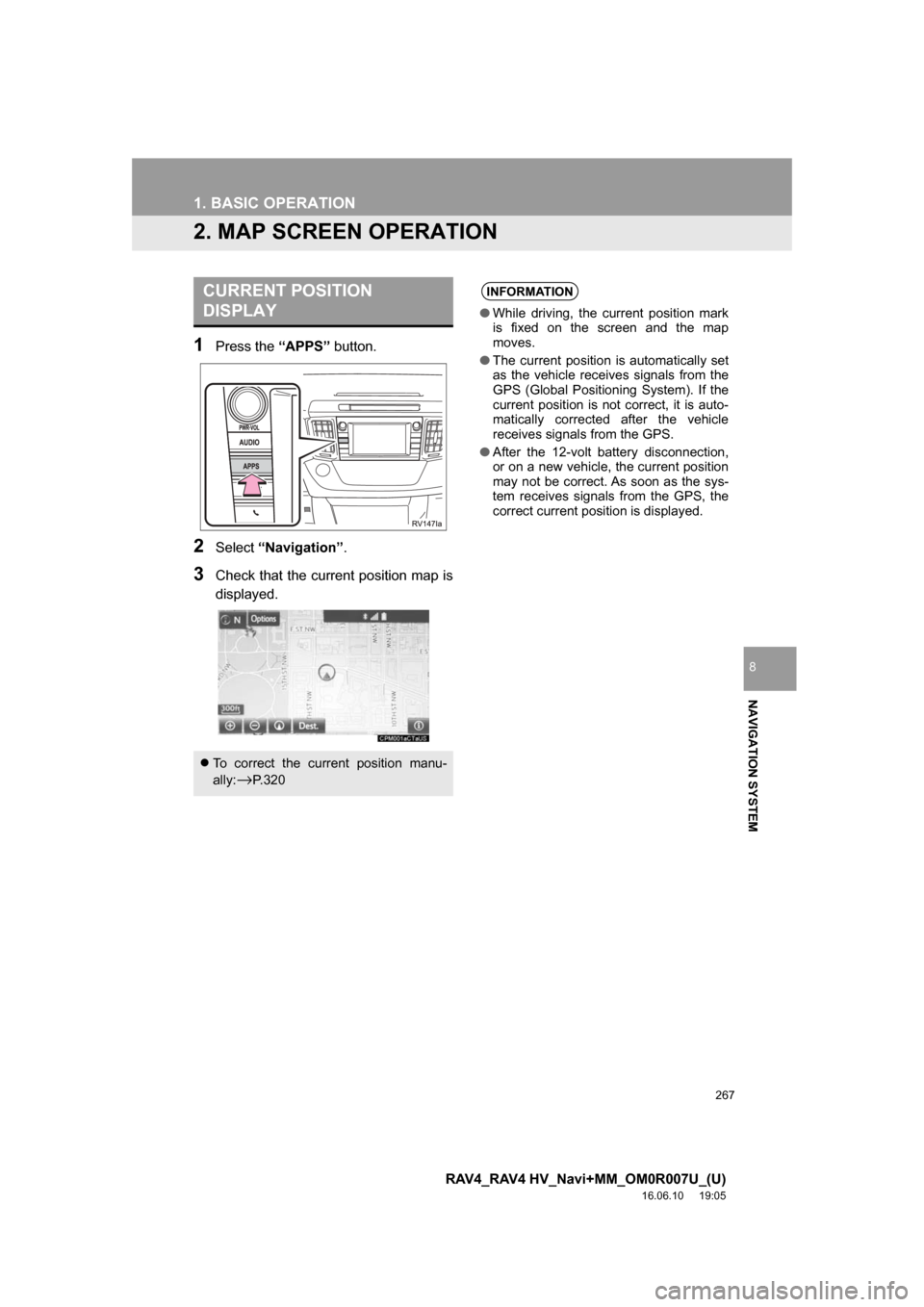
1Press the “APPS” button.
2Select“Navigation” .
3Check that the current position map is
displayed.
CURRENT POSITION
DISPLAY
To correct the current position manu-
ally:
→P. 3 2 0
INFORMATION
● While driving, the current position mark
is fixed on the screen and the map
moves.
● The current position is automatically set
as the vehicle receives signals from the
GPS (Global Positioning System). If the
current position is not correct, it is auto-
matically corrected after the vehicle
receives signals from the GPS.
● After the 12-volt battery disconnection,
or on a new vehicle, the current position
may not be correct. As soon as the sys-
tem receives signals from the GPS, the
correct current position is displayed.
Page 269 of 366
269
1. BASIC OPERATION
RAV4_RAV4 HV_Navi+MM_OM0R007U_(U)
16.06.10 19:05
NAVIGATION SYSTEM
8
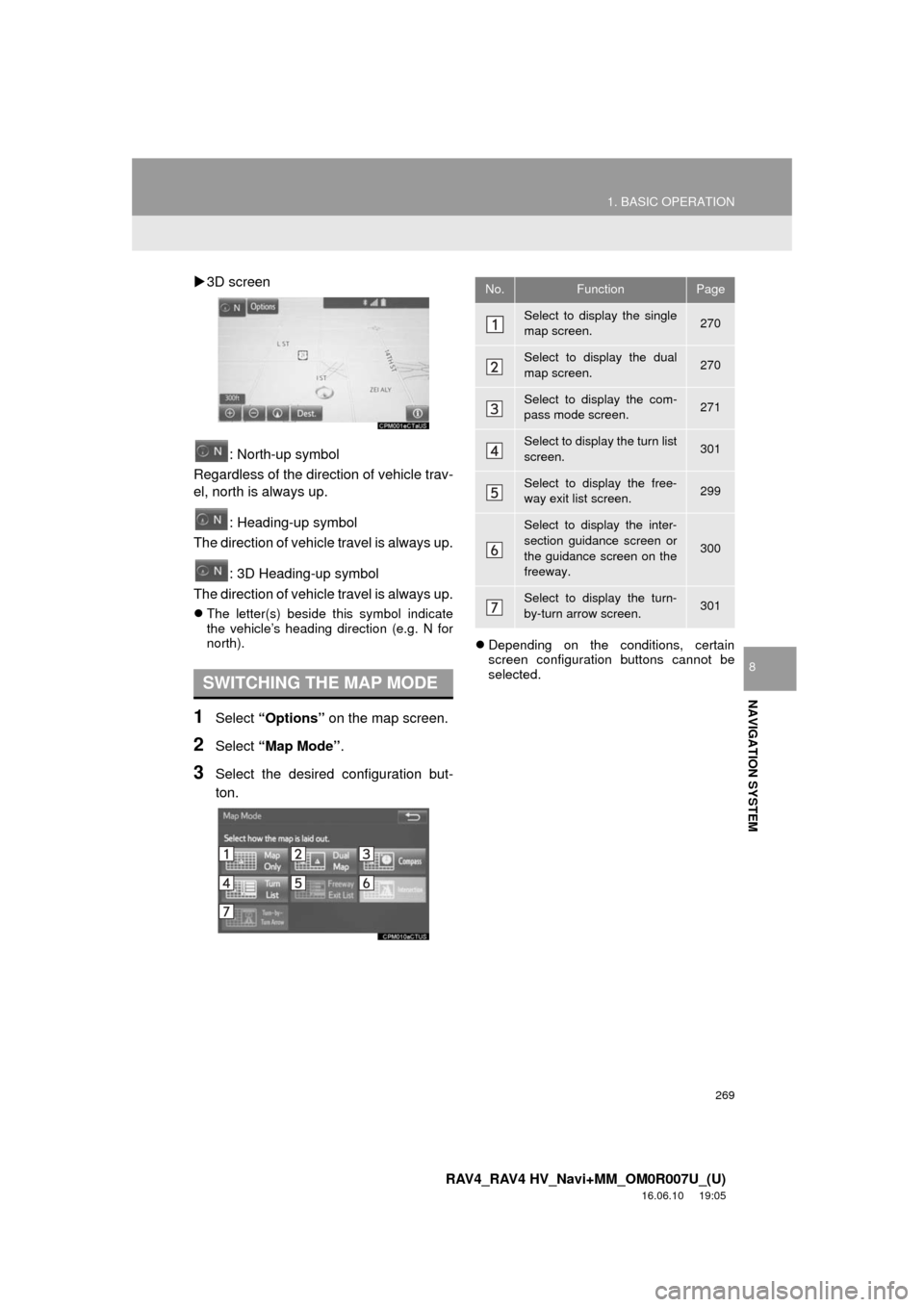
3D screen
: North-up symbol
Regardless of the direction of vehicle trav-
el, north is always up.
: Heading-up symbol
The direction of vehicle travel is always up.
: 3D Heading-up symbol
The direction of vehicle travel is always up.
The letter(s) beside this symbol indicate
the vehicle’s heading direction (e.g. N for
north).
1Select “Options” on the map screen.
2Select “Map Mode” .
3Select the desired configuration but-
ton.
Depending on the conditions, certain
screen configuration buttons cannot be
selected.
SWITCHING THE MAP MODE
No.FunctionPage
Select to display the single
map screen. 270
Select to display the dual
map screen.270
Select to display the com-
pass mode screen.271
Select to display the turn list
screen.301
Select to display the free-
way exit list screen.299
Select to display the inter-
section guidance screen or
the guidance screen on the
freeway.
300
Select to display the turn-
by-turn arrow screen.301
Page 271 of 366
271
1. BASIC OPERATION
RAV4_RAV4 HV_Navi+MM_OM0R007U_(U)
16.06.10 19:05
NAVIGATION SYSTEM
8
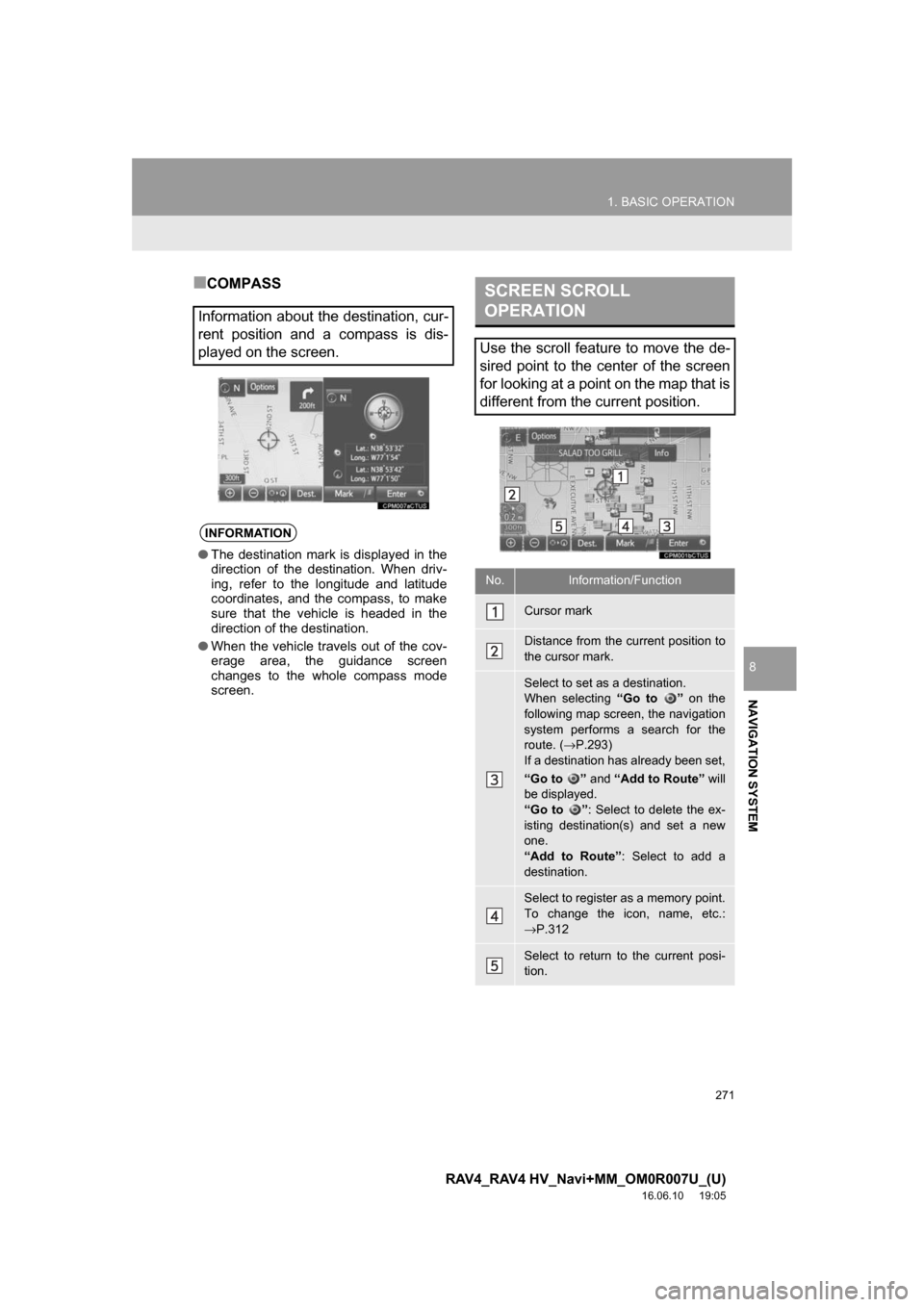
■COMPASS
Information about the destination, cur-
rent position and a compass is dis-
played on the screen.
INFORMATION
● The destination mark is displayed in the
direction of the destination. When driv-
ing, refer to the longitude and latitude
coordinates, and the compass, to make
sure that the vehicle is headed in the
direction of the destination.
● When the vehicle travels out of the cov-
erage area, the guidance screen
changes to the whole compass mode
screen.
SCREEN SCROLL
OPERATION
Use the scroll feature to move the de-
sired point to the center of the screen
for looking at a point on the map that is
different from the current position.
No.Information/Function
Cursor mark
Distance from the current position to
the cursor mark.
Select to set as a destination.
When selecting “Go to ” on the
following map screen, the navigation
system performs a search for the
route. ( →P.293)
If a destination has already been set,
“Go to ” and “Add to Route” will
be displayed.
“Go to ” : Select to delete the ex-
isting destination(s) and set a new
one.
“Add to Route”: Select to add a
destination.
Select to register as a memory point.
To change the icon, name, etc.:
→ P.312
Select to return to the current posi-
tion.
Page 273 of 366
273
1. BASIC OPERATION
RAV4_RAV4 HV_Navi+MM_OM0R007U_(U)
16.06.10 19:05
NAVIGATION SYSTEM
8
3. MAP SCREEN INFORMATION
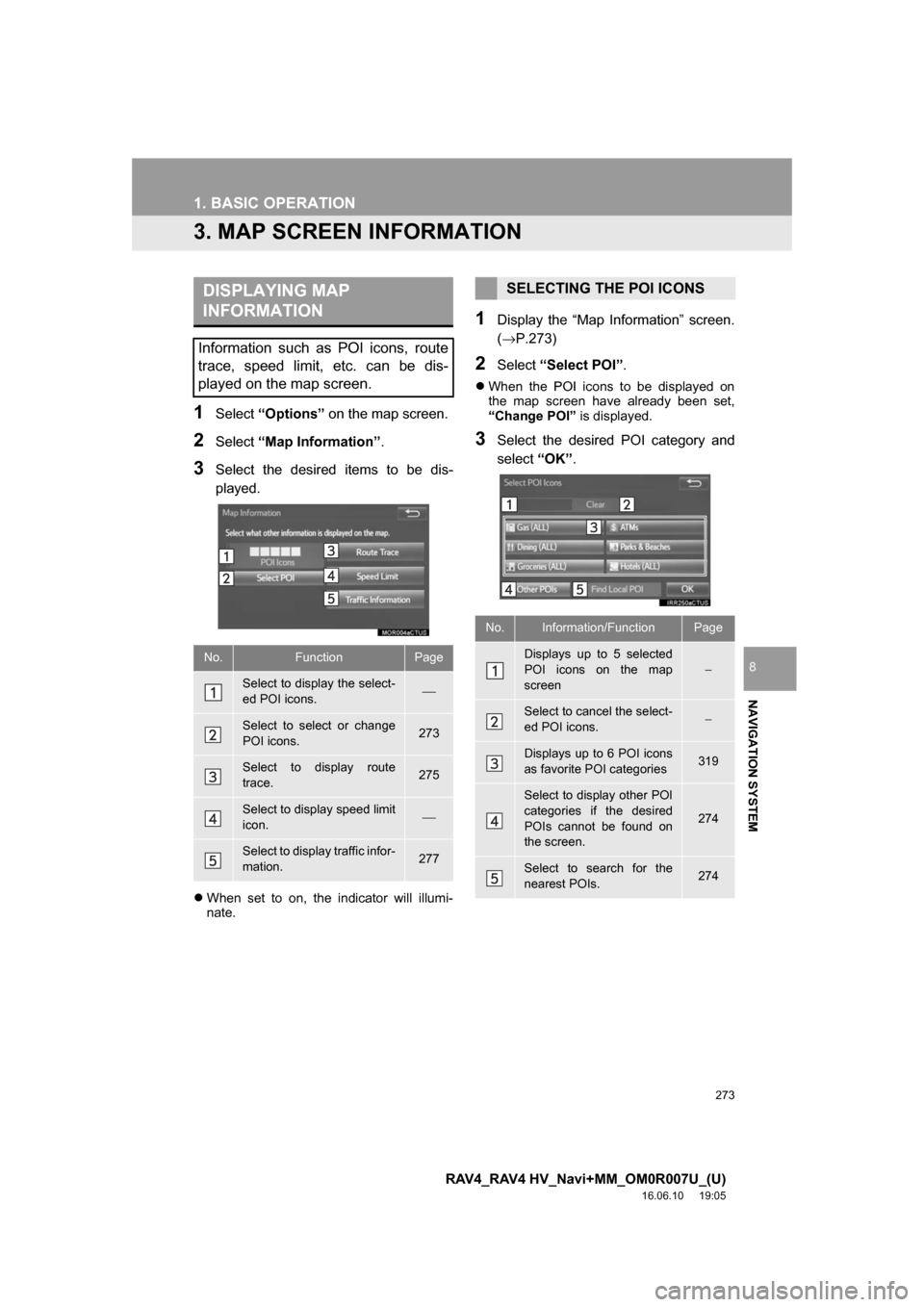
1Select“Options” on the map screen.
2Select“Map Information” .
3Select the desired items to be dis-
played.
When set to on, the indicator will illumi-
nate.
1Display the “Map Information” screen.
(→P.273)
2Select “Select POI” .
When the POI icons to be displayed on
the map screen have already been set,
“Change POI” is displayed.
3Select the desired POI category and
select“OK”.
DISPLAYING MAP
INFORMATION
Information such as POI icons, route
trace, speed limit, etc. can be dis-
played on the map screen.
No.FunctionPage
Select to display the select-
ed POI icons.⎯
Select to select or change
POI icons.273
Select to display route
trace.275
Select to display speed limit
icon.⎯
Select to display traffic infor-
mation.277
SELECTING THE POI ICONS
No.Information/FunctionPage
Displays up to 5 selected
POI icons on the map
screen−
Select to cancel the select-
ed POI icons.−
Displays up to 6 POI icons
as favorite POI categories319
Select to display other POI
categories if the desired
POIs cannot be found on
the screen.
274
Select to search for the
nearest POIs.274
Page 275 of 366
275
1. BASIC OPERATION
RAV4_RAV4 HV_Navi+MM_OM0R007U_(U)
16.06.10 19:05
NAVIGATION SYSTEM
8
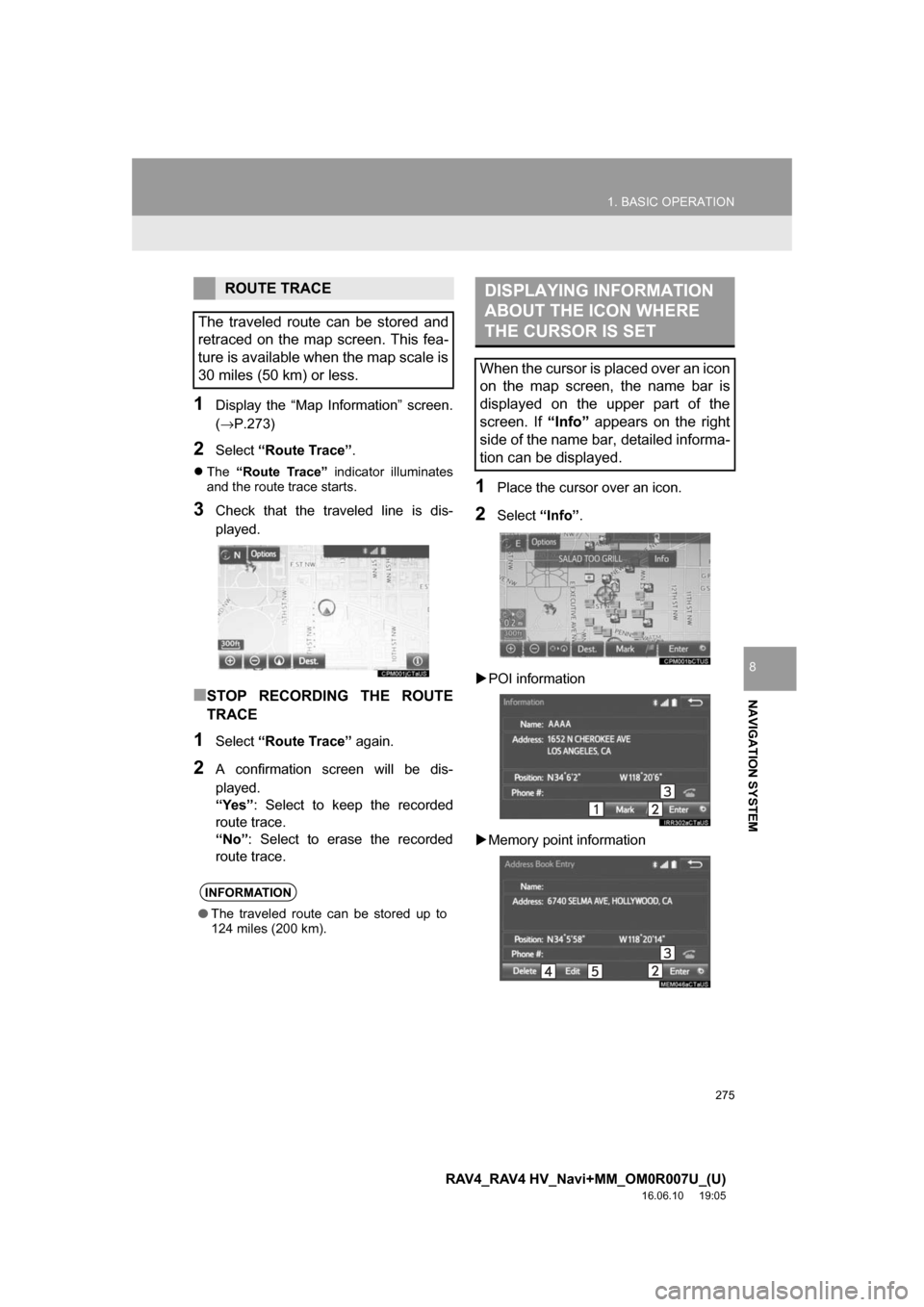
1Display the “Map Information” screen.
(→P.273)
2Select“Route Trace”.
The “Route Trace” indicator illuminates
and the route trace starts.
3Check that the traveled line is dis-
played.
■STOP RECORDING THE ROUTE
TRACE
1Select “Route Trace” again.
2A confirmation screen will be dis-
played.
“Yes”: Select to keep the recorded
route trace.
“No” : Select to erase the recorded
route trace.
1Place the cursor over an icon.
2Select “Info”.
POI information
Memory point information
ROUTE TRACE
The traveled route can be stored and
retraced on the map screen. This fea-
ture is available when the map scale is
30 miles (50 km) or less.
INFORMATION
● The traveled route can be stored up to
124 miles (200 km).
DISPLAYING INFORMATION
ABOUT THE ICON WHERE
THE CURSOR IS SET
When the cursor is placed over an icon
on the map screen, the name bar is
displayed on the upper part of the
screen. If “Info” appears on the right
side of the name bar, detailed informa-
tion can be displayed.
Page 277 of 366
277
1. BASIC OPERATION
RAV4_RAV4 HV_Navi+MM_OM0R007U_(U)
16.06.10 19:05
NAVIGATION SYSTEM
8
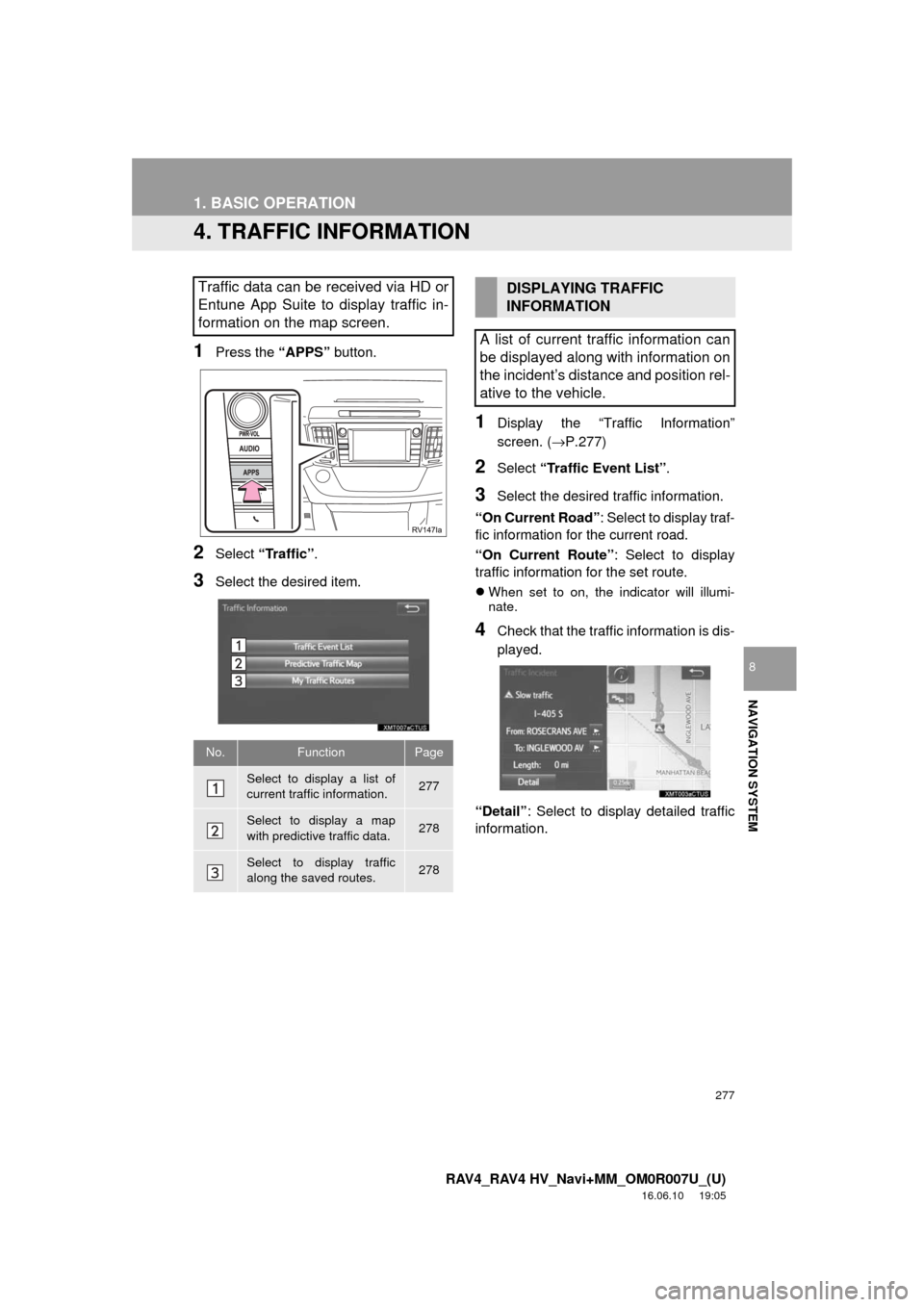
4. TRAFFIC INFORMATION
1Press the “APPS” button.
2Select “Traffic” .
3Select the desired item.
1Display the “Traffic Information”
screen. (→P.277)
2Select “Traffic Event List” .
3Select the desired traffic information.
“On Current Road” : Select to display traf-
fic information for the current road.
“On Current Route” : Select to display
traffic information for the set route.
When set to on, the indicator will illumi-
nate.
4Check that the traffic information is dis-
played.
“Detail” : Select to displa y detailed traffic
information.
Traffic data can be received via HD or
Entune App Suite to display traffic in-
formation on the map screen.
No.FunctionPage
Select to display a list of
current traffic information.277
Select to display a map
with predictive traffic data.278
Select to display traffic
along the saved routes.278
DISPLAYING TRAFFIC
INFORMATION
A list of current traffic information can
be displayed along with information on
the incident’s distance and position rel-
ative to the vehicle.
Page 279 of 366
279
1. BASIC OPERATION
RAV4_RAV4 HV_Navi+MM_OM0R007U_(U)
16.06.10 19:05
NAVIGATION SYSTEM
8
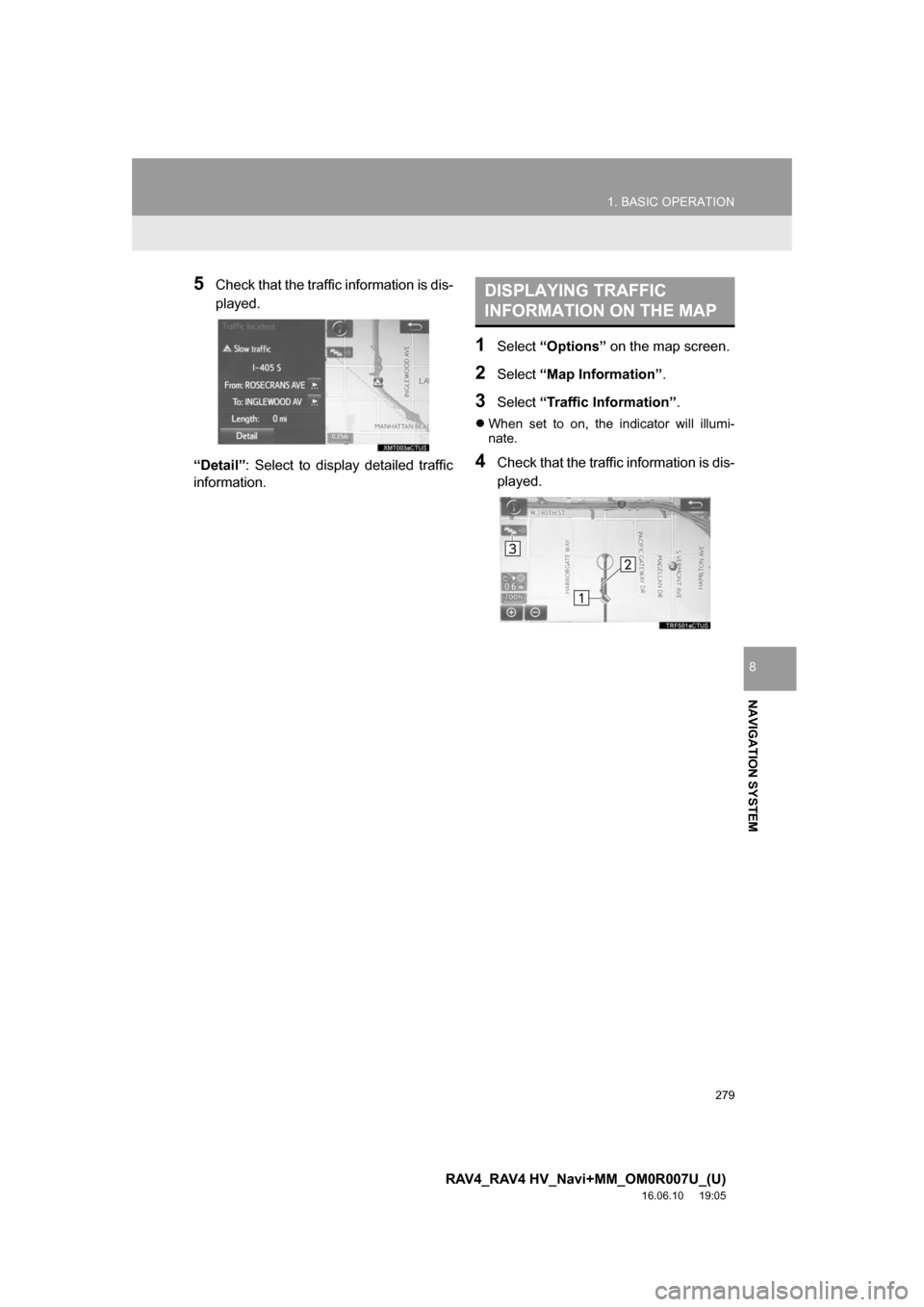
5Check that the traffic information is dis-
played.
“Detail” : Select to display detailed traffic
information.
1Select “Options” on the map screen.
2Select“Map Information” .
3Select“Traffic Information” .
When set to on, the indicator will illumi-
nate.
4Check that the traffic information is dis-
played.
DISPLAYING TRAFFIC
INFORMATION ON THE MAP