air filter TOYOTA RAV4 2020 Owners Manual (in English)
[x] Cancel search | Manufacturer: TOYOTA, Model Year: 2020, Model line: RAV4, Model: TOYOTA RAV4 2020Pages: 736, PDF Size: 30.79 MB
Page 5 of 736
5TABLE OF CONTENTS
1
2
3
4
5
6
7
8
9
10
5-16.Connected Services over-view
Connected Services ...... 495
Type A: Function achieved by using a smartphone or DCM.................................... 496
Type B: Function achieved by using DCM and the system
.................................... 498
Type C: Function achieved by using DCM .................. 499
Type D: Function achieved by using DCM and a smart-
phone .......................... 502
5-17.Connected Services opera- tion
Toyota Apps .................. 504
5-18.Setup Toyota Apps settings ..... 508
6-1. Using the air conditioning
system and defogger
Manual air conditioning sys- tem .............................. 510
Automatic air conditioning system ......................... 515
Heated steering wheel/seat heaters/seat ventilators 522
6-2. Using the interior lights Interior lights list ............ 525
6-3. Using the storage features List of storage features . 528
Luggage compartment fea- tures ............................ 5326-4. Using the other interior fea-
tures
Other interior features ... 537
Garage door opener ...... 548
7-1. Maintenance and care Cleaning and protecting the vehicle exterior ............ 558
Cleaning and protecting the vehicle interior ............. 561
7-2. Maintenance Maintenance requirements.................................... 564
General maintenance .... 565
Emission inspection and maintenance (I/M) programs.................................... 568
7-3. Do-it-yourself maintenance Do-it-yourself service precau-tions ............................. 569
Hood .............................. 571
Positioning a floor jack .. 572
Engine compartment ..... 574
Tires .............................. 581
Tire inflation pressure .... 595
Wheels .......................... 597
Air conditioning filter ...... 599
Wiper insert replacement .................................... 601
Wireless remote control/elec- tronic key battery ......... 604
Checking and replacing fuses .................................... 607
Light bulbs ..................... 609
6Interior features
7Maintenance and care
Page 513 of 736
5136-1. Using the air conditioning system and defogger
6
Interior features
and dehumidification functions turn
off and only ambient temperature air
is blown, and there is a possibility
that the blowing of ambient tem-
perature air will stop . To prevent the
air conditioning system from turning
off, press the Stop & Start cancel
switch to deactivate the system.
■When the windshield is fogged
up and the engine is stopped
due to the Stop & Start system
(vehicles with Stop & Start sys-
tem)
Press the windshield defogger
switch to restart the engine and
defog the windshield.
If the windshield continuously fogs
up, press the Stop & Start cancel
switch and refrain from using the
Stop & Start system.
■When an odor c omes from the
air conditioning system while
the engine is stopped due to the
Stop & Start system (vehicles
with Stop & Start system)
Press the Stop & Start cancel switch
to restart the engine.
■Air conditioning filter
P. 5 9 9
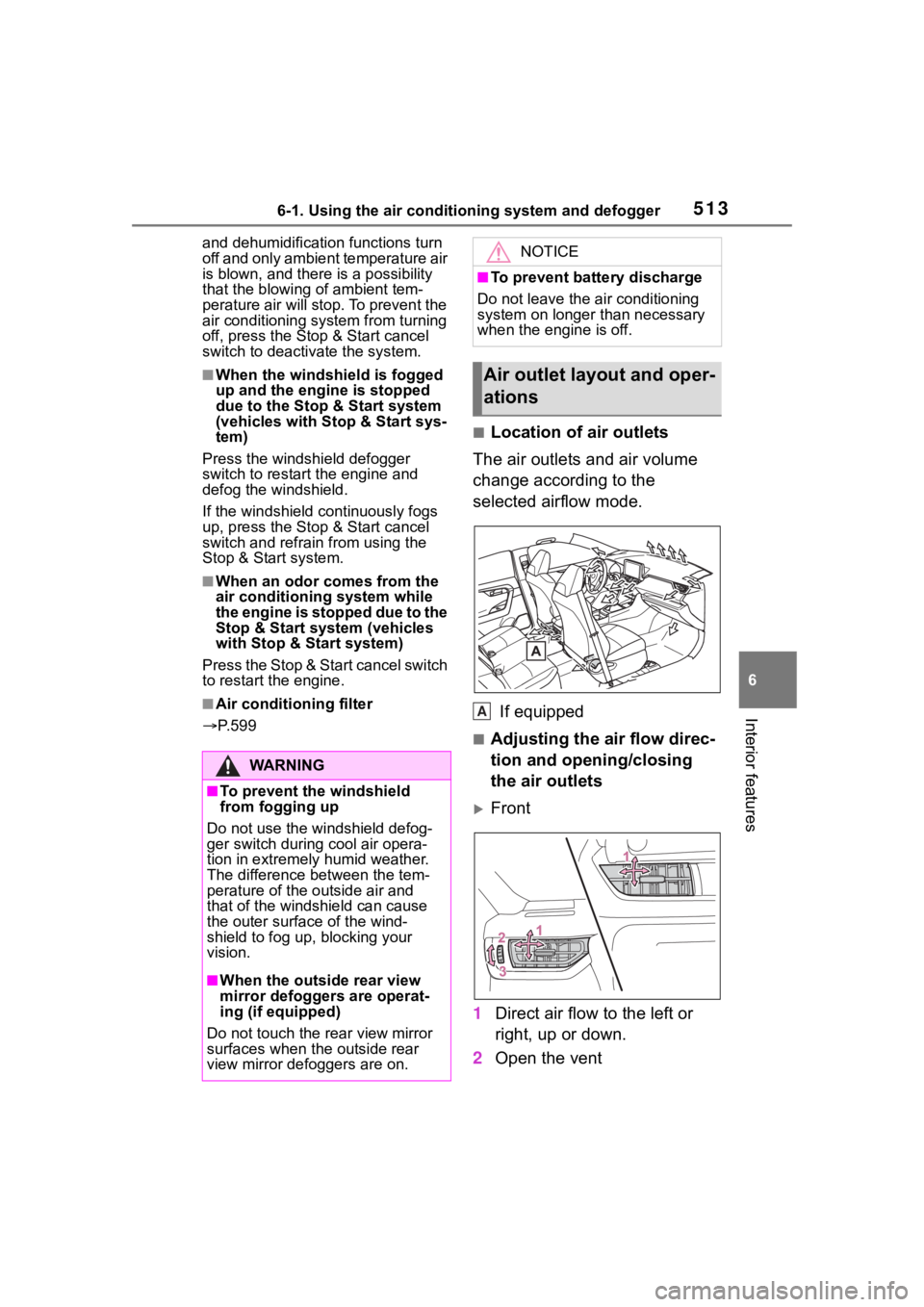
■Location of air outlets
The air outlets and air volume
change according to the
selected airflow mode.
If equipped
■Adjusting the air flow direc-
tion and opening/closing
the air outlets
Front
1 Direct air flow to the left or
right, up or down.
2 Open the vent
WA R N I N G
■To prevent the windshield
from fogging up
Do not use the windshield defog-
ger switch during cool air opera-
tion in extremely humid weather.
The difference between the tem-
perature of the outside air and
that of the windshield can cause
the outer surface of the wind-
shield to fog up, blocking your
vision.
■When the outside rear view
mirror defoggers are operat-
ing (if equipped)
Do not touch the rear view mirror
surfaces when the outside rear
view mirror defoggers are on.
NOTICE
■To prevent battery discharge
Do not leave the air conditioning
system on longer than necessary
when the engine is off.
Air outlet lay out and oper-
ations
A
Page 518 of 736

5186-1. Using the air conditioning system and defogger
operation controlled to restrict
heating/cooling capacity
• Fan speed restr icted when auto-
matic mode is selected
●To improve air co nditioning perfor-
mance, perform the following
operations:
• Adjust the fan speed
• Turn off Eco drive mode ( P.351)
• Turn off Eco air conditioning mode
●When the driving mode is set to
Eco driving mode, the Eco air con-
ditioning mode will be turned on
automatically. Even in this case,
the Eco air conditioning mode can
be turned off by pressing the Eco
air conditioning mode switch.
■When the outside temperature
falls to nearly 32°F (0°C)
The dehumidification function may
not operate even when “A/C” switch
is pressed.
■Ventilation and air conditioning
odors
●To let fresh air in, set the air condi-
tioning system to the outside air
mode.
●During use, various odors from
inside and outside the vehicle may
enter into and a ccumulate in the
air conditioning system. This may
then cause odor to be emitted
from the vents.
●To reduce potential odors from
occurring:
• It is recommended that the air conditioning system be set to out-
side air mode prior to turning the
vehicle off.
• The start timing of the blower may
be delayed for a short period of
time immediately after the air con-
ditioning system is started in auto-
matic mode.
●When parking, the system auto-
matically switches to outside air
mode to encourage better air cir-
culation throughout the vehicle,
helping to reduce odors that occur
when starting the vehicle.
■Air conditioning system opera-
tions when the engine is
stopped due to the Stop & Start
system (vehicles with Stop &
Start system)
When the engine is stopped due to
Stop & Start system operations, the
automatic air conditioning cooling,
heating and dehumidification func-
tions turn off and the fan speed is
decreased according to the outside
temperature etc. or air blowing
stops. To stop the air conditioning
system from turning off, press the
Stop & Start cancel switch and
refrain from using the Stop & Start
system.
■When the windshield is fogged
up and the engine is stopped
due to the Stop & Start system
(vehicles with Stop & Start sys-
tem)
Press the windshield defogger
switch to restart the engine and
defog the windshield.
If the windshield continuously fogs
up, press the Stop & Start cancel
switch and refrain from using the
Stop & Start system.
■When an odor comes from the
air conditioning system while
the engine is stopped due to the
Stop & Start system (vehicles
with Stop & Start system)
Press the Stop & Start cancel switch
to restart the engine.
■Air conditioning filter
P.599
■Customization
Some functions can be customized.
(Customizable features: P.697)
Page 557 of 736
557
7
7
Maintenance and care
Maintenance and care
7-1. Maintenance and careCleaning and protecting the vehicle exterior .......... 558
Cleaning and protecting the vehicle interior ........... 561
7-2. Maintenance Maintenance requirements.................................. 564
General maintenance.. 565
Emission inspection and maintenance (I/M) pro-
grams ........................ 568
7-3. Do-it-yourself mainte- nance
Do-it-yourself service pre- cautions ..................... 569
Hood ........................... 571
Positioning a floor jack 572
Engine compartment ... 574
Tires ............................ 581
Tire inflation pressure.. 595
Wheels ......... ...............597
Air conditioning filter .... 599
Wiper insert replacement .................................. 601
Wireless remote con- trol/electronic key battery.................................. 604
Checking and replacing fuses.......................... 607
Light bulbs................... 609
Page 570 of 736
5707-3. Do-it-yourself maintenance
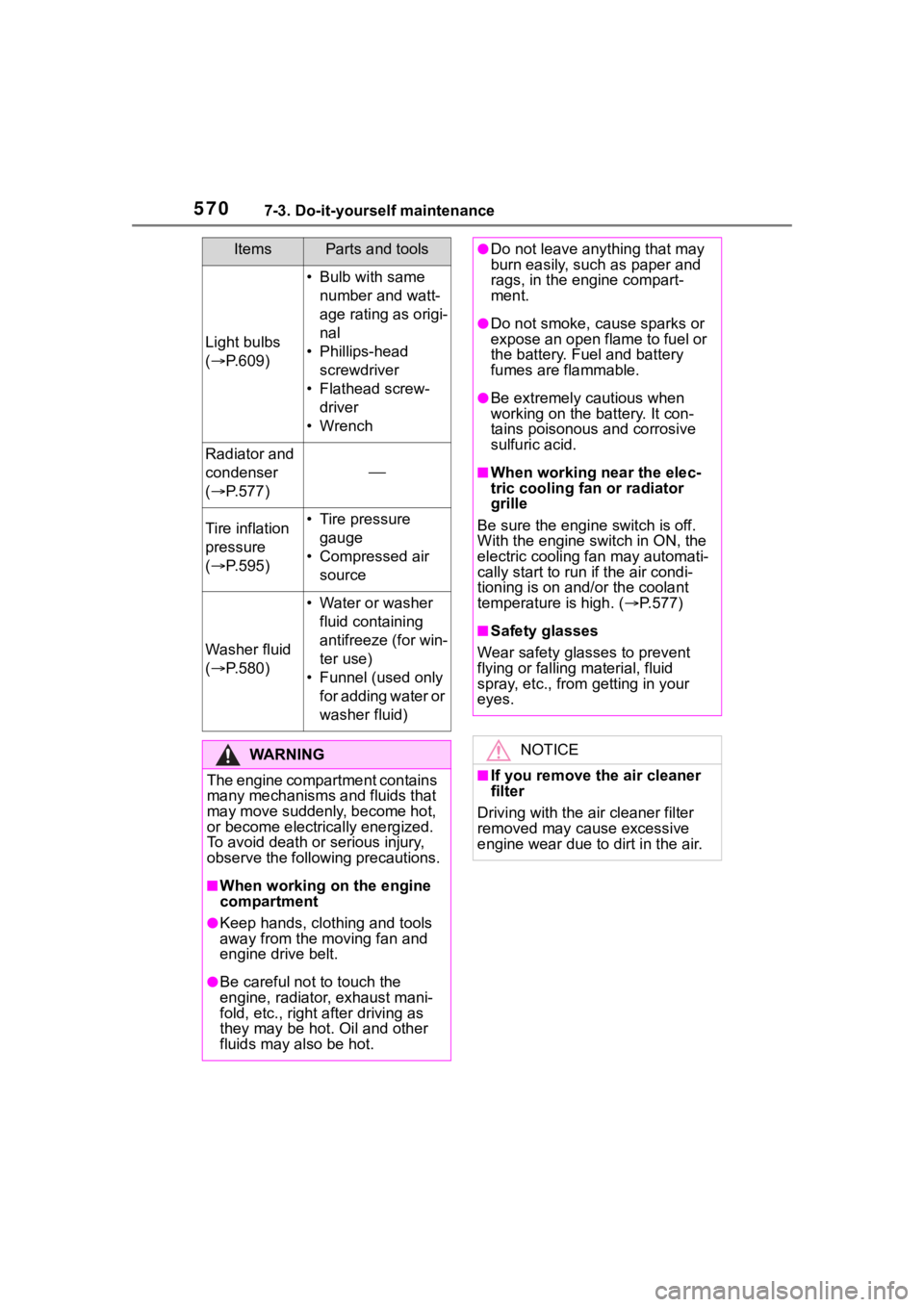
Light bulbs
( P.609)
• Bulb with same
number and watt-
age rating as origi-
nal
• Phillips-head screwdriver
• Flathead screw- driver
•Wrench
Radiator and
condenser
( P.577)
Tire inflation
pressure
( P.595)• Tire pressure
gauge
• Compressed air source
Washer fluid
( P.580)
• Water or washer
fluid containing
antifreeze (for win-
ter use)
• Funnel (used only for adding water or
washer fluid)
WA R N I N G
The engine compartment contains
many mechanisms and fluids that
may move suddenly, become hot,
or become electrically energized.
To avoid death or serious injury,
observe the following precautions.
■When working on the engine
compartment
●Keep hands, clothing and tools
away from the moving fan and
engine drive belt.
●Be careful not to touch the
engine, radiator , exhaust mani-
fold, etc., right after driving as
they may be hot . Oil and other
fluids may also be hot.
ItemsParts and tools●Do not leave anything that may
burn easily, such as paper and
rags, in the engine compart-
ment.
●Do not smoke, c ause sparks or
expose an open flame to fuel or
the battery. Fuel and battery
fumes are flammable.
●Be extremely cautious when
working on the battery. It con-
tains poisonous and corrosive
sulfuric acid.
■When working near the elec-
tric cooling fan or radiator
grille
Be sure the engine switch is off.
With the engine switch in ON, the
electric cooling fa n may automati-
cally start to run if the air condi-
tioning is on and/or the coolant
temperature is high. ( P.577)
■Safety glasses
Wear safety glasses to prevent
flying or falling material, fluid
spray, etc., from getting in your
eyes.
NOTICE
■If you remove the air cleaner
filter
Driving with the ai r cleaner filter
removed may cause excessive
engine wear due to dirt in the air.
Page 599 of 736
5997-3. Do-it-yourself maintenance
7
Maintenance and care
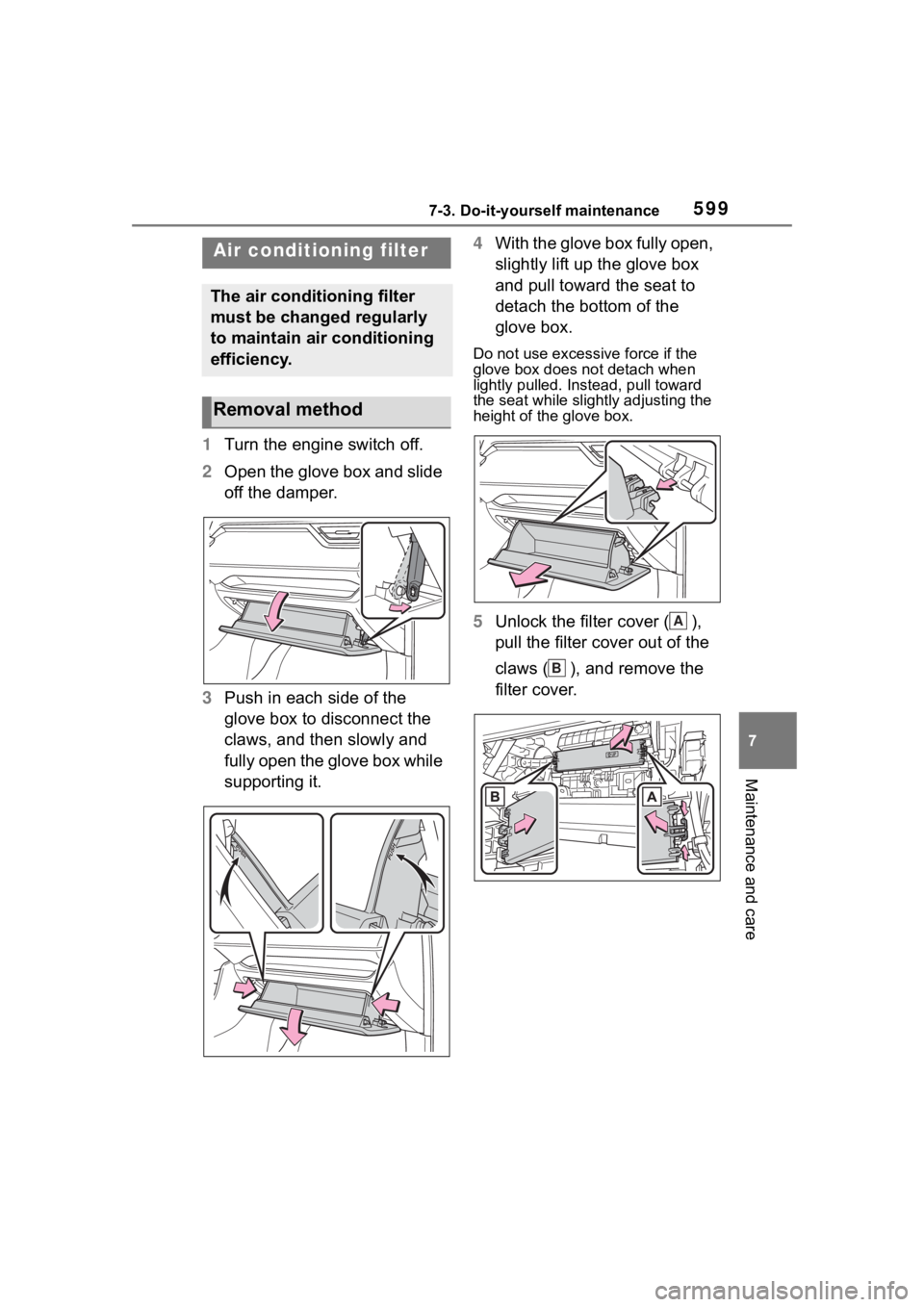
1Turn the engine switch off.
2 Open the glove box and slide
off the damper.
3 Push in each side of the
glove box to disconnect the
claws, and then slowly and
fully open the glove box while
supporting it. 4
With the glove box fully open,
slightly lift up the glove box
and pull toward the seat to
detach the bottom of the
glove box.
Do not use excessi ve force if the
glove box does not detach when
lightly pulled. Ins tead, pull toward
the seat while slightly adjusting the
height of the glove box.
5 Unlock the filter cover ( ),
pull the filter cover out of the
claws ( ), and remove the
filter cover.
Air condition ing filter
The air conditioning filter
must be changed regularly
to maintain air conditioning
efficiency.
Removal method
A
B
Page 600 of 736
6007-3. Do-it-yourself maintenance
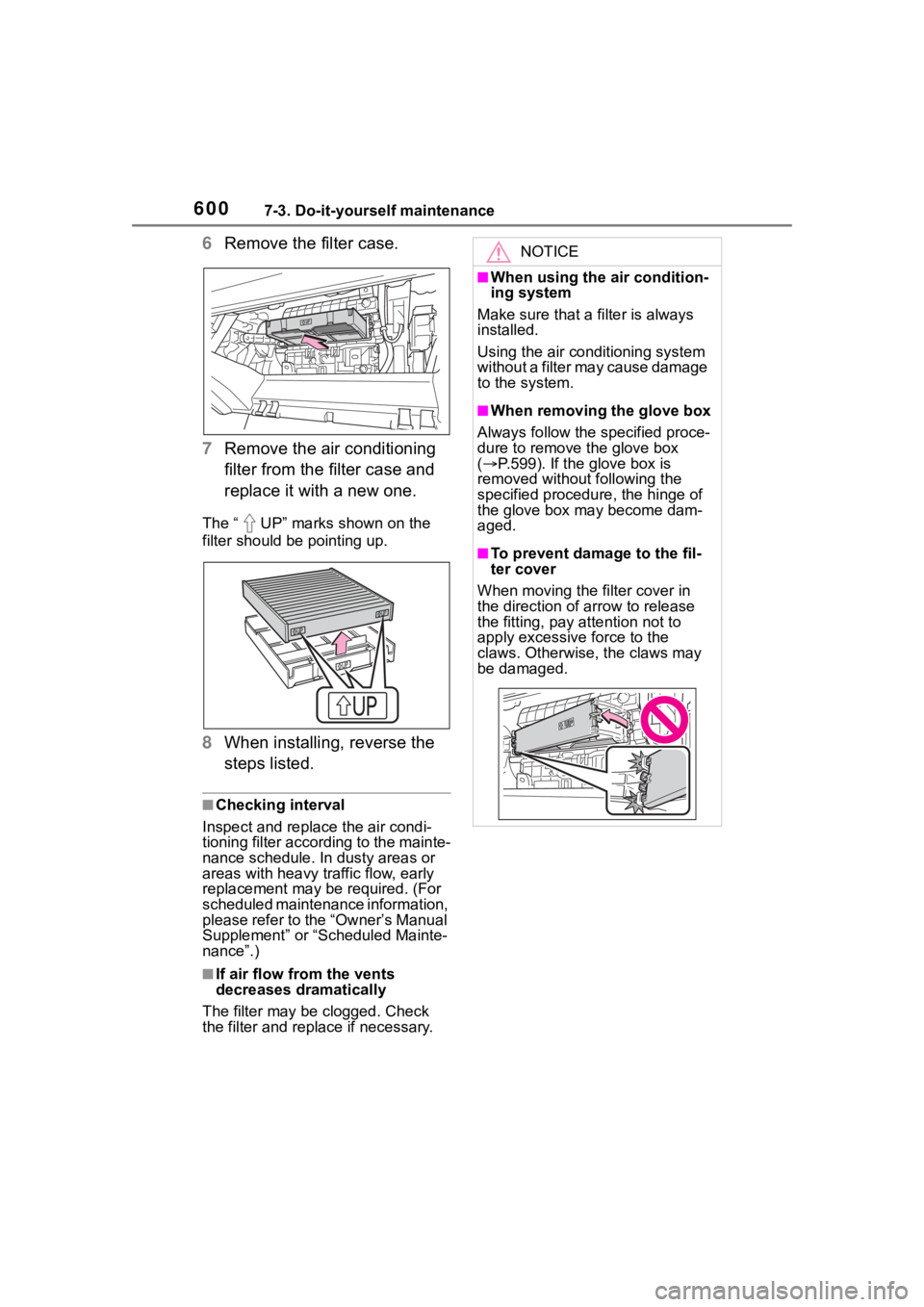
6Remove the filter case.
7 Remove the air conditioning
filter from the filter case and
replace it with a new one.
The “ UP” marks shown on the
filter should be pointing up.
8When installing, reverse the
steps listed.
■Checking interval
Inspect and replace the air condi-
tioning filter according to the mainte-
nance schedule. In dusty areas or
areas with heavy traffic flow, early
replacement may be required. (For
scheduled maintenance information,
please refer to the “Owner’s Manual
Supplement” or “Scheduled Mainte-
nance”.)
■If air flow from the vents
decreases dramatically
The filter may be clogged. Check
the filter and replace if necessary.
NOTICE
■When using the air condition-
ing system
Make sure that a filter is always
installed.
Using the air conditioning system
without a filter may cause damage
to the system.
■When removing the glove box
Always follow the specified proce-
dure to remove the glove box
( P.599). If the glove box is
removed without following the
specified procedure, the hinge of
the glove box may become dam-
aged.
■To prevent damage to the fil-
ter cover
When moving the filter cover in
the direction of arrow to release
the fitting, pay attention not to
apply excessive force to the
claws. Otherwise, the claws may
be damaged.
Page 717 of 736

717Alphabetical Index
Alphabetical Index
A
A/C ................................... 510, 515Air conditioning filter ............. 599
Automatic air conditioning sys-tem ..................................... 515
Eco air conditioning mode .... 516
Front seat concentrated airflow mode (S-FLOW) ................. 519
Manual air conditioning system ........................................... 510
ABS (Anti-lock Brake System) ............................................... 360Function ............................... 360
Warning light ........................ 630
ACA (Active Cornering Assist) ............................................... 360
Active Cornering Assist (ACA) ............................................... 360
Airbags ...................................... 33 Airbag operating conditions.... 35
Airbag precautions for your child............................................. 38
Airbag warning light.............. 629
Correct driving posture ........... 27
Curtain shield airbag operating conditions ............................. 36
Curtain shield airbag precautions ............................................. 38
Front passenger occupant clas- sification system ................... 43
General airbag precautions .... 38
Locations of airbags ............... 33
Modification and disposal of air- bags ..................................... 41
Seat cushion airbag ............... 33
Side airbag operating conditions ............................................. 36
Side airbag precautions ......... 38
Side and curtain shield airbags operating conditions ............. 36
Side and curtain shield airbags precautions ...........................38
SRS airbag instructions for Canadian owners ...............704
SRS airbags ...........................33
SRS warning light .................629
Air conditioning filter .............599
Air conditioning system.510, 515 Air conditioning filter .............599
Automatic air conditioning sys-tem .....................................515
Eco air conditioning mode ....516
Front seat concent rated airflow
mode (S-FLOW) .................519
Manual air conditioning system ...........................................510
Alarm .........................................73 Alarm ......................................73
Warning buzzer ....................628
AM ............................................425
Anchor brackets .......................61
Android Auto ...........407, 410, 437
Android Auto button (Menu screen) ...................................377
Antenna (Smart key system) .128
Anti-lock brake system (ABS)360 Function................................360
Warning light.........................630
Apple CarPlay .........................434
Apple CarPlay
®/Android Auto
.......................................407, 410
Apple CarPlay button (Menu screen) ...................................377
Approach warning ..................256
Apps button (Menu screen) ...377
Armrest ......... ......................... ..547
Assist grips .............................547
Audio .......................................420 Operating information ...........446
Some basics .........................421
Turning the sys tem on and off
...........................................421
Audio button (Menu screen) ..377
Page 718 of 736

718Alphabetical Index
Audio button (Setup screen) ... ........... 380, 444
AUDIO button.......................... 375
Audio buttons overview......... 375
Audio settings ........................ 444
Automatic air conditioning sys- tem ......................................... 515Air conditioning filter ............. 599
Eco air conditioning mode .... 516
Automatic High Beam ............ 212
Automatic light control system ............................................... 210
Automatic transmission ........ 199 S mode ................................. 201
Auxiliary boxes ....................... 530
Average fuel consumption ...... 99
Average fuel economy ............. 91
Average vehicle speed....... 93, 99
B
Back door ................................ 114 Hands Free Power Back Door........................................... 119
Power back door .................. 118
Wireless remote control ....... 118
Back-up lights Replacing light bulbs ............ 609
Wattage ................................ 670
Battery Checking .............................. 579
If the vehicle battery is dis-charged .............................. 655
Preparing and c hecking before
winter.................................. 367
Replacing ............................. 657
Warning light ........................ 628
Blind Spot Monitor (BSM) ...... 260 Blind Spot Monitor function .. 264
Rear Cross Traffic Alert function........................................... 267
Bluetooth
® button (Setup screen) ...................................380
Bluetooth
® details settings ...394
Bluetooth
® setup screen.......395
Connecting a Bluetooth
® device
...........................................395
Deleting a Bluetooth
® device397
Detailed settings screen .......399
Displaying the Bluetooth
® setup
screen.................................394
Editing the Bluetooth
® device
information..........................398
Registering a Bluetooth
® device
...........................................397
Bluetooth
® device information
...............................................398
Bluetooth
® hands-free system
...............................................465
Bluetooth
® phone message func-
tion .........................................476 Calling the message sender .479
Checking received messages ...........................................477
Displaying the message screen ...........................................476
Receiving a mess age ...........477
Replying to a message (dicta- tion reply)............................478
Replying to a message (quick reply) ..................................479
Bottle holders .........................530
Brake Brake Hold ............................206
Fluid......................................577
Parking brake .......................203
Warning light.........................628
Brake assist ............................360
Brake Hold...............................206
Break-in tips ............................170
Brightness control Instrument panel light
Page 724 of 736

724Alphabetical Index
L
Lane Tracing Assist (LTA)...... 237Operation ............................. 237
Warning messages............... 246
Language (multi-information dis- play) ................................. 96, 689
LATCH anchors ........................ 59
Lever Auxiliary catch lever ............. 571
Hood lock release lever........ 571
Shift lever ............................. 199
Turn signal lever ................... 202
Wiper lever ................... 215, 218
License plate lights Light switch .......................... 209
Replacing light bulbs ............ 609
Light bulbs Replacing ............................. 609
Wattage ................................ 670
Lights Automatic High Beam system........................................... 212
Fog light switch .................... 215
Front interior lights ............... 525
Headlight switch ................... 209
Interior lights......................... 525
Personal lights...................... 526
Rear interior light .................. 526
Replacing light bulbs ............ 609
Turn signal lever ................... 202
Vanity lights .......................... 537
Wattage ................................ 670
Linking multi-information display and the system ..................... 389
Lock steering column ............ 195
LTA (Lane Tracing Assist) ...... 237 Operation ............................. 237
Warning messages............... 246
Luggage compartment light................................ 117, 120Wattage ................................ 670 Luggage cover ........................534M
Maintenance
Do-it-yourself maintenance ..569
General maintenance ...........565
Maintenance data .................664
Maintenance requirements ...564
Malfunction indicator lamp ....629
Manual air conditioning system ...............................................510Air conditioning filter .............599
Menu icons ................................90
Menu screen............................377 Menu screen operation.........377
Meter Clock ................................82, 85
Indicators ................................76
Instrument panel light control.............................84, 88
Meter control switches............90
Meters ..............................82, 85
Multi-information display.........89
Settings ..........................94, 689
Units ...............................96, 689
Warning lights .......................628
Warning messages .........98, 639
Meter control switches.............90
Microphone ........... ..................468
Mirrors Digital Rear-view Mirror ........145
Inside rear view mirror ..........143
Outside rear view mirror defog-gers ............................ 511, 517
Outside rear view mirrors .....154
Vanity mirrors........................537
Moon roof Door lock linked moon roof oper-ation....................................159
Jam protection function ........159
Operation..............................159
Warning message.................160