deactivate TOYOTA RAV4 2020 Owners Manual (in English)
[x] Cancel search | Manufacturer: TOYOTA, Model Year: 2020, Model line: RAV4, Model: TOYOTA RAV4 2020Pages: 736, PDF Size: 30.79 MB
Page 43 of 736
431-1. For safe use
1
For safety and security
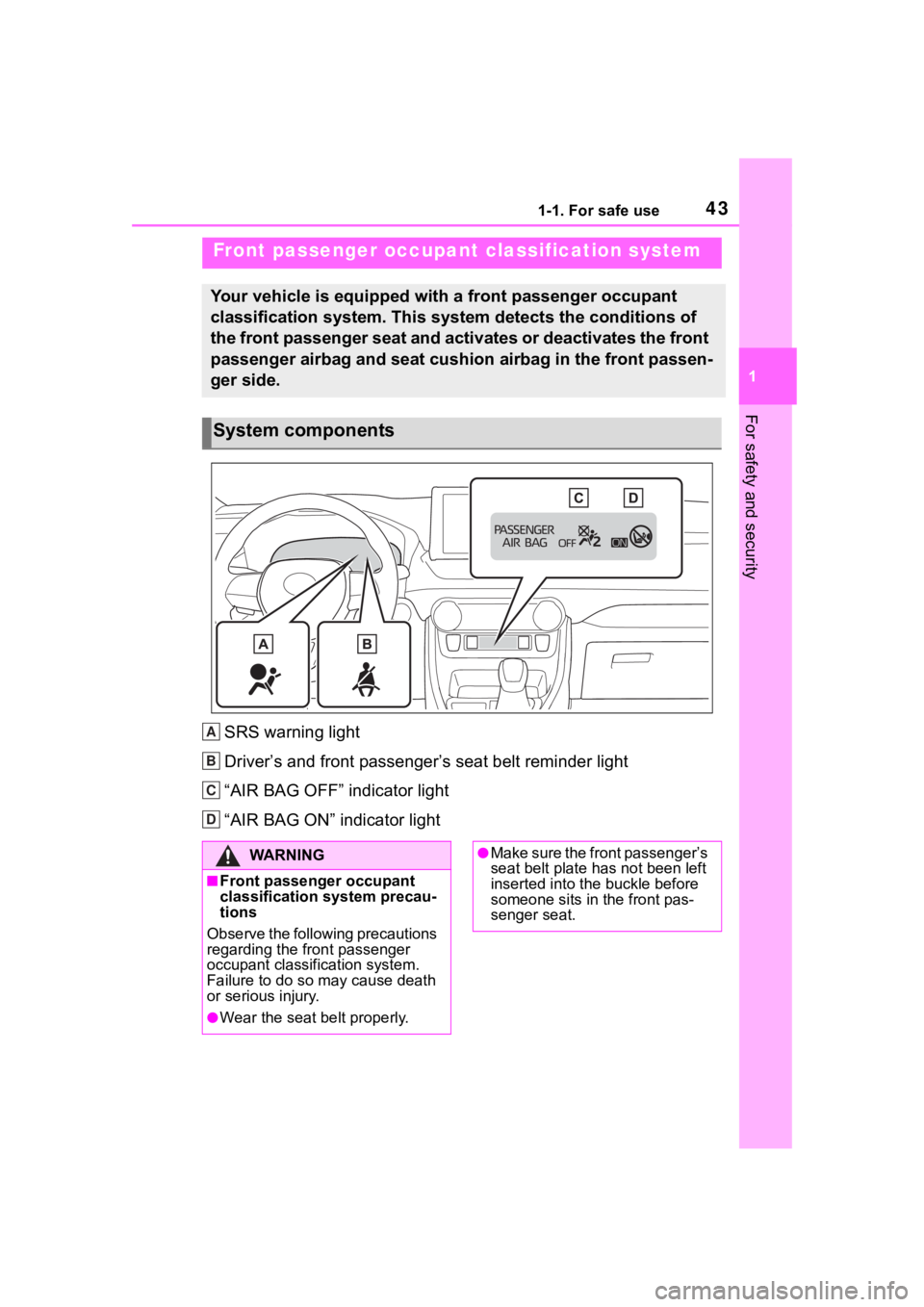
SRS warning light
Driver’s and front passenger’s seat belt reminder light
“AIR BAG OFF” indicator light
“AIR BAG ON” indicator light
Front passenger occupant classification system
Your vehicle is equipped with a front passenger occupant
classification system. This system detects the conditions of
the front passenger seat and activates or deactivates the front
passenger airbag and seat cushion airbag in the front passen-
ger side.
System components
A
B
C
D
:$ 5 1 , 1 *
■Front passenger occupant
classification system precau-
tions
Observe the following precautions
regarding the front passenger
occupant classification system.
Failure to do so may cause death
or serious injury.
●Wear the seat belt properly.
●Make sure the front passenger’s
seat belt plate has not been left
inserted into the buckle before
someone sits in the front pas-
senger seat.
Page 45 of 736
451-1. For safe use
1
For safety and security
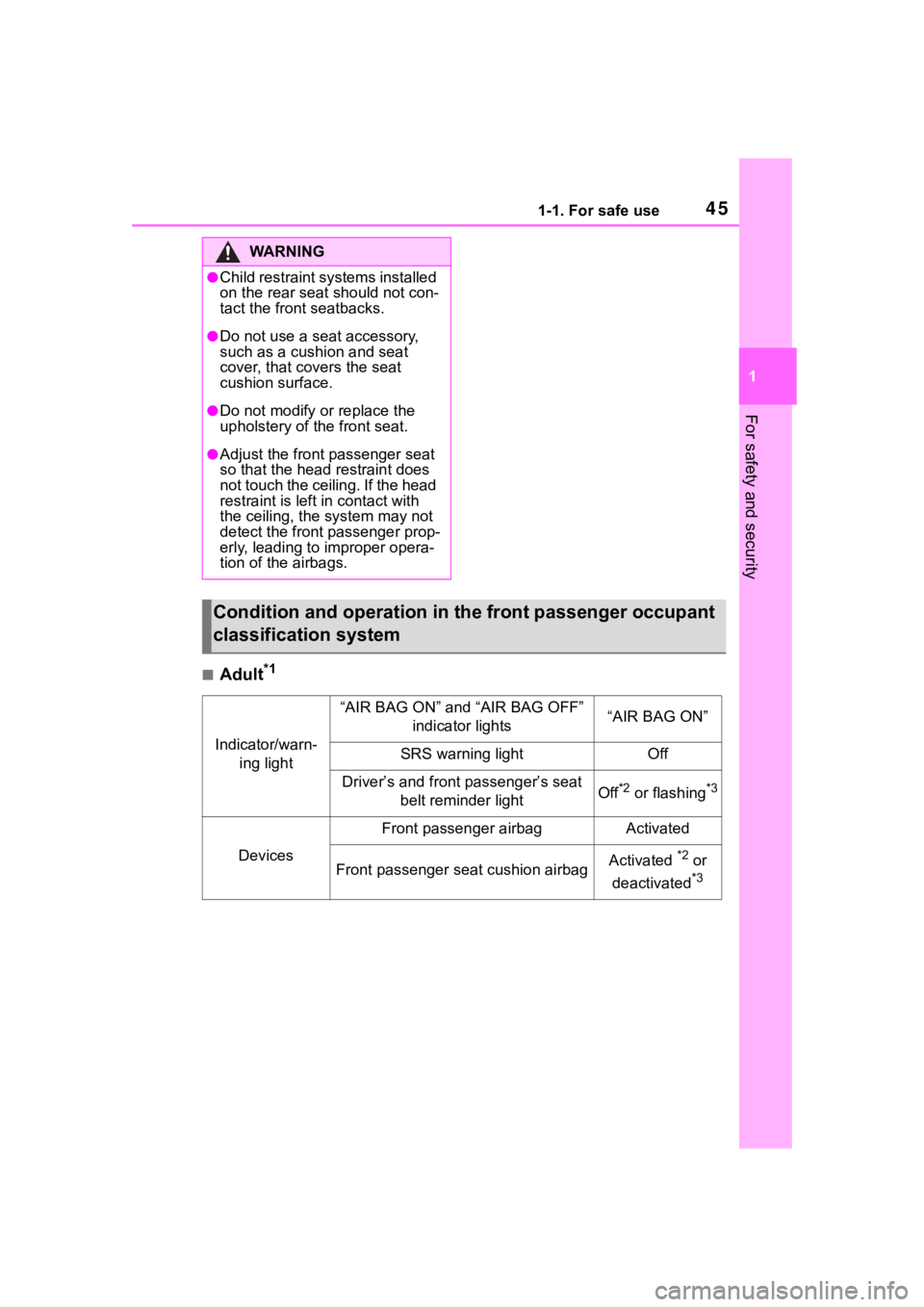
■Adult*1
WA R N I N G
●Child restraint systems installed
on the rear seat should not con-
tact the front seatbacks.
●Do not use a seat accessory,
such as a cushion and seat
cover, that covers the seat
cushion surface.
●Do not modify or replace the
upholstery of the front seat.
●Adjust the front passenger seat
so that the head restraint does
not touch the ceiling. If the head
restraint is left in contact with
the ceiling, the system may not
detect the front passenger prop-
erly, leading to improper opera-
tion of the airbags.
Condition and operation in th e front passenger occupant
classification system
Indicator/warn- ing light
“AIR BAG ON” and “AIR BAG OFF” indicator lights“AIR BAG ON”
SRS warning lightOff
Driver’s and front passenger’s seat belt reminder lightOff*2 or flashing*3
Devices
Front passenger airbagActivated
Front passenger seat cushion airbagActivated *2 or
deactivated
*3
Page 46 of 736
461-1. For safe use
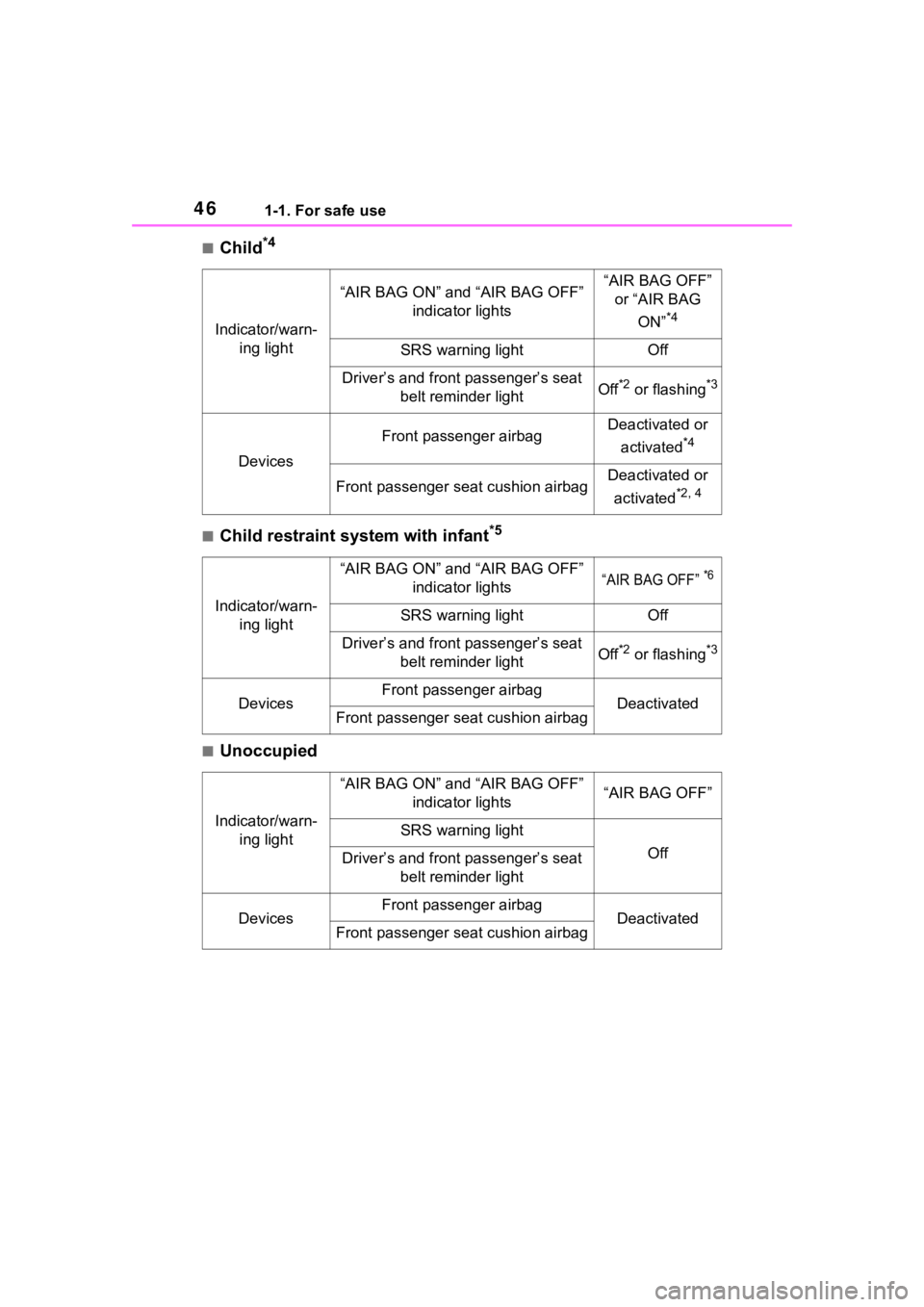
■Child*4
■Child restraint system with infant*5
■Unoccupied
Indicator/warn-ing light
“AIR BAG ON” and “AIR BAG OFF” indicator lights“AIR BAG OFF” or “AIR BAG
ON”
*4
SRS warning lightOff
Driver’s and front passenger’s seat belt reminder lightOff*2 or flashing*3
Devices
Front passenger airbagDeactivated or
activated
*4
Front passenger seat cushion airbagDeactivated or
activated
*2, 4
Indicator/warn- ing light
“AIR BAG ON” and “AIR BAG OFF” indicator lights“AIR BAG OFF” *6
SRS warning lightOff
Driver’s and front passenger’s seat belt reminder lightOff*2 or flashing*3
DevicesFront passenger airbagDeactivatedFront passenger seat cushion airbag
Indicator/warn-ing light
“AIR BAG ON” and “AIR BAG OFF” indicator lights“AIR BAG OFF”
SRS warning light
OffDriver’s and front passenger’s seat belt reminder light
DevicesFront passenger airbagDeactivatedFront passenger seat cushion airbag
Page 47 of 736
471-1. For safe use
1
For safety and security
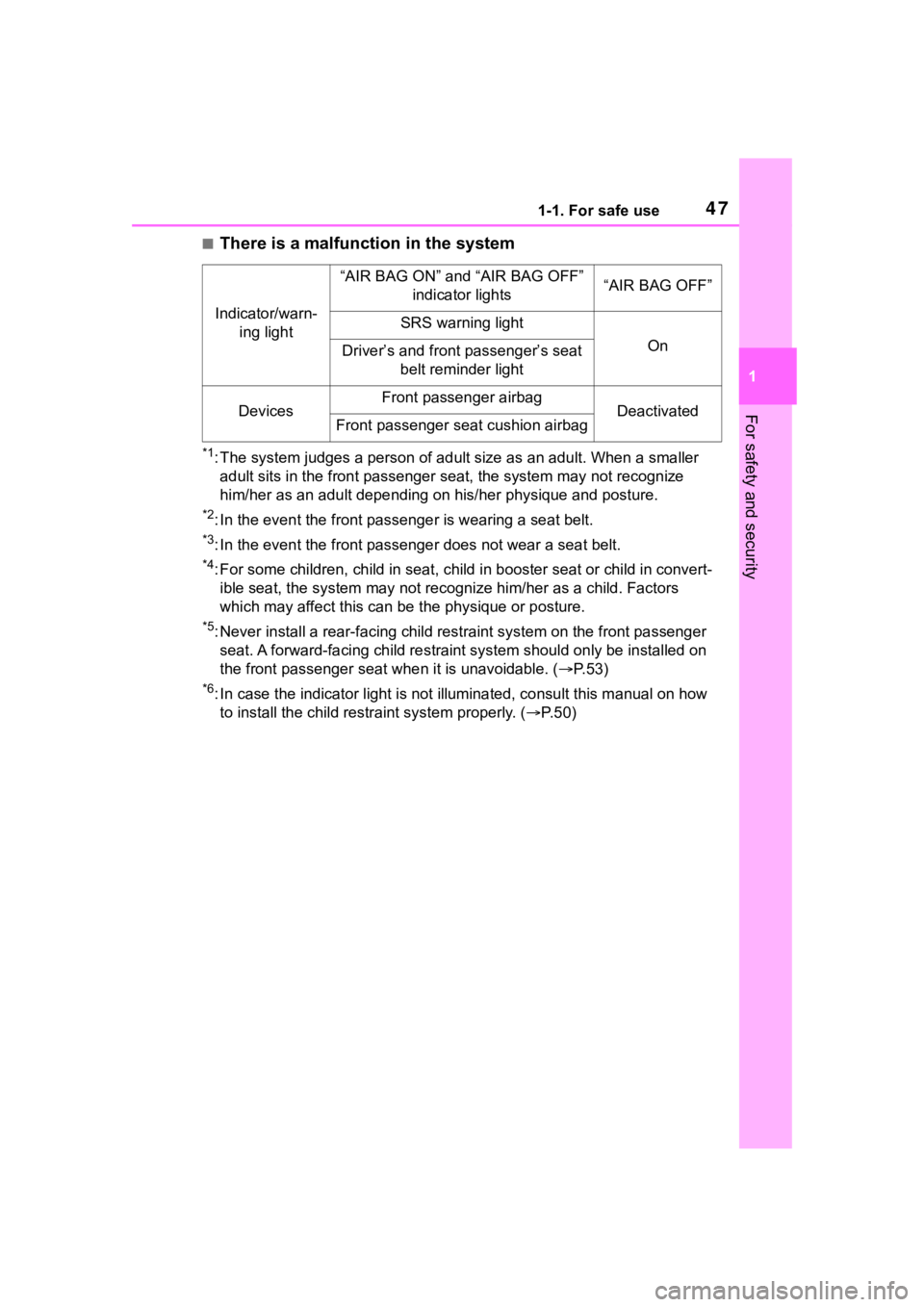
■There is a malfunction in the system
*1: The system judges a person of adult size as an adult. When a smaller
adult sits in the front passenger seat, the system may not recognize
him/her as an adult depending on his/her physique and posture.
*2: In the event the front passenger is wearing a seat belt.
*3: In the event the front passenge r does not wear a seat belt.
*4: For some children, child in seat, child in booster seat or chi ld in convert-
ible seat, the system may not recognize him/her as a child. Fac tors
which may affect this can be the physique or posture.
*5: Never install a rear-facing ch ild restraint system on the front passenger
seat. A forward-facing child restraint system should only be in stalled on
the front passenger sea t when it is unavoidable. ( P.53)
*6: In case the indicator light is not illuminated, consult this m anual on how
to install the child restr aint system properly. (P. 5 0 )
Indicator/warn-
ing light
“AIR BAG ON” and “AIR BAG OFF” indicator lights“AIR BAG OFF”
SRS warning light
OnDriver’s and front passenger’s seat belt reminder light
DevicesFront passenger airbagDeactivatedFront passenger seat cushion airbag
Page 73 of 736
731-4. Theft deterrent system
1
For safety and security
*: If equipped
■Items to check before lock-
ing the vehicle
To prevent unexpected trigger-
ing of the alarm and vehicle
theft, make sure of the following:
Nobody is in the vehicle.
The side windows and moon
roof (if equipped) or pan- oramic moon roof (if
equipped) are closed before
the alarm is set.
No valuables or other per-
sonal items are left in the
vehicle.
■Setting
Close the doors and hood, and
lock all the doors. The system
will be set automatically after 30
seconds.
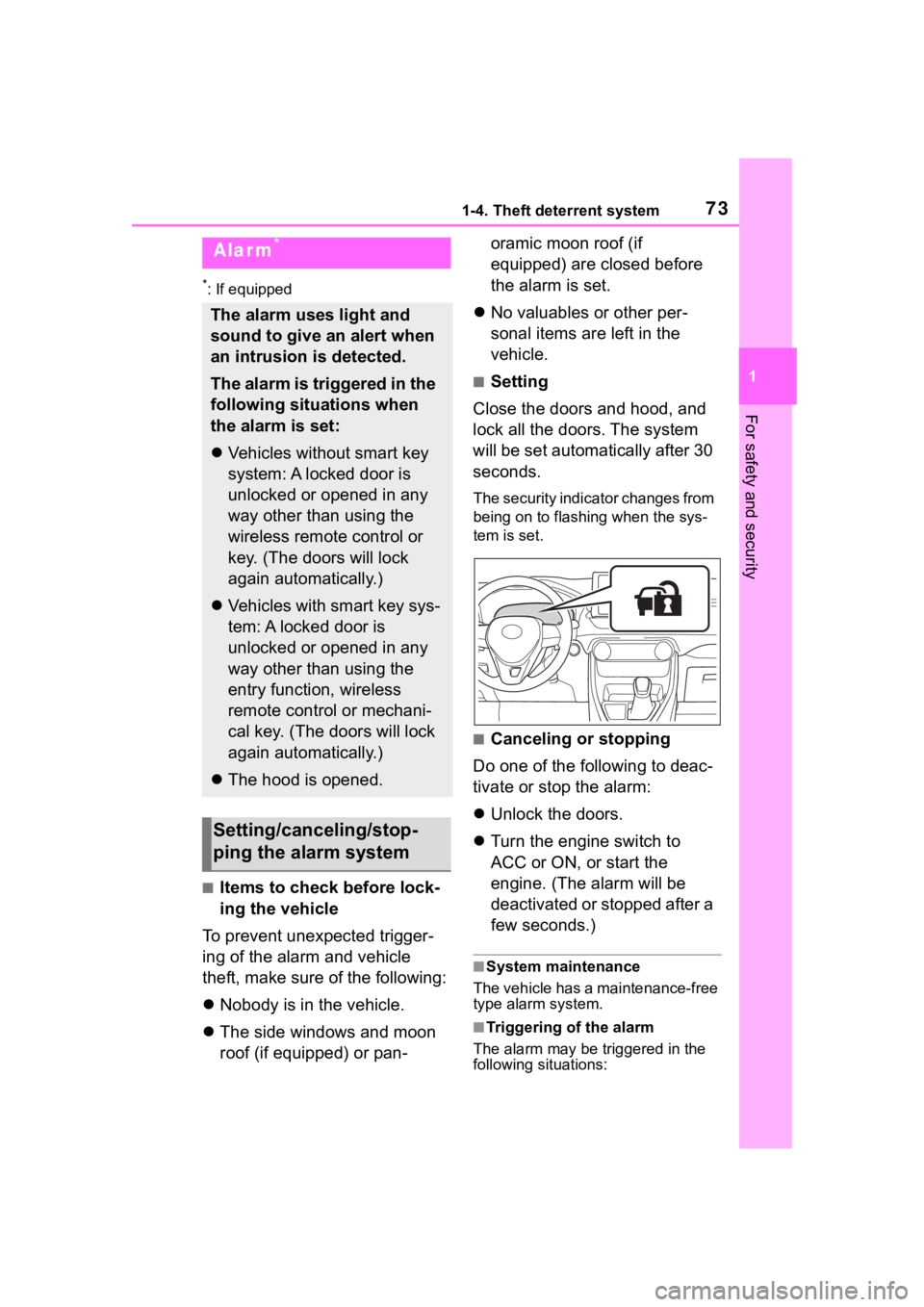
The security indicator changes from
being on to flashing when the sys-
tem is set.
■Canceling or stopping
Do one of the following to deac-
tivate or stop the alarm:
Unlock the doors.
Turn the engine switch to
ACC or ON, or start the
engine. (The alarm will be
deactivated or stopped after a
few seconds.)
■System maintenance
The vehicle has a maintenance-free
type alarm system.
■Triggering of the alarm
The alarm may be triggered in the
following situations:
Alarm*
The alarm uses light and
sound to give an alert when
an intrusion is detected.
The alarm is triggered in the
following situations when
the alarm is set:
Vehicles without smart key
system: A locked door is
unlocked or opened in any
way other than using the
wireless remote control or
key. (The doors will lock
again automatically.)
Vehicles with smart key sys-
tem: A locked door is
unlocked or opened in any
way other than using the
entry function, wireless
remote control or mechani-
cal key. (The doors will lock
again automatically.)
The hood is opened.
Setting/canceling/stop-
ping the alarm system
Page 74 of 736
741-4. Theft deterrent system
(Stopping the alarm deactivates the
alarm system.)
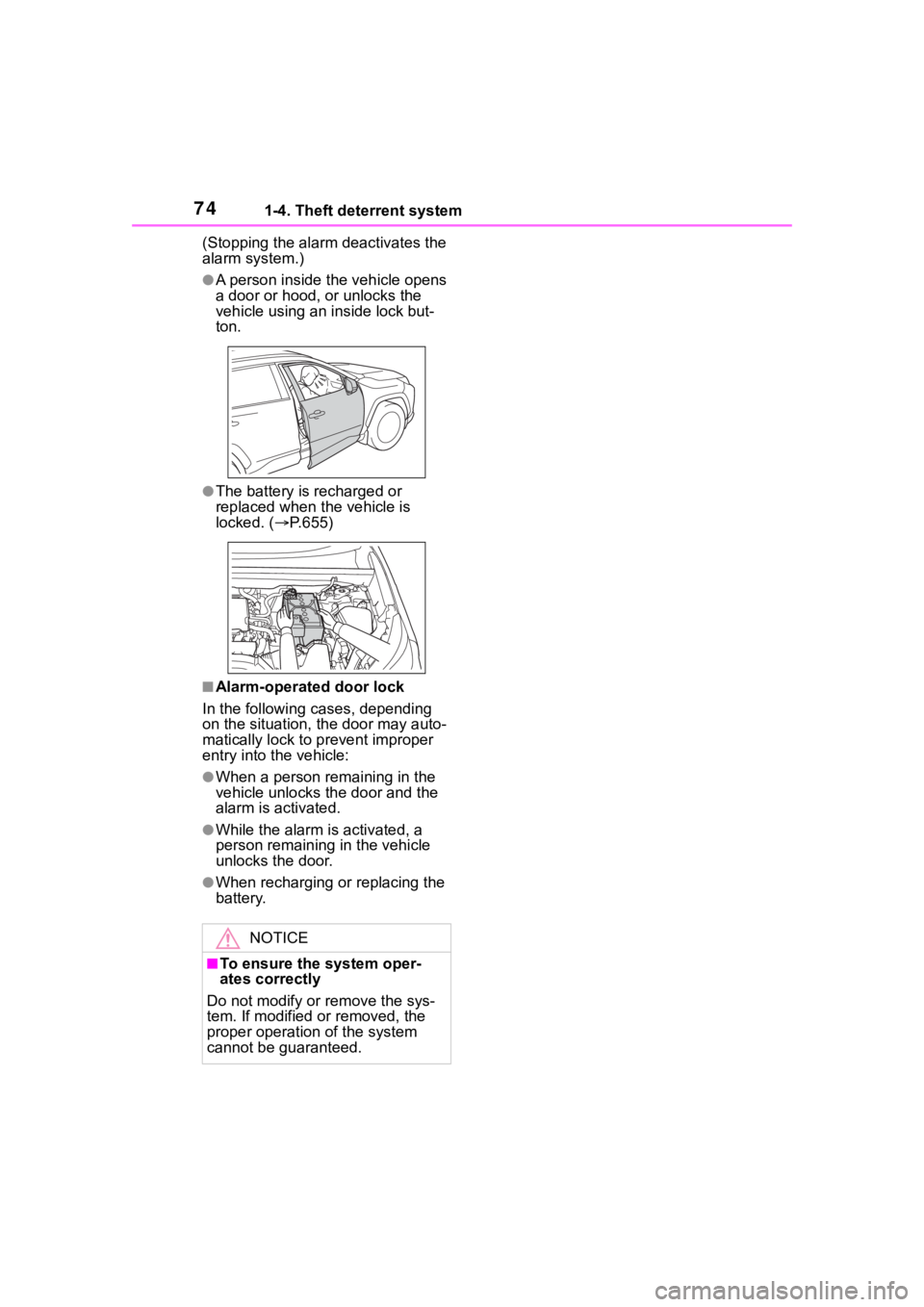
●A person inside the vehicle opens
a door or hood, or unlocks the
vehicle using an inside lock but-
ton.
●The battery is recharged or
replaced when the vehicle is
locked. (P.655)
■Alarm-operated door lock
In the following cases, depending
on the situation, th e door may auto-
matically lock to p revent improper
entry into the vehicle:
●When a person remaining in the
vehicle unlocks the door and the
alarm is activated.
●While the alarm is activated, a
person remaining in the vehicle
unlocks the door.
●When recharging or replacing the
battery.
NOTICE
■To ensure the system oper-
ates correctly
Do not modify or remove the sys-
tem. If modified or removed, the
proper operation of the system
cannot be guaranteed.
Page 97 of 736
972-1. Instrument cluster
2
Vehicle status information and indicators
Select to change the units of mea-
sure displayed.
“Meter Type” (7-inch display)
Select to change the speedometer
display.
(Eco Driving Indicator
Light) ( P.92)
Select to activate/deactivate the
Eco Driving Indicator Light.
(Driving information dis-
play settings)
Select to change the display on
Fuel Economy ( P. 9 1 ) .
(Audio settings) (if
equipped)
Select to enable/disable
screen.
(Vehicle information dis-
play settings)
• “Display Contents”
Select to enable/disable the AWD
system display ( P.94). (AWD
models)
• “Drive Info Type”
Select to change the drive informa-
tion type display between trip and
total. ( P. 9 3 ) .
• “Drive Info Items”
Select to set the items on the upper
and lower side of the drive informa-
tion screen. from three items, aver-
age speed, distance and total time.
“Pop-Up Display”
Select to enable/d isable the follow-
ing pop-up displays, which may
appear in some situations. • Intersection guidance display of
the navigation s ystem-linked sys-
tem (if equipped)
• Incoming call display of the hands-free phone system (if
equipped)
• Audio operation (if equipped)
• Volume operation (if equipped)
• Voice control (if equipped)
• Stop & Start system duration (if equipped)
• Stop & Start system status (if equipped)
“MID OFF”
A blank screen is displayed
“Default Settings”
Select to reset the meter display
settings.
■Suspension of the settings dis-
play
●In the following situations, opera-
tion of the settings display will be
temporarily suspended.
• When a warning message appears on the multi-information
display
• When the vehicle begins to move
●Settings for functions not
equipped to the vehicle are not
displayed.
●When a function is turned off, the
related settings for that function
are not selectable.
Page 131 of 736
1313-2. Opening, closing and locking the doors
3
Before driving
the effective range, the door may
lock and unlock repeatedly. In that
case, follow the fo llowing correc-
tion procedures to wash the vehi-
cle:
• Place the electronic key in a loca-
tion 6 ft. (2 m) or more away from
the vehicle. (Take care to ensure
that the key is not stolen.)
• Set the electronic key to battery- saving mode to disable the smart
key system. ( P.129)
●If the electronic key is inside the
vehicle and a door handle
becomes wet during a car wash, a
message may be shown on the
multi-informatio n display and a
buzzer will sound outside the vehi-
cle. To turn off the alarm, lock all
the doors.
●The lock sensor may not work
properly if it com es into contact
with ice, snow, mud, etc. Clean
the lock sensor and attempt to
operate it again, or use the lock
sensor on the lower part of the
door handle.
●A sudden approach to the effec-
tive range or door handle may pre-
vent the doors from being
unlocked. In this case, return the
door handle to the original position
and check that the doors unlock
before pulling the door handle
again.
●If there is another electronic key in
the detection area, it may take
slightly longer to unlock the doors
after the door handle is gripped.
■When the vehicle is not driven
for extended periods
●To prevent theft of the vehicle, do
not leave the electronic key within
6 ft. (2 m) of the vehicle.
●The smart key system can be
deactivated in advance. ( P.691)
●Battery-saving mode can reduce
the power consumption of elec-
tronic keys. ( P.129)
■To operate the system properly
Make sure to carry the electronic
key when operating the system. Do
not get the electronic key too close
to the vehicle when operating the
system from the out side of the vehi-
cle.
Depending on the position and hold-
ing condition of the electronic key,
the key may not be detected cor-
rectly and the system may not oper-
ate properly. (The alarm may go off
accidentally, or the door lock pre-
vention may not operate.)
■If the smart key system does
not operate properly
●Locking and unlocking the doors:
Use the mechanical key. ( P.653)
●Starting the engine: P. 6 5 4
■Customization
Settings (e.g. smart key system)
can be changed.
(Customizable features: P.691)
If the smart key system has been
deactivated in a customized setting,
refer to the explanations for the fol-
lowing operations.
●Locking and unlocking the doors:
Use the wireless remote control or
mechanical key. ( P.108, 653)
●Starting the engi ne and changing
engine switch modes: P. 6 5 4
●Stopping the engine: P. 1 9 6
Page 193 of 736
1934-2. Driving procedures
4
Driving
4-2.Driving procedures
1Pull the parking brake switch
to check that the parking
brake is set. ( P.203)
The parking brake indicator will
come on.
2Check that the shift lever is
set in P.
3 Firmly depress the brake
pedal.
4 Turn the engine switch to
START to start the engine.
■If the engine does not start
The engine immobilizer system may
not have been deactivated. ( P. 7 0 )
Contact your Toyota dealer.
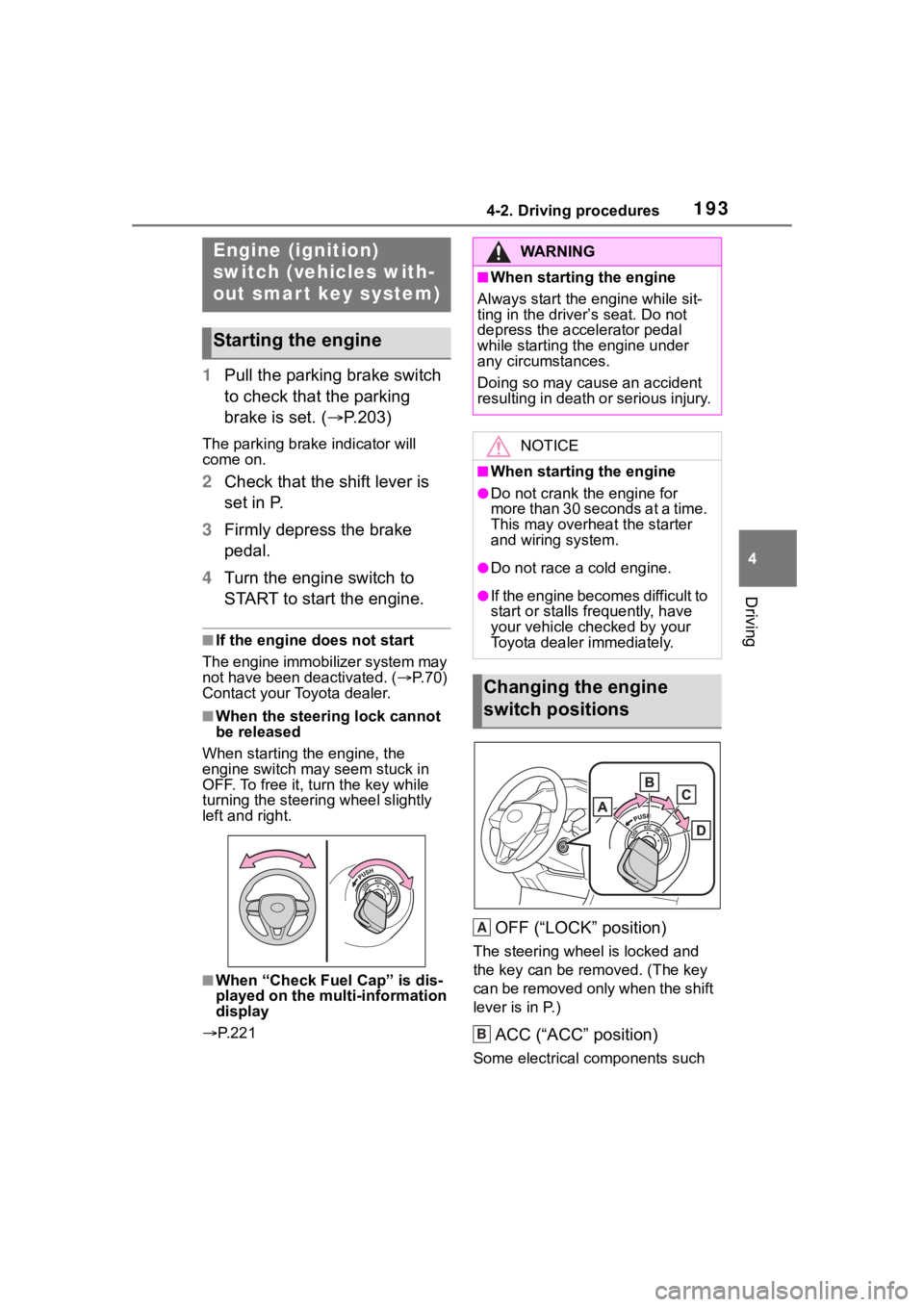
■When the steering lock cannot
be released
When starting the engine, the
engine switch may seem stuck in
OFF. To free it, turn the key while
turning the steerin g wheel slightly
left and right.
■When “Check Fuel Cap” is dis-
played on the multi-information
display
P. 2 2 1
OFF (“LOCK” position)
The steering wheel is locked and
the key can be re moved. (The key
can be removed only when the shift
lever is in P.)
ACC (“ACC” position)
Some electrical components such
Engine (ignition)
switch (vehicles with-
out smart key system)
Starting the engine
WA R N I N G
■When starting the engine
Always start the engine while sit-
ting in the driver’s seat. Do not
depress the accelerator pedal
while starting the engine under
any circumstances.
Doing so may cause an accident
resulting in death o r serious injury.
NOTICE
■When starting the engine
●Do not crank the engine for
more than 30 seconds at a time.
This may overheat the starter
and wiring system.
●Do not race a cold engine.
●If the engine becomes difficult to
start or stalls frequently, have
your vehicle checked by your
Toyota dealer immediately.
Changing the engine
switch positions
A
B
Page 195 of 736
1954-2. Driving procedures
4
Driving
engine switch mode.
■If the engine does not start
●The engine immobilizer system
may not have been deactivated.
( P. 7 0 )
Contact your Toyota dealer.
●If a message related to start-up is
shown on the multi-information
display, read the message and fol-
low the instructions.
■If the battery is discharged
The engine cannot be started using
the smart key system. Refer to
P.655 to restart the engine.
■Electronic key battery depletion
P. 1 0 2
■Conditions affecting operation
P. 1 2 9
■Note for the entry function
P. 1 3 0
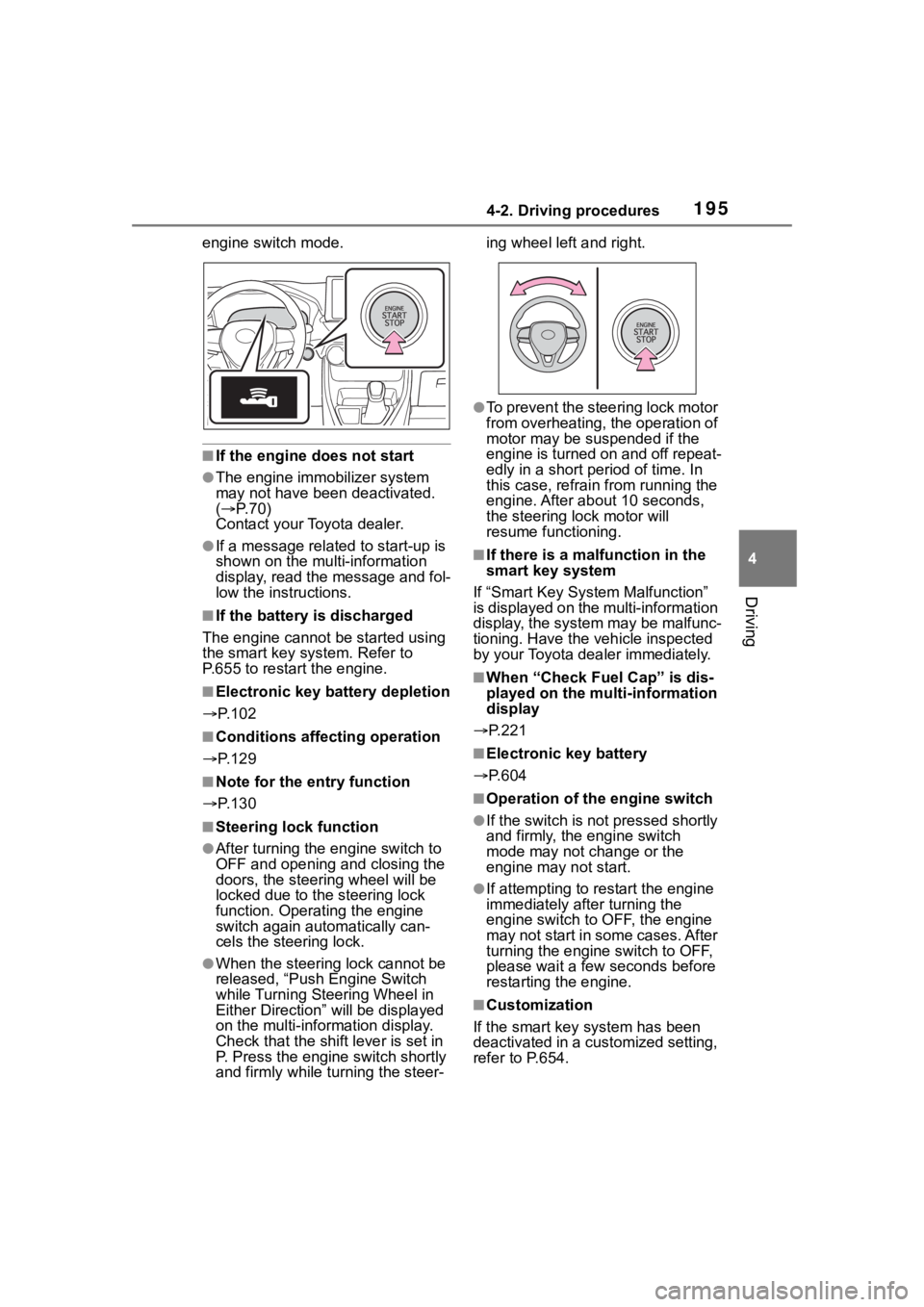
■Steering lock function
●After turning the engine switch to
OFF and opening and closing the
doors, the steer ing wheel will be
locked due to the steering lock
function. Operating the engine
switch again automatically can-
cels the steering lock.
●When the steering lock cannot be
released, “Push Engine Switch
while Turning Steering Wheel in
Either Direction” will be displayed
on the multi-information display.
Check that the shift lever is set in
P. Press the engine switch shortly
and firmly while turning the steer- ing wheel left and right.
●To prevent the steering lock motor
from overheating, the operation of
motor may be suspended if the
engine is turned on and off repeat-
edly in a short period of time. In
this case, refrain from running the
engine. After about 10 seconds,
the steering lo
ck motor will
resume functioning.
■If there is a malfunction in the
smart key system
If “Smart Key System Malfunction”
is displayed on the multi-information
display, the system may be malfunc-
tioning. Have the vehicle inspected
by your Toyota dealer immediately.
■When “Check Fuel Cap” is dis-
played on the multi-information
display
P.221
■Electronic key battery
P.604
■Operation of the engine switch
●If the switch is not pressed shortly
and firmly, the engine switch
mode may not change or the
engine may not start.
●If attempting to res tart the engine
immediately after turning the
engine switch to OFF, the engine
may not start in some cases. After
turning the engine switch to OFF,
please wait a few seconds before
restarting the engine.
■Customization
If the smart key system has been
deactivated in a customized setting,
refer to P.654.