hood open TOYOTA RAV4 2020 Owners Manual (in English)
[x] Cancel search | Manufacturer: TOYOTA, Model Year: 2020, Model line: RAV4, Model: TOYOTA RAV4 2020Pages: 736, PDF Size: 30.79 MB
Page 5 of 736
5TABLE OF CONTENTS
1
2
3
4
5
6
7
8
9
10
5-16.Connected Services over-view
Connected Services ...... 495
Type A: Function achieved by using a smartphone or DCM.................................... 496
Type B: Function achieved by using DCM and the system
.................................... 498
Type C: Function achieved by using DCM .................. 499
Type D: Function achieved by using DCM and a smart-
phone .......................... 502
5-17.Connected Services opera- tion
Toyota Apps .................. 504
5-18.Setup Toyota Apps settings ..... 508
6-1. Using the air conditioning
system and defogger
Manual air conditioning sys- tem .............................. 510
Automatic air conditioning system ......................... 515
Heated steering wheel/seat heaters/seat ventilators 522
6-2. Using the interior lights Interior lights list ............ 525
6-3. Using the storage features List of storage features . 528
Luggage compartment fea- tures ............................ 5326-4. Using the other interior fea-
tures
Other interior features ... 537
Garage door opener ...... 548
7-1. Maintenance and care Cleaning and protecting the vehicle exterior ............ 558
Cleaning and protecting the vehicle interior ............. 561
7-2. Maintenance Maintenance requirements.................................... 564
General maintenance .... 565
Emission inspection and maintenance (I/M) programs.................................... 568
7-3. Do-it-yourself maintenance Do-it-yourself service precau-tions ............................. 569
Hood .............................. 571
Positioning a floor jack .. 572
Engine compartment ..... 574
Tires .............................. 581
Tire inflation pressure .... 595
Wheels .......................... 597
Air conditioning filter ...... 599
Wiper insert replacement .................................... 601
Wireless remote control/elec- tronic key battery ......... 604
Checking and replacing fuses .................................... 607
Light bulbs ..................... 609
6Interior features
7Maintenance and care
Page 15 of 736
15Pictorial index
Precautions against winter season ...................................... P.367
To prevent freezing (windshield wiper de-icer)
*.................... P.520
Precautions against car wash
(Rain-sensing windshield wipers)
*....................................... P.559
Replacing the wiper insert ..................................... ............... P.601
Fuel filler door ............................................... ..................... P.220
Refueling method ............................................... .................. P.220
Fuel type/fuel tan k capacity ................................... .............. P.666
Tires.......................................................... ........................... P.581
Tire size/inflation pressure ................................... ................ P.671
Winter tires/tire chain ........................................ ................... P.367
Checking/rotation/tire pressure warning system
*................. P.581
Coping with flat tires......................................... .................... P.642
Hood ........................................................... ......................... P.571
Opening ............................................................................... P.571
Engine oil ..................................................... ........................ P.666
Coping with overheat ........................................... ................ P.659
Warning messages ............................................... ............... P.639
Headlights..................................................... ...................... P.209
Turn signal lights ............................................. .................. P.202
Parking lights ................................................. .................... P.209
Daytime running lights .. .................................................... P.209
Side marker lights ............................................. ................. P.209
Fog lights
*............................................................... ............ P.437
Stop lights/tail lights/turn s ignal lights .................... P.202, 209
Tail lights.................................................... ......................... P.209
Back-up lights
Light bulbs of the exterior lights for driving
(Replacing method: P.609, Watts: P.675)
E
F
G
H
I
J
K
L
M
N
O
Page 18 of 736

18Pictorial index
When the warning messages are displayed ........................P. 6 3 9
Turn signal lever.............................................. ................... P.202
Headlight switch ............................................... ................. P.209
Headlights/parking lights/tail lights/
license plate lights/daytime running lights .................... ........ P.209
Fog lights
*1............................................................... ............ P.437
Windshield wiper and washer switch............................... P.215
Rear window wiper and washer switch ........................... P.218
Usage.......................................................... ................. P.215, 218
Adding washer fluid .............................................................. P.580
Warning messages ............................................... ............... P.639
Emergency flasher switch ....................................... .......... P.618
Hood lock release lever ........................................ ............. P.571
Tilt and telescopic steering lock release lever ................P. 1 4 2
Adjustment ..................................................... ...................... P.142
Air conditioning system ............................. ............... P.510, 515
Usage.......................................................... ................. P.510, 515
Rear window defogger ........................................... ...... P.511, 517
Audio
*1............................................................... ................. P.375
Audio Plus
*1, 2
Premium Audio*1, 2
Fuel filler door opener lever .................................. ............ P.221
*1: If equipped
*2: Refer to “NAVIGATION AND MULTIMEDIA SYSTEM OWNER’S MAN-
UAL”.
E
F
G
H
I
J
K
L
Page 49 of 736
491-2. Child safety
1
For safety and security
1-2.Child safety
Riding with children
Observe the following pre-
cautions when children are
in the vehicle.
Use a child restraint system
appropriate for the child,
until the child becomes
large enough to properly
wear the vehicle’s seat belt.
It is recommended that chil-
dren sit in the rear seats to
avoid accidental contact
with the shift lever, wiper
switch, etc.
Use the rear door child-pro-
tector lock or the window
lock switch to avoid children
opening the door while driv-
ing or operating the power
window accidentally.
( P.112, 158)
Do not let small children
operate equipment which
may catch or pinch body
parts, such as the power
window, hood, back door,
seats, etc.
WA R N I N G
■When children are in the vehi-
cle
Never leave children unattended
in the vehicle, and never allow
children to have or use the key.
Children may be able to start the
vehicle or shift the vehicle into
neutral. There is also a danger
that children ma y injure them-
selves by playing with the side
windows, the moon roof (if
equipped), the panoramic moon
roof (if equipped) or other features
of the vehicle. In addition, heat
build-up or extremely cold tem-
peratures inside the vehicle can
be fatal to children.
Page 73 of 736
731-4. Theft deterrent system
1
For safety and security
*: If equipped
■Items to check before lock-
ing the vehicle
To prevent unexpected trigger-
ing of the alarm and vehicle
theft, make sure of the following:
Nobody is in the vehicle.
The side windows and moon
roof (if equipped) or pan- oramic moon roof (if
equipped) are closed before
the alarm is set.
No valuables or other per-
sonal items are left in the
vehicle.
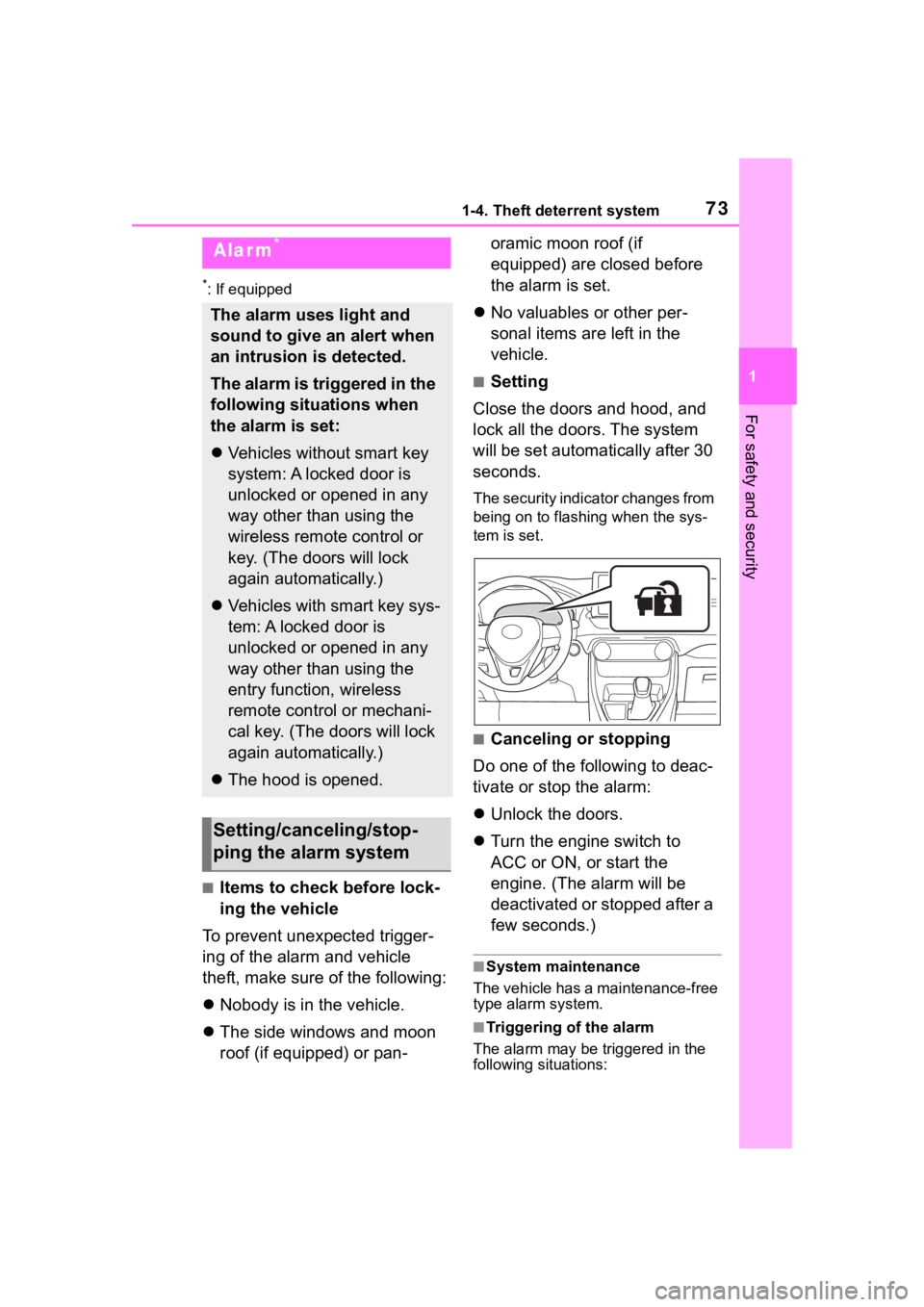
■Setting
Close the doors and hood, and
lock all the doors. The system
will be set automatically after 30
seconds.
The security indicator changes from
being on to flashing when the sys-
tem is set.
■Canceling or stopping
Do one of the following to deac-
tivate or stop the alarm:
Unlock the doors.
Turn the engine switch to
ACC or ON, or start the
engine. (The alarm will be
deactivated or stopped after a
few seconds.)
■System maintenance
The vehicle has a maintenance-free
type alarm system.
■Triggering of the alarm
The alarm may be triggered in the
following situations:
Alarm*
The alarm uses light and
sound to give an alert when
an intrusion is detected.
The alarm is triggered in the
following situations when
the alarm is set:
Vehicles without smart key
system: A locked door is
unlocked or opened in any
way other than using the
wireless remote control or
key. (The doors will lock
again automatically.)
Vehicles with smart key sys-
tem: A locked door is
unlocked or opened in any
way other than using the
entry function, wireless
remote control or mechani-
cal key. (The doors will lock
again automatically.)
The hood is opened.
Setting/canceling/stop-
ping the alarm system
Page 74 of 736
741-4. Theft deterrent system
(Stopping the alarm deactivates the
alarm system.)
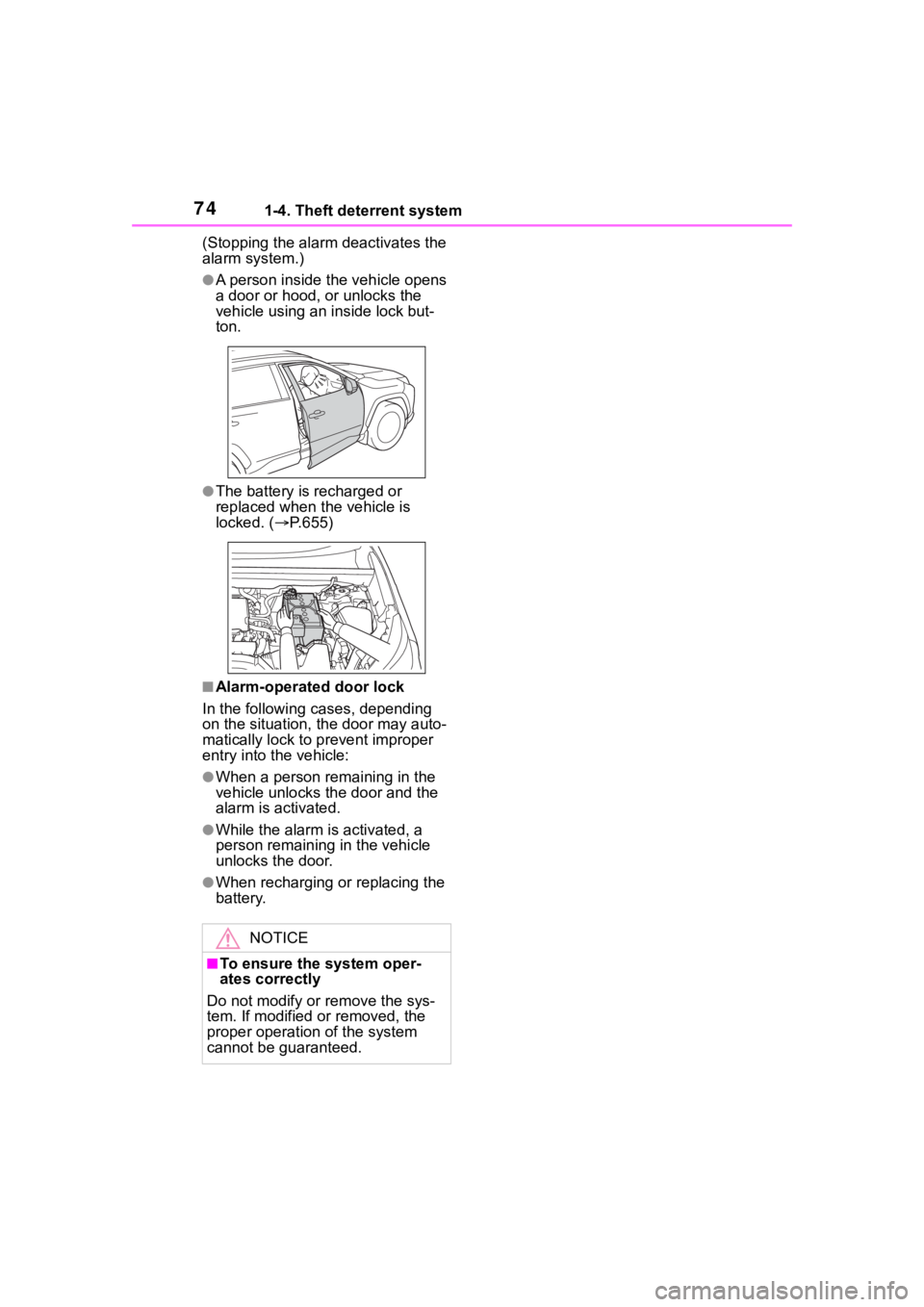
●A person inside the vehicle opens
a door or hood, or unlocks the
vehicle using an inside lock but-
ton.
●The battery is recharged or
replaced when the vehicle is
locked. (P.655)
■Alarm-operated door lock
In the following cases, depending
on the situation, th e door may auto-
matically lock to p revent improper
entry into the vehicle:
●When a person remaining in the
vehicle unlocks the door and the
alarm is activated.
●While the alarm is activated, a
person remaining in the vehicle
unlocks the door.
●When recharging or replacing the
battery.
NOTICE
■To ensure the system oper-
ates correctly
Do not modify or remove the sys-
tem. If modified or removed, the
proper operation of the system
cannot be guaranteed.
Page 112 of 736
1123-2. Opening, closing and locking the doors
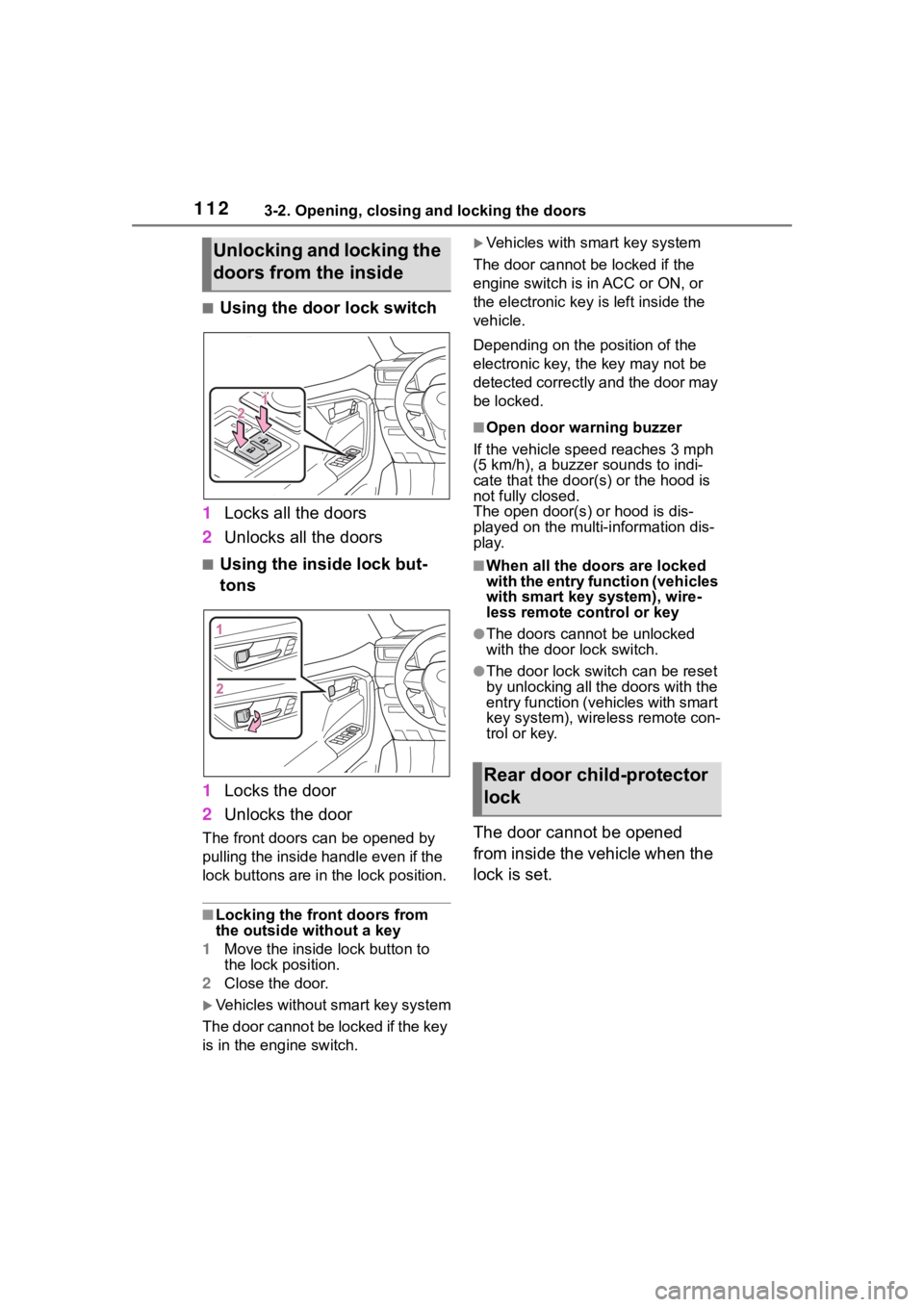
■Using the door lock switch
1 Locks all the doors
2 Unlocks all the doors
■Using the inside lock but-
tons
1 Locks the door
2 Unlocks the door
The front doors can be opened by
pulling the inside ha ndle even if the
lock buttons are in the lock position.
■Locking the front doors from
the outside without a key
1 Move the inside lock button to
the lock position.
2 Close the door.
Vehicles without smart key system
The door cannot be locked if the key
is in the engine switch.
Vehicles with smart key system
The door cannot be locked if the
engine switch is in ACC or ON, or
the electronic key is left inside the
vehicle.
Depending on the position of the
electronic key, the key may not be
detected correctly and the door may
be locked.
■Open door warning buzzer
If the vehicle speed reaches 3 mph
(5 km/h), a buzzer sounds to indi-
cate that the door( s) or the hood is
not fully closed.
The open door(s) or hood is dis-
played on the multi-information dis-
play.
■When all the doors are locked
with the entry function (vehicles
with smart key system), wire-
less remote control or key
●The doors cannot be unlocked
with the door lock switch.
●The door lock switch can be reset
by unlocking all the doors with the
entry function (vehicles with smart
key system), wireless remote con-
trol or key.
The door cannot be opened
from inside the vehicle when the
lock is set.
Unlocking and locking the
doors from the inside
Rear door child-protector
lock
Page 228 of 736
2284-5. Using the driving support systems
●In the following situations, if the situation has changed (or the vehicle has
been driven for some time) and the normal operating conditions are
detected, the message will disappear and the system will become opera-
tional.
If the message does not disapp ear, contact your Toyota dealer.
• When the temperature around the radar sensor is outside of the opera-
tional range, such as when the vehicle is in the sun or in an e xtremely cold
environment
• When the front camera cannot d etect objects in front of the vehicle, such
as when driving in the dark, sno w, or fog, or when bright lights are shining
into the front camera
When the temperature around the
front camera is outside of the opera-
tional range, such as when the vehi-
cle is in the sun or in an extremely
cold environment
If the front camera is hot, such as
after the vehicle had been parked in
the sun, use the air conditioning sys-
tem to decrease the temperature
around the front camera.
If a sunshade was used when the
vehicle was parked, depending on its
type, the sunlight reflected from the
surface of the sunshade may cause
the temperature of the front camera
to become excessively high.
If the front camera is cold, such as
after the vehicle is parked in an
extremely cold environment, use the
air conditioning system to increase
the temperature around the front
camera.
The area in front o f the front camera
is obstructed, such as when the
hood is open or a sticker is attached
to the part of the win dshield in front
of the front camera.
Close the hood, rem ove the sticker,
etc. to clear the obstruction.
SituationActions
Page 347 of 736

3474-5. Using the driving support systems
4
Driving
• The vehicle has been driven a cer-tain amount of time.
• The brake pedal is being
depressed firmly. (except when
the vehicle is stopped by the
dynamic radar cruise control with
full-speed range when in vehicle-
to-vehicle distanc e control mode)
• The D shift position is selected.
• The driver’s seat belt is fastened.
• The driver’s door is closed.
• The selected driv ing mode is nor-
mal or Eco drive mode.
• The selected driv ing mode is not
snow mode (AWD models).
• Mud & Sand or Rock & Dirt mode is not selected for Multi-terrain
Select (AWD models).
• The windshield defogger is off. (vehicles without a manual air
conditioning system)
• The accelerator pedal is not being depressed.
• The engine is adequately warmed
up.
• The outside temperature is 23°F (- 5°C) or higher.
• The hood is closed. ( P.348)
●In the following situations, the
engine may not be stopped by the
Stop & Start system. This is not a
malfunction of the Stop & Start
system.
• When the air conditioning system is being used.
• When the battery is undergoing a periodic recharge.
• When the battery is not sufficiently
charged, such as if the vehicle
has been parked for a long time
and the battery charge has
decreased, the e lectric load is
large, the battery fluid tempera-
ture is excessively low or the bat-
tery has deteriorated.
• When the brake booster vacuum is low.
• When the elapsed time since the
engine was restarted is short.
• When the vehicle is stopped fre- quently, such as when in a traffic
jam.
• When the engine coolant tem- perature or transmission fluid tem- perature is extremely low or high.
• When the vehicle is stopped on a
steep incline.
• When the steering wheel is being operated.
• When the vehicle is being driven
in a high altitude area.
• When the battery fluid tempera- ture is extremely low or high.
• For a while after the battery termi- nals have been disconnected and
reconnected.
●When the engine is stopped by
the Stop & Star t system, the
engine will be restarted automati-
cally if any of the following condi-
tions are met:
(To enable the engine to be
stopped by the Stop & Start sys-
tem again, drive the vehicle.)
• The air conditioning system is turned on. (vehicles without a
manual air conditioning system)
• The windshield defogger is turned on. (vehicles without a manual air
conditioning system)
• The shift lever is shifted from D.
• The driver’s seat belt is unfas- tened.
• The driver’s door is opened.
• The driving mode is changed from normal or Eco drive mode to
another mode.
• The driving mode is changed to snow mode (AWD models).
• Mud & Sand or Rock & Dirt mode is selected for Mult i-terrain Select
(AWD models).
• The Stop & Start cancel switch is pressed.
• The steering wheel is operated.
• The accelerator pedal is
depressed.
• The vehicle starts to roll on an
incline.
●When the engine is stopped by
the Stop & Star t system, the
engine may restart automatically
in the following situations: (To
enable the engine to be stopped
by the Stop & Start system again,
drive the vehicle.)
• When the brake pedal is pumped
Page 348 of 736
3484-5. Using the driving support systems
or strongly depressed.
• When the air conditioning system is being used.
• When a switch of the air condition- ing system is operated (windshield
defogger switch, etc.).
• If the battery charge becomes low.
■When the hood is opened
●If the hood is opened while the
engine is stopped by the Stop &
Start system, the engine will stall
and will not be able to be restarted
by the automatic engine start
function. In this case, restart the
engine using the normal engine
starting procedure. ( P.193, 194)
●If the hood is closed after the
engine is started with the hood
open, the Stop & Start system will
not operate. Close the hood, turn
the engine switch off, wait 30 sec-
onds or more, and then start the
engine.
■Air conditioning system opera-
tion while the engine is stopped
by the Stop & Start system
Vehicles with an automatic air con-
ditioning system: When the air con-
ditioning is in automatic mode and
the engine is stopped by the Stop &
Start system, the fan may operate at
a low speed in order to prevent the
temperature in the cabin from
increasing or decreasing or may be
stopped.
To prioritize air conditioning system
performance when the vehicle is
stopped, disable the Stop & Start
system by pressing the Stop & Start
cancel switch.
●If the windshield is fogged up
Turn the windshield defogger on.
( P.511, 517)
If the windshield fogs up frequently,
press the Stop & Start cancel switch
to disable the Stop & Start system.
●If an odor is emitted from the air
conditioning system
• Vehicles with a manual air condi- tioning system:
If the idling stop time setting is set
to “Extended”, change it to “Stan-
dard”. If an odor is emitted when
the idling stop time setting is set to
“Standard”, press the Stop & Start
cancel switch to deactivate the
Stop & Start system.
• Vehicles with a n automatic air
conditioning system:
Press the Stop & Start cancel
switch to deactivate the Stop &
Start system.
■Changing the idling stop time
with the air conditioning system
on
The length of time the Stop & Start
system will operate when the air
conditioning system is on can be
changed in of the multi-informa-
tion display ( P.94). (The length of
time the Stop & Start system will
operate when the a ir conditioning
system is off cann ot be changed.)
■Displaying the Stop & Start sys-
tem status
After Start:
Displays the cumulative time that
the engine is stopped by the Stop &
Start system from when the engine
is started until the engine is
stopped.
This item is reset each time the
engine stops.
■Multi-information display mes-
sages
If the following situations,
and a message may be displayed
on the multi-information display.
●When the engine cannot be
stopped by the Stop & Start sys-
tem “Press Brake More to Acti-
vate”