low beam TOYOTA RAV4 2020 Owners Manual (in English)
[x] Cancel search | Manufacturer: TOYOTA, Model Year: 2020, Model line: RAV4, Model: TOYOTA RAV4 2020Pages: 736, PDF Size: 30.79 MB
Page 209 of 736
2094-3. Operating the lights and wipers
4
Driving
4-3.Operating the lights and wipers
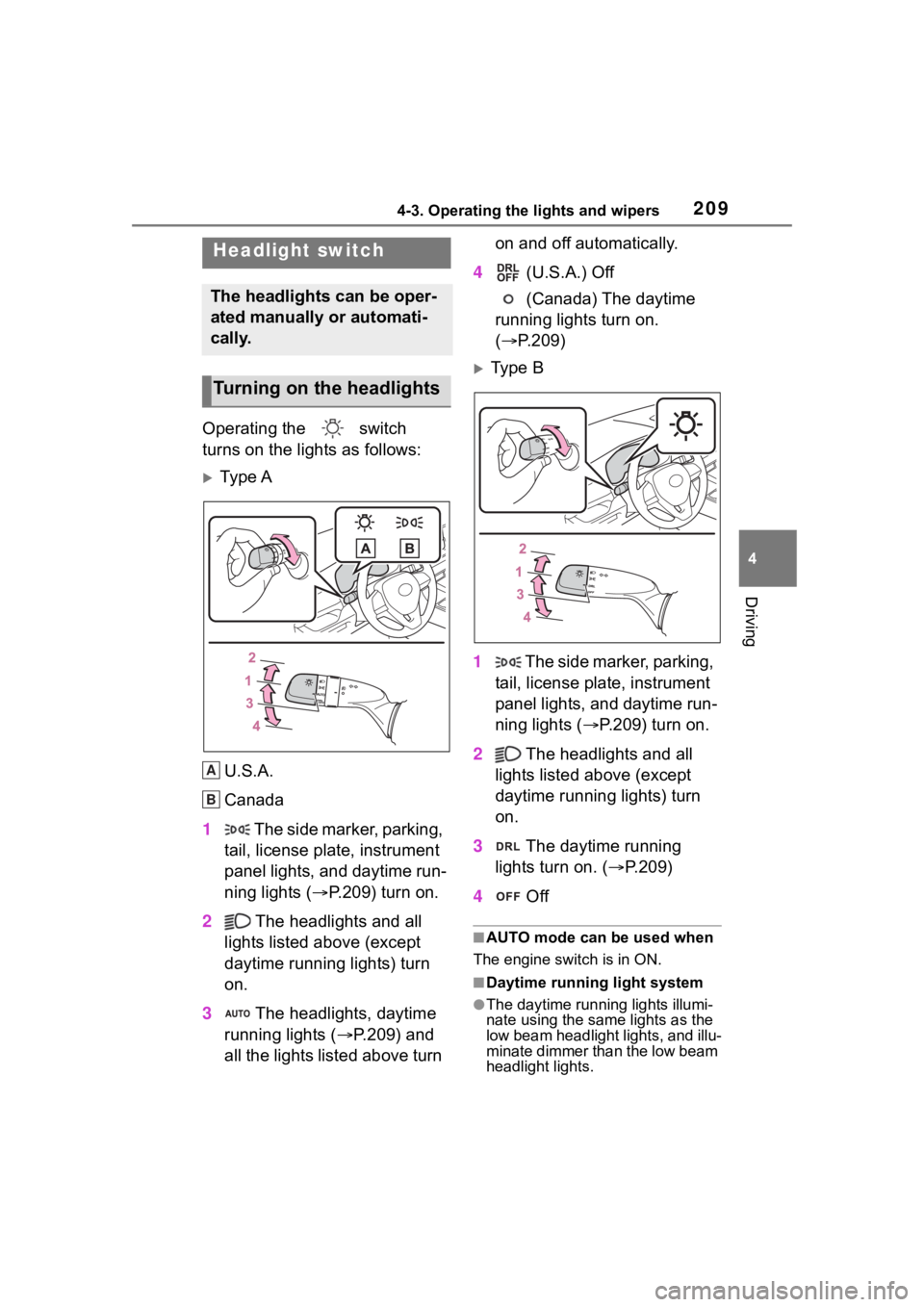
Operating the switch
turns on the lights as follows:
Ty p e A
U.S.A.
Canada
1 The side marker, parking,
tail, license plate, instrument
panel lights, and daytime run-
ning lights ( P.209) turn on.
2 The headlights and all
lights listed above (except
daytime running lights) turn
on.
3 The headlights, daytime
running lights ( P.209) and
all the lights listed above turn on and off automatically.
4 (U.S.A.) Off
(Canada) The daytime
running lights turn on.
( P.209)
Type B
1 The side marker, parking,
tail, license plate, instrument
panel lights, and daytime run-
ning lights ( P.209) turn on.
2 The headlights and all
lights listed above (except
daytime running lights) turn
on.
3 The daytime running
lights turn on. ( P.209)
4 Off
■AUTO mode can be used when
The engine switch is in ON.
■Daytime running light system
●The daytime runn ing lights illumi-
nate using the same lights as the
low beam headlight lights, and illu-
minate dimmer than the low beam
headlight lights.
Headlight switch
The headlights can be oper-
ated manually or automati-
cally.
Turning on the headlights
A
B
Page 212 of 736
2124-3. Operating the lights and wipers
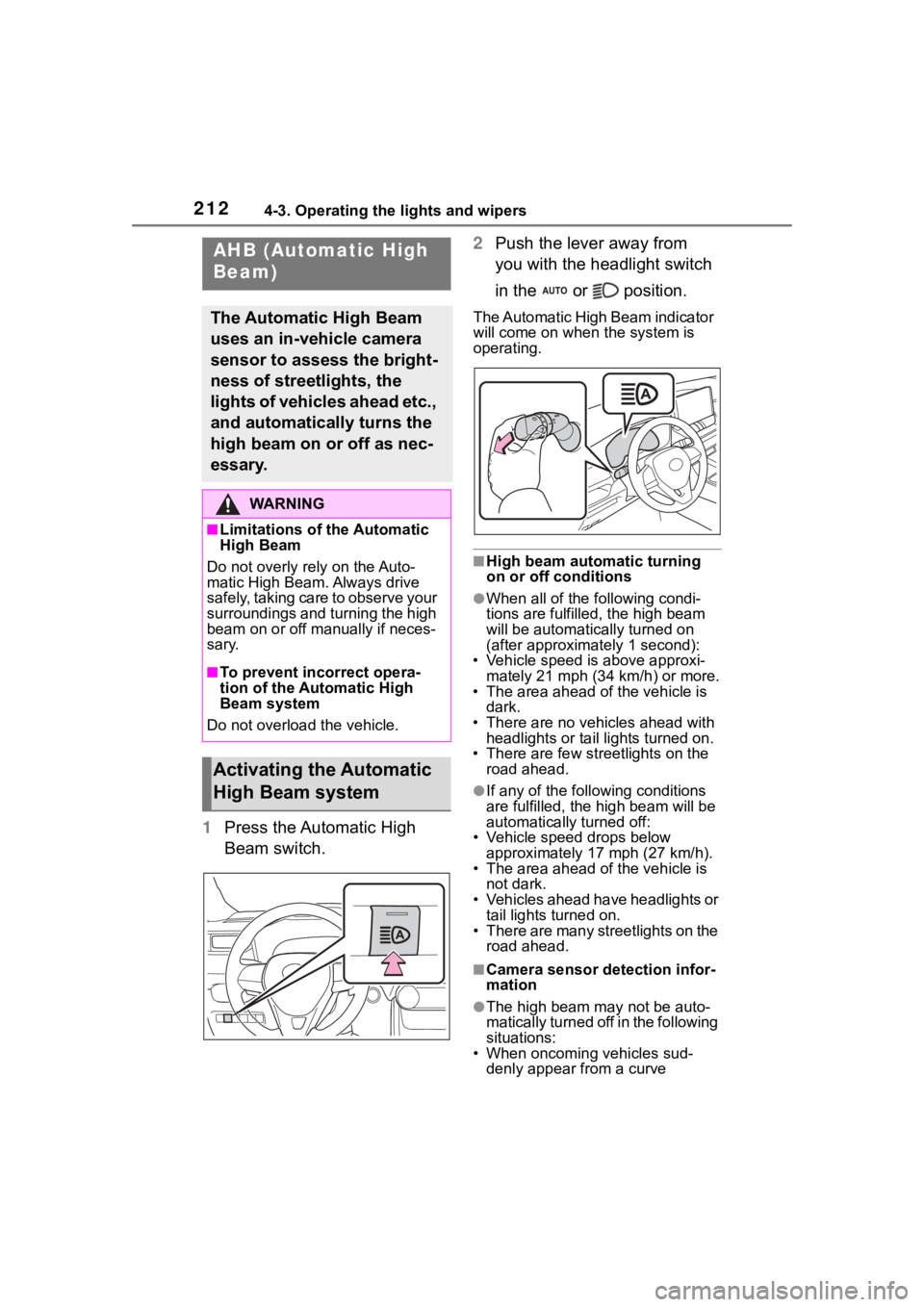
1Press the Automatic High
Beam switch. 2
Push the lever away from
you with the headlight switch
in the or position.
The Automatic High Beam indicator
will come on when the system is
operating.
■High beam automatic turning
on or off conditions
●When all of the f ollowing condi-
tions are fulfilled, the high beam
will be automatica lly turned on
(after approximately 1 second):
• Vehicle speed is above approxi-
mately 21 mph (34 km/h) or more.
• The area ahead of the vehicle is dark.
• There are no vehicles ahead with headlights or tail lights turned on.
• There are few str eetlights on the
road ahead.
●If any of the following conditions
are fulfille d, the high beam will be
automatically turned off:
• Vehicle speed drops below
approximately 17 mph (27 km/h).
• The area ahead of the vehicle is not dark.
• Vehicles ahead have headlights or tail lights turned on.
• There are many streetlights on the road ahead.
■Camera sensor detection infor-
mation
●The high beam ma y not be auto-
matically turned off in the following
situations:
• When oncoming vehicles sud-
denly appear from a curve
AHB (Automatic High
Beam)
The Automatic High Beam
uses an in-vehicle camera
sensor to assess the bright-
ness of streetlights, the
lights of vehicles ahead etc.,
and automatically turns the
high beam on or off as nec-
essary.
WA R N I N G
■Limitations of the Automatic
High Beam
Do not overly rely on the Auto-
matic High Beam. Always drive
safely, taking care to observe your
surroundings and turning the high
beam on or off manually if neces-
sary.
■To prevent incorrect opera-
tion of the Automatic High
Beam system
Do not overload the vehicle.
Activating the Automatic
High Beam system
Page 213 of 736
2134-3. Operating the lights and wipers
4
Driving
• When the vehicle is cut in front of
by another vehicle
• When vehicles ahead are hidden
from sight due to repeated curves,
road dividers or roadside trees
• When vehicles ahead appear from
the faraway lane on a wide road
• When vehicles ahead have no lights
●The high beam may be turned off
if a vehicle ahead that is using fog
lights without using the headlights
is detected.
●House lights, street lights, traffic
signals, and illumi nated billboards
or signs may cause the high beam
to switch to the low beams, or the
low beams to remain on.
●The following factors may affect
the amount of time taken to turn
the high beam on or off:
• The brightness of headlights, fog lights, and tail lig hts of vehicles
ahead
• The movement and direction of vehicles ahead
• When a vehicle ahead only has
operational lights on one side
• When a vehicle ahead is a two- wheeled vehicle
• The condition of the road (gradi-
ent, curve, condi tion of the road
surface etc.)
• The number of passengers and amount of luggage
●The high beam may be turned on
or off when the driver does not
expect it.
●Bicycles or similar objects may not
be detected.
●In the situations shown below, the
system may not be able to accu-
rately detect surrounding bright-
ness levels. This may cause the
low beams to remain on or the
high beams to cause problems for
pedestrians, vehicles ahead or
other parties. In these cases,
manually switch between the high
and low beams.
• In bad weather ( rain, snow, fog,
sandstorms, etc.) • The windshield is obscured by
fog, mist, i ce, dirt, etc.
• The windshield is cracked or dam-
aged
• The camera sensor is deformed or dirty
• When the temperature of the cam- era sensor is extremely high
• Surrounding brightness levels are
equal to those of headlights, tail
lights or fog lights
• When headlights or tail lights of
vehicles ahead are turned off,
dirty, changing color, or not aimed
properly
• When the vehicle is hit by water,
snow, dust, etc. from a preceding
vehicle
• When driving through an area of intermittently changing brightness
and darkness
• When frequently and repeatedly driving ascending/descending
roads, or roads with rough, bumpy
or uneven surfaces (such as
stone-paved roads, gravel roads,
etc.)
• When frequently and repeatedly taking curves or driving on a wind-
ing road
• There is a highly reflective object ahead of the vehicle, such as a
sign or mirror
• The back of a vehicle ahead is highly reflective, such as a con-
tainer on a truck
• The vehicle’s headlights are dam- aged or dirty, or are not aimed
properly
• The vehicle is listing or titling due to a flat tire, a trailer being towed,
etc.
• The high beam and low beam are repeatedly being switched
between in an abnormal manner
• The driver believes that the high beam may be causing problems
or distress to other drivers or
pedestrians nearby
Page 214 of 736
2144-3. Operating the lights and wipers
■If “Headlight System Malfunc-
tion Visit Your Dealer” is dis-
played on the multi-information
display
The system may be malfunctioning.
Have the vehicle inspected by your
Toyota dealer.
■Temporarily lowering sensor
sensitivity
The sensitivity of the sensor can be
temporarily lowered.
1 Turn the engine s witch off while
the following cond itions are met.
●The headlight switch is in or
position.
●The headlight switch lever is in
high beam position.
●Automatic High Beam switch is
on.
2 Turn the engine switch to ON.
3 Within 60 seconds after step 2,
repeat pulling the headlight
switch lever to the original posi-
tion then pushing it to the high
beam position qu ickly 10 times,
then leave the lever in high beam
position.
4 If the sensitivity is changed, the
Automatic High Beam indicator
is turn on and off 3 times.
Automatic High Beam (headlights)
may turn on even w hen the vehicle
is stopped.
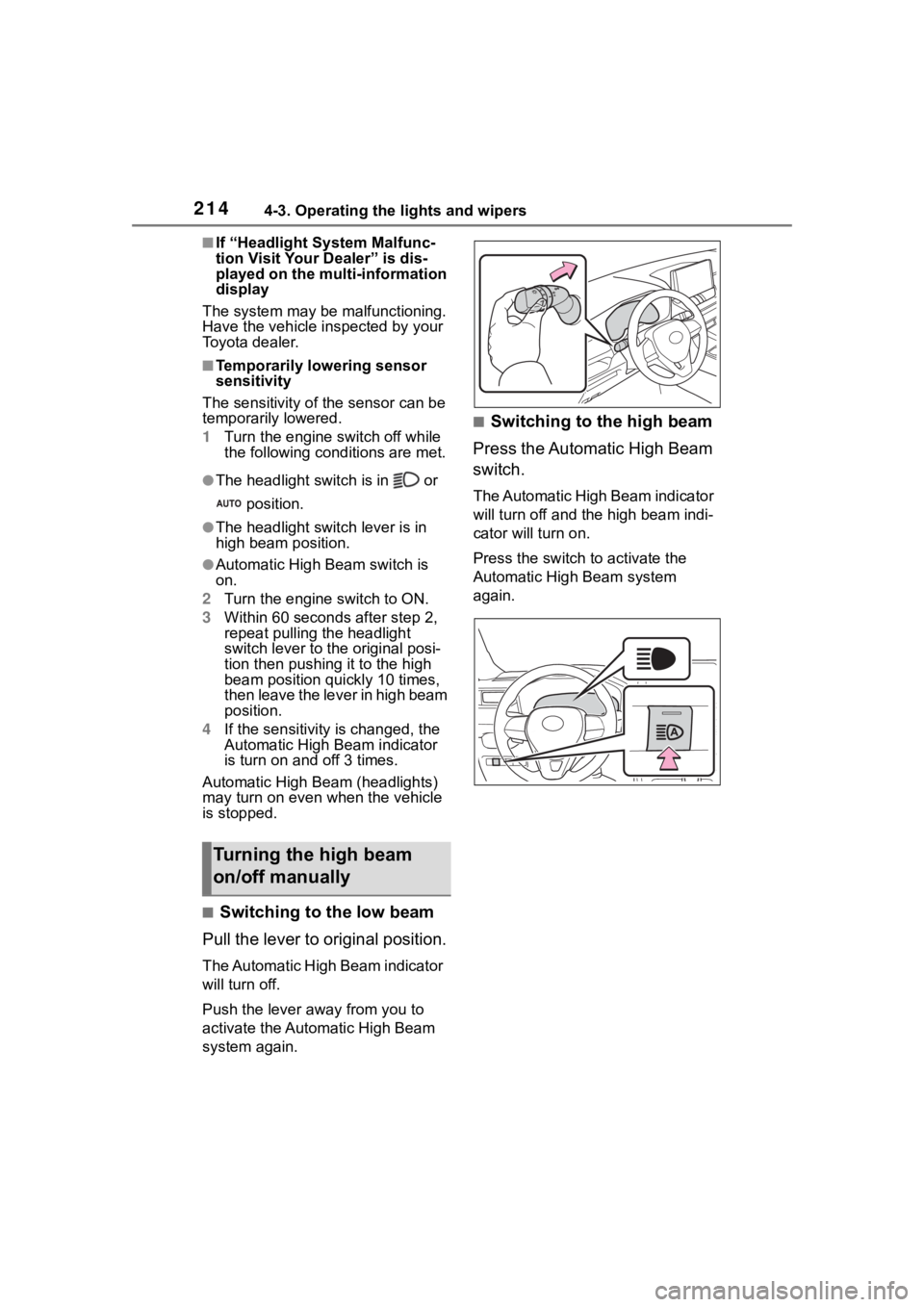
■Switching to the low beam
Pull the lever to original position.
The Automatic High Beam indicator
will turn off.
Push the lever away from you to
activate the Automatic High Beam
system again.
■Switching to the high beam
Press the Automatic High Beam
switch.
The Automatic High Beam indicator
will turn off and the high beam indi-
cator will turn on.
Press the switch to activate the
Automatic High Beam system
again.
Turning the high beam
on/off manually
Page 215 of 736
2154-3. Operating the lights and wipers
4
Driving
*: If equipped
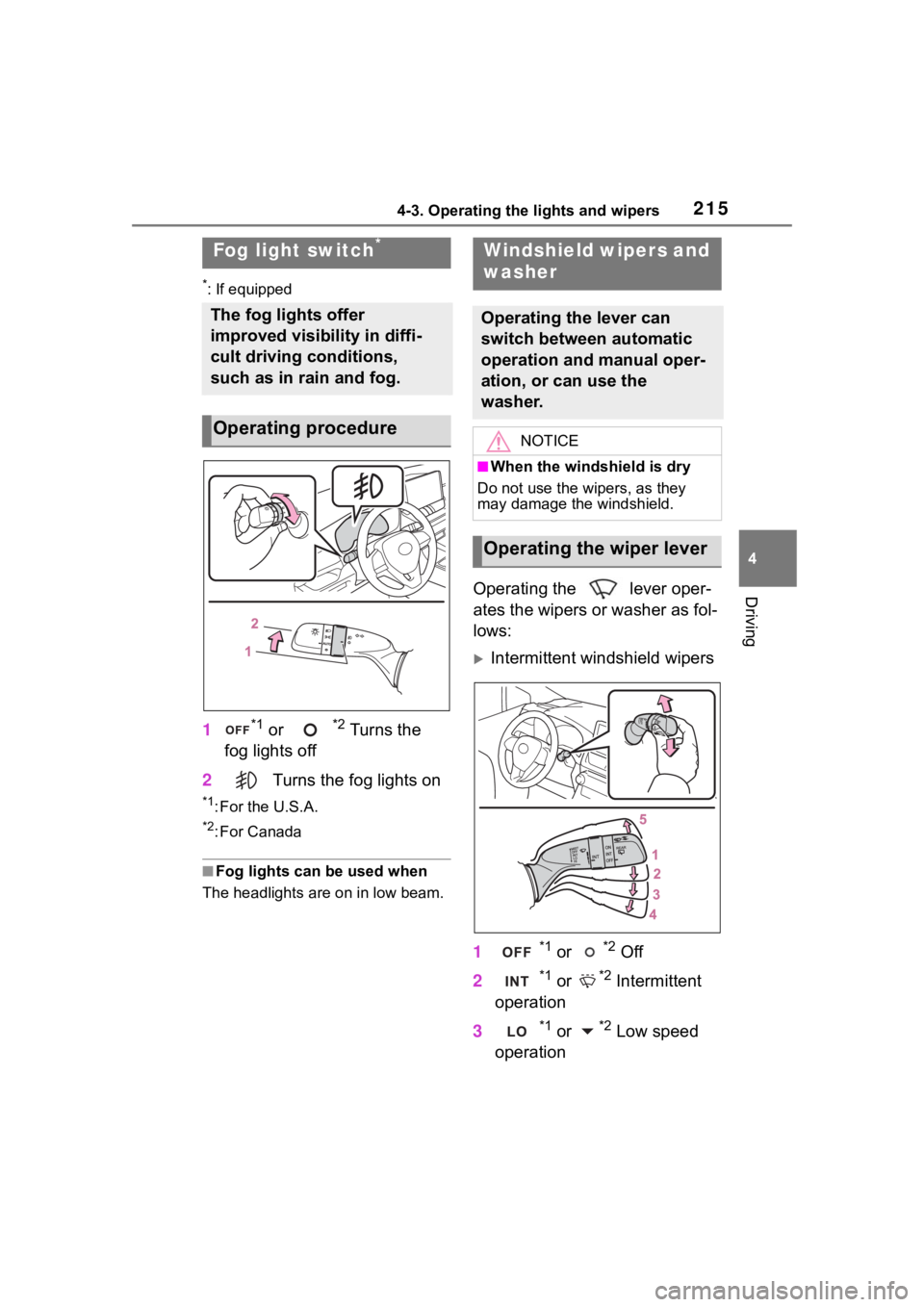
1*1 or *2 Turns the
fog lights off
2 Turns the fog lights on
*1: For the U.S.A.
*2: For Canada
■Fog lights can be used when
The headlights are on in low beam.
Operating the lever oper-
ates the wipers or washer as fol-
lows:
Intermittent windshield wipers
1
*1 or *2 Off
2
*1 or *2 Intermittent
operation
3
*1 or *2 Low speed
operation
Fog light switch*
The fog lights offer
improved visibility in diffi-
cult driving conditions,
such as in rain and fog.
Operating procedure
Windshield wipers and
washer
Operating the lever can
switch between automatic
operation and manual oper-
ation, or can use the
washer.
NOTICE
■When the windshield is dry
Do not use the wipers, as they
may damage the windshield.
Operating the wiper lever
Page 223 of 736
2234-5. Using the driving support systems
4
Driving
4-5.Using the driving support systems
■PCS (Pre-Collision System)
P. 2 2 9
■LTA (Lane Tracing Assist)
P. 2 3 7
■AHB (Automatic High
Beam)
P. 2 1 2
■RSA (Road Sign Assist) (if
equipped)
P. 2 4 7
■Dynamic radar cruise con-
trol with full-speed range
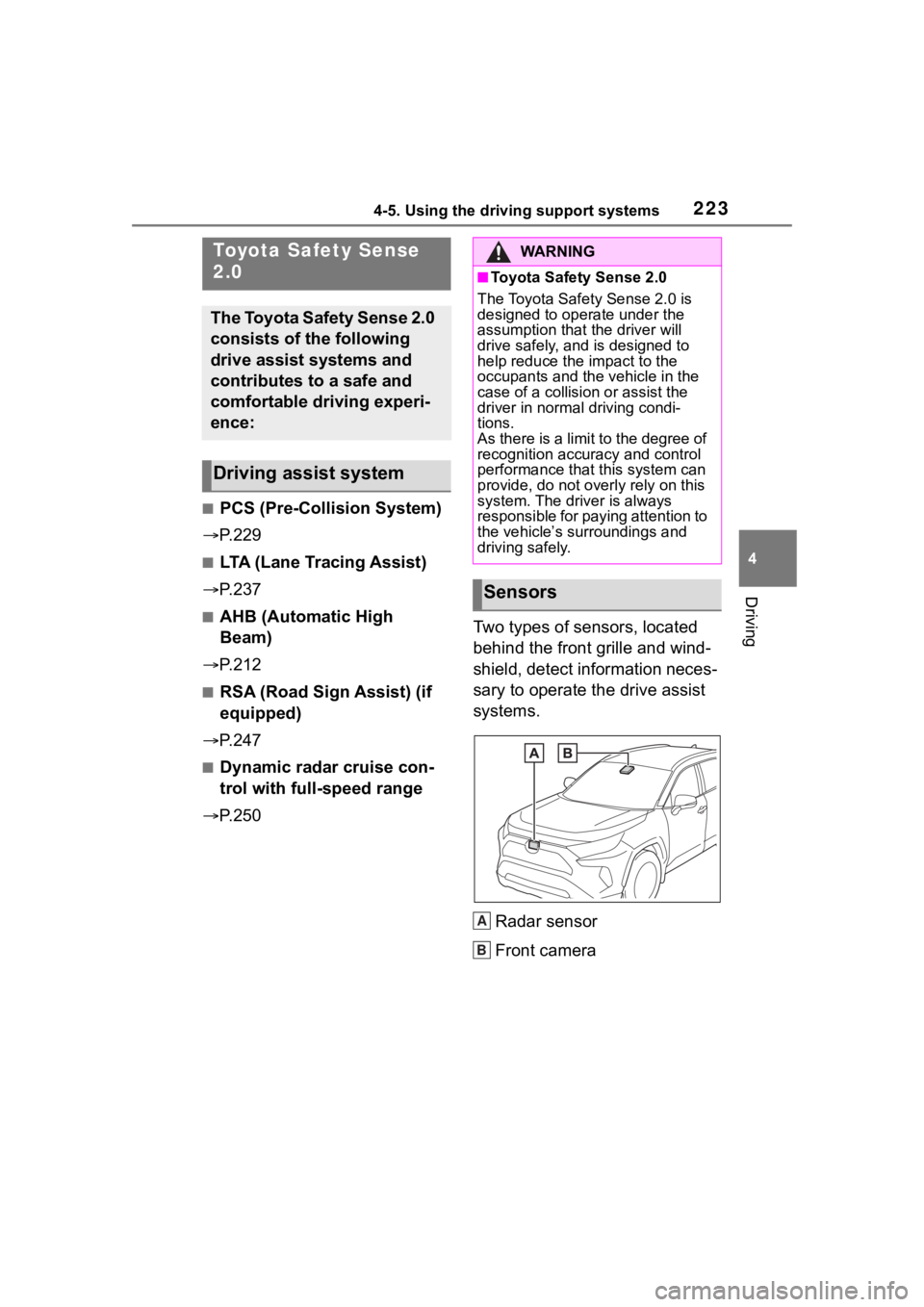
P. 2 5 0 Two types of sensors, located
behind the front grille and wind-
shield, detect information neces-
sary to operate the drive assist
systems.
Radar sensor
Front camera
Toyota Safety Sense
2.0
The Toyota Safety Sense 2.0
consists of the following
drive assist systems and
contributes to a safe and
comfortable driving experi-
ence:
Driving assist system
WA R N I N G
■Toyota Safety Sense 2.0
The Toyota Safety Sense 2.0 is
designed to operate under the
assumption that the driver will
drive safely, and is designed to
help reduce the impact to the
occupants and the vehicle in the
case of a collision or assist the
driver in normal driving condi-
tions.
As there is a limit to the degree of
recognition accuracy and control
performance that this system can
provide, do not overly rely on this
system. The driver is always
responsible for paying attention to
the vehicle’s su rroundings and
driving safely.
Sensors
A
B
Page 641 of 736
6418-2. Steps to take in an emergency
8
When trouble arises
■If “Front Camera Unavailable”
or “Front Camera Unavailable
See Owner’s Manual” is dis-
played
The following sys tems may be sus-
pended until the pr oblem shown in
the message is resolved. ( P.445,
630)
●PCS (Pre-Collis ion System)
●LTA (Lane Tracing Assist)
●Automatic High Beam
●RSA (Road Sign Assist)*
●Dynamic radar cruise control with
full-speed range
*: If equipped
■If “Radar Cruise Control
Unavailable See Owner’s Man-
ual” is shown
The dynamic radar cruise control
with full-speed range system is sus-
pended temporarily or until the prob-
lem shown in the message is
resolved. (causes a nd coping meth-
ods: P.445)
■If “Radar Cruise Control
Unavailable” is shown
The dynamic radar cruise control
with full-speed range system cannot
be used temporarily. Use the system
when it becomes available again.
■Warning buzzer
P. 6 3 5
WA R N I N G
■If a warning light comes on or
a warning buzzer sounds
when a warning message is
shown on the multi-informa-
tion display
P. 6 3 7
NOTICE
■“High Power Consumption
Partial Limit On AC/Heater
Operation” is frequently
shown
There is a possible malfunction
relating to the charging system or
the battery may be deteriorating.
Have the vehicle inspected by
your Toyota dealer.
Page 650 of 736
6508-2. Steps to take in an emergency
WA R N I N G
■When the compact spare tire
is attached
The vehicle speed may not be
correctly detecte d, and the follow-
ing systems may not operate cor-
rectly:
• ABS & Brake assist
• VSC/Trailer Sway Control
•TRAC
• Dynamic radar cruise control with full-speed range
• Dynamic radar cruise control
• PCS (Pre-Collision System)
•EPS
• LTA (Lane Tracing Assist)
• Tire pressure warning system (if equipped)
• AHB (Automatic High Beam)
• BSM (Blind Spot Monitor) (if equipped)
• Downhill assist control system (if equipped)
• Rear view monitor system (if equipped)
• Panoramic view monitor (if equipped)
• Toyota parking assist monitor (if equipped)
• Intuitive parking assist (if equipped)
• Navigation system (if equipped)
Also, not only can the following
systems not be utilized fully, but
they may actually negatively
affect the drive-train components:
• Dynamic Torque Control AWD system (if equipped)
• Dynamic Torque Vectoring AWD system (if equipped)
■Speed limit when using the
compact spare tire
Do not drive at speeds in excess
of 50 mph (80 km /h) when a com-
pact spare tire is installed on the
vehicle.
The compact spare tire is not
designed for driving at high
speeds. Failure to observe this
precaution may lead to an acci-
dent causing death or serious
injury.
■After using the tools and jack
Before driving, ma ke sure all the
tools and jack are securely in
place in their storage location to
reduce the possibility of personal
injury during a collision or sudden
braking.
NOTICE
■Be careful when driving over
bumps with the compact
spare tire installed on the
vehicle
The vehicle height may become
lower when drivi ng with the com-
pact spare tire compared to when
driving with standard tires. Be
careful when driving over uneven
road surfaces.
■Driving with tire chains and
the compact spare tire
Do not fit tire chains to the com-
pact spare tire.
Tire chains may damage the vehi-
cle body and adversely affect driv-
ing performance.
Page 668 of 736
6689-1. Specifications
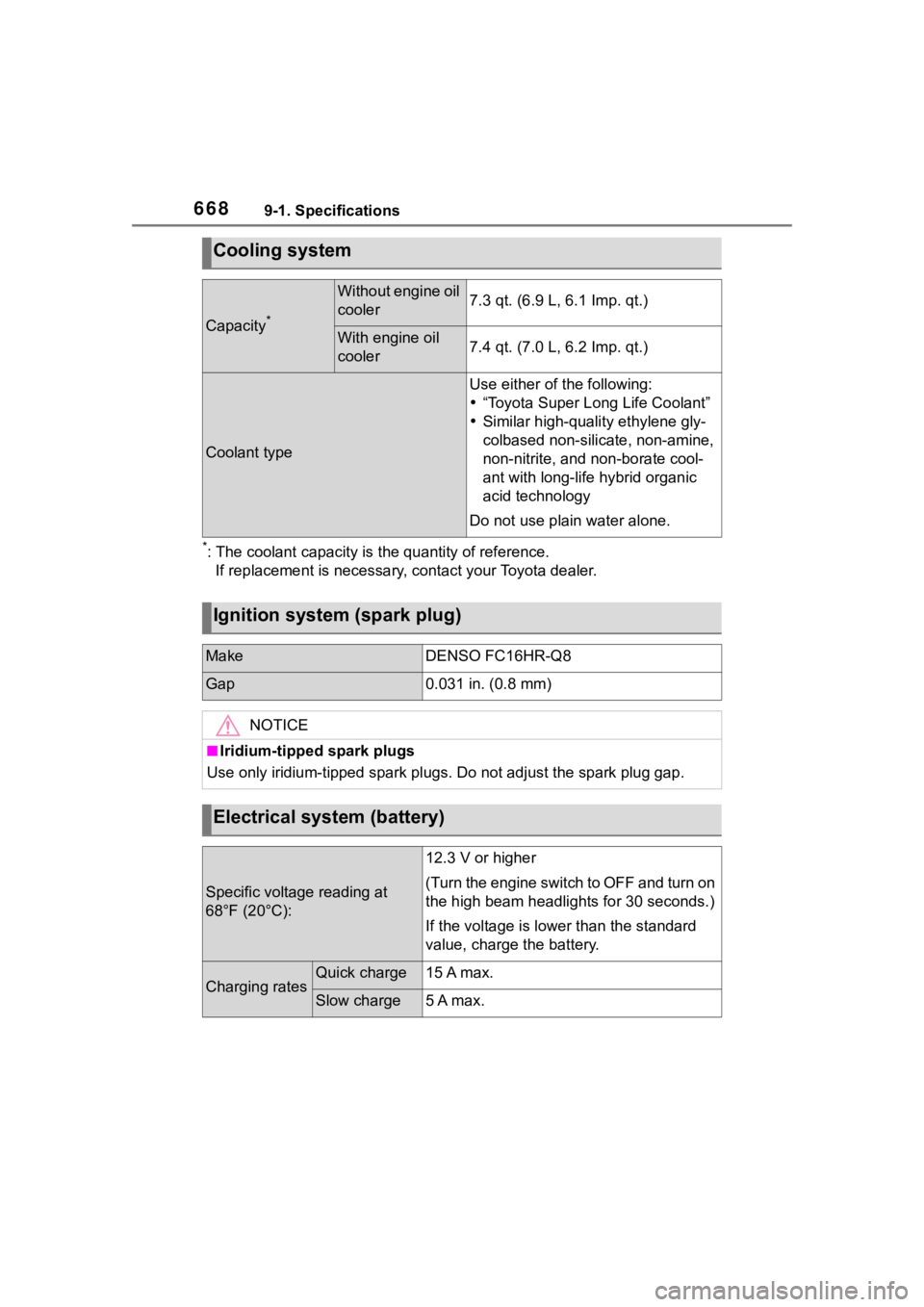
*: The coolant capacity is the quantity of reference.If replacement is necessary, contact your Toyota dealer.
Cooling system
Capacity*
Without engine oil
cooler7.3 qt. (6.9 L, 6.1 Imp. qt.)
With engine oil
cooler7.4 qt. (7.0 L, 6.2 Imp. qt.)
Coolant type
Use either of the following:
“Toyota Super Long Life Coolant”
Similar high-quality ethylene gly-
colbased non-silic ate, non-amine,
non-nitrite, and non-borate cool-
ant with long-life hybrid organic
acid technology
Do not use plain water alone.
Ignition system (spark plug)
MakeDENSO FC16HR-Q8
Gap0.031 in. (0.8 mm)
NOTICE
■Iridium-tipped spark plugs
Use only iridium-tipped spark plugs. Do not adjust the spark pl ug gap.
Electrical system (battery)
Specific voltage reading at
68°F (20°C):
12.3 V or higher
(Turn the engine switch to OFF and turn on
the high beam headlights for 30 seconds.)
If the voltage is lower than the standard
value, charge the battery.
Charging ratesQuick charge15 A max.
Slow charge5 A max.
Page 731 of 736
Alphabetical Index731
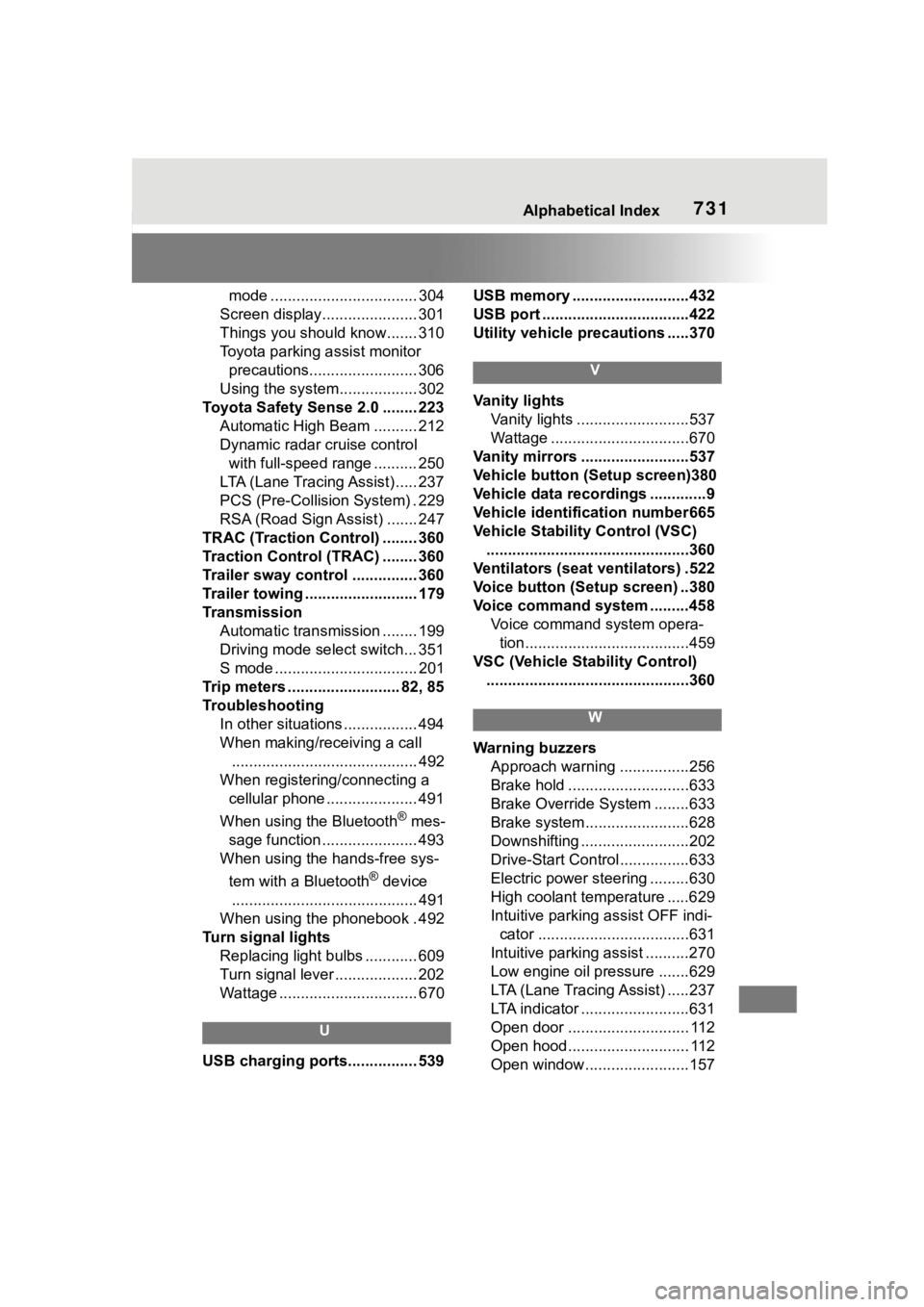
mode .................................. 304
Screen display...................... 301
Things you should know....... 310
Toyota parking assist monitor precautions......................... 306
Using the system.................. 302
Toyota Safety Sense 2.0 ........ 223 Automatic High Beam .......... 212
Dynamic radar cruise control with full-speed range .......... 250
LTA (Lane Tracing Assist) ..... 237
PCS (Pre-Collision System) . 229
RSA (Road Sign Assist) ....... 247
TRAC (Traction Control) ........ 360
Traction Control (TRAC) ........ 360
Trailer sway control ............... 360
Trailer towing .......................... 179
Transmission Automatic transmission ........ 199
Driving mode select switch... 351
S mode ................................. 201
Trip meters .......................... 82, 85
Troubleshooting In other situations ................. 494
When making/receiving a call........................................... 492
When registering/connecting a cellular phone ..................... 491
When using the Bluetooth
® mes-
sage function ...................... 493
When using the hands-free sys-
tem with a Bluetooth
® device
........................................... 491
When using the phonebook . 492
Turn signal lights Replacing light bulbs ............ 609
Turn signal lever ................... 202
Wattage ................................ 670
U
USB charging ports................ 539 USB memory ...........................432
USB port ..................................422
Utility vehicle pre
cautions .....370
V
Vanity lights
Vanity lights ..........................537
Wattage ................................670
Vanity mirrors .........................537
Vehicle button (Setup screen)380
Vehicle data recordings .............9
Vehicle identification number665
Vehicle Stability Control (VSC) ...............................................360
Ventilators (seat ventilators) .522
Voice button (Setup screen) ..380
Voice command system .........458 Voice command system opera-tion......................................459
VSC (Vehicle Stability Control) ...............................................360
W
Warning buzzers Approach warning ................256
Brake hold ............................633
Brake Override System ........633
Brake system ........................628
Downshifting .........................202
Drive-Start Control ................633
Electric power steering .........630
High coolant temperature .....629
Intuitive parking assist OFF indi- cator ...................................631
Intuitive parking assist ..........270
Low engine oil pressure .......629
LTA (Lane Tracing Assist) .....237
LTA indicator .........................631
Open door ............................ 112
Open hood............................ 112
Open window........................157