carplay TOYOTA RAV4 2021 Accessories, Audio & Navigation (in English)
[x] Cancel search | Manufacturer: TOYOTA, Model Year: 2021, Model line: RAV4, Model: TOYOTA RAV4 2021Pages: 240, PDF Size: 9.35 MB
Page 2 of 240
2TABLE OF CONTENTS
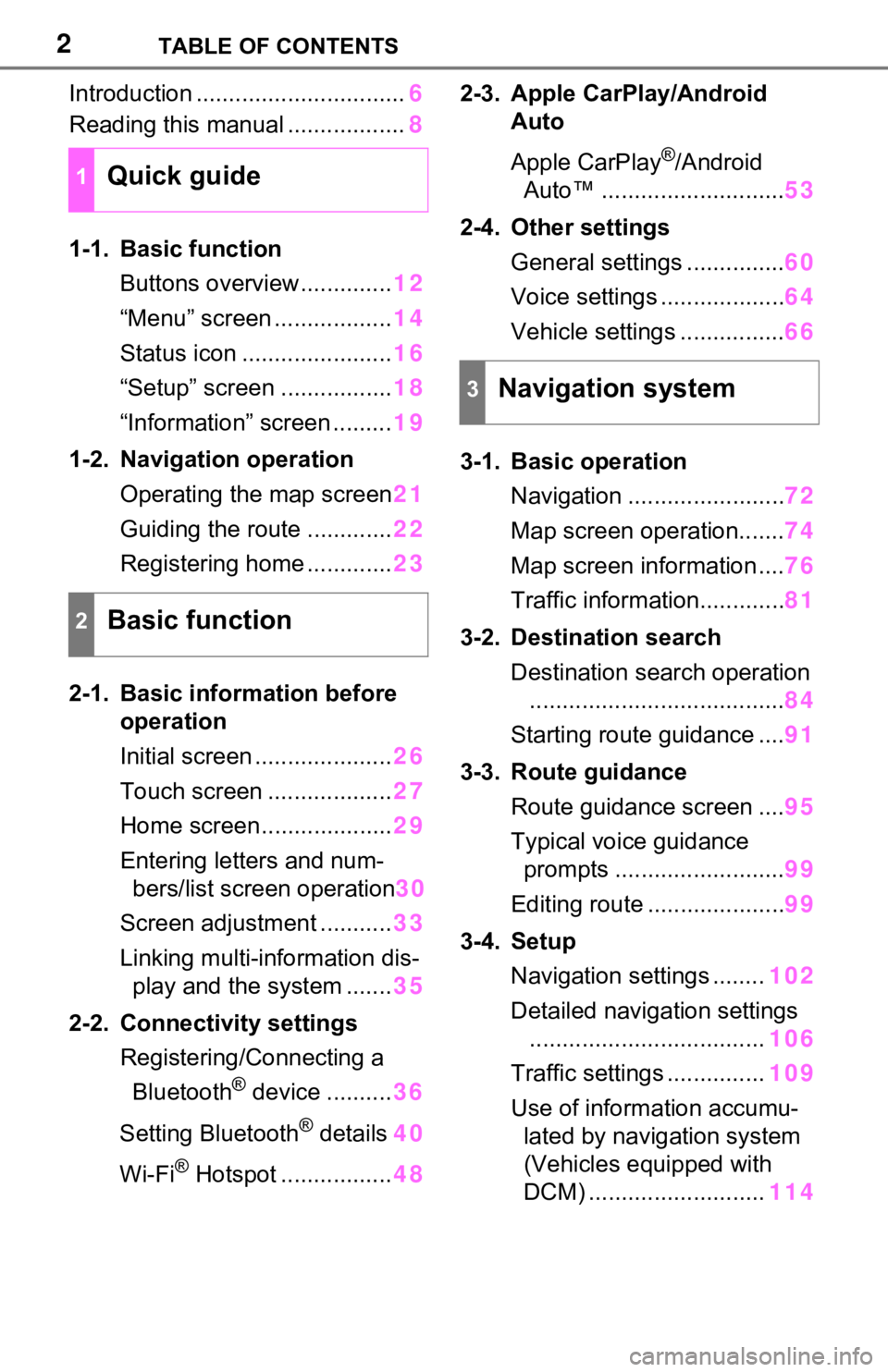
Introduction ................................6
Reading this manual .................. 8
1-1. Basic function Buttons overview.............. 12
“Menu” screen .................. 14
Status icon ....................... 16
“Setup” screen ................. 18
“Information” screen ......... 19
1-2. Navigation operation Operating the map screen 21
Guiding the route ............. 22
Registering home ............. 23
2-1. Basic information before operation
Initial screen ..................... 26
Touch screen ................... 27
Home screen.................... 29
Entering letters and num- bers/list screen operation 30
Screen adjustment ........... 33
Linking multi-information dis- play and the system ....... 35
2-2. Connectivity settings Registering/Connecting a Bluetooth
® device .......... 36
Setting Bluetooth
® details 40
Wi-Fi
® Hotspot ................. 482-3. Apple CarPlay/Android
Auto
Apple CarPlay
®/Android
Auto™ ............................ 53
2-4. Other settings General settings ............... 60
Voice settings ................... 64
Vehicle settings ................ 66
3-1. Basic operation Navigation ........................ 72
Map screen operation....... 74
Map screen information .... 76
Traffic information............. 81
3-2. Destination search Destination search operation....................................... 84
Starting route guidance .... 91
3-3. Route guidance Route guidance screen .... 95
Typical voice guidance prompts .......................... 99
Editing route ..................... 99
3-4. Setup Navigation settings ........ 102
Detailed navigation settings .................................... 106
Traffic settings ............... 109
Use of informa tion accumu-
lated by navigation system
(Vehicles equipped with
DCM) ........................... 1141Quick guide
2Basic function
3Navigation system
Page 3 of 240
3TABLE OF CONTENTS
1
2
3
4
5
6
7
8
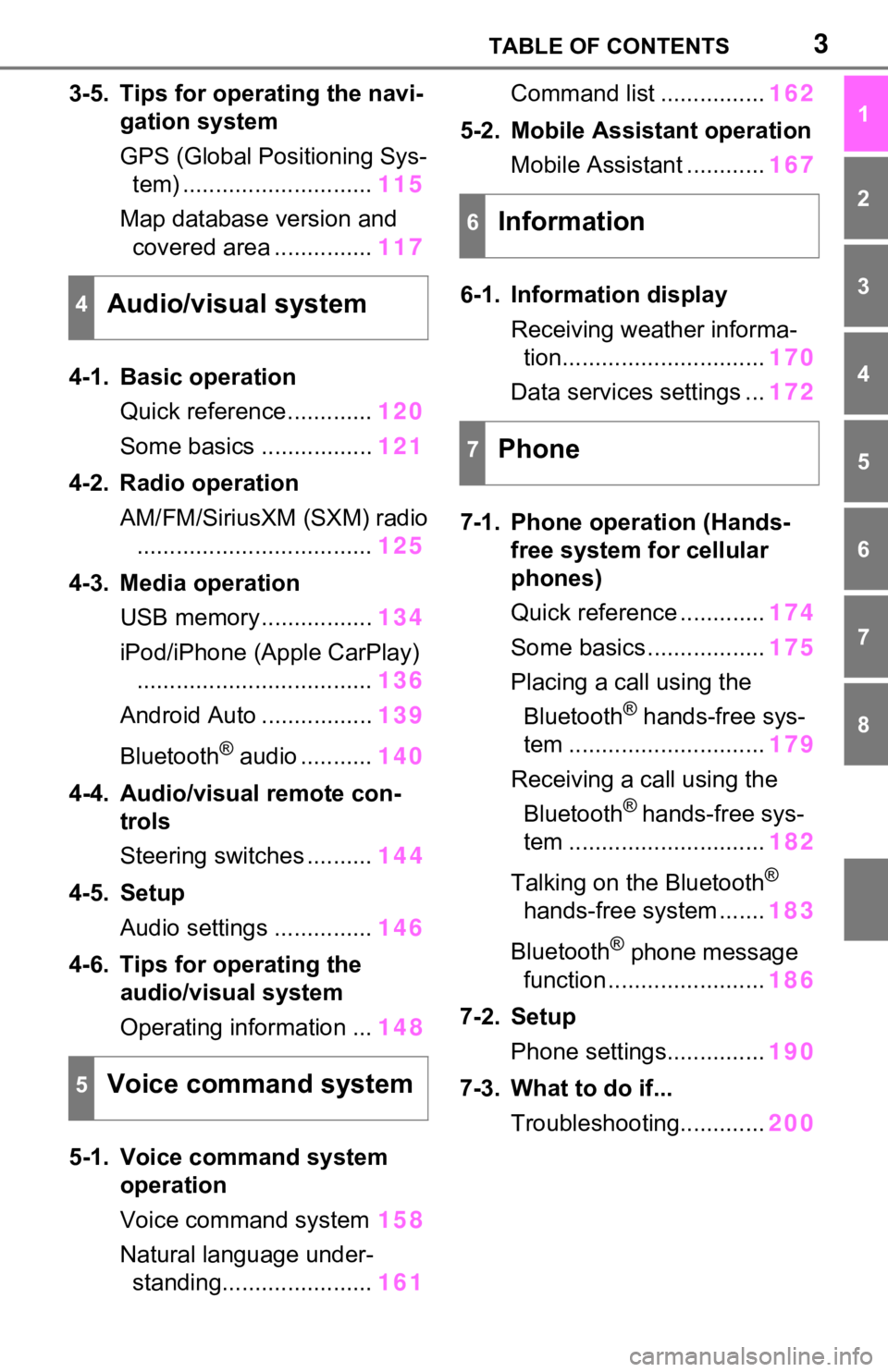
3-5. Tips for operating the navi-gation system
GPS (Global Positioning Sys-tem) ............................. 115
Map database version and covered area ............... 117
4-1. Basic operation Quick reference............. 120
Some basics ................. 121
4-2. Radio operation AM/FM/SiriusXM (SXM) radio.................................... 125
4-3. Media operation USB memory................. 134
iPod/iPhone (Apple CarPlay) .................................... 136
Android Auto ................. 139
Bluetooth
® audio ........... 140
4-4. Audio/visual remote con- trols
Steering switches .......... 144
4-5. Setup Audio settings ............... 146
4-6. Tips for operating the audio/visual system
Operating information ... 148
5-1. Voice command system operation
Voice command system 158
Natural language under- standing....................... 161Command list ................
162
5-2. Mobile Assistant operation Mobile Assistant ............ 167
6-1. Information display Receiving weather informa-tion............................... 170
Data services settings ... 172
7-1. Phone operation (Hands- free system for cellular
phones)
Quick reference ............. 174
Some basics .................. 175
Placing a call using the Bluetooth
® hands-free sys-
tem .............................. 179
Receiving a call using the Bluetooth
® hands-free sys-
tem .............................. 182
Talking on the Bluetooth
®
hands-free system ....... 183
Bluetooth
® phone message
function ........................ 186
7-2. Setup Phone settings............... 190
7-3. What to do if... Troubleshooting............. 200
4Audio/visual system
5Voice command system
6Information
7Phone
Page 12 of 240
121-1. Basic function
1-1.Basic function
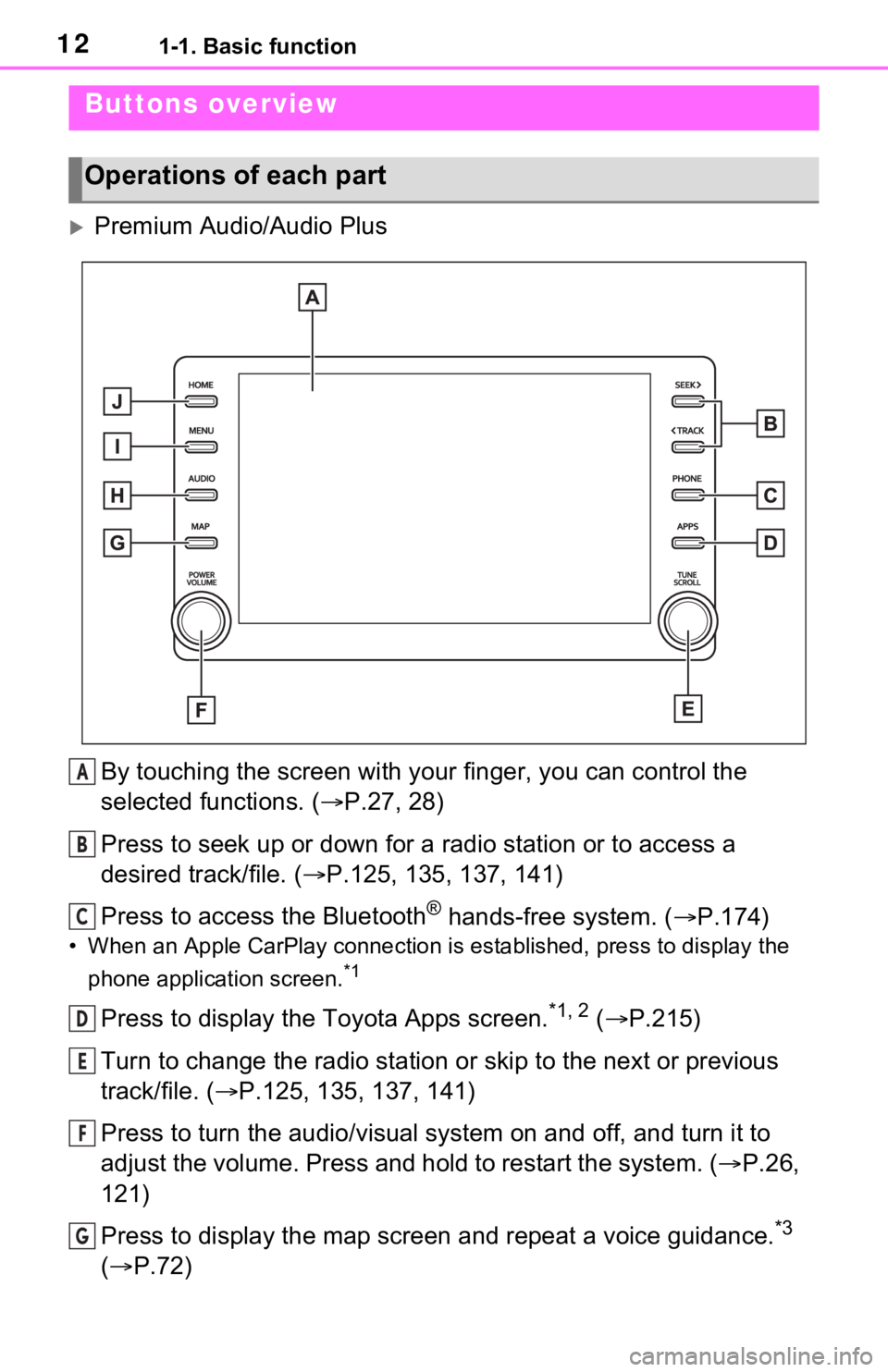
Premium Audio/Audio PlusBy touching the screen with y our finger, you can control the
selected functions. ( P.27, 28)
Press to seek up or down for a radio station or to access a
desired track/file. ( P.125, 135, 137, 141)
Press to access the Bluetooth
® hands-free system. ( P.174)
• When an Apple CarPlay connecti on is established, press to display the
phone application screen.
*1
Press to display the Toyota Apps screen.*1, 2 ( P.215)
Turn to change the radio station or skip to the next or previou s
track/file. ( P.125, 135, 137, 141)
Press to turn the audio/visual system on and off, and turn it t o
adjust the volume. Press and hold to restart the system. ( P.26,
121)
Press to display the map screen and repeat a voice guidance.
*3
( P.72)
Buttons overview
Operations of each part
A
B
C
D
E
F
G
Page 13 of 240

131-1. Basic function
1
Quick guide
If a turn-by-turn navigation application has been downloaded to a
connected smartphone, the application will be displayed and can
be used.
*1, 4, 5
When an Apple CarPlay/Android Auto connection is established,
press to display the Maps application screen.
*4
Press to display the audio/visual system screen. ( P.120, 121)
Press to display the “Menu” screen. ( P.14)
Press to display the home screen. ( P.29)
*1: This function is not made available in some countries or areas.
*2: When an Apple CarPlay/Android Auto connection is established, this
function will be unavailable.
*3: Premium Audio only
*4: Audio Plus only
*5: For details about a turn-by-turn navigation application, refer to
http://www.toyota.com/audio-multimedia
in the United States,
http://www.toyota.ca/connected
in Canada, and
http://www.toyotapr.com/audio-multimedia
in Puerto Rico.
H
I
J
Page 14 of 240
141-1. Basic function
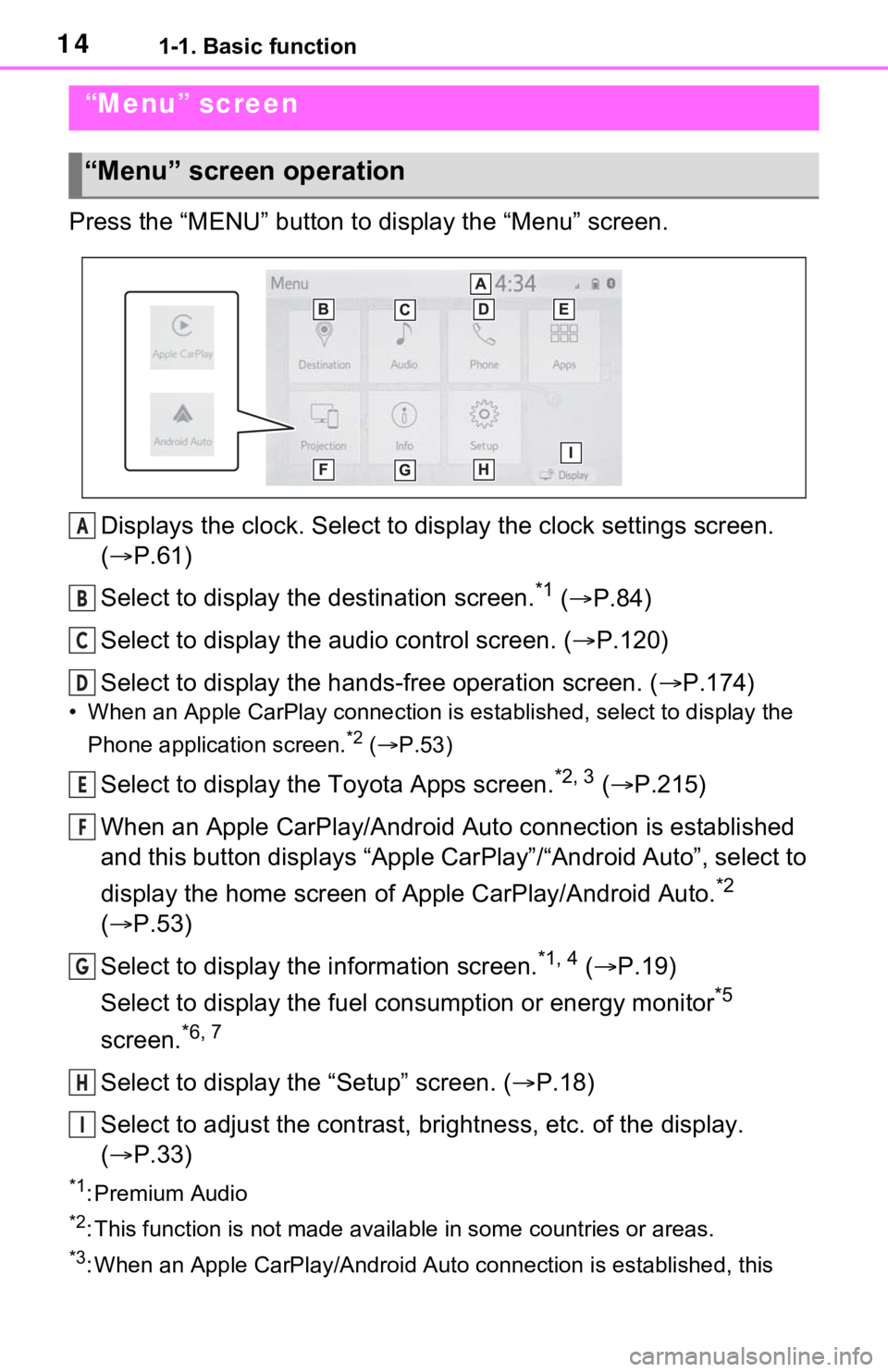
Press the “MENU” button to display the “Menu” screen.
Displays the clock. Select to display the clock settings screen.
( P.61)
Select to display the destination screen.
*1 ( P.84)
Select to display the audio control screen. ( P.120)
Select to display the hands-free operation screen. ( P.174)
• When an Apple CarPlay connection is established, select to display the
Phone application screen.
*2 ( P.53)
Select to display the Toyota Apps screen.*2, 3 ( P.215)
When an Apple CarPlay/Android Auto connection is established
and this button displays “Apple CarPlay”/“Android Auto”, select to
display the home screen of Apple CarPlay/Android Auto.
*2
( P.53)
Select to display the information screen.
*1, 4 ( P.19)
Select to display the fuel consumption or energy monitor
*5
screen.
*6, 7
Select to display the “Setup” screen. ( P.18)
Select to adjust the contrast, brightness, etc. of the display.
( P.33)
*1: Premium Audio
*2: This function is not made available in some countries or areas .
*3: When an Apple CarPlay/Android Auto connection is established, this
“Menu” screen
“Menu” screen operation
A
B
C
D
E
F
G
H
I
Page 25 of 240
25
2
2
Basic function
Basic function
2-1. Basic information before operation
Initial screen ................... 26
Touch screen ................. 27
Home screen.................. 29
Entering letters and num- bers/list screen operation..................................... 30
Screen adjustment ......... 33
Linking multi-information display and the system. 35
2-2. Connectivity settings Registering/Connecting a Bluetooth
® device ........ 36
Setting Bluetooth
® details
..................................... 40
Wi-Fi
® Hotspot ............... 48
2-3. Apple CarPlay/Android Auto
Apple CarPlay
®/Android
Auto™ .......................... 53
2-4. Other settings General settings ............. 60
Voice settings................. 64
Vehicle settings .............. 66
Page 27 of 240
272-1. Basic information before operation
2
Basic function
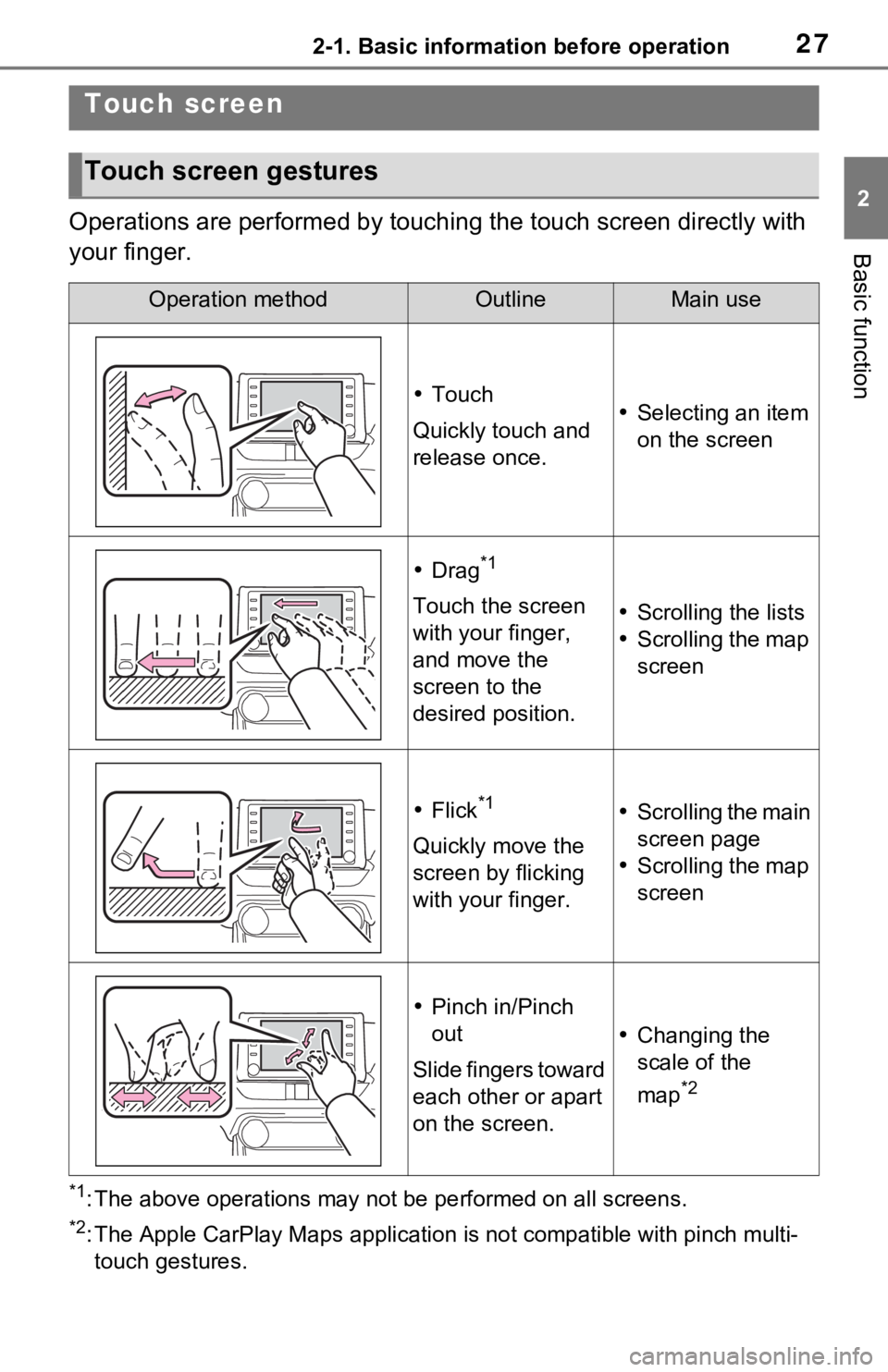
Operations are performed by touching the touch screen directly with
your finger.
*1: The above operations may not be performed on all screens.
*2: The Apple CarPlay Maps applicat ion is not compatible with pinch multi-
touch gestures.
Touch screen
Touch screen gestures
Operation methodOutlineMain use
Touch
Quickly touch and
release once. Selecting an item
on the screen
Drag*1
Touch the screen
with your finger,
and move the
screen to the
desired position. Scrolling the lists
Scrolling the map
screen
Flick*1
Quickly move the
screen by flicking
with your finger.
Scrolling the main
screen page
Scrolling the map
screen
Pinch in/Pinch
out
Slide fingers toward
each other or apart
on the screen.
Changing the
scale of the
map
*2
Page 35 of 240
352-1. Basic information before operation
2
Basic function
Linking multi-informa-
tion display and the
system
The following functions of
the system are linked with
the multi-information dis-
play in the instrument clus-
ter:
Audio
Phone
*
etc.
These functions can be
operated using meter con-
trol switches on the steering
wheel. For details, refer to
“OWNER’S MANUAL”.
*: When an Apple CarPlay con-
nection is established, this
function will be unavailable.
Page 36 of 240
362-2. Connectivity settings
2-2.Connectivity settings
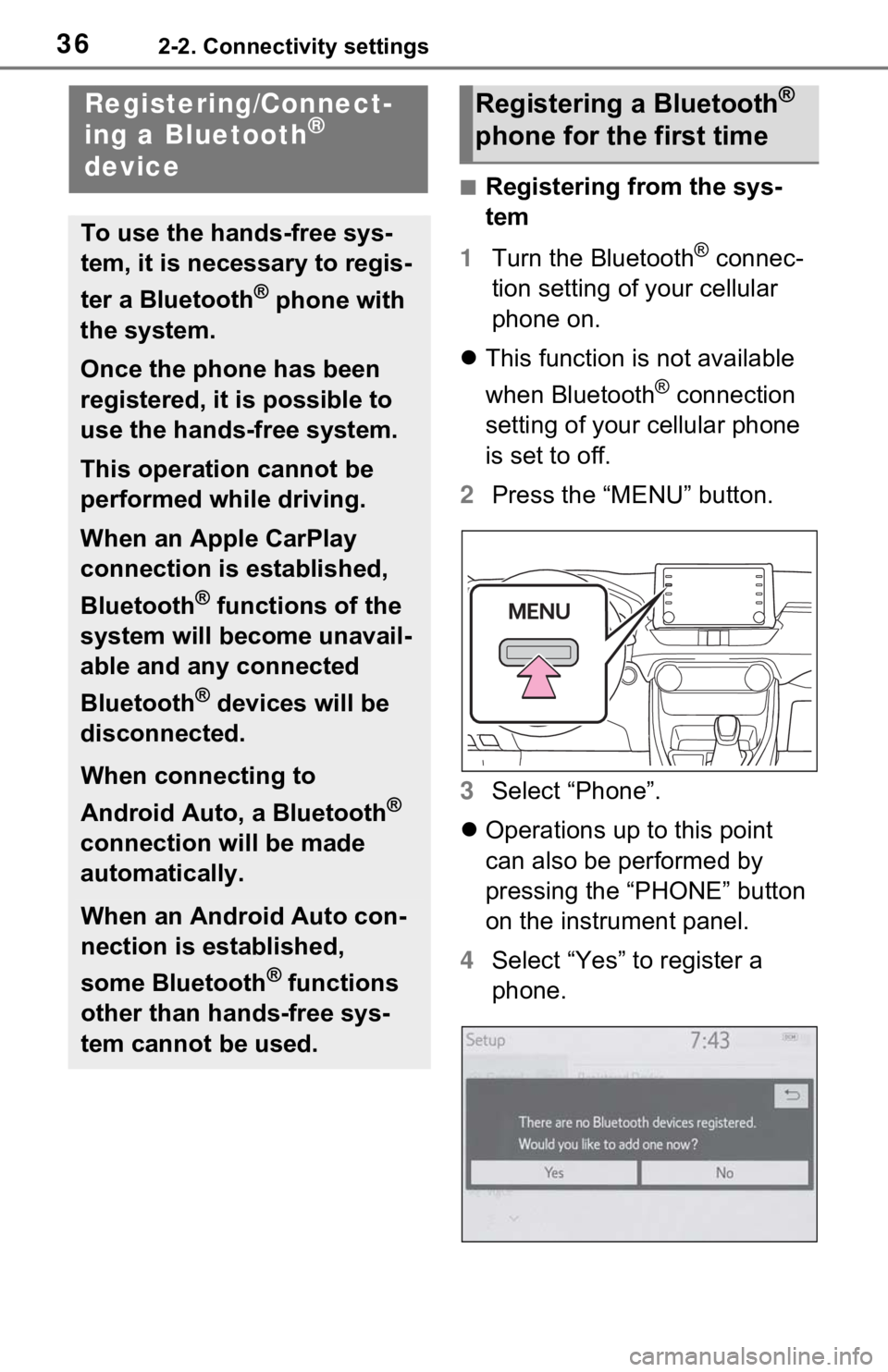
■Registering from the sys-
tem
1 Turn the Bluetooth
® connec-
tion setting of your cellular
phone on.
This function is not available
when Bluetooth
® connection
setting of your cellular phone
is set to off.
2 Press the “MENU” button.
3 Select “Phone”.
Operations up to this point
can also be performed by
pressing the “PHONE” button
on the instrument panel.
4 Select “Yes” to register a
phone.
Registering/Connect-
ing a Bluetooth®
device
To use the hands-free sys-
tem, it is necessary to regis-
ter a Bluetooth
® phone with
the system.
Once the phone has been
registered, it is possible to
use the hands-free system.
This operation cannot be
performed while driving.
When an Apple CarPlay
connection is established,
Bluetooth
® functions of the
system will become unavail-
able and any connected
Bluetooth
® devices will be
disconnected.
When connecting to
Android Auto, a Bluetooth
®
connection will be made
automatically.
When an Android Auto con-
nection is established,
some Bluetooth
® functions
other than hands-free sys-
tem cannot be used.
Registering a Bluetooth®
phone for the first time
Page 40 of 240
402-2. Connectivity settings
●If the connected Bluetooth®
device version is older than rec-
ommended or incompatible, the
Bluetooth
® device function may
not work properly.
●Refer to
http://www.toyota.com/
audio-multimedia in the United
States,
http://www.toyota.ca/connected
in
Canada, and
http://www.to yotapr.com/
audio-multimedia in Puerto Rico,
to find approved Bluetooth®
phones for this system.
●Certification
Bluetooth is a reg istered trademark
of Bluetooth SIG, Inc.
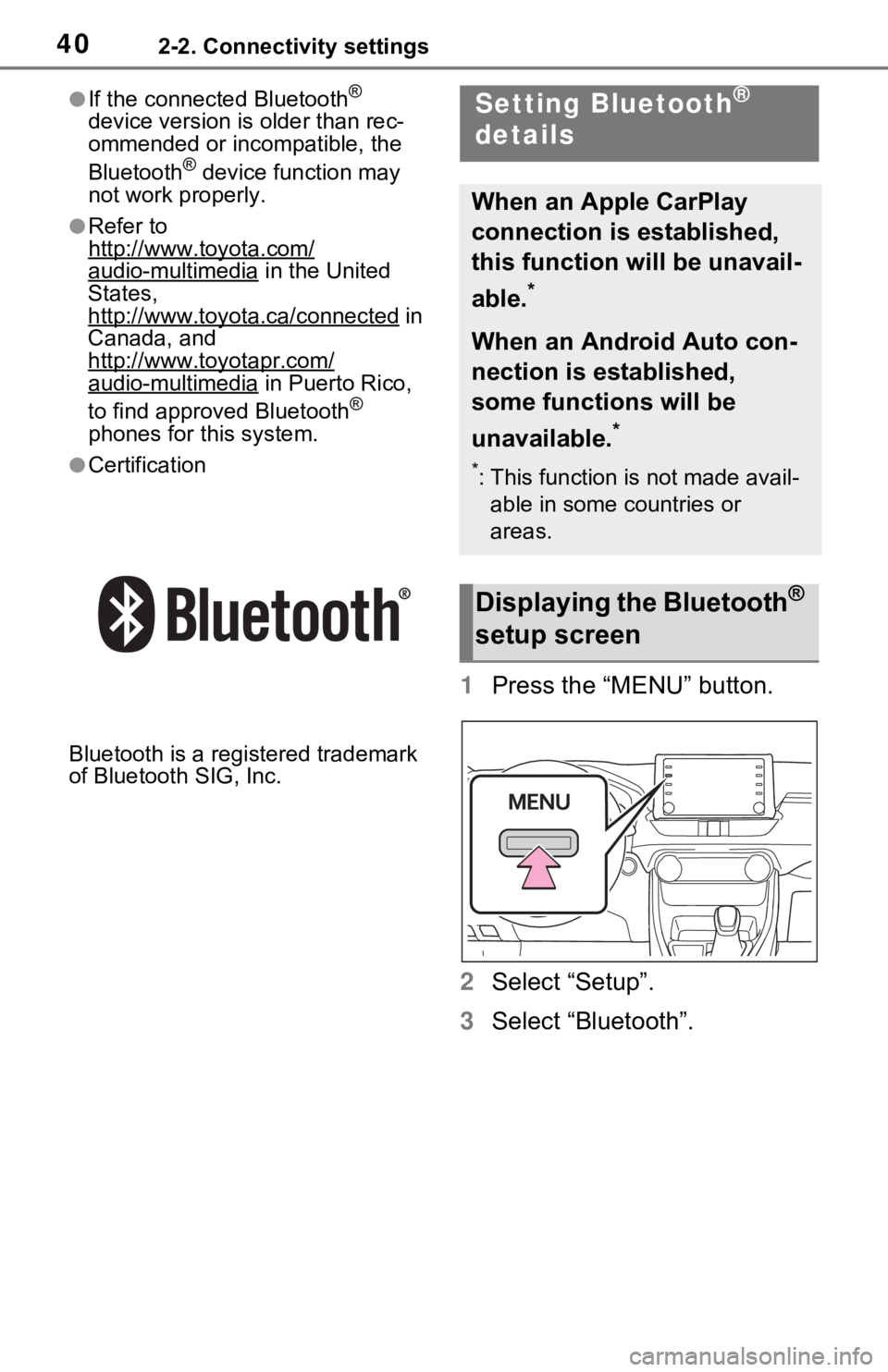
1 Press the “MENU” button.
2 Select “Setup”.
3 Select “Bluetooth”.
Setting Bluetooth®
details
When an Apple CarPlay
connection is established,
this function will be unavail-
able.
*
When an Android Auto con-
nection is established,
some functions will be
unavailable.
*
*: This function is not made avail-
able in some countries or
areas.
Displaying the Bluetooth®
setup screen