change wheel TOYOTA RAV4 2021 (in English) Owner's Manual
[x] Cancel search | Manufacturer: TOYOTA, Model Year: 2021, Model line: RAV4, Model: TOYOTA RAV4 2021Pages: 748, PDF Size: 30.79 MB
Page 304 of 748
3044-5. Using the driving support systems
*: If equipped
●The screen illustrations used in
this text are intended as exam-
ples, and may differ from the
image that is actually displayed on
the screen.
The parking assist monitor is a
supplemental device intended to
assist the driver when backing
up. When backing up, be sure to
visually check all around the
vehicle both directly and using
the mirrors before proceeding. If
you do not, you may hit another
vehicle, and could possibly
cause an accident.
Pay attention to the following
precautions when using the
parking assist monitor.
Toyota parking assist
monitor*
The parking assist monitor
assists the driver by dis-
playing an image of the view
behind the vehicle while
backing up, for example
while parking.
When the display is
changed to the wide rear
view mode, a wider lateral
view behind the vehicle will
be displayed.
Driving precautions
WARNING
●Never depend on the parking
assist monitor entirely when
backing up. The image and the
position of the guide lines dis-
played on the screen may differ
from the actual state.
Use caution, just as you would
when backing up any vehicle.
●Be sure to back up slowly,
depressing the brake pedal to
control vehicle speed.
●If you seem likely to hit nearby
vehicles, obstacles, people or
mount the shoulder, depress
the brake pedal to stop the vehi-
cle.
●The instructions given are only
guidelines. When and how
much to turn the steering wheel
will vary according to traffic con-
ditions, road surface condi-
tions, vehicle condition, etc.
when parking. It is necessary to
be fully aware o f this before
using the parking assist system.
●When parking, be sure to check
that the parking space will
accommodate your vehicle
before maneuvering into it.
●Do not use the parking assist
monitor in the f ollowing cases:
• On icy or slick road surfaces, or in snow
• When using tire chains or emer- gency tires
• When the back door is not closed completely
• On roads that are not flat or straight, such as curves or
slopes
• If the suspension has been modified or tires of a size other
than specified are installed
Page 306 of 748
3064-5. Using the driving support systems
Display mode switching but-
ton
Each time the button is selected,
the rear view mode and the wide
rear view mode are switched.
Guide line switching button
Select to switch the guide line
mode. ( P.306)
• Each time the button is selected, the display mode changes in the
following order:
Estimated course line display mode
Parking assist guide line display
mode Distance guide line dis-
play mode.
Rear Cross Traffic Alert*
When a sensor detects a stationary
object, the direction of stationary
object is displayed and the buzzer
sounds.
Intuitive parking assist*
When a sensor detects an obsta-
cle, the direction of and the approx-
imate distance to the obstacle are
displayed and the buzzer sounds.
*: If equipped
●For details about the Rear Cross
Traffic Alert function ( P.270)
and intuitive parking assist.
( P.273)
The parking assist monitor is
canceled when the shift lever is
shifted into any position other
than the “R”.
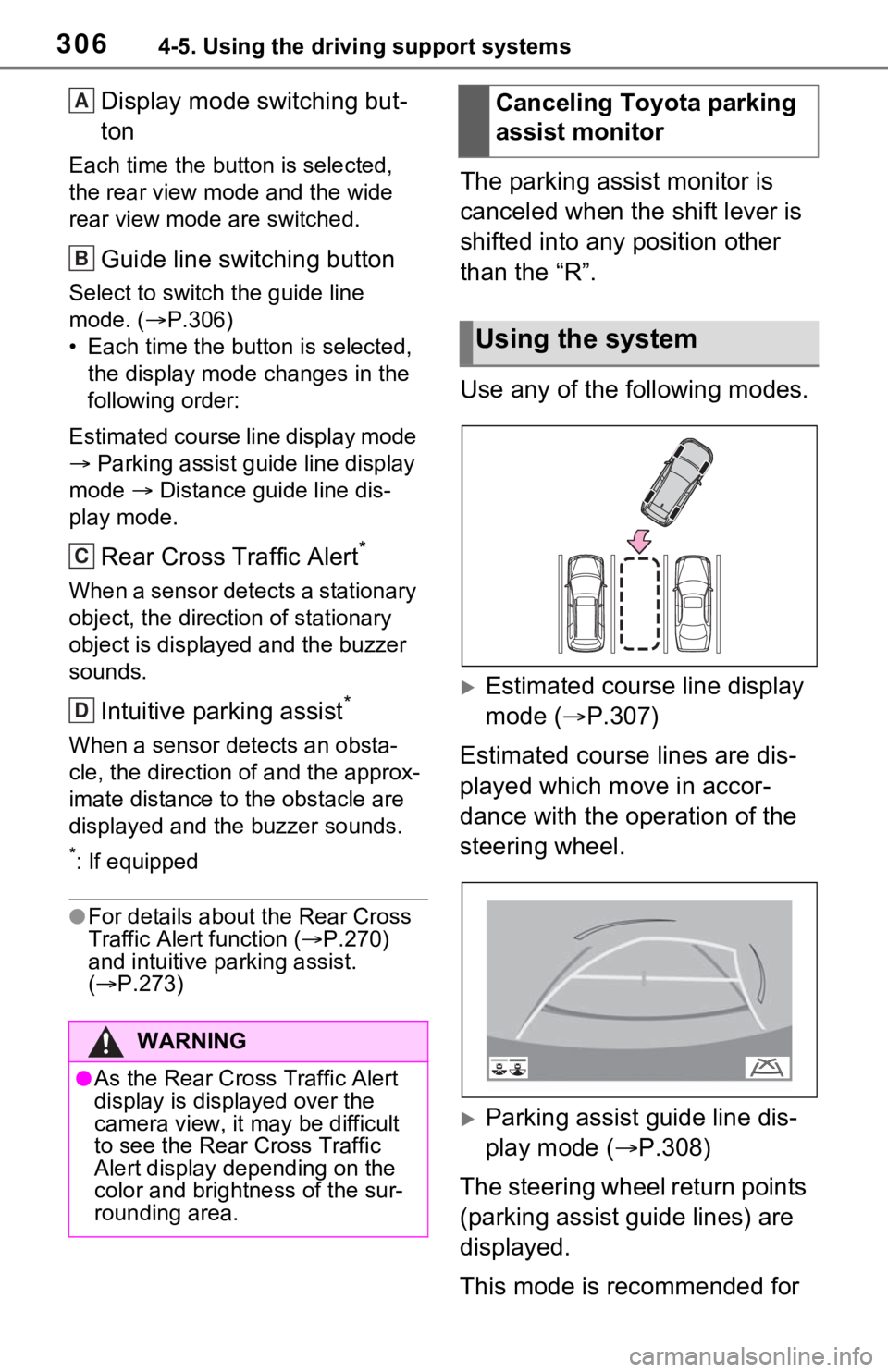
Use any of the following modes.
Estimated course line display
mode ( P.307)
Estimated course lines are dis-
played which move in accor-
dance with the operation of the
steering wheel.
Parking assist guide line dis-
play mode ( P.308)
The steering wheel return points
(parking assist guide lines) are
displayed.
This mode is recommended for
WARNING
●As the Rear Cross Traffic Alert
display is displayed over the
camera view, it may be difficult
to see the Rear Cross Traffic
Alert display depending on the
color and brightness of the sur-
rounding area.
A
B
C
D
Canceling Toyota parking
assist monitor
Using the system
Page 324 of 748
3244-5. Using the driving support systems
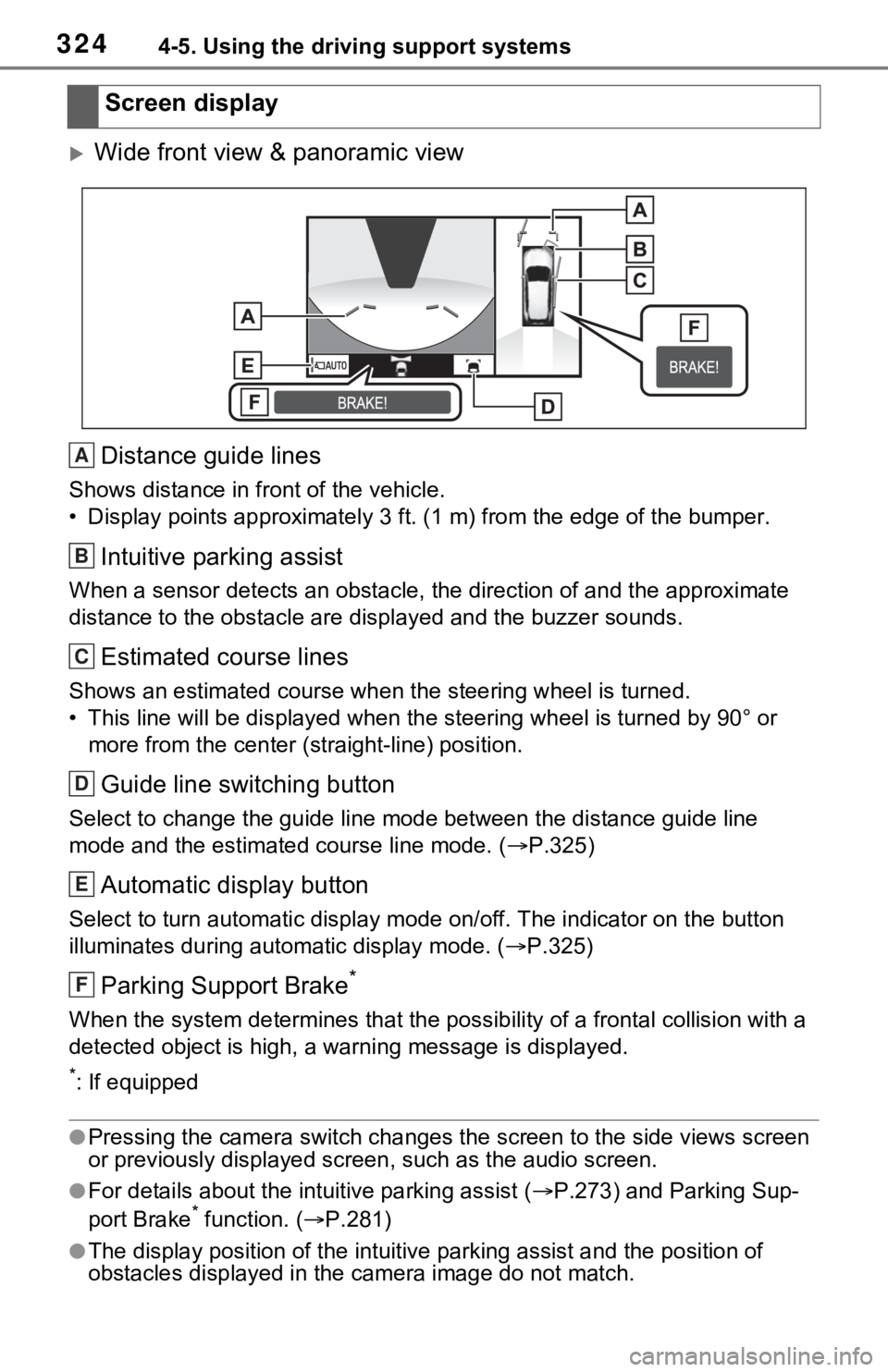
Wide front view & panoramic viewDistance guide lines
Shows distance in front of the vehicle.
• Display points approximately 3 ft. (1 m) from the edge of the bumper.
Intuitive parking assist
When a sensor detects an obstacle, the direction of and the app roximate
distance to the obsta cle are displayed and the buzzer sounds.
Estimated course lines
Shows an estimated course when the steering wheel is turned.
• This line will be displayed when the steering wh eel is turned by 90° or
more from the cen ter (straight-line) position.
Guide line switching button
Select to change the guide line mode between the distance guide line
mode and the estimated course line mode. ( P.325)
Automatic display button
Select to turn automatic display mode on/off. The indicator on the button
illuminates during autom atic display mode. (P.325)
Parking Support Brake*
When the system determines that the possib ility of a frontal collision with a
detected object is high, a warning message is displayed.
*: If equipped
●Pressing the camera switch chan ges the screen to the side views screen
or previously displayed scre en, such as the audio screen.
●For details about the intuitive parking assist (P.273) and Parking Sup-
port Brake* function. ( P.281)
●The display position of the intuitive parking assist and the po sition of
obstacles displayed in the camera image do not match.
Screen display
A
B
C
D
E
F
Page 331 of 748
3314-5. Using the driving support systems
4
Driving
When the system determines that the possibility of a collision with a
detected object is high, a warning message is displayed.
*: If equipped
●The monitor is canceled when the shift lever is shifted into any position
other than the “R” position.
●For details about the intuitive parking assist ( P.273), Rear Cross Traffic
Alert function ( P.270) and Parking Support Brake* function. ( P.281)
●The display position of the intuitive parking assist and the po sition of
obstacles displayed in the camera image do not match.
*: If equipped
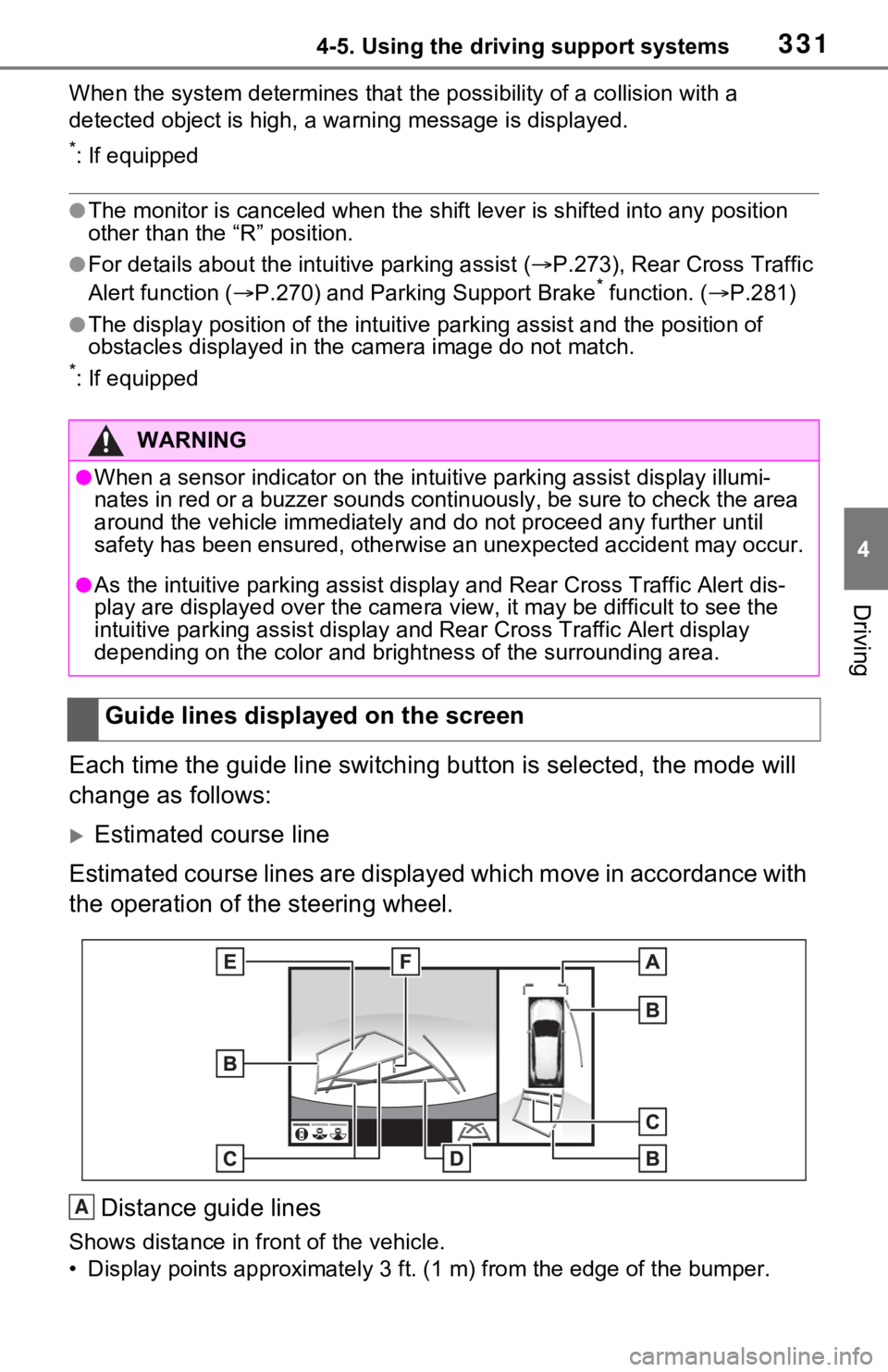
Each time the guide line switching button is selected, the mode will
change as follows:
Estimated course line
Estimated course lines are displ ayed which move in accordance w ith
the operation of the steering wheel.
Distance guide lines
Shows distance in front of the vehicle.
• Display points approximately 3 ft. (1 m) from the edge of the bumper.
WARNING
●When a sensor indicator on the intuitive parking assist display illumi-
nates in red or a buzzer sounds continuously, be sure to check the area
around the vehicle immediately a nd do not proceed any further until
safety has been ensured, otherwise an unexpected accident may o ccur.
●As the intuitive parking assist display and Rear Cross Traffic Alert dis-
play are displayed over the came ra view, it may be difficult to see the
intuitive parking assist display and Rear Cross Traffic Alert d isplay
depending on the color and brigh tness of the surrounding area.
Guide lines displayed on the screen
A
Page 333 of 748
3334-5. Using the driving support systems
4
Driving
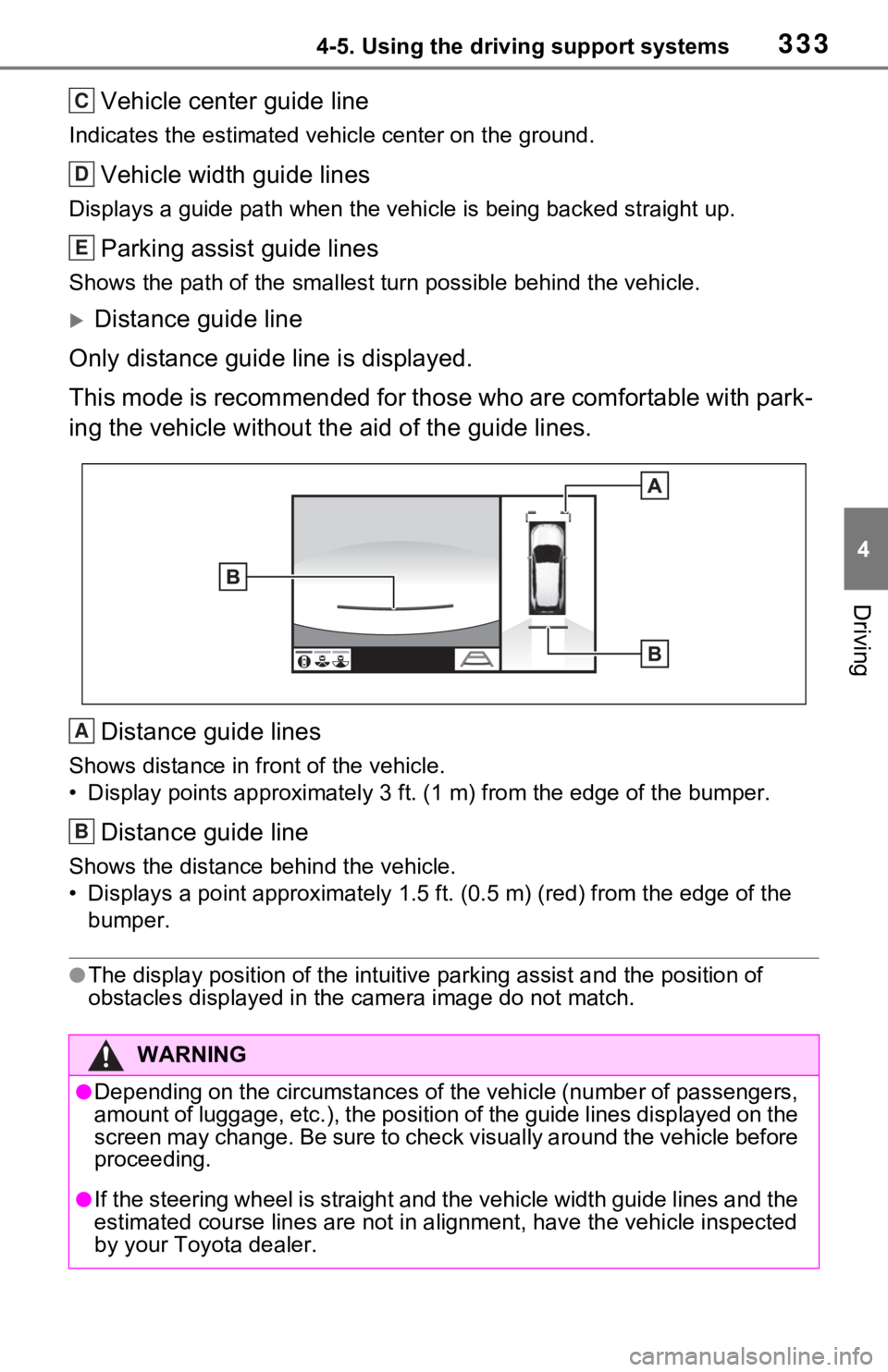
Vehicle center guide line
Indicates the estimated vehicle center on the ground.
Vehicle width guide lines
Displays a guide path when the vehicle is being backed straight up.
Parking assist guide lines
Shows the path of the smallest turn possible behind the vehicle .
Distance guide line
Only distance guide line is displayed.
This mode is recommended for those who are comfortable with par k-
ing the vehicle without the aid of the guide lines.
Distance guide lines
Shows distance in front of the vehicle.
• Display points approximately 3 ft. (1 m) from the edge of the bumper.
Distance guide line
Shows the distance behind the vehicle.
• Displays a point approximately 1.5 ft. (0.5 m) (red) from the edge of the
bumper.
●The display position of the intuitive parking assist and the po sition of
obstacles displayed in the camera image do not match.
WARNING
●Depending on the circumstances of the vehicle (number of passen gers,
amount of luggage, etc.), the position of the guide lines displ ayed on the
screen may change. Be sure to check visually around the vehicle before
proceeding.
●If the steering wheel is straight and the vehicle width guide l ines and the
estimated course lines are not in alignment, have the vehicle i nspected
by your Toyota dealer.
C
D
E
A
B
Page 350 of 748
3504-5. Using the driving support systems
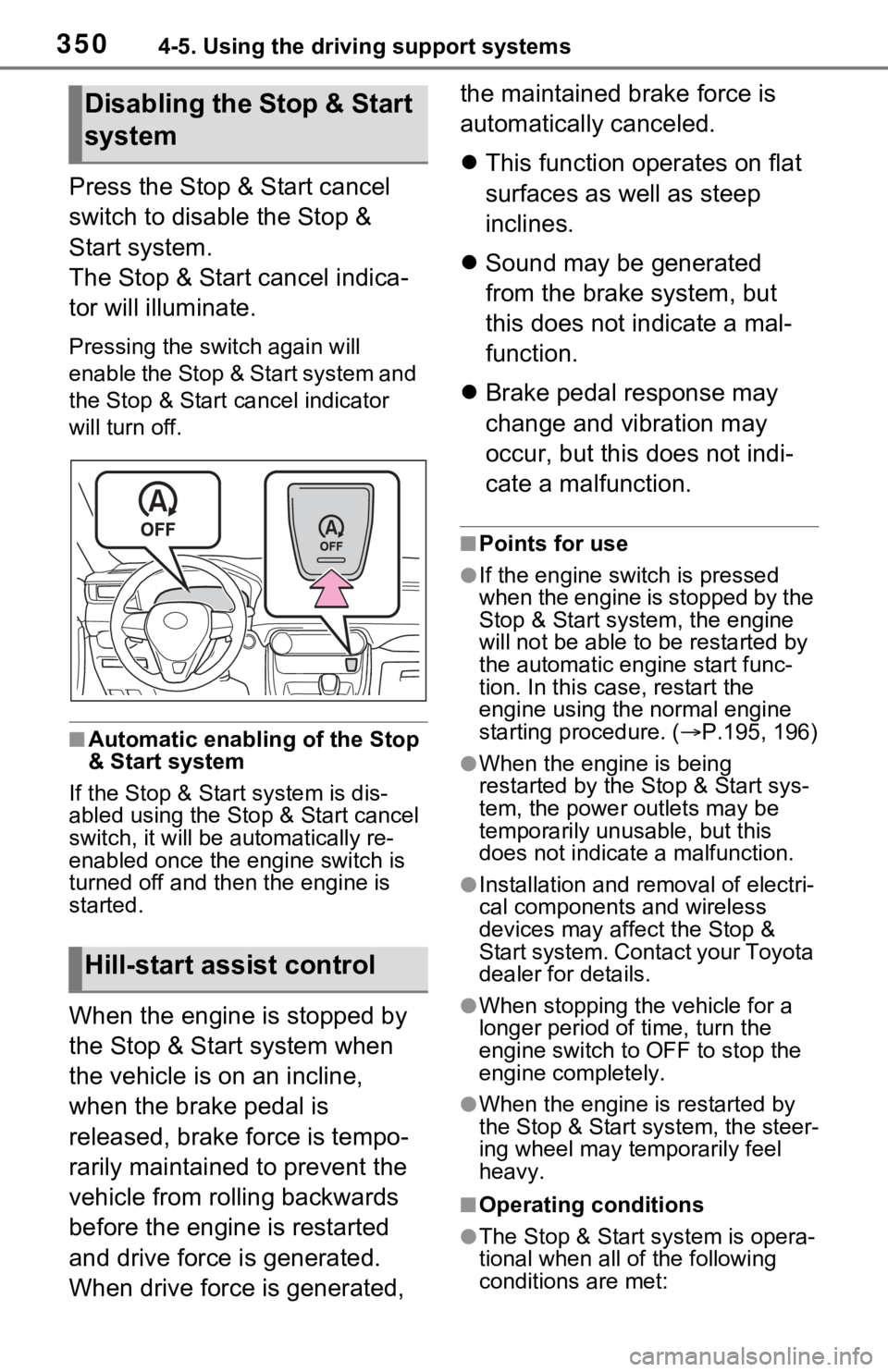
Press the Stop & Start cancel
switch to disable the Stop &
Start system.
The Stop & Start cancel indica-
tor will illuminate.
Pressing the switch again will
enable the Stop & Start system and
the Stop & Start cancel indicator
will turn off.
■Automatic enabling of the Stop
& Start system
If the Stop & Start system is dis-
abled using the Sto p & Start cancel
switch, it will be automatically re-
enabled once the engine switch is
turned off and then the engine is
started.
When the engine is stopped by
the Stop & Start system when
the vehicle is on an incline,
when the brake pedal is
released, brake force is tempo-
rarily maintained to prevent the
vehicle from rolling backwards
before the engine is restarted
and drive force is generated.
When drive force is generated, the maintained brake force is
automatically canceled.
This function operates on flat
surfaces as well as steep
inclines.
Sound may be generated
from the brake system, but
this does not indicate a mal-
function.
Brake pedal response may
change and vibration may
occur, but this does not indi-
cate a malfunction.
■Points for use
●If the engine switch is pressed
when the engine is stopped by the
Stop & Start system, the engine
will not be able to be restarted by
the automatic engine start func-
tion. In this case, restart the
engine using the normal engine
starting procedure. ( P.195, 196)
●When the engine is being
restarted by the Stop & Start sys-
tem, the power ou tlets may be
temporarily unusable, but this
does not indicate a malfunction.
●Installation and removal of electri-
cal components and wireless
devices may affect the Stop &
Start system. Contact your Toyota
dealer for details.
●When stopping the vehicle for a
longer period of time, turn the
engine switch to OFF to stop the
engine completely.
●When the engine is restarted by
the Stop & Start system, the steer-
ing wheel may temporarily feel
heavy.
■Operating conditions
●The Stop & Start system is opera-
tional when all of the following
conditions are met:
Disabling the Stop & Start
system
Hill-start assist control
Page 351 of 748

3514-5. Using the driving support systems
4
Driving
• The vehicle has been driven a cer-tain amount of time.
• The brake pedal is being depressed firmly. (except when
the vehicle is stopped by the
dynamic radar cruise control with
full-speed range when in vehicle-
to-vehicle distanc e control mode)
• The D shift position is selected.
• The driver’s seat belt is fastened.
• The driver’s door is closed.
• The selected driv ing mode is nor-
mal or Eco drive mode.
• The selected driv ing mode is not
snow mode (AWD models).
• Mud & Sand or Rock & Dirt mode
is not selected for Multi-terrain
Select (AWD models).
• The windshield defogger is off.
(vehicles without a manual air
conditioning system)
• The accelerator pedal is not being depressed.
• The engine is adequately warmed up.
• The outside temperature is 23°F (-
5°C) or higher.
• The hood is closed. ( P.352)
●In the following situations, the
engine may not be stopped by the
Stop & Start syste m. This is not a
malfunction of the Stop & Start
system.
• When the air conditioning system
is being used.
• When the battery is undergoing a periodic recharge.
• When the battery is not sufficiently charged, such as if the vehicle
has been parked for a long time
and the battery charge has
decreased, the e lectric load is
large, the battery fluid tempera-
ture is excessively low or the bat-
tery has deteriorated.
• When the brake booster vacuum
is low.
• When the elapsed time since the engine was restarted is short.
• When the vehicle is stopped fre- quently, such as when in a traffic
jam.
• When the engine coolant tem- perature or transmission fluid tem- perature is extremely low or high.
• When the vehicle is stopped on a
steep incline.
• When the steering wheel is being
operated.
• When the vehicle is being driven in a high altitude area.
• When the battery fluid tempera- ture is extremely low or high.
• For a while after the battery termi-
nals have been disconnected and
reconnected.
●When the engine is stopped by
the Stop & Star t system, the
engine will be restarted automati-
cally if any of the following condi-
tions are met:
(To enable the engine to be
stopped by the Stop & Start sys-
tem again, drive the vehicle.)
• The air conditioning system is turned on. (vehicles without a
manual air conditioning system)
• The windshield defogger is turned on. (vehicles without a manual air
conditioning system)
• The shift lever is shifted from D.
• The driver’s seat belt is unfas- tened.
• The driver’s door is opened.
• The driving mode is changed from normal or Eco drive mode to
another mode.
• The driving mode is changed to
snow mode (AWD models).
• Mud & Sand or Rock & Dirt mode is selected for Mult i-terrain Select
(AWD models).
• The Stop & Start cancel switch is pressed.
• The steering wheel is operated.
• The accelerator pedal is depressed.
• The vehicle starts to roll on an incline.
●When the engine is stopped by
the Stop & Star t system, the
engine may restart automatically
in the following situations: (To
enable the engine to be stopped
by the Stop & Start system again,
drive the vehicle.)
• When the brake pedal is pumped
Page 360 of 748

3604-5. Using the driving support systems
is approximately 25 km/h (16
mph) or more
If the vehicle speed drops below the
above speeds, the system automati-
cally switches to t he AWD control
suitable for each mode.
■When Multi-terrain Select brake
control temporarily stops oper-
ating
If Mud & Sand or Rock & Dirt mode
is continuously used for a long
period of time, the b rakes may over-
heat, and Multi-terrain Select brake
control may tempor arily stop operat-
ing.
●At this time, the buzzer sounds
intermittently and “Traction Con-
trol Turned OFF” is displayed on
the multi-inform ation display.
●If Multi-terrain Select brake control
stops operating, stop the vehicle
in a safe location as soon as pos-
sible
* and wait until the system
temperature decreases. Once the
display message on the multi-
information displa y turns off, the
brake control retu rns to normal.
Note that normal driving is still
possible even when Multi-terrain
Select brake control is not operat-
ing.
*: After stopping the vehicle, do not
stop the engine until the display
message has turned off.
■When Mud & Sand or Rock &
Dirt mode is canceled
In the following situations, Mud &
Sand mode or Rock & Dirt mode are
automatically canceled even if they
are selected.
●When the driving mode is
changed ( P.355)
●When the engine switch is turned
off
■Driving in Mud & Sand or Rock
& Dirt mode
The following types of situations
may occur, but they are not mal- functions.
●Vibrations may be felt throughout
the vehicle or steering wheel
●Operating noise may be heard
from the engine compartment
■When an inspection at your
Toyota dealer is necessary
In the following situ ations, the sys-
tem may be malf unctioning. Have
the vehicle inspected by your
Toyota dealer immediately.
●When the slip indica tor light illumi-
nates while Mud & Sand or Rock
& Dirt mode is selected
●When the indicator for each mode
does not illuminat e even though
Mud & Sand or Rock & Dirt mode
is selected
Page 370 of 748

3704-5. Using the driving support systems
WARNING
■Replacing tires
Make sure that all tires are of the
specified size, brand, tread pat-
tern and total load capacity. In
addition, make sure that the tires
are inflated to the recommended
tire inflation pressure level.
The ABS, TRAC and VSC/Trailer
Sway Control systems will not
function correctly if different tires
are installed on the vehicle.
Contact your Toyota dealer for
further information when replacing
tires or wheels.
■Handling of tires and the sus-
pension
Using tires with any kind of prob-
lem or modifying the suspension
will affect the driving assist sys-
tems, and may cause a system to
malfunction.
■Trailer Sway Control precau-
tion
The Trailer Sway Control system
is not able to reduce trailer sway
in all situations . Depending on
many factors such as the condi-
tions of the vehicle, trailer, road
surface and driving environment,
the Trailer Sway Control system
may not be effective. Refer to
your trailer owner’s manual for
information on how to tow your
trailer properly.
■If trailer sway occurs
Observe the following precau-
tions.
Failing to do so m ay cause death
or serious injury.
●Firmly grip the steering wheel.
Steer straight ahead. Do not try
to control trailer swaying by
turning the steering wheel.
●Begin releasing the accelerator
pedal immediately but very
gradually to reduce speed.
Do not increase speed. Do not
apply vehicle brakes.
If you make no extreme correction
with the steering or brakes, your
vehicle and traile r should stabi-
lize. ( P.181)
■Secondary Collision Brake
Do not rely sole ly upon the Sec-
ondary Collision Brake. This sys-
tem is designed to help reduce
the possibility of further damage
due to a secondary collision, how-
ever, that effect changes accord-
ing to various conditions. Overly
relying on the system may result
in death or se rious injury.
Page 375 of 748
3754-6. Driving tips
4
Driving
road, please observe the follow-
ing precautions to ensure your
driving enjoyment and to help
prevent the closure of areas to
off-road vehicles:
Drive your vehicle only in
areas where off-road vehicles
are permitted to travel.
Respect private property. Get
owner’s permission before
entering private property.
Do not enter areas that are
closed. Honor gates, barriers
and signs that restrict travel.
Stay on established roads.
When conditions are wet,
driving techniques should be
changed or travel delayed to
prevent damage to roads.
■Additional information for off-
road driving
For owners in U.S. mainland,
Hawaii and Puerto Rico:
To obtain additional information per-
taining to driving your vehicle off-
road, consult the following organiza-
tions: • State and Local Parks and Recre-
ation Departments
• State Motor Vehicle Bureau
• Recreational Vehicle Clubs
• U.S. Forest Service and Bureau of Land Management
WARNING
■Off-road driving precautions
Always observe t he following pre-
cautions to minim ize the risk of
death, serious injury or damage to
your vehicle:
●Drive carefully when off the
road. Do not take unnecessary
risks by driving in dangerous
places.
●Do not grip the steering wheel
spokes when driving off-road. A
bad bump could jerk the wheel
and injure your hands. Keep
both hands and especially your
thumbs on the ou tside of the
rim.
●Always check your brakes for
effectiveness immediately after
driving in sand, mud, water or
snow.
●After driving through tall grass,
mud, rock, sand, rivers, etc.,
check that there is no grass,
bush, paper, rags, stone, sand,
etc. adhering or trapped on the
underbody. Clear off any such
matter from the underbody. If
the vehicle is used with these
materials trapped or adhering to
the underbody, a breakdown or
fire could occur.