phone TOYOTA RAV4 2023 User Guide
[x] Cancel search | Manufacturer: TOYOTA, Model Year: 2023, Model line: RAV4, Model: TOYOTA RAV4 2023Pages: 574, PDF Size: 17.31 MB
Page 363 of 574
3635-4. Using the other interior features
5
Interior features
• Portable devices compliant with WPC Ver1.2.4 and compatible
with rapid charging
• iPhone’s with an iOS version that supports 7.5 W charging (iPhone
8 and later models)
To switch to the rapid
charging function, press the
power supply switch 3 times
while charging. When rapid
charging is possible, the oper-
ation indicator light will switch
from orange to flashing
between green and orange.
When charging is complete,
the rapid charging function
will stop. Switch again to the
rapid charging function to use
rapid charging again.
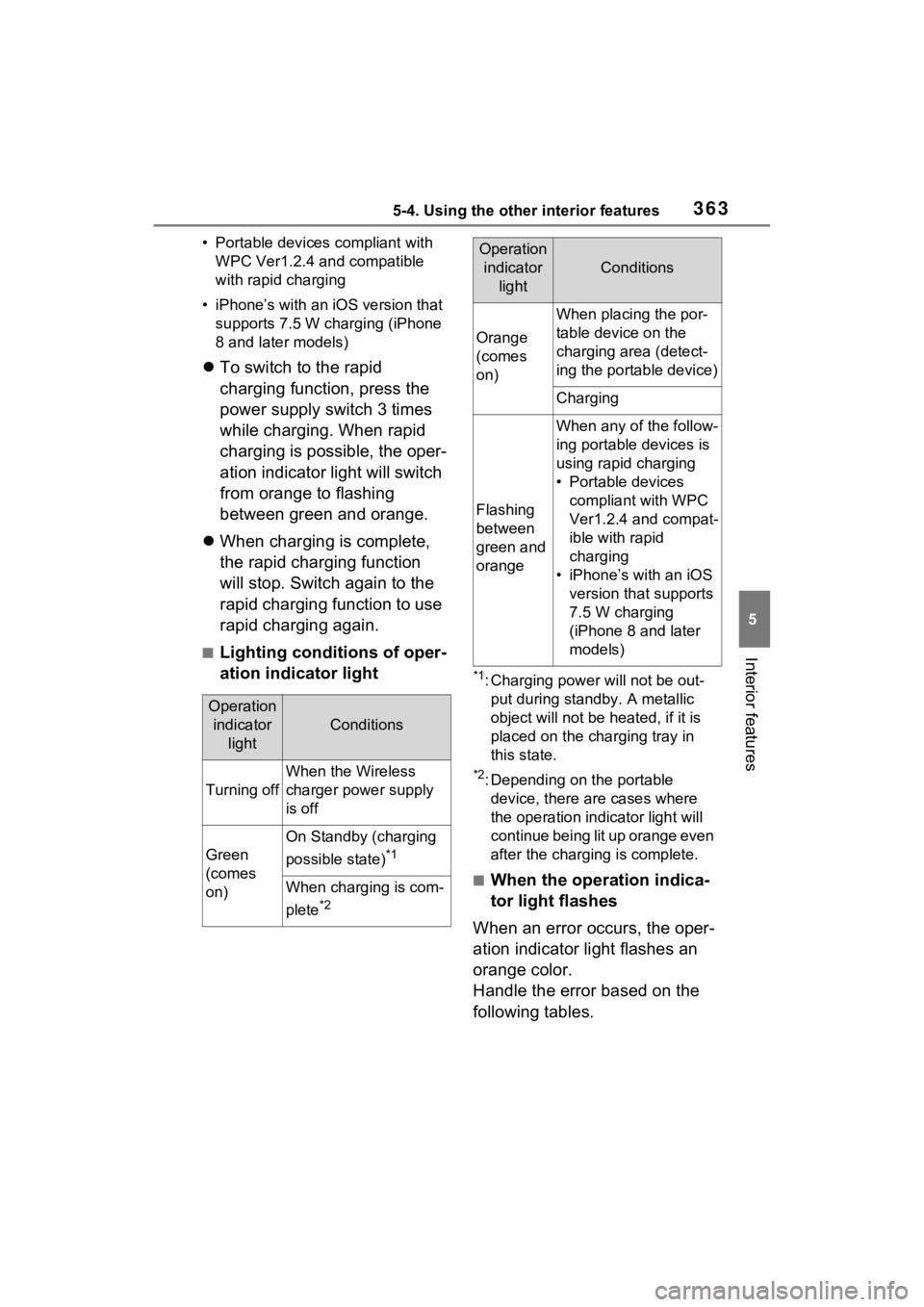
■Lighting conditions of oper-
ation indicator light
*1: Charging power will not be out-
put during standb y. A metallic
object will not be heated, if it is
placed on the charging tray in
this state.
*2: Depending on the portable device, there are cases where
the operation indicator light will
continue being lit up orange even
after the charging is complete.
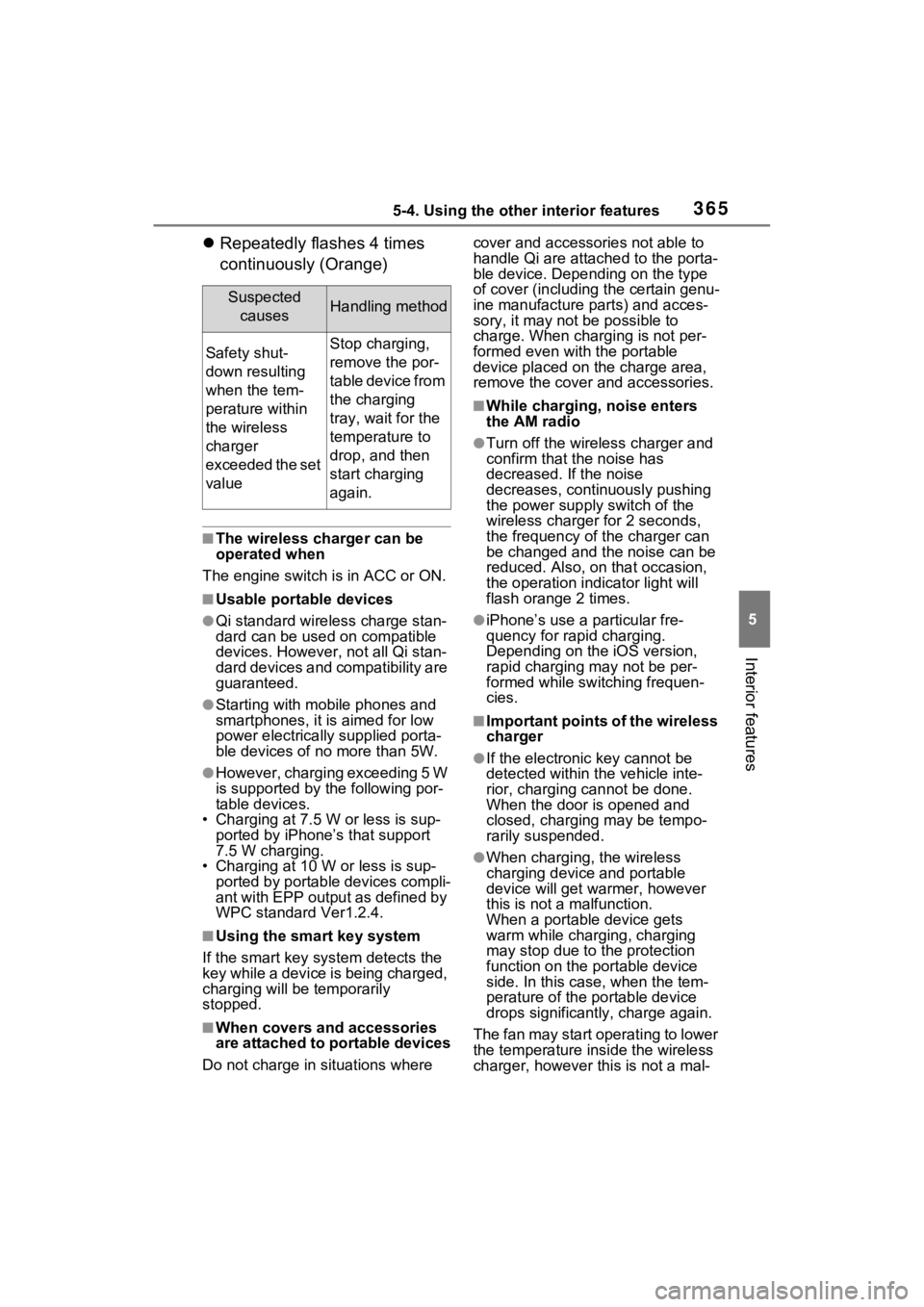
■When the operation indica-
tor light flashes
When an error occurs, the oper-
ation indicator light flashes an
orange color.
Handle the error based on the
following tables.
Operation indicator light
Conditions
Turning off
When the Wireless
charger power supply
is off
Green
(comes
on)
On Standby (charging
possible state)
*1
When charging is com-
plete
*2
Orange
(comes
on)
When placing the por-
table device on the
charging area (detect-
ing the portable device)
Charging
Flashing
between
green and
orange
When any of the follow-
ing portable devices is
using rapid charging
• Portable devices compliant with WPC
Ver1.2.4 and compat-
ible with rapid
charging
• iPhone’s with an iOS version that supports
7.5 W charging
(iPhone 8 and later
models)
Operation indicator light
Conditions
Page 365 of 574
3655-4. Using the other interior features
5
Interior features
Repeatedly flashes 4 times
continuously (Orange)
■The wireless charger can be
operated when
The engine switch is in ACC or ON.
■Usable portable devices
●Qi standard wireless charge stan-
dard can be used on compatible
devices. However, not all Qi stan-
dard devices and compatibility are
guaranteed.
●Starting with mobile phones and
smartphones, it is aimed for low
power electrically supplied porta-
ble devices of no more than 5W.
●However, chargin g exceeding 5 W
is supported by the following por-
table devices.
• Charging at 7.5 W or less is sup- ported by iPhone’s that support
7.5 W charging.
• Charging at 10 W or less is sup- ported by portable devices compli-
ant with EPP output as defined by
WPC standard Ver1.2.4.
■Using the smart key system
If the smart key system detects the
key while a device is being charged,
charging will be temporarily
stopped.
■When covers and accessories
are attached to portable devices
Do not charge in situations where cover and accessories not able to
handle Qi are attached to the porta-
ble device. Depending on the type
of cover (including the certain genu-
ine manufacture
parts) and acces-
sory, it may not be possible to
charge. When charging is not per-
formed even with the portable
device placed on the charge area,
remove the cover and accessories.
■While charging, noise enters
the AM radio
●Turn off the wireless charger and
confirm that the noise has
decreased. If the noise
decreases, continuously pushing
the power supply switch of the
wireless charger for 2 seconds,
the frequency of the charger can
be changed and the noise can be
reduced. Also, on that occasion,
the operation indicator light will
flash orange 2 times.
●iPhone’s use a particular fre-
quency for rapid charging.
Depending on the iOS version,
rapid charging may not be per-
formed while switching frequen-
cies.
■Important points of the wireless
charger
●If the electronic key cannot be
detected within the vehicle inte-
rior, charging c annot be done.
When the door is opened and
closed, charging may be tempo-
rarily suspended.
●When charging, the wireless
charging device and portable
device will get warmer, however
this is not a malfunction.
When a portable device gets
warm while char ging, charging
may stop due to the protection
function on the portable device
side. In this case, when the tem-
perature of the portable device
drops significantly, charge again.
The fan may start operating to lower
the temperature inside the wireless
charger, however this is not a mal-
Suspected causesHandling method
Safety shut-
down resulting
when the tem-
perature within
the wireless
charger
exceeded the set
valueStop charging,
remove the por-
table device from
the charging
tray, wait for the
temperature to
drop, and then
start charging
again.
Page 366 of 574
3665-4. Using the other interior features
function.
■Operation sounds
A buzzing noise may be heard when
pressing the power supply switch to
turn the power supply on, when
turning the engine switch to ACC or
ON while the wireless charger
power supply is on, or when detect-
ing a portable device. However, this
is not a malfunction.
■If the smartphone OS has been
updated
If the smartphone OS has been
updated to a newer version, its
charging specifications may have
changed significantly. For details,
check the information on the manu-
facturer’s website.
■Trademark information
iPhone is a trademark of Apple Inc.,
registered in the U.S. and other
countries.
WARNING
■Caution while driving
When charging a portable device,
for safety reasons, the driver
should not operate the main part
of the portable device while driv-
ing.
■Caution while in motion
Do not charge lightweight devices
such as wireless headphones
while in motion. These devices
are very light and may be ejected
from the charging tray, which may
lead to unforeseen accidents.
■Caution regarding interfer-
ence with electronic devices
People with implantable cardiac
pacemakers, cardiac resynchroni-
zation therapy-pacemakers or
implantable cardio verters, as well
as any other electrical medical
device, should consult their physi-
cian about the usage of the wire-
less charger.
■To prevent malfunctions or
burns
Observe the following precau-
tions. Failure to do so may result
in a equipment failure and dam-
age, catch fire, bur ns due to over-
heat or electric shock.
●Do not insert any metallic
objects between the charge
area and the portable device
while charging
●Do not attach a n aluminum
sticker or other metallic object to
the charge area
●Do not attach a n aluminum
sticker or other metallic object to
the side of the portable device
(or to its case or cover) that
touches the charge area
●Do not use the ch arging tray as
a small storage space
●Do not subject to a strong force
or impact
●Do not disassemb le, modify or
remove
●Do not charge devices other
than specified portable devices
●Keep away from magnetic items
●Do not charge devices if the
charge area is covered in dust
●Do not cover with a cloth or sim-
ilar material
NOTICE
■Situations in which the func-
tion may not operate normally
Devices may not be charged nor-
mally in the following situations.
●The portable device is fully
charged
Page 407 of 574
4096-3. Do-it-yourself maintenance
6
Maintenance and care
operate properly.
• If non-genuine Toyota wheels are used.
• A tire has been replaced with a tire that is not an OE (Original
Equipment) tire.
• A tire has been replaced with a tire that is not of the specified size.
• Tire chains, etc. are equipped.
• An auxiliary-supported run-flat tire
is equipped.
• If a window tint that affects the
radio wave signals is installed.
• If there is a lot of snow or ice on the vehicle, particularly around the
wheels or wheel housings.
• If the tire inflation pressure is extremely higher than the speci-
fied level.
• If wheels without tire pressure warning valves a nd transmitters
are used.
• If the ID code on the tire pressure warning valves and transmitters is
not registered in the tire pressure
warning computer.
●Performance may be affected in
the following situations.
• Near a TV tower, electric power
plant, gas station , radio station,
large display, airpo rt or other facil-
ity that generates strong radio
waves or electrical noise
• When carrying a portable radio, cellular phone, cordless phone or
other wireless communication
device
If tire position information is not cor-
rectly displayed due to the radio
wave conditions, the display may be
corrected by driving and changing
the radio wave conditions.
●When the vehicle is parked, the
time taken for the warning to start
or go off could be extended.
●When tire inflation pressure
declines rapidly for example when
a tire has burst, the warning may
not function.
■Warning performance of the tire
pressure warning system
The warning of the tire pressure
warning system w ill change in
accordance with the conditions
under which it was initialized. For
this reason, the system may give a
warning even if th e tire pressure
does not reach a low enough level,
or if the pressure is higher than the
pressure that was adjusted to when
the system was initialized.
When replacing tires or wheels,
tire pressure warning valves and
transmitters must also be
installed.
When new tire pressure warning
valves and transmitters are
installed, new ID codes must be
registered in the tire pressure
warning computer and the tire
pressure warning system must
be initialized. ( P.413)
■When replacing the tires and
wheels
If the ID code of the tire pressure
warning valve and tr ansmitter is not
registered, the tire pressure warning
system will not work properly. After
driving for about 20 minutes, the tire
pressure warning light blinks for 1
minute and stays on to indicate a
system malfunction.
Installing tire pressure
warning valves and trans-
mitters (if equipped)
Page 525 of 574
5279-1. For owners
9
For owners
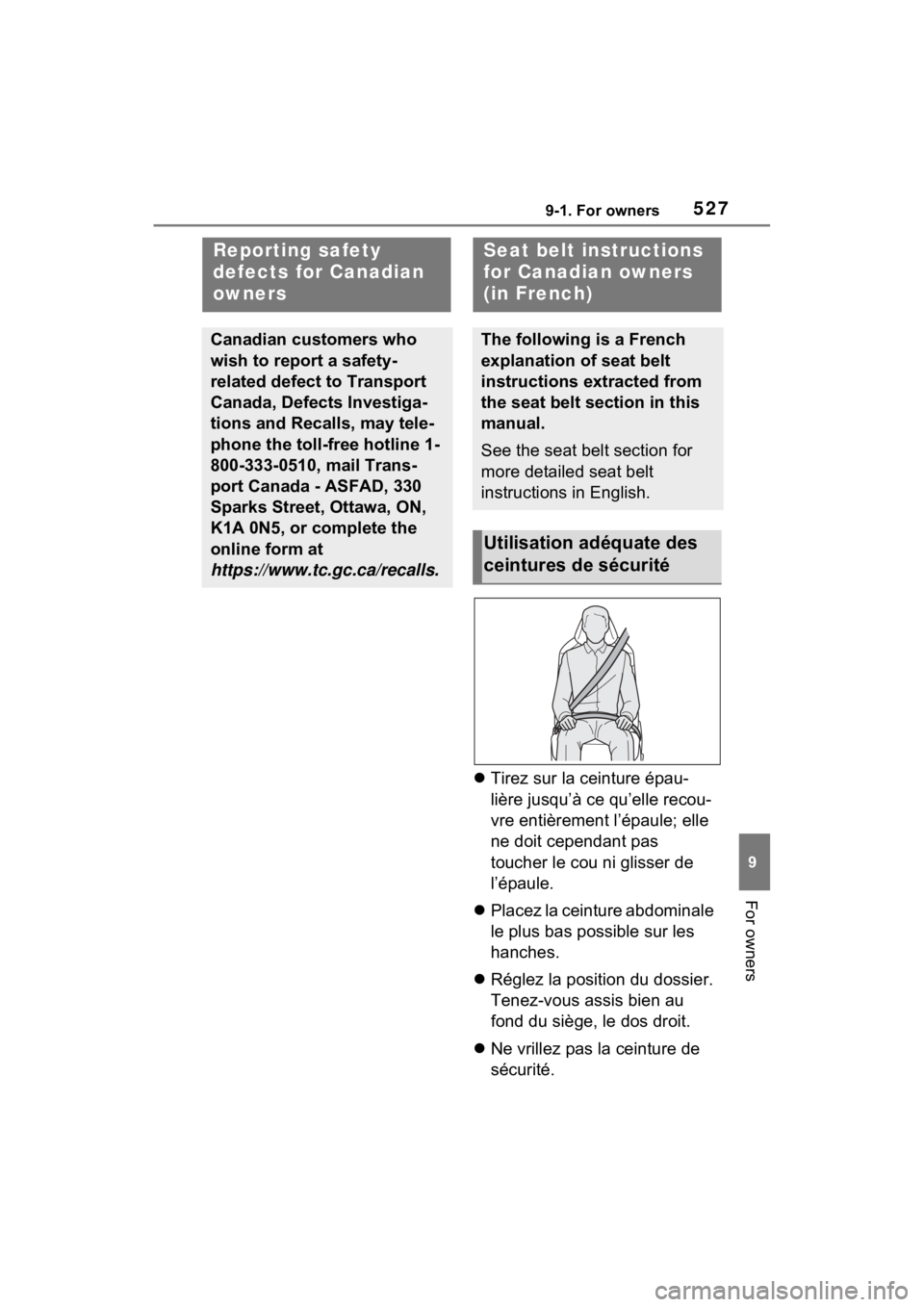
Tirez sur la ceinture épau-
lière jusqu’à ce qu’elle recou-
vre entièrement l’épaule; elle
ne doit cependant pas
toucher le cou ni glisser de
l’épaule.
Placez la ceinture abdominale
le plus bas possible sur les
hanches.
Réglez la position du dossier.
Tenez-vous assis bien au
fond du siège, le dos droit.
Ne vrillez pas la ceinture de
sécurité.
Reporting safety
defects for Canadian
owners
Canadian customers who
wish to report a safety-
related defect to Transport
Canada, Defects Investiga-
tions and Recalls, may tele-
phone the toll-free hotline 1-
800-333-0510, mail Trans-
port Canada - ASFAD, 330
Sparks Street, Ottawa, ON,
K1A 0N5, or complete the
online form at
https://www.tc.gc.ca/recalls.
Seat belt in structions
for Canadian owners
(in French)
The following is a French
explanation of seat belt
instructions extracted from
the seat belt section in this
manual.
See the seat belt section for
more detailed seat belt
instructions in English.
Utilisation adéquate des
ceintures de sécurité