towing TOYOTA RAV4 HYBRID 2018 (in English) Owner's Manual
[x] Cancel search | Manufacturer: TOYOTA, Model Year: 2018, Model line: RAV4 HYBRID, Model: TOYOTA RAV4 HYBRID 2018Pages: 680, PDF Size: 13.71 MB
Page 248 of 680
248
RAV4-HV_OM_OM42B81U_(U)
4-5. Using the driving support systems
WARNING
■When to disable the pre-collision system
In the following situations, disable the system, as it may not operate prop-
erly, possibly leading to an accident resulting in death or serious injury:
● When the vehicle is being towed
● When your vehicle is towing another vehicle
● When transporting the vehicle via truck, boat, train or similar means of
transportation
● When the vehicle is raised on a lift with the hybrid system on and the tires
are allowed to rotate freely
● When inspecting the vehicle using a drum tester such as a chassis dyna-
mometer or speedometer tester, or when using an on vehicle wheel bal-
ancer
● When a strong impact is applied to the front bumper or front grille, due to
an accident or other reasons
● If the vehicle cannot be driven in a stable manner, such as when the vehi-
cle has been in an accident or is malfunctioning
● When the vehicle is driven in a sporty manner or off-road
● When the tires are not properly inflated
● When the tires are very worn
● When tires of a size other than specified are installed
● When tire chains are installed
● When a compact spare tire is used
● If equipment (snow plow, etc.) that may obstruct the radar sensor or cam-
era sensor is temporarily installed to the vehicle
Page 261 of 680
RAV4-HV_OM_OM42B81U_(U)
2614-5. Using the driving support systems
4
Driving
WARNING
■Before using LDA system
Do not rely solely upon the LDA system. The LDA system does not auto-
matically drive the vehicle or reduce the amount of attention that must be
paid to the area in front of the vehicle. The driver must always assume full
responsibility for driving safely by paying careful attention to the surround-
ing conditions and operating the steering wheel to correct the path of the
vehicle. Also, the driver must take adequate breaks when fatigued, such as
from driving for a long period of time.
Failure to perform appropriate driving operations and pay careful attention
may lead to an accident, resulting in death or serious injury.
■ To avoid operating LDA system by mistake
When not using the LDA system, use the LDA switch to turn the system off.
■ Situations unsuitable for LDA system
Do not use the LDA system in the following situations.
The system may not operate properly and lead to an accident, resulting in
death or serious injury.
● A spare tire, tire chains, etc., are equipped.
● When the tires have been excessively worn, or when the tire inflation pres-
sure is low.
● Tires which differ by structure, manufacturer, brand or tread pattern are
used.
● Objects or patterns that could be mistaken for white (yellow) lines are
present on the side of the road (guardrails, curbs, reflective poles, etc.).
● Vehicle is driven on a snow-covered road.
● White (yellow) lines are difficult to see due to rain, snow, fog, dust, etc.
● Asphalt repair marks, white (yellow) line marks, etc., are present due to
road repair.
● Vehicle is driven in a temporary lane or restricted lane due to construction
work.
● Vehicle is driven on a road surface which is slippery due to rainy weather,
fallen snow, freezing, etc.
● Vehicle is driven in traffic lanes other than on highways and freeways.
● Vehicle is driven in a construction zone.
● Vehicle is towing a trailer or another vehicle.
Page 270 of 680
270
RAV4-HV_OM_OM42B81U_(U)
4-5. Using the driving support systems
WARNING
■Situations unsuitable for dynamic radar cruise control
Do not use dynamic radar cruise control in any of the following situations.
Doing so may result in inappropriate speed control and could cause an acci-
dent resulting in death or serious injury.
● Roads where there are pedestrians, cyclists, etc.
● In heavy traffic
● On roads with sharp bends
● On winding roads
● On slippery roads, such as those covered with rain, ice or snow
● On steep downhills, or where there are sudden changes between sharp up
and down gradients
Vehicle speed may exceed the set speed when driving down a steep hill.
● At entrances to freeways and highways
● When weather conditions are bad enough that they may prevent the sen-
sors from detecting correctly (fog, snow, sandstorm, heavy rain, etc.)
● When there is rain, snow, etc. on the front surface of the radar sensor or
camera sensor
● In traffic conditions that require frequent repeated acceleration and decel-
eration
● When your vehicle is towing a trailer or during emergency towing
● When an approach warning buzzer is heard often
Page 283 of 680
RAV4-HV_OM_OM42B81U_(U)
2834-5. Using the driving support systems
4
Driving
WARNING
■To avoid operating the cruise control by mistake
Switch the cruise control off using the “ON-OFF” button when not in use.
■ Situations unsuitable for cruise control
Do not use cruise control in any of the following situations.
Doing so may result in loss of control and could cause an accident resulting
in death or serious injury.
● In heavy traffic
● On roads with sharp bends
● On winding roads
● On slippery roads, such as those covered with rain, ice or snow
● On steep hills
Vehicle speed may exceed the set speed when driving down a steep hill.
● When your vehicle is towing a trailer or during emergency towing
Page 308 of 680

308
RAV4-HV_OM_OM42B81U_(U)
4-5. Using the driving support systems
■Conditions under which the Blind Spot Monitor function may not func-
tion correctly
●The Blind Spot Monitor function may not detect vehicles correctly in the fol-
lowing conditions:
• During bad weather such as heavy rain, fog, snow, etc.
• When ice, mud, etc. is attached to the rear bumper
• When driving on a road surface that is wet due to rain, standing water,
etc.
• When there is a significant difference in speed between your vehicle and
the vehicle that enters the detection area
• When a vehicle is in the detection area from a stop and remains in the detection area as your vehicle accelerates
• When driving up or down consecutive steep inclines, such as hills, a dip in the road, etc.
• When multiple vehicles approach with only a small gap between each
vehicle
• When vehicle lanes are wide, and the vehicle in the next lane is too far away from your vehicle
• When the vehicle that enters the detection area is traveling at about the same speed as your vehicle
• When there is a significant difference in height between your vehicle and
the vehicle that enters the detection area
• Directly after the Blind Spot Monitor system is turned on
• When towing a trailer
• When items such as a bicycle carrier are installed on the rear of the vehi- cle.
● Instances of the Blind Spot Monitor function unnecessarily detecting a vehi-
cle and/or object may increase under the following conditions:
• When there is only a short distance between your vehicle and a guardrail,
wall, etc.
• When there is only a short distance between your vehicle and a following vehicle
• When vehicle lanes are narrow and a vehicle driving 2 lanes across from
your vehicle enters the detection area
• When items such as a bicycle carrier are installed on the rear of the vehi- cle
Page 311 of 680
RAV4-HV_OM_OM42B81U_(U)
3114-5. Using the driving support systems
4
Driving
■Conditions under which the Rear Cr oss Traffic Alert function will not
detect a vehicle
The Rear Cross Traffic Alert function is not designed to detect the following
types of vehicles and/or objects.
● Small motorcycles, bicycles, pedestrians, etc.
*
●Vehicles approaching from directly behind
● Guardrails, walls, signs, parked vehi cles and similar stationary objects
*
●Vehicles moving away from your vehicle
● Vehicles approaching from the parking spaces next to your vehicle
*
●Vehicles backing up in the parking space next to your vehicle*
*
: Depending on conditions, detection of a vehicle and/or object may occur.
■ Conditions under which the Rear Cr oss Traffic Alert function may not
function correctly
The Rear Cross Traffic Alert function may not detect vehicles correctly in the
following conditions:
● When ice, mud, etc. is attached to the rear bumper
● During bad weather such as heavy rain, fog, snow, etc.
● When multiple vehicles approach continuously
● Shallow angle parking
● When a vehicle is approaching at high speed
● When parking on a steep incline, such as hills, a dip in the road, etc.
● Directly after the Blind Spot Monitor system is turned on
● Directly after the hybrid system is started with the Blind Spot Monitor system
is set to on
● When towing a trailer
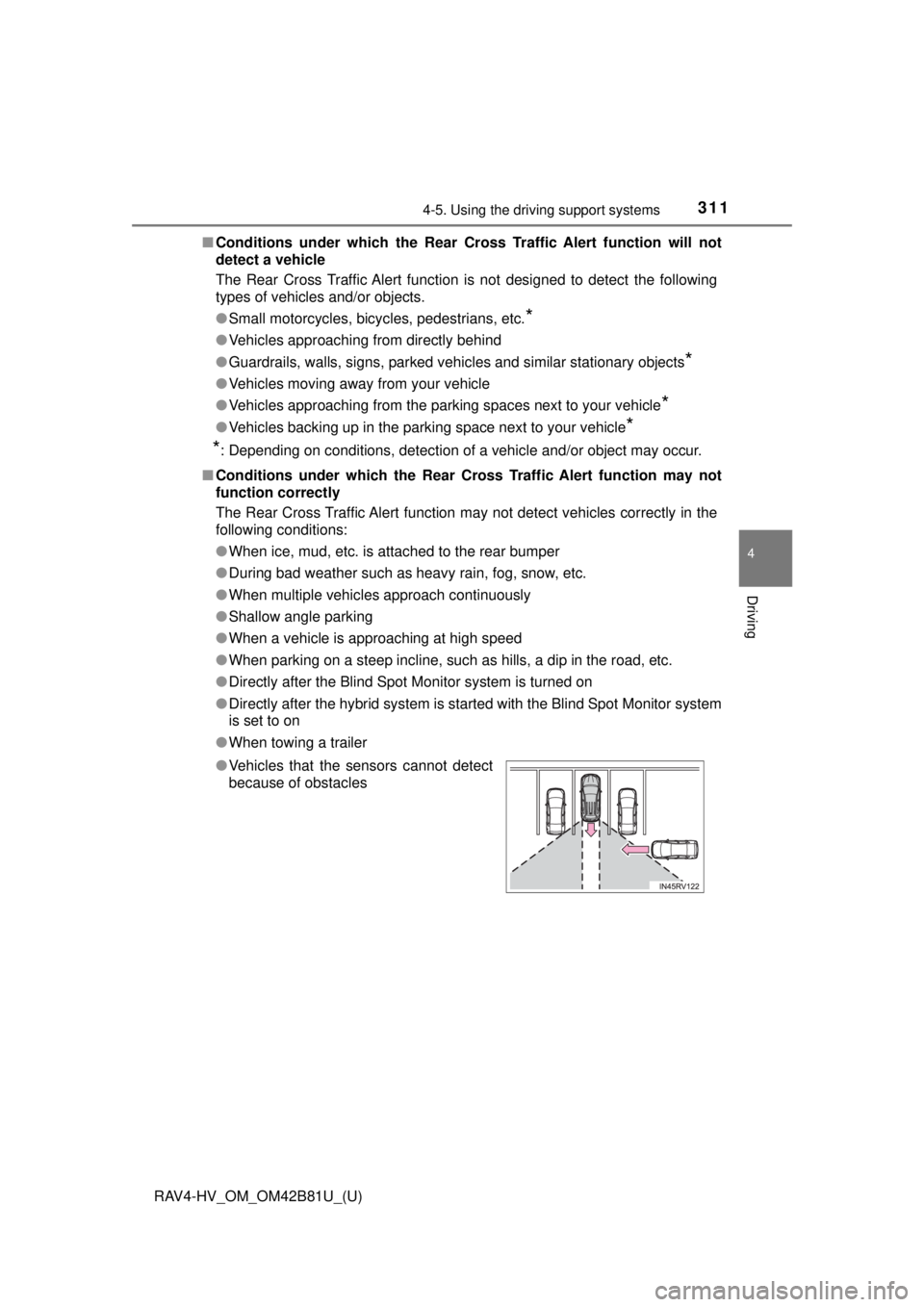
● Vehicles that the sensors cannot detect
because of obstacles
Page 446 of 680
446
RAV4-HV_OM_OM42B81U_(U)
6-3. Using the storage features
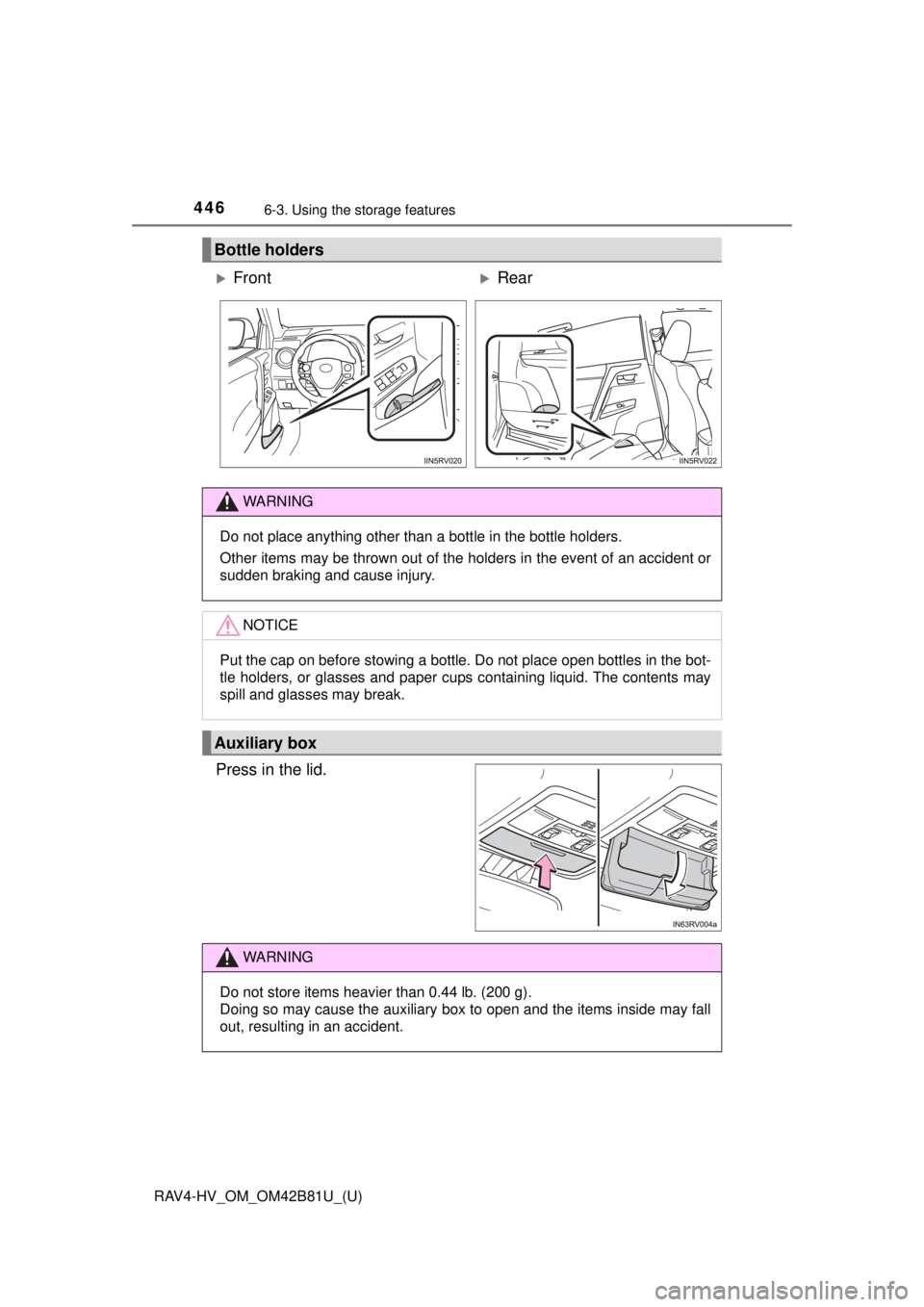
Press in the lid.
Bottle holders
FrontRear
WARNING
Do not place anything other than a bottle in the bottle holders.
Other items may be thrown out of the holders in the event of an accident or
sudden braking and cause injury.
NOTICE
Put the cap on before stowing a bottle. Do not place open bottles in the bot-
tle holders, or glasses and paper cups containing liquid. The contents may
spill and glasses may break.
Auxiliary box
WARNING
Do not store items heavier than 0.44 lb. (200 g).
Doing so may cause the auxiliary box to open and the items inside may fall
out, resulting in an accident.
Page 450 of 680
450
RAV4-HV_OM_OM42B81U_(U)
6-3. Using the storage features
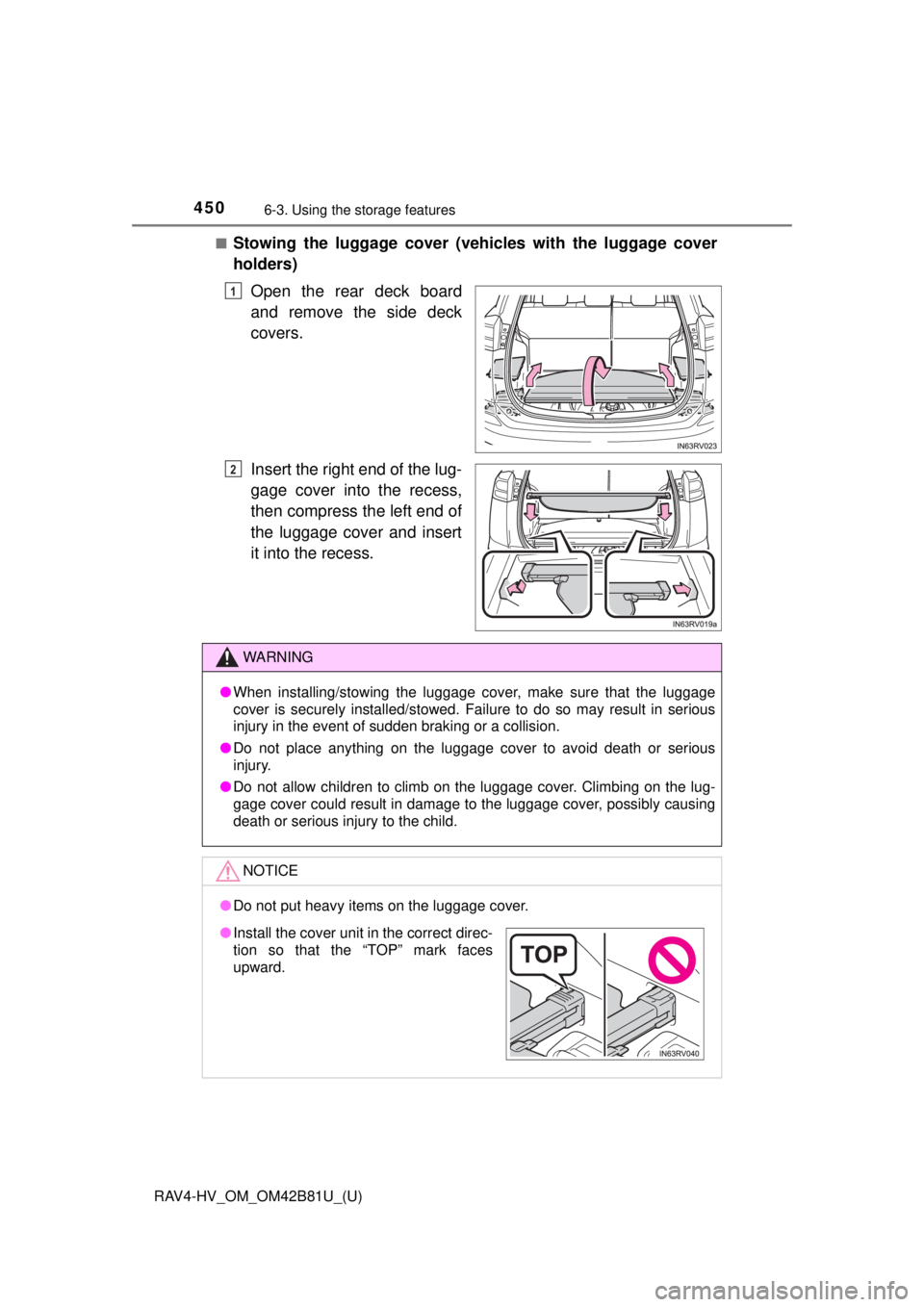
■Stowing the luggage cover (vehicles with the luggage cover
holders)
Open the rear deck board
and remove the side deck
covers.
Insert the right end of the lug-
gage cover into the recess,
then compress the left end of
the luggage cover and insert
it into the recess.
1
2
WARNING
●When installing/stowing the luggage cover, make sure that the luggage
cover is securely installed/stowed. Failure to do so may result in serious
injury in the event of sudden braking or a collision.
● Do not place anything on the luggage cover to avoid death or serious
injury.
● Do not allow children to climb on the luggage cover. Climbing on the lug-
gage cover could result in damage to the luggage cover, possibly causing
death or serious injury to the child.
NOTICE
●Do not put heavy items on the luggage cover.
●Install the cover unit in the correct direc-
tion so that the “TOP” mark faces
upward.
Page 454 of 680
454
RAV4-HV_OM_OM42B81U_(U)
6-3. Using the storage features
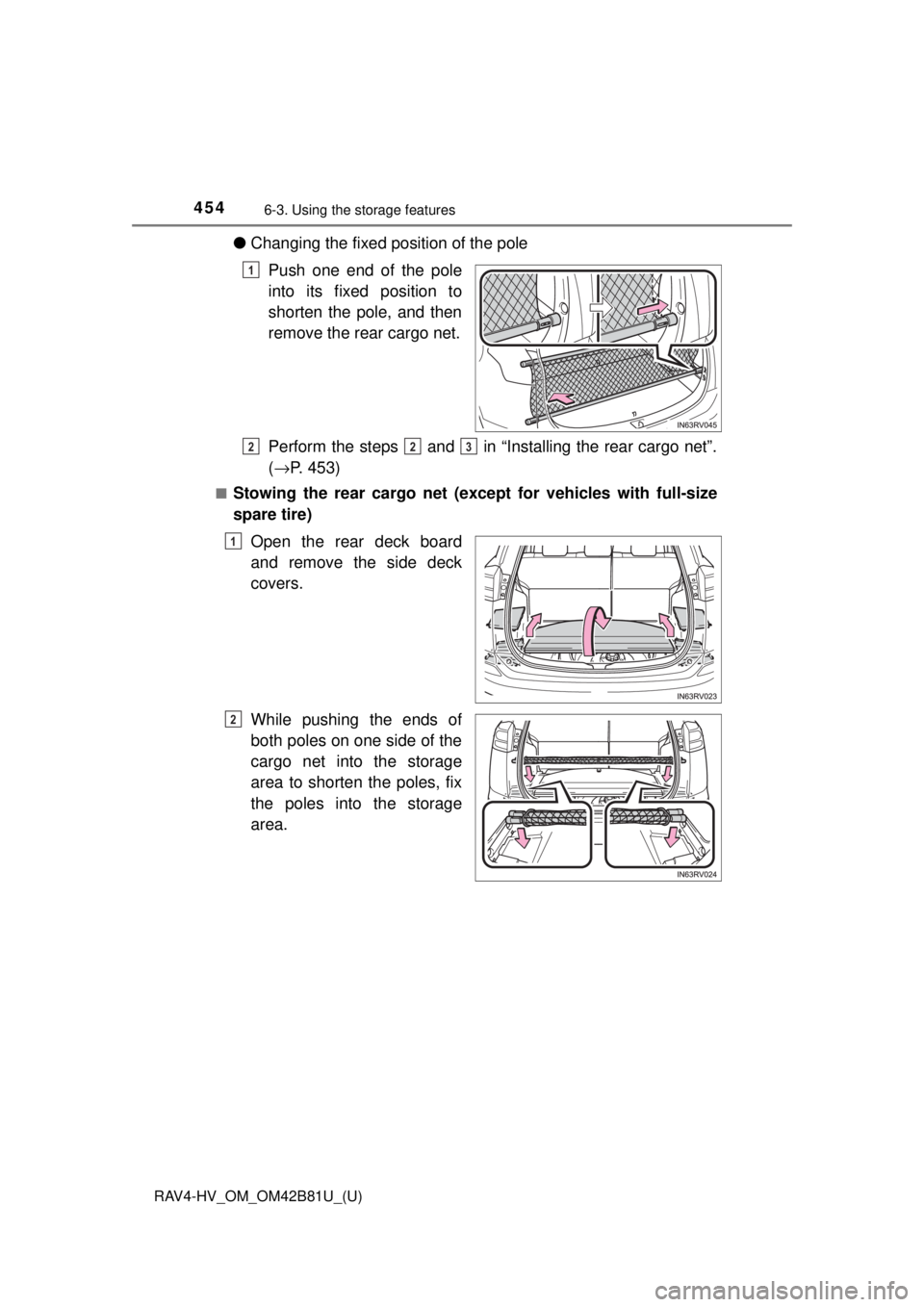
●Changing the fixed position of the pole
Push one end of the pole
into its fixed position to
shorten the pole, and then
remove the rear cargo net.
Perform the steps and in “Installing the rear cargo net”.
(→ P. 453)
■Stowing the rear cargo net (except for vehicles with full-size
spare tire)
Open the rear deck board
and remove the side deck
covers.
While pushing the ends of
both poles on one side of the
cargo net into the storage
area to shorten the poles, fix
the poles into the storage
area.
1
223
1
2
Page 455 of 680
RAV4-HV_OM_OM42B81U_(U)
4556-3. Using the storage features
6
Interior features
WARNING
Make sure to observe the following precautions. Failure to observe these
precautions may result in death or serious injury.
●Do not allow children to climb or ride on the rear cargo net.
● Do not load any luggage into the rear cargo net that extends beyond the
height of the pole.
● When installing the rear cargo net to the vehicle, check that both ends of
the pole are securely inserted into their fixed positions.
● When stowing the rear cargo net, securely fix it into the storage area.
NOTICE
●Do not place luggage weighing approximately 22.1 lb. (10 kg) or more
onto the rear cargo net.
● Install the pole to matching fixed positions on the left and right sides so
that the pole is straight. If the pole is installed at an angle, the rear cargo
net may come loose.
● Do not use the rear cargo net with only one pole installed. The pole may
move while the vehicle is in motion, resulting in damage to the rear cargo
net pole or other equipment in the luggage compartment.