car play TOYOTA RAV4 HYBRID 2019 Accessories, Audio & Navigation (in English)
[x] Cancel search | Manufacturer: TOYOTA, Model Year: 2019, Model line: RAV4 HYBRID, Model: TOYOTA RAV4 HYBRID 2019Pages: 244, PDF Size: 6.8 MB
Page 36 of 244
362-2. Connectivity settings
2-2.Connectivity settings
■Registering from the sys-
tem
1 Turn the Bluetooth
® connec-
tion setting of your cellular
phone on.
This function is not available
when Bluetooth
® connection
setting of your cellular phone
is set to off. 2
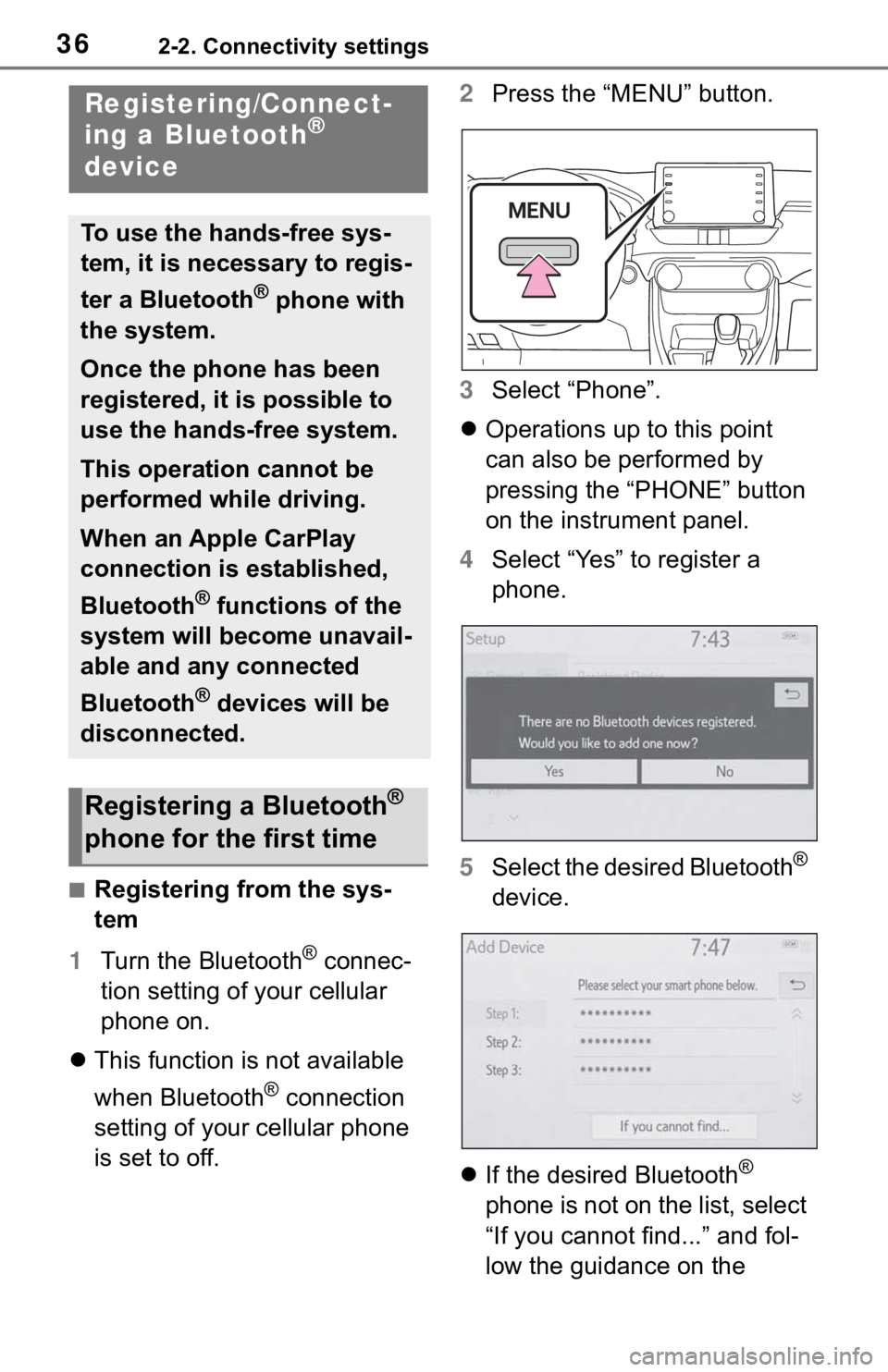
Press the “MENU” button.
3 Select “Phone”.
Operations up to this point
can also be performed by
pressing the “PHONE” button
on the instrument panel.
4 Select “Yes” to register a
phone.
5 Select the desired Bluetooth
®
device.
If the desired Bluetooth
®
phone is not on the list, select
“If you cannot find...” and fol-
low the guidance on the
Registering/Connect-
ing a Bluetooth®
device
To use the hands-free sys-
tem, it is necessary to regis-
ter a Bluetooth
® phone with
the system.
Once the phone has been
registered, it is possible to
use the hands-free system.
This operation cannot be
performed while driving.
When an Apple CarPlay
connection is established,
Bluetooth
® functions of the
system will become unavail-
able and any connected
Bluetooth
® devices will be
disconnected.
Registering a Bluetooth®
phone for the first time
Page 38 of 244
382-2. Connectivity settings
■Registering from phone
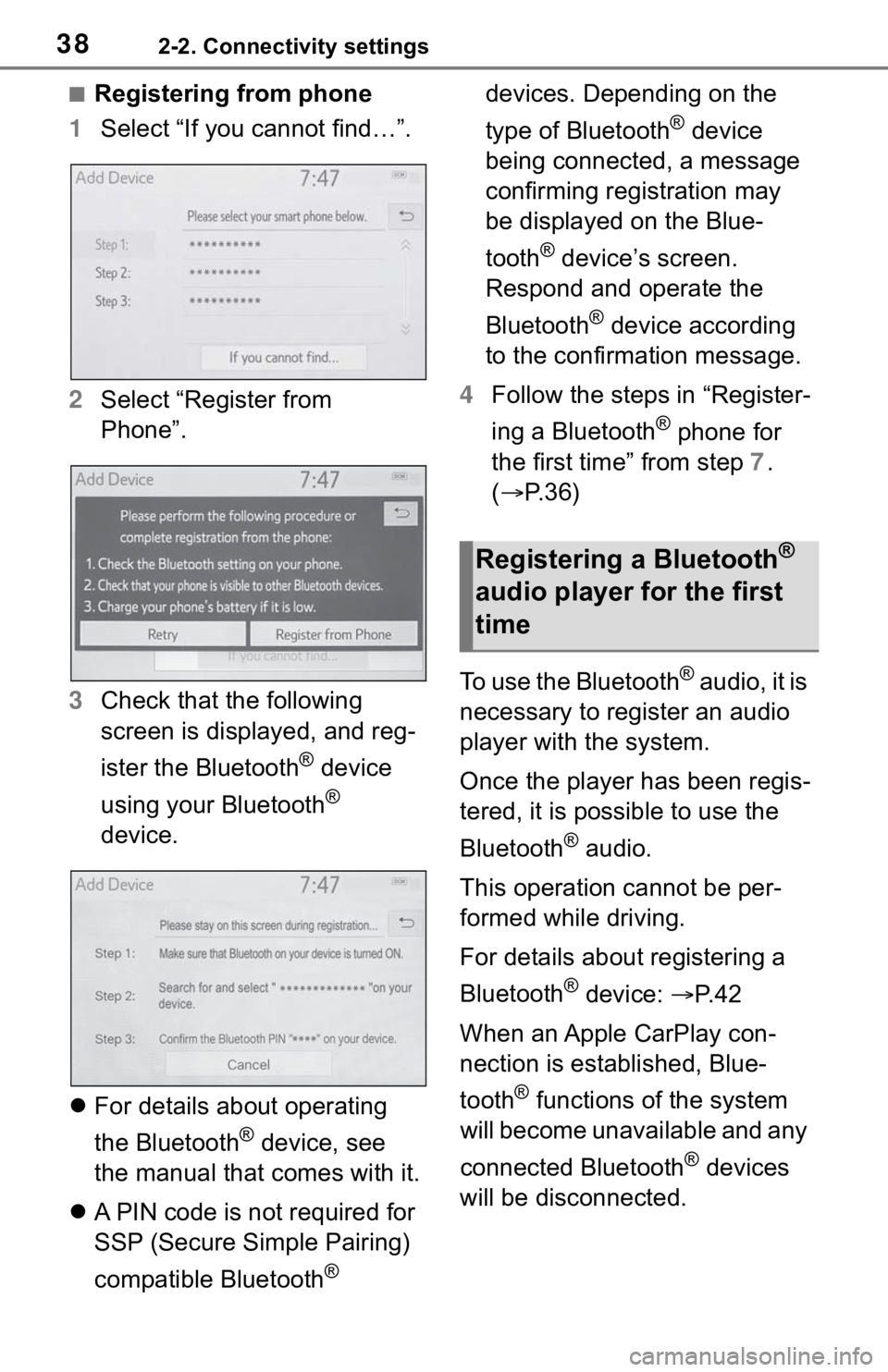
1 Select “If you cannot find…”.
2 Select “Register from
Phone”.
3 Check that the following
screen is displayed, and reg-
ister the Bluetooth
® device
using your Bluetooth
®
device.
For details about operating
the Bluetooth
® device, see
the manual that comes with it.
A PIN code is not required for
SSP (Secure Simple Pairing)
compatible Bluetooth
® devices. Depending on the
type of Bluetooth
® device
being connected, a message
confirming registration may
be displayed on the Blue-
tooth
® device’s screen.
Respond and operate the
Bluetooth
® device according
to the confirmation message.
4 Follow the steps in “Register-
ing a Bluetooth
® phone for
the first time” from step 7.
( P.36)
To use the Bluetooth
® audio, it is
necessary to register an audio
player with the system.
Once the player has been regis-
tered, it is possible to use the
Bluetooth
® audio.
This operation cannot be per-
formed while driving.
For details about registering a
Bluetooth
® device: P. 4 2
When an Apple CarPlay con-
nection is established, Blue-
tooth
® functions of the system
will become unavailable and any
connected Bluetooth
® devices
will be disconnected.
Registering a Bluetooth®
audio player for the first
time
Page 41 of 244
412-2. Connectivity settings
2
Basic function
device and editing the Blue-
tooth
® device information
( P.41, 43)
Registering a Bluetooth
®
device ( P. 4 2 )
Deleting a Bluetooth
® device
( P. 4 3 )
Setting the Bluetooth
® sys-
tem ( P.45)
Up to 5 Bluetooth
® devices
(Phones (HFP) and audio play-
ers (AVP)) can be registered.
If more than 1 Bluetooth
® device
has been registered, select
which device to connect to.
1 Display the Bluetooth
® set-
tings screen. ( P. 4 0 )
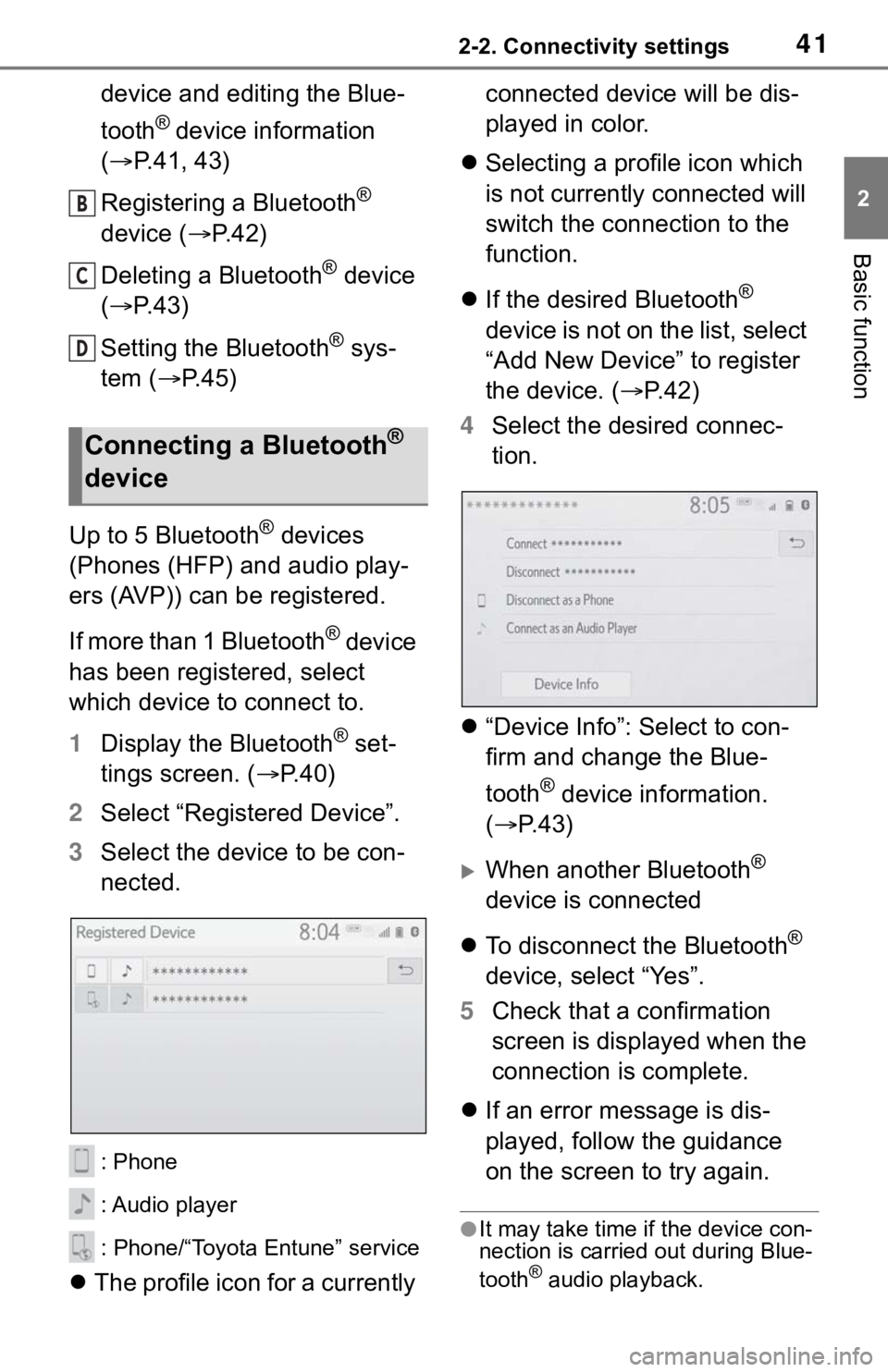
2 Select “Registered Device”.
3 Select the device to be con-
nected.
: Phone
: Audio player
: Phone/“Toyota Entune” service
The profile icon for a currently connected device will be dis-
played in color.
Selecting a profile icon which
is not currently connected will
switch the connection to the
function.
If the desired Bluetooth
®
device is not on the list, select
“Add New Device” to register
the device. ( P. 4 2 )
4 Select the desired connec-
tion.
“Device Info”: Select to con-
firm and change the Blue-
tooth
® device information.
( P.43)
When another Bluetooth®
device is connected
To disconnect the Bluetooth
®
device, select “Yes”.
5 Check that a confirmation
screen is displayed when the
connection is complete.
If an error message is dis-
played, follow the guidance
on the screen to try again.
●It may take time if the device con-
nection is carried out during Blue-
tooth
® audio playback.
Connecting a Bluetooth®
device
B
C
D
Page 51 of 244
512-2. Connectivity settings
2
Basic function
the Wi-Fi® Hotspot function, the
communication speed may
decrease.
●If the vehicle is near a radio
antenna, radio station or other
source of strong radio waves and
electrical noise, communication
may be slow or impossible.
The condition of Wi-Fi® connec-
tion appears on the right upper
side of the screen. ( P.16)
Communication standards
IEEE 802.11b
IEEE 802.11g
IEEE 802.11n (2.4GHz)
Security
WPA™
WPA2™
• WPA™ and WPA2™ are trade-
marks of Wi-Fi Alliance
®.
WARNING
●Use Wi-Fi® devices only when
safe and legal to do so.
●Your audio unit is fitted with
Wi-Fi® antennas. People with
implantable cardiac pacemak-
ers, cardiac resynchronization
therapy-pacemakers or implant-
able cardioverter defibrillators
should maintain a reasonable
distance between themselves
and the Wi-Fi
® antennas.
The radio waves may affect the
operation of such devices.
●Before using Wi-Fi® devices,
users of any electrical medical
device other than implantable
cardiac pacemakers, cardiac
resynchronization therapy-
pacemakers or implantable car-
dioverter defibrillators should
consult the manufacturer of the
device for information about its
operation under the influence of
radio waves.
Radio waves could have unex-
pected effects on the operation
of such medical devices.
Conditions displayed with
Wi-Fi
® icon
Specifications
Page 52 of 244
522-2. Connectivity settings
*: This function is not made avail-able in some countries or areas.
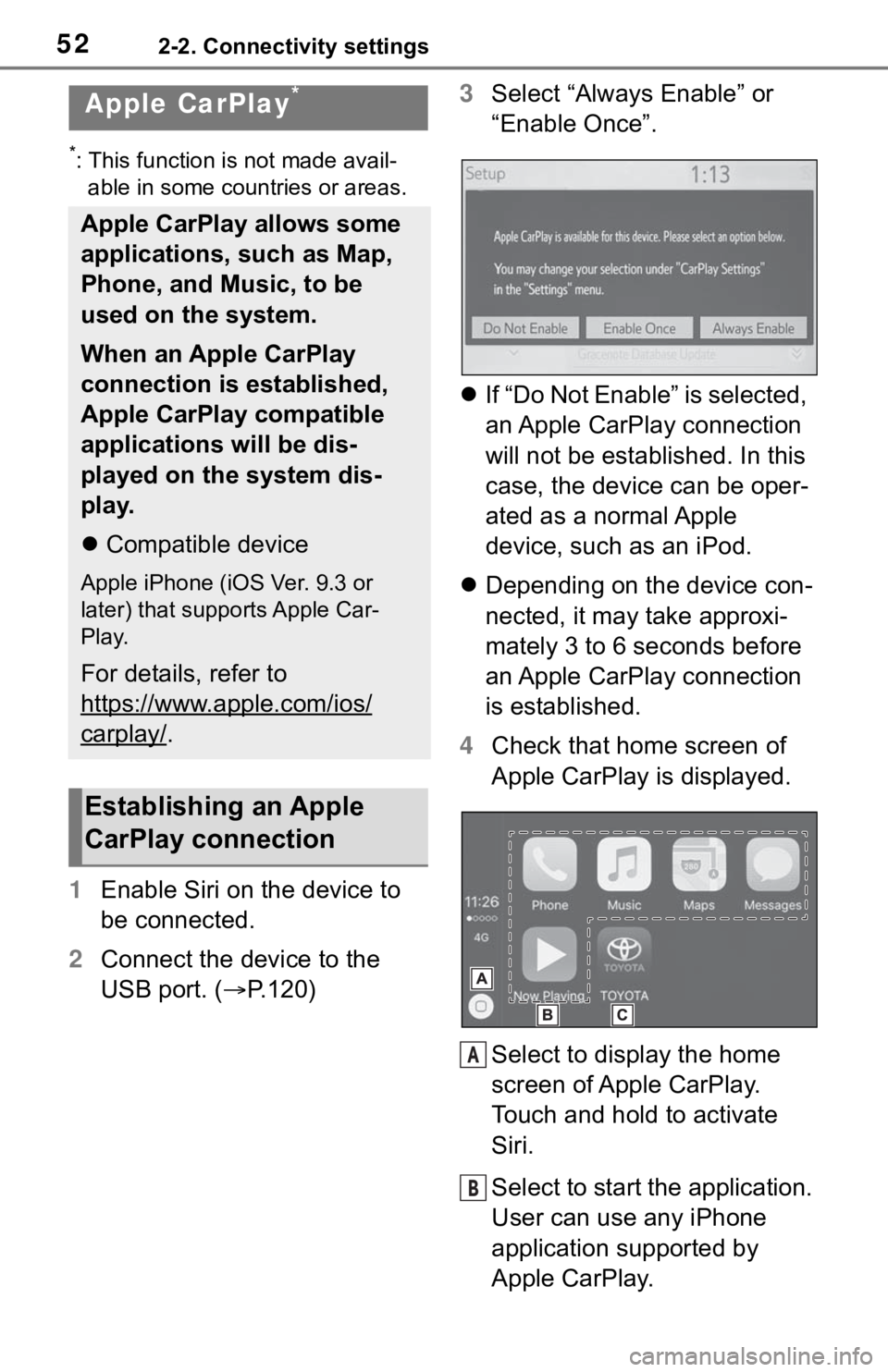
1 Enable Siri on the device to
be connected.
2 Connect the device to the
USB port. ( P.120) 3
Select “Always Enable” or
“Enable Once”.
If “Do Not Enable” is selected,
an Apple CarPlay connection
will not be established. In this
case, the device can be oper-
ated as a normal Apple
device, such as an iPod.
Depending on the device con-
nected, it may take approxi-
mately 3 to 6 seconds before
an Apple CarPlay connection
is established.
4 Check that home screen of
Apple CarPlay is displayed.
Select to display the home
screen of Apple CarPlay.
Touch and hold to activate
Siri.
Select to start the application.
User can use any iPhone
application supported by
Apple CarPlay.
Apple CarPlay*
Apple CarPlay allows some
applications, such as Map,
Phone, and Music, to be
used on the system.
When an Apple CarPlay
connection is established,
Apple CarPlay compatible
applications will be dis-
played on the system dis-
play.
Compatible device
Apple iPhone (iOS Ver. 9.3 or
later) that supports Apple Car-
Play.
For details, refer to
https://www.apple.com/ios/
carplay/.
Establishing an Apple
CarPlay connection
A
B
Page 53 of 244
532-2. Connectivity settings
2
Basic function
Select to display the system
screen.
●When an Apple CarPlay connec-
tion is established, the function of
some system buttons will change.
●When an Apple CarPlay connec-
tion is established, some system
functions, such as the following,
will be replaced by similar Apple
CarPlay functions or will become
unavailable:
• iPod (Audio Playback)
• Hands-free Phone
• USB audio/USB video
• Bluetooth
® audio
• Bluetooth® phone
• Toyota Entune App Suite Connect
●The guidance volume can be
changed on the voice settings
screen. ( P. 6 0 )
●To disable Apple CarPlay while a
device is connected, set “Apple
CarPlay” on the general settings
screen to off. ( P.56)
●Apple CarPlay is an application
developed by Apple Inc. Its func-
tions and services may be termi-
nated or changed without notice
depending on the connected
device’s operation system, hard-
ware and software, or due to
changes in Apple CarPlay specifi-
cations.
●If the vehicle’s navigation system
is being used for route guidance
and a route is set using the Apple
CarPlay Maps app, route guid-
ance will be performed through
Apple CarPlay.
If the Apple CarPlay Maps app is
being used for route guidance and
a route is set usi ng the vehicle’s
navigation system, route guidance
will be performed b y the vehicle’s
navigation system.
●In some regions, speed limit infor-
mation is displayed on the route
guidance screen of the iOS 11 or
later map application. The dis- played information is based on the
information in the map application,
so it may differ from the speed
limit information d
isplayed on the
multi-information display.
●Use of the Apple CarPlay logo
means that a vehicle user inter-
face meets Apple performance
standards. Apple is not responsi-
ble for the operation of this vehicle
or its compliance with safety and
regulatory standards. Please note
that the use of this product with
iPhone or iPod may affect wire-
less performance.
●Apple, iPad, iPhone, iPod, and
iPod touch are t rademarks of
Apple Inc., registered in the U.S.
and other countries. Apple Car-
Play is a trademark of Apple Inc.
C
WARNING
●Do not connect iPhone or oper-
ate the controls while driving.
NOTICE
●Do not leave your iPhone in the
vehicle. In particular, high tem-
peratures inside the vehicle
may damage the iPhone.
●Do not push down on or apply
unnecessary pressure to the
iPhone while it is connected as
this may damage the iPhone or
its terminal.
●Do not insert foreign objects into
the port as this may damage the
iPhone or its terminal.
Page 54 of 244
542-2. Connectivity settings
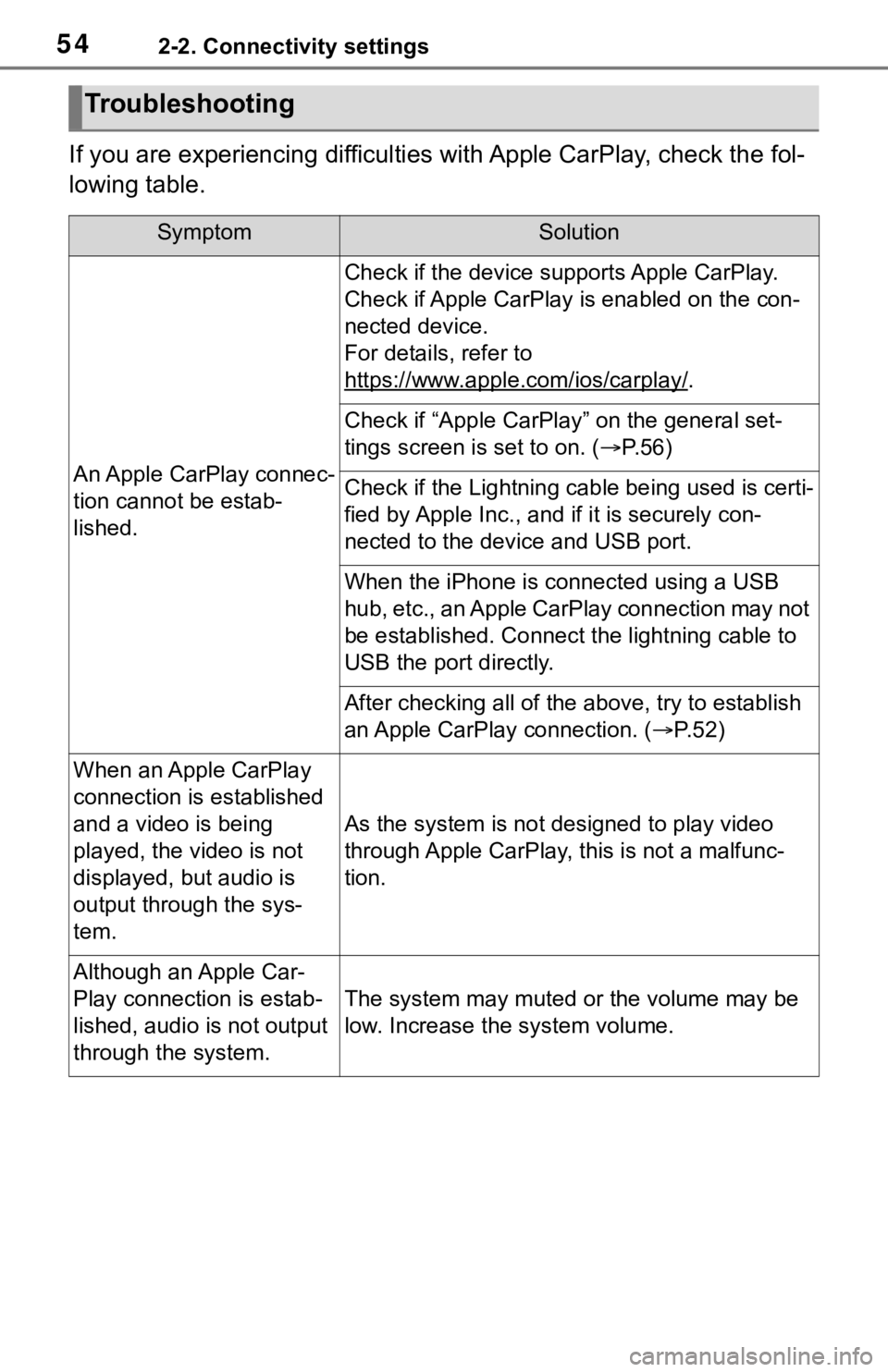
If you are experiencing difficulties with Apple CarPlay, check the fol-
lowing table.
Troubleshooting
SymptomSolution
An Apple CarPlay connec-
tion cannot be estab-
lished.
Check if the device supports Apple CarPlay.
Check if Apple CarPlay is enabled on the con-
nected device.
For details, refer to
https://www.apple.com/ios/carplay/
.
Check if “Apple CarPlay” on the general set-
tings screen is set to on. ( P.56)
Check if the Lightning cable being used is certi-
fied by Apple Inc., and i f it is securely con-
nected to the devic e and USB port.
When the iPhone is c onnected using a USB
hub, etc., an Apple CarPlay connection may not
be established. Connect the lightning cable to
USB the port directly.
After checking all of the above, try to establish
an Apple CarPlay connection. ( P. 5 2 )
When an Apple CarPlay
connection is established
and a video is being
played, the video is not
displayed, but audio is
output through the sys-
tem.
As the system is not designed to play video
through Apple CarPlay, this is not a malfunc-
tion.
Although an Apple Car-
Play connection is estab-
lished, audio is not output
through the system.
The system may muted or the volume may be
low. Increase the system volume.
Page 55 of 244
552-2. Connectivity settings
2
Basic function
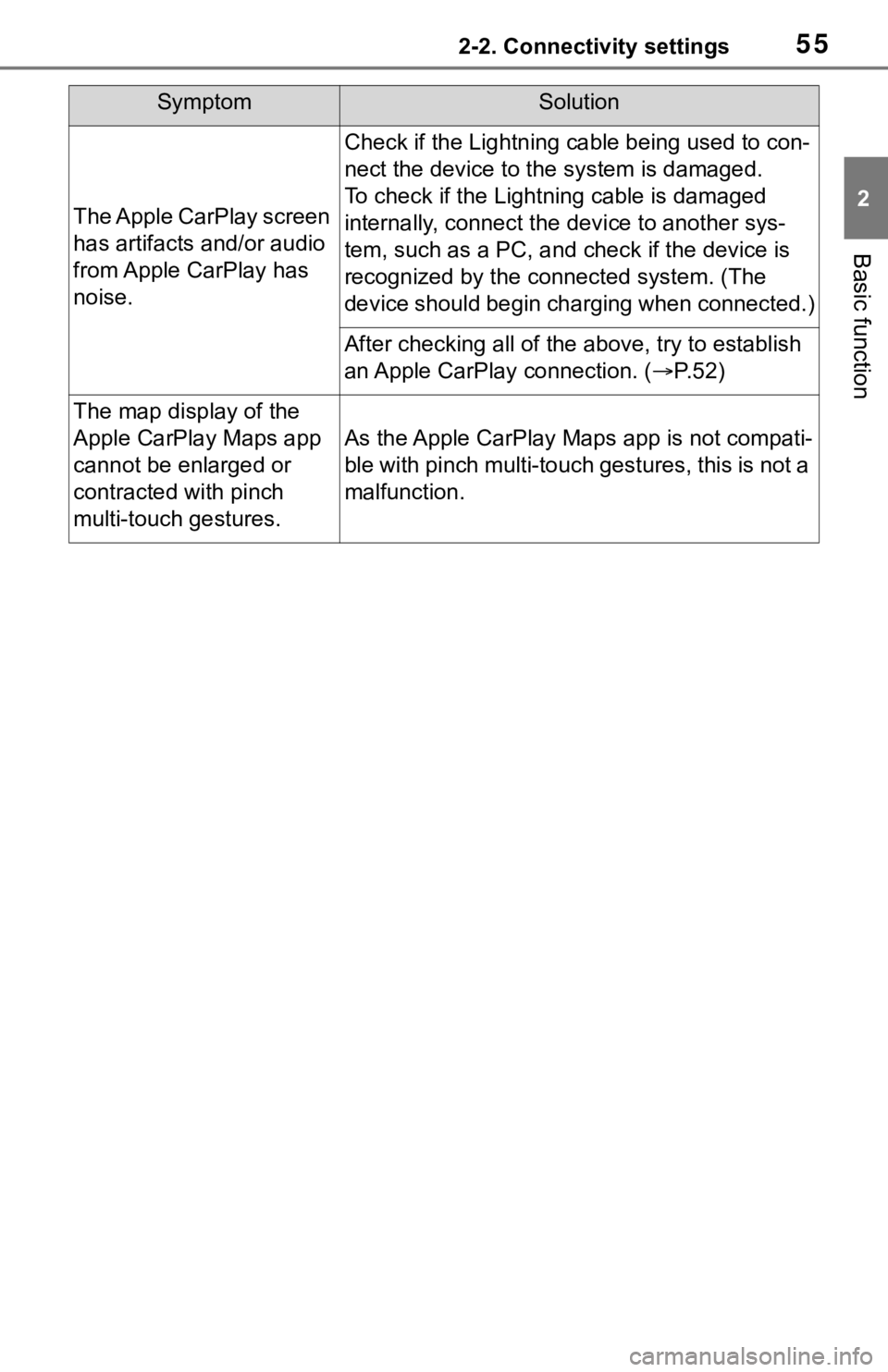
The Apple CarPlay screen
has artifacts and/or audio
from Apple CarPlay has
noise.
Check if the Lightning cable being used to con-
nect the device to the system is damaged.
To check if the Lightning cable is damaged
internally, connect the device to another sys-
tem, such as a PC, and check if the device is
recognized by the conn ected system. (The
device should begin charging when connected.)
After checking all of the above, try to establish
an Apple CarPlay connection. ( P. 5 2 )
The map display of the
Apple CarPlay Maps app
cannot be enlarged or
contracted with pinch
multi-touch gestures.
As the Apple CarPlay Maps app is not compati-
ble with pinch multi-touch gestures, this is not a
malfunction.
SymptomSolution
Page 56 of 244
562-3. Other settings
2-3.Other settings
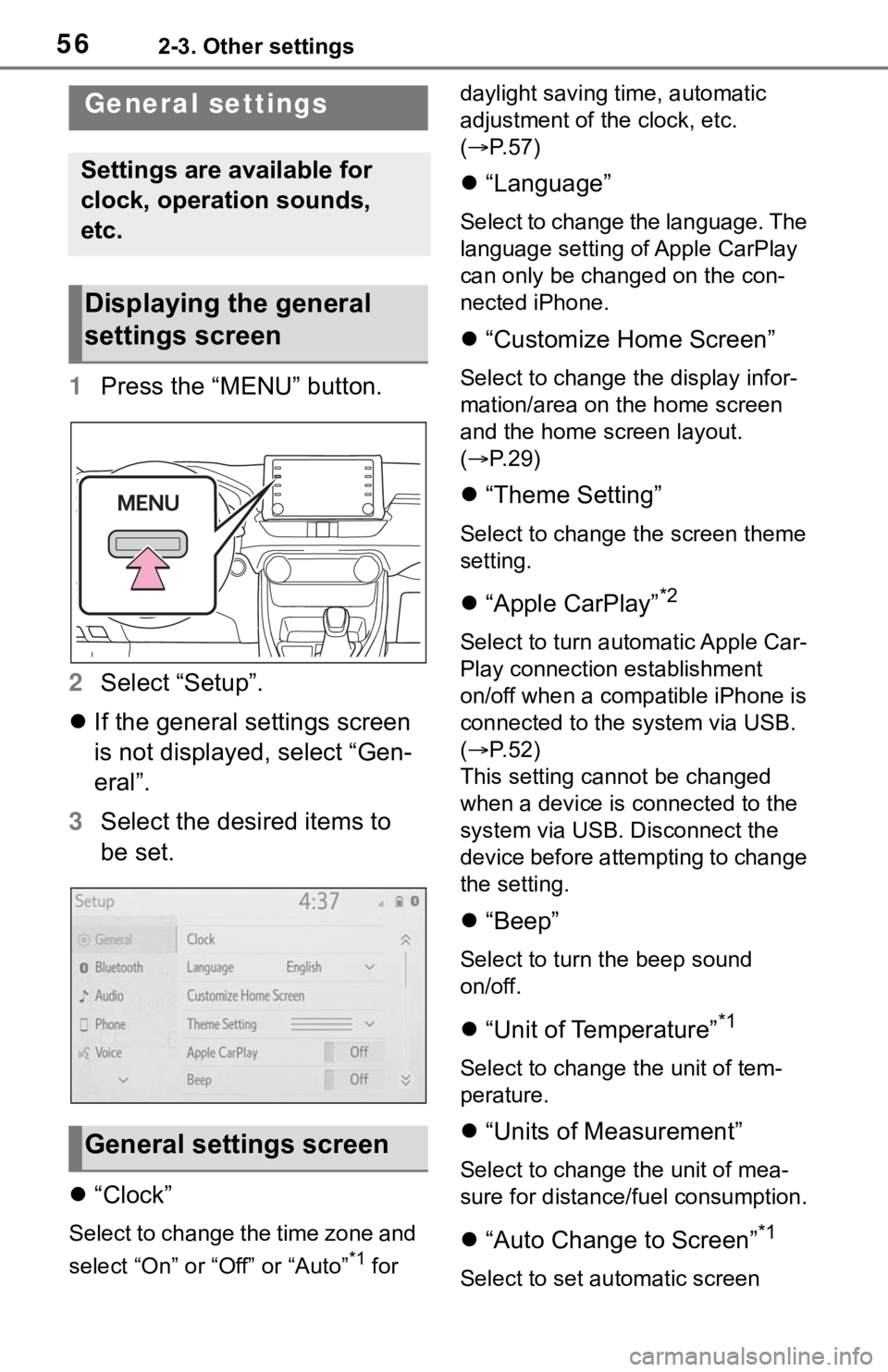
1Press the “MENU” button.
2 Select “Setup”.
If the general settings screen
is not displayed, select “Gen-
eral”.
3 Select the desired items to
be set.
“Clock”
Select to change the time zone and
select “On” or “Off” or “Auto”
*1 for daylight saving time, automatic
adjustment of the clock, etc.
(
P. 5 7 )
“Language”
Select to change the language. The
language setting of Apple CarPlay
can only be chan ged on the con-
nected iPhone.
“Customize Home Screen”
Select to change the display infor-
mation/area on the home screen
and the home screen layout.
( P. 2 9 )
“Theme Setting”
Select to change the screen theme
setting.
“Apple CarPlay”*2
Select to turn automatic Apple Car-
Play connection establishment
on/off when a compatible iPhone is
connected to the system via USB.
( P. 5 2 )
This setting cann ot be changed
when a device is connected to the
system via USB. Disconnect the
device before attempting to change
the setting.
“Beep”
Select to turn the beep sound
on/off.
“Unit of Temperature”*1
Select to change the unit of tem-
perature.
“Units of Measurement”
Select to change the unit of mea-
sure for distance/fuel consumption.
“Auto Change to Screen”*1
Select to set automatic screen
General settings
Settings are available for
clock, operation sounds,
etc.
Displaying the general
settings screen
General settings screen
Page 114 of 244

1143-5. Tips for the navigation system
• When driving on a long straight road.
• When freeway and surface streets run in parallel.
• After moving by ferry or vehicle carrier.
• When a long route is searched during high speed driving.
• When driving without setting the current position calibration cor-
rectly.
• After repeating a change of direc- tion by going forward and back-
ward, or turning on a turntable in
a parking lot.
• When leaving a covered parking lot or parking garage.
• When a roof carrier is installed.
• When driving with tire chains installed.
• When the tires are worn.
• After replacing a tire or tires.
• When using tires that are smaller or larger than the factory specifi-
cations.
• When the tire pressure in any of the 4 tires is not correct.
If the vehicle cannot receive
GPS signals, the current posi-
tion can be adjusted manu-
ally. For information on setting
the current position calibra-
tion: P. 1 0 5
Inappropriate route guidance
may occur in the following
cases:
• When turning at an intersection
off the designated route guid-
ance. • If you set more than 1 destination
but skip any of them, auto reroute
will display a rout e returning to
the destination on the previous
route.
• When turning at an intersection for which there is no route guid-
ance.
• When passing through an inter- section for which there is no route
guidance.
• During auto rer oute, the route
guidance may not be available for
the next turn to t he right or left.
• During high speed driving, it may take a long time fo r auto reroute
to operate. In auto reroute, a
detour route may be shown.
• After auto reroute, the route may not be changed.
• If an unnecessary U-turn is shown or announced.
• If a location has multiple names
and the system announces 1 or
more of them.
• When a route cannot be searched.
• If the route to your destination includes gravel, unpaved roads or
alleys, the route guidance may
not be shown.
• Your destination point might be shown on the opposite side of the
street.
• When a portion of the route has regulations prohibiting the entry
of the vehicle that vary by time,
season or other reasons.
• The road and map data stored in the navigation system may not be
complete or may not be the latest