car play TOYOTA RAV4 HYBRID 2019 Accessories, Audio & Navigation (in English)
[x] Cancel search | Manufacturer: TOYOTA, Model Year: 2019, Model line: RAV4 HYBRID, Model: TOYOTA RAV4 HYBRID 2019Pages: 244, PDF Size: 6.8 MB
Page 2 of 244
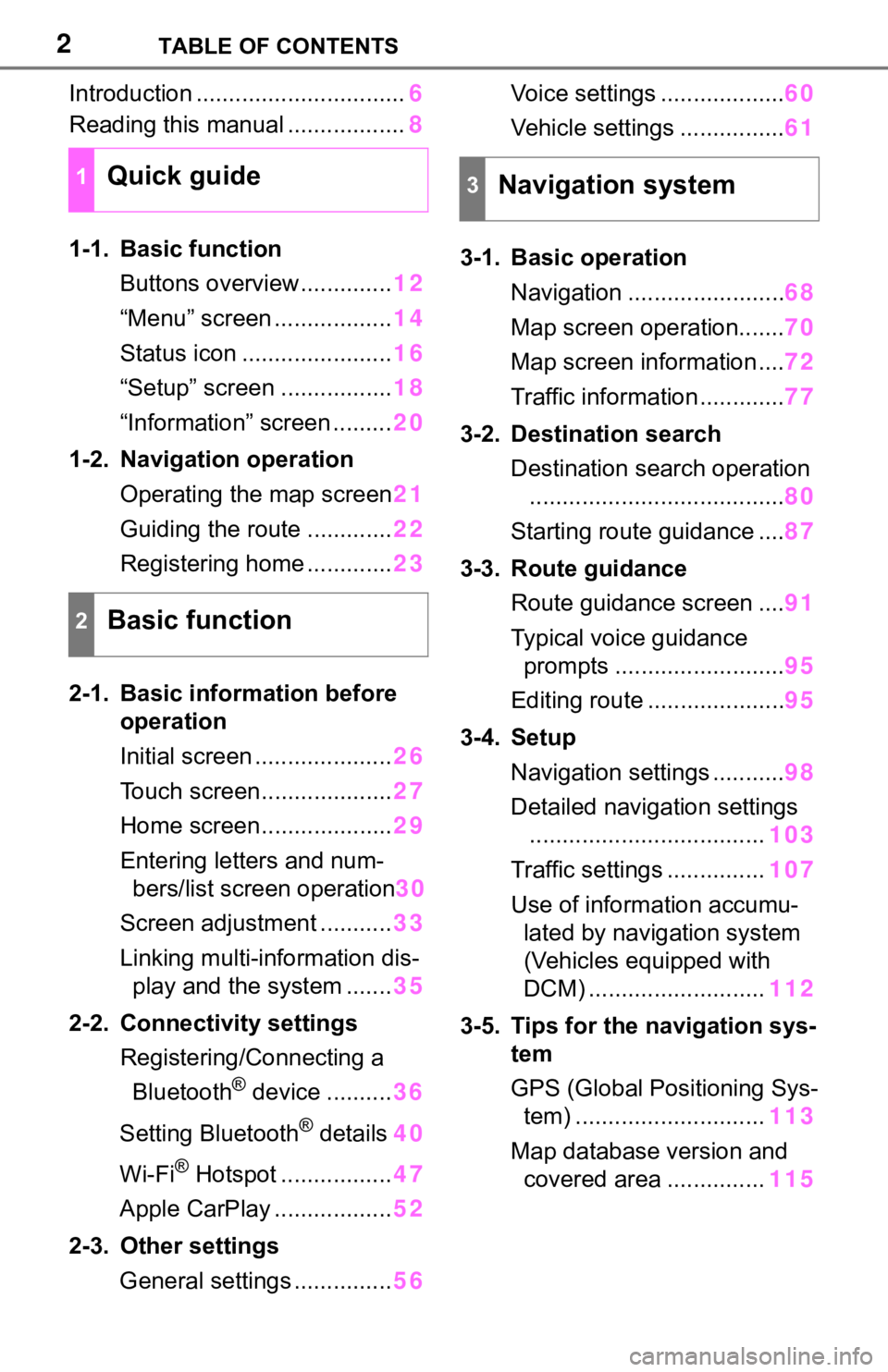
2TABLE OF CONTENTS
Introduction ................................6
Reading this manual .................. 8
1-1. Basic function Buttons overview.............. 12
“Menu” screen .................. 14
Status icon ....................... 16
“Setup” screen ................. 18
“Information” screen ......... 20
1-2. Navigation operation Operating the map screen 21
Guiding the route ............. 22
Registering home ............. 23
2-1. Basic information before operation
Initial screen ..................... 26
Touch screen.................... 27
Home screen.................... 29
Entering letters and num- bers/list screen operation 30
Screen adjustment ........... 33
Linking multi-information dis- play and the system ....... 35
2-2. Connectivity settings Registering/Connecting a Bluetooth
® device .......... 36
Setting Bluetooth
® details 40
Wi-Fi
® Hotspot ................. 47
Apple CarPlay .................. 52
2-3. Other settings General settings ............... 56Voice settings ...................
60
Vehicle settings ................ 61
3-1. Basic operation Navigation ........................ 68
Map screen operation....... 70
Map screen information .... 72
Traffic information ............. 77
3-2. Destination search Destination search operation....................................... 80
Starting route guidance .... 87
3-3. Route guidance Route guidance screen .... 91
Typical voice guidance prompts .......................... 95
Editing route ..................... 95
3-4. Setup Navigation settings ........... 98
Detailed navigation settings .................................... 103
Traffic settings ............... 107
Use of informa tion accumu-
lated by navigation system
(Vehicles equipped with
DCM) ........................... 112
3-5. Tips for the navigation sys- tem
GPS (Global Positioning Sys-tem) ............................. 113
Map database version and covered area ............... 115
1Quick guide
2Basic function
3Navigation system
Page 6 of 244
6
This manual explains the opera-
tion of the system. Please read
this manual carefully to ensure
proper use. Keep this manual in
your vehicle at all times.
The screens shown in this man-
ual may differ from the actual
screen of the system depending
on availability of functions, Toy-
ota Entune subscription status,
and map data available at the
time this manual was produced.
The screens in this manual will
also differ if the screen theme
settings have been changed.
(Theme setting: P. 5 6 )
In some situations when chang-
ing between screens, it may
take longer than normal for the
screen to change, the screen
may be blank momentarily or
noise may be displayed.
Please be aware that the con-
tent of this manual may be dif-
ferent from the system in some
cases, such as when the sys-
tem’s software is updated.
The navigation system is one of the most technologically
advanced vehicle accessories
ever developed. The system
receives satellite signals from
the Global Positioning System
(GPS) operated by the U.S.
Department of Defense. Using
these signals and other vehicle
sensors, the system indicates
your present position and
assists in locating a desired des-
tination.
The navigation system is
designed to select efficient
routes from your present start-
ing location to your destination.
The system is also designed to
direct you to a destination that is
unfamiliar to you in an efficient
manner. The system uses AISIN
AW maps. The calculated routes
may not be the shortest nor the
least traffic congested. Your own
personal local knowledge or
“short cut” may at times be
faster than the calculated
routes.
The navigation system’s data-
base includes Point of Interest
categories to allow you to easily
select destinat
ions such as
restaurants and hotels. If a des-
tination is not in the database,
you can enter the street address
close to it and the system will
guide you there.
The system will provide both a
visual map and audio instruc-
tions. The audio instructions will
Introduction
Navigation and multime-
dia system owner’s manu-
al
Navigation system (En-
tune Premium Audio)
Page 12 of 244
121-1. Basic function
1-1.Basic function
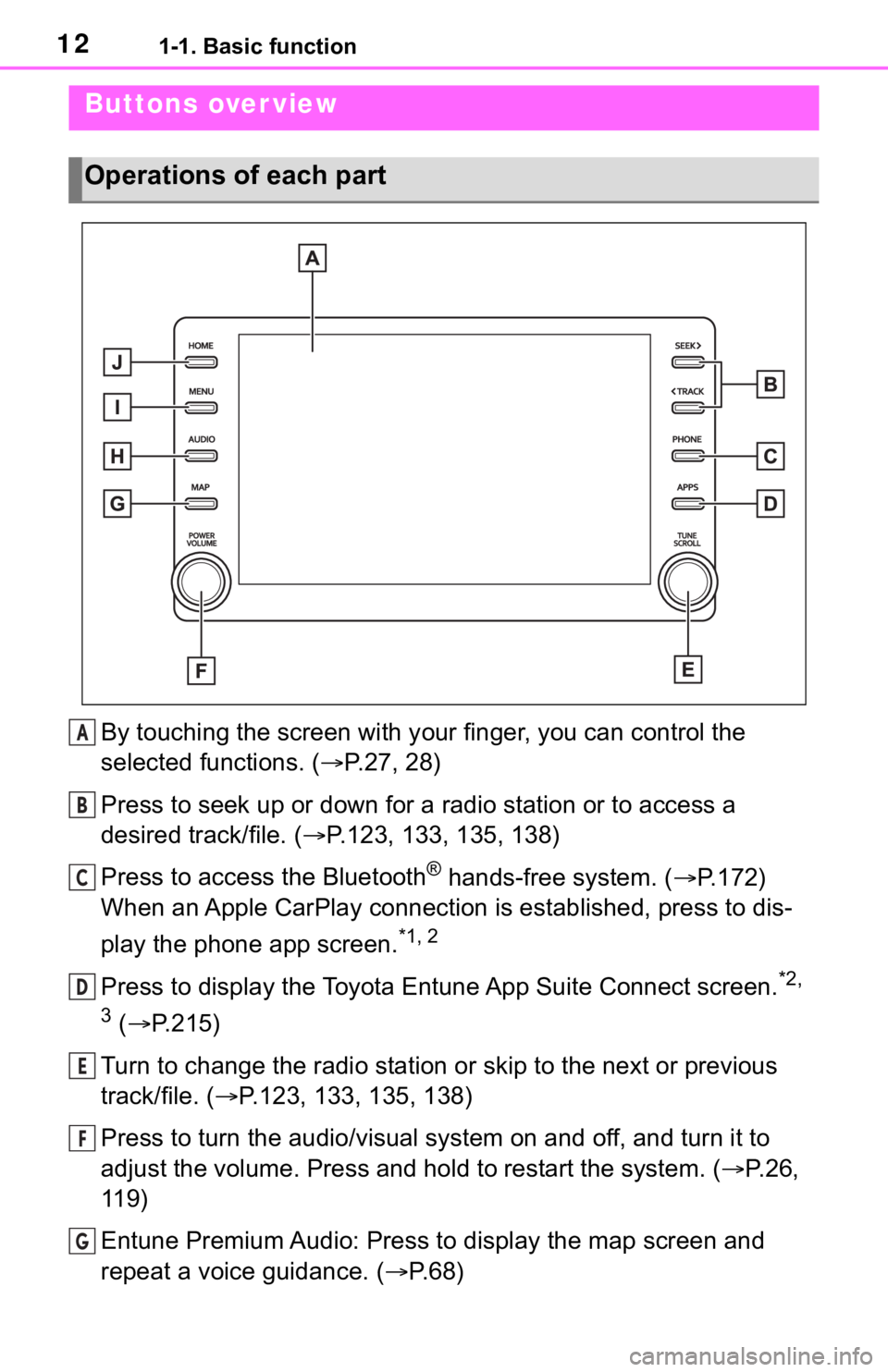
By touching the screen with your finger, you can control the
selected functions. ( P.27, 28)
Press to seek up or down for a radio station or to access a
desired track/file. ( P.123, 133, 135, 138)
Press to access the Bluetooth
® hands-free system. ( P.172)
When an Apple CarPlay connection is established, press to dis-
play the phone app screen.
*1, 2
Press to display the Toyota Entune App Suite Connect screen.*2,
3
( P.215)
Turn to change the radio station or skip to the next or previou s
track/file. ( P.123, 133, 135, 138)
Press to turn the audio/visual system on and off, and turn it t o
adjust the volume. Press and hold to restart the system. ( P.26,
119)
Entune Premium Audio: Press to display the map screen and
repeat a voice guidance. ( P. 6 8 )
Buttons over view
Operations of each part
A
B
C
D
E
F
G
Page 13 of 244

131-1. Basic function
1
Quick guide
Entune Audio Plus: If a turn-by-turn navigation application has
been downloaded to a connected smartphone, the application will
be displayed and can be used.
*4
When an Apple CarPlay connection is established, press to dis-
play the Maps app screen.
*1, 2
Press to display the audio/visual system screen. ( P.118, 119)
Press to display the “Menu” screen. ( P. 1 4 )
Press to display the home screen. ( P. 2 9 )
*1: For details about Apple CarPlay: P. 5 2
*2: This function is not made available in some countries or areas.
*3: The Toyota Entune App Suite Connect screen may not be displaye d
when an Apple CarPlay connection is established.
*4: For details about a turn-by-turn navigation application, refer to
http://www.toyot a.com/Entune/
in the United States,
http://www.toy ota.ca/entune
in Canada, and
http://www.toyotapr.com/entune
in Puerto Rico.
H
I
J
Page 14 of 244
141-1. Basic function
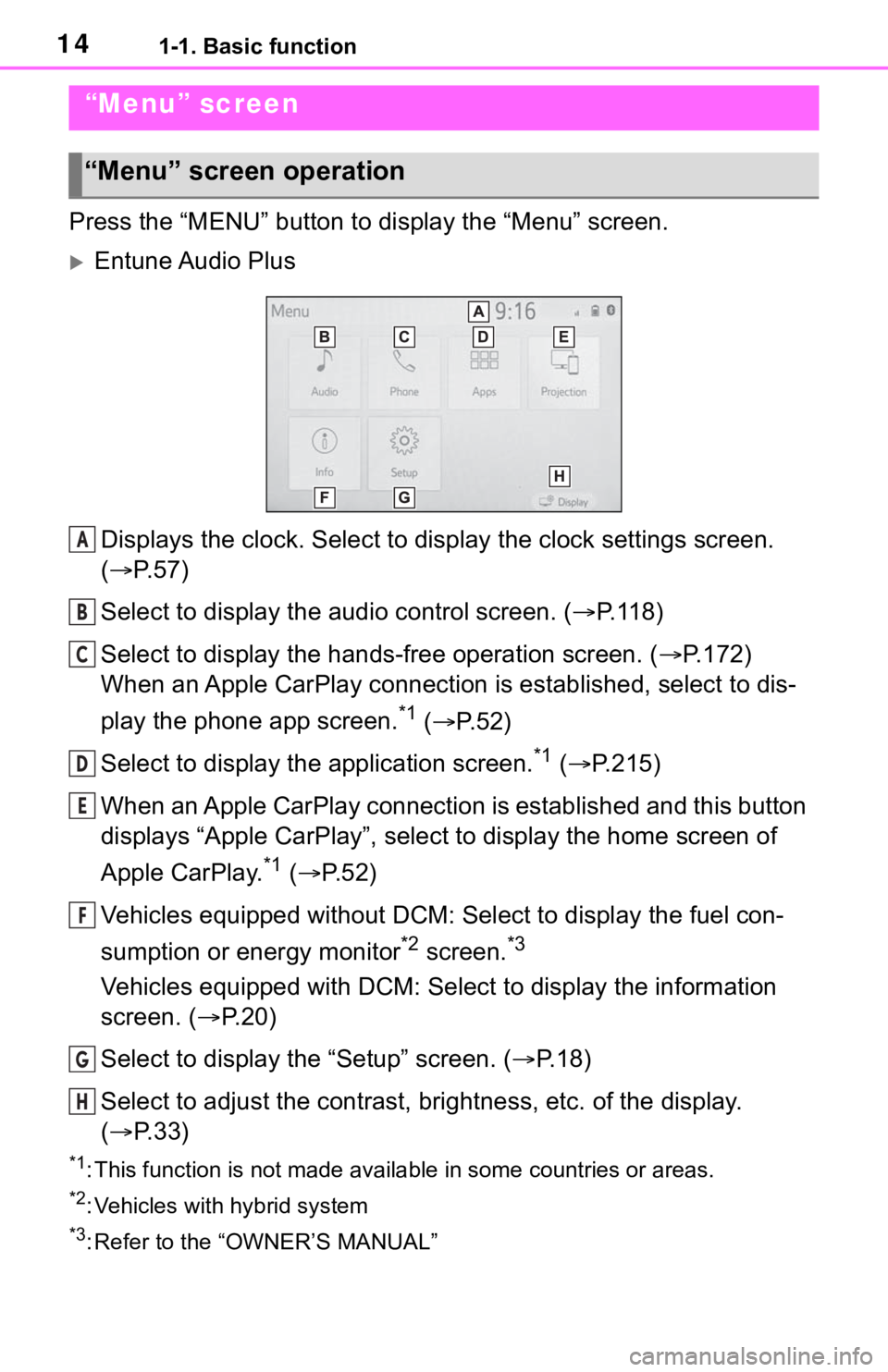
Press the “MENU” button to display the “Menu” screen.
Entune Audio Plus
Displays the clock. Select to display the clock settings screen.
( P. 5 7 )
Select to display the audio control screen. ( P.118)
Select to display the hands-free operation screen. ( P.172)
When an Apple CarPlay connection is established, select to dis-
play the phone app screen.
*1 ( P.52)
Select to display the application screen.
*1 ( P.215)
When an Apple CarPlay connection is established and this button
displays “Apple CarPlay”, select to display the home screen of
Apple CarPlay.
*1 ( P. 5 2 )
Vehicles equipped without DCM: Select to display the fuel con-
sumption or energy monitor
*2 screen.*3
Vehicles equipped with DCM: Select to display the information
screen. ( P.20)
Select to display the “Setup” screen. ( P.18)
Select to adjust the contrast, brightness, etc. of the display.
( P. 3 3 )
*1: This function is not made available in some countries or areas .
*2: Vehicles with hybrid system
*3: Refer to the “OWNER’S MANUAL”
“Menu” screen
“Menu” screen operation
A
B
C
D
E
F
G
H
Page 15 of 244
151-1. Basic function
1
Quick guide
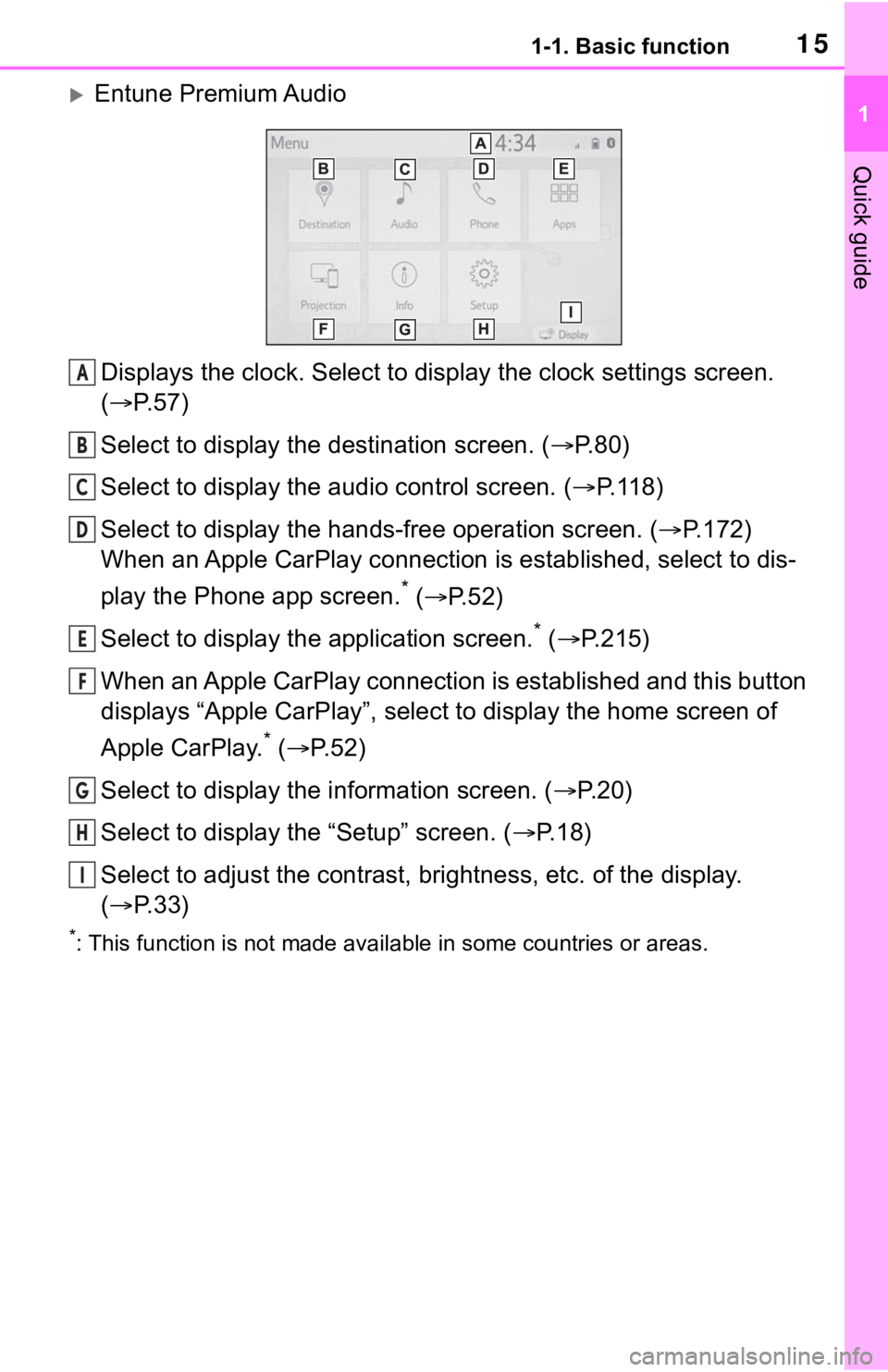
Entune Premium AudioDisplays the clock. Select to display the clock settings screen.
( P. 5 7 )
Select to display the destination screen. ( P.80)
Select to display the audio control screen. ( P.118)
Select to display the hands-free operation screen. ( P.172)
When an Apple CarPlay connection is established, select to dis-
play the Phone app screen.
* ( P.52)
Select to display the application screen.
* ( P.215)
When an Apple CarPlay connection is established and this button
displays “Apple CarPlay”, select to display the home screen of
Apple CarPlay.
* ( P.52)
Select to display the information screen. ( P.20)
Select to display the “Setup” screen. ( P.18)
Select to adjust the contrast, brightness, etc. of the display.
( P. 3 3 )
*: This function is not made availa ble in some countries or areas.
A
B
C
D
E
F
G
H
I
Page 25 of 244
25
2
2
Basic function
Basic function
2-1. Basic information before operation
Initial screen ................... 26
Touch screen.................. 27
Home screen.................. 29
Entering letters and num- bers/list screen operation..................................... 30
Screen adjustment ......... 33
Linking multi-information display and the system. 35
2-2. Connectivity settings Registering/Connecting a Bluetooth
® device ........ 36
Setting Bluetooth
® details
..................................... 40
Wi-Fi
® Hotspot ............... 47
Apple CarPlay ................ 52
2-3. Other settings General settings ............. 56
Voice settings ................. 60
Vehicle settings .............. 61
Page 27 of 244
272-1. Basic information before operation
2
Basic function
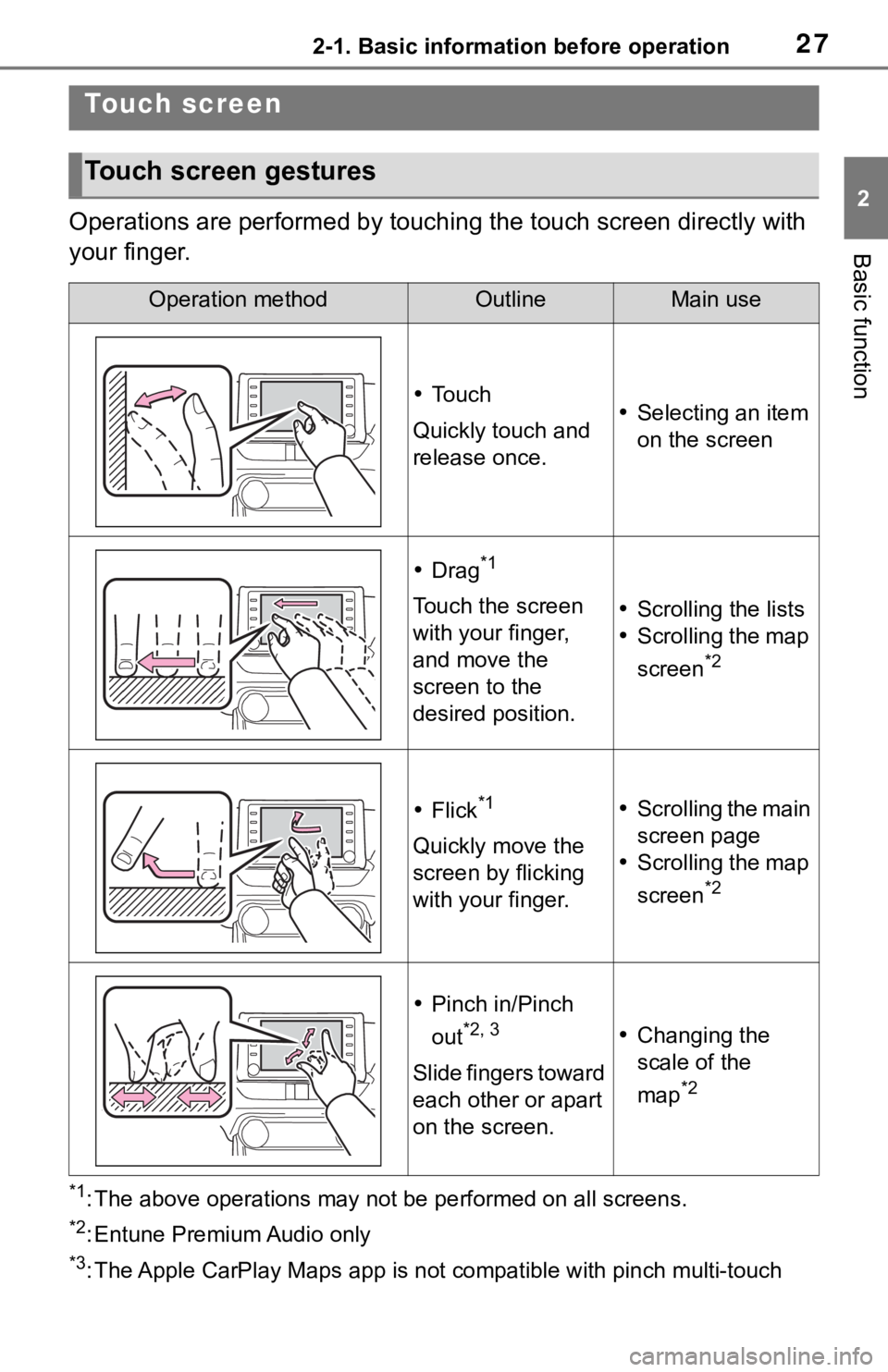
Operations are performed by touching the touch screen directly with
your finger.
*1: The above operations may not be performed on all screens.
*2: Entune Premium Audio only
*3: The Apple CarPlay Maps app is no t compatible with pinch multi-touch
Touch screen
Touch screen gestures
Operation methodOutlineMain use
To u c h
Quickly touch and
release once. Selecting an item
on the screen
Drag*1
Touch the screen
with your finger,
and move the
screen to the
desired position. Scrolling the lists
Scrolling the map
screen
*2
Flick*1
Quickly move the
screen by flicking
with your finger.
Scrolling the main
screen page
Scrolling the map
screen
*2
Pinch in/Pinch
out
*2, 3
Slide fingers toward
each other or apart
on the screen.
Changing the
scale of the
map
*2
Page 29 of 244
292-1. Basic information before operation
2
Basic function
the following, it may not oper-
ate properly:
• Magnetic isolation cards
• Metallic foil, such as the inner packaging of a cigarette box
• Metallic wallets or bags
• Coins
• Discs, such as a CD or DVD
If the operable part of a
capacitive touch screen but-
ton is wiped, it may operate
unintentionally.
If the capacitive touch screen
button is being touched when
the engine switch
ON, the button may not oper-
ate properly. In this case,
remove anything touching the
button, turn the engine switch
turn it to ACC or ON, or
restart the system by press
and hold the “POWER VOL-
UME” knob for 3 seconds or
more.
●Capacitive touch screen button
sensor sensitivity can be adjusted.
( P. 5 6 )
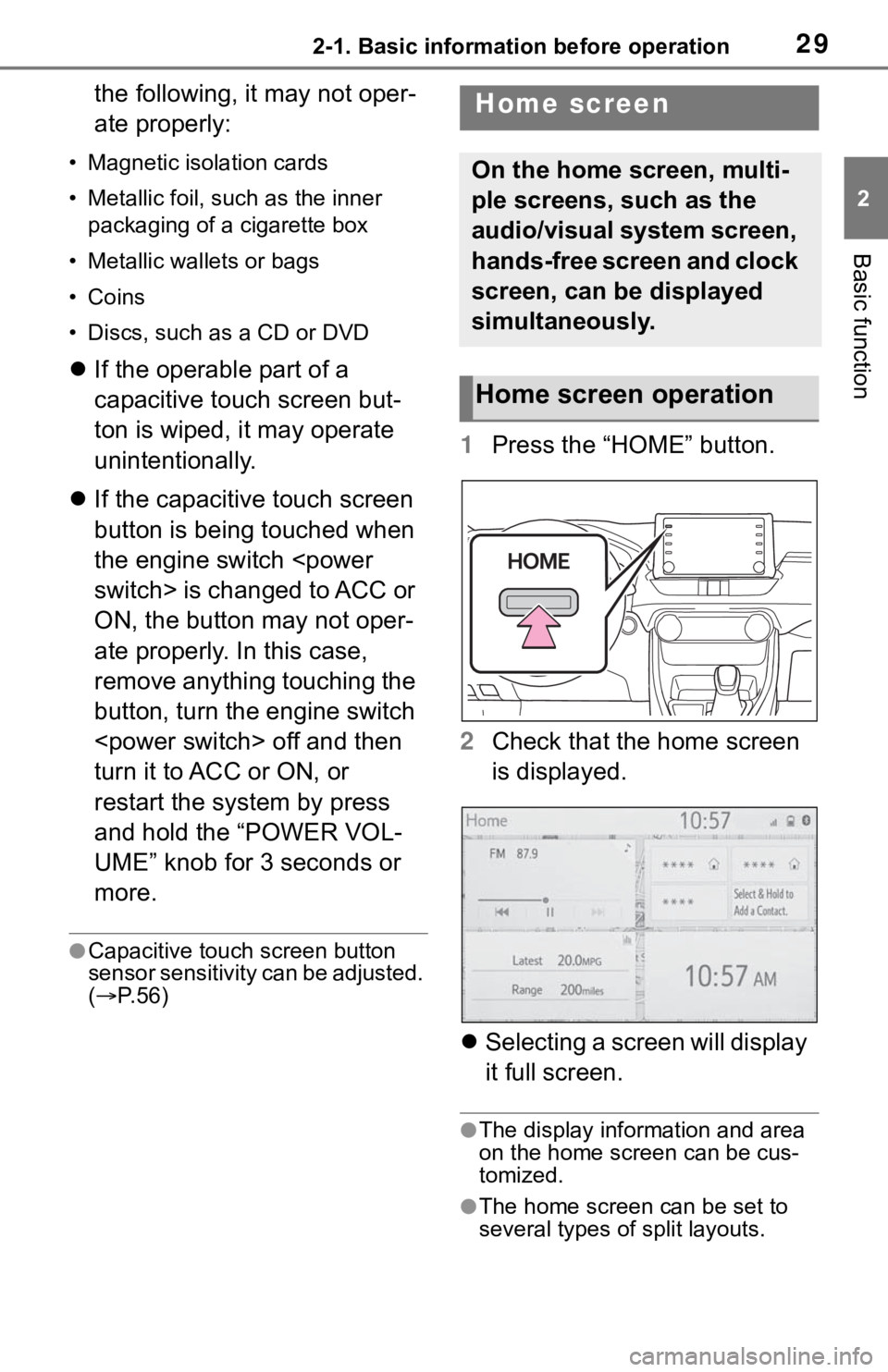
1 Press the “HOME” button.
2 Check that the home screen
is displayed.
Selecting a screen will display
it full screen.
●The display information and area
on the home screen can be cus-
tomized.
●The home screen can be set to
several types of split layouts.
Home screen
On the home screen, multi-
ple screens, such as the
audio/visual system screen,
hands-free screen and clock
screen, can be displayed
simultaneously.
Home screen operation
Page 35 of 244
352-1. Basic information before operation
2
Basic function
Linking multi-infor ma-
tion display and the
system
The following functions of
the system are linked with
the multi-information dis-
play in the instrument clus-
ter:
Audio
Phone
*
etc.
These functions can be
operated using multi-infor-
mation display control
switches on the steering
wheel. For details, refer to
“OWNER’S MANUAL”.
*: When an Apple CarPlay con-
nection is established, this
function will be unavailable.