parking sensors TOYOTA RAV4 HYBRID 2020 (in English) Owner's Manual
[x] Cancel search | Manufacturer: TOYOTA, Model Year: 2020, Model line: RAV4 HYBRID, Model: TOYOTA RAV4 HYBRID 2020Pages: 748, PDF Size: 30.6 MB
Page 312 of 748
3124-5. Using the driving support systems
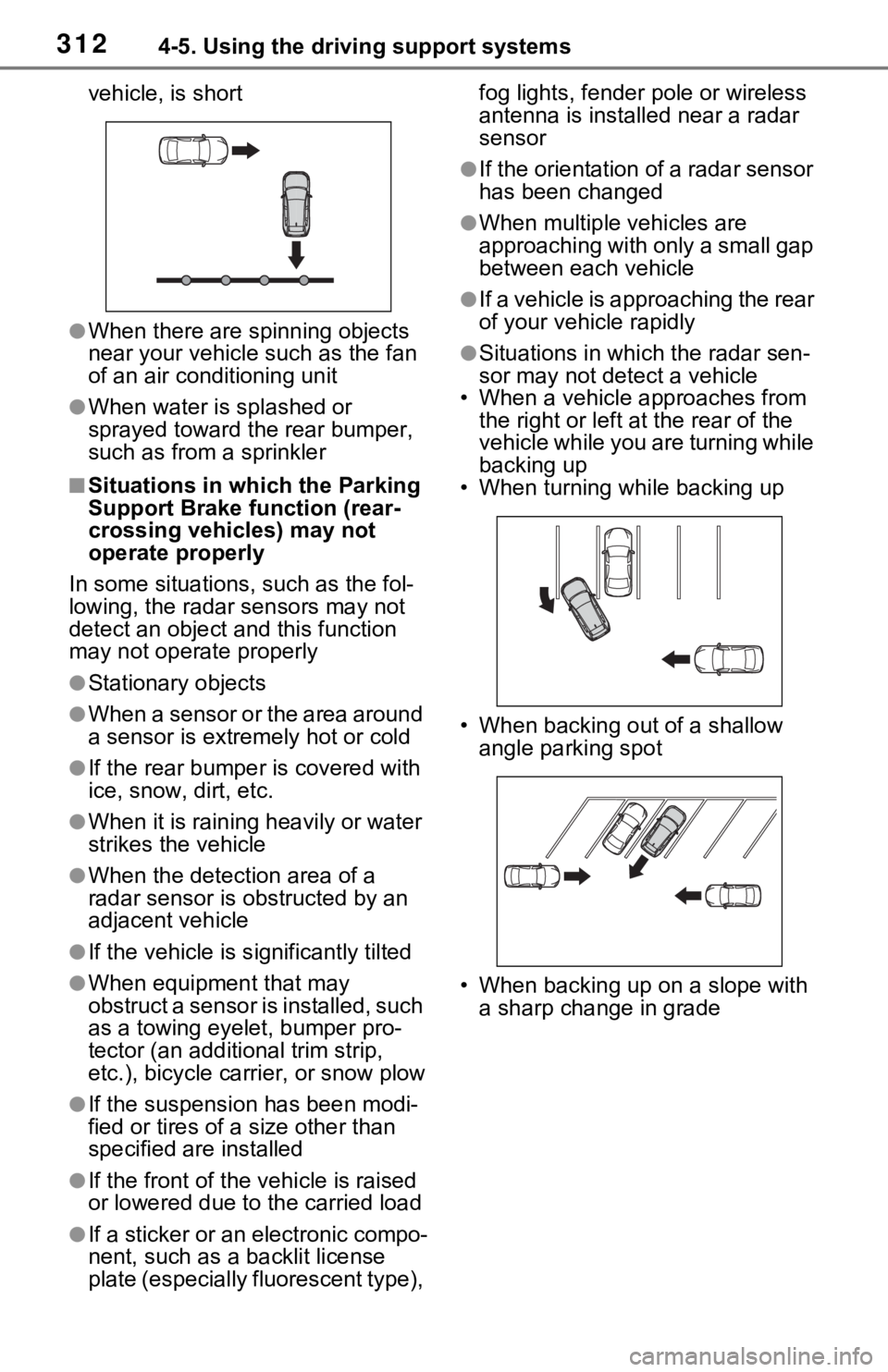
vehicle, is short
●When there are spinning objects
near your vehicle such as the fan
of an air conditioning unit
●When water is splashed or
sprayed toward the rear bumper,
such as from a sprinkler
■Situations in which the Parking
Support Brake function (rear-
crossing vehicles) may not
operate properly
In some situations, such as the fol-
lowing, the radar sensors may not
detect an object and this function
may not operate properly
●Stationary objects
●When a sensor or the area around
a sensor is extremely hot or cold
●If the rear bumper is covered with
ice, snow, dirt, etc.
●When it is raining heavily or water
strikes the vehicle
●When the detecti on area of a
radar sensor is obstructed by an
adjacent vehicle
●If the vehicle is s ignificantly tilted
●When equipment that may
obstruct a sensor is installed, such
as a towing eyelet, bumper pro-
tector (an additional trim strip,
etc.), bicycle carrier, or snow plow
●If the suspension has been modi-
fied or tires of a size other than
specified are installed
●If the front of the vehicle is raised
or lowered due to the carried load
●If a sticker or an electronic compo-
nent, such as a backlit license
plate (especially fluorescent type), fog lights, fender pole or wireless
antenna is installed near a radar
sensor
●If the orientation of a radar sensor
has been changed
●When multiple vehicles are
approaching with only a small gap
between each vehicle
●If a vehicle is approaching the rear
of your vehicle rapidly
●Situations in which the radar sen-
sor may not detect a vehicle
• When a vehicle approaches from
the right or left at the rear of the
vehicle while you are turning while
backing up
• When turning while backing up
• When backing out of a shallow angle parking spot
• When backing up on a slope with a sharp change in grade
Page 738 of 748

738Alphabetical Index
Warning message ................ 184
Panoramic view monitor ........ 334 Camera switch ..................... 336
Checking around the vehicle 339
Checking the front and around the vehicle .......................... 340
Checking the rear and around the vehicle .......................... 345
Checking the sides of the vehicle ........................................... 342
Customizing the panoramic view monitor ............................... 353
Display ................................. 336
Driving precautions .............. 334
How to switch the display ..... 337
Magnifying function .............. 353
Panoramic view monitor precau- tions.................................... 354
Things you should know....... 363
When folding the outside rear view mirrors ........................ 352
Parking assist sensors (intuitive parking assist) ...................... 291
Parking brake Operation ............................. 224
Parking brake engaged warning buzzer ................................ 226
Warning light ........................ 643
Warning message ................ 225
Parking lights Light switch .......................... 229
Replacing light bulbs ............ 620
Wattage ................................ 686
Parking Support Brake (PKSB) ............................................... 298Indicator ................................. 91
Parking Support Brake function (rear-crossing vehicles) ...... 309
Parking Support Brake function (static objects) .................... 303
Warning light ........................ 642
Warning message ................ 302 PCS (Pre-Collision System)
Enabling/disabling the pre-colli-sion system ........................252
Function................................250
Warning light ........................641
Warning messag e ........248, 651
Personal lights ........................533 Switch ...................................533
Wattage ................................686
Phone............ ......................... ..480
About the contacts in the contact list .......................................481
Phone screen operation .......477
Registering/Connecting a
Bluetooth
® phone ...............479
Some basics .........................478
Troubleshooting....................503
Voice command system .......481
When selling or disposing of the vehicle ................................481
Phone button (Menu screen) .389
Phone button (Setup screen) 392
Phone button ........ ..................480
Phone settings ...... ..................493
Contacts/Call history settings495
Message settings .................501
Notifications/display settings 494
Sounds settings ....................493
PKSB (Parking Support Brake) ...............................................298Indicator..................................91
Parking Support Brake function (rear-crossing vehicles) ......309
Parking Support Brake function (static objects) ....................303
Warning light ........................642
Warning message . ...............302
Placing a call using the
Bluetooth
® hands-free system
...............................................482 By call history .......................482
By contacts list .....................483