parking brake TOYOTA RAV4 HYBRID 2020 (in English) Workshop Manual
[x] Cancel search | Manufacturer: TOYOTA, Model Year: 2020, Model line: RAV4 HYBRID, Model: TOYOTA RAV4 HYBRID 2020Pages: 748, PDF Size: 30.6 MB
Page 346 of 748
3464-5. Using the driving support systems
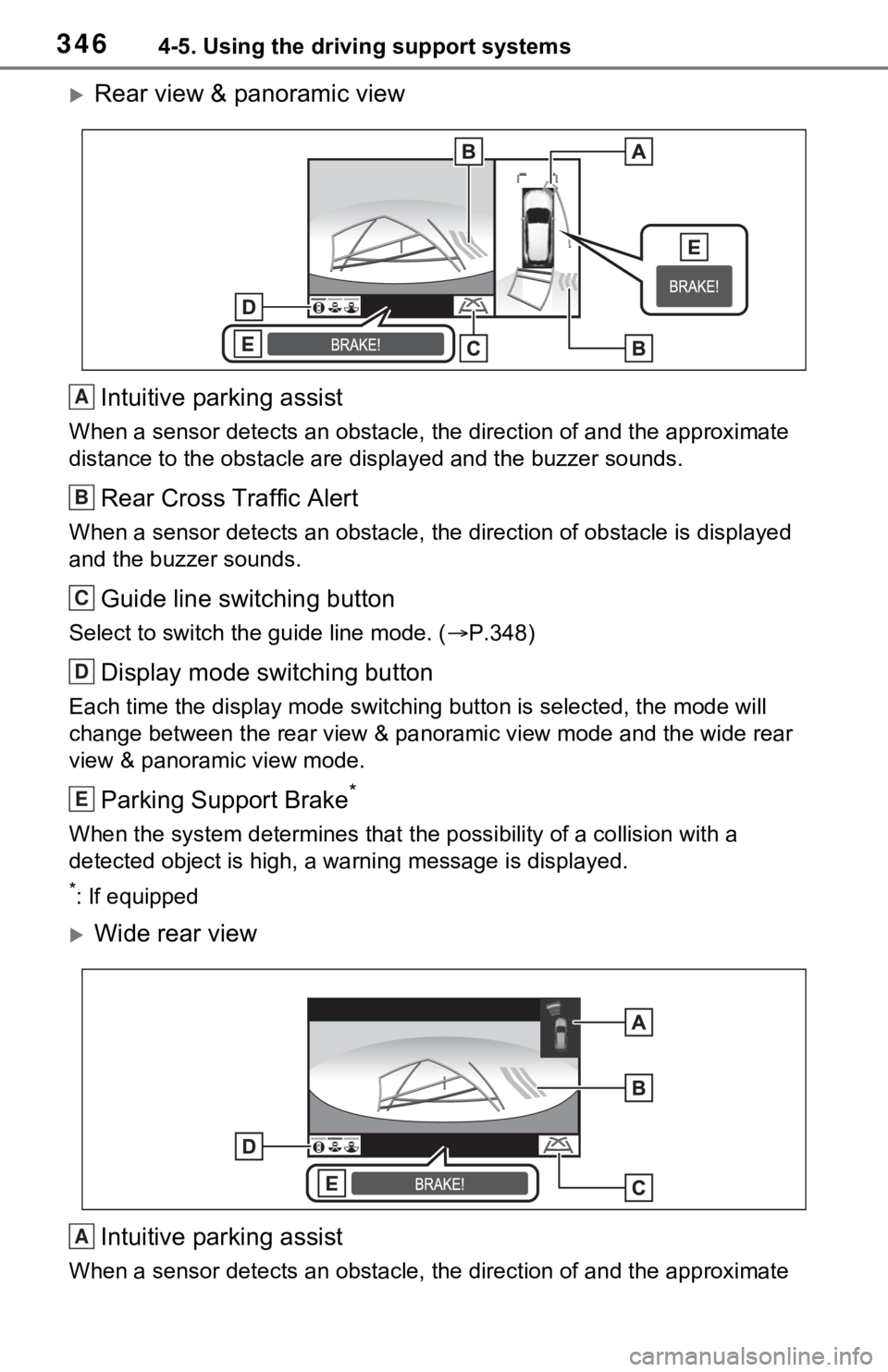
Rear view & panoramic viewIntuitive parking assist
When a sensor detects an obstacle, the direction of and the app roximate
distance to the obsta cle are displayed and the buzzer sounds.
Rear Cross Traffic Alert
When a sensor detects an obstacle, the direction of obstacle is displayed
and the buzzer sounds.
Guide line switching button
Select to switch the guide line mode. ( P.348)
Display mode switching button
Each time the display mode swit ching button is selected, the mode will
change between the rear view & panoramic view mode and the wide rear
view & panoramic view mode.
Parking Support Brake*
When the system determines that the possibility of a collision with a
detected object is high, a warning message is displayed.
*: If equipped
Wide rear view
Intuitive parking assist
When a sensor detects an obstacle, the direction of and the app roximate
A
B
C
D
E
A
Page 347 of 748
3474-5. Using the driving support systems
4
Driving
distance to the obstacle are displayed and the buzzer sounds.
Rear Cross Traffic Alert
When a sensor detects an obstacle, the direction of obstacle is displayed
and the buzzer sounds.
Guide line switching button
Select to switch the guide line mode. ( P.348)
Display mode switching button
Each time the display mode swit ching button is selected, the mode will
change between the rear view & panoramic view mode and the wide rear
view & panoramic view mode.
Parking Support Brake*
When the system determines that the possibility of a collision with a
detected object is high, a warning message is displayed.
*: If equipped
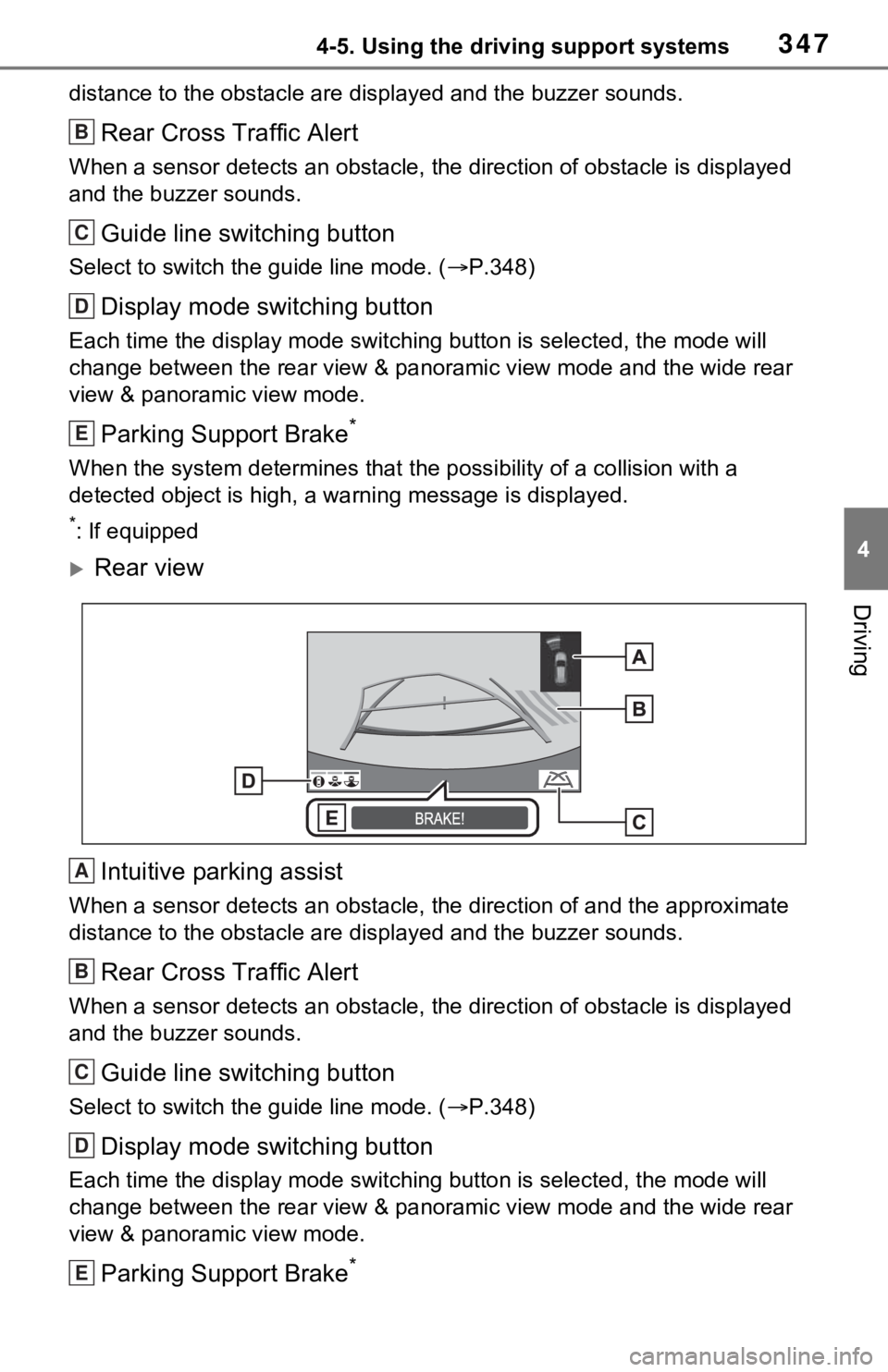
Rear view
Intuitive parking assist
When a sensor detects an obstacle, the direction of and the app roximate
distance to the obsta cle are displayed and the buzzer sounds.
Rear Cross Traffic Alert
When a sensor detects an obstacle, the direction of obstacle is displayed
and the buzzer sounds.
Guide line switching button
Select to switch the guide line mode. ( P.348)
Display mode switching button
Each time the display mode swit ching button is selected, the mode will
change between the rear view & panoramic view mode and the wide rear
view & panoramic view mode.
Parking Support Brake*
B
C
D
E
A
B
C
D
E
Page 348 of 748
3484-5. Using the driving support systems
When the system determines that the possibility of a collision with a
detected object is high, a warning message is displayed.
*: If equipped
●The monitor is canceled when the shift lever is shifted into any position
other than the “R” position.
●For details about the intuitive parking assist ( P.291), Rear Cross Traffic
Alert function ( P.288) and Parking Support Brake* function. ( P.298)
●The display position of the intuitive parking assist and the po sition of
obstacles displayed in the camera image do not match.
*: If equipped
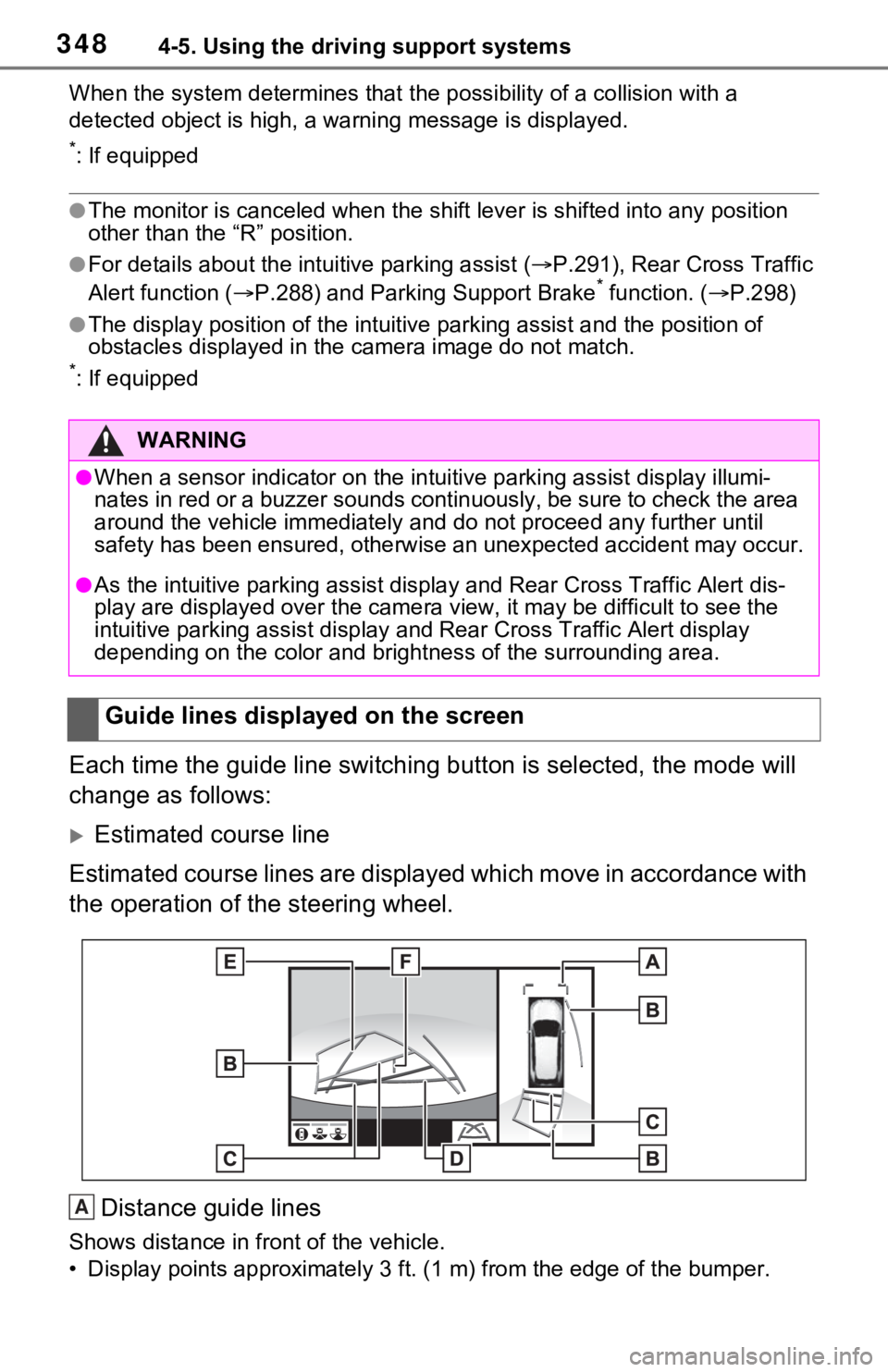
Each time the guide line switching button is selected, the mode will
change as follows:
Estimated course line
Estimated course lines are displ ayed which move in accordance w ith
the operation of the steering wheel.
Distance guide lines
Shows distance in front of the vehicle.
• Display points approximately 3 ft. (1 m) from the edge of the bumper.
WARNING
●When a sensor indicator on the intuitive parking assist display illumi-
nates in red or a buzzer sounds continuously, be sure to check the area
around the vehicle immediately a nd do not proceed any further until
safety has been ensured, otherwise an unexpected accident may o ccur.
●As the intuitive parking assist display and Rear Cross Traffic Alert dis-
play are displayed over the came ra view, it may be difficult to see the
intuitive parking assist display and Rear Cross Traffic Alert d isplay
depending on the color and brigh tness of the surrounding area.
Guide lines displayed on the screen
A
Page 371 of 748
3714-5. Using the driving support systems
4
Driving
*: PCS will also be disabled (only Pre-Collision warning is avail-
able). The PCS warning light will
come on and a message will be
displayed on the multi-information
display. ( P.257)
■When the message is dis-
played on the multi-information
display showing that TRAC has
been disabled even if has
not been pressed
TRAC is temporary deactivated. If
the information continues to show,
contact your Toyota dealer.
■Operating conditions of hill-
start assist control
When the following four conditions
are met, the hill-start assist control
will operate:
●The shift lever is in a position
other than P or N (when starting
off forward/backward on an
upward incline).
●The vehicle is stopped.
●The accelerator pedal is not
depressed.
●The parking brake is not engaged.
■Automatic system cancelation
of hill-start as sist control
The hill-start assis t control will turn
off in any of the following situations:
●The shift lever is shifted to P or N.
●The accelerator pedal is
depressed.
●The parking brake is engaged.
●No more than 2 seconds have
elapsed after the brake pedal is
released.
■Sounds and vibrations caused
by the ABS, brake assist, VSC,
Trailer Sway Control, TRAC and
hill-start assist control systems
●A sound may be heard from the
engine compartment when the
brake pedal is dep ressed repeat- edly, when the h
ybrid system is
started or just after the vehicle
begins to move. This sound does
not indicate that a malfunction has
occurred in any of these systems.
●Any of the following conditions
may occur when the above sys-
tems are operating. None of these
indicates that a malfunction has
occurred.
• Vibrations may be felt through the vehicle body and steering.
• A motor sound may be heard also after the vehicle comes to a stop.
■ECB operating sound
ECB operating sound may be heard
in the following cases, but it does
not indicate that a malfunction has
occurred.
●Operating sound heard from the
engine compartment when the
brake pedal is operated.
●Motor sound of the brake system
heard from the f ront part of the
vehicle when the driver’ door is
opened.
●Operating sound heard from the
engine compartment when one or
two minutes passed after the stop
of the hybrid system.
■Active Cornering Assist opera-
tion sounds and vibrations
When the Active Cornering Assist is
operated, operation sounds and
vibrations may be generated from
the brake system, but this is not a
malfunction.
■EPS operation sound
When the steering wheel is oper-
ated, a motor sound (whirring
sound) may be heard. This does not
indicate a malfunction.
■Automatic reactivation of
TRAC, Trailer Sway Control and
VSC systems
After turning the TRAC, Trailer
Sway Control and VSC systems off,
the systems will be a utomatically re-
enabled in the following situations:
Page 374 of 748

3744-5. Using the driving support systems
WARNING
●When driving over roads with
potholes or uneven surfaces
■TRAC/VSC may not operate
effectively when
Directional control and power may
not be achievable while driving on
slippery road surfaces, even if the
TRAC/VSC system is operating.
Drive the vehicle carefully in con-
ditions where st ability and power
may be lost.
■Active Cornering Assist does
not operate effectively when
●Do not overly rely on Active
Cornering Assist. Active Corner-
ing Assist may not operate
effectively when accelerating
down slopes or driving on slip-
pery road surfaces.
●When Active Cornering Assist
frequently operates, Active Cor-
nering Assist may temporarily
stop operating to ensure proper
operation of the brakes, TRAC
and VSC.
■Hill-start assist control does
not operate effectively when
●Do not overly rely on hill-start
assist control. Hill-start assist
control may not operate effec-
tively on steep inclines and
roads covered with ice.
●Unlike the parking brake, hill-
start assist control is not
intended to hold the vehicle sta-
tionary for an extended period
of time. Do not attempt to use
hill-start assist control to hold
the vehicle on an incline, as
doing so may lead to an acci-
dent.
■When the
TRAC/ABS/VSC/Trailer Sway
Control is activated
The slip indicator light flashes.
Always drive carefully. Reckless
driving may cause an accident.
Exercise particula r care when the
indicator light flashes.
■When the TRAC/VSC/Trailer
Sway Control systems are
turned off
Be especially careful and drive at
a speed appropriate to the road
conditions. As these are the sys-
tems to help ensure vehicle stabil-
ity and driving force, do not turn
the TRAC/VSC/Tra iler Sway Con-
trol systems off unless necessary.
Trailer Sway Control is part of the
VSC system and will not operate
if VSC is turned off or experiences
a malfunction.
■Replacing tires
Make sure that all tires are of the
specified size, brand, tread pat-
tern and total load capacity. In
addition, make sure that the tires
are inflated to the recommended
tire inflation p ressure level.
The ABS, TRAC and VSC/Trailer
Sway Control systems will not
function correctly if different tires
are installed on the vehicle.
Contact your Toyota dealer for
further information when replacing
tires or wheels.
■Handling of tires and the sus-
pension
Using tires with any kind of prob-
lem or modifying the suspension
will affect the driving assist sys-
tems, and may cause a system to
malfunction.
Page 376 of 748
3764-6. Driving tips
4-6.Driving tips
When using Eco drive mode, the
torque corresponding to the
accelerator pedal depression
amount can be generated more
smoothly than it is in normal
conditions. In addition, the oper-
ation of the air conditioning sys-
tem (heating/cooling) will be
minimized, improving the fuel
economy. (P.366)
The Eco-friendly driving is pos-
sible by keeping the indicator of
Hybrid System Indicator within
Eco area. ( P.95, 100)
Shift the shift lever to D when
stopped at a traffic light, or driv-
ing in heavy traffic etc. Shift the
shift lever to P when parking.
When using the N position,
there is no positive effect on fuel
consumption. In the N position,
the gasoline engine operates
but electricity cannot be gener-
ated. Also, when using the air conditioning system, etc., the
hybrid battery (traction battery)
power is consumed.
Drive your vehicle smoothly.
Avoid abrupt acceleration and
deceleration. Gradual accel-
eration and deceleration will
make more effective use of
the electric motor (traction
motor) without having to use
gasoline engine power.
Avoid repeated acceleration.
Repeated acceleration con-
sumes hybrid battery (trac-
tion battery) power, resulting
in poor fuel consumption. Bat-
tery power can be restored by
driving with the accelerator
pedal slightly released.
Make sure to operate the brakes
gently and in a timely manner. A
greater amount of electrical
energy can be regenerated
when slowing down.
Repeated acceleration and
deceleration, as well as long
waits at traffic lights, will lead to
bad fuel economy. Check traffic
reports before leaving and avoid
delays as much as possible.
Hybrid vehicle driving
tips
For economical and ecolog-
ical driving, pay attention to
the following points:
Using Eco drive mode
Use of Hybrid System
Indicator
Shift lever operation
Accelerator pedal/brake
pedal operation
When braking
Delays
Page 379 of 748
3794-6. Driving tips
4
Driving
Perform the following according
to the driving conditions:
Do not try to forcibly open a
window or move a wiper that
is frozen. Pour warm water
over the frozen area to melt
the ice. Wipe away the water
immediately to prevent it from
freezing.
To ensure proper operation of
the climate control system
fan, remove any snow that
has accumulated on the air
inlet vents in front of the wind-
shield.
Check for and remove any
excess ice or snow that may
have accumulated on the
exterior lights, vehicle’s roof,
chassis, around the tires or on
the brakes.
Remove any snow or mud
from the bottom of your shoes
before getting in the vehicle.
Accelerate the vehicle slowly,
keep a safe distance between
you and the vehicle ahead, and
drive at a reduced speed suit-
able to road conditions.
Park the vehicle and move
the shift lever to P without set- ting the parking brake. The
parking brake may freeze up,
preventing it from being
released. If the vehicle is
parked without setting the
parking brake, make sure to
block the wheels.
Failure to do so may be dan-
gerous because it may cause
the vehicle to move unexpect-
edly, possibly leading to an
accident.
When the parking brake is in
automatic mode, release the
parking brake after shifting
the shift lever to P. (
P.224)
If the vehicle is left parked
with the brakes damp in cold
temperatures, there is a pos-
sibility of the brakes freezing.
If the vehicle is parked without
setting the parking brake,
confirm that the shift lever
cannot be moved out of P
*.
*: The shift lever will be locked if it is
attempted to be sh ifted from P to
any other position without
depressing the brake pedal. If the
shift lever can be shifted from P,
there may be a problem with the
shift lock system. Have the vehi-
cle inspected by your Toyota
dealer immediately.
Before driving the vehicle
When driving the vehicle
When parking the vehicle
Page 380 of 748
3804-6. Driving tips
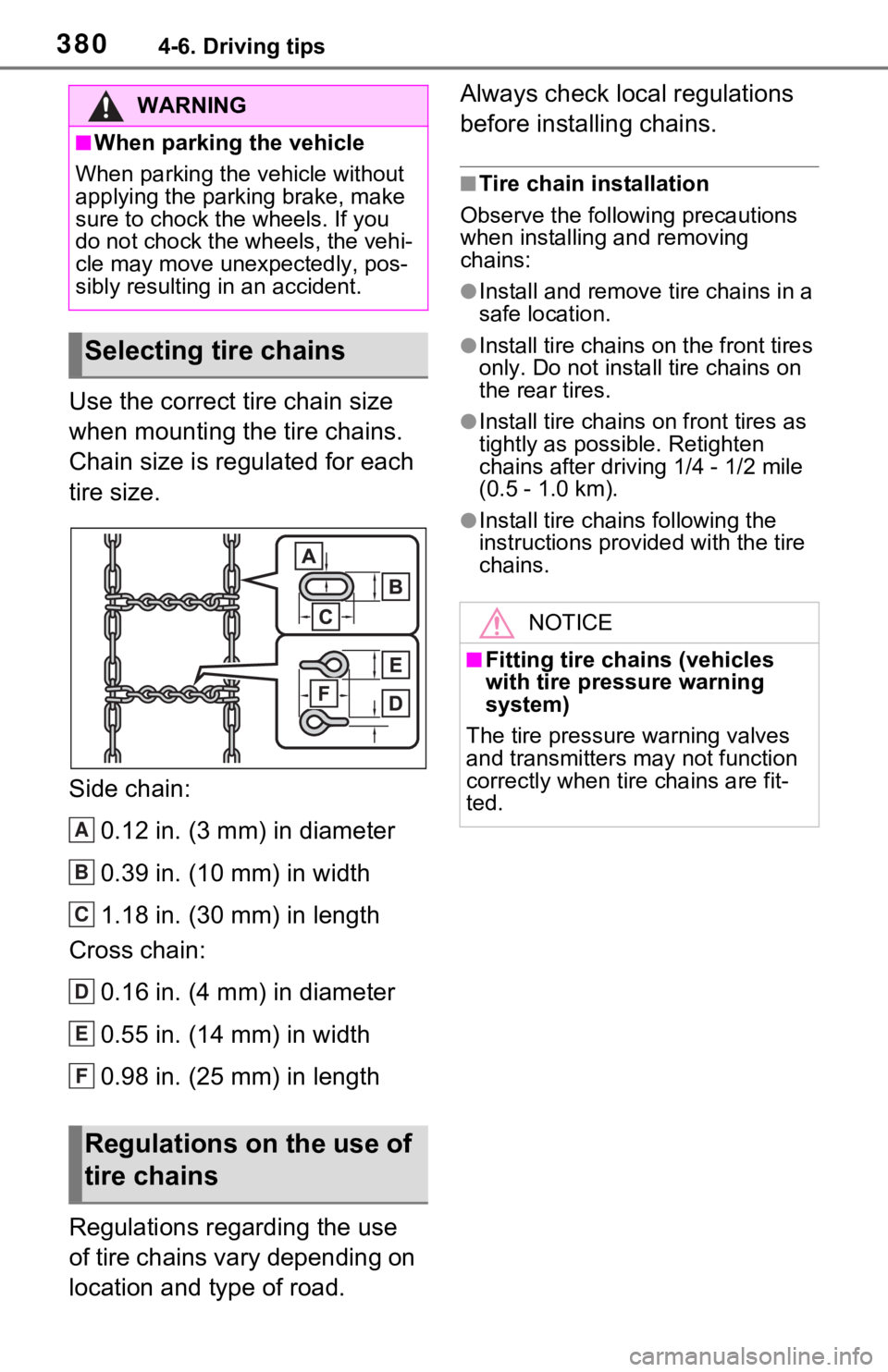
Use the correct tire chain size
when mounting the tire chains.
Chain size is regulated for each
tire size.
Side chain:0.12 in. (3 mm) in diameter
0.39 in. (10 mm) in width
1.18 in. (30 mm) in length
Cross chain:
0.16 in. (4 mm) in diameter
0.55 in. (14 mm) in width
0.98 in. (25 mm) in length
Regulations regarding the use
of tire chains vary depending on
location and type of road. Always check local regulations
before installing chains.
■Tire chain installation
Observe the followi ng precautions
when installing and removing
chains:
●Install and remove tire chains in a
safe location.
●Install tire chains on the front tires
only. Do not install tire chains on
the rear tires.
●Install tire chains on front tires as
tightly as possible. Retighten
chains after drivi ng 1/4 - 1/2 mile
(0.5 - 1.0 km).
●Install tire chains following the
instructions provided with the tire
chains.
WARNING
■When parking the vehicle
When parking the v ehicle without
applying the parking brake, make
sure to chock the wheels. If you
do not chock the wheels, the vehi-
cle may move une xpectedly, pos-
sibly resulting in an accident.
Selecting tire chains
Regulations on the use of
tire chains
A
B
C
D
E
F
NOTICE
■Fitting tire chains (vehicles
with tire pressure warning
system)
The tire pressure warning valves
and transmitters may not function
correctly when tire chains are fit-
ted.
Page 393 of 748
3935-2. Basic information before operation
5
Audio
5-2.Basic information before operation
After a few seconds, the caution
screen will be displayed.
After about 5 seconds or select-
ing “Continue”, the caution
screen automatically switches to
the next screen.
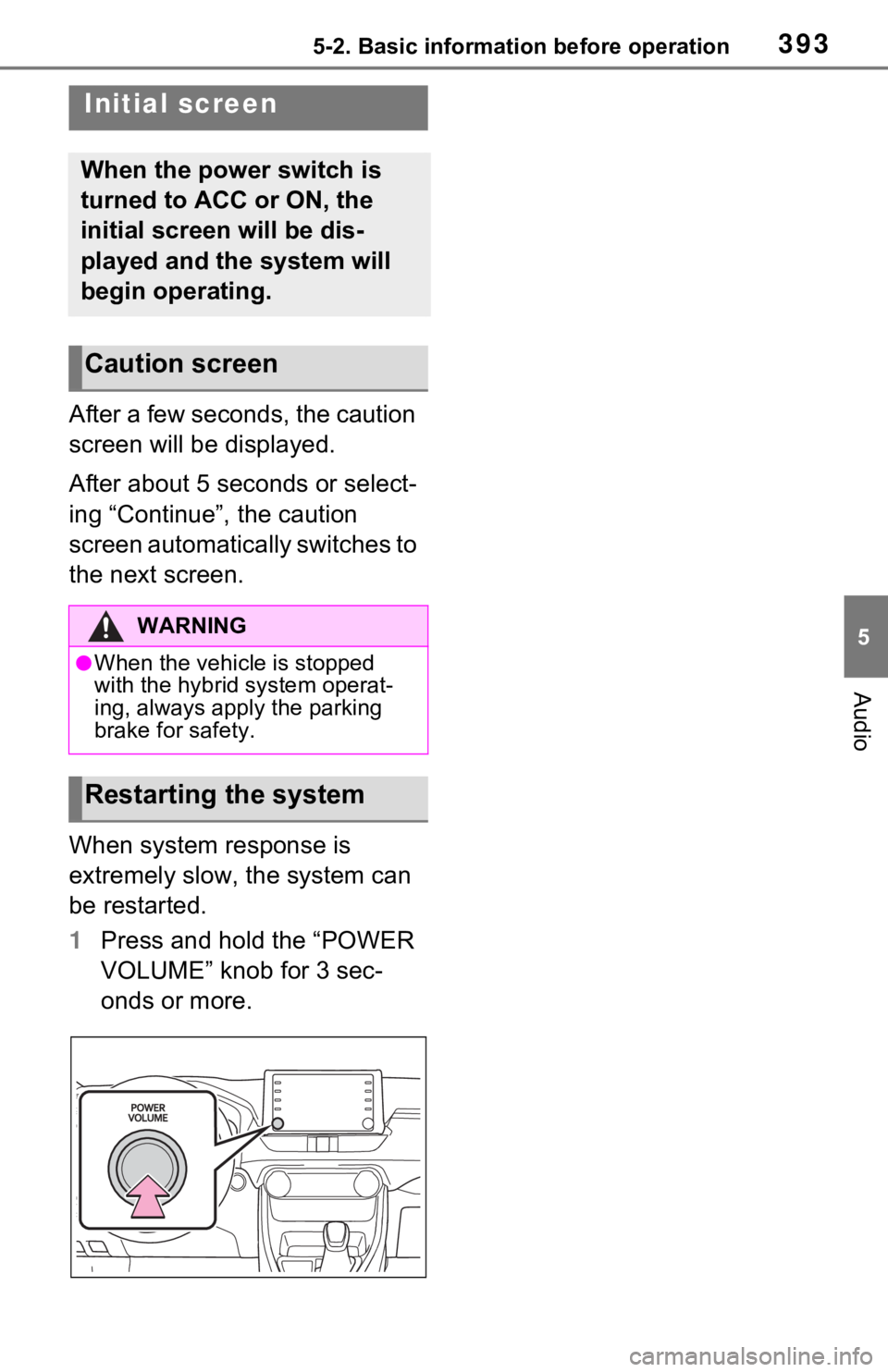
When system response is
extremely slow, the system can
be restarted.
1Press and hold the “POWER
VOLUME” knob for 3 sec-
onds or more.
Initial screen
When the power switch is
turned to ACC or ON, the
initial screen will be dis-
played and the system will
begin operating.
Caution screen
WARNING
●When the vehicle is stopped
with the hybrid system operat-
ing, always apply the parking
brake for safety.
Restarting the system
Page 573 of 748
5737-2. Maintenance
7
Maintenance and care
Parking brake
• Does the park-ing brake oper-
ate normally?
• When parked on a slope and the
parking brake is
on, is the vehicle
securely
stopped?
Seat belts
• Do the seat belts operate
smoothly?
• The seat belts should not be
damaged.
Seats
• Do the seat con-trols operate
properly?
Steering wheel
• Does the steer-ing wheel rotate
smoothly?
• Does the steer- ing wheel have
the correct
amount of free
play?
• There should not be any strange
sounds coming
from the steer-
ing wheel.
ItemsCheck pointsVehicle exterior
ItemsCheck points
Doors
• Do the doors operate
smoothly?
Engine hood
• Does the engine hood lock system
work properly?
Fluid leaks
• There should not be any signs of
fluid leakage
after the vehicle
has been parked.
Tires
• Is the tire infla-tion pressure
correct?
• The tires should not be damaged
or excessively
worn.
• Have the tires been rotated
according to the
maintenance
schedule?
• The wheel nuts should not be
loose.
Windshield
wipers/rear
window wiper
• The wiper blades should not show
any signs of
cracking, split-
ting, wear, con-
tamination or
deformation.
• The wiper blades should clear the
windshield/rear
window without
streaking or skip-
ping.