parking brake TOYOTA RAV4 HYBRID 2020 (in English) Service Manual
[x] Cancel search | Manufacturer: TOYOTA, Model Year: 2020, Model line: RAV4 HYBRID, Model: TOYOTA RAV4 HYBRID 2020Pages: 748, PDF Size: 30.6 MB
Page 306 of 748

3064-5. Using the driving support systems
■The Parking Support Brake
function (static object) will
operate when
The function will op erate when the
PKSB OFF indicato r is not illumi-
nated or flashing ( P.89, 91) and
all of the followin g conditions are
met:
●Hybrid system output restriction
control
• The Parking Support Brake is
enabled.
• The vehicle speed is 9 mph (15 km/h) or less.
• There is a static object in the trav- eling direction of the vehicle and 6
to 13 ft. (2 to 4 m) away.
• The Parking Support Brake deter- mines that a stronger-than-nor-
mal brake operation is necessary
to avoid a collision.
●Brake control
• Hybrid system output restriction control is operating
• The Parking Support Brake deter-
mines that an immediate brake
operation is necessary to avoid a
collision.
■The Parking Support Brake
function (static objects) will
stop operating when
The function will st op operating if
any of the following conditions are
met:
●Hybrid system output restriction
control
• The Parking Support Brake is dis- abled.
• The system determines that the
collision has beco me avoidable
with normal brake operation.
• The static object is no longer 6 to
13 ft. (2 to 4 m) away from the
vehicle or in the traveling direction
of the vehicle.
●Brake control
• The Parking Support Brake is dis-
abled.
• Approximately 2 seconds have elapsed since the vehicle was stopped by brake control.
• The brake pedal is depressed after the vehicle is stopped by
brake control.
• The static object is no longer 6 to 13 ft. (2 to 4 m) away from the
vehicle or in the traveling direction
of the vehicle.
■Detection range of the Parking
Support Brake function (static
objects)
The detection range of the Parking
Support Brake function (static
objects) differs from the detection
range of the intuiti ve parking assist.
( P.296) Therefore, even if the
intuitive parking assist detects an
object and provides a warning, the
Parking Support Brake function
(static objects) may not start operat-
ing.
■Objects that the Parking Sup-
port Brake function (static
objects) may not detect
The sensors may not be able to
detect certain objects, such as the
following:
●Pedestrian
●Cotton, snow, and other materials
that are poor re flectors of sonic
waves
●Objects which are not perpendicu-
lar to the ground, are not perpen-
dicular to the traveling direction of
the vehicle, are uneven or are
waving
●Low objects
●Thin objects such as wires,
fences, ropes and signposts
●Objects that are e xtremely close
to the bumper
●Sharply-angled objects
●Tall objects with upper sections
projecting outwards in the direc-
tion of your vehicle
Page 307 of 748
3074-5. Using the driving support systems
4
Driving
■Situations in which the Parking
Support Brake function (static
objects) may not operate
When the shift lever is in N
■Intuitive parking assist buzzer
Regardless of whether the intuitive
parking assist syste m is enabled or
not ( P.293), if the Parking Support
Brake function (static objects) is
enabled ( P.299), the front or rear
sensors detect an object and brake
control and hybrid system output
restriction control are performed, the
intuitive parking assist buzzer will
sound to notify the driver of the
approximate distanc e to the object.
■Situations in which the Parking
Support Brake function (static
objects) may operate even if
there is no possibility of a colli-
sion
In some situations, such as the fol-
lowing, the Parking Support Brake
function (static objects) may operate
even though there is no possibility of
a collision.
●Vehicle surroundings
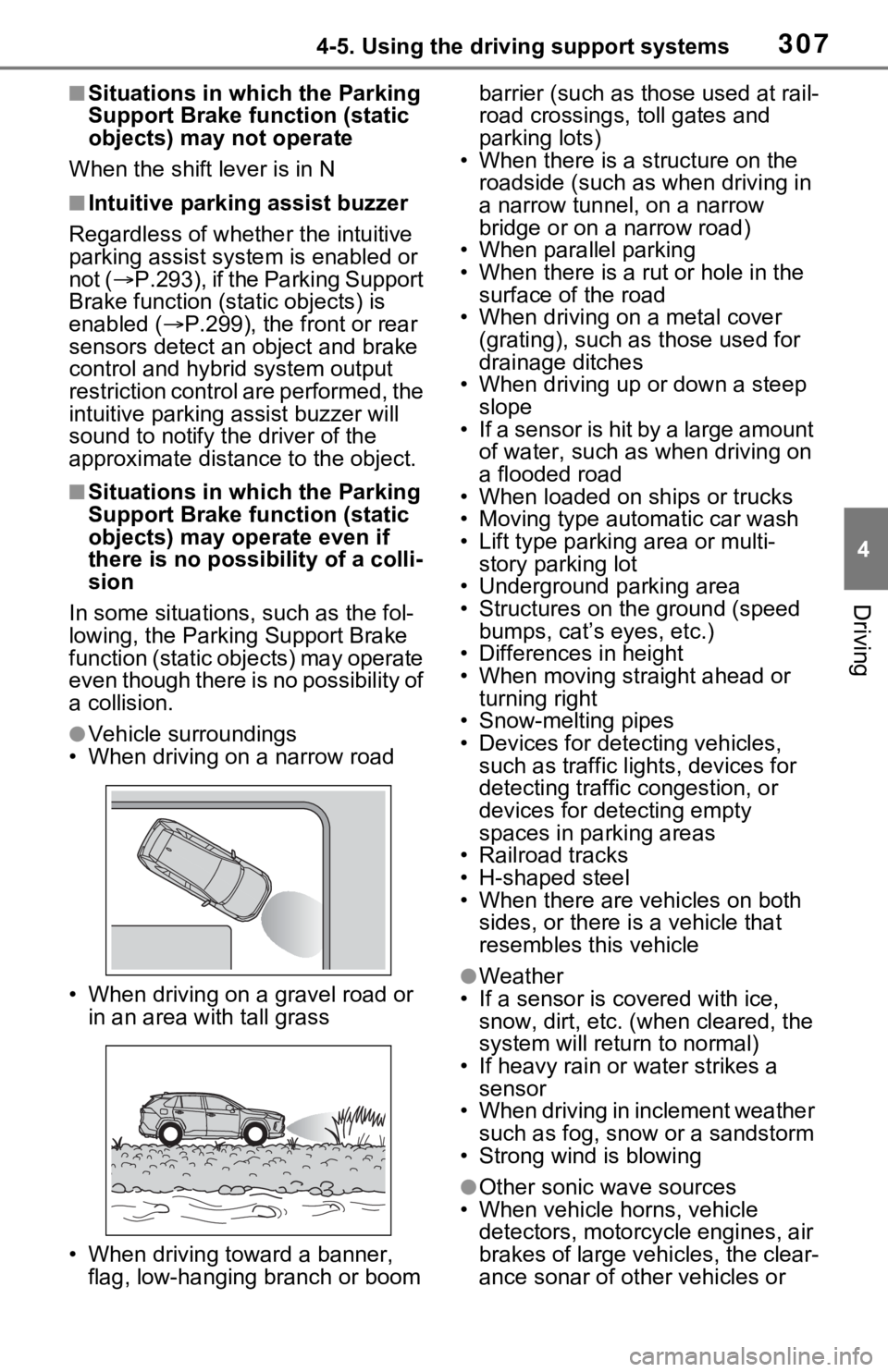
• When driving on a narrow road
• When driving on a gravel road or in an area with tall grass
• When driving toward a banner, flag, low-hanging branch or boom barrier (such as those used at rail-
road crossings, toll gates and
parking lots)
• When there is a structure on the
roadside (such as when driving in
a narrow tunnel , on a narrow
bridge or on a narrow road)
• When parallel parking
• When there is a rut or hole in the surface of the road
• When driving on a metal cover (grating), such as those used for
drainage ditches
• When driving up or down a steep slope
• If a sensor is hit by a large amount
of water, such as when driving on
a flooded road
• When loaded on ships or trucks
• Moving type automatic car wash
• Lift type parking area or multi-
story parking lot
• Underground parking area
• Structures on the ground (speed
bumps, cat’s eyes, etc.)
• Differences in height
• When moving straight ahead or
turning right
• Snow-melting pipes
• Devices for detecting vehicles,
such as traffic lig hts, devices for
detecting traffic congestion, or
devices for detecting empty
spaces in parking areas
• Railroad tracks
• H-shaped steel
• When there are vehicles on both sides, or there is a vehicle that
resembles this vehicle
●Weather
• If a sensor is covered with ice, snow, dirt, etc. (when cleared, the
system will return to normal)
• If heavy rain or water strikes a sensor
• When driving in inclement weather
such as fog, snow or a sandstorm
• Strong wind is blowing
●Other sonic wave sources
• When vehicle horns, vehicle detectors, motorcycle engines, air
brakes of large vehicles, the clear-
ance sonar of ot her vehicles or
Page 308 of 748
3084-5. Using the driving support systems
other devices which produce ultra-
sonic waves are near the vehicle
• If a sticker or an electronic compo- nent, such as a backlit license
plate (especially fluorescent type),
fog lights, fender pole or wireless
antenna is insta lled near a sensor
●Changes in the vehicle posture
• If the vehicle is significantly tilted
• If the front of the vehicle is raised
or lowered due to the carried load
• If the orientation of a sensor has
been changed due t o a collision or
other impact
■Situations in which the Parking
Support Brake function (static
objects) may not operate prop-
erly
In some situations, such as the fol-
lowing, this function may not oper-
ate properly.
●Weather
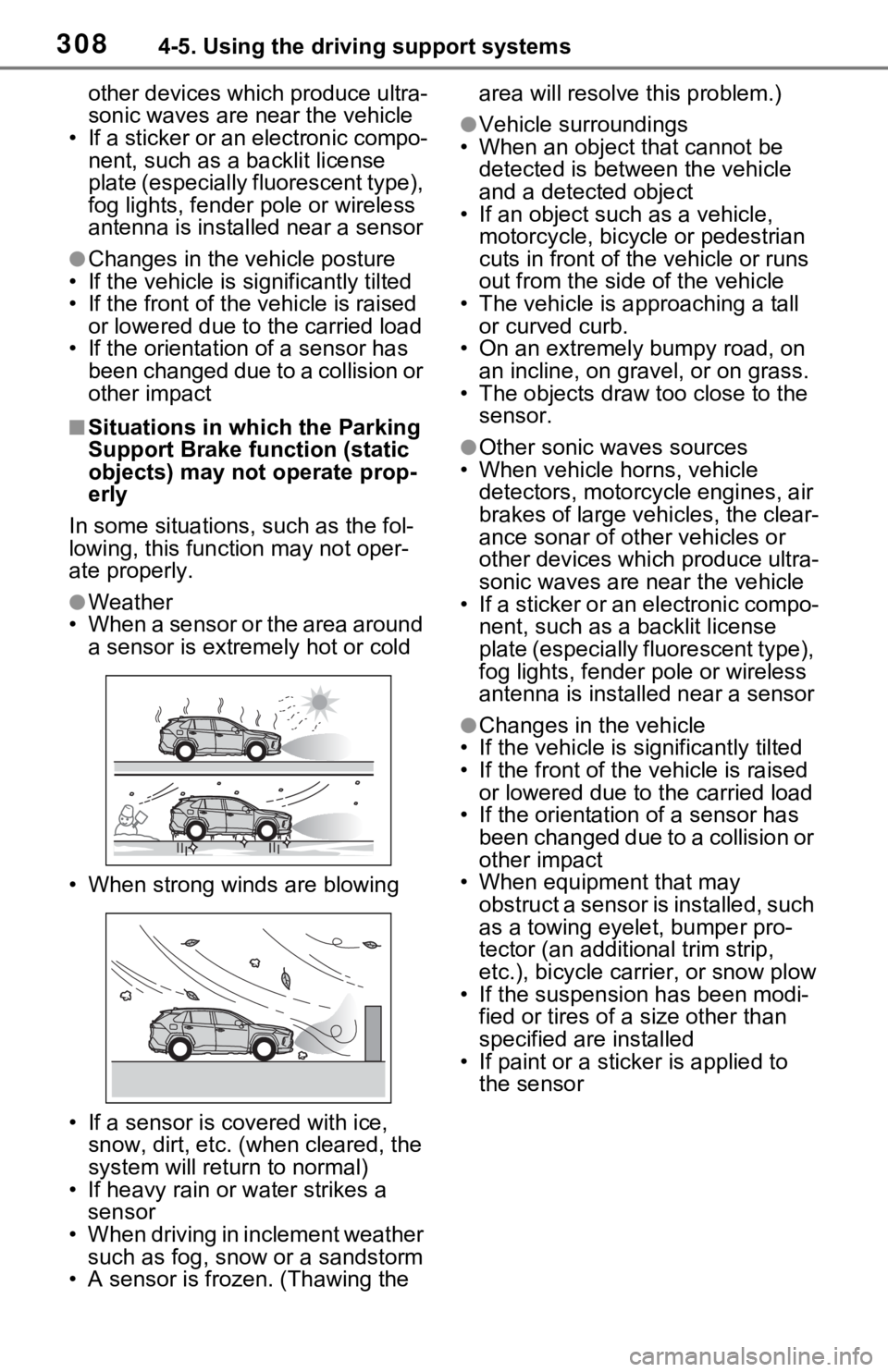
• When a sensor or the area around a sensor is extremely hot or cold
• When strong winds are blowing
• If a sensor is covered with ice, snow, dirt, etc. (when cleared, the
system will return to normal)
• If heavy rain or water strikes a sensor
• When driving in inclement weather
such as fog, snow or a sandstorm
• A sensor is frozen. (Thawing the area will resolve this problem.)
●Vehicle surroundings
• When an object that cannot be
detected is between the vehicle
and a detected object
• If an object such as a vehicle,
motorcycle, bicycle or pedestrian
cuts in front of the vehicle or runs
out from the side of the vehicle
• The vehicle is approaching a tall or curved curb.
• On an extremely bumpy road, on
an incline, on gravel, or on grass.
• The objects draw too close to the sensor.
●Other sonic waves sources
• When vehicle horns, vehicle
detectors, motorcycle engines, air
brakes of large vehicles, the clear-
ance sonar of ot her vehicles or
other devices which produce ultra-
sonic waves are near the vehicle
• If a sticker or an electronic compo- nent, such as a backlit license
plate (especially fluorescent type),
fog lights, fender pole or wireless
antenna is installed near a sensor
●Changes in the vehicle
• If the vehicle is significantly tilted
• If the front of the v ehicle is raised
or lowered due to the carried load
• If the orientation of a sensor has
been changed due to a collision or
other impact
• When equipment that may
obstruct a sensor is installed, such
as a towing eyelet, bumper pro-
tector (an additional trim strip,
etc.), bicycle car rier, or snow plow
• If the suspension has been modi- fied or tires of a size other than
specified are installed
• If paint or a stic ker is applied to
the sensor
Page 309 of 748
3094-5. Using the driving support systems
4
Driving
*: If equipped
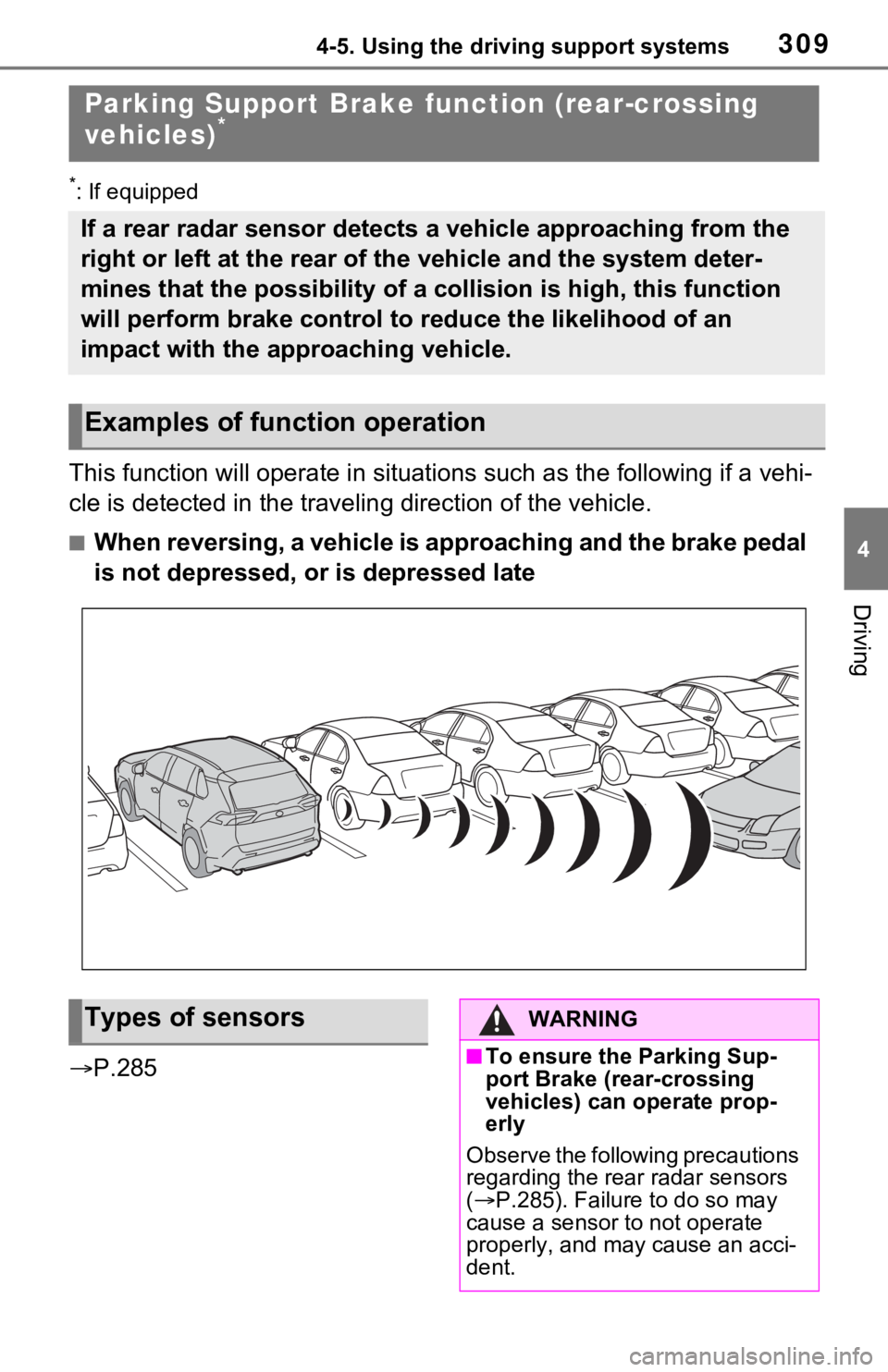
This function will operate in situations such as the following if a vehi-
cle is detected in the traveling direction of the vehicle.
■When reversing, a vehicle is approaching and the brake pedal
is not depressed, or is depressed late
P.285
Parking Support Brake function (rear-crossing
vehicles)*
If a rear radar sensor detects a vehicle approaching from the
right or left at the rear of the vehicle and the system deter-
mines that the possibility of a collision is high, this functio n
will perform brake control to reduce the likelihood of an
impact with the approaching vehicle.
Examples of function operation
Types of sensorsWARNING
■To ensure the Parking Sup-
port Brake (rear-crossing
vehicles) can operate prop-
erly
Observe the following precautions
regarding the rear radar sensors
( P.285). Failure to do so may
cause a sensor t o not operate
properly, and may cause an acci-
dent.
Page 310 of 748
3104-5. Using the driving support systems
■The Parking Support Brake
function (rear-crossing vehi-
cles) will operate when
The function will operate when the
PKSB OFF indicato r is not illumi-
nated or flashing ( P.89, 91) and
all of the followin g conditions are
met:
●Hybrid system output restriction
control
• The Parking Support Brake is
enabled.
• The vehicle speed is 9 mph (15 km/h) or less.
• Vehicles are approaching from the right or left at the rear of the vehi-
cle at a traveling speed of more
than approximately 5 mph (8
km/h)
• The shift lever is in R.
• The Parking Support Brake deter-
mines that a stronger than normal
brake operation is necessary to
avoid a collision with an approach-
ing vehicle.
●Brake control • Hybrid system output restriction
control is operating
• The Parking Support Brake deter- mines that an emergency brake
operation is necessary to avoid a
collision with an approaching vehi-
cle.
■The Parking Support Brake
function (rear-crossing vehi-
cles) will stop operating when
The function will stop operating if
any of the following conditions are
met:
●Hybrid system output restriction
control
• The Parking Support Brake is dis- abled.
• The collision becomes avoidable
with normal brake operation.
• A vehicle is no longer approaching from the right or le ft at the rear of
the vehicle.
●Brake control
• The Parking Support Brake is dis-
abled.
• Approximately 2 seconds have elapsed since the vehicle was
stopped by brake control.
• The brake pedal is depressed after the vehicle is stopped by
brake control.
• A vehicle is no longer approaching from the right or le ft at the rear of
the vehicle.
■Detection area of the Parking
Support Brake function (rear-
crossing vehicles)
The detection area of the Parking
Support Brake function (rear-cross-
ing vehicles) differs from the detec-
tion area of the RCTA function
( P.289). Therefore, even if the
RCTA function detects a vehicle
and provides an alert, the Parking
Support Brake function (rear-cross-
ing vehicles) may not start operat-
ing.
WARNING
●Do not modify, disassemble or
paint the sensors.
●Do not replace a rear radar sen-
sor with a part o ther than a gen-
uine part.
●Do not damage the rear radar
sensors, and always keep the
radar sensors and their sur-
rounding area on the bumper
clean.
●If the area around a rear radar
sensor is subjected to an
impact, the system may not
operate properly due to a sen-
sor malfunction. Have the vehi-
cle inspected by your Toyota
dealer.
●Observe the rear radar sensor
handling precautions. ( P.285)
Page 311 of 748
3114-5. Using the driving support systems
4
Driving
■Conditions under which the
Parking Support Brake func-
tion (rear-crossing vehicles)
will not detect a vehicle
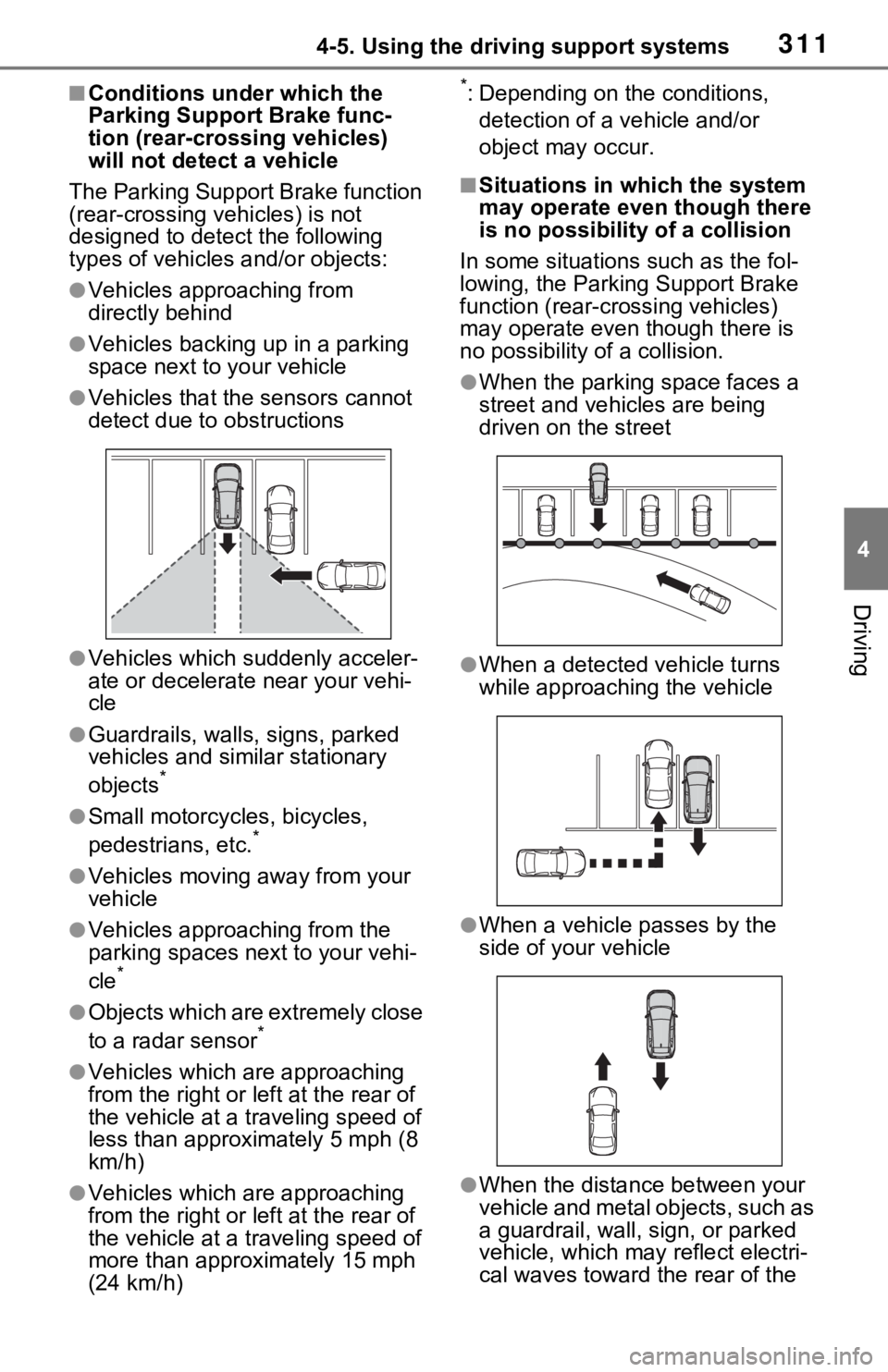
The Parking Support Brake function
(rear-crossing vehicles) is not
designed to detect the following
types of vehicles and/or objects:
●Vehicles approaching from
directly behind
●Vehicles backing up in a parking
space next to your vehicle
●Vehicles that the sensors cannot
detect due to obstructions
●Vehicles which suddenly acceler-
ate or decelerate near your vehi-
cle
●Guardrails, walls, signs, parked
vehicles and similar stationary
objects
*
●Small motorcycles, bicycles,
pedestrians, etc.*
●Vehicles moving away from your
vehicle
●Vehicles approaching from the
parking spaces next to your vehi-
cle
*
●Objects which are extremely close
to a radar sensor*
●Vehicles which are approaching
from the right or left at the rear of
the vehicle at a traveling speed of
less than approxi mately 5 mph (8
km/h)
●Vehicles which are approaching
from the right or left at the rear of
the vehicle at a traveling speed of
more than approximately 15 mph
(24 km/h)
*: Depending on the conditions,
detection of a v ehicle and/or
object may occur.
■Situations in which the system
may operate even though there
is no possibility of a collision
In some situations such as the fol-
lowing, the Parking Support Brake
function (rear-cro ssing vehicles)
may operate even t hough there is
no possibility of a collision.
●When the parking space faces a
street and vehicles are being
driven on the street
●When a detected vehicle turns
while approaching the vehicle
●When a vehicle passes by the
side of your vehicle
●When the distance between your
vehicle and metal objects, such as
a guardrail, wall, sign, or parked
vehicle, which may reflect electri-
cal waves toward the rear of the
Page 312 of 748
3124-5. Using the driving support systems
vehicle, is short
●When there are spinning objects
near your vehicle such as the fan
of an air conditioning unit
●When water is splashed or
sprayed toward the rear bumper,
such as from a sprinkler
■Situations in which the Parking
Support Brake function (rear-
crossing vehicles) may not
operate properly
In some situations, such as the fol-
lowing, the radar sensors may not
detect an object and this function
may not operate properly
●Stationary objects
●When a sensor or the area around
a sensor is extremely hot or cold
●If the rear bumper is covered with
ice, snow, dirt, etc.
●When it is raining heavily or water
strikes the vehicle
●When the detecti on area of a
radar sensor is obstructed by an
adjacent vehicle
●If the vehicle is s ignificantly tilted
●When equipment that may
obstruct a sensor is installed, such
as a towing eyelet, bumper pro-
tector (an additional trim strip,
etc.), bicycle carrier, or snow plow
●If the suspension has been modi-
fied or tires of a size other than
specified are installed
●If the front of the vehicle is raised
or lowered due to the carried load
●If a sticker or an electronic compo-
nent, such as a backlit license
plate (especially fluorescent type), fog lights, fender pole or wireless
antenna is installed near a radar
sensor
●If the orientation of a radar sensor
has been changed
●When multiple vehicles are
approaching with only a small gap
between each vehicle
●If a vehicle is approaching the rear
of your vehicle rapidly
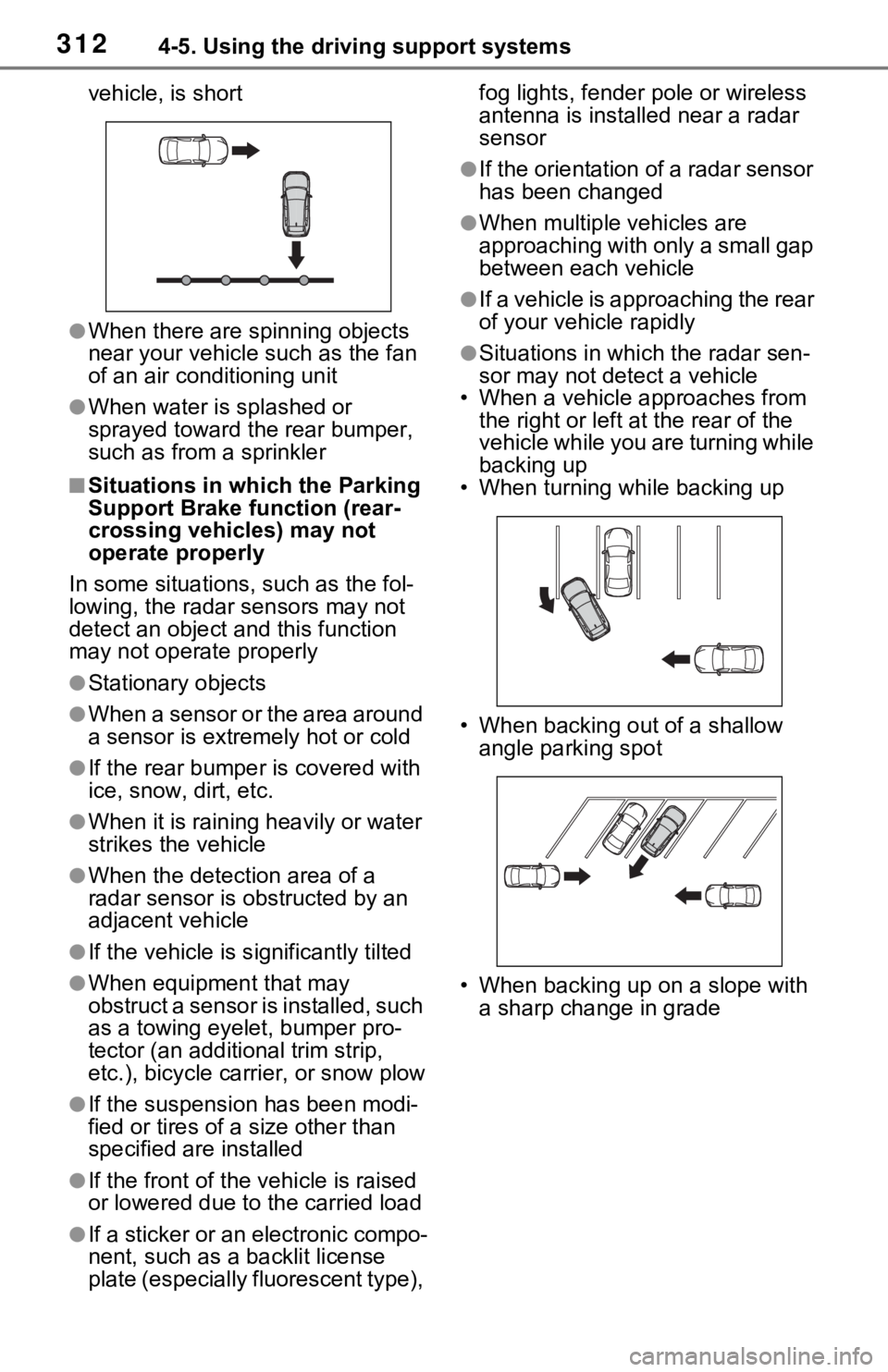
●Situations in which the radar sen-
sor may not detect a vehicle
• When a vehicle approaches from
the right or left at the rear of the
vehicle while you are turning while
backing up
• When turning while backing up
• When backing out of a shallow angle parking spot
• When backing up on a slope with a sharp change in grade
Page 314 of 748

3144-5. Using the driving support systems
The rear view monitor system
screen will be displayed if the
shift lever is shifted to the “R”
position while the power switch
is in ON.Vehicle width guide line
Displays a guide path when the
vehicle is being backed straight up.
• The displayed width is wider than the actual veh icle width.
Vehicle center guide line
WARNING
●Never depend on t he rear view
monitor system entirely when
backing up. The image and the
position of the guide lines dis-
played on the screen may differ
from the actual state.
Use caution, just as you would
when backing up any vehicle.
●Be sure to back up slowly,
depressing the brake pedal to
control vehicle speed.
●The instructions given are only
guide lines. When and how
much to turn the steering wheel
will vary according to traffic con-
ditions, road surface condi-
tions, vehicle condition, etc.
when parking. It is necessary to
be fully aware o f this before
using the rear view monitor sys-
tem.
●When parking, be sure to check
that the par king space will
accommodate your vehicle
before maneuveri ng into it.
●Do not use the rear view moni-
tor system in the following
cases:
• On icy or slick road surfaces, or in snow
• When using tire chains or emer- gency tires
• When the back door is not closed completely
• On roads that are not flat or straight, such as curves or
slopes
●In low temperatures, the screen
may darken or the image may
become faint. The image could
distort when the vehicle is mov-
ing, or you may become unable
to see the image on the screen.
Be sure to visually check all
around the vehicle both directly
and using the mirrors before
proceeding.
●If the tire sizes are changed, the
position of the fixed guide lines
displayed on the screen may
change.
●The camera uses a special lens.
The distances between objects
and pedestrians that appear in
the image displayed on the
screen will differ from the actual
distances. ( P.316)
Screen description
A
B
Page 321 of 748

3214-5. Using the driving support systems
4
Driving
*: If equipped
●The screen illustrations used in
this text are intended as exam-
ples, and may differ from the
image that is actually displayed on
the screen.
The parking assist monitor is a
supplemental device intended to
assist the driver when backing
up. When backing up, be sure to
visually check all around the
vehicle both directly and using
the mirrors before proceeding. If
you do not, you may hit another
vehicle, and could possibly
cause an accident.
Pay attention to the following
precautions when using the
parking assist monitor.
Toyota parking assist
monitor*
The parking assist monitor
assists the driver by dis-
playing an image of the view
behind the vehicle while
backing up, for example
while parking.
When the display is
changed to the wide rear
view mode, a wider lateral
view behind the vehicle will
be displayed.
Driving precautions
WARNING
●Never depend on the parking
assist monitor entirely when
backing up. The image and the
position of the guide lines dis-
played on the screen may differ
from the actual state.
Use caution, just as you would
when backing up any vehicle.
●Be sure to back up slowly,
depressing the brake pedal to
control vehicle speed.
●If you seem likely to hit nearby
vehicles, obstacles, people or
mount the shoulder, depress
the brake pedal to stop the vehi-
cle.
●The instructions given are only
guidelines. When and how
much to turn the steering wheel
will vary according to traffic con-
ditions, road surface condi-
tions, vehicle condition, etc.
when parking. It is necessary to
be fully aware o f this before
using the parking assist system.
●When parking, be sure to check
that the parking space will
accommodate your vehicle
before maneuvering into it.
●Do not use the parking assist
monitor in the f ollowing cases:
• On icy or slick road surfaces, or in snow
• When using tire chains or emer- gency tires
• When the back door is not closed completely
• On roads that are not flat or straight, such as curves or
slopes
• If the suspension has been modified or tires of a size other
than specified are installed
Page 341 of 748
3414-5. Using the driving support systems
4
Driving
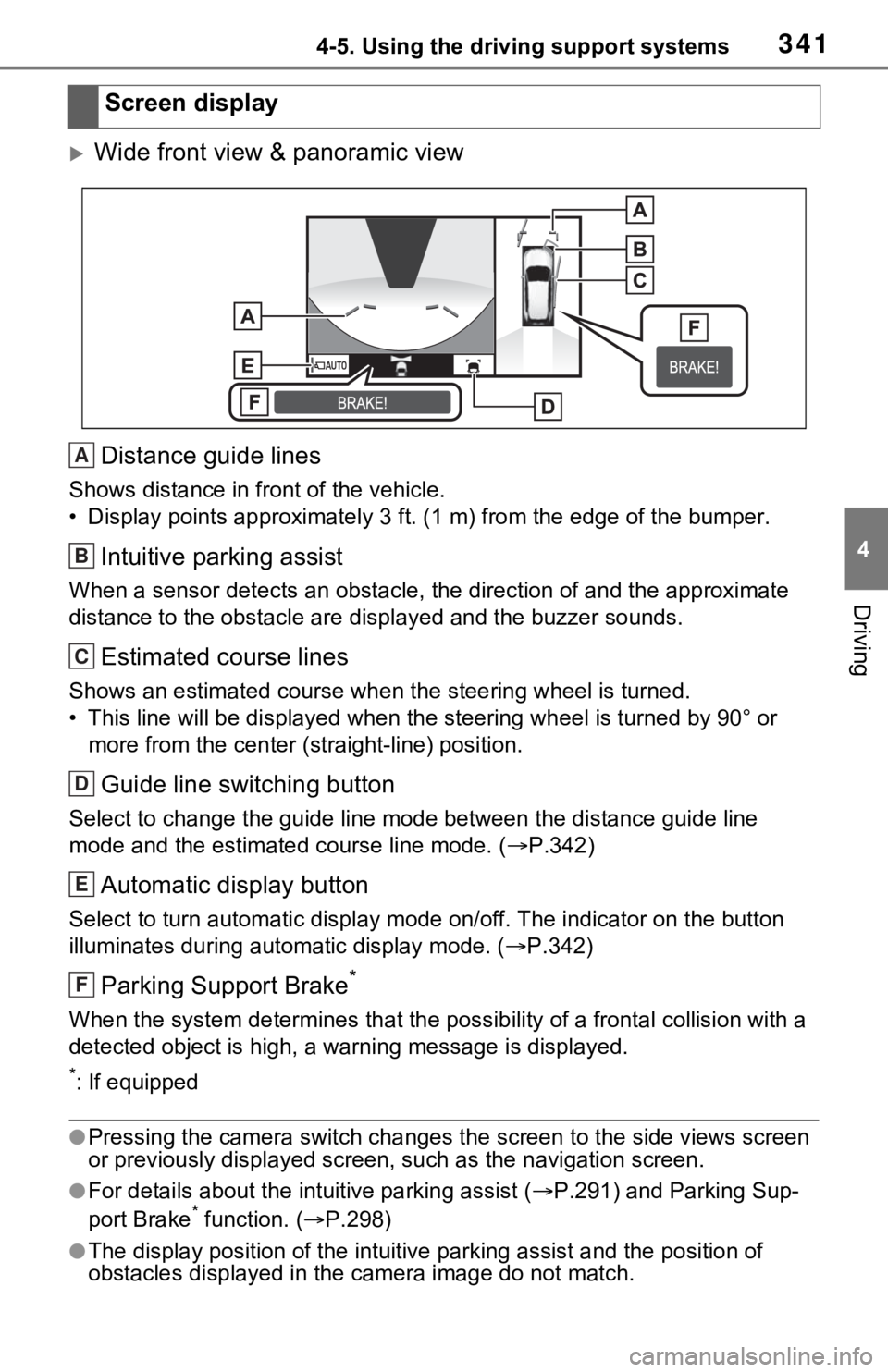
Wide front view & panoramic viewDistance guide lines
Shows distance in front of the vehicle.
• Display points approximately 3 ft. (1 m) from the edge of the bumper.
Intuitive parking assist
When a sensor detects an obstacle, the direction of and the app roximate
distance to the obsta cle are displayed and the buzzer sounds.
Estimated course lines
Shows an estimated course when the steering wheel is turned.
• This line will be displayed when the steering wh eel is turned by 90° or
more from the cen ter (straight-line) position.
Guide line switching button
Select to change the guide line mode between the distance guide line
mode and the estimated course line mode. ( P.342)
Automatic display button
Select to turn automatic display mode on/off. The indicator on the button
illuminates during autom atic display mode. (P.342)
Parking Support Brake*
When the system determines that the possib ility of a frontal collision with a
detected object is high, a warning message is displayed.
*: If equipped
●Pressing the camera switch chan ges the screen to the side views screen
or previously displayed screen, s uch as the navigation screen.
●For details about the intuitive parking assist (P.291) and Parking Sup-
port Brake* function. ( P.298)
●The display position of the intuitive parking assist and the po sition of
obstacles displayed in the camera image do not match.
Screen display
A
B
C
D
E
F