sport mode TOYOTA RAV4 HYBRID 2020 Owners Manual (in English)
[x] Cancel search | Manufacturer: TOYOTA, Model Year: 2020, Model line: RAV4 HYBRID, Model: TOYOTA RAV4 HYBRID 2020Pages: 748, PDF Size: 30.6 MB
Page 92 of 748
922-1. Instrument cluster
*1: This light illuminates on the multi-information display with a
message.
*2: Depending on the operating con-ditions of the system, the color
and state (illuminat ed/blinking) of
the indicator change.
*3: The light comes on when the system is turned off.
*4: Intuitive parking assist OFF indi-cator turns on wh en the power
switch is turned t o ON while the
Intuitive parking assist function is
on. It will turn off after a few sec-
onds.
*5: These lights tu rn on when the
power switch is turned to ON to
indicate that a system check is
being performed. They will turn
off after the hybrid system is on,
or after a few seconds. There
may be a malfunction in a sys-
tem if the lights do not turn on, or
turn off. Have the vehicle
inspected by your Toyota dealer.
*6: This light illuminates on the out- side rear view mirrors.
*7: When the outside temperature is approximately 37°F (3°C) or
lower, the indicator will flash for
approximately 10 seconds, then
stay on.
*8: This light illuminates on the cen-ter panel.
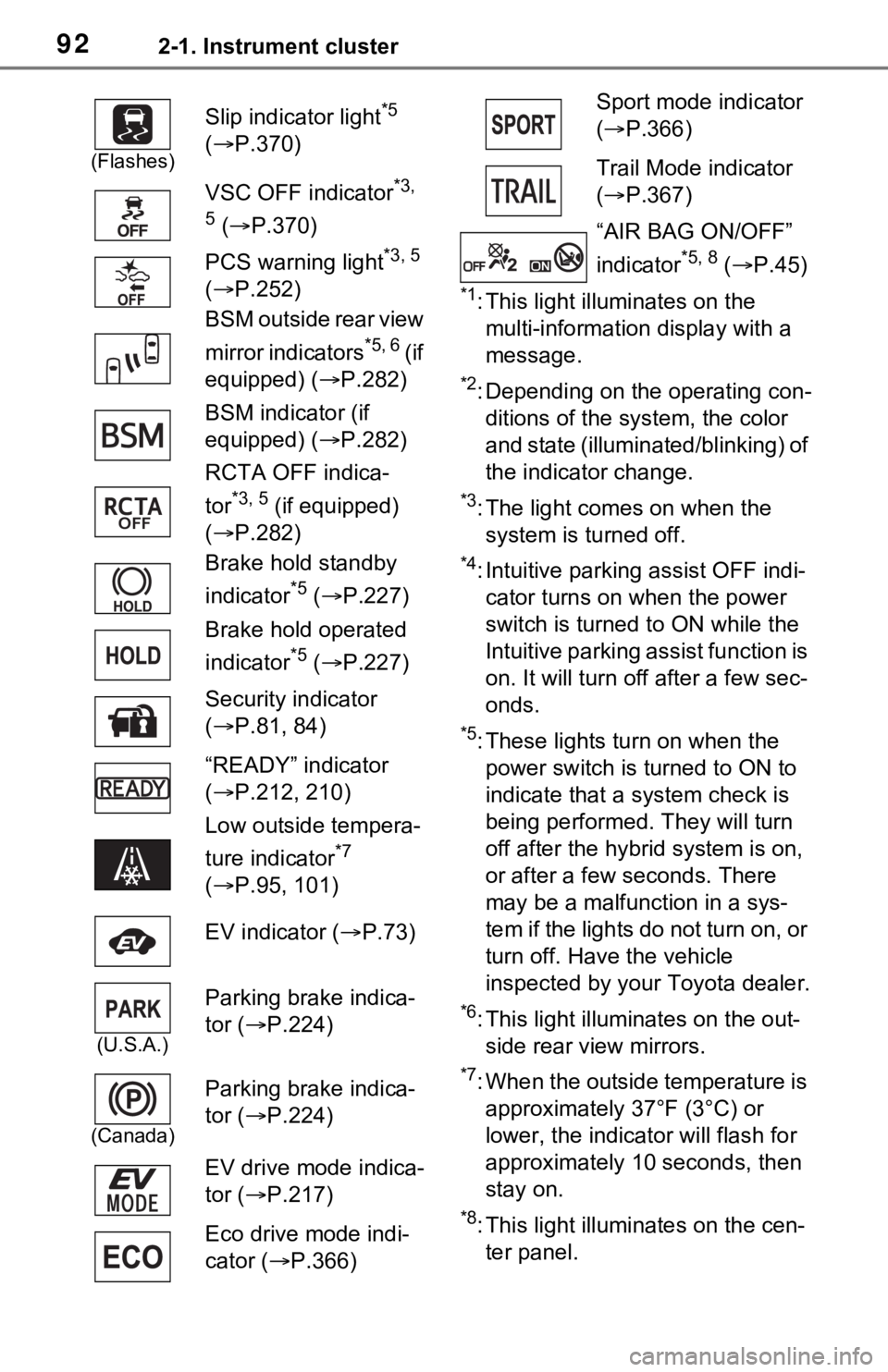
(Flashes)
Slip indicator light*5
( P.370)
VSC OFF indicator
*3,
5
( P.370)
PCS warning light
*3, 5
( P.252)
BSM outside rear view
mirror indicators
*5, 6 ( i f
equipped) ( P.282)
BSM indicator (if
equipped) ( P.282)
RCTA OFF indica-
tor
*3, 5 (if equipped)
( P.282)
Brake hold standby
indicator
*5 ( P.227)
Brake hold operated
indicator
*5 ( P.227)
Security indicator
( P.81, 84)
“READY” indicator
( P.212, 210)
Low outside tempera-
ture indicator
*7
( P.95, 101)
EV indicator ( P.73)
(U.S.A.)
Parking brake indica-
tor ( P.224)
(Canada)
Parking brake indica-
tor ( P.224)
EV drive mode indica-
tor ( P.217)
Eco drive mode indi-
cator ( P.366)
Sport mode indicator
( P.366)
Trail Mode indicator
( P.367)
“AIR BAG ON/OFF”
indicator
*5, 8 ( P.45)
Page 108 of 748
1082-1. Instrument cluster
the “Drive Info Items” setting
(average speed, distance and
total time) can be displayed ver-
tically.
The displayed information
changes according to the “Drive
Info Type” setting (since the sys-
tem was started or between
resets). (P.108)
Use the displayed information as a
reference only.
Following items will be displayed.
“Trip”
• “Average Speed”: Displays the
average vehicl e speed since
hybrid system start
*
• “Distance”: Displ ays the distance
driven since hybrid system start
*
• “Total Time”: Displays the elapsed time since hybrid system
start
*
*
: These items are reset each time the hybrid system stops.
“Total”
• “Average Speed”: Displays the
average vehicle speed since the
display was reset
*
• “Distance”: Displ ays the distance
driven since the display was
reset
*
• “Total Time”: Displays the elapsed time since the display
was reset
*
*
: To reset, display the desired item and press and hold .
■Energy monitor
P.113
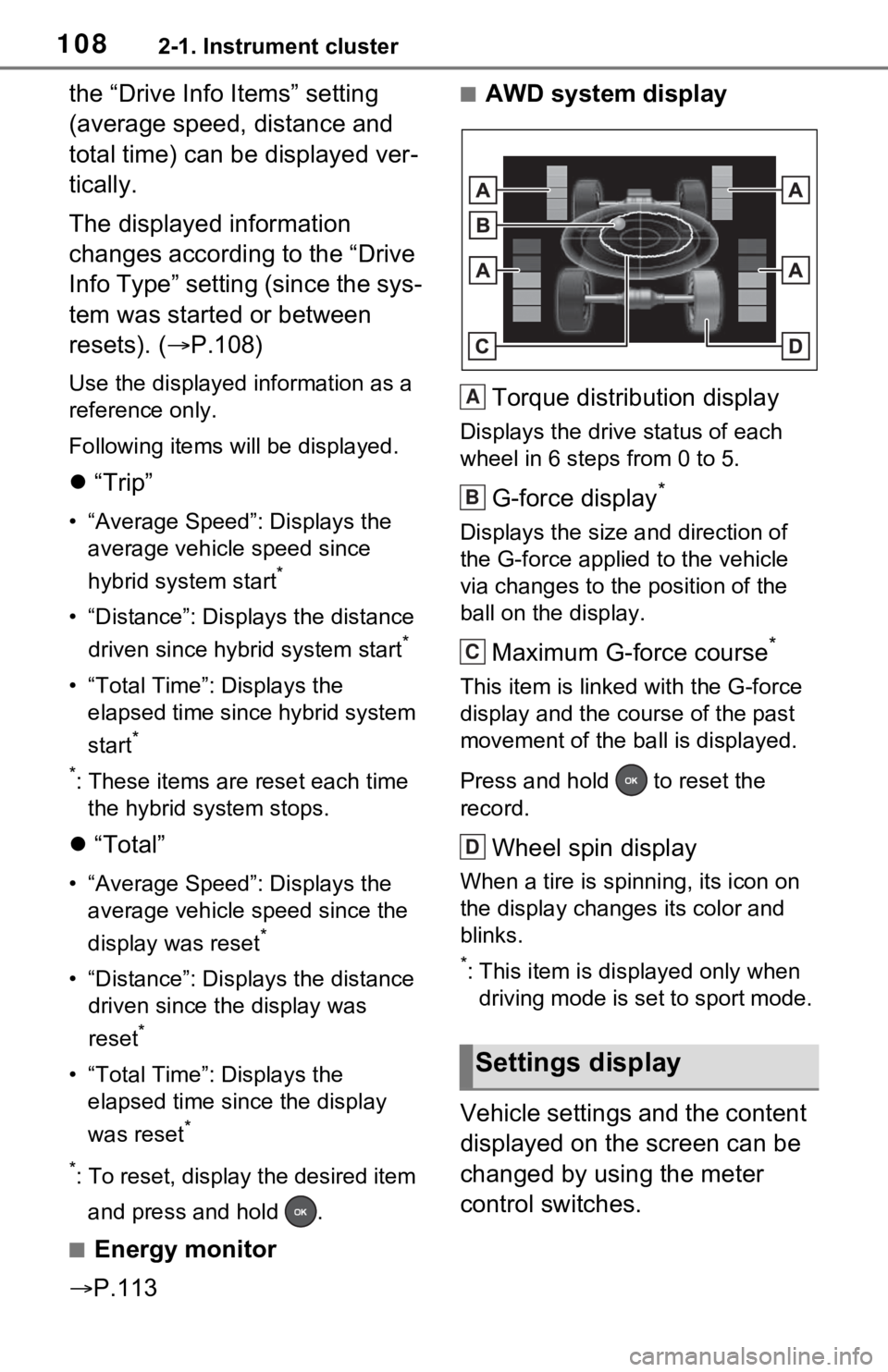
■AWD system display
Torque distribution display
Displays the drive status of each
wheel in 6 steps from 0 to 5.
G-force display*
Displays the size a nd direction of
the G-force applied to the vehicle
via changes to the position of the
ball on the display.
Maximum G-force course*
This item is linke d with the G-force
display and the co urse of the past
movement of the ba ll is displayed.
Press and hold to reset the
record.
Wheel spin display
When a tire is spi nning, its icon on
the display changes its color and
blinks.
*: This item is displayed only when driving mode is set to sport mode.
Vehicle settings and the content
displayed on the screen can be
changed by using the meter
control switches.
Settings display
A
B
C
D
Page 219 of 748
2194-2. Driving procedures
4
Driving
*1: To improve fuel efficiency and reduce noise, shift the shift lever
to D for normal driving.
*2: By selecting shift ranges using S mode, you can control accelerat-
ing force and engine braking
force.
■When driving with dynamic
radar cruise control with full-
speed range activated
Even when perform ing the following
actions with the intent of enabling
engine braking, engine braking will
not activate because dynamic radar
cruise control with full-speed range
will not be canceled.
●While driving in S mode, down-
shifting to 5 or 4. ( P.221)
●When switching th e driving mode
to sport mode while driving in D
position. ( P.366)
WARNING
■Caution while driving
When driving in EV drive mode,
pay special attention to the area
around the vehicle. Because
there is no engine noise, pedestri-
ans, people riding bicycles or
other people and vehicles in the
area may not be aware of the
vehicle starting off or approaching
them, so take ext ra care while
driving.
Hybrid transmission
Select the shift position
depending on your purpose
and situation.
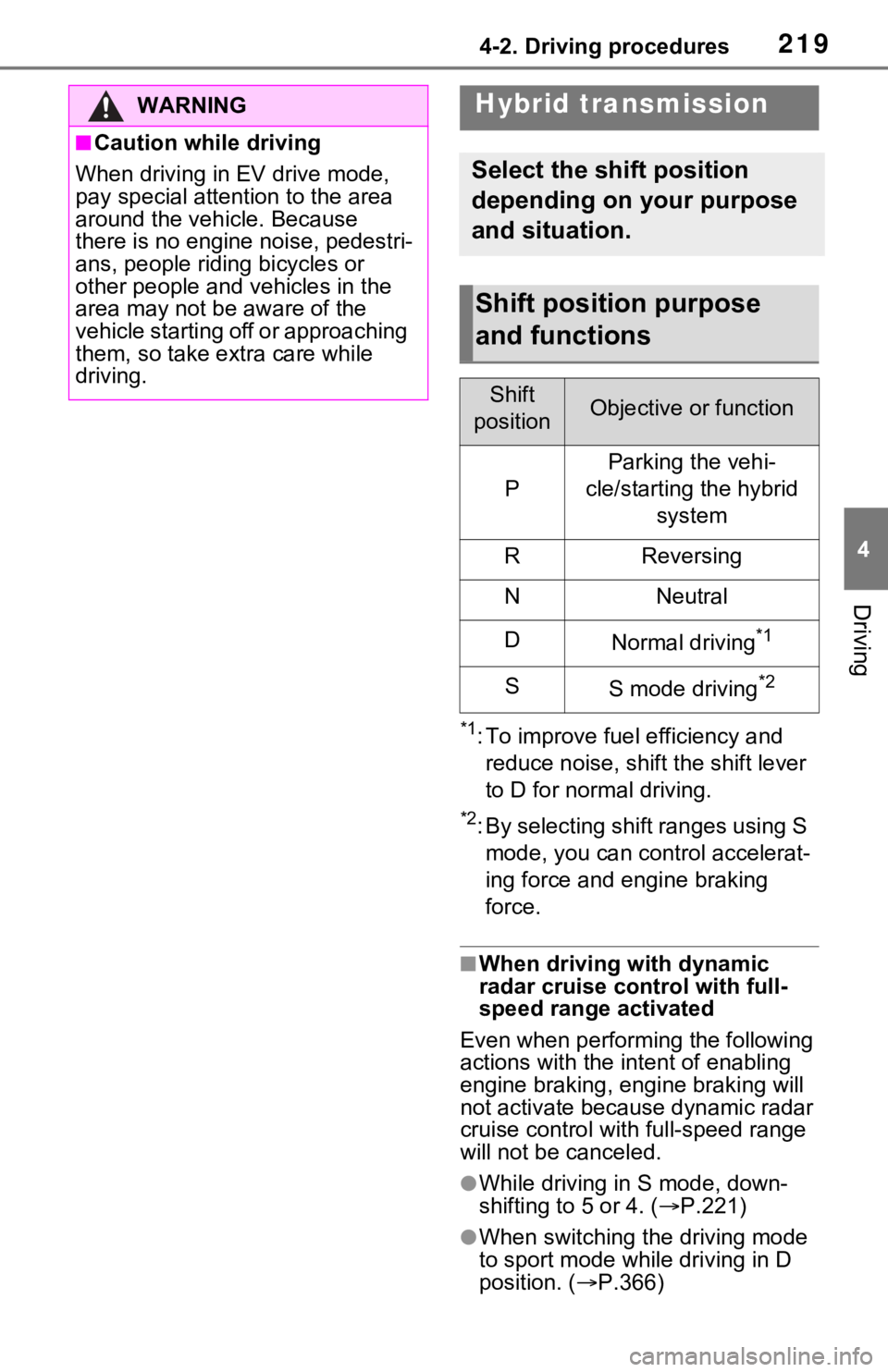
Shift position purpose
and functions
Shift
positionObjective or function
P
Parking the vehi-
cle/starting the hybrid system
RReversing
NNeutral
DNormal driving*1
SS mode driving*2
Page 366 of 748
3664-5. Using the driving support systems
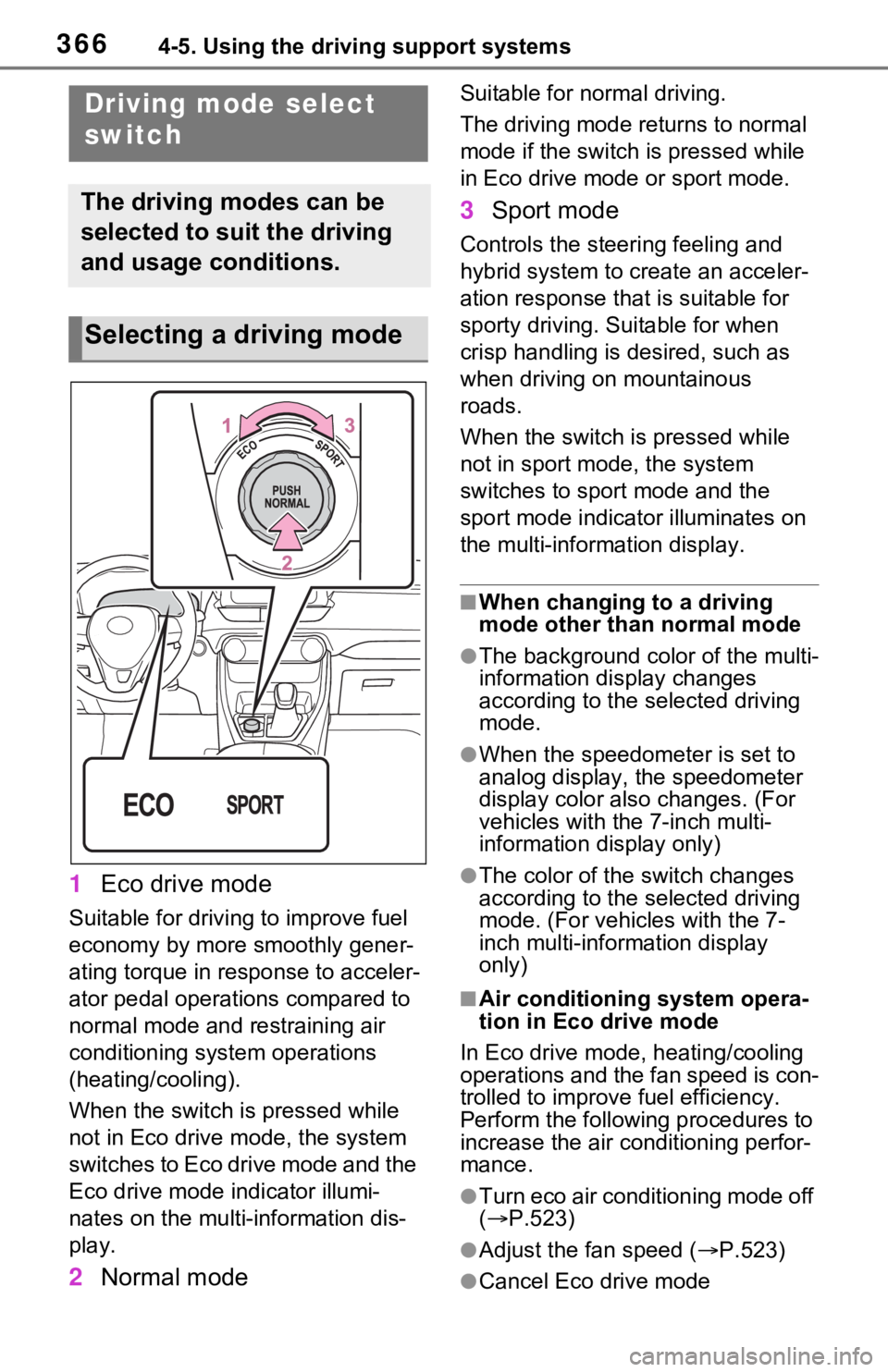
1Eco drive mode
Suitable for driving to improve fuel
economy by more smoothly gener-
ating torque in response to acceler-
ator pedal operations compared to
normal mode and restraining air
conditioning system operations
(heating/cooling).
When the switch is pressed while
not in Eco drive mode, the system
switches to Eco drive mode and the
Eco drive mode indicator illumi-
nates on the multi-information dis-
play.
2Normal mode
Suitable for n ormal driving.
The driving mode returns to normal
mode if the switch i s pressed while
in Eco drive mode or sport mode.
3 Sport mode
Controls the steering feeling and
hybrid system to create an acceler-
ation response tha t is suitable for
sporty driving. Suitable for when
crisp handling is desired, such as
when driving on mountainous
roads.
When the switch is pressed while
not in sport mode, the system
switches to sport mode and the
sport mode indicat or illuminates on
the multi-information display.
■When changing to a driving
mode other than normal mode
●The background color of the multi-
information display changes
according to the selected driving
mode.
●When the speedometer is set to
analog display, the speedometer
display color also changes. (For
vehicles with the 7-inch multi-
information di splay only)
●The color of the switch changes
according to the selected driving
mode. (For vehicles with the 7-
inch multi-information display
only)
■Air conditioning system opera-
tion in Eco drive mode
In Eco drive mode, heating/cooling
operations and the fan speed is con-
trolled to improve fuel efficiency.
Perform the following procedures to
increase the air conditioning perfor-
mance.
●Turn eco air conditioning mode off
( P.523)
●Adjust the fan speed ( P.523)
●Cancel Eco drive mode
Driving mode select
switch
The driving modes can be
selected to suit the driving
and usage conditions.
Selecting a driving mode
Page 367 of 748
3674-5. Using the driving support systems
4
Driving
■Canceling a driving mode
●Sport mode is automatically can-
celed and the driving mode
returns to normal mode when the
power switch is turned off.
●Normal mode and Eco drive mode
are not canceled until another
driving mode is sel ected. (Even if
the power switch is turned off, nor-
mal mode and Eco drive mode will
not be automatically canceled).
Press the Trail Mode switch
When the switch is pressed, Trail
Mode turns on and the Trail Mode
indicator illuminates on the multi-
information display.
When the switch is pressed again,
the Trail Mode indicator turns off.
Trail Mode
Trail Mode is a system that
performs integrated control
for the AWD, brake and
drive force control systems
to assist the drive power on
bumpy roads, etc.
WARNING
■Before using Trail Mode
Make sure to observe the follow-
ing precautions. Failure to
observe these precautions may
result in an unexp ected accident.
●Check that the Trail Mode indi-
cator is illuminated before driv-
ing. Trail Mode will not operate
when the indicator is off.
●Trail Mode is not intended to
expand the limits of the vehicle.
Thoroughly check the road con-
ditions and drive with caution.
●Thoroughly check the road con-
ditions before driving. As Trail
Mode is suitable for driving on
bumpy roads, such as those
where the tire on one side
spins, there is a chance that
Trail Mode may not be the most
appropriate for other road con-
ditions.
Turning Trail Mode on
Page 741 of 748

Alphabetical Index741
Shift lock system .................... 221
Side airbags .............................. 35
Side auxiliary box ................... 541
Side doors ............................... 128
Side marker lightsLight switch .......................... 229
Replacing light bulbs ............ 620
Wattage ................................ 686
Side mirrors ............................ 174 Adjustment ........................... 174
BSM (Blind Spot Monitor)..... 282
Folding ................................. 174
Heaters................................. 524
Side turn signal lights Replacing light bulbs ............ 620
Turn signal lever................... 223
Side windows ...... ................... 176
Smart key system ................... 148 Antenna location .................. 148
Entry functions ............. 128, 135
Starting the hybrid system.... 212
Warning message ................ 648
Snow tires ............................... 378
Spare tire Storage location ................... 653
Specifications ......................... 678
Speedometer ...................... 94, 98
Sport mode ............................. 366
Status icon .............................. 390 Status icon explanation ........ 390
Steering lock Column lock release..... 210, 213
Steering lock system warning message............................. 213
Steering switch ............... 454, 481 Audio switch ......................... 454
Steering wheel Adjustment ........................... 162
Heated steering wheel ......... 529
Meter control switches ......... 104
Stop lights Replacing light bulbs ............ 620 Storage feature ..
.....................535
Storage precaution s ...............535
Stuck If the vehicle becomes stuck 674
Suggestion functi on ...............112
Sunglass holder.... ..................537
Sunshade ........................179, 182
Sun visors ...............................544
Switches “ODO TRIP”switch ..........96, 101
“SOS” button ..........................67
Automatic High Beam switch 232
Brake hold switch .................227
BSM (Blind Spot M onitor) .....283
Digital Rear-view Mirror control switches..............................165
Door lock switch ...................132
Driving mode select switch ...366
Driving position memory switches..............................157
Dynamic radar cruise control with full-speed range ..........271
Electronic sunshade switch ..182
Emergency flashers switch...630
EV drive mode switch ...........217
Fog light switch .....................235
Garage door opener switches ...........................................554
Heated steering wheel..........530
Ignition switch (power switch) ...................................210, 212
Intuitive parking assist ..........293
Light switch...........................229
LTA switch ............................263
Meter control switches..........104
Moon roof switches ..............179
Outside rear v iew mirror
switches..............................174
Panoramic moon roof switches ...........................................182
Parking brake switch ............224
PCS (Pre-Collisio n System) .252