rear view mirror TOYOTA RAV4 HYBRID 2020 (in English) Owner's Manual
[x] Cancel search | Manufacturer: TOYOTA, Model Year: 2020, Model line: RAV4 HYBRID, Model: TOYOTA RAV4 HYBRID 2020Pages: 744, PDF Size: 31.43 MB
Page 174 of 744
1743-4. Adjusting the steering wheel and mirrors
■Defogging the mirrors (if
equipped)
The outside rear v iew mirrors can
be cleared using the mirror defog-
gers. Turn on the rear window
defogger to turn on the outside rear
view mirror defoggers.
( P.522)
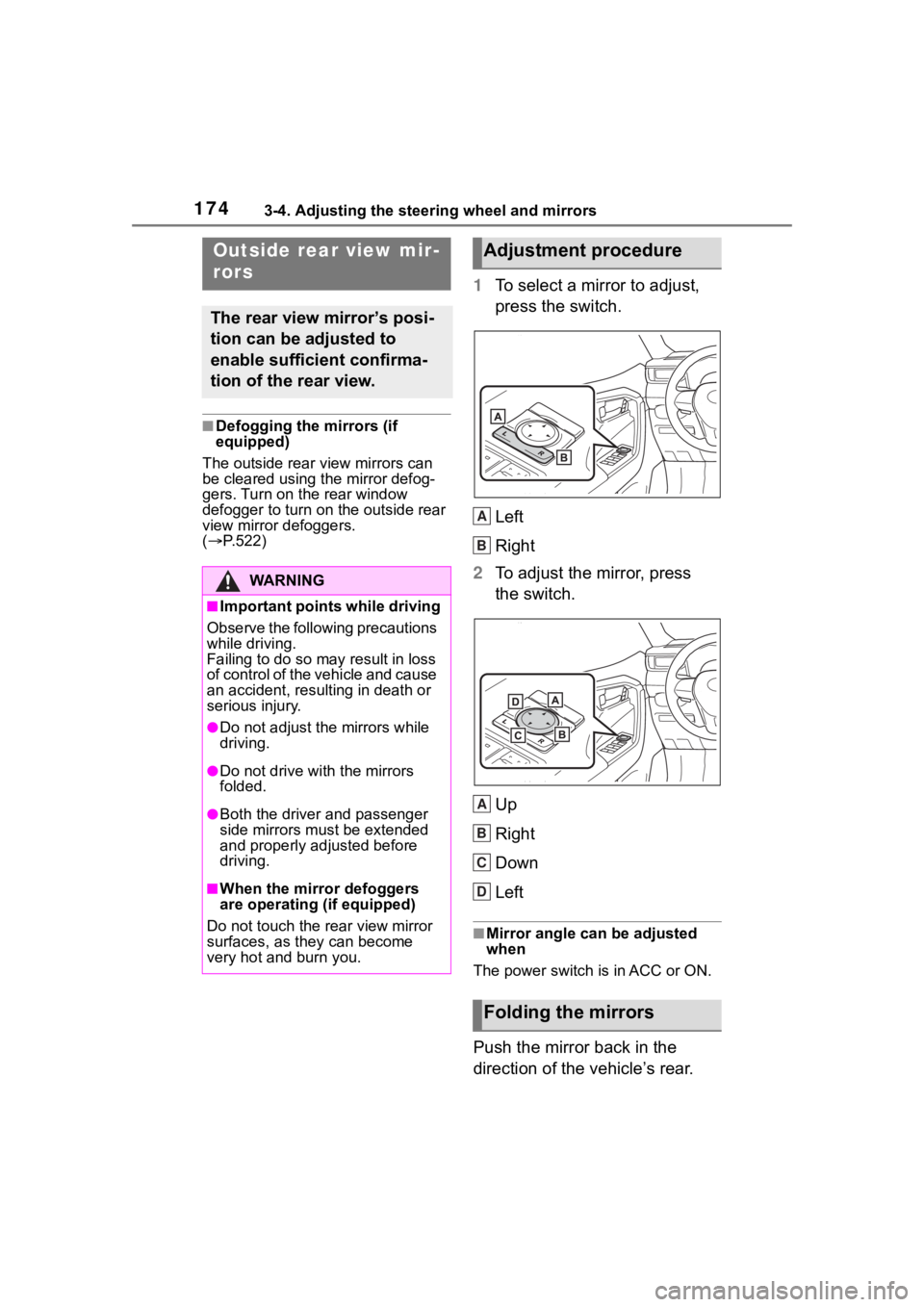
1 To select a mirror to adjust,
press the switch.
Left
Right
2 To adjust the mirror, press
the switch.
Up
Right
Down
Left
■Mirror angle can be adjusted
when
The power switch is in ACC or ON.
Push the mirror back in the
direction of the vehicle’s rear.
Outside rear view mir-
rors
The rear view mirror’s posi-
tion can be adjusted to
enable sufficient confirma-
tion of the rear view.
WA R N I N G
■Important points while driving
Observe the following precautions
while driving.
Failing to do so may result in loss
of control of the vehicle and cause
an accident, resul ting in death or
serious injury.
●Do not adjust the mirrors while
driving.
●Do not drive with the mirrors
folded.
●Both the driver and passenger
side mirrors must be extended
and properly adjusted before
driving.
■When the mirror defoggers
are operating (if equipped)
Do not touch the rear view mirror
surfaces, as they can become
very hot and burn you.
Adjustment procedure
Folding the mirrors
A
B
A
B
C
D
Page 200 of 744
2004-1. Before driving
■Before towing
Check that the fo llowing conditions
are met:
●Ensure that your vehicle’s tires
are properly inflated. ( P.681)
●Trailer tires are inflated according
to the trailer manufacturer’s rec-
ommendation.
●All trailer lights work as required
by law.
●All lights work each time you con-
nect them.
●The trailer ball is set at the proper
height for the coupler on the
trailer.
●The trailer is level when it is
hitched.
Do not drive if th e trailer is not
level, and check for improper
tongue weight, overloading, worn
suspension, or other possible
causes.
●The trailer cargo is securely
loaded.
●The rear view mirr ors conform to
all applicable fede ral, state/provin-
cial or local regulations. If they do
not, install rear view mirrors
appropriate for towing purposes.
Trailer towing
Your vehicle is designed pri-
marily as a passenger-and-
load-carrying vehicle. Tow-
ing a trailer can have an
adverse impact on handling,
performance, braking, dura-
bility, and fuel consumption.
For your safety and the
safety of others, you must
not overload your vehicle or
trailer. You must also
ensure that you are using
appropriate towing equip-
ment, that the towing equip-
ment has been installed
correctly and used prop-
erly, and that you employ
the requisite driving habits.
Vehicle-trailer stability and
braking performance are
affected by trailer stability,
brake performance and set-
ting, trailer brakes, the hitch
and hitch systems (if
equipped).
To tow a trailer safely, use
extreme care and drive the
vehicle in accordance with
your trailer’s characteris-
tics and operating condi-
tions.
Toyota warranties do not
apply to damage or mal-
function caused by towing a
trailer for commercial pur-
poses.
Contact your Toyota dealer for
further information about addi-
tional requirements such as a
towing kit, etc.
Page 245 of 744
2454-5. Using the driving support systems
4
Driving
WA R N I N G
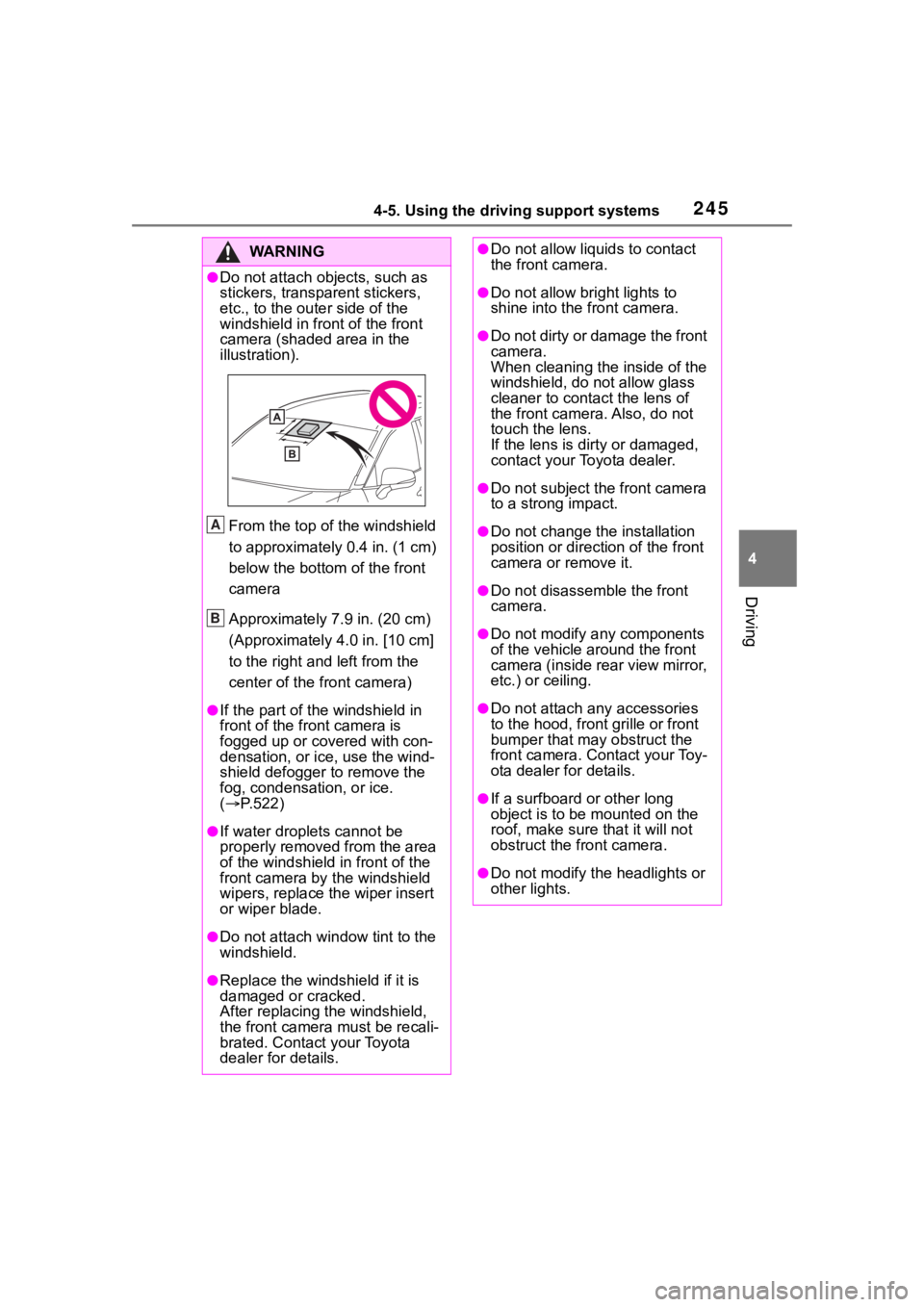
●Do not attach objects, such as
stickers, transparent stickers,
etc., to the outer side of the
windshield in fr ont of the front
camera (shaded area in the
illustration).
From the top of the windshield
to approximately 0.4 in. (1 cm)
below the bottom of the front
camera
Approximately 7.9 in. (20 cm)
(Approximately 4.0 in. [10 cm]
to the right and left from the
center of the front camera)
●If the part of the windshield in
front of the front camera is
fogged up or covered with con-
densation, or ice, use the wind-
shield defogger to remove the
fog, condensation, or ice.
( P.522)
●If water droplets cannot be
properly removed from the area
of the windshield in front of the
front camera by the windshield
wipers, replace the wiper insert
or wiper blade.
●Do not attach win dow tint to the
windshield.
●Replace the windshield if it is
damaged or cracked.
After replacing the windshield,
the front camera must be recali-
brated. Contact your Toyota
dealer for details.
A
B
●Do not allow liquids to contact
the front camera.
●Do not allow bright lights to
shine into the front camera.
●Do not dirty or damage the front
camera.
When cleaning the inside of the
windshield, do not allow glass
cleaner to contact the lens of
the front camera. Also, do not
touch the lens.
If the lens is dirty or damaged,
contact your Toyota dealer.
●Do not subject the front camera
to a strong impact.
●Do not change the installation
position or direction of the front
camera or remove it.
●Do not disasse mble the front
camera.
●Do not modify any components
of the vehicle around the front
camera (inside rear view mirror,
etc.) or ceiling.
●Do not attach a ny accessories
to the hood, front grille or front
bumper that may obstruct the
front camera. Contact your Toy-
ota dealer for details.
●If a surfboard or other long
object is to be mounted on the
roof, make sure that it will not
obstruct the front camera.
●Do not modify the headlights or
other lights.
Page 281 of 744
2814-5. Using the driving support systems
4
Driving
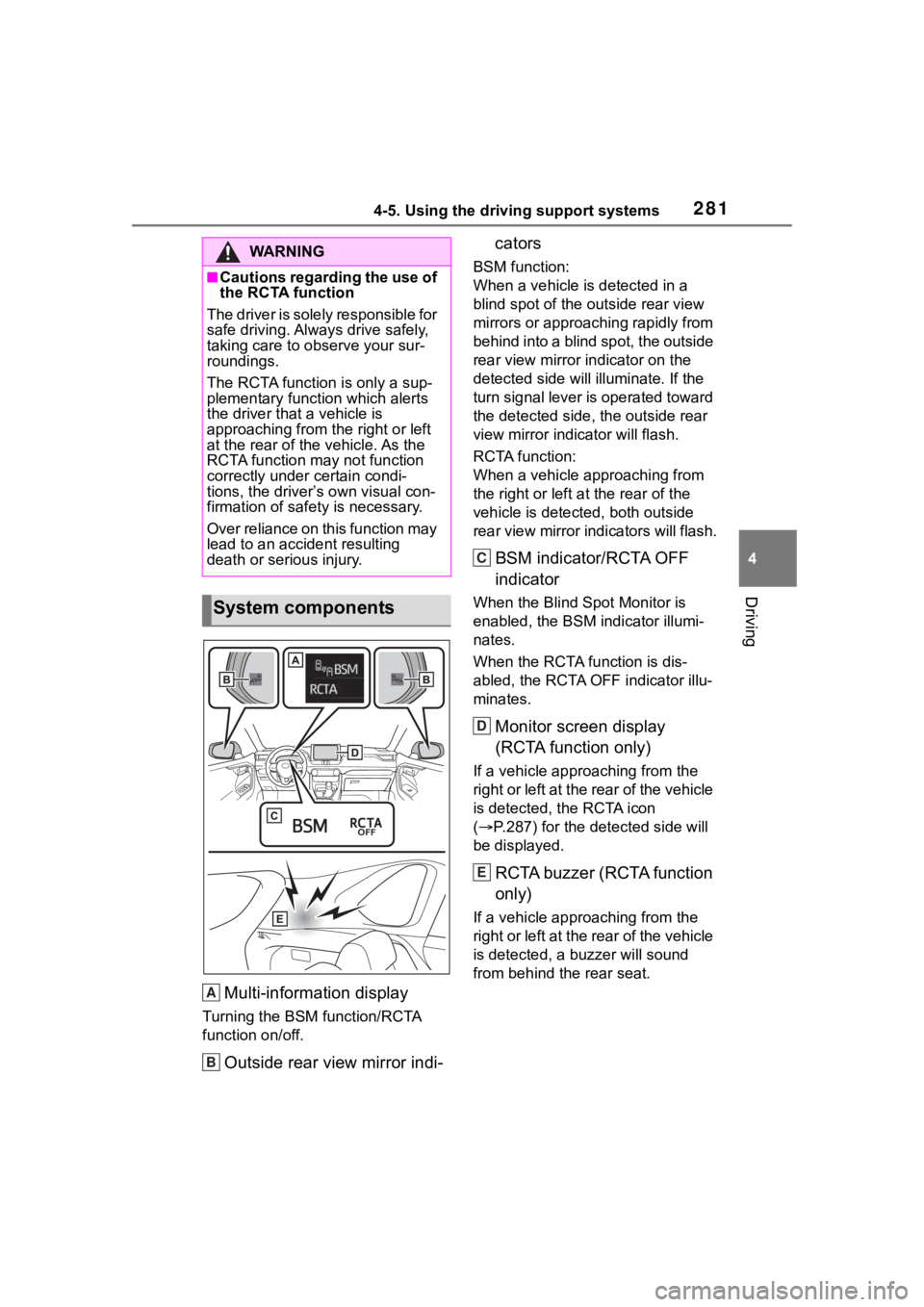
Multi-information display
Turning the BSM function/RCTA
function on/off.
Outside rear view mirror indi-cators
BSM function:
When a vehicle is detected in a
blind spot of the outside rear view
mirrors or approaching rapidly from
behind into a blind spot, the outside
rear view mirror indicator on the
detected side will illuminate. If the
turn signal lever is operated toward
the detected side, the outside rear
view mirror indicator will flash.
RCTA function:
When a vehicle approaching from
the right or left a
t the rear of the
vehicle is detected, both outside
rear view mirror indicators will flash.
BSM indicator/RCTA OFF
indicator
When the Blind Spot Monitor is
enabled, the BSM indicator illumi-
nates.
When the RCTA function is dis-
abled, the RCTA OFF indicator illu-
minates.
Monitor screen display
(RCTA function only)
If a vehicle approaching from the
right or left at the rear of the vehicle
is detected, the RCTA icon
( P.287) for the detected side will
be displayed.
RCTA buzzer (RCTA function
only)
If a vehicle approaching from the
right or left at the rear of the vehicle
is detected, a buzzer will sound
from behind the rear seat.
WA R N I N G
■Cautions regarding the use of
the RCTA function
The driver is solely responsible for
safe driving. Always drive safely,
taking care to o bserve your sur-
roundings.
The RCTA functi on is only a sup-
plementary function which alerts
the driver tha t a vehicle is
approaching from the right or left
at the rear of the vehicle. As the
RCTA function may not function
correctly under certain condi-
tions, the driver’s own visual con-
firmation of safety is necessary.
Over reliance on this function may
lead to an accident resulting
death or serious injury.
System components
A
B
C
D
E
Page 282 of 744
2824-5. Using the driving support systems
The BSM function and the
RCTA function can be
enabled/disabled on the
screen of the multi-information
display. (P.108)
■Outside rear view mirror indica-
tors visibility
In strong sunlight, the outside rear
view mirror indicato r may be difficult
to see.
■Hearing the RCTA buzzer
The RCTA buzzer may be difficult to
hear over loud noises such as high
audio volume.
■When “Blind Spot Monitor
Unavailable” or “Rear Cross
Traffic Alert Unavailable” is
shown on the multi-information
display
The sensor voltage has become abnormal, or water, snow, mud, etc.,
may be built up in th
e vicinity of the
sensor area of the rear bumper.
( P.283)
Removing the water, snow, mud,
etc., from the vicini ty of the sensor
area should return it to normal.
Also, the sensor may not function
normally when used in extremely
hot or cold weather.
■When “Blind Spot Monitor Sys-
tem Malfunction Visit Your
Dealer” or “Rear Cross Traffic
Alert Malfunction Visit Your
Dealer” is shown on the multi-
information display
There may be a sensor malfunction
or misaligned. Have the vehicle
inspected at a Toyota dealer.
■Customization
Some functions can be customized.
( P.108)
■Certification for the Blind Spot Monitor
For vehicles sold in t he U.S.A., Hawaii, Ame rican Samoa, Guam, Saipan
and Puerto Rico
Turning the BSM func-
tion/RCTA function on/off
Page 284 of 744
2844-5. Using the driving support systems
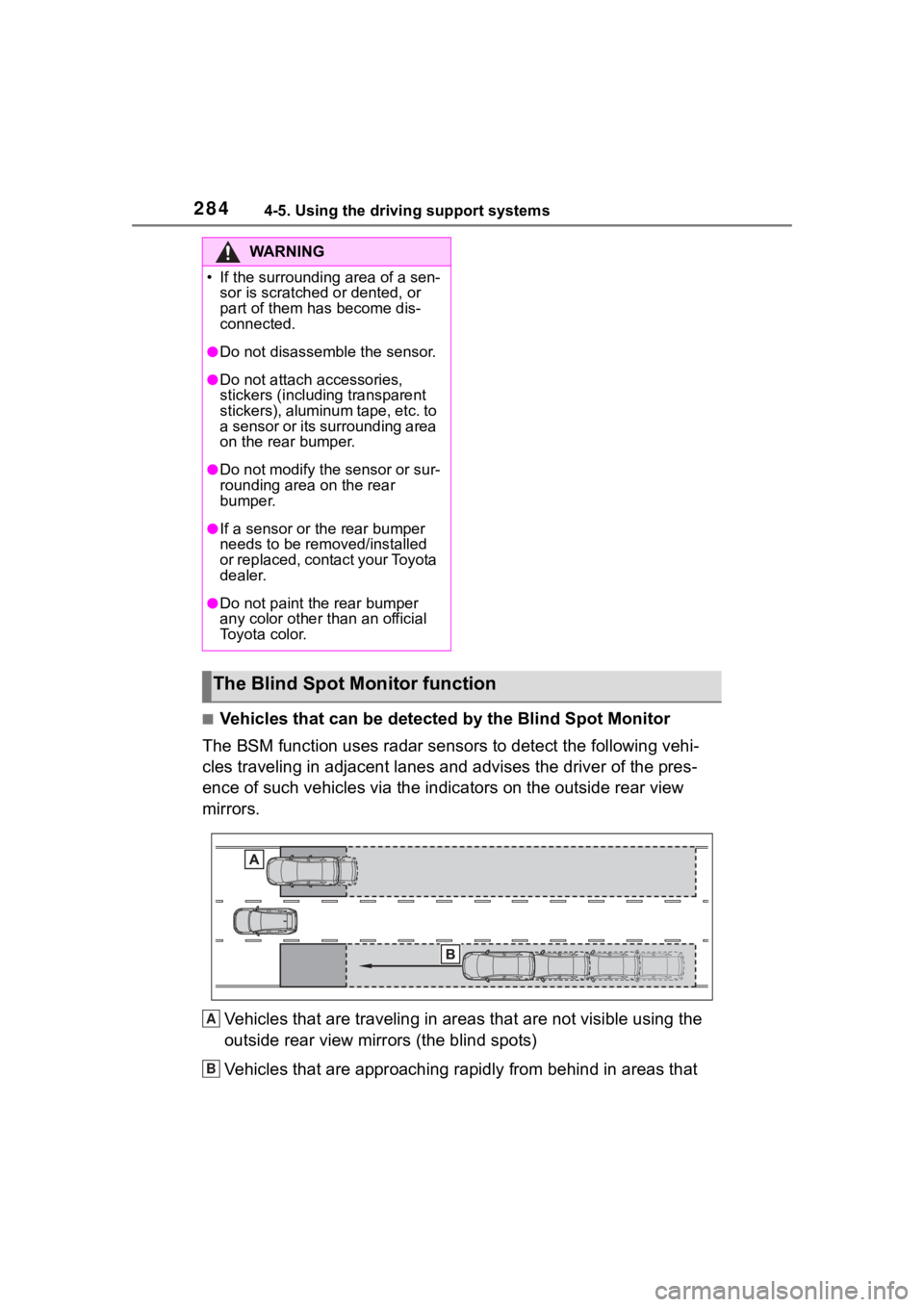
■Vehicles that can be detected by the Blind Spot Monitor
The BSM function uses radar sensors to detect the following vehi-
cles traveling in adjacent lane s and advises the driver of the pres-
ence of such vehicles via the indi cators on the outside rear view
mirrors.
Vehicles that are traveling in areas that are not visible using the
outside rear view mirrors (the blind spots)
Vehicles that are approaching r apidly from behind in areas that
WA R N I N G
Page 285 of 744
2854-5. Using the driving support systems
4
Driving
are not visible using the outside rear view mirrors (the blind spots)
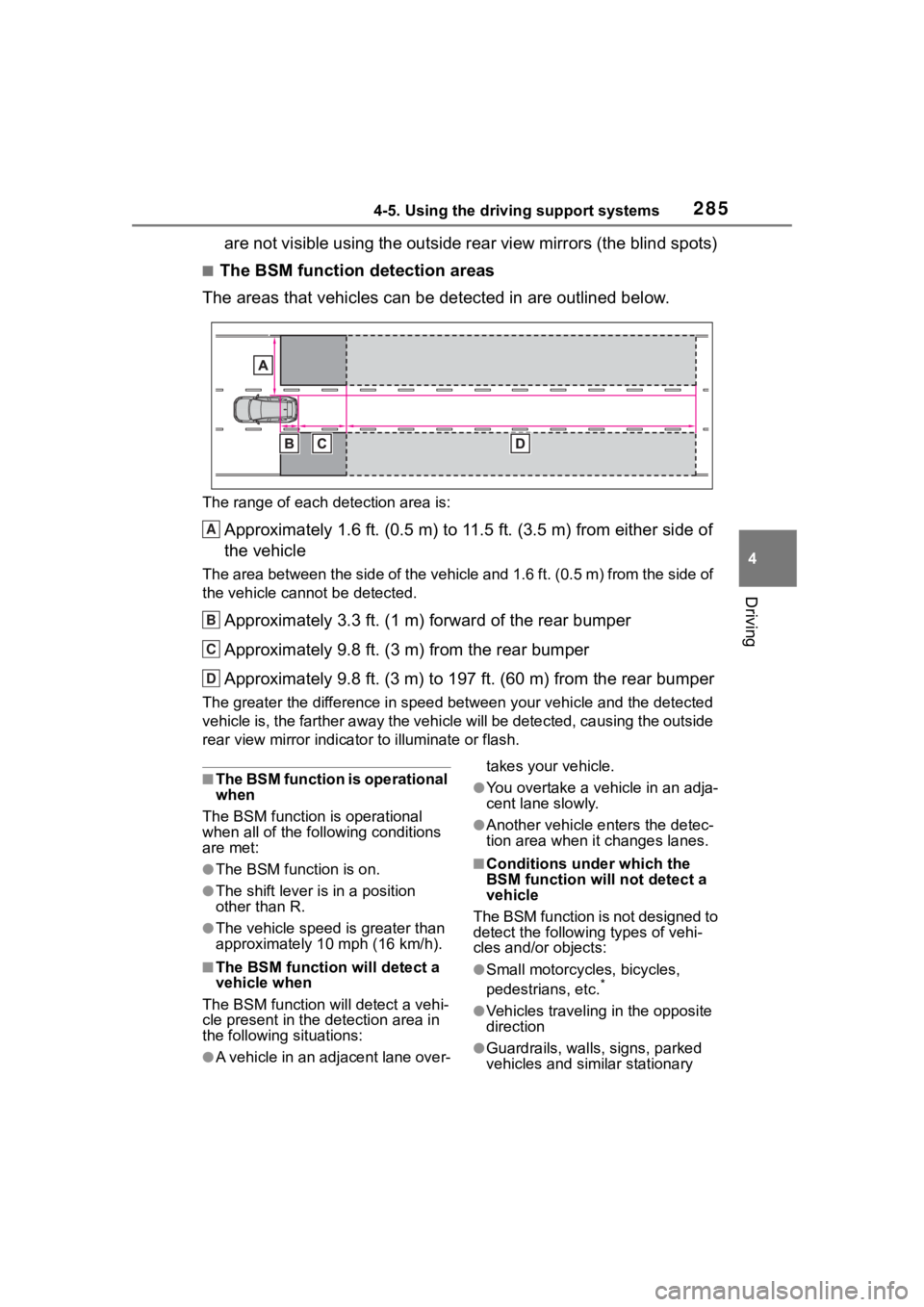
■The BSM function detection areas
The areas that vehicles can be detected in are outlined below.
The range of each detection area is:
Approximately 1.6 ft. (0.5 m) to 11.5 ft. (3.5 m) from either s ide of
the vehicle
The area between the side of the vehicle and 1.6 ft. (0.5 m) fr om the side of
the vehicle cann ot be detected.
Approximately 3.3 ft. (1 m) forward of the rear bumper
Approximately 9.8 ft. (3 m) from the rear bumper
Approximately 9.8 ft. (3 m) to 197 ft. (60 m) from the rear bum per
The greater the difference in speed between your vehicle and th e detected
vehicle is, the farther away the vehicle will be detected, caus ing the outside
rear view mirror indicato r to illuminate or flash.
■The BSM function is operational
when
The BSM function is operational
when all of the following conditions
are met:
●The BSM function is on.
●The shift lever is in a position
other than R.
●The vehicle speed is greater than
approximately 10 mph (16 km/h).
■The BSM function will detect a
vehicle when
The BSM function will detect a vehi-
cle present in the detection area in
the following situations:
●A vehicle in an adjacent lane over- takes your vehicle.
●You overtake a vehicle in an adja-
cent lane slowly.
●Another vehicle enters the detec-
tion area when it changes lanes.
■Conditions under which the
BSM function will not detect a
vehicle
The BSM function is not designed to
detect the following types of vehi-
cles and/or objects:
●Small motorcycles, bicycles,
pedestrians, etc.*
●Vehicles traveling in the opposite
direction
●Guardrails, walls, signs, parked
vehicles and similar stationary
A
B
C
D
Page 287 of 744
2874-5. Using the driving support systems
4
Driving
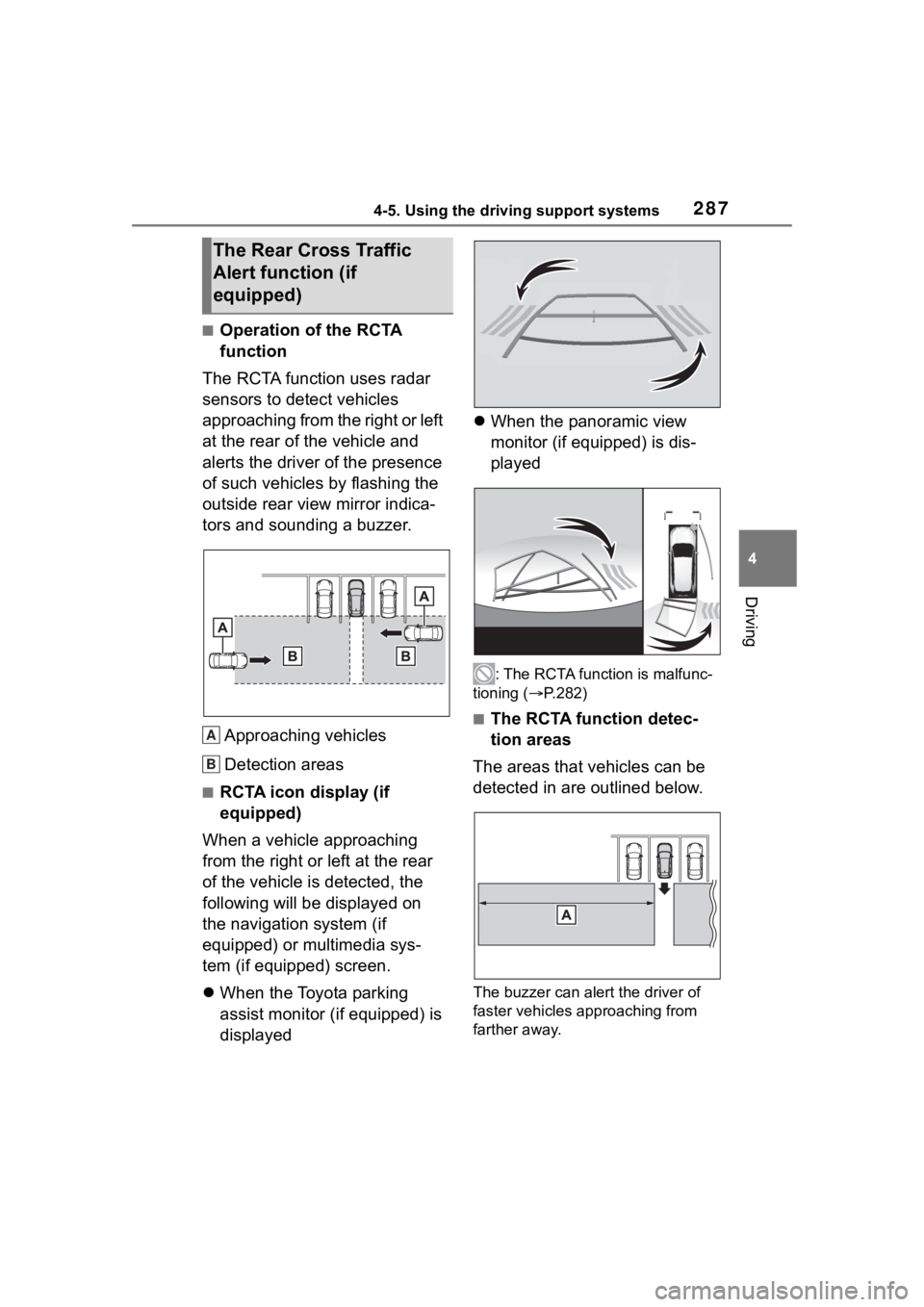
■Operation of the RCTA
function
The RCTA function uses radar
sensors to detect vehicles
approaching from the right or left
at the rear of the vehicle and
alerts the driver of the presence
of such vehicles by flashing the
outside rear view mirror indica-
tors and sounding a buzzer.
Approaching vehicles
Detection areas
■RCTA icon display (if
equipped)
When a vehicle approaching
from the right or left at the rear
of the vehicle is detected, the
following will be displayed on
the navigation system (if
equipped) or multimedia sys-
tem (if equipped) screen.
When the Toyota parking
assist monitor (if equipped) is
displayed
When the panoramic view
monitor (if equipped) is dis-
played
: The RCTA function is malfunc-
tioning ( P.282)
■The RCTA function detec-
tion areas
The areas that vehicles can be
detected in are outlined below.
The buzzer can alert the driver of
faster vehicles approaching from
farther away.
The Rear Cross Traffic
Alert function (if
equipped)
A
B
Page 312 of 744
3124-5. Using the driving support systems
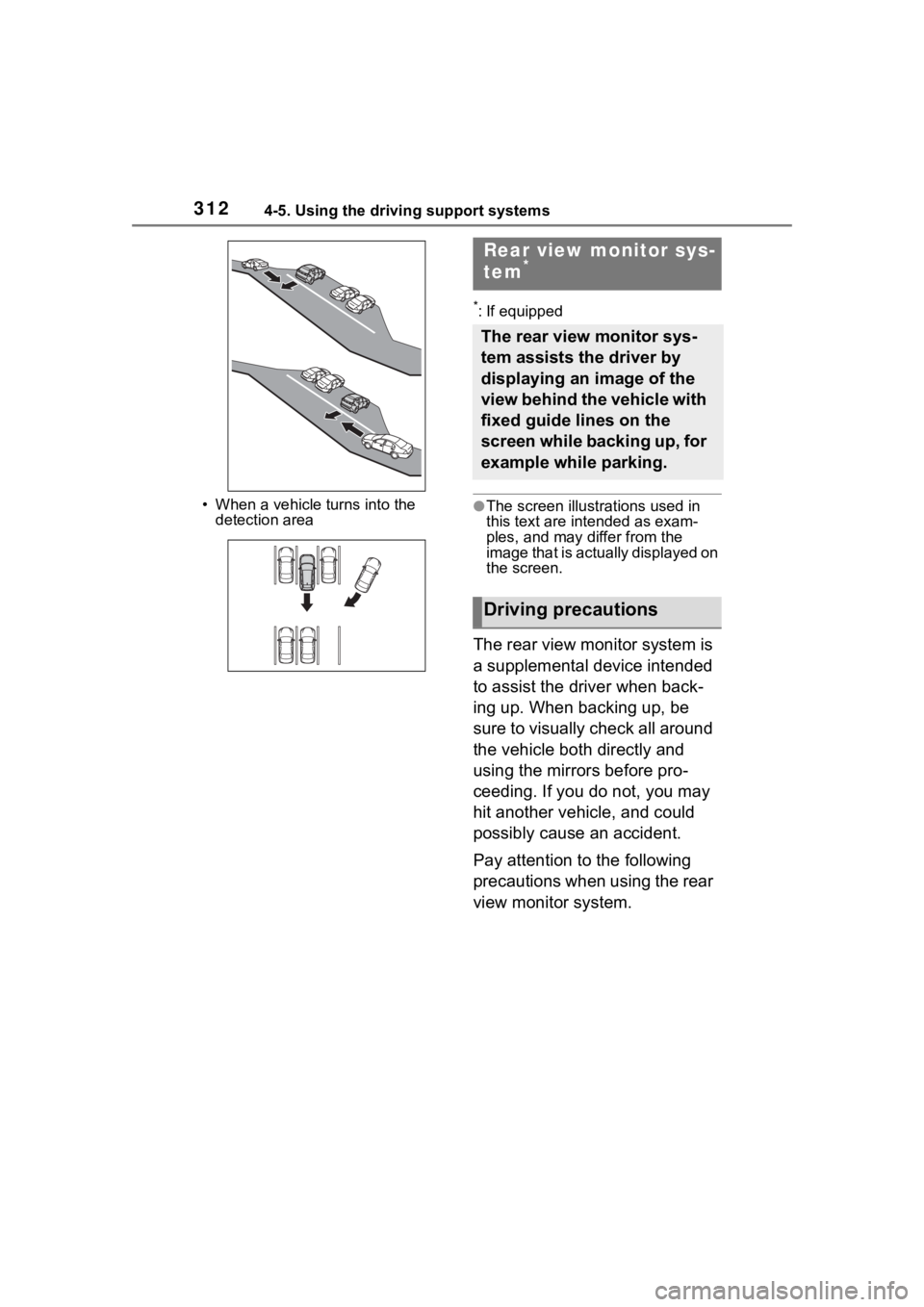
• When a vehicle turns into the detection area
*: If equipped
●The screen illust rations used in
this text are intended as exam-
ples, and may di ffer from the
image that is actually displayed on
the screen.
The rear view monitor system is
a supplemental device intended
to assist the driver when back-
ing up. When backing up, be
sure to visually check all around
the vehicle both directly and
using the mirrors before pro-
ceeding. If you do not, you may
hit another vehicle, and could
possibly cause an accident.
Pay attention to the following
precautions when using the rear
view monitor system.
Rear view monitor sys-
tem*
The rear view monitor sys-
tem assists the driver by
displaying an image of the
view behind the vehicle with
fixed guide lines on the
screen while backing up, for
example while parking.
Driving precautions
Page 313 of 744
3134-5. Using the driving support systems
4
Driving
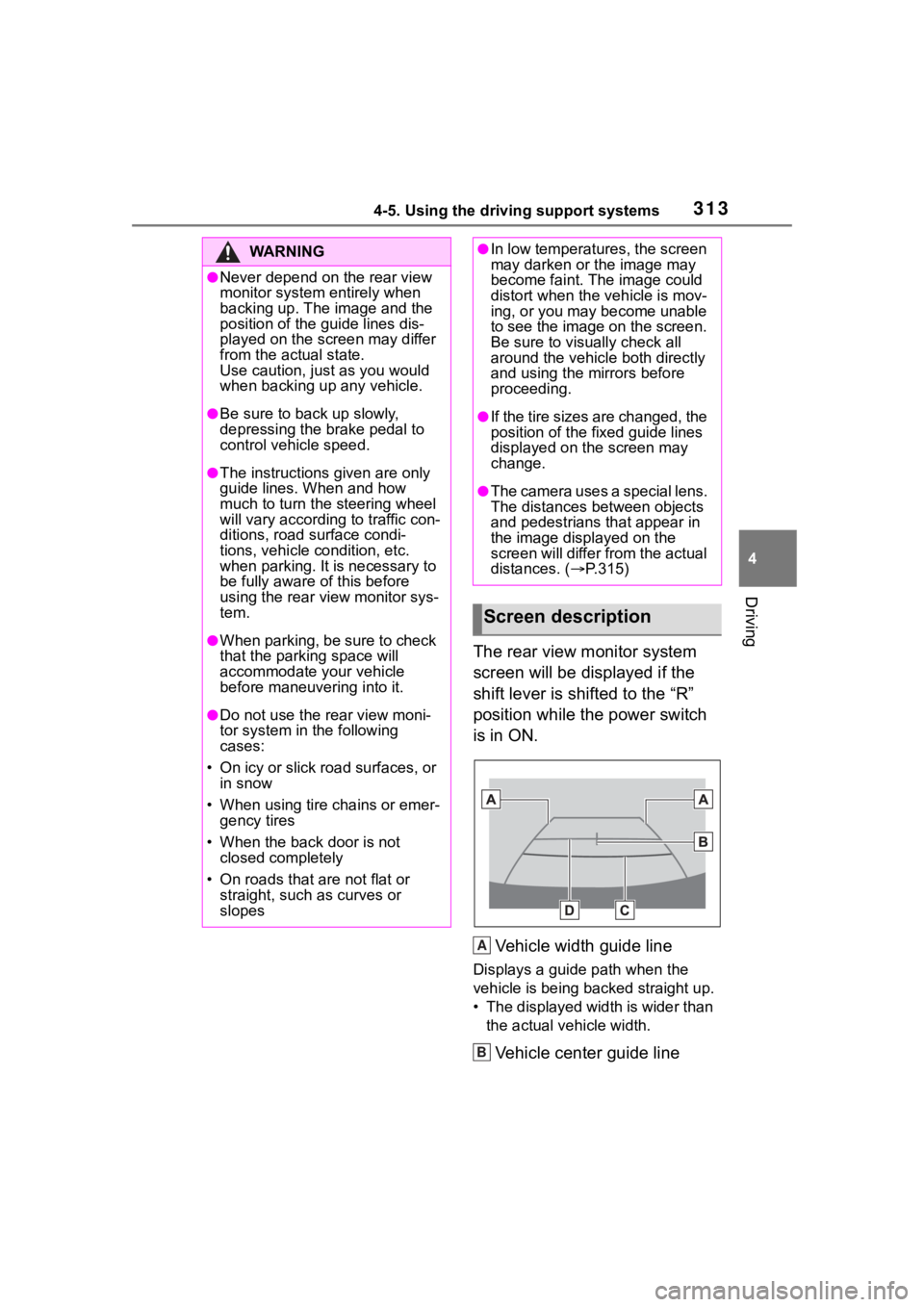
The rear view monitor system
screen will be displayed if the
shift lever is shifted to the “R”
position while the power switch
is in ON.Vehicle width guide line
Displays a guide path when the
vehicle is being backed straight up.
• The displayed width is wider than the actual veh icle width.
Vehicle center guide line
WA R N I N G
●Never depend on t he rear view
monitor system entirely when
backing up. The image and the
position of the guide lines dis-
played on the screen may differ
from the actual state.
Use caution, just as you would
when backing up any vehicle.
●Be sure to back up slowly,
depressing the brake pedal to
control vehicle speed.
●The instructions given are only
guide lines. When and how
much to turn the steering wheel
will vary according to traffic con-
ditions, road surface condi-
tions, vehicle condition, etc.
when parking. It is necessary to
be fully aware o f this before
using the rear view monitor sys-
tem.
●When parking, be sure to check
that the par king space will
accommodate your vehicle
before maneuveri ng into it.
●Do not use the rear view moni-
tor system in the following
cases:
• On icy or slick road surfaces, or in snow
• When using tire chains or emer- gency tires
• When the back door is not closed completely
• On roads that are not flat or straight, such as curves or
slopes
●In low temperatures, the screen
may darken or the image may
become faint. The image could
distort when the vehicle is mov-
ing, or you may become unable
to see the image on the screen.
Be sure to visually check all
around the vehicle both directly
and using the mirrors before
proceeding.
●If the tire sizes are changed, the
position of the fixed guide lines
displayed on the screen may
change.
●The camera uses a special lens.
The distances between objects
and pedestrians that appear in
the image displayed on the
screen will differ from the actual
distances. ( P.315)
Screen description
A
B