light TOYOTA RAV4 PHEV 2021 Owners Manual
[x] Cancel search | Manufacturer: TOYOTA, Model Year: 2021, Model line: RAV4 PHEV, Model: TOYOTA RAV4 PHEV 2021Pages: 666, PDF Size: 161.28 MB
Page 464 of 666
4626-1. Using the air conditioning system and defogger
*: If equipped
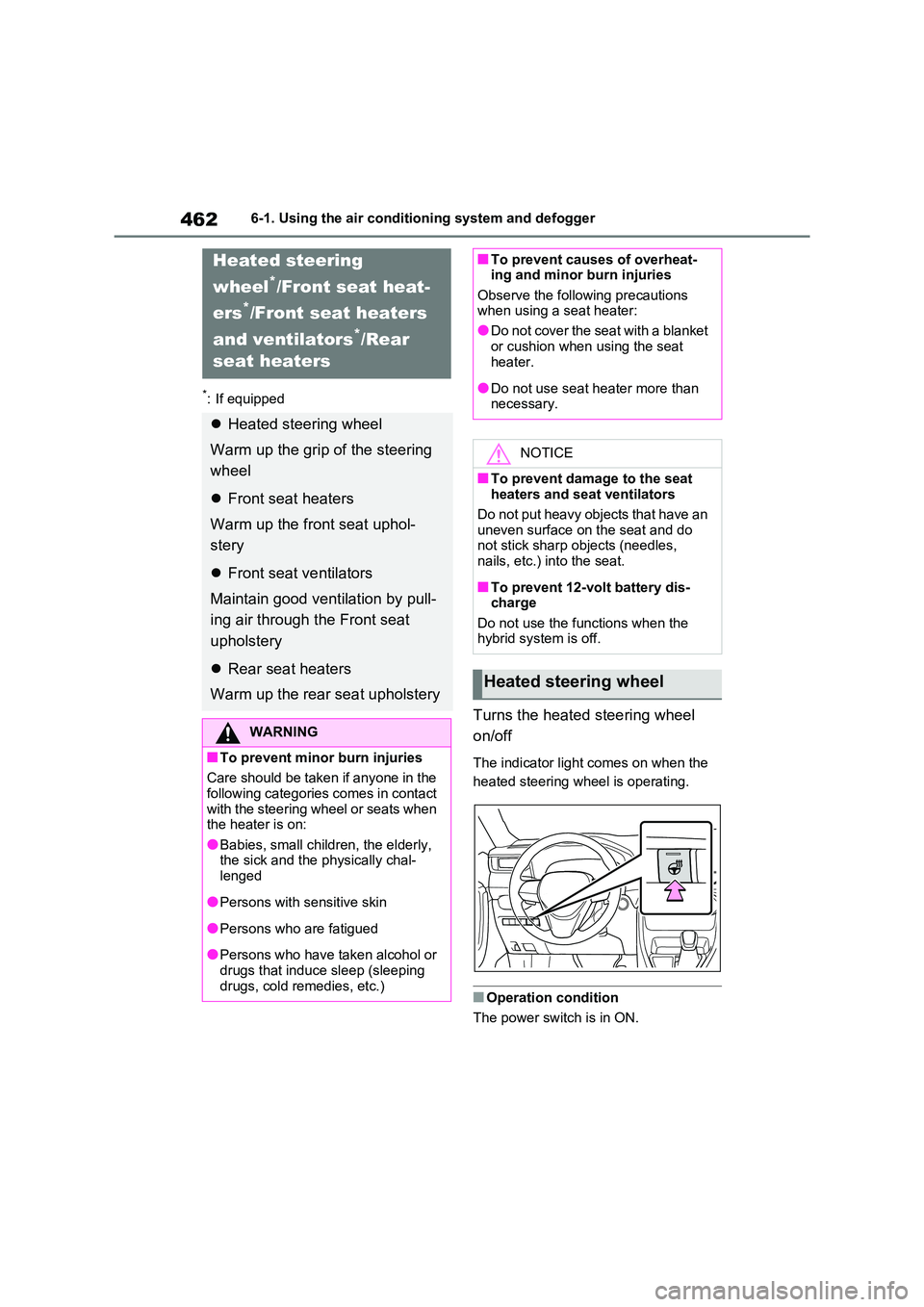
Turns the heated steering wheel
on/off
The indicator light comes on when the
heated steering wheel is operating.
■Operation condition
The power switch is in ON.
Heated steering
wheel*/Front seat heat-
ers*/Front seat heaters
and ventilators*/Rear
seat heaters
Heated steering wheel
Warm up the grip of the steering
wheel
Front seat heaters
Warm up the fr ont seat uphol-
stery
Front seat ventilators
Maintain good ventilation by pull -
ing air through the Front seat
upholstery
Rear seat heaters
Warm up the rear seat upholstery
WARNING
■To prevent minor burn injuries
Care should be taken if anyone in the
following categories comes in contact with the steering wheel or seats when
the heater is on:
●Babies, small children, the elderly, the sick and the p hysically chal-
lenged
●Persons with sensitive skin
●Persons who are fatigued
●Persons who have taken alcohol or
drugs that induce sleep (sleeping drugs, cold remedies, etc.)
■To prevent causes of overheat - ing and minor burn injuries
Observe the following precautions
when using a seat heater:
●Do not cover the seat with a blanket
or cushion when using the seat
heater.
●Do not use seat heater more than
necessary.
NOTICE
■To prevent damage to the seat heaters and seat ventilators
Do not put heavy objects that have an
uneven surface on the seat and do not stick sharp objects (needles,
nails, etc.) into the seat.
■To prevent 12-volt battery dis -
charge
Do not use the functions when the hybrid system is off.
Heated steering wheel
Page 465 of 666
463
6
6-1. Using the air conditi oning system and defogger
Interior features
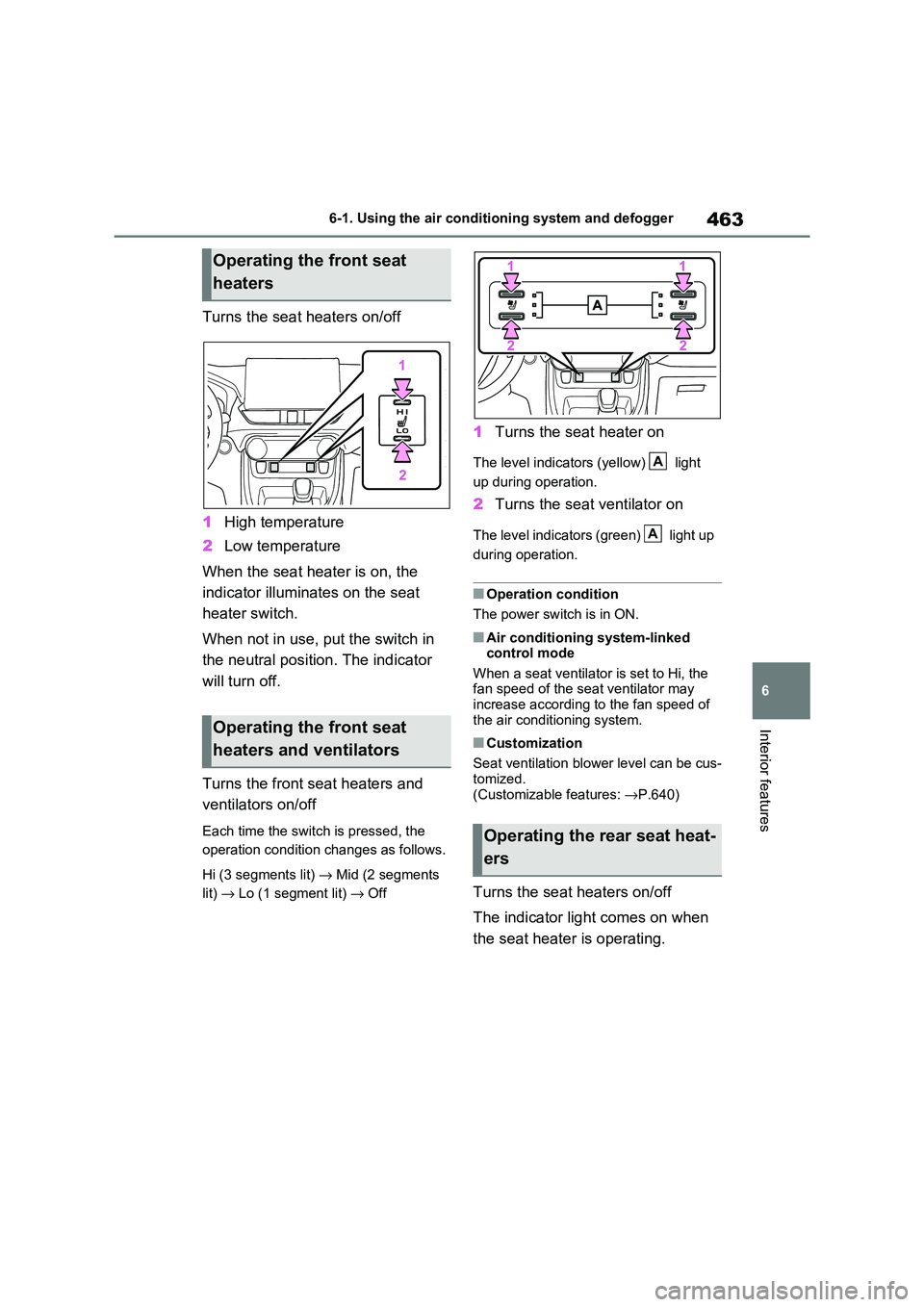
Turns the seat heaters on/off
1 High temperature
2 Low temperature
When the seat heater is on, the
indicator illumina tes on the seat
heater switch.
When not in use, put the switch in
the neutral position. The indicator
will turn off.
Turns the front s eat heaters and
ventilators on/off
Each time the switch is pressed, the
operation condition changes as follows.
Hi (3 segments lit) → Mid (2 segments
lit) → Lo (1 segment lit) → Off
1Turns the seat heater on
The level indicators (yellow) light
up during operation.
2 Turns the seat ventilator on
The level indicators (green) light up
during operation.
■Operation condition
The power switch is in ON.
■Air conditioning system-linked
control mode
When a seat ventilator is set to Hi, the fan speed of the se at ventilator may
increase according to the fan speed of
the air condit ioning system.
■Customization
Seat ventilation blower level can be cus -
tomized.
(Customizable features: →P.640)
Turns the seat heaters on/off
The indicator light comes on when
the seat heater is operating.
Operating the front seat
heaters
Operating the front seat
heaters and ventilators
Operating the rear seat heat -
ers
A
A
Page 467 of 666
465
6
6-2. Using the interior lights
Interior features
6-2.Using the interior lights
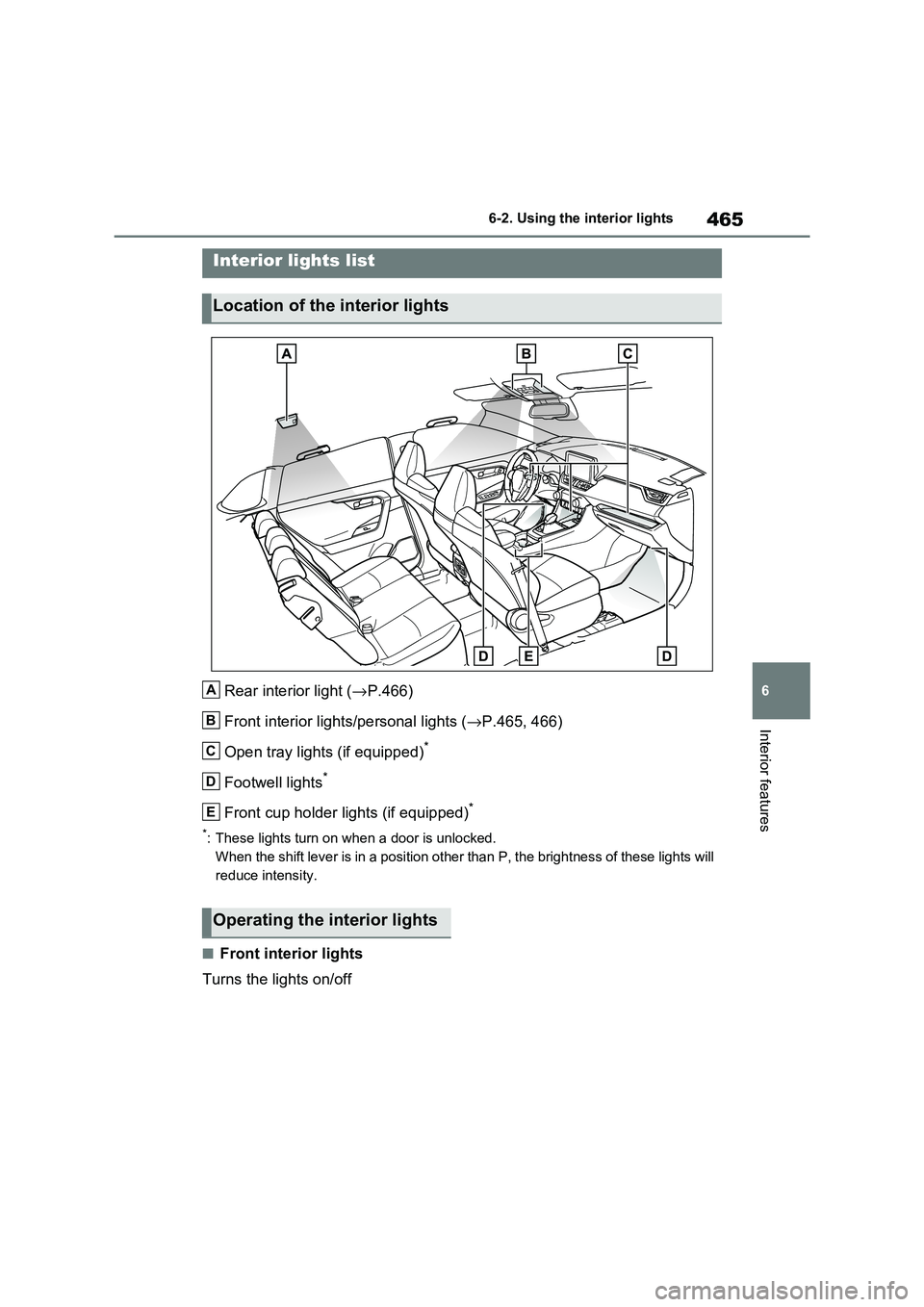
Rear interior light ( →P.466)
Front interior lights/personal lights ( →P.465, 466)
Open tray lights (if equipped)*
Footwell lights*
Front cup holder lights (if equipped)*
*: These lights turn on when a door is unlocked.
When the shift lever is in a position other than P, the brightn ess of these lights will
reduce intensity.
■Front interior lights
Turns the lights on/off
Interior lights list
Location of the interior lights
A
B
C
D
E
Operating the interior lights
Page 468 of 666
4666-2. Using the interior lights
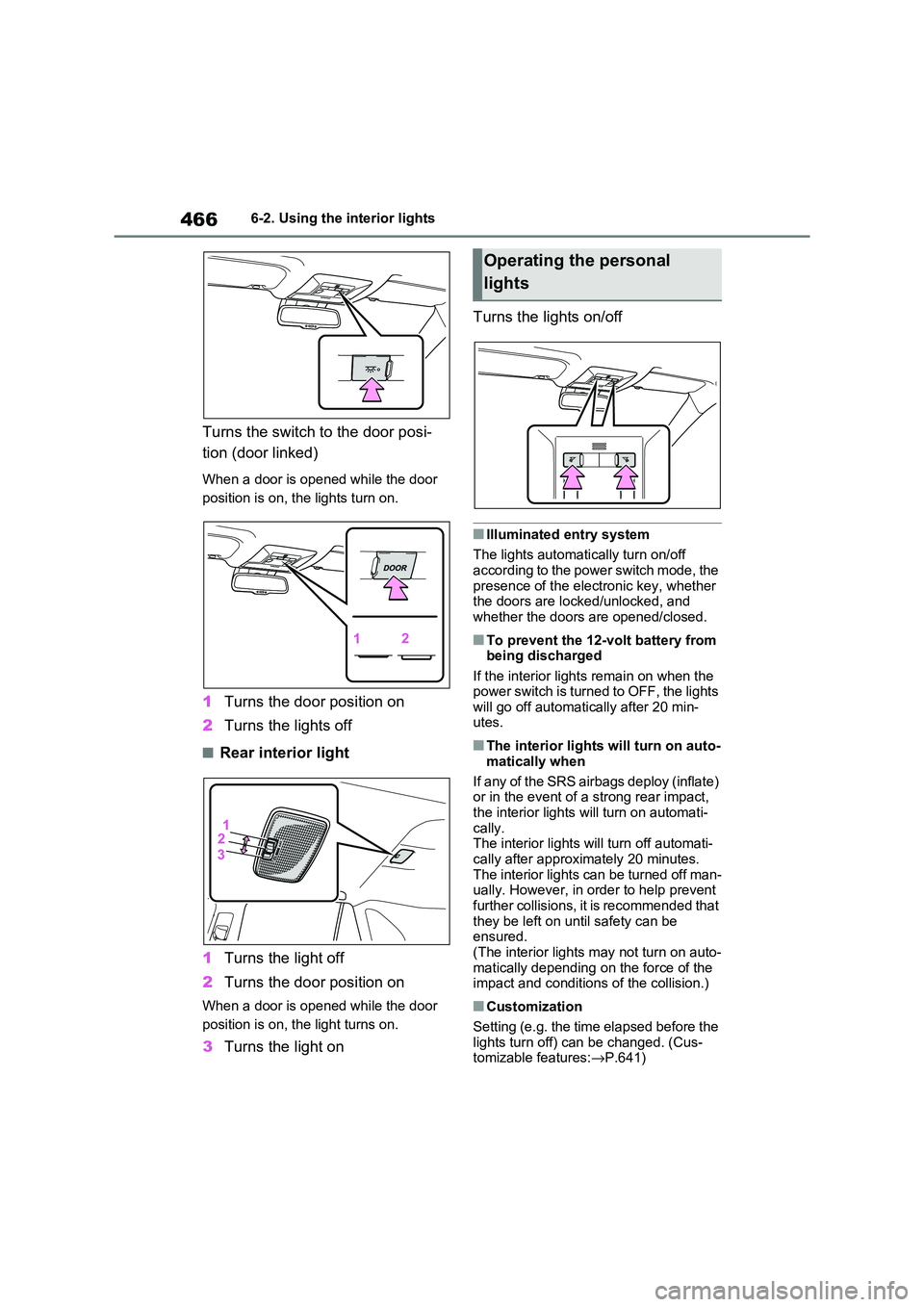
Turns the switch to the door posi-
tion (door linked)
When a door is opened while the door
position is on, the lights turn on.
1 Turns the door position on
2 Turns the lights off
■Rear interior light
1 Turns the light off
2 Turns the door position on
When a door is opened while the door
position is on, t he light turns on.
3Turns the light on
Turns the lights on/off
■Illuminated entry system
The lights automati cally turn on/off
according to the power switch mode, the presence of the electronic key, whether
the doors are locked/unlocked, and
whether the doors are opened/closed.
■To prevent the 12-volt battery from being discharged
If the interior lights remain on when the
power switch is turned to OFF, the lights will go off automati cally after 20 min-
utes.
■The interior lights will turn on auto -
matically when
If any of the SRS airbags deploy (inflate)
or in the event of a strong rear impact,
the interior lights will turn on automati- cally.
The interior lights w ill turn off automati-
cally after approximately 20 minutes. The interior lights can be turned off man -
ually. However, in order to help prevent
further collisions, it is recommended that
they be left on un til safety can be ensured.
(The interior lights may not turn on auto -
matically depending on the force of the impact and conditions of the collision.)
■Customization
Setting (e.g. the time elapsed before the
lights turn off) can be changed. (Cus - tomizable features: →P.641)
Operating the personal
lights
Page 469 of 666
467
6
6-2. Using the interior lights
Interior features
NOTICE
■To prevent 12-volt battery dis -
charge
Do not leave the lights on longer than necessary when the hybrid system is
off.
Page 471 of 666
469
6
6-3. Using the storage features
Interior features
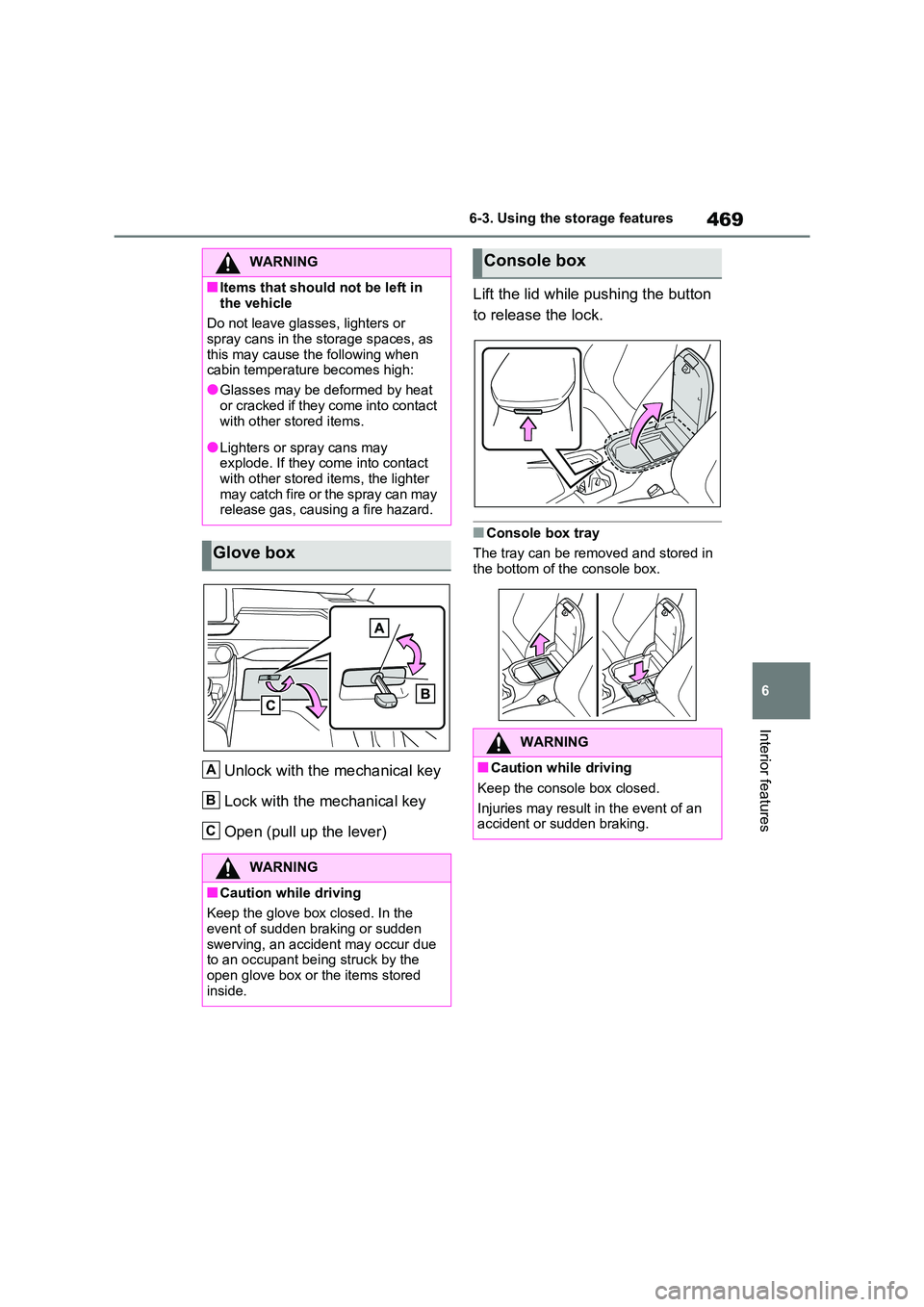
Unlock with the mechanical key
Lock with the mechanical key
Open (pull up the lever)
Lift the lid while pushing the button
to release the lock.
■Console box tray
The tray can be removed and stored in
the bottom of the console box.
WARNING
■Items that should not be left in
the vehicle
Do not leave glasses, lighters or spray cans in the storage spaces, as
this may cause the following when
cabin temperature becomes high:
●Glasses may be deformed by heat
or cracked if they come into contact
with other stored items.
●Lighters or spray cans may
explode. If they come into contact
with other stored items, the lighter may catch fire or the spray can may
release gas, causing a fire hazard.
Glove box
WARNING
■Caution while driving
Keep the glove box closed. In the
event of sudden braking or sudden swerving, an accident may occur due
to an occupant be ing struck by the
open glove box or t he items stored inside.
A
B
C
Console box
WARNING
■Caution while driving
Keep the console box closed.
Injuries may result in the event of an
accident or sudden braking.
Page 478 of 666
4766-4. Using the other interior features
6-4.Using the other interior features
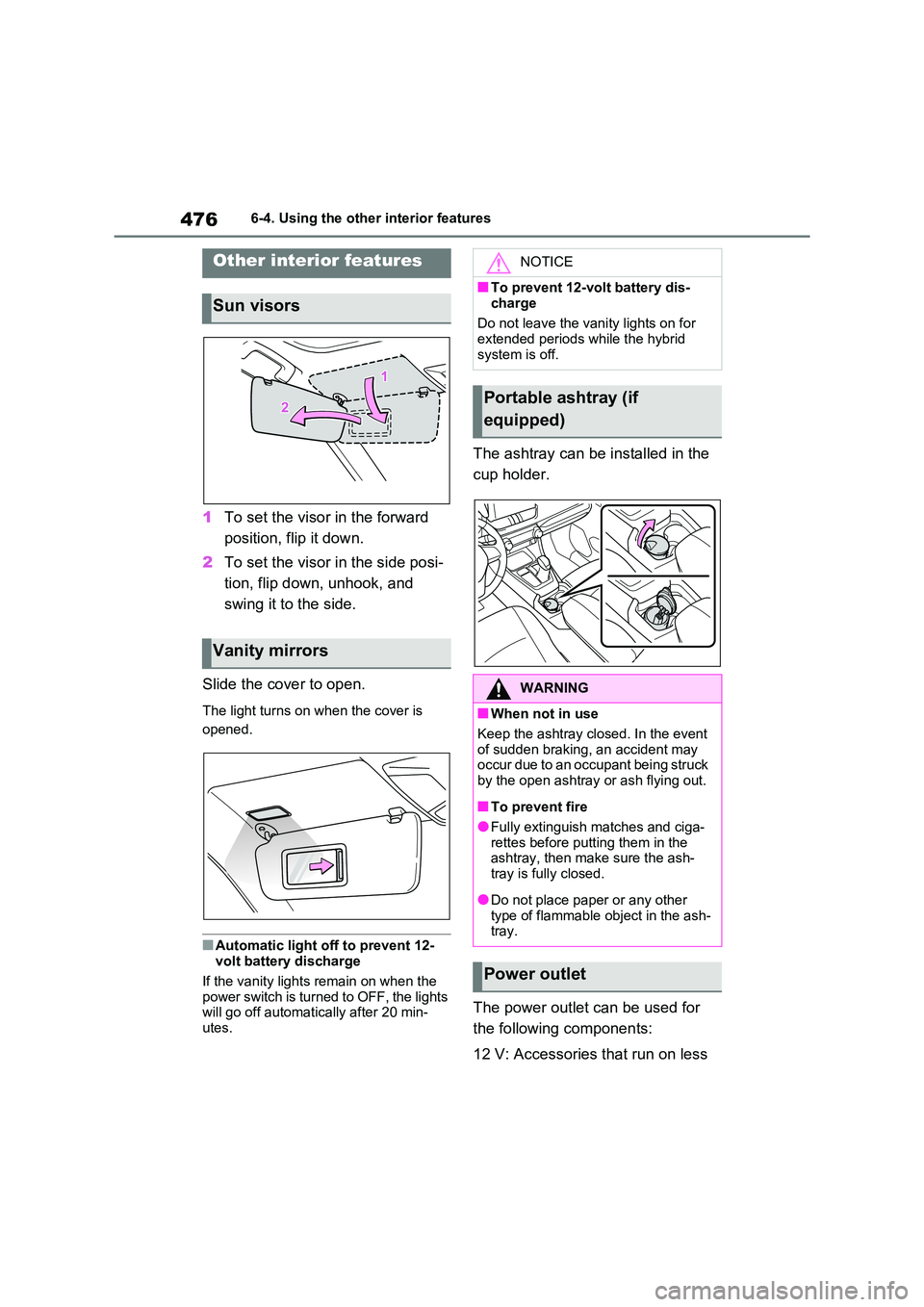
1To set the visor in the forward
position, flip it down.
2 To set the visor in the side posi-
tion, flip down, unhook, and
swing it to the side.
Slide the cover to open.
The light turns on when the cover is
opened.
■Automatic light off to prevent 12-
volt battery discharge
If the vanity lights remain on when the power switch is turned to OFF, the lights
will go off automat ically after 20 min-
utes.
The ashtray can be installed in the
cup holder.
The power outlet can be used for
the following components:
12 V: Accessories t hat run on less
Other interior features
Sun visors
Vanity mirrors
NOTICE
■To prevent 12-volt battery dis-
charge
Do not leave the vani ty lights on for extended periods while the hybrid
system is off.
Portable ashtray (if
equipped)
WARNING
■When not in use
Keep the ashtray closed. In the event
of sudden braking, an accident may
occur due to an occupant being struck by the open ashtray or ash flying out.
■To prevent fire
●Fully extinguish matches and ciga- rettes before putting them in the
ashtray, then make sure the ash -
tray is fully closed.
●Do not place paper or any other
type of flammable object in the ash- tray.
Power outlet
Page 482 of 666
4806-4. Using the other interior features
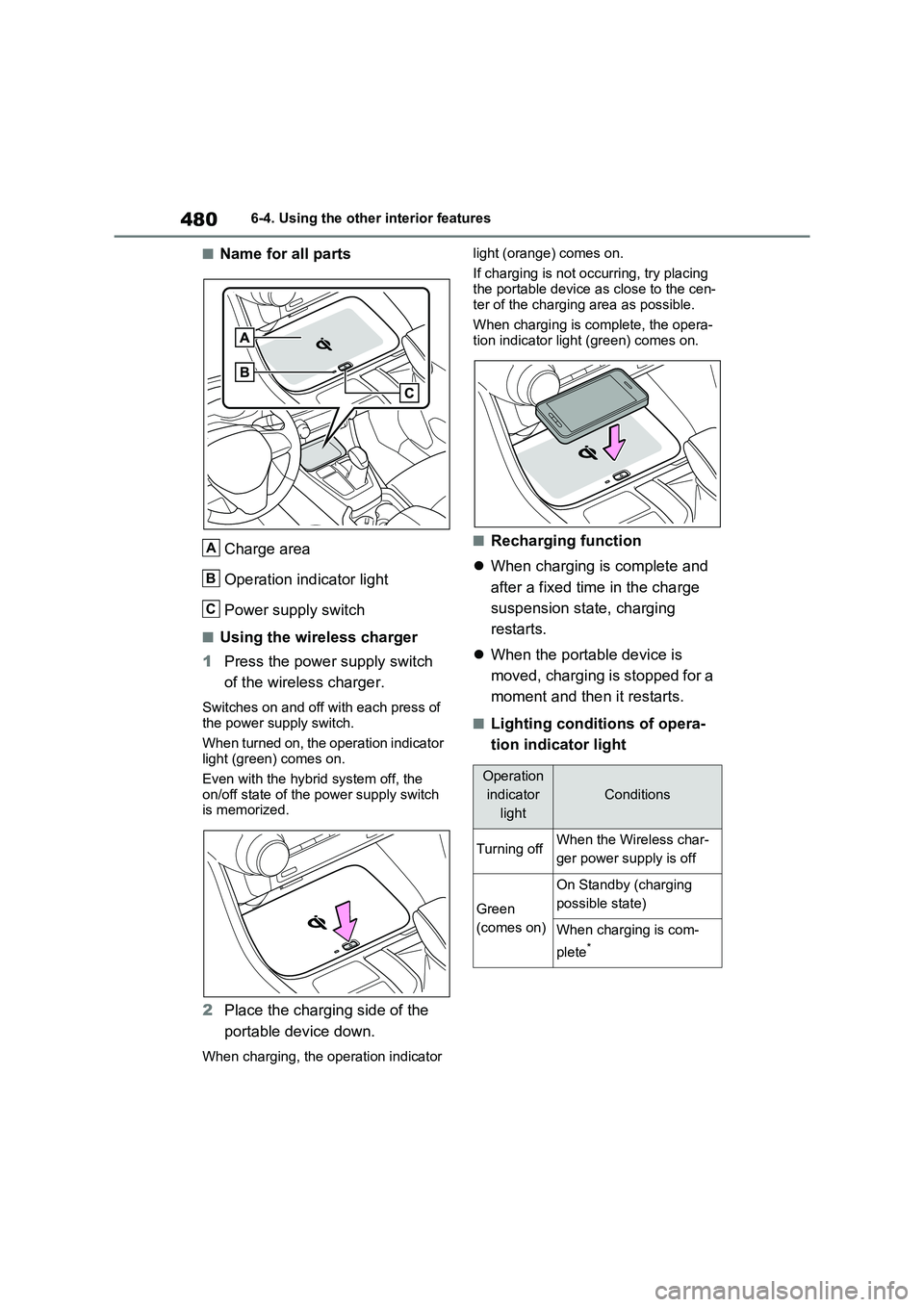
■Name for all parts
Charge area
Operation indicator light
Power supply switch
■Using the wireless charger
1 Press the power supply switch
of the wireless charger.
Switches on and off wi th each press of the power supply switch.
When turned on, the operation indicator
light (green) comes on.
Even with the hybr id system off, the
on/off state of the power supply switch
is memorized.
2 Place the charging side of the
portable device down.
When charging, the operation indicator
light (orange) comes on.
If charging is not occurring, try placing the portable device a s close to the cen-
ter of the charging area as possible.
When charging is complete, the opera - tion indicator light (green) comes on.
■Recharging function
When charging is complete and
after a fixed time in the charge
suspension state, charging
restarts.
When the portable device is
moved, charging is stopped for a
moment and then it restarts.
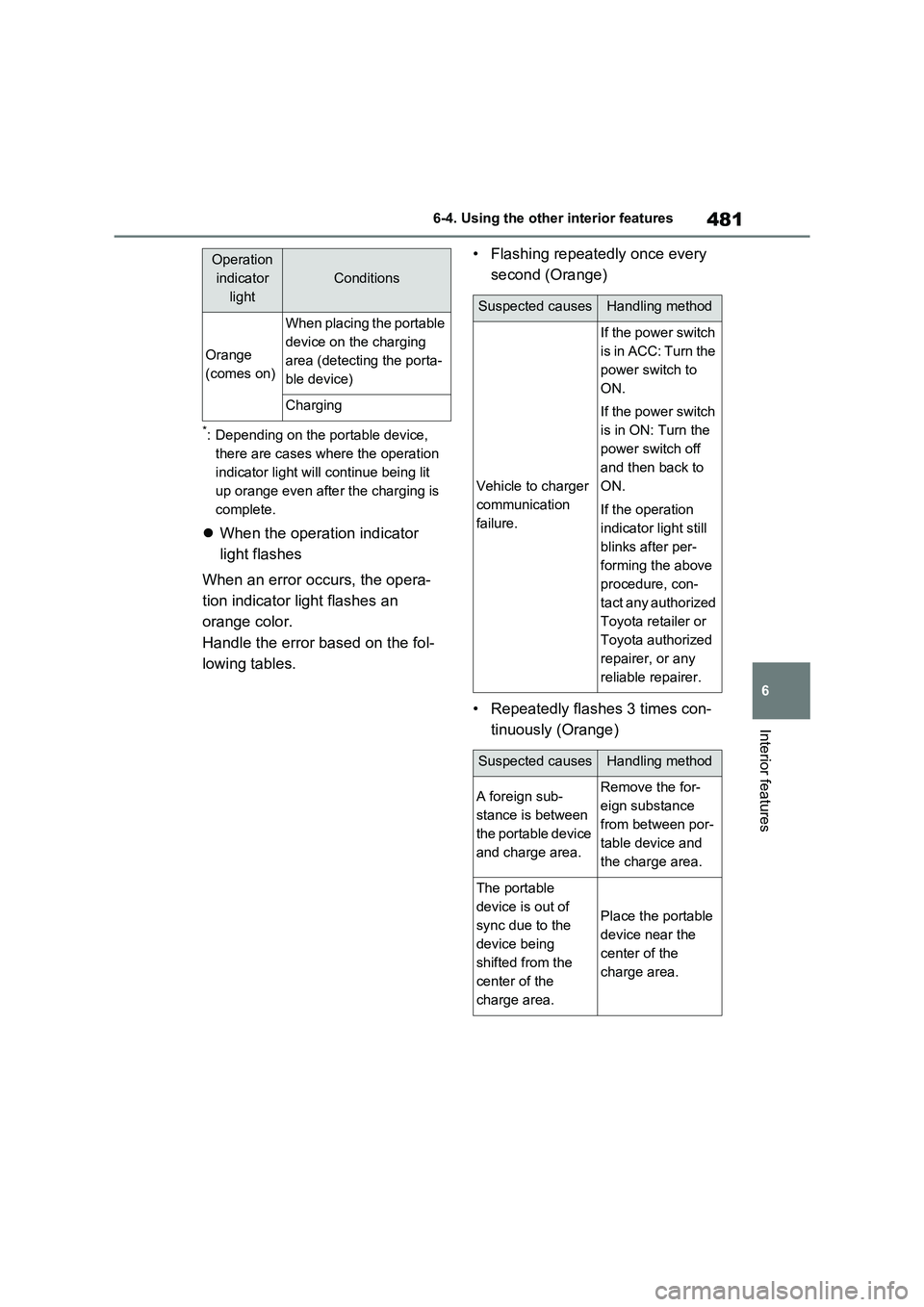
■Lighting conditions of opera -
tion indicator light
A
B
C
Operation
indicator
light
Conditions
Turning offWhen the Wireless char -
ger power supply is off
Green
(comes on)
On Standby (charging
possible state)
When charging is com -
plete*
Page 483 of 666
481
6
6-4. Using the other interior features
Interior features
*: Depending on the portable device,
there are cases where the operation
indicator light will continue being lit
up orange even afte r the charging is
complete.
When the operation indicator
light flashes
When an error occurs, the opera -
tion indicator light flashes an
orange color.
Handle the error based on the fol -
lowing tables.
• Flashing repeatedly once every
second (Orange)
• Repeatedly flashes 3 times con -
tinuously (Orange)
Orange
(comes on)
When placing the portable
device on the charging
area (detecting the porta -
ble device)
Charging
Operation
indicator
light
Conditions
Suspected causesHandling method
Vehicle to charger
communication
failure.
If the power switch
is in ACC: Turn the
power switch to
ON.
If the power switch
is in ON: Turn the
power switch off
and then back to
ON.
If the operation
indicator light still
blinks after per -
forming the above
procedure, con -
t a c t a n y a u t h o r i z e d
Toyota retailer or
Toyota authorized
repairer, or any
reliable repairer.
Suspected causesHandling method
A foreign sub -
stance is between
the portable device
and charge area.
Remove the for -
eign substance
from between por -
table device and
the charge area.
The portable
device is out of
sync due to the
device being
shifted from the
center of the
charge area.
Place the portable
device near the
center of the
charge area.
Page 484 of 666
4826-4. Using the other interior features
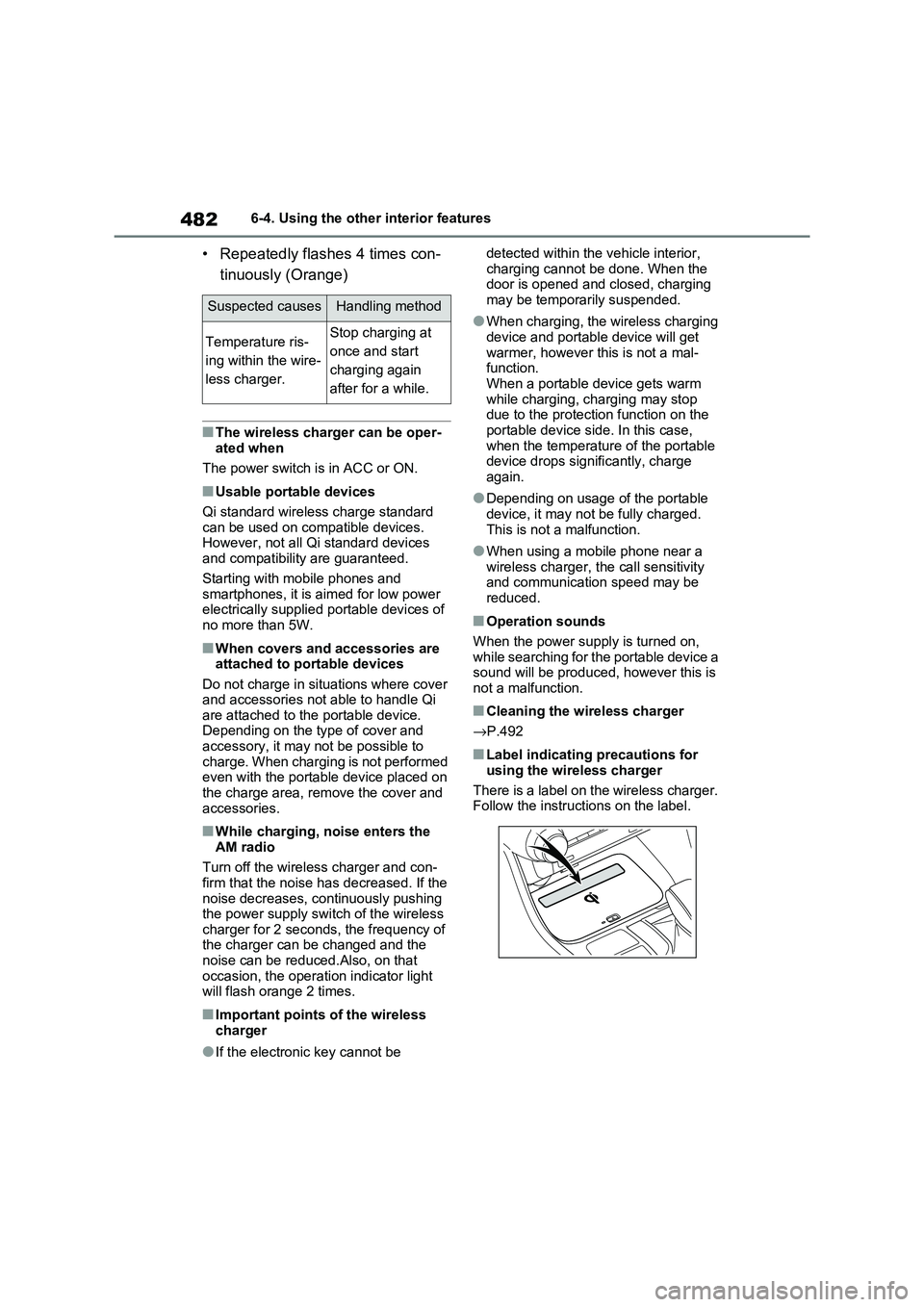
• Repeatedly flashes 4 times con-
tinuously (Orange)
■The wireless charger can be oper -
ated when
The power switch is in ACC or ON.
■Usable portable devices
Qi standard wireless charge standard
can be used on compatible devices. However, not all Qi standard devices
and compatibility are guaranteed.
Starting with mobile phones and smartphones, it is aimed for low power
electrically supplie d portable devices of
no more than 5W.
■When covers and accessories are attached to portable devices
Do not charge in situations where cover
and accessories not able to handle Qi are attached to the portable device.
Depending on the type of cover and
accessory, it may n ot be possible to charge. When charging is not performed
even with the portable device placed on
the charge area, remove the cover and
accessories.
■While charging, noise enters the AM radio
Turn off the wireless charger and con -
firm that the noise has decreased. If the noise decreases, continuously pushing
the power supply switch of the wireless
charger for 2 seconds, the frequency of the charger can be changed and the
noise can be reduced.Also, on that
occasion, the operation indicator light will flash orange 2 times.
■Important points of the wireless
charger
●If the electronic key cannot be
detected withi n the vehicle interior,
charging cannot b e done. When the door is opened and closed, charging
may be temporarily suspended.
●When charging, the wireless charging
device and portable device will get
warmer, however this is not a mal - function.
When a portable device gets warm
while charging, c harging may stop due to the protecti on function on the
portable device side. In this case,
when the temperature of the portable device drops significantly, charge
again.
●Depending on usage of the portable
device, it may not be fully charged.
This is not a malfunction.
●When using a mobile phone near a
wireless charger, the call sensitivity and communication speed may be
reduced.
■Operation sounds
When the power supply is turned on, wh ile s e ar c hing fo r th e por t ab le de v ic e a
sound will be produced, however this is
not a malfunction.
■Cleaning the wireless charger
→ P.492
■Label indicating precautions for
using the wireless charger
There is a label on the wireless charger. Follow the instructions on the label.
Suspected causesHandling method
Temperature ris -
ing within the wire -
less charger.
Stop charging at
once and start
charging again
after for a while.